Do You Crave More People To Engage With On Your Blog? Check These Settings Now.

How easily can all visitors engage with you on your blog?

Is it as easy as you think it is?
Banner for the blog post 'Do You Crave More People To Engage With On Your Blog? Check These Settings Now.'
Did you know that you could be preventing some visitors to your blog from leaving you comments?

After receiving an e-mail from Jean, who blogs at DelightfulRepast.com, who had seen one of my posts at the Senior Salon Pitstop weekly linky party hosted by Esme and Julie, I was somewhat concerned when she mentioned that it wasn’t easy for her to engage with me on my blog.

Jean explained that she didn’t want to leave her e-mail address, create a WordPress account or use social media to be able to leave me comments. I understand why she didn’t want to leave any of those details. After all, our information is private and shouldn’t be given out if we don’t want to give it out.

WordPress offers ‘Discussions‘ options where users can decide how easily readers can engage with them without leaving any personal details. I thought I already had this option switched off, so nobody needed to leave any personal details, and I was right, but it didn’t explain why Jean thought she had to leave her personal details if she wanted to comment on my posts.

Upon further checking my discussion settings, I saw where the confusion was coming from and want to highlight it so those who wish to engage with me without personal details can still leave comments knowing they do not need to give any personal information.

Let’s Look At The Discussion Settings On WordPress.

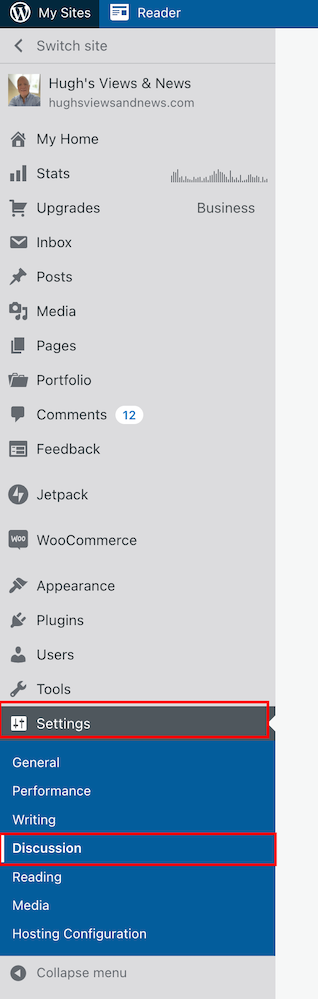
  • Ensure you’re viewing your blog’s dashboard in the Default view. To do this, click on the View button in the top right of the screen when viewing your blog’s dashboard.
  • Go to Settings – Discussion.
Screenshot highlighting the discussion setting on the dashboard of a WordPress blog
Make sure you’re viewing your blog’s dashboard in the Default view.
  • On the Discussions Settings page, look for the Comments box.
Image highlighting the Comments settings on the Discussion Settings page of a WordPress blog.
Look for the comments settings box.

As you will see from the above screenshot, I have turned off both the ‘Comment author must fill out name and e-mail‘ and ‘Users must be registered and logged in to comment‘ options. So why wasn’t Jean able to leave me a comment?

It seems that, for whatever reason, in their wisdom, WordPress has decided to still show visitors a login box when these options have been switched off. This is what Jean and visitors who are not logged in see.
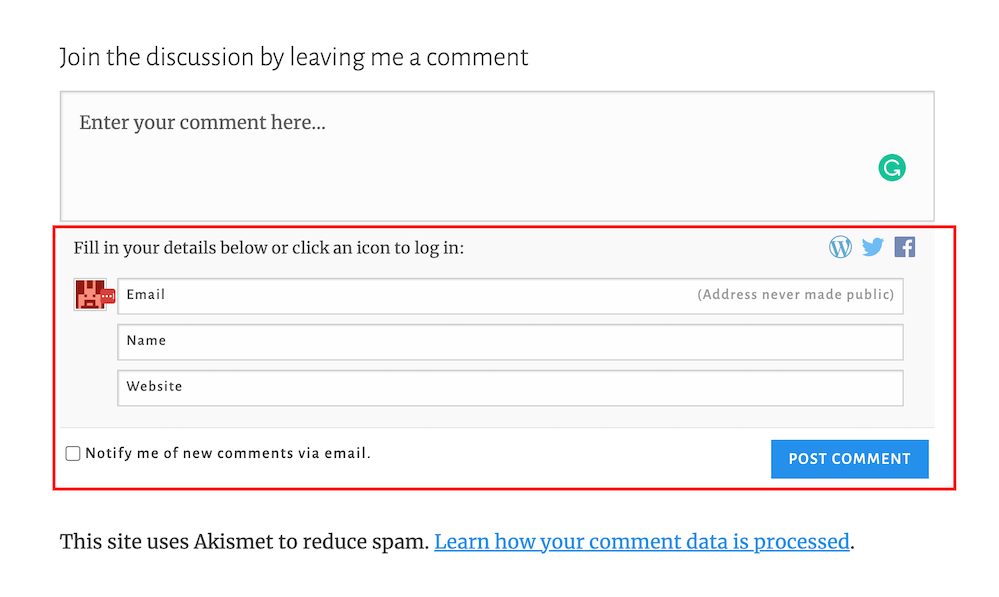
Screenshot highlighting the login box when wanting to leave a comment on a WordPress blog.
The log in box tricks visitors into believing they have to leave personal details to be able to leave comments.

And this is what WordPress say –

Comment author must fill out name and e-mail: When this setting is on, anyone leaving a comment will be forced to leave a name and a valid e-mail address. If the setting is off, visitors can leave anonymous comments. While your commenters do not have to fill in the e-mail field if you’ve turned this setting off, it will still be visible to them when they comment.

So I understand why Jean thought I wasn’t making it easy for her to engage with me.

If you only want readers to engage with you who must leave their name and email address, ensure you have this option switched on.

If you only want comments from readers who are logged in and registered, ensure you have the ‘Users must be registered and logged in to comment‘ setting switched on.

If you want comments from both, ensure both settings are switched on.

However, if, like me, you’re happy to allow anyone to leave you a comment, then switch both of these settings off.

Don’t forget to click the ‘Save‘ button in the Comments settings box if you make any changes.

Are There Any Disadvantages To Switching These Discussion Settings Off?

The main disadvantage is that it could open the gates for spammers and trolls to leave you comments. However, the Akismet antispam software on WordPress catches and places the majority of spam into your blog’s spam folder, so you’ll never see it unless you check what’s in it.

Further down on the Discussion Settings page, there is more help to filter out spam and troll comments.

  • Look for the ‘Before A Comment Appears‘ box, and you’ll see these two options.
  1. Comment must be manually approved: If this setting is on, all comments will go into moderation, and they will need to be approved by you before appearing on your blog.
  2. Comment author must have a previously approved comment: If this option is on, any visitors that have had a comment approved on your blog in the past will get a free pass through approval and only comments from new visitors will go into moderation.

As you will see from the following screenshot, my blog is set for manually approving all comments before they appear on any of my posts.

Screenshot highlighting the 'Comments moderation' settings on WordPress
Decide which level of protection you want to stop the comments of spammers and trolls from appearing on your blog posts.

This helps me stop unprofessional, rude, nasty comments from appearing on any of my posts, even if they’re from somebody who has previously left a friendly comment.

My thanks to Jean for contacting me about discussion settings on blogs. And apologies for the confusion WordPress causes in insisting a login box shows when visitors do not need to leave any personal details when wanting to engage or leave a comment.

If you see a login box or are asked to leave your name and email address when leaving a comment, try leaving a comment without filling in personal details or logging in. If the blogger you’re engaging with has switched off the ‘Comment author must fill out name and e-mail‘ and ‘Users must be registered and logged in to comment.‘ options, your comment will go through.

If either or one of those options is switched on, you’ll need to follow the instructions to be able to leave a comment.

Let’s wrap it up.

  • Check the discussion settings on your blog to see if you’re preventing visitors from leaving comments.
  • Decide whether you want only certain visitors to be able to leave comments or if you’re happy for all visitors to leave comments.
  • The majority of spam comments will go straight to your spam folder. Remember to empty your spam folder regularly.
  • To stop comments from trolls appearing on your blog posts, switch on the ‘Comment must be manually approved‘ setting.
  • Consider whether comments from those who have previously left you a friendly comment do not need to be manually approved by you.

If you have questions about the discussion settings on your WordPress blog, leave them in the comments section.

Layout, content, settings, and format might differ on self-hosted blogs.

Follow Hugh on Social Media. Click the buttons below.

Want more posts like this? Enter your email address and click Subscribe.

Copyright @ 2024 hughsviewsandnews.com – All rights reserved.

Is Blogging Causing You Stress Or Making You Feel Guilty? How To Fix It

What makes you put your head in your hands or shake your head regarding blogging?

Recently, I’ve been shaking my head a lot when visiting the blogging world.

Some of my fellow bloggers worry me, and I’m concerned about their mental health.

I’m witnessing bloggers panicking, stressed, feeling guilty, or apologising because of how they blog.

Banner for the blog post 'Is Blogging Causing You Stress Or Making You Feel Guilty? How To Fix It'
Are you showing signs of stress because of blogging?

Here are some of the bloggers I am referring to. Are you one of them?

The Sprinters

Have you heard this quote?

Blogging is a marathon, not a sprint!

It’s a quote many bloggers acknowledge.

Sprinters rush around the blogging world every day as if they’re on a time challenge where they must read and leave comments on as many blog posts as possible within a certain amount of time.

The comments they leave are seldom engaging and are often empty. Instead of leaving a comment saying why they thought a post was great or why they liked a photo or reading a piece of fiction, they’ll leave a comment like, ‘Great story’ or ‘I enjoyed this.’

They don’t have time to leave engaging comments, so leave comments that’ll not make you want to engage with them other than maybe to say ‘Thanks.’

If they fail to leave comments on all the blogs they’re following, they believe they may upset someone. They need to prove they’ve visited your post, often by leaving an empty comment.

They often show signs of stress or pressure in the content they publish and the comments they leave.

They won’t read long-engaging posts because that wastes time and worsens their stress. They’re on a mission to read as many posts as possible in the time they have so they don’t upset anyone.

Why read a couple of interesting, engaging, long posts when you can read lots of short blog posts in the time it takes to read one fascinating post over 1,000 words that gets you and lots of other readers wanting to get into a discussion?

When I saw the above tweet from James, I punched the air with my fist. He makes a valid point. And it doesn’t only apply to new bloggers.

Blogging should never be about sprinting under pressure around the blogging world to see how many blog posts you can read and comment on in 20 minutes!

Those posts will still be there next week.

There is no such thing as being behind in blogging. Read, respond and leave comments when you have the time to do so.

Hugh W. Roberts

Ask yourself why you started blogging. Was it for enjoyment and fun? Or did you come to the blogging world on a mission to try and break the world record every day for the number of blog posts you can read and comment on so you don’t feel guilty or upset anyone?

Is rushing around the blogging world, feeling stressed out while leaving the same non-engaging short comments, fun?

Slow down, and engage with bloggers rather than trying to prove the point that you have visited their posts.

If you don’t have the time to read and leave comments, make time by reading less blogs.

Hugh W. Roberts

This brings me to…

The obliging blogger

In the next paragraph, I’ll ask you a question. Leave your answer in the comments section before reading the rest of this post.

Question: If a blogger reads and leaves comments on all your blog posts, should you feel obliged to read and leave comments on all their posts?

You won’t be surprised that my answer to that question is ‘No.’

But if you answered ‘Yes’, share your reasons in the comments section.

Nobody should feel obliged to read and comment on another blogger’s posts because they read and leave comments on all their blog posts.

Your time is precious, and wasting it by forcing yourself to read and comment on content that does not interest you is a waste of your time.

“But won’t the blogger who reads and comments on all my posts stop reading and commenting on my blog posts if I don’t return the favour?’

Yes, they may, but does it matter? And if they do, ask yourself this question.

‘Why am I following that blogger?’

If it’s because you genuinely enjoy reading their content, then, by all means, continue to follow them, but don’t feel obliged to read and leave comments on all their posts.

If a blogger gets upset with you for not reading and leaving comments on all their posts, consider unfollowing them.

Allocate the time you spent reading their blogs to the blogs you enjoy reading, and leave valuable, engaging comments on those posts rather than short, empty, non-engaging comments.

Tip: Make the first comment count and show that you genuinely want to engage.

Don’t get too upset if the blogger you’re trying to engage with doesn’t want to engage with you when they respond to your comment with nothing but a ‘Thank you.’

That’s your cue to think twice before engaging with them again.

If you don’t want to engage with a blogger after reading a post, press the like button and move on. After all, that’s why it’s there.

There is nothing wrong with not leaving a comment after reading a blog post if you’ve nothing of value to add. Stop acting like it’s a crime not to leave one.

Hugh W. Roberts

Don’t be tricked into feeling guilty if you don’t always leave a comment. I read many blog posts where I do not click the ‘like’ button or leave comments. Why? Because I have nothing of value to add.

Likewise, never feel obliged to follow a blogger who has followed your blog. There’s no harm in visiting their blog to check out their content. If you like it, by all means, follow back, but don’t follow them simply because they followed you.

The desperate blogger

This blogger comes in two forms.

The first are bloggers you’ve never received comments from, and suddenly they’ll leave a comment and link on one of your posts that begs you (and your readers) to check out their blog, read their posts and leave comments.

I’ve received lots of these types of comments recently.

Their comment won’t mention anything about the contents of the posts they’ve left their comment on, just a few words of desperation and a link to their blog.

You’ll see them leaving the same comment on other blogs. I never approve these comments, so you’ll never see them in the comments section of any of my blog posts.

These types of comments are often left by new bloggers looking for new followers and readers.

If you’re new to blogging, there are much better ways to gain followers and new readers than to leave uninvited links on other blogs. These posts list some tips that will help you gain new followers and readers.

New To Blogging? These Free Tips On Leaving Comments Will Help Bring New Visitors To Your Blog

Are You Struggling To Get People To Your Blog? These 7 Free Methods Will Help

The other type of desperate blogger is someone who has previously left some engaging comments but unexpectedly starts dropping links to their posts that have nothing to do with the content of your post, asking you to read and comment.

I’ve said this many times before. Other blogs are not places for you to leave links unless the host has invited you to leave them. For example, in my Wordless Wednesday posts, I invite bloggers to leave links to their Wordless Wednesday posts.

If you have a post you’d like to share with a blogger in the comments section because it’s connected to their post, ask for permission to leave the link first.

Many bloggers class uninvited links as spam and move comments that include them to the spam folder or bin.

How do you deal with uninvited links left in the comments section of your blog?

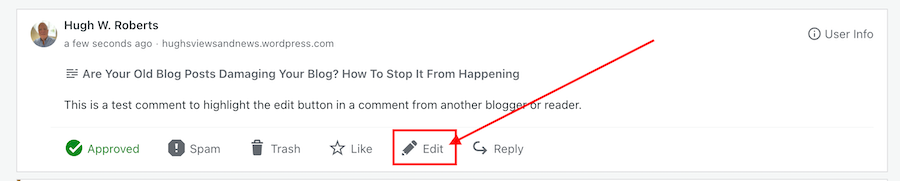
I edit them out before approving the comment by pressing the edit button.

Image highlighting the edit button on a comment on a WordPress blog
Click edit to edit out uninvited links from bloggers

Remember to save the changes and then approve the comment. Most bloggers leaving uninvited links soon get the message.

Let’s wrap it up

  • Never feel pressured to read and comment on too many blog posts when you don’t have the time.
  • Read and leave engaging comments on a few blog posts a day/week rather than try and read and leave empty, non-engaging comments on all the blog posts of those you follow.
  • Never feel obliged to follow a blog simply because they followed you.
  • Don’t force yourself or waste time reading blog posts that do not interest you. Instead, invest your time reading and engaging with bloggers who publish content that interests you.
  • It doesn’t matter if you don’t read a blog post today. It’ll still be there to read in a week or when you have more time.
  • Don’t feel guilty if you do not get around to reading all the blog posts you want to read and comment on.
  • If you have nothing of value to add in a comment, rather than leaving short, empty, non-engaging comments, click the ‘like’ button and move on.
  • Other blogs are not the place to leave uninvited links promoting your blog.
  • Edit out uninvited links before approving comments.
  • Remove any thoughts of thinking you’re behind with blogging and have to catch up. Read and comment on posts when you have the time to do so.

Are there any examples of blogging that have you holding your head in your hands, shaking your head or concerned for other bloggers? Please share them in the comments section.

Follow Hugh on Social Media. Click on the buttons below.

Copyright © 2022 hughsviewsandnews.com – All rights reserved.
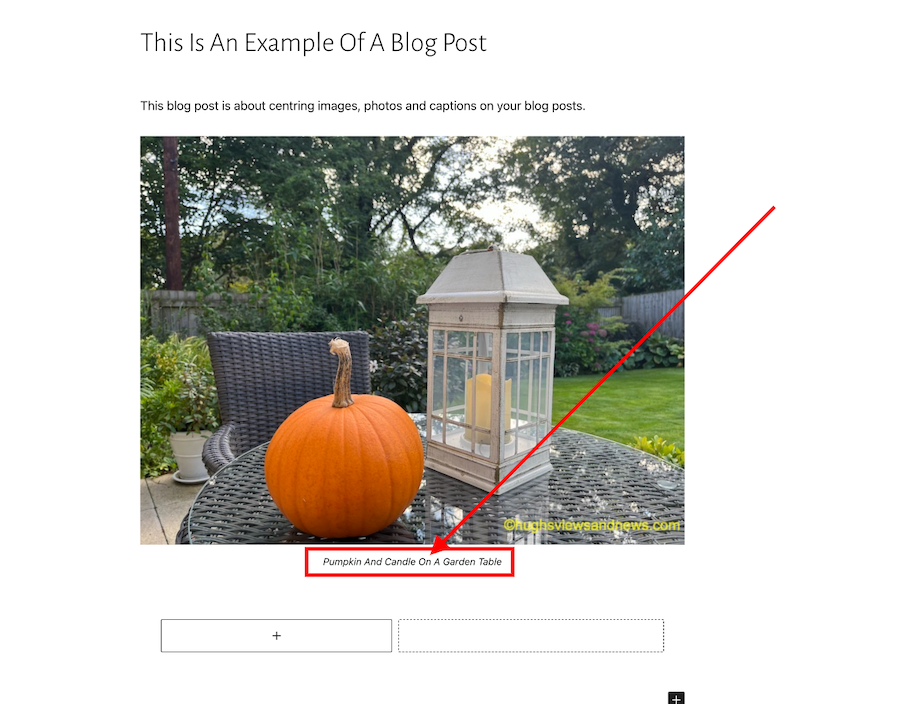
This Is How Easy It Is To Centre Captions Underneath Images And Photos On WordPress

Once upon a time, getting captions to centre underneath photos and images on blog posts involved adding complicated CSS code to your blog.

I don’t know about you, but it doesn’t look right to me whenever I see uncentred captions. It gives blog posts a messy look.

However, WordPress now makes it much easier to centre captions under blog posts, images and photos.

Banner for the blog post 'This Is How Easy It Is To Centre Captions Underneath Images And Photos On WordPress'
Are your captions centred?

Here’s my simple guide to centring captions.

  • Add an image or photo to a blog post.
  • Click on the image to open the image toolbar.
Image of a photo on a WordPress blog highlighting the image toolbar
How to centre a caption

You’ll see that the caption is aligned to the left under the above photo. Arghhhhh!

  • On the toolbar, click on the ‘Align‘ button and on the dropdown menu that appears, click on ‘Align Centre.’
Image highlighting the Align Centre button on WordPress
Click on the Align Centre button.
  • The image or photo will now be centred on your blog post, as will the caption.
Image showing a centred caption under an image on a WordPress blog.
The caption is now centred underneath the photo.

How easy was that? No more ‘Arghhhhhs.’

The example I have given above works on the Block editor.

Of course, if you prefer captions on your blog posts to be aligned to the left or right, you can ignore everything I’ve said in this post.

If you have any questions about centring captions, leave them in the comments section.

Looking for more blogging tips? Click on the ‘Blogging Tips’ and ‘Block Editor – How To’ buttons on the menubar of my blog.

Follow Hugh on social media. Click on the buttons below.

Copyright © 2022 hughsviewsandnews.com – All rights reserved.

5 Powerful Blogging Tools That Will Get Your Blog Noticed

Getting readers to engage with you by leaving comments on your blog posts is something many bloggers crave.

And when those comments clearly show that your post has been read, it’s one of the best feelings in the world.

However, once you get visitors reading your posts and leaving comments, you need to do all you can to ensure they keep coming back.

Writing good quality posts that make your readers want to engage with you and each other is one way to keep your readers returning, but you also need to ensure they can easily find your other similarly themed posts, which are often buried deep in your blog archives.

Banner for the blog post, 5 Powerful Blogging Tools That Will Get Your Blog Noticed
Need more readers and followers? These 5 blogging tools will help

Here are five blogging tools that work for me. Not only do they give my readers a way of finding more similarly-themed content, but these tools have also helped bring me many new readers and followers.

1. The Search Bar

The other day, I was writing a new blog post and wanted to include links to some posts I had read on other blogs.

However, try as I might, I couldn’t find one of the posts I wanted to link to. Even worse, there was no search bar on the blog concerned.

It wasn’t long before I gave up looking for that blog post. I didn’t have the time to find it.

You can make it easy for readers to find what they are looking for by including a search bar on your blog.

Does your blog have a search bar? If not, WordPress has a ‘search’ widget. Click here to find out how to install one.

Once you’ve installed a search bar, open up one of your blog posts and check you are happy with its position. Ensure it’s visible and easy for visitors to find. The search bar on my blog is the first widget on my widget bar to the right of all my blog posts.

Remember, too, that you can use the search bar when looking for your own posts. You can save yourself a lot of time by doing this instead of scrolling through all your blog posts on your blog’s dashboard.

2. The Menu Bar

Navigation is of prime importance on any blog. Make it difficult for visitors to navigate or find more content, and they’ll probably give up and never return.

That’s why it’s essential to have a menu bar on your blog.

A menu bar allows your readers to check out what is on your blog and helps direct them to other parts of your blog they’d like to explore.

Many bloggers can be frightened by including a menu bar on their blog or adding items. However, it’s an easy and straightforward process.

Click here for details on how to set up a custom menu bar on your WordPress blog.

However, don’t overload the menu bar on your blog, as it can look overwhelming. And ensure you keep it updated and check that everything works on it.

3. The ‘Contact Me Page

Just imagine another blogger, a magazine editor, or somebody from your local radio station wanting to contact you to invite you to write an article or appear on a show. How exciting would that be? But they can’t find a way of reaching you privately!

Not everyone wants to leave a comment when they want to invite you to write a guest post, be interviewed, or ask you to appear on a show. If you don’t have a ‘contact me’ page, and nobody can contact you privately, then they’ll probably move on and give that opportunity to somebody else.

On the menu bar of my blog, you’ll see a ‘Contact Hugh’ button. That’s how people can contact me privately.

I get lots of people contacting me every week. As a result, I’ve written guest articles, appeared on radio shows and recorded podcasts, all of which have allowed me to promote myself and my blog. In return, I’ve got hundreds of new readers and followers to my blog.

Make sure you’re contactable. Click here to find out how to set up a ‘contact me’ page.

4. The ‘About Me’ Page

Ever since my early days of blogging, I’ve been told that many new blog visitors will want to learn a little about the blogger behind the blog before deciding whether to follow.

When I visit a new blog, I first look for an ‘about me’ page to learn more about the blogger.

If the blogger doesn’t have an ‘about me’ page or it’s difficult to find, I’m more likely to move on than check out the rest of their blog.

If you do have an ‘about me’ page, ensure you allow new visitors to introduce themselves by allowing them to leave a comment on it. And don’t forget, a friendly reply is more likely to keep that visitor returning to read your posts.

Click here for details on setting up an ‘About Me’ page and what to include.

5. The Gravatar

The image that appears next to all comments is known as a Gravatar. A gravatar is created for you as soon as you leave your first review or comment on the internet.

How many times have you clicked on the gravatar image of somebody who has left an excellent comment on a post and not been able to find their blog details? Frustrating, isn’t it, especially when you think it may be a blog you’d like to follow.

Unfortunately, one of the biggest mistakes many bloggers make, as soon as their gravatar is created, is they forget about it. Many don’t realise they can add images and leave links to their blog and social media accounts on their gravatar.

If a reader then clicks on your gravatar, they’ll see the links to your blog and social media accounts and be able to visit them. That means more visitors to your blog and social media accounts which could result in more followers.

Click here to find out how to add links to your blog and social media accounts to your gravatar.

Let’s wrap it up

  • Many blogging tools can help readers notice your blog and keep them returning.
  • Make sure you have a Search Bar on your blog to help visitors find other content.
  • Ensure your blog includes a menu bar, but don’t overload it with too many items.
  • Ensure the links on your blog’s menu bar all work. Check for broken links at least once a month and fix any that have become broken.
  • Ensure your blog has a page where readers and visitors can contact you privately. Not everyone will want to leave a comment inviting you to write a guest post or to appear on a radio show or podcast.
  • Many new visitors want to know a little about the person behind the blog before deciding whether to follow. Tell visitors a little about yourself on an ‘about me’ page.
  • Ensure your Gravatar has links to your blog and social media accounts.

This is an updated version of a post originally published on Hugh’s Views And News in September 2018

What powerful blogging tools do you use on your blog, and why do you use them? Share them with us by leaving a comment.

Copyright © 2022 hughsviewsandnews.com – All rights reserved.

4 Tips For Housekeeping Your Blog And Improving Its SEO Rating

Performing housekeeping on your blog has many benefits. After all, who doesn’t want their blog to look like a friendly, easy-to-use and inviting place old and new visitors will want to keep coming back to?

If you’re a blogger looking to expand their readership, performing housekeeping on your blog is something you should seriously consider.

But what blog housekeeping jobs should you consider doing?

Banner for the blog post '4 Tips For Housekeeping Your Blog And Improving Its SEO Rating
This is why blog housekeeping is essential.

During a 4-day heatwave last month, I couldn’t venture outside, so I took the opportunity to do some blog housekeeping. Here’s what I did.

1. Delete old, out-of-date blog posts.

I always feel that old, out-of-date blog posts that can not be updated or rewritten do nothing but drag down my blog.

They hang around like some uninvited members of the family you hardly ever see or have contact with. You know they are there but feel afraid to ask them to leave.

I had over 400 blog posts on my blog, some of which were doing nothing apart from attracting spam comments. They were dead ducks. They were not attracting any new views, visitors or comments.

I ended up deleting over 80 posts. Not only did I feel good getting rid of what I considered clutter, but it made my blog look much better with no more outdated information.

Some bloggers claim that deleting old posts is not a good idea because they can look back and see how much they have improved since those early posts. I disagree! When you’re somebody who never goes back to read old posts, mainly because you don’t have the time to do so, deleting these old blog posts is like cutting away the string tied to the brick holding your blog down.

2. Fixing broken links.

A downside of deleting old blog posts is that any pingback and links you have to them will become broken.

I used Broken Link Check to run a report showing me broken links on my blog. It’s free to use.

Since SEOs like Google rank blogs that have broken links lower, cleaning up and fixing broken links is a job every blogger should consider.

That first broken link report could be long and overwhelming, but once you start running a broken link report every month, you’ll soon conquer that job.

Fixing broken links was the best bit of blog housekeeping I did because it improves your blog’s overall ranking, meaning more traffic and visitors to your blog.

3. Categories and tags

When I checked how many categories and tags I had on my blog, I was shocked by the number.

What amazed me was that many categories and tags were no longer active. Like some of my old blog posts, they were deadwood.

Checking which categories and tags are no longer active is easy.

Follow this guide.

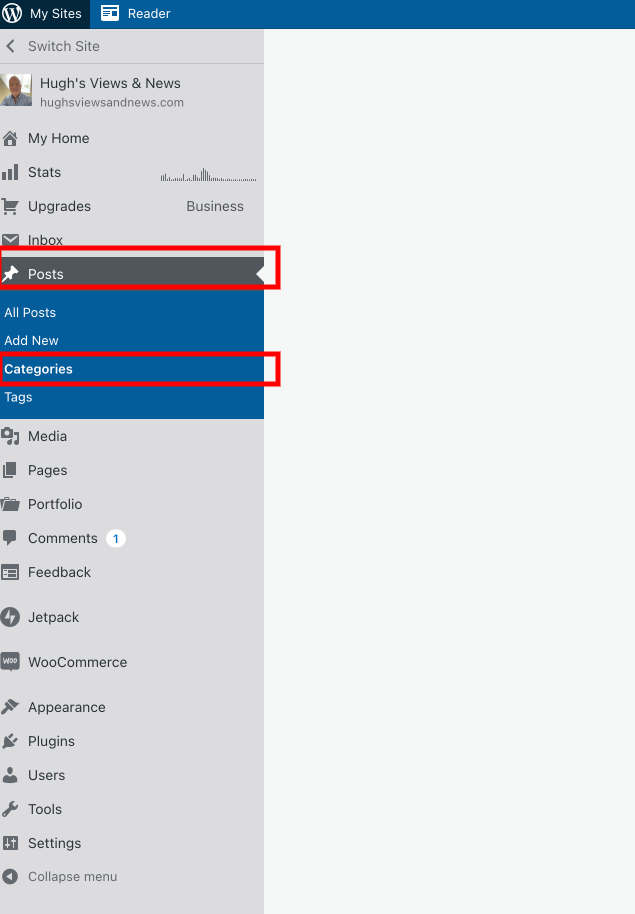
  • On your blog’s dashboard, click on Posts and then Categories. (Click on Tags to manage Tags).
Image highlighting where to manage categories and tags on your WordPress blog
How to manage categories and tags on your WordPress blog

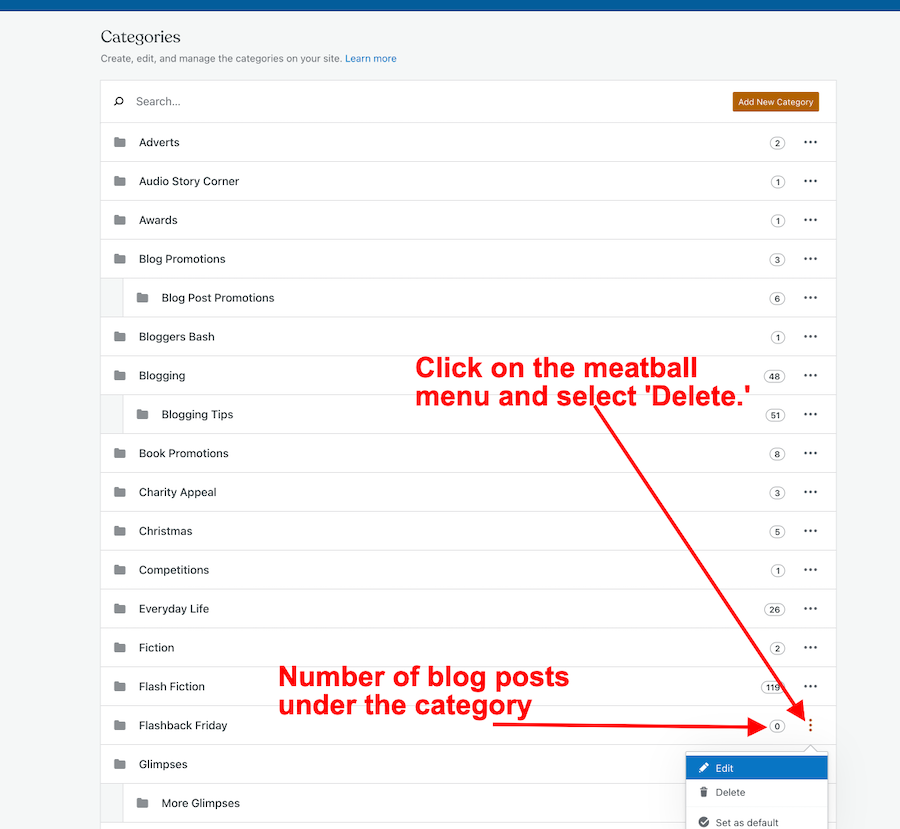
A list of all your categories will show how many posts you have under each category.

  • To delete a category, click on the meatball menu next to the number and click on ‘delete.’
Image showing how to delete categories on a WordPress blog
How to delete categories on your WordPress blog

Follow the same process for managing the Tags on your blog.

4. Menu Bar

I also took the opportunity to tidy up the menubar on my blog. Although it was not what I considered ‘top heavy’, I moved some items to sub-categories.

Here’s an example. I moved some fictional stuff to sub-categories under ‘Fiction.’ When you hover over ‘Fiction‘ on the menu, you’ll see the sub-categories pop up.

Blogs with top-heavy menus can look overwhelming and messy to visitors.

For more information about menus on your blog, see ‘Menus‘ by WordPress.

Once you start housekeeping your blog, it will make you feel much more positive about blogging.

Try and get into the habit of housekeeping your blog at least once every six months, although I’d recommend running a broken links report at least once a month.

Let’s wrap it up

  • Performing housekeeping on your blog is something every blogger should perform at least once every six months.
  • A well-kept blog is one that old and new visitors will want to keep returning to.
  • Fixing broken links on your blog will improve your blog’s SEO rating.
  • Run a broken link report for your blog once a month. Fix any broken links.
  • Delete categories and tags that are no longer being used on your blog. Too many categories and tags can confuse readers.
  • Delete old out-of-date blog posts, especially if all they are doing is attracting lots of spam.
  • Try and keep the menu of your blog to a minimum. Top-heavy menus can look messy and overwhelming.

How often do you perform blog housekeeping? What do those jobs involve? Do you have any simple tips for housekeeping your blog? Share them in the comments.

Remember that a well-kept blog is a positive and friendly place for your visitors and readers.

Follow Hugh on social media. Click on the links below.

Copyright © 2022 hughsviewsandnews.com – All rights reserved.

Is Reblogging Dead? Why I Have Removed The Reblog Button From My Blog

How often do you click on the reblog sharing button?

Are you somebody who reblogs every day or, like me, no longer uses the reblog button?

Banner for the blog post 'Is Reblogging Dead? Why I Have Removed The Reblog Button From My Blog
Are you still reblogging?

When I first started blogging in 2014, I was amazed by how many bloggers used the reblog button. Fast forward to today, and I see little use for it.

It’s one of the reasons why I removed the reblog button from my blog. Not only have I seen a sharp decline in the reblogging of my posts, but I’ve seen the same in the reblogging of the posts of other bloggers.

Looking Back

I remember the first time one of my blog posts got reblogged. It was one of the highlights of my blogging journey. Funnily, it marked the beginning of my believing I’d become a successful blogger.

For years, my blog posts got reblogged almost weekly. It helped put me and my blog in front of new readers and did wonders for the number of followers my blog gained.

When Followers Are Not Followers

Of course, not all followers are followers.

I soon learned that people followed my blog but never returned to it.

I knew that some unfollowed my blog as soon as I followed them back.

I couldn’t figure out why anyone would unfollow my blog as soon as I followed them, but a couple of years into my blogging journey, I discovered that some bloggers are more interested in numbers than content. They don’t hang around in the blogging world for long.

What’s The Most Significant Risk In Reblogging?

When I first heard of bloggers receiving fines for reblogging material that included copyrighted material, my love of reblogging began to dwindle. Seriously? Are bloggers fined for reblogging? Yes, it’s true, and that may be one of many reasons why many bloggers no longer use the reblog button.

When author and blogger Deborah Jay wrote a guest post for me, she shared her story of how a simple reblog ended up with her being threatened with legal action and a fine. Click here to read the post.

But it’s not only Deborah who has faced legal action and a fine for reblogging another blogger’s blog post. Several bloggers have been fined for reblogging blog posts that included copyrighted photos or images.

Don’t think it can’t happen to you. It can happen to anyone who shares copyrighted material on their blog.

Removed The Reblog Button From Your Blog? Your Posts Can Still Be Reblogged!

Did you know that just because I have removed the reblog button from my blog posts doesn’t mean nobody can no longer reblog them?

One of the few flaws of WordPress that annoys me is that readers can still reblog any of my posts from the WordPress Reader. That doesn’t make sense to me when I’ve removed the reblog button from my blog.

Fortunately, it hasn’t happened to any of my blog posts since I removed the reblog button.

However, I am still delighted when somebody shares my blog posts via a ‘pingback‘ the ‘Press This‘ marketing (not sharing) button or on social media.

Feel free to share this post via one of those methods.

How Do I Remove The Reblog Button From My Blog?

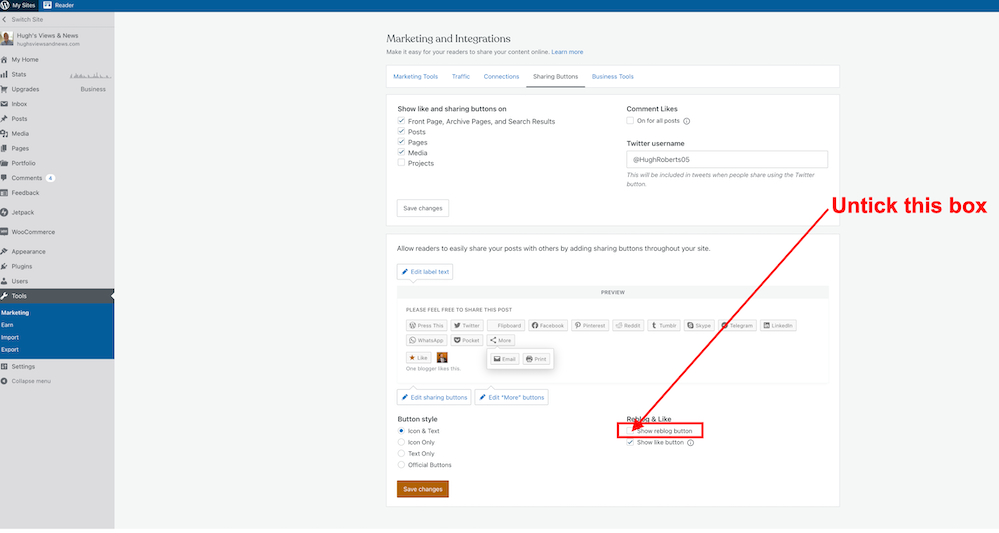
If you decide you would rather not offer the option to reblog your posts, you can disable the button by navigating to My Sites → Tools → Marketing. Then click on the Sharing Buttons tab. Disable ‘Show reblog button’ under Reblog & Like, and the Reblog button will no longer appear on your blog posts.

Image showing how to disable the reblog button on WordPress
How to disable the reblog button on WordPress

Did You Know This?

Blogs that are full of reblogged posts are known as ‘Reblogging Farms.’ Is your blog a reblogging farm?

Do you still use the reblog button? If so, what do you reblog?

Follow Hugh On Social Media. Click on the buttons below.

Copyright © 2022 hughsviewsandnews.com – All rights reserved.
How To Participate In Throwback Thursday And Help Your Old Blog Posts Get Noticed

What is Throwback Thursday?

How do you participate in Throwback Thursday?

Throwback Thursday is the day to bring your old blog posts back to life.

Image for the blog post 'How To Participate In Throwback Thursday And Help Your Old Blog Posts Get Noticed Again'
Are you making the most of your old blog posts?

We all have old blog posts in our archives, many of which are buried bits of treasure that can reward us again. Throwback Thursday is the perfect day to rekindle those old blog posts.

Only use blog posts that are still relevant, although always ensure you first make any necessary changes to the posts you want to highlight.

How to participate in Throwback Thursday

Select a favourite blog post that is at least a few months old.

Share it via a pingback or link in a new Throwback Thursday blog post.

After all, not only will some of your readers not have seen the post the first time it was published, but new followers may also not have seen it.

However, as I mentioned, rather than publish the whole post again, the idea behind Throwback Thursday is to include a link to the post you want to highlight in your Throwback Thursday post.

What you should do with your Throwback Thursday blog posts.

Only publish the post on a Thursday. That may seem like common sense, but I’ve seen bloggers publish them on other days of the week. Some readers may find it odd to publish Throwback Thursday posts on any other day than a Thursday. After all, the clue is in the title.

However, don’t worry if you miss publishing your Throwback Thursday blog post. You can always delay publication until the following Thursday. There are lots of Thursdays to choose from.

Flashback Friday.

If you’re a day late in publishing your Throwback Thursday post, you can always change it to a Flashback Friday post. Flashback Friday has the same concept as Throwback Thursday, where you are encouraged to highlight older blog posts.

Share your Throwback Thursday posts on social media using the hashtag #ThrowbackThursday so that other participants can find your post.

Tag your post ‘ThrowBack Thursday’ on your blog so other participants can find it.

You can also include the words ‘Throwback Thursday’ or the hashtag in the title of your blog post, but always ensure you add the title of the blog post you’re highlighting. You don’t want to end up with many blog posts simply titled ‘Throwback Thursday.’

When creating the pingback to the post you want to highlight, ensure you turn on the ‘open in new tab‘ button so that readers don’t lose the page of your blog they’re on.

Not sure how to create a pingback? Click here for full details.

Is there anything else I should consider when publishing Throwback Thursday blog posts?

Yes, I recommend closing comments on the post and asking readers to leave any new comments on the original blog post you’re highlighting. That way, they can see and read comments already left on the post you’re promoting. They can join any ongoing discussion. It makes more sense to have comments on the same post rather than scattered across several blog posts.

When selecting which posts to promote, choose the ones you believe your readers will benefit from and think they’ll enjoy reading again.

And that is Throwback Thursday.

Do you participate in Throwback Thursday? Do you have any questions about Throwback Thursday? Please leave them in the comments section.

Join Hugh on Social Media. Click the button below.

Copyright © 2022 hughsviewsandnews.com – All rights reserved.
Why I Was Threatened With Legal Action After Reblogging On WordPress – A True Story And Guest Post by Deborah Jay @DeborahJay2

If you’re a blogger who has used or still uses the reblog button to share other bloggers’ posts, I urge you to read this post.

Likewise, if you use photos or images in your own posts that are not your own or do not come from a genuine website that offers free images and photos, this post is a must-read.


Early 2021, during the lockdown, I had a nasty shock.

For me, the lockdown was terrific – I live in a farmhouse in the Scottish Highlands with gorgeous gardens, have a horse and a pack of rescue dogs, and for once, I could legitimately stay at home and not travel for work. This also allowed me to sit and write without feeling like I was short-changing some other part of my life.

What I had not expected, however, was to receive an email from a law firm accusing me of copyright infringement on a photograph I’d displayed on my blog back in my earliest blogging days, somewhere around 2013.

To add insult to injury, it wasn’t even a blog post I’d put together myself, but a collection of inspirational photos on a friend’s blog, which I’d reblogged! 

I shared her post using the WordPress ‘Reblog’ button, and, as you may know, the post appears on your blog with a link to the original for anyone wanting to see more.

I had NO idea (this was quite early in my blogging career); this meant that ALL the photographs in that post were downloaded and stored in my own media library. The fact they were downloaded, even without my knowledge, became a potential legal problem.

If this happens to you, DO NOT ignore it.

The ‘Cease and Desist’ email came from an Italian law firm. Their client, the photographer, is based in the UK, as am I. It detailed the blog post and the specific photograph and demanded £1045.00 compensation for using the picture without obtaining a licence. This was justified as:

  • £195 financial loss (£39 per year for the licence)
  • £150 damages for flagrancy (putting the photographer at increased risk of having the photo stolen/used without obtaining a licence)
  • £100 damages for negative financial consequences
  • £150 for the absence of a picture credit
  • £50 damages for moral prejudice
  • £100 damages for consequential losses
  • £100 damages for devaluing the image
  • £200 lawyers’ fees

Scary, huh?

This was what I did:

  • The first step was to check that the law firm existed, looking up their website and digging a little on Google. Sadly, for me, it was legit.
  • Then I looked at the photographer’s site to find the photo. Yes, it was there, along with the price for an annual licence, as detailed in the legal letter.
  • So, having established that I had indeed violated copyright, although unwittingly, I checked my own post. As a reblog, I could only see the first picture, which wasn’t the one in dispute. I replied to the lawyer, asking for a screenshot of the image displayed on my site. To my shock, an image of the entire post came back, with all the photos in evidence displayed on my blog. I still don’t know how this is possible, but I couldn’t argue because they had the screenshot. 
  • I removed the post from my site and also delved into my media library, which is when I discovered to my shock, that all the pictures from the post were stored there. I deleted them all, just in case.
  • I contacted the original blogger and advised her to delete it, which she did. The last thing I wanted was for them to go after her, too.
  • The next step was to contact the lawyer again and point out I was not the original poster, explaining it was a reblog of someone else’s post. 
  • They replied that while they would consider this, I was still held responsible because the image had been displayed on my site. They dropped the proposed settlement to £800 and gave me 10 days to pay up.
  • I contacted another lawyer for advice. Her answer was: ‘If you did not download it and post it on your site, then you did not copy it. I would argue that re-posting or embedding is not copying because the image is hosted elsewhere and therefore cannot be copyright infringement.’ Note that last bit? Unfortunately, the way WordPress works, the photo had been downloaded and hosted on my own site, even though I hadn’t known it, so this didn’t help me.
  • I went back to the Italian lawyer and again stressed that I was not the person who had chosen to use the image. I felt they were being unfair coming after me and not the original poster (which is why I’d given her the heads-up first and ensured she’d removed all traces from her site before typing this message). 
  • By now, this had gone on for 6 weeks, with me leaving it almost to the stipulated 10-day deadline when I replied to the lawyer. I never once refused to pay them, but I did not offer to do so or haggle about the sum. I spent more time researching potential help from legal groups, but…
  • Nearly a year on, and I’ve not heard from them again! This sounds fairly simple, but it was a time-consuming and stressful experience.

I understand from years ago, mainly when posting paper letters, that sometimes the answer to such events is to continue corresponding. Never offer anything, but keep querying small details and spread them out as long as possible. If nothing else, you may get a reduction (as I did) in the sum they demand.

I was lucky; I know others who have had to pay up. In this case, they apparently wrote me off as too much bother to pursue. 

If you should be unfortunate enough to have this happen to you, the most important things are: 

  1. Don’t ignore it – it has the potential to be very expensive.
  2. Don’t pay up straight away – always investigate your options.

Deborah Jay writes fantasy and urban fantasy featuring complex, quirky characters and multi-layered plots – just what she likes to read.

Fortunate enough to live not far from Loch Ness in the majestic, mystery-filled Scottish Highlands with her partner and a pack of rescue dogs, she can often be found lurking in secluded glens and forests, researching locations for her books.

Her first published novel, epic fantasy THE PRINCE’S MAN, won a UK Arts Council award and debuted as an Amazon Hot 100 New Release.

Photo of author, writer and blogger Deborah Jay

Connect With Deborah

Blog: Deborah Jay

Facebook

Twitter

Pinterest

Goodreads

Amazon

Newsletter & Free Short Story

Books

THE PRINCE’S MAN

DESPRITE MEASURES

SPRITE NIGHT

THE WORLD AND THE STARS

Image of the books by Deborah Jay
Books by Deborah Jay

Important Reminders About Reblogging from Hugh

Reblogging saves many bloggers time. It’s quick to do and can result in more visits and comments to the reblogged post.

It’s also a safe option, but only when used correctly. Here are several points to consider and note if you intend to reblog another blogger’s post or have ever reblogged another blogger’s post.

  • If you reblog or have reblogged the blog posts of other bloggers, any images, videos or photos in those posts will have been downloaded into your WordPress media library. You could, therefore, have downloaded illegal images or photos and images that are copyrighted.
  • Check the small print – Some photos, images, and pictures may have a limited time that they’re free to use. After that, you could face a fine if they remain on your blog or in your media library.
  • Consider other options for sharing blog posts where images and photos are not downloaded to your blog. The ‘Press This’ sharing button is a good option, as no images and photos are downloaded to your media library.
  • Another option instead of reblogging is to write and publish a post that includes pingback links to blog posts you want to share. Blogger Sally Cronin does this with her ‘Blogger Weekly’ feature.
  • If you run a blogging challenge where you reblog posts from participants, consider adding links to those posts in your blog post or in a new blog post rather than reblogging them. Blogger Terri Webster Schrandt does this in her Sunday Stills photography challenge.
  • If you’re unsure that any content in a blog post you want to share is not free to download or use, don’t reblog the post.
  • Don’t think that what happened to Deborah won’t happen to you. It can!
  • If you believe you may have reblogged posts that have images or photos that are copyrighted or not free to download and use, delete the posts immediately.
  • After deleting posts, remember to remove any images and photos that appeared on the reblog from your WordPress media library, as deleting the post does not delete them.
  • Remember that copyright laws can also apply to lyrics, artwork, drawings and text.

WordPress offers users hundreds of free images and photos.

If you’re not convinced by Deborah’s experience of copyright infringement, then read Debby Kaye’s post here about a copyright experience she had where she was fined for reblogging a post that contained an image that was copyright protected.

If you have any questions about Deborah’s experience or about reblogging, leave them in the comments section. Deborah and I will try and answer them, although we cannot offer any legal advice.

Follow Hugh on Social Media. Click the buttons below.

Not sure it’s free? Then don’t reblog, copy or download it.

I thank Deborah for sharing her true story about the perils of reblogging with us and for allowing me to publish it on my blog.

Do you have any experience of being fined for copyright infringement?

Copyright © 2022 hughsviewsandnews.com – All rights reserved.