5 ‘Questionable’ Photos That Give You The Chance To Say Who You Are

Last month, I published the first post of my ‘photography-themed’ series. If you missed it, you can read ‘4 Never Before Seen Photos And Why You Need To See Them‘ and join the many readers who have already joined the conversations.

I want to thank everyone who left a comment and those who started conversations about the photos I featured. Honestly, the post’s success exceeded my expectations. I have a dedicated group of readers who love to engage, and for that, I am genuinely grateful.

December 2025

This month, I am not only showcasing five photographs (some of which I appear in), all with a Christmas theme, but I am also highlighting another WordPress gallery block you can use to display your photos and photography.

So, here we go. I’m excited to share five photos, three of which are new to my blog, each one posing a question. Feel free to leave a comment or write your own post with your answers. If you choose to write a post, you’re welcome to link back to mine so other bloggers can join the discussion.

1. When did you first meet Father Christmas?

A photo of a smiling man standing next to Father Christmas
When was the last time you bumped into Father Christmas?

I have to dig deep into the archives of my memory to recall the first time I encountered Father Christmas. I was six years old, and meeting the man I thought was the ultimate VIP (Very Important Person) was like waiting for the last biscuit in the jar.

It happened in a department store’s Christmas grotto, a place where the air smelled like gingerbread and desperation—not just mine, but also my sister’s, who was so terrified of Father Christmas that she screamed like we were evacuating from a man-eating, zombie, giant snowman! The whole store was probably questioning their Christmas spirit as they listened to her wails echo off the walls, rattling every bauble and piece of tinsel in the store.

However, on Christmas Eve, she had no problem with Father Christmas making his grand entrance into our home, as if he owned the place, and dropping off presents. After all, she was fast asleep, blissfully convinced that if she couldn’t see him, he mustn’t be able to see her!

The above photo was snapped one June while I was on a cruise, proving that you might just find Father Christmas on a beach holiday! So remember to be nice all year long, because you never know when you may be teetering on the edge of his nice list.

Do you have a photo of you with Father Christmas?

2. Have you ever baked a Christmas cake?

A photo taken from above of an iced Christmas cake. On top of the cake are some stars, Santa, a Christmas tree, and a snowman.
Have you ever baked a Christmas cake?

I distinctly recall my grandmother turning into a Christmas cake factory every year. I adored being her little helper, especially during the cake decoration extravaganza a few days before Christmas.

It was quite the spectacle watching her bake the cakes in September, then patiently unwrap them from their greaseproof swaddling every few weeks for a little “brandishing” with brandy. Who knew a cake could get an alcoholic makeover before the Christmas festivities even started?

I would sit there, as she dramatically stabbed the cake bases with a fork and spooned what seemed like an endless supply of brandy into the tiny holes. Of course, she’d also help herself to a few swigs of brandy while waiting for the cakes to soak up what she’s already spooned in. It was like she was giving them a little boozy makeover and joining in the festivities early.

The cake in the above photo was baked by me, but it wasn’t made the traditional way my grandmother prepared her Christmas cakes. I cheated by using a box with all the ready-prepared ingredients for making a Christmas cake. However, the magic of icing and decorating the cake was still present. And, of course, I carried on the tradition of a few glasses of brandy while feeding and decorating it.

If you’re wondering why it’s just a photo of the top of the cake, I decided it was the only part of it I felt I hadn’t cheated at. However, this made me start looking at all the different angles you can take photos, giving them a new dimension.

Do you make your own Christmas cake or do you buy a shop-bought one? And what’s inside your cake? Is it fruit-based, or filled with sponge, jam, and buttercream?

3. What’s your go-to karaoke song?

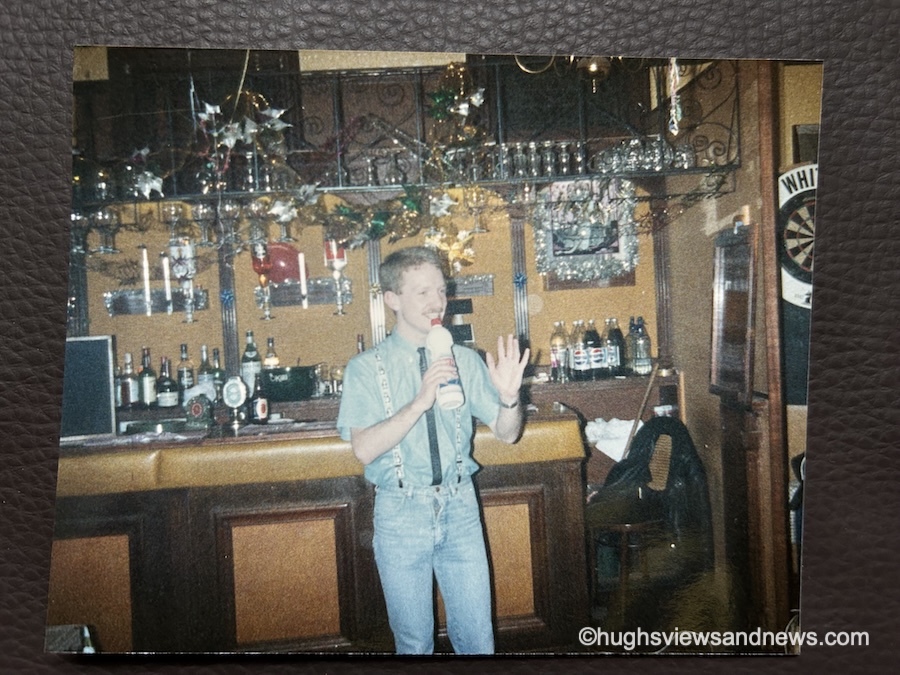
An old 1980s photo of a young man at a Christmas party in a bar, singing into a plastic bottle?
What’s your go-to song at a party?

Get ready to cringe! I’ve totally lost track of how many Christmas parties I’ve attended over the years—seriously, it’s like my life turned into a never-ending Netflix series focused on festive cheer, and most of them were work parties, where the eggnog flows like water, and the awkward small talk is the real gift! From fancy dress to black tie, I’ve always got into the spirit of Christmas celebrations. And the above photo is no exception.

Taken in the late 1980s, I’m not entirely sure why I decided a bottle of bleach was the ideal choice for a microphone, but let’s chalk it up to a few too many festive glasses of sherry or eggnog that night! My outfit is a glorious testament to the era; I mean, who could resist the charm of penguins proudly dancing on my braces? Clearly, I was ahead of my time in fashion… or maybe just in silliness!

However, I still know the song I was singing when the photo was taken.

This song has become my ‘go-to’ whenever anyone puts a microphone in my hand. So, if you ever meet me, never give me a bottle of bleach or a microphone!

What’s your go-to karaoke song?

4. What’s your favourite Christmas tree ornament?

A photo of a Christmas tree ornament of Father Christmas in his sleigh being pulled by reindeer.
What’s your favourite Christmas tree ornament?

My favorite Christmas tree ornament is a jolly old Father Christmas in his sleigh, dramatically being yanked along by two reindeer who have clearly lost the plot; they’re now engaged in an epic showdown over who gets the last carrot that all the kids left out, while Father Christmas just sits back, chuckling with a mince pie in one hand and a glass of brandy in the other, thinking, “This is the real Christmas spirit!”

As Father Christmas steers his sleigh joyfully, all those glasses of brandy would probably get him into trouble if he were caught by a traffic officer. However, as he’s flying, rather than driving on roads, hopefully he won’t get into any trouble.

Over the years, I have collected many Christmas tree ornaments. This one is only a few years old and was bought online from a well-known London store. Yes, it was expensive, but the joy it has brought is worth every penny.

Do you have a favourite Christmas tree ornament? Share the details or a photo with us.

5. Is this how Christmas makes you feel?

And finally, is this how Christmas makes you feel?

A photo of a festive Christmas reindeer that appears to have collapsed onto the ground after a busy Christmas.
Does the thought of Christmas make you feel like this?

Whether it’s before or after Christmas, most of us will find ourselves feeling deflated, like a poor reindeer caught napping three days after the big day—let’s just say, even Rudolph looks like he needs a strong cup of cocoa at this point!

The look on its face says it all and reminds me of those confusing days between Christmas and New Year, when the days of the week all blend into one. “Is it Monday or Tuesday? No, it’s Wednesday, isn’t it, or was Wednesday yesterday? Hang on, wasn’t it Thursday yesterday?”

The Slideshow Block

This month, I am displaying and featuring the ‘Slideshow’ block. Here are my five photos, all in the slideshow block.

  • A photo of a smiling man standing next to Father Christmas
  • A photo taken from above of an iced Christmas cake. On top of the cake are some stars, Santa, a Christmas tree, and a snowman.
  • An old 1980s photo of a young man at a Christmas party in a bar, singing into a plastic bottle?
  • A photo of a Christmas tree ornament of Father Christmas in his sleigh being pulled by reindeer.
  • A photo of a festive Christmas reindeer that appears to have collapsed onto the ground after a busy Christmas.

You can select as many photos as you like for your slideshow. Captions you have added to your photos also appear, but unfortunately, and this is something I dislike, the captions cannot be centred.

You can set the slideshow to manual, so readers must click to view the next image, or select an autoplay option. If you choose autoplay, you can also decide how many seconds pass between each photo (I chose 4 seconds).

Another option is to add a transition. You can choose slide or fade for your photos. You can also select the image size: small, medium, large, or extra large. I decided on the ‘Large’ option.

All of these options can be found by clicking on the image and choosing the ‘Block‘ option.

An image showing the different options of the Slideshow block on WordPress
The Slideshow Block options.

Click the following link for more information about the Slideshow Block.

How to make a photographer’s day.

Next time you leave a comment on a photography post, instead of saying ‘Great photo,’ explain what it was about the picture that made you think it was great. Was it the subject, the lighting, the scenery, the angle it was taken from, or the emotion it evoked when you saw it?

It only needs to be a few lines, but the people you leave the comment for will appreciate the feedback much more than when all you say, time after time, is that it’s a great photo.

Do you have a photo of you with Father Christmas? Do you make your own Christmas cake or do you buy a shop-bought one? What’s your go-to karaoke song? Do you have a favourite Christmas tree ornament? How does Christmas make you feel?

The featured image in this blog post is taken from Pixabay. AI checked spelling and grammar mistakes.

You can follow me at the following sites.

Copyright @ 2025 hughsviewsandnews.com – All rights reserved.

4 Never Before Seen Photos And Why You Need To See Them

I used to publish a substantial amount of photography on my blog, especially in Wordless Wednesday posts, and then it all ceased!

I couldn’t help but notice how they generated little to no engagement. I felt somewhat disheartened by this apparent lack of interest in my photography. After all, how can you respond week after week to the same ‘Great shot’ comments, other than with a ‘Thank you?’ It almost seems as if people are just going through the motions with those kinds of comments without truly engaging with the content.

Can a photography blog post generate meaningful engagement?

It’s something I wasn’t entirely convinced about. I only had to look around the blogosphere and see the same ‘Great photo’ comments on photography posts.

However, some photo challenges seem to spark discussion and engagement, although you’ll sometimes have to sift through the ‘Nice shot’ types of comments. Nevertheless, as I’ve discovered, hosting any kind of blog challenge is hard work, so it’s always a shame when people drop links or short comments and run without recognising the effort the host has put into creating the post. Some of those hosts must feel disheartened when it happens, but the thoughtful and engaging comments they get must make all the difference.

I love photography, so why don’t I showcase mine?

After realising I was missing out on sharing my photography and not wanting to create my own photography challenge, I decided to publish a monthly photography post showcasing four photographs I’ve never featured on my blog before.

Not only that, but at the end of each post, I will display the photos in a separate WordPress photo Gallery block and give a brief explanation of that block’s features.

So, here we go. I’m excited to share with you four never-before-seen photos that I’m delighted to finally unveil on my blog!

1. How old is this tree?

A photo of the ends of a tree trunk that has been cut down. The rings on the inside of the trunk are visible. In the background are some colourful buildings, trees and plantlife.
How old was this tree?

What initially caught my eye in this shot were those colourful buildings in the background. But the fallen tree had me asking many more questions.

Can you actually determine a tree’s age by counting the rings in its trunk? Well, this tree got a bit overzealous during a storm and decided to take a nap across a footpath! It turned into the ultimate footpath block, leading to some unfortunate lumberjack shenanigans where it had to be chopped into manageable pieces.

Not only did I ponder the ancient age of this tree—seriously, is it older than me?—but I also found myself wondering about the brave soul who planted it and how many people have swung from its branches or taken leisurely naps beneath its leafy embrace. The rings? Oh, they’ve got secrets, but counting them seemed as feasible as getting my two dogs to sit still long enough for a family photo.

Today, the chunks of trunk are still hanging around, serving as a posh Airbnb for wildlife that need a place to kick back and relax. I’m thrilled parts of it are still there because this tree has decided to become the ultimate retirement home for other species.

2. Do you know this bear?

A photo of the head of a child's toy bear that has been put over one of the stones that jut out on top of the wall. Behind the toy is some plant life.
I’m lost. Have you seen my owner?

This cheeky face practically yanked a grin out of me when it halted my stroll. I simply had to snap a photo—who could resist it? There it was, perched impossibly high, making me ponder not just how it got there, but also who the previous owner was. Was it a child’s hat, a brave toy that escaped the toy box, or maybe even a rogue UFO pilot’s accessory? Hey, a guy can dream about flying a UFO dressed as a Bear, can’t he!?

A few days later, the bear was gone. Someone had either claimed it or rehomed it, although my darker, more creative mind was also insisting that it had fallen off the wall and was now trapped behind it (was that a call for help I could hear?).

Whatever had happened to this smiling bear, I was thankful for the joy it had not only given me when I spotted it, but also for the smiles it must have brought to others who had seen it on their journeys. I hope it was reunited with its owner.

3. Does this sign give you mixed emotions?

A photo of a wooden sign that reads 'Dogs' Graves, St Catwg Walks Exit, and Bluebell Wood.' In the background are some trees and grass areas
This way please

This sign will probably evoke mixed feelings. After all, that first line isn’t pleasant, is it? It evoked a vision of a horror story and film by one of my favourite authors, Stephen King. However, the bottom part of this sign brought to mind a beautiful, tranquil place that could be the name of a location you’d find in a children’s book.

I wondered why there was not a separate sign for the dogs’ graves. After all, who would want to visit a dog’s graveyard, apart from maybe pet owners who had buried their beloved pets there? Bluebell Wood, on the other hand, sounded like a lovely place for a walk, especially during bluebell season in May. I pictured myself sitting in Bluebell Wood, forest-bathing, while recharging my body and mind.

Later, I discovered that the gardens, where the photo was taken, were purchased by William Graham Vivian in 1860, when he acquired Clyne Castle, a nearby dwelling, and began creating the surrounding landscape gardens. He died in 1912, and the many dogs buried in the graveyard were his pet dogs. So, there’s the answer to why the dogs’ graveyard is on the sign.

4. Do you know this dog?

A photo of a black and white Welsh Cardigan corgi sitting next to a sofa while looking directly at the camera.
Do you think I look younger than my age?

Talking of dogs, the chap in the above photo turned 14 last month.

For those of you who haven’t read my ‘About‘ page, this is Toby, the older of the two Welsh Cardigan Corgis my partner and I own. I still recall the day we collected him and how, from the moment we met him, our lives took a new turn. It’s one of the best days of our lives.

Toby is a photography subject, like me, in that he usually moves when a picture is taken. However, on this particular day, his 14th birthday, he posed for the camera, and I was thrilled with the result.

Toby’s hobbies include sleeping, walking, and meeting his mates on the beach. He also enjoys having a mad 10 minutes after dinner, when I have to chase him (very slowly) around the dining table while carrying his favourite toy in his mouth. Additionally, he likes to believe he’s in charge of the household.

When I first started blogging in 2013, Toby was a prominent feature on my blog, but over the years, he hasn’t been as interested in appearing. However, he has recently garnered considerable attention on Bluesky, where some of his photos have been shared hundreds of times and generated a lot of engagement. It’s a rare occurrence that he appears on my blog, and I’m very grateful that he agreed to let me share his photo.

The Gallery Block

The first WordPress gallery I am displaying and featuring is the ‘Gallery‘ block. Here are my four photos.

The Gallery block is a straightforward photo gallery that lets you drag and rearrange images to display them in any way you prefer. It’s a useful gallery, and I notice it being used more frequently than any of the other image blocks provided by WordPress.

Notice how the captions I’ve added to my photos appear at the bottom of each one. You don’t need to add captions to photos, but they are a great way to boost engagement from visitors, especially when asking a question.

To find the ‘Gallery‘ block, search for ‘Gallery‘ under the ‘Blocks‘ tab when drafting a post.

An image displaying the 'Gallery' block under the 'Block' tab on WordPress
The Gallery Block

Click the following link for more information about the Gallery Block.

How to make a photographer’s day.

Next time you leave a comment on a photography post, instead of simply saying ‘Great photo,’ explain what it was about the picture that made you think it was great. Was it the subject, the lighting, the scenery, the angle it was taken from, or the emotion it evoked when you saw it? It only needs to be a few lines, but they will appreciate the feedback much more than when all you say time after time is that it’s a great photo.

How do you usually engage with photography posts? What encourages you to leave a comment other than saying, ‘These are nice photos.’ Are you a photography blogger? If so, does engagement on your posts matter to you?

The featured image in this blog post is taken from Pixabay. AI checked spelling and grammar mistakes.

You can follow me at the following sites.

Copyright @ 2025 hughsviewsandnews.com – All rights reserved.

This Is The One Thing You Can Do To Help Bloggers

We all know that comments play a crucial role in fostering community and enhancing conversations within the blogging world. When someone takes the time to engage thoughtfully with you, the impact is significantly greater than mere participation. But how?

An image depicting colourful individuals with vibrant comment boxes above them.
Image by Gerd Altmann from Pixabay

Imagine meeting a friend for coffee and hearing the same thing from them every time you meet. It would soon get boring, wouldn’t it? That’s what leaving the same comments on the blogs you visit can seem like.

I remember the first time somebody left me an engaging comment. I felt like they were not only listening to me but were interested in what I had to say. They were taking an interest in me instead of trying to get me to take an interest in them.

The benefits of leaving engaging comments, as opposed to short, non-engaging ones, are not only startling, but they help propel those receiving those types of comments into a whole new dimension of blogging.

Let’s examine some of the ways leaving thoughtful, engaging comments helps.

1. Enhances Community Interaction

Engaging comments foster a vibrant community atmosphere, often sparking discussions between those who leave the comments. When readers share their thoughts, experiences, or questions, it sparks conversation and encourages others to participate; even those who would not usually want to speak may be tempted to talk. This collaborative environment is crucial for fostering relationships among readers and between bloggers and their audience.

Short, non-engaging comments tend to have the opposite effect, creating off-page questions such as ‘did this person really read the post?’ or ‘is this person interested in my content or just proving they visited?’

2. Provides Valuable Feedback

When readers leave detailed, constructive comments, they provide valuable insights into your content. This feedback can help bloggers refine their writing and tailor future posts to better serve their audience. This is especially true for those who write fiction or poetry in helping them become even better at what they write.

Short comments like “Great post!” “Great story,” or “These are lovely photos,” may be easy to type, but they don’t offer the depth of feedback that engaging comments can provide.

Next time you want to tell a blogger that their story, post, or photos are great, explain why you think they are wonderful. By doing so, you’ll be providing them with much higher quality feedback and likely brightening their day even more.

3. Boosts SEO and Visibility

Did you know that certain comments, especially those containing valuable feedback and questions, can enhance a blog’s SEO rankings? Search engines not only favour blogs with dynamic content, but an active comments section filled with meaningful discussions can improve visibility. Engaging comments indicate to SEOs that the blog is active and has a thriving community.

4. Encourages More In-Depth Discussion

Thoughtful comments often contain questions or points that invite further discussion and exploration. This creates an opportunity for dialogue and deeper exploration of the topic at hand. As discussions develop, so can connections and friendships. After all, trying to make connections with those who keep telling you the same thing can be much more difficult when all they are doing is taking you down a dead end every time they leave a comment.

5. Builds Blogger Credibility

When a blogger responds to engaging comments, they can demonstrate their expertise and invest in their readers. This back-and-forth not only shows that the blogger values their audience’s input but also positions them as knowledgeable in their field. Leaving engaging comments or questions can help boost a blogger’s confidence and encourage them to write and share more content.

Disengaged comments may go unnoticed and fail to establish any genuine connection between a blogger and their reader. When this occurs across all their posts, it can lead to the blogger feeling disconnected from their audience, which may result in their blog being abandoned or deleted.

6. Increases Reader Retention

Readers who leave engaging and thoughtful comments are more likely to attract new visitors, encourage them to return, read future posts, and join in the discussions. They develop a sense of ownership and connection to the content they’ve interacted with. When other readers see their comments, they are more likely to view that blogger as friendly, engaging, and interested in expanding their audience. Their blog will seem like a fun place to visit.

Many visitors who encounter the same brief, uninspiring comments from the same individual are unlikely to wish to connect, unless they, too, post similar types of comments.

Time isn’t the enemy!

Many will say that they don’t always have the time to leave thoughtful, engaging comments. Instead, they tend to leave numerous short, unengaging comments everywhere. However, if they invested the time they spend leaving all those unengaging, brief comments to write just one thoughtful, engaging comment each day, they’d make a significant difference to the blogs and bloggers they visit.

Blogging isn’t a sprint to dash through all the blogs you follow, leaving brief, disengaging comments; it’s a space to take your time, enjoy what you read, and show other bloggers that you are genuinely interested in the content they create by offering valuable feedback that will help them craft and publish even better blog posts. Moreover, other visitors will perceive you as someone who seeks to engage with others.

Absolutely, you should feel free to engage or not, based on your desire! Always share your thoughts if you have something valuable to contribute to the conversation. Your insightful comments will be warmly welcomed and cherished by those who receive them.

And remember that there is nothing wrong with not leaving a comment if you have nothing of value to add.

Conclusion

  • Engaging comments are more than mere feedback; they are an essential part of the blogging ecosystem.
  • While short, unengaging comments have their place with some, the advantages of leaving thoughtful, engaging comments are much more powerful.
  • When you leave a thoughtful, engaging comment, you are not only enriching the conversation, but also enhancing SEO for that blog and providing valuable feedback for the blogger.
  • A blog with a comment section full of thoughtful and engaging comments is viewed by SEOs as having a thriving community.
  • As readers, taking the time to contribute meaningfully can transform a blog into a vibrant hub of interaction and knowledge sharing. It can also help boost the author’s confidence in their writing.
  • The next time you read a blog post, consider the impact of your comments—make them count!

How do you feel about the quality of the comments you receive? Do they inspire you to write more? What strategies do you employ to create engaging comments on other blogs? Have you ever felt discouraged by short or generic comments, and how did that affect your motivation? What tips would you offer someone who struggles to leave meaningful comments? How do you balance leaving thoughtful comments with limited time when visiting multiple blogs?

I’m getting tough with non-engaging comments. Comments such as ‘Nice post’ are marked as spam.

The featured image in this blog post is taken from Pixabay. AI checked spelling and grammar mistakes.

Click the buttons below to follow Hugh on Social Media

Copyright @ 2025 hughsviewsandnews.com – All rights reserved.

Astonishing! Some Bloggers Kill Off Comments On Their Blogs. Why?

I’ve always believed that engaging with comments is at the core of what makes blogging so vibrant and interactive.

While I won’t reiterate what has been said about bloggers who choose not to respond to comments, I was taken aback to learn that some bloggers are opting to turn off comments entirely. Some claim that it’s the future of blogging, where people no longer want to engage, mainly because they don’t have the time.

Wait a minute. A silent blog? No comments? No space for discussion or interaction with fellow bloggers and readers? Will these blogs be relegated to ‘library’ status – a place for reading but not engaging?

Is it possible that some of those who neglect to respond to comments are also the ones shutting down comments altogether?

What drives the decision to turn off comments?

The leading reason appears to be time constraints. Many bloggers argue that responding to comments diverts precious time away from creating new content. This perspective honestly frustrates me.

If your content generates a lot of comments, managing responses can indeed feel overwhelming. While it’s true that time spent responding might seem more effectively allocated to writing new posts, with proper time management, it doesn’t have to be a significant issue.

Is there a limit to how many comments are too many?

In my 11 years of blogging, I’ve managed and replied to over 25,000 comments. Whether that’s excessive is debatable, but as a blogger, I continuously seek more engagement. I always feel sad for those blogs that generate little to no comments from readers. What are they doing wrong?

At times, responding to comments might take up an entire morning, time I could dedicate to crafting additional blog posts or short stories. Nevertheless, I’ve always believed that if someone takes the time to read my work and leave a comment, it’s only courteous to return the favour with a response.

“Treat every visitor to your blog, just as you would a guest in your home.”

This advice stuck with me early in my blogging journey, given by a blogger with an awe-inspiring follower count. She made it a point to respond to each comment (except comments from spammers or trolls), a lesson that remains ingrained in my approach.

A priority every morning when I log into my blog is to respond to comments. Not only does this affirm that my writing is resonating with readers, but it also establishes a friendly atmosphere, showing visitors and commenters that their contributions are valued.

Are all comments created equal?

Absolutely not. Comments vary widely. Some reflect that the commenter has read the entire post, generating fresh ideas for future content. Others, however, leave you wondering if they merely clicked the ‘like’ button without engaging deeply with your work. Some find it difficult not to leave a comment, regardless of what it is. Perish the thought that they may upset a blogger by not leaving a comment every time.

I acknowledge these lighter comments by liking them. At the very least, it signifies that I’ve read their input. However, I’ve grown tired of the short, non-engaging comments from the same bloggers all the time, especially those who obviously have not read the posts and who see my blog as a quick way to get some free marketing for their own blog.

Do I have a meaningful quote about comments?

Indeed, I do! This quote has resonated with many over the years:

“Not addressing comments left on your blog is akin to inviting someone over for coffee and ignoring their presence.”

The broader impact of comments.

Comments can spark rich debates among readers. It’s always enlightening to see two or more bloggers engage in discussions about the subject I’ve tackled in my post. I regard this as a ‘healthy debate.’ A blogger once told me that encouraging dialogue through comments showcases your engagement with the audience, even if not every comment is directly addressed to you.

But let’s revisit the question posed in the title: Why should bloggers eliminate comments from their blogs? I understand why some might temporarily disable comments (e.g. when they’re taking a blogging break), but turning them off completely seems contrary to the essence of blogging.

After all, don’t comments facilitate communication between the reader and the author? Isn’t that what most bloggers aspire to do—to connect with their audience?

Are you thinking about turning off comments on your blog? Are you somebody who can’t resist leaving a comment on every single post you check out, or do you just never bother to comment at all? Jump into the chat!

The featured image in this blog post is taken from Pixabay. Spelling and grammar mistakes were checked with the help of AI.

I’m getting tough with non-engaging comments. Any non-engaging comments, such as ‘Nice post’, are marked as spam.

Click the buttons below to follow Hugh on Social Media

Copyright @ 2025 hughsviewsandnews.com – All rights reserved.
Did You Miss Any Of These? Monthly Round-Up – February 2025

You may have noticed that I’m publishing fewer posts than usual and be wondering why. Let me reassure you that everything is well with me. I would like to thank those who contacted me out of concern.

The main reason I am publishing fewer posts is to ascertain whether it affects the stats. So far this year, I’ve published seven posts (eight, if you include this one) and have had just under 9,500 views.

This time last year, I had published 20 posts and had 7,500 views.

So, publishing fewer posts is affecting my stats, but probably not in the way some of you would have thought.

Here is your opportunity to catch up on my three blog posts published in February 2025.

  • Discover the exciting possibilities of BlueSky for enhancing your WordPress blog! Connect easily, share your posts, and engage with a growing community of users.

Boost Your WordPress Blog’s Reach: A Step-by-Step Guide to Adding a BlueSky Sharing Button

  • An ‘About’ page is essential for bloggers, promoting connection, credibility, and engagement with readers through personal insights and mission statements. This post outlines the key elements of what information to include.

Why Every Blogger Needs an Engaging ‘About’ Page: Key Elements and Tips

  • Email notifications from WordPress may prevent comments on some posts. This easy solution will help.

How to Fix Commenting Issues on WordPress Email Notifications: A Simple Solution

Hugh’s Views and News is at the heart of fascinating conversations and engagement. Have you participated in the debates and discussions? If not, why not join in and share your thoughts with us?

Don’t forget to add a BlueSky sharing button to your blog.

Follow Hugh On Social Media.

Copyright @ 2025 hughsviewsandnews.com – All rights reserved.

How to Fix Commenting Issues on WordPress Email Notifications: A Simple Solution

If you receive email notifications from WordPress about new blog posts, you might face difficulties leaving comments on certain blogs.

When I attempt to leave a comment, I receive an error message.

Image of an error message that appears when trying to leave a comment on WordPress.
The error message.

This issue only impacts comments made when opening posts from email, not those via the WordPress Reader or the bell icon in the notification centre of my blog.

The issue still exists at the time of this post. However, I have found that comments go through when replying to the You can also reply to this email to leave a comment message (see the image below).

Image highlighting the 'You can also reply to this email to leave a comment' link on a new post notification from WordPress.
Leave your comment via the ‘You can also reply to this email to leave a comment’ link.

You’ll see that it’s like replying to an email rather than leaving a comment on the post, so press the reply button to the email, draft your comment and click the send button. When you check the post, you’ll see your comment unless it’s waiting for approval by the blogger for which you’re leaving the comment.

I recently came across this message. I’m unsure how long it’s been appearing in WordPress emails, whether WordPress has temporarily added it to email notifications to address the issue, or whether it’s a permanent fix. Next time I talk with WordPress, I’ll ask them and update this post.

The important thing is that this method of leaving comments works, so there’s no longer a need to remember to copy comments before submitting them.

Update: See the below response from a staff member at WordPress to me.

An image of a comment from a member of staff at WordPress about the problem involving not be able to leave comments via the WordPress new blog post notification email.
WordPress is working on the problem that is causing some comments to fail.

I inquired with WordPress about whether the text ‘You can also reply to this email to leave a comment at the bottom of their notifications is a recent addition. They confirmed that this specific wording is new; however, the ability to leave comments by replying to emails has been available for a long time.

Update 2

WordPress has now resolved this problem. I’m no longer seeing the error message.

However, if you still get the ‘Sorry, this comment could not be posted’ message when leaving comments, please contact WordPress.

Is this commenting problem affecting you? Please feel free to ask any questions by leaving a comment.

Click the buttons below to follow Hugh on Social Media

Copyright @ 2025 hughsviewsandnews.com – All rights reserved.

Turn This Setting On To Stop Seeing Too Much Spam On Your WordPress Blog

Is your WordPress blog getting too much spam?

Do you want to free up the time it takes you to filter through spam looking for genuine comments?

Turn this setting on now.

Light blue image with the words 'Turn This Setting On To Stop Seeing Too Much Spam On Your WordPress Blog' in white text.
Does your blog get too much spam? Turn this setting on.
  • On your blog’s dashboard, go to Jetpack – Akismet Anti-spam.
Image highlighting Jetpack - Akismet Anti-spam on the dashboard of a WordPress blog
Click Jetpack – Akismet Anti-spam
  • On the page that opens, look for the Settings box. Under Spam Filtering, ensure ‘Silently discard the worst and most pervasive spam so I never see it’ is selected.
Image highlighting the 'Silently discard the worst and most pervasive spam so I never see it' setting on WordPress.
Ensure ‘Silently discard the worst and most pervasive spam so I never see it’ has been selected.
  • Click the ‘Save changes‘ button.

You’ll now see much less spam in your blog’s spam folder.

Obviously, you can continue to review all spam, but this can be very time-consuming if your blog gets a lot of spam.

On average, I now see less than 10 spam comments per week in my spam folder. It used to be hundreds. Turning this setting on has helped.

On the same page, you can also see how much good work the Akismet anti-spam software has done in capturing spam comments on your blog. Here’s a snapshot of my blog.

Image showing the stats of how much spam has been blocked on Hugh's Views And News.
How much spam has been blocked on your WordPress blog?

Akismet has caught over 308,000 spam comments since I started blogging in February 2014!

Occasionally, spam comments will get through, but you can help WordPress by marking them as spam. Likewise, if a genuine comment ends up in the spam folder by mistake, mark it as ‘not spam.’

Something else you may find interesting is that WordPress now deletes spam that is over 15 days old in the spam folder, so you no longer have to do it! Another win! Thank you, WordPress.

Don’t stress about spam!

I’ve come across some bloggers who allow spam to stress them. This does nothing but spoil the enjoyment blogging brings.

If your blog receives too much spam, turn on the setting outlined in this post. You’ll soon see a vast decrease in the amount of spam you see.

How do you deal with spam on your blog?

Layout, content, settings, and format might differ on self-hosted blogs.

Did you enjoy this post? Then you may like…

Click the buttons below to follow Hugh on Social Media

Copyright @ 2024 hughsviewsandnews.com – All rights reserved.

7 Common Mistakes To Avoid When Deciding Whether To Follow A Blog

How many blogs do you follow?

How many of those blogs do you regularly visit and comment on?

How many of those blogs do you never visit? I bet most of you never visit at least a few. Yes? Then why are you still following them?

Banner for the blog post '7 Common Mistakes To Avoid When Deciding Whether To Follow A Blog'

I used to follow over 500 blogs! I merely followed many because they followed me first.

What a big mistake that was!

New blog posts were continually dropping onto my WordPress reader and email box.

It wasn’t long before I started to feel overwhelmed by it all and realised I couldn’t possibly read and comment on every new blog post. Only fools try doing that.

Then, I started feeling guilty about not having enough time to visit and comment on every blog I followed.

Something had to change.

I decided to go through all the blogs I followed and unfollow some of them – gulp! Shock horror. Wouldn’t that upset somebody?

Today, I’m following 55 blogs, and I’ve set myself a target of never exceeding a total of 75.

For some, that may seem like a lot of blogs to follow. For others, not enough. But it’s the perfect balance for me.

But what mistakes did I make when following blogs?

1. Following blogs that publish content I had no interest in

Seems obvious, doesn’t it? But look through the list of blogs you follow and count how many of them publish content you’re not interested in reading.

Then, ask yourself why you are following them.

Many of the blogs I unfollowed were blogs that followed my blog first. I felt it polite to follow back even though I had no idea what content they published.

It was like buying a car without having test-driven it first.

Before following a blog, check out some of the posts and ask yourself these two questions.

Does the content interest me enough to keep me coming back?

Does the content motivate me enough to leave engaging comments? 

If you answer ‘No’ to the first question, then don’t follow.

Some bloggers you unfollow may unfollow you but don’t get yourself all worked up about it. It’s no big deal.

My blog loses followers almost every day. If readers no longer find my content interesting, they have every right to unfollow me.

2. Following unfriendly blogs

Two things that I dislike in blog posts are lots of swearing and belittling others. Even worse is swearing in blog post titles. There’s no need for it.

I’m adult enough to know that most adults do swear, but when there’s too much of it in blog posts, or there isn’t any need for it, then I won’t follow.

The same goes for bloggers who publish content that belittles other people or criticises them for how they live, look, write or talk.

By all means, warn readers at the beginning that a post contains swear words or may offend, but never swear at or criticise others in the post or comments section.

If you think you’ll be offended by the content on a blog or in its comments section, don’t follow it.

3. Following non-engaging blogs.

While reading blog posts, remember to check the comments section to see if the blogger responds to them. If the comments are all one-way, think seriously before following and commenting.

If they don’t respond to comments (especially on their ‘about‘ page), ask yourself if the blog is worth following.

If the content is interesting, then, by all means, follow, but think hard about whether it’s worth trying to engage with the blog host.

If they do respond, look at the way they respond. Are they lazily interacting with their readers? Do they respond to all comments in the same dull, non-engaging manner (e.g. ‘Thanks for reading!’)?

Even though a blogger may respond to all the comments, if they are not engaging with their audience, ask yourself if it’s worth leaving comments and following their blog. 

4. Following blogs that could damage your health

There are lots of things that can damage your health when online. For example, too much screen time, addiction to social media and reading too many negative articles or comments.

One of the worst things that can happen to a blogger is feeling overwhelmed, stressed or guilty. This usually occurs when they can’t keep up with reading blog posts or leaving comments. It also happens when a blogger feels obliged to read and comment on other blogs simply because that blogger follows and comments on their blog.

Don’t feel obliged, guilty, or stressed because certain bloggers comment on your posts. 

If you’re following blogs that you believe publish too many daily posts, think about unfollowing them or turning off notifications for those posts when they are published.  

Of course, we can ignore all those posts, but don’t fall into the trap of thinking you could miss out on something if you don’t read or comment on them all.

Remember to make the most of setting up to receive notifications on a daily or weekly basis rather than every time somebody publishes a new post. This gives you the power to pick and choose which posts to read.

5. Following ghost blogs

I’ve mentioned it many times before, but the first thing I now do before deciding whether or not to follow a blog is to visit its ‘about’ page. If there isn’t one, I consider it a ‘ghost blog.’

If there isn’t an ‘about’ page, it isn’t easy to find, is outdated, or doesn’t contain any interesting information, I won’t follow.

Why? I want to find out about the person behind the blog before deciding whether to follow it.

If the site owner doesn’t care about having an ‘about’ page or updating it, the rest of their blog could also be outdated and not worth your time.

A blogger who does not care about their blog won’t care about their audience.

6. Following uncared-for or neglected blogs

If a new blog I’m visiting is eye-catching, well-organised, easy to navigate, has excellent content, feels friendly, and seems a great place to be, I will press the follow button.

After all, if it looks and feels good and the content is interesting, I will likely read posts and leave engaging comments.

If a blog’s design is poor, it takes too long to download, it uses a font that is too small to read, it has a brightly lit background that produces stars in front of my eyes, it hasn’t been updated in years, or it has lots of broken links, then I’ll move on quickly.

If a blogger doesn’t care about their blog, they are unlikely to care about their audience.

7. Following the blogs of trolls

We talked about checking out responses a blogger leaves to comments on their posts, but are those responses written in a friendly manner? And do they leave unfriendly comments elsewhere?

Because we blog or leave reviews, not everyone will agree with what we have to say.

I’ve witnessed many rude comments from the host and readers on many blogs.

I’ve been the victim of rude and unfriendly comments on other blogs where I’ve left a friendly comment. If the host of a blog responds to me in an unfriendly manner, I’ll unfollow their blog.

If a blog host allows other followers to attack readers without taking action, I will unfollow them.

I always respond to comments in a friendly, courteous, and professional manner, even if a reader disagrees with my words.

If there’s evidence of a blogger attacking somebody because they have not agreed with all or some of the content in a post or in the comments section, consider whether it’s worth following that blog.

Blog hosts should do all they can to prevent trolls from commenting on their posts. If they don’t, they probably don’t care much or have any concern about the welfare of their audience.

By all means, if the content of that blog still interests you, you can still follow and never leave any comments, but be careful when reading negative responses to comments, as they can often affect your mood.

Whatever you do, though, never respond to unfriendly comments by attacking the person who has left them. Leave the trolls alone. They’ll soon get fed up with not getting the attention they crave and will move on.

#blogging

I’m looking for 20 new blogs to follow. If you’d like to recommend any, please leave a link to that blog and a couple of sentences about why I should follow. Please do not just leave a link as it will be deleted.

How many blogs do you follow? Is that number the right balance, or do you need to reduce the number? What factors are important to you when deciding whether or not to follow a blog? Join the discussion by leaving a comment.

Looking for blogging tips from Hugh?

WordPress Problems: Don’t Panic! How To Solve Issues Quickly

WordPress users often face problems, but they may not always be caused by their blogging platform. Device issues, internet browsers, poor blog housekeeping and retired themes can all contribute to problems.

My post outlines what to do if you’re experiencing issues with using WordPress.

WordPress: How To Close Comments: What You Need To Know

WordPress has relocated the ‘Discussion’ setting to a more visible and accessible position, simplifying the control of comments and pingbacks.

My post outlines where to find the ‘discussion setting’ and when you should consider turning comments off on specific posts.

To follow Hugh on Social Media, click on the buttons below.

Copyright @ 2024 hughsviewsandnews.com – All rights reserved.

WordPress: How To Close Comments: What You Need To Know

WordPress has managed to do it once more! It’s relocated a setting I frequently use, seemingly without informing anyone about it.

Light blue image with the words 'WordPress: How To Close Comments: What You Need To Know' in white text.
Turning comments off is simple to do. But WordPress has moved the settings!

During a recent post-drafting session, I attempted to disable comments on a post. I encountered difficulty locating the ‘Discussion‘ setting, which is the usual place for enabling or disabling comments on individual posts.

Why turn comments off?

I consistently close comments whenever I share another blogger’s post or a guest post I’ve written on another blog. This strategy ensures that new comments appear on the original post, consolidating the discussion in one place rather than being split between two posts. Kinda makes sense, doesn’t it?

Some bloggers also choose to close comments on older posts as a proactive measure. This practice became popular when WordPress faced a significant spam issue. Specific posts received hundreds of spam comments daily, making it challenging for bloggers to sift through the spam in their WordPress folders to find authentic comments that can sometimes end up there.

The installation of the updated Askimet anti-spam software in 2023 has led to a significant improvement in the spam situation. Thanks to Askimet’s enhanced functionality, the previously prevalent issue of hundreds of visible spam comments daily has been effectively curtailed to just a few a week. Consequently, there is no longer a necessity to close comments on these posts.

Where has the ‘Discussion’ setting gone?

The ‘Discussion’ setting used to be located at the bottom of the settings box of a post.

Image highlighting where on WordPress the 'Discussion' setting used to be.
The ‘Discussion’ setting used to sit under ‘Tags.’

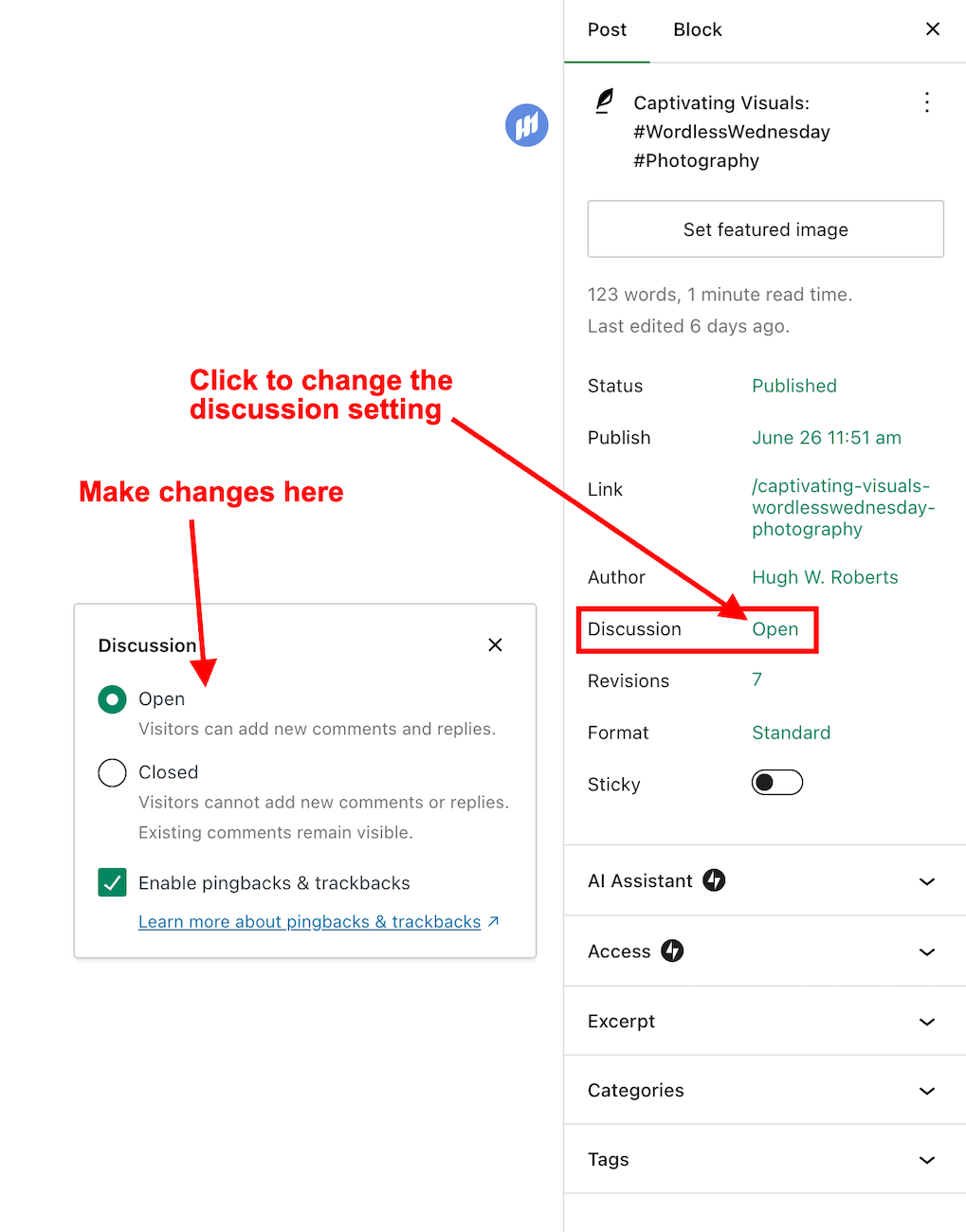
Now, the discussion setting has been conveniently relocated to a more prominent position at the top of the post settings panel rather than at the bottom. This new placement, coupled with the clear indication of whether comments on a post are open or closed, significantly enhances the ease and user-friendliness of managing comments and pingbacks.

Changing the discussion setting is straightforward. Click on ‘open‘ or ‘closed‘ to make the change.

Image highlighting where a WordPress post's 'Discussion' setting is now located.
The ‘Discussion’ setting is now further up the ‘draft post’ section of a post.

This simple, user-friendly system also allows you to control comments, pingbacks, and trackbacks.

Image highlighting where to enable or switch off pingbacks and trackbacks on a WordPress post.
This is where to turn on or switch off pingbacks on your WordPress posts.

Pingbacks and trackbacks are methods for alerting other blogs that you have linked to them. However, they only work when the blog you’re linking to has enabled pingbacks and trackbacks and you do not link to a blog’s home page. My post, ‘The Power Of Pingbacks: How To Create One‘, has more details.

Do you disable comments on posts? If so, which posts? Do you have any questions about the ‘Discussion’ setting on WordPress? Please leave them in the comments box.

Layout, content, settings, and format might differ on self-hosted blogs.

Click the buttons below to follow Hugh on Social Media

Copyright @ 2024 hughsviewsandnews.com – All rights reserved.

Blogging Simplified: Engagement. Am I Doing It Right?

Imagine having a blog where nobody wants to engage. It’s a thought that’s hard to fathom. After all, what’s the point of writing and publishing blog posts if there’s no one to interact with?

Light blue image with the words 'Blogging Simplified: Engagement. Am I Doing It Right?' in white text
How do you engage with your readers and other bloggers?

As bloggers, we can spark curiosity and questions in our readers, even when publishing informative posts. And that’s where the actual engagement begins. It’s our responsibility to set the stage for meaningful interactions. One way to do this is by asking open-ended questions at the end of your posts or inviting readers to share their thoughts or experiences related to the post’s topic. It can encourage more in-depth and meaningful discussions.

Those bloggers who blog to make money will only care a little about the interaction. For them, making a living out of blogging is more important. Good for them if they are successful, but take your readers seriously, especially if they want to engage with you. Consider removing the comments section from your blog if you’re going to refrain from engaging or responding to questions.

What’s the right way to engage with readers? Is there a right way?

I’ve always craved engagement, but over the ten years I’ve been blogging, the type of engagement I crave has changed.

I’ve become more of a ‘discussion’ blogger. By that, I mean a blogger who likes to discuss the subject of a post rather than just leaving a comment that only confirms I visited. It’s about sparking a conversation, sharing different perspectives, and learning from each other. This type of engagement is more valuable than a simple ‘I agree’ comment, as it adds depth and richness to the post’s content.

Over the past year, I’ve made a conscious effort to reduce the number of non-engaging comments on my blog, a decision I’m proud of. I’ve aimed to break free from the cycle of leaving comments solely to prove a visit or just for the sake of doing so.

This shift has decreased the overall number of comments I get but has made me feel like a more thoughtful and influential blogger. It’s not about the number of comments but the quality of the interactions. This change has helped my personal growth in writing and blogging.

Should we always try to engage? No!

Of course, just because I don’t leave a comment on a blog post does not mean I’ve not read it. Likewise, I know many people read my posts but want to avoid engaging. There’s nothing wrong with that. These silent readers are still part of the blogging community; their support is as important as active engagement. So, let’s recognise their presence and continue to create content that resonates with them.

If you’re new to blogging, leaving an engaging comment every once in a while is far more beneficial than leaving short, non-engaging comments on every post you read in an attempt to get noticed.

Are you approving spam comments without realising it?

Imagine my concern when I came across this comments section on a recently read post.

Image showing three spam comments in the comments section of a blog post
Never approve these types of comments

I was appalled to see these comments and could not understand why they’d been approved. Given that the blog’s posts would probably be full of these types of comments, I also decided not to follow it.
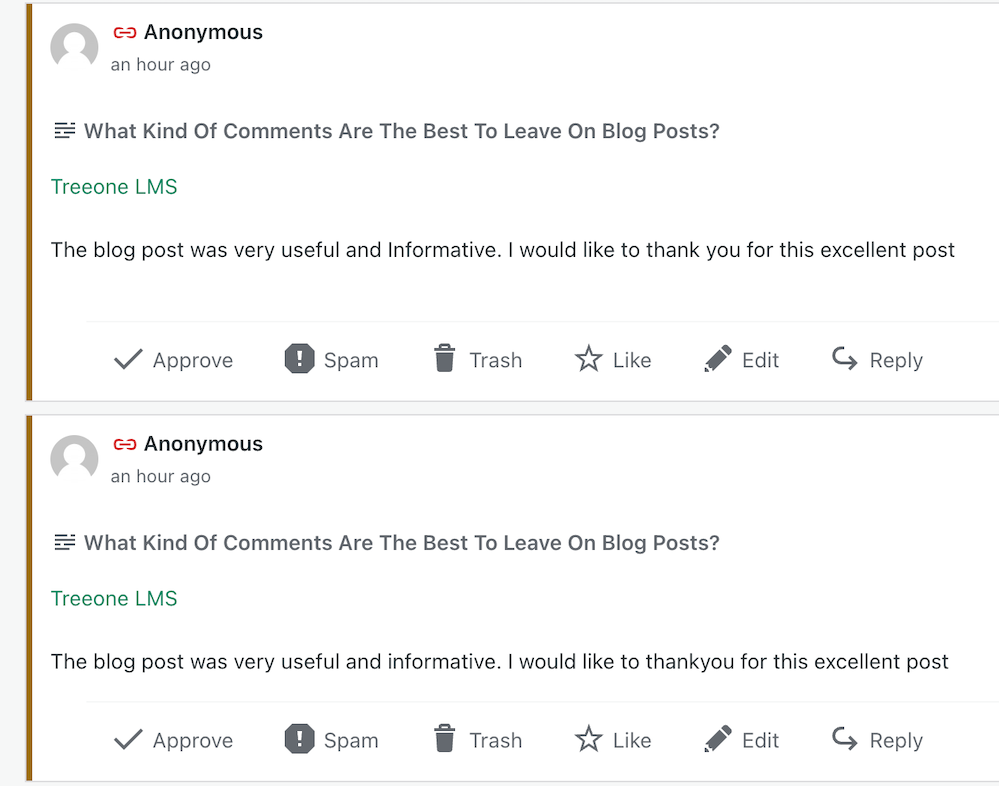
Spam comments not only detract from the quality of a blog but also discourage meaningful interactions. Let’s keep the blogging community free from such spam and focus on producing meaningful engagement. Your thoughts and ideas are too valuable to be drowned out by spam.

Other examples of spam comments.

Image showing spam comments on a WordPress blog

Some may look genuine, but they’re not. Spammers and spambots are getting cleverer at fooling us into approving their comments, so beware.

Thank you

I want to express my deep appreciation to all of you who support and interact with me here. Your engagement is not just a number on a screen but a vibrant testament to the joys and value of blogging. I especially want to acknowledge those who actively interact with me, as your contributions are the lifeblood of my blog.

Remember, it’s not just about the numbers but the profound connections we build through interactions. For instance, when a reader shares a personal experience related to a blog post or when we engage in a thoughtful debate about a controversial topic, these are the types of interactions that genuinely enrich the blogging community.

Let’s wrap it up.

This post delves into the importance of engaging with readers and other bloggers, offering insightful strategies to spark meaningful interactions.

Avoid leaving short, non-engaging comments on all the posts you read. Instead, leave a thoughtful comment every now and again.

Don’t leave a comment just to leave a comment or prove you’ve visited.

Never feel obligated to comment because they always comment on your posts.

There’s nothing wrong with not wanting to engage. Some readers are more comfortable reading a post without saying anything.

Take your readers seriously by responding to or acknowledging their comments.

Never approve spam comments. Mark them as spam and delete them.

Consider closing comments off if you do not want to engage with your readers or respond to any questions.

If you crave engagement, ask open-ended questions at the end of your posts or invite readers to share details of their experiences with the subject you’ve discussed in the post.

Do you enjoy engaging with your readers and other bloggers? What type of commenter are you? How do you deal with spam comments and the spammers? Share your knowledge and ideas in the comments section.

Click the buttons below to follow Hugh on Social Media

Copyright @ 2024 hughsviewsandnews.com – All rights reserved.