I don’t use the WordPress Reader nearly as much as I should.
I get email notifications when the bloggers I follow publish new blog posts. This makes sense, since I follow only about 55 blogs, most of which publish no more than a few times a week.
Am I missing out on not using the WordPress Reader? I think so, yes! But why?
One reason I stopped using the WP Reader was that when I was following over 500 blogs, I felt like a hamster constantly running on a wheel in my endless battle to reach the top. I never reached the top, so I thought I was missing out!
However, I occasionally use the WordPress Reader to search for posts on subjects I enjoy reading. In my opinion, this is where the WordPress Reader shines!
For example, I recently entered the word ‘WordPress’ into the reader search bar and was presented with a long list of blog posts in which ‘WordPress’ was used as a category or tag (this shows how important it is to categorise and tag your posts).
But before I discuss some of the search results, let me first say that, unlike some bloggers who seem to think WordPress has deleted the ‘Reader,’ the WP Reader has moved.
Where is the WordPress Reader?
If you’re using a desktop computer, the WP Reader is now in the top-right corner of your blog. Look for the pair-of-spectacles icon.
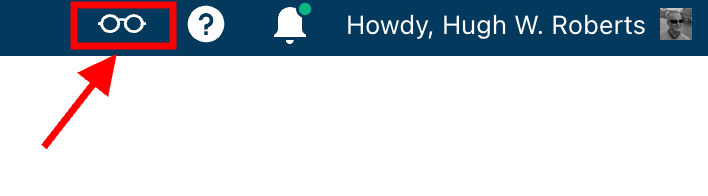
Click on it, and you’ll be taken to the WordPress Reader.
On mobile phones and tablets (using the Jetpack app), the WP Reader icon (spectacles) is located at the bottom of the screen.
What I found in the search results!
I was delighted to see some of my posts appear in the search results. However, I was more interested in the posts from blogs I don’t currently follow.
One post that grabbed my attention was from Mitch, who blogs at The Power Of Story. Mitch’s post, ‘What’s Up WordPress?‘, was about the sudden ups and downs in his blog’s number of subscribers/followers. Indeed, I’ve noticed the same thing happening with my blog.

My subscriber/follower stats have become like a fairground rollercoaster ride. Some days, I lose a lot of subscribers/followers, and then the numbers suddenly return, though they aren’t the same subscribers.
I did some digging and found that WordPress are now actively deleting spam blogs and blogs run by spambots. That’s a good thing, especially since I’ve been manually unsubscribing from them for many months. WordPress is unsubscribing me from these blogs, although I will unsubscribe from any I find myself.
Have you noticed your subscriber/follower numbers going on a rollercoaster ride recently?
Another post that grabbed my attention from the results page was from Kevin, who blogs at Chef Kevin Ashton. Kevin’s post, titled ‘The Thorny Issue Of WordPress Likes.’ touched on a subject I’ve often written about – the ‘like’ button!
Love it or hate it, the ‘like’ button is something almost every WordPress user and visitor will use. However, Kevin touched on the ‘guilt’ of not using it, especially when he doesn’t have enough time to visit and read blogs.
I’ve been there, Kevin. Many bloggers feel guilty or stressed about not clicking ‘like’, visiting blogs that follow them, or leaving comments. Yet, in my opinion, nobody really cares that you can’t always visit their blog. I’ve discovered that leaving one engaging comment occasionally that shows you read the post is much more appreciated than leaving short, non-engaging comments just to prove you visited. However, you may not have read their post.
I’ve written many posts about blogging guilt and stress. In my last post on the subject, ‘Stressed Or Feeling Guilty About Blogging? Please Read This Post. Let’s Keep Blogging Fun,’ many readers spoke up about how bad they feel when they don’t have the time to read blogs, click ‘like,’ and leave comments, often resulting in blogging feeling like a chore rather than something that should be enjoyed.
Nobody should ever feel obliged to read posts, click the ‘like’ button or leave comments. Keep blogging fun.
How do you deal with blogging stress or guilt?
The happy and sad sides of blogging!
It was also lovely to see WordPress blog posts celebrating milestones in the results. From celebrating 15 years of blogging on WordPress to publishing their 100th post and some folks being notified that their blogs had reached half a million visits, these posts made me smile.
Of course, the results also included posts complaining about how bad WordPress is and the problems bloggers are having. Although I read only a few, most of the reported issues related to WordPress changes, and the author often confirmed in the comments section that the issue(s) had been resolved.
Personally, I’m glad WordPress makes changes. If they left things alone, the platform would quickly become outdated and dull, as would all our blogs. WordPress would lose many paying customers, and we’d all lose our blogs if they went out of business. I used to hate change but learned that adapting to it is much less stressful than fighting it
Are you encountering any issues with WordPress? My recent post, ‘WordPress Problems: Don’t Panic! How To Solve Issues Quickly,’ may be of some help.
Are your blog posts appearing on the WordPress Reader?
I always check that my blog posts appear in the WordPress reader. To do this, I follow my blog and check the reader immediately after publishing a post. If it’s not there, I know something’s wrong.
Several reasons may keep your posts from appearing in the WordPress Reader. The main reason is that you add too many categories and tags to a post. WordPress allows up to 15 categories and tags combined. Your post could be marked as spam and won’t appear if you add more, so ensure you do not add more than 15 tags and categories (combined).
Your posts may not show up in the reader for technical reasons. If you don’t see your posts, contact WordPress. They’ll be able to help.
Why do you use the WordPress Reader?
The featured image in this post was created using the WordPress image generator. AI was used to check for grammar and spelling mistakes and to help with the layout of the post.
Layout, content, settings, and format might differ on self-hosted blogs.
Click the buttons below to follow Hugh on Social Media
Copyright @ 2024 hughsviewsandnews.com – All rights reserved.















Feel free to leave a comment. Engagement helps keep blogs alive and forms community.