
WordPress has managed to do it once more! It’s relocated a setting I frequently use, seemingly without informing anyone.
During a recent post-drafting session, I attempted to disable comments on a post. I had difficulty locating the ‘Discussion’ setting, which is the usual place to enable or disable comments on individual posts.
Why turn comments off?
I consistently close comments whenever I share another blogger’s post or a guest post I’ve written on another blog. This strategy ensures that new comments appear on the original post, consolidating the discussion in one place rather than being split between two posts. Kinda makes sense, doesn’t it?
Some bloggers also choose to close comments on older posts as a proactive measure. This practice became popular when WordPress faced a significant spam issue. Specific posts received hundreds of spam comments daily, making it challenging for bloggers to sift through the spam in their WordPress folders to find authentic comments that can sometimes end up there.
The installation of the updated Askimet anti-spam software in 2023 has led to a significant improvement in the spam situation. Thanks to Askimet’s enhanced functionality, the previously prevalent issue of hundreds of visible spam comments daily has been effectively curtailed to just a few a week. Consequently, there is no longer a necessity to close comments on these posts.
Where has the ‘Discussion’ setting gone?
The ‘Discussion’ setting used to be located at the bottom of a post’s settings box.

Now, the discussion setting has been conveniently moved to the top of the post settings panel, rather than the bottom. This new placement, coupled with a clear indication of whether post comments are open or closed, significantly enhances the ease and user-friendliness of managing comments and pingbacks.
Changing the discussion setting is straightforward. Click on ‘open‘ or ‘closed‘ to make the change.
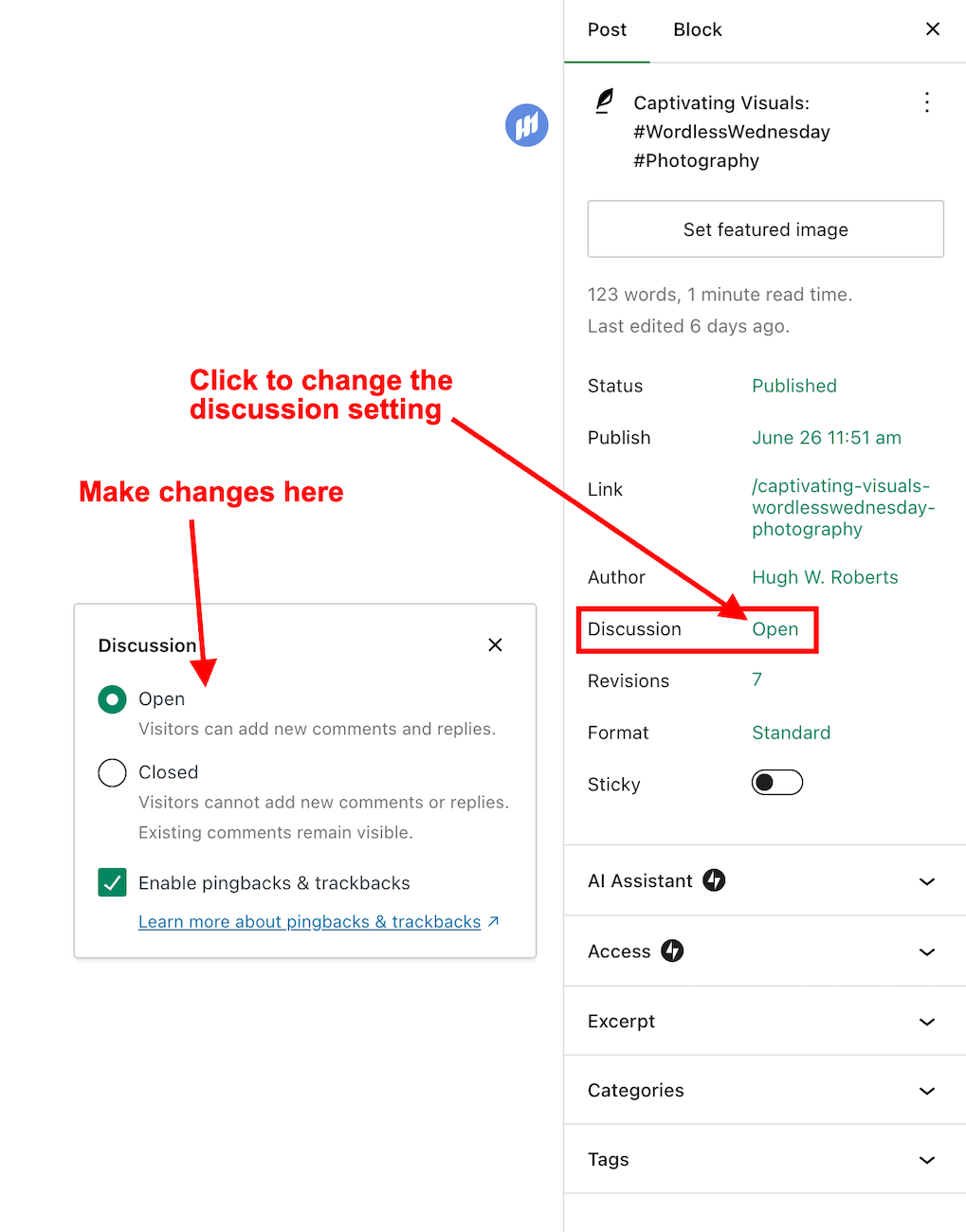
This simple, user-friendly system also allows you to control comments, pingbacks, and trackbacks.

Pingbacks and trackbacks are methods for alerting other blogs that you have linked to them. However, they only work when the blog you’re linking to has enabled pingbacks and trackbacks, and you do not link to a blog’s home page. My post, ‘The Power Of Pingbacks: How To Create One‘, has more details.
Do you disable comments on posts? If so, which posts? Do you have any questions about the ‘Discussion’ setting on WordPress? Please leave them in the comments box.
Layout, content, settings, and format might differ on self-hosted blogs.
The featured image in this post was created using the WordPress image generator. AI was used to check for grammar and spelling mistakes and to help with the layout of the post.
Click the buttons below to follow Hugh on Social Media
Copyright @ 2024 hughsviewsandnews.com – All rights reserved.














Feel free to leave a comment. Engagement helps keep blogs alive and forms community.