WordPress has managed to do it once more! It’s relocated a setting I frequently use, seemingly without informing anyone about it.

Light blue image with the words 'WordPress: How To Close Comments: What You Need To Know' in white text.
Turning comments off is simple to do. But WordPress has moved the settings!

During a recent post-drafting session, I attempted to disable comments on a post. I encountered difficulty locating the ‘Discussion‘ setting, which is the usual place for enabling or disabling comments on individual posts.

Why turn comments off?

I consistently close comments whenever I share another blogger’s post or a guest post I’ve written on another blog. This strategy ensures that new comments appear on the original post, consolidating the discussion in one place rather than being split between two posts. Kinda makes sense, doesn’t it?

Some bloggers also choose to close comments on older posts as a proactive measure. This practice became popular when WordPress faced a significant spam issue. Specific posts received hundreds of spam comments daily, making it challenging for bloggers to sift through the spam in their WordPress folders to find authentic comments that can sometimes end up there.

The installation of the updated Askimet anti-spam software in 2023 has led to a significant improvement in the spam situation. Thanks to Askimet’s enhanced functionality, the previously prevalent issue of hundreds of visible spam comments daily has been effectively curtailed to just a few a week. Consequently, there is no longer a necessity to close comments on these posts.

Where has the ‘Discussion’ setting gone?

The ‘Discussion’ setting used to be located at the bottom of the settings box of a post.

Image highlighting where on WordPress the 'Discussion' setting used to be.
The ‘Discussion’ setting used to sit under ‘Tags.’

Now, the discussion setting has been conveniently relocated to a more prominent position at the top of the post settings panel rather than at the bottom. This new placement, coupled with the clear indication of whether comments on a post are open or closed, significantly enhances the ease and user-friendliness of managing comments and pingbacks.

Changing the discussion setting is straightforward. Click on ‘open‘ or ‘closed‘ to make the change.
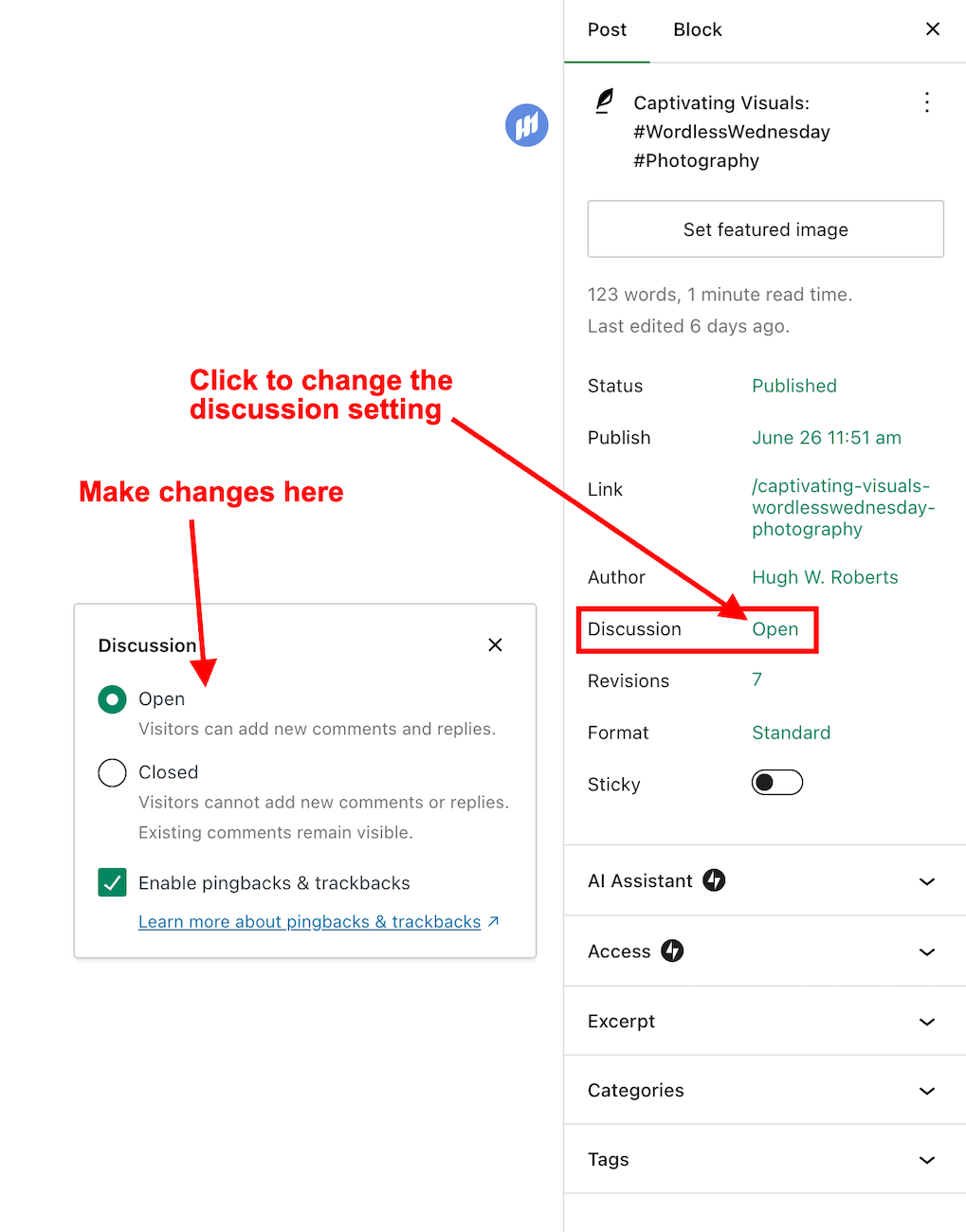
Image highlighting where a WordPress post's 'Discussion' setting is now located.
The ‘Discussion’ setting is now further up the ‘draft post’ section of a post.

This simple, user-friendly system also allows you to control comments, pingbacks, and trackbacks.

Image highlighting where to enable or switch off pingbacks and trackbacks on a WordPress post.
This is where to turn on or switch off pingbacks on your WordPress posts.

Pingbacks and trackbacks are methods for alerting other blogs that you have linked to them. However, they only work when the blog you’re linking to has enabled pingbacks and trackbacks and you do not link to a blog’s home page. My post, ‘The Power Of Pingbacks: How To Create One‘, has more details.

Do you disable comments on posts? If so, which posts? Do you have any questions about the ‘Discussion’ setting on WordPress? Please leave them in the comments box.

Layout, content, settings, and format might differ on self-hosted blogs.

Click the buttons below to follow Hugh on Social Media

Copyright @ 2024 hughsviewsandnews.com – All rights reserved.


Discover more from Hugh’s Views & News  

Subscribe to get the latest posts sent to your email.

38 responses to “WordPress: How To Close Comments: What You Need To Know”

  1. Did You Miss Any Of These? Monthly Round-Up - July 2024 avatar

    […] WordPress: How To Close Comments: What You Need To Know […]

  2. Michelle (Boomer Eco Crusader) avatar

    Thanks for this, Hugh. I hadn’t noticed the change because I usually leave comments enabled on all my posts by default. The only time I disable is on my Throwback Thursday posts.

    I have had a problem with WordPress randomly disallowing comments on some posts. Thankfully, some of my blogging friends pointed it out to me so I could fix it. I have no idea why that happens.

    1. Hugh W. Roberts avatar

      The only reason I can think of for being unable to leave a comment is that they’ve been closed by the blog’s owner, Michelle. You can certainly automatically close comments after so many days on blog posts, but they shouldn’t close if you’ve not changed the settings. That’s one to watch and report to WordPress if it keeps happening. I’d ask those reporting the problem to email you some screenshots so you can send them to WordPress as proof.

      1. Michelle (Boomer Eco Crusader) avatar

        Thanks Hugh. I’ll keep an eye on it to see if it happens again.

  3. Dan Antion avatar

    Thanks Hugh. I only ever turn off comments on posts I share someone’s post. Thanks for letting me know where it’s been moved.

    1. Hugh W. Roberts avatar

      The same as me, Dan. I’m not a fan of turning comments off other posts. It feels like shutting the door in your audience’s face. Other than for information, I see no point in keeping posts online if you don’t allow anyone to add their thoughts and interact with you.

  4. Eugi avatar

    Thank you this information, Hugh. Yes, I have used the close comments feature and just recently. I published a post about issues with my hands, and of course, closed the comments since it was painful to type.

    Though I receive news about WordPress, it seems they aren’t transparent about changes that are important to bloggers and the every day operation of blogging.

    1. Hugh W. Roberts avatar

      I get WordPress news but don’t always have time to read it all, Eugi. They may well have mentioned this change, but given that their support page still had the old version of where to find the ‘discussion’ setting until a few days after I contacted them, I think it’s more likely they didn’t share it.

      I’m sorry to hear about your hand problem. I hope it improves. You may need to rest them for a few days and stay away from the keyboard. Take care.

      1. Eugi avatar

        Thank you, Hugh. It’s hard to stay away from the keyboard and my hands are slowly improving. I wear a fingerless glove and bought a new mousepad with a soft cushion for my wrist.

        1. Hugh W. Roberts avatar

          I also have one of those mousepad soft cushions. I love it. It helped stop the pain I used to get in my wrists. I also have one for the keyboard, and that has helped.

  5. Jennie avatar

    I wish WP would notify users when they make changes.

    1. Hugh W. Roberts avatar

      I agree, Jennie, although I can’t say for sure that they didn’t send information out about this change. It could have been that I just missed it.

      1. Jennie avatar

        Somehow I suspect they just ‘did it’. Best to you, Hugh.

  6. Linda Schaub avatar

    I’m glad I was recommended to do this Hugh as I was getting tons of SPAM to wade through every day to ensure no legitimate comments were embedded in there.

    1. Hugh W. Roberts avatar

      You should have seen a dramatic reduction in visible spam messages since last year’s update, Linda. I used to get hundreds of visible spam messages daily, but now I get maybe two or three a week. It’s much better.

      1. Linda Schaub avatar

        Oh, is that why it decreased so much Hugh – I was wishing I’d closed comments a long time before I did. Same here – I felt I should go through them as occasionally a legitimate comment was trapped in there.

        1. Hugh W. Roberts avatar

          Yes, I always found it odd that some legitimate comments ended up in spam, yet spam messages that were obviously spam would go into my moderation queue.

          1. Linda Schaub avatar

            Amazing sometimes Hugh. Tonight, every comment I responded to I got a message it was a duplicate comment or I couldn’t post it. I went to my blog and the comment was there. Every so often it’s like WP just gets an attitude and everything goes buggy.

  7. Erika avatar

    I barely use this function but lately I did and noticed that they changed something. But I found everything soon…. lol

    1. Hugh W. Roberts avatar

      It took me a while to figure out where they’d moved the setting even though it was staring me in the face, Erika.

      1. Erika avatar

        Yes, same overhere. WP remains and adventure… lol

        1. Hugh W. Roberts avatar

          Yes, I like the adventure, Erika. It can be frustrating sometimes, but we carry on with it, don’t we?

          1. Erika avatar

            Of course, we do 😎

  8. Colleen Chesebro avatar

    OH my goodness! Thanks so much, Hugh. I was in a hurry with a reshare the other day and couldn’t find the comments off! Now I see it! 🤦🏼‍♀️

    1. Hugh W. Roberts avatar

      I don’t know why WordPress didn’t announce the change, Colleen. It took me a while to find where they’d moved it.

      1. Colleen Chesebro avatar

        They keeping changing things and I struggle to find where they’ve hidden them. It’s very frustrating. Thanks for letting us know.

        1. Hugh W. Roberts avatar

          I just wish they’d inform us of changes, Colleen. I don’t mind changes and updates but tell your users about them.

          1. Colleen Chesebro avatar

            Yes. But that hasn’t been the case at all. Corporate greed ignores the small accounts. WP is all about big accounts now.

  9. Mac's Opinion avatar

    For the longest time when I got back into blogging on WordPress, I wasn’t aware that pinbacks and trackbacks were disabled by default. It was my Trackback Alliance post that I did when I realized that it was disabled. Explained a lot of questions that I had.

    1. Hugh W. Roberts avatar

      Pingbacks and trackbacks have never been off by default for me. I have to turn them off if I don’t want anyone to link to one of my posts (not that I’ve ever done so). I occasionally get pingback requests from spam sites, but I mark them as spam, so they never make it through.

      1. Mac's Opinion avatar

        Must be a self hosed thing then because mine was set to disabled.

        1. Hugh W. Roberts avatar

          Yes, I think that’s more likely.

          1. Mac's Opinion avatar

            Lol. Welk now tour reader know if they read this.

            1. Mac's Opinion avatar

              Omg. I didn’t proof read that.
              “Well now your readers know if they read this.”
              That’s what it was supposed to say lol.
              Fat fingers on iPhone don’t work well together.

  10. Terri Webster Schrandt avatar

    Thank you for sharing your thoughts and tips on allowing comments, Hugh. I’ve noticed a lot of subtle changes lately in layout of post tools. I was one of those folks who turned off Comments after xx days to relieve the spam. I have noticed Akismet is performing better.

    Question…do you ever have issues commenting using jetpack? I can comment 90% of the time, however in some posts that linked to mine for example, when I comment or like, I’m taken to a log in or kicked out completely. Clearly I’m logged into WordPress. Do you think it’s related to their themes? The issue has improved, but I find myself heading to my PC if I want to comment on some posts.

    Thanks again for your tutorials! Have a great week!

    1. Hugh W. Roberts avatar

      Hi Terri, thanks for your question about jetpack.

      I do 95% of my blogging on my iMac, so it’s very rare that I get the ‘login’ issue. Are you using your phone or tablet to leave comments, and is this where the problem is occurring?

      1. Terri Webster Schrandt avatar

        The problems occur with my phone. But not on every post. I can easily like and comment on yours from my phone. And this is true for most posts. And I also notice that this may be true for other folks, too, that leave an anonymous comment. It happens far less. I tend to think it’s the theme. A couple bloggers are self-hosted.

        1. Hugh W. Roberts avatar

          I’ll try it on my phone and see if I get the same problems, Terri. However, I agree with you that it’s more likely to happen on blogs with non-supportive and retired themes.

Leave a reply to Dan Antion Cancel reply

I’m Hugh

Welcome to my blog. I’m delighted to have you here. This is the place to discover tips on blogging and WordPress, flash fiction, photography, and more. I enjoy engaging with my readers, so please feel free to explore, join discussions, and contact me. I’m happy to assist! Find out more about me and my blog by clicking the ‘Meet Hugh’ button.

Let’s connect

Subscribe to Hugh’s Views And News

Latest Posts

Follow Hugh in the Fediverse

Hugh's Views & News  
Hugh's Views & News  
@hughsviewsandnews.com@hughsviewsandnews.com

WordPress & Blogging tips, flash fiction, photography and lots more!

403 posts
6 followers

Recommend Blogs To Follow


Boomer Eco Crusader
Boomer Eco Crusader
Live Green | Declutter | Simplify Life

Jacqueline Lambert
Jacqueline Lambert
Award-Winning Travel Humour Writer

Spo-Reflections
Spo-Reflections
To live is to battle with trolls in the vaults of heart and brain. To write; this is to sit in judgment over one's Self. Henrik Ibsen

Anne R. Allen’s Blog… with Ruth Harris
Writing about writing. Mostly.

Fancying France
The musings of a ‘femme d’un certain âge’ who divides her time between SW France and SE England

SONGS AND SCRIPTS AND DUNKING BISCUITS
Every day tales of a winging-it creative

Marsha Ingrao         Always Write
Marsha Ingrao Always Write
Having fun blogging with friends

Curiosities, Castles and Coffee Shops
The musings of a curious mind

WrookieSchU
WrookieSchU
Live life 🙌🏼

WPcomMaven
WPcomMaven
Helping you make the most of your free WordPress.com website since 2011

Second Wind Leisure Perspectives
Fun, Photography & Friends

Share Your Light
Share Your Light
You are a miracle – Let it happen

No Facilities
No Facilities
Random thoughts, life lessons, hopes and dreams

Esther Chilton
Writer, Tutor and Editor

Roaming About
A Life Less Ordinary

Saying nothing in particular
Jan … JT Twissel

The Chicago Files
The Chicago Files
A Canadian Perspective on Living in the Windy City!

Thank you to all my visitors

470,014 hits

253,274 visitors

Most Viewed Posts & Pages

Copyright Protected Blog

COPYRIGHT ©2011-2031 Hugh’s Views And News BLOG – All Rights Reserved.

This work by Hugh W. Roberts, and/or Hugh’s Views And News blog, is licensed under a Creative Commons Attribution-Noncommercial-NoDerivatives 4.0 International License. Unauthorised use and/or duplication of this material (text and images) without express and written permission from this blog’s author and/or owner is strictly prohibited. If you want to use posts, excerpts, photos and links, you may contact me first. You must give full and clear credit to Hugh W. Roberts and Hugh’s Views And News dot com with links to the original content.








