Here’s your chance to catch up on the nine blog posts published in October 2024.
Hugh’s Views and News is at the heart of great conversations and engagement. Did you join the debates and conversations? If not, why not jump in and let us know what you think?
Question: Do you know the name of this strange-looking fruit on this tree?
Are you seeing too much spam on your blog? How To activate Akismet’s spam setting in WordPress to significantly reduce spam comments and streamline your blogging experience.
Do you use excerpts in your WordPress blog posts? If so, there’s an ongoing issue with them. WordPress has now fixed this problem. Read on for more details.
Do you use excerpts in your WordPress blog posts? If so, there has been an ongoing issue with them that has now been fixed. However, for the fix to work, you must take action. Read on for more details.
Did you see these nine blog posts that got readers talking, asking questions and wondering? If you haven’t joined the conversation yet, why not jump in and let us know what you think!
I don’t write book reviews. But this book has helped me change my mind. Read on for more details.
WordPress users often face problems, but they may not always be caused by their blogging platform. Device issues, internet browsers, poor blog housekeeping and retired themes can all contribute to problems. My post outlines what to do if you’re experiencing issues with using WordPress.
Did you see these nine blog posts that got readers talking, asking questions and wondering? If you haven’t joined the conversation yet, why not jump in and let us know what you think!
After a decade of crafting short stories and flash fiction on my blog, I’ve learned valuable storytelling techniques, which I shared in a guest post. But what helped me write better stories that many readers love? Read on for more details.
WordPress has relocated the ‘Discussion’ setting to a more visible and accessible position, simplifying the control of comments and pingbacks. My post outlines where to find the ‘discussion setting’ and when you should consider turning comments off on specific posts.
You can now add images to WordPress posts directly from your phone using the Jetpack app, with simple resizing options. Read my posts for all the details.
Time is the enemy for all of us, especially Mr Kingston, who needs to frantically clean his house before time runs out and his visitors arrive. But why the panic?
Did you check out these nine blog posts that got everyone talking and wondering? If you haven’t joined the conversation yet, why not jump in and let us know what you think!
Categorising and tagging your blog posts correctly is one of the most powerful way of getting your blog posts noticed. My post will show you how to add categories and tag words correctly, resulting in more visitors to your blog.
A difficult choice of lip colour, comfortable purple shoes, a new green dress, and nostalgic gold nail varnish set the stage for an unexpected encounter.
The first Gay Pride march in London in 1972 marked a pivotal moment in LGBTQ+ history, paving the way for rights and acceptance. Pride events continue to celebrate progress and advocate for equality, but have changed considerably over the years. Have you ever attended a pride event? Share your Pride stories here.
Did you see these 9 blog posts that got people talking, discussing, and wondering? Maybe you joined the conversation, but if not, jump in and let us know what you think!
Three contrasting nights out reveal the challenges and joys of a gay man’s life. Incidents highlight the struggle for acceptance as well as a changing societal attitude towards the LGBT community in the 1980s and 1990s. You may laugh, you may cry, but these three true stories about gay nightlife are very different.
How obsessed are you with your blog stats and blogging? And what essential points have you learned about blogging?
How obsessed are you with your blog?
When I first started blogging in 2014, I was obsessed with my blog stats. I checked them almost hourly to see if anybody had visited my blog. We all know that wonderful feeling when somebody clicks the ‘like’ button, or better still, when somebody leaves a comment on one of our posts for the first time.
It didn’t matter what that comment said. Even if it was, ‘Great post,’ it made my day. How times have changed!
Taking the advice of other bloggers
When another more experienced blogger and somebody who had been blogging much longer than me told me that most of the hits my posts were getting were probably from people who didn’t stay more than a few seconds on my blog, my whole blogging world began caving in.
Even worse, that blogger told me that many of those who hit the ‘like’ button probably didn’t even read the post. What?
I was so deflated that I thought, ‘Why bother?’ It wasn’t until another blogger told me to stop obsessing over my blog stats and to put the energy of stat-watching into writing blog posts that I took that advice.
More trouble
A few months later, I found myself in trouble again. ‘Concentrate on the comments rather than how many people have visited your blog or how many have hit the ‘like’ button,’ another blogger told me. ‘Most importantly, don’t forget to visit, read and leave engaging comments on other blogs.’
But I took that last bit of information to heart and soon found myself spending all my blogging time reading and leaving engaging comments instead of writing posts. I was following over 500 blogs and I believed I had to read and comment on every single post.
Blogging guilt and stress crept up on me, and I thought I’d upset people if I didn’t read their posts and leave them comments, or, even worse, people would unfollow me if I stopped reading and leaving comments on their posts. After all, they were reading and commenting on all my posts.
Once again, I found myself on the edge of packing in blogging. I was going to delete my blog and find something else to do that was more fun and enjoyable.
How do you find the right blogging balance?
Thankfully, I never deleted my blog, but I know of bloggers who have done so, some of whom came back and started afresh. Unfortunately, it doesn’t always work out, and some of these bloggers went on to abandon their blogs for the same reasons they left blogging in the first place.
Finding a balance between writing blog posts and reading and commenting on other blogs can be a significant task. Thankfully, I found it.
I know some bloggers who balance blogging by reading as many posts as possible in as short a time as possible. They’ll often leave short, non-engaging comments on all those posts. It works for them, but not for me, but good for them if that’s what works.
What works for some won’t work for others.
Then there are the bloggers who reduce the number of blogs they follow without worrying that they’ll probably lose followers in the process (and they will), giving them more time to write. Good for them.
Why do bloggers suddenly stop leaving comments?
I’ve lost followers because I cut down on the number of blogs I followed. Now, I’m following around 75 blogs, all of which I’m interested in. That gives me more time to write, more time to read and more time to leave engaging comments on the blogs I follow.
I no longer get comments from people who always used to leave me comments, however, the fall in non-engaging comments is something I’m delighted with.
Some bloggers seem to have disappeared from the blogging world while others are still around, but have lost interest in what I have to say or no longer have anything interesting to add in a comment. But there’s nothing wrong with that. It’s not worth worrying about.
Are you more of an engaging or non-engaging blogger?
Someone once told me that a non-engaging comment indicates that the person who left it does not want to engage with you (or anybody else). This is usually because they’ll say they don’t have the time to engage. All they want to do is say, ‘Hello, I visited,’ before moving on quickly. They may not have even read the post.
And then there are the bloggers who leave comments like ‘Subscribe to my blog!’ or ‘Nice’ without saying anything else. Do they want to engage, or are they simply number/follower-hunting? I often wonder how would they react if I left them an engaging comment on one of their posts.
Of course, blogging isn’t only about engagement. Many people blog just to express their thoughts online. Some bloggers do not respond to comments. Some bloggers simply thank people for leaving a comment without engaging with them, even if the comment they’re responding to shouts, ‘I want to engage with you!’ thus taking the person who wants to engage down a dead-end.
Many bloggers want to engage, yet I’ve heard from some bloggers who say the comments section of blogs is a waste of time and should be removed. I don’t agree with that, but if a blogger does not want to engage then there is the option to turn off comments.
How often should you blog?
I’ve learned the only answer to this question is – ‘blog as often as you like without feeling obliged to publish something.’
It took me a while to find that I’m happier publishing two or three posts weekly. Any more than that, and I find I’m forcing myself to write posts, which makes blogging less enjoyable. Sometimes, I may only publish once a week.
I do not want to get myself feeling stressed because I haven’t got a post ready, so my advice is not to blog to any schedule of when you’re going to publish posts. If readers are interested in what you write and publish, they’ll read your posts regardless of how often or when you publish and sometimes that could mean days, weeks or even months after the publication of a post, so don’t close comments off to force your audience to read your posts within a particular time-frame. Blogging should always be a leisurely activity.
I also witnessed a drop in the quality of the posts I publish when publishing more than a few times a week. For me, quality is much more important than quantity, but it may not be the same for you.
I also tend to stay clear of blogs that publish more than once daily as they tend to bring an overwhelming feeling that I don’t like. Once again, it’s about finding the perfect balance that works best for you.
Blogging! It’s a fascinating subject, isn’t it? I could go on, but it’s now over to you. Can we discuss blogging honestly without fearing upsetting other people? What do you think? Let me know in the comments section. Let’s discuss blogging.
Pingbacks are a vital tool in the blogging world, fostering connections and increasing site traffic. Are you making the most of pingbacks or missing out on their benefits? This post details their benefits, creation, and anti-spam measures.
Did you catch these 9 blog posts that got everyone talking, discussing, and wondering? Maybe you were part of the conversation, but if not, jump in and share your thoughts!
Are you making use of your old blog posts? My three quick and easy tips to bring old blog posts alive again are easy to follow and will deliver results.
This new WordPress dashboard feature includes settings like privacy, site tools, and domain management for your blog. My post tells you where to find it and how to use it.
Where would we be without friends in our lives? We all need them, don’t we? As a gay man, I’ve had my fair share of both male and female friends over the years, but some of those friendships were not what I thought the true meaning of friendship was all about. Meet Tasmin, Neville and Janet. Which one would you like to be friends with?
Are there easy ways to promote your old blog posts, and should you feature them on your blog again?
Can old blog posts bring in more visitors, followers and comments?
The answer is YES.
Have you killed off your old blog posts?
One of the biggest mistakes many bloggers make is forgetting their old blog posts. They publish posts and quickly forget about them.
Yet, If they’ve been regularly publishing blog posts, their blog archive will be a treasure trove of opportunities waiting for them to bring posts alive again. Just think about all those followers, readers and visitors who have never seen those posts.
Rather than ignoring these old blog posts, there are ways to bring them back to the attention of your audience.
These old blog posts probably never got anywhere near as many views and comments as your recent blog posts, but did you know that they could quickly bring you many more views, comments and followers?
My three quick and easy tips for bringing these old blog posts back to life are easy to follow and will deliver results as soon as you implement them.
1. Display ‘related’ posts at the end of all your blog posts.
I’m always surprised by how many WordPress bloggers don’t have this feature switched on.
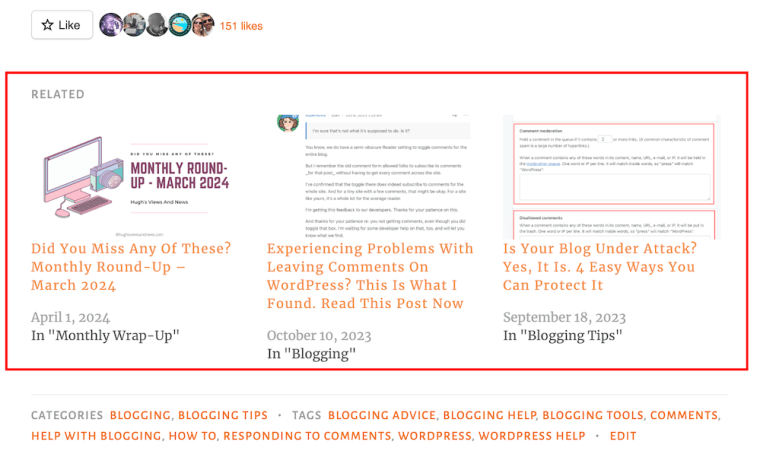
Here’s a screenshot of the related posts that featured at the end of one of my recent blog posts.
Promote similar older blog posts at the end of new blog posts.
WordPress automatically chooses which of your posts to display.
If you’re not already showing related blog posts at the end of newly published blog posts, follow this guide.
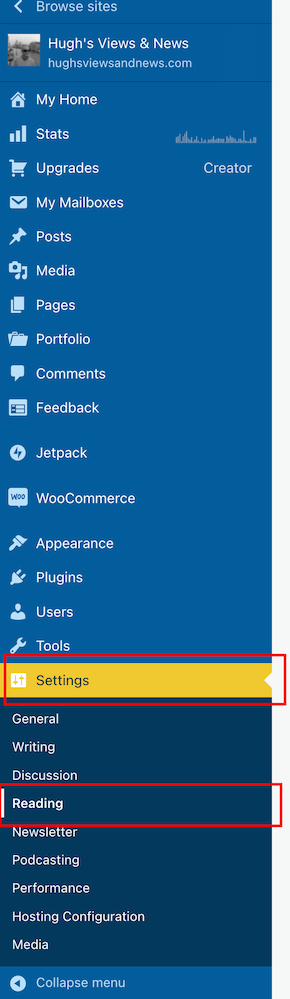
On the dashboard of your blog, click on Settings and Reading.
Select ‘Settings’ – ‘Reading’
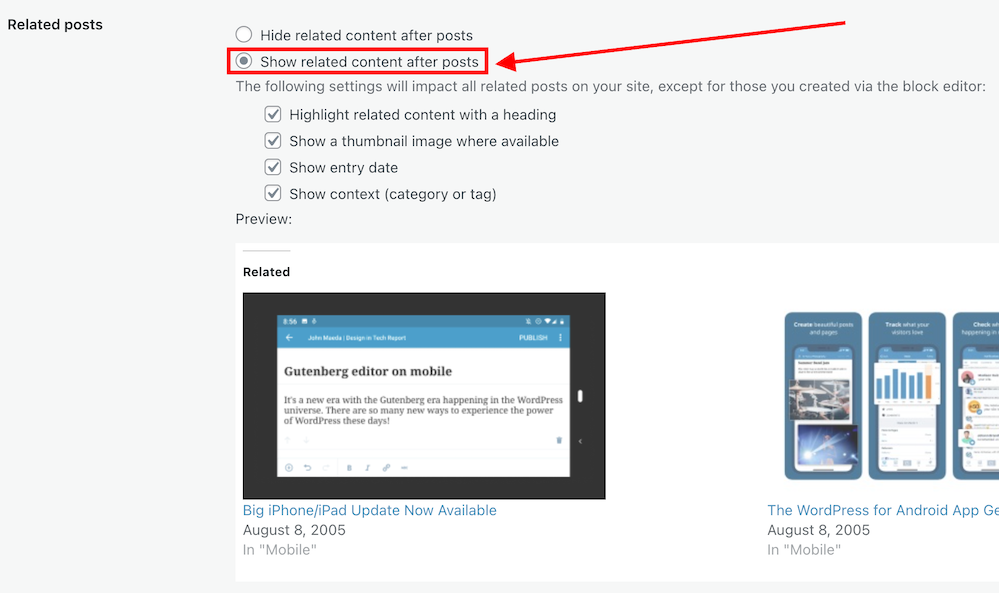
On the Reading Settings page, look for Related Posts and ensure ‘Show Related Content After Posts’ is switched on.
Switch on ‘Show related content after posts.’
Choose which other settings options you want to use.
Choose which settings options you want to use.
At the bottom of the screen, click on the Save Changes button.
Future posts will now display three related posts from your archives, resulting in those posts being seen again.
2. The ‘Blog Posts’ Block
Those using the Block Editor can use a terrific block called the’ Blog Posts’ block. It allows bloggers to choose which of their previous blog posts to promote on newly published posts.
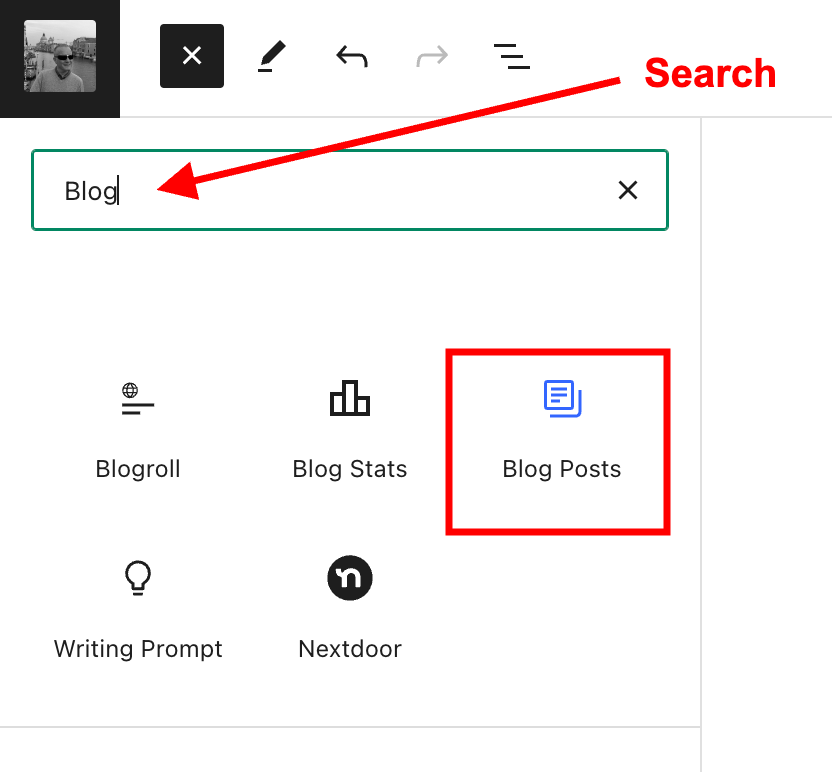
Insert the ‘Blog Posts’ block in the place where you’d like to feature it on your upcoming new post. You’ll find the ‘Blog Posts’ block under the ‘Widgets’ section, or you can search for it by entering ‘Blog Posts’ in the search bar.
Select the ‘Blog Posts’ block
The Blog Posts block defaults to showing the last three blog posts you published, but you can change this. You can leave it as it is or switch to other settings.
Today, I will show you how to choose the blog posts you want to display.
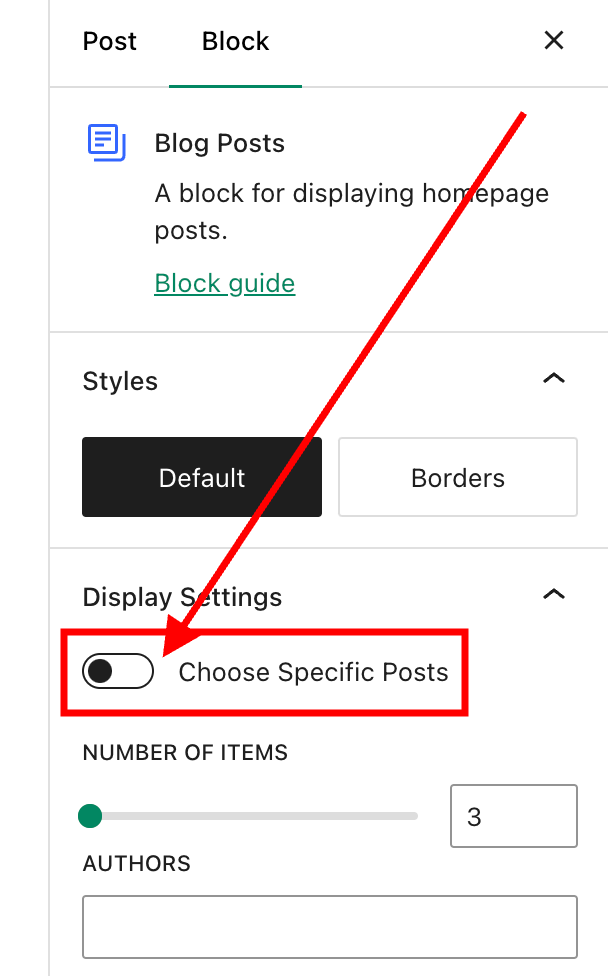
When you insert the block, a toolbar will open on the right-hand side of the page. Under Display Settings, look for Choose specific posts and slide the button to the ‘on‘ position.
Switch on the ‘Choose Specific Posts’ option
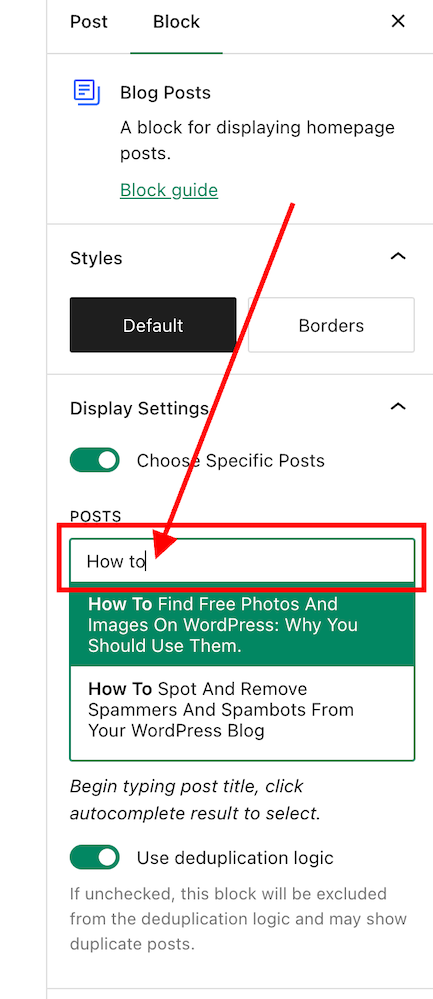
In the ‘Posts‘ box, type in the blog post title you want to display. As you type, suggestions for blog posts with the words you are using will appear.
Search for the posts you want to promote on your new blog post.
Select the blog post you want to feature.
If you’re going to add more blog posts, search for them by typing in more words in the Posts box.
I recommend that you add no more than three posts.
The Blog Posts block has many other settings, which you can read about here.
There’s nothing wrong with adding pingbacks and linking back to your previous blog posts. Lots of bloggers do it.
In fact, I recommend that you include at least a couple of pingbacks in all your blog posts. However, you should always ensure that what you’re writing about is connected to the post you’re linking back to.
Pingbacks can also be added to images, pictures, and photos in blog posts and captions.
Let’s wrap it up!
Your blog’s archives are a treasure trove of blog posts that can attract new visitors, comments, and followers.
Don’t allow old blog posts to remain idle and not work for you. Use them.
Your previous blog posts may not have been read by new followers. Introduce them to your new audience.
People who may have read your older posts are often thankful for the opportunity to read them again, especially if the post includes tips and advice.
Ensure you keep old blog posts up to date.
WordPress has made several blocks available on the Block editor to promote old blog posts. The ‘Blog Posts’ block is just one of those blocks.
Consider switching it on if you’re not already using the ‘Related Posts’ feature.
Remember that you can create pingbacks to old blog posts from any images or photos in future blog posts.
Do you promote your old blog posts? If not, why not? How do you promote them? What way(s) of promoting old blog posts have worked best for you? Have you had much success promoting old blog posts?
Did you enjoy reading this post? Then you may also like…
Did you catch these 9 blog posts that got everyone talking, discussing, and wondering? Maybe you were part of the conversation, but if not, jump in and share your thoughts!
Kenneth has a problem. His wife believes he’s having an affair. Can Artificial Intelligence help?
WordPress have hidden the ‘Open in new tab’ box again! This updated post shows you where to find it so that links in your blog posts open a new window.
WordPress has introduced a new block-style comment box that aligns with the Block editor. But what can users do with it besides leaving comments? Are some bloggers really refusing to use it and threatening to leave WordPress? My post contains all the details you need.
Coming out to my family is one of the most difficult things I have done in my life. I faced varied reactions that led to estrangement from some but eventual reconciliation with others. In this post, I highlight some of the ups and downs of family acceptance of somebody being gay.
Did you catch these 9 blog posts that got everyone talking, discussing, and wondering? Maybe you were part of the conversation, but if not, jump in and share your thoughts!
Can objects hold emotional significance, evoking conversations about their beauty and cost? This group of friends are about to delve into the significance of senses and emotional connections. Will you join them?
Pingbacks are a vital tool in the blogging world, fostering connections and increasing site traffic. Are you making the most of pingbacks or missing out on their benefits? This post details their benefits, creation, and anti-spam measures.
In the 1970s, I faced discrimination in my first job for being gay. Progressing to a more accepting workplace in the 1980s, I finally came out openly to colleagues. But even today, despite the changing times, fear and discrimination still persist in the workplace. This is my story, but have you faced fear or discrimination because of who you are?









 Hugh's Views & News