You wouldn’t leave your doors unlocked if you were the last one to leave the house, would you?

Would you give a stranger the password to your online banking account?

Would you share or give a stranger the password to your blog?

Protecting your blog is just as important as protecting your home and online bank accounts, yet many bloggers share personal details about themselves on their blogs and on social media, which can be a treasure trove for scammers. Be careful what information you share.

Before sharing any information, ask yourself, ‘Would I share this information with a complete stranger?’
Light blue image with the words 'Is Your Blog Safe? One Security Feature You Must Have' in white text.
Adding this feature will give your blog an extra layer of security.

Although we’re all encouraged to use a strong password to protect our blogs, did you know that many blogging platforms, including WordPress, offer users an extra layer of security when it comes to protecting their blogs?

Two-factor authentication adds an extra layer of security by requiring you to enter a code or use another device in addition to your password. For example, you can use an app like Microsoft Authenticator or Google Authenticator to generate access codes for your blog.

WordPress offers users two-factor authentication security. Follow the guide below to set it up for your WordPress blog. For this example, I’m using an Apple iMac desktop computer.

How to set up two-step authentication for your WordPress blog.

  • In the top right of your blog, click on your profile picture/avatar.
  • Click on ‘Security‘ in the menu on the page’s left side.
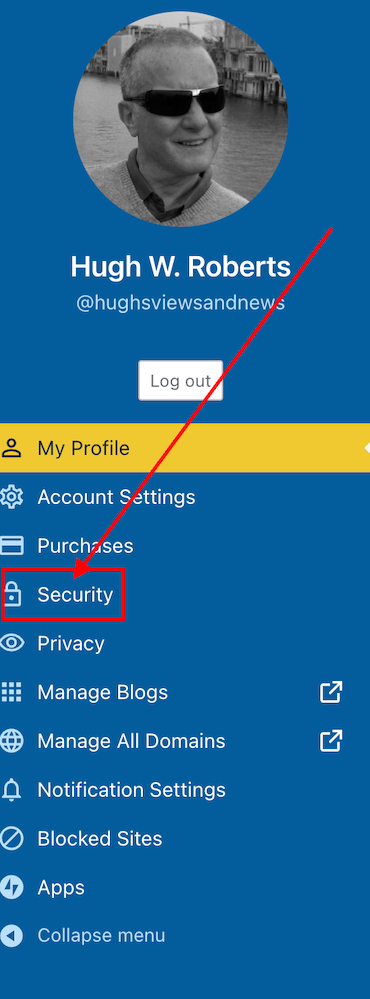
Image highlighting the 'Security' tab on a WordPress blog.
Click on the ‘Security’ tab.
  • Select the ‘Two-step Authentication‘ option.
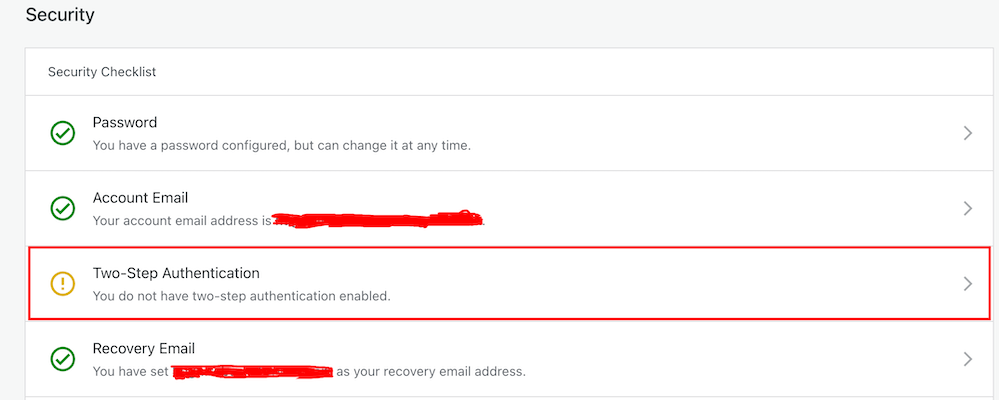
Image highlight the Two-Step Authentication tab on a WordPress blog.
Select Two-Step Authentication
  • Select which method you would like to receive the two-step passcode generated by WordPress, and click the ‘Get Started‘ button.
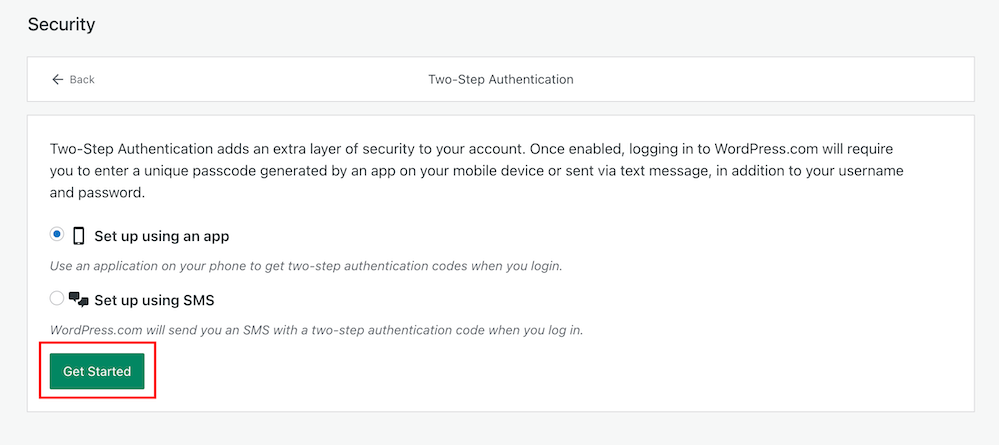
Image highlighting the 'Get Started' button when setting up Two-Step Authentication on WordPress.
Click the ‘Get Started’ button.
  • Follow the onscreen instructions depending on your selected method to receive the WordPress two-step authentication passcode.
  • Once enabled, logging into WordPress.com will require you to enter a unique passcode generated by an app on your mobile device or sent via text after adding your username and password.
  • You will receive an email from WordPress confirming that two-step authentication has been enabled.
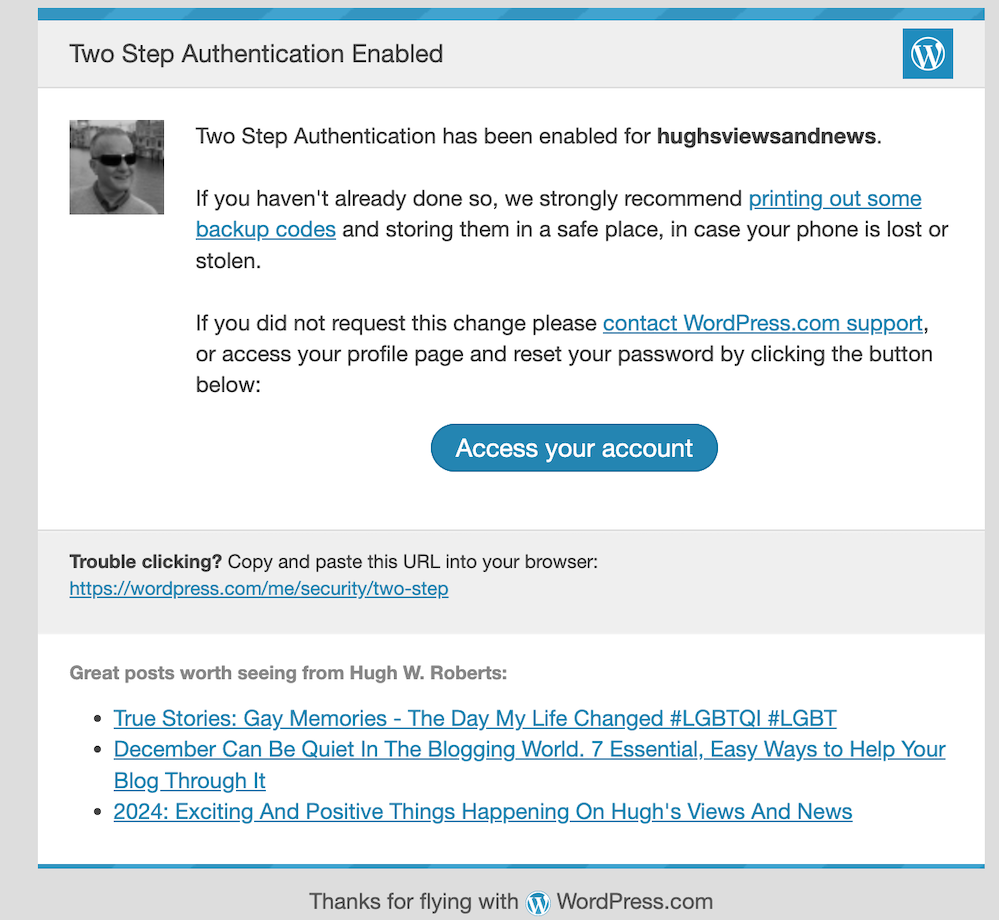
Image showing an email confirmation from WordPress confirming that two-step authentication has been set up.
You’ll get an email from WordPress confirming that two-step authentication has been set up for your blog.
  • That’s it! Access to your blog is now protected by an extra layer of security.

I’d recommend adding or checking that the recovery email address and recovery SMS number for your WordPress blog/account are also correct when switching on two-step authentication.

Are you making the most of Two-Step Authentication to safeguard your blog? Need guidance on setting it up? Share your best practices for securing your blog in the comments below.

Did you miss my post giving details of what plans I have for my blog in 2024? Check out my post, ‘2024: Exciting And Positive Things Happening On Hugh’s Views And News‘, for complete details.

Follow Hugh on social media. Click the buttons below.

Layout, content, settings, and format might differ on self-hosted blogs.

Copyright @ 2024 hughsviewsandnews.com – All rights reserved.


Discover more from Hugh’s Views & News  

Subscribe to get the latest posts sent to your email.

63 responses to “Is Your Blog Safe? One Security Feature You Must Have”

  1. Carol anne avatar

    This is a good feature and I am glad it is offered, it makes sense to have it! X

    1. Hugh W. Roberts avatar

      I agree, Carol anne. We got to do all we can to stop the spammers and hackers.

  2. Introductions over Coffee #13(2) - Curiosities, Castles and Coffee Shops avatar

    […] To get us started, fellow blogger, Hugh Roberts at Hugh’s Views and News shared a related post which I hope you’ll read […]

  3. beetleypete avatar

    I have had WP 2-step authentication by text message code for a good few years now. The only time it let me down was when I had forgotten to charge my phone.

    Best wishes, Pete.

    1. Hugh W. Roberts avatar

      Fortunately, I have an iPad and Apple watch too, so it usually works on at least one of them even if I’ve upgraded one of the items.

  4. robbiesinspiration avatar

    Hi Hugh, this is useful to know. I’ve seen the Security tab but never investigated it.

    1. Hugh W. Roberts avatar

      It’s defiantly worth investigating, Robbie. The safety of blogs is something many bloggers take for granted with so many thinking ‘it’ll never happen to me.’ It may not, but we never know.

      1. robbiesinspiration avatar

        That is true. It’s best to avoid problems.

  5. Did You Miss Any Of These? Monthly Round-Up - January 2024 avatar

    […] Is Your Blog Safe? One Security Feature You Must Have […]

  6. Is Your Blog Safe? One Security Feature You Must Have avatar

    […] Is Your Blog Safe? One Security Feature You Must Have […]

  7. Are You Getting 'Anonymous' Blog Comments? How To Stop Them avatar

    […] Is Your Blog Safe? One Security Feature You Must Have […]

  8. Inspire Me Monday Linky Party #452 | Mostly Blogging avatar

    […] Is Your Blog Safe? One Security Feature You Must Have […]

  9. Janice Wald avatar

    Congratulations! You won the Inspire Me Monday Linky Party and will be featured on my site tomorrow.
    Janice

    1. Hugh W. Roberts avatar

      Thanks for the fantastic news, Janice.

  10. EsmeSalon avatar
    EsmeSalon

    Hi Hugh, Great and very useful tip as always.
    Thanks so much for participating and sharing at SSPS 293. See you again next week!

    1. Hugh W. Roberts avatar

      I’m glad this post has been so helpful. Thanks Esme.

  11. dgkaye avatar

    Thanks for another great tip Hugh. I’d like to know if by adding the two-step, does that mean we have to do two logins to open our dashboards? :)

    1. Hugh W. Roberts avatar

      It depends, Debby. I went the SMS direction. After logging in, I now get a link sent to my phone (and Apple Watch). All I have to do is click on the link, and my blog then opens on my desktop. So no having to enter any passcodes.

      1. dgkaye avatar

        Thanks Hugh. I’m not a Mac user so it may be a tad different.

        1. Hugh W. Roberts avatar

          Yes, you’re right. Also, if you go or the app option, you’ll be sent a number code (usually 6 figures long) to open up your blog. I used to do that using an authentication app until I discovered I could open my blog (and computer) from my watch.

          1. dgkaye avatar

            Thanks again Hugh. :)

Feel free to leave a comment. Engagement helps keep blogs alive and forms community.

I’m Hugh

Welcome to my blog. I’m delighted to have you here. This is the place to discover tips on blogging and WordPress, flash fiction, photography, and more. I enjoy engaging with my readers, so please feel free to explore, join discussions, and contact me. I’m happy to assist! Find out more about me and my blog by clicking the ‘Meet Hugh’ button.

Let’s connect

Subscribe to Hugh’s Views And News

Latest Posts

Looking for your next quick read? Try my books

An image of book covers, book, tablet and mobile phone, for the book Glimpses.
An image for the book More Glimpses - showing a book cover, tablet and mobile phone.

Follow Hugh in the Fediverse

Hugh's Views & News  
Hugh's Views & News  
@hughsviewsandnews.com@hughsviewsandnews.com

WordPress & Blogging tips, flash fiction, photography and lots more!

301 posts
6 followers
A widget with the words 'Team Effort - Story Chat Digest - Where Authors Meet - Author'

Recommend Blogs To Follow


Boomer Eco Crusader
Boomer Eco Crusader
Live Green | Declutter | Simplify Life

Jacqueline Lambert
Jacqueline Lambert
Award-Winning Travel Humour Writer

Spo-Reflections
Spo-Reflections
To live is to battle with trolls in the vaults of heart and brain. To write; this is to sit in judgment over one's Self. Henrik Ibsen

Anne R. Allen’s Blog… with Ruth Harris
Writing about writing. Mostly.

Fancying France
The musings of a ‘femme d’un certain âge’ who divides her time between SW France and SE England

SONGS AND SCRIPTS AND DUNKING BISCUITS
Every day tales of a winging-it creative

Marsha Ingrao         Always Write
Marsha Ingrao Always Write
Having fun blogging with friends

Curiosities, Castles and Coffee Shops
The musings of a curious mind

WrookieSchU
WrookieSchU
Live life 🙌🏼

WPcomMaven
WPcomMaven
Helping you make the most of your free WordPress.com website since 2011

Second Wind Leisure Perspectives
Fun, Photography & Friends

Share Your Light
Share Your Light
You are a miracle – Let it happen

No Facilities
No Facilities
Random thoughts, life lessons, hopes and dreams

Esther Chilton
Writer, Tutor and Editor

Roaming About
A Life Less Ordinary

Saying nothing in particular
Jan … JT Twissel

The Chicago Files
The Chicago Files
A Canadian Perspective on Living in the Windy City!

Thank you to all my visitors

471,708 hits

254,619 visitors

Most Viewed Posts & Pages Over The Last 24 Hours

Copyright Protected Blog

COPYRIGHT ©2011-2031 Hugh’s Views And News BLOG – All Rights Reserved.

This work by Hugh W. Roberts, and/or Hugh’s Views And News blog, is licensed under a Creative Commons Attribution-Noncommercial-NoDerivatives 4.0 International License. Unauthorised use and/or duplication of this material (text and images) without express and written permission from this blog’s author and/or owner is strictly prohibited. If you want to use posts, excerpts, photos and links, you may contact me first. You must give full and clear credit to Hugh W. Roberts and Hugh’s Views And News dot com with links to the original content.