Why Do You Use The WordPress Reader? This Is Why You Should Use It.

I don’t use the WordPress Reader nearly as much as I should.

I get email notifications when new blog posts are published by the bloggers I follow. This makes sense as I only follow around 55 blogs, most of which publish no more than a few times a week.

Am I missing out on not using the WordPress Reader? I think so, yes! But why?

Light blue image with the words 'Why Do You Use The WordPress Reader?' in white text.
Tell me why you use or don’t use the WordPress Reader.

One of the reasons I stopped using the WP Reader was that when I was following over 500 blogs, I felt like a hamster constantly running around a wheel in my endless battle to reach the top of the reader. I never reached the top, so I thought I was missing out!

However, I occasionally use the WordPress Reader to search for posts on subjects I enjoy reading. In my opinion, this is where the WordPress Reader is at its best!

For example, I recently entered the word ‘WordPress’ into the reader search bar and was presented with a long list of blog posts in which ‘WordPress’ had been used as a category or tag (this shows how important categorising and tagging your posts is).

But before I discuss some of the search results, let me first say that, unlike some bloggers who seem to think WordPress has deleted the ‘Reader,’ the WP Reader has moved.

Where is the WordPress Reader?

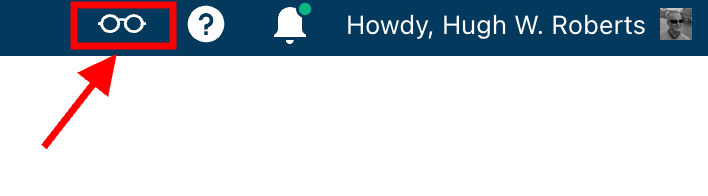
If you’re using a desktop computer, the WP Reader is now located in the top right corner of your blog. Look for the pair of spectacles icon.

Image highlighting the WordPress Reader icon and where to find it.
The WordPress Reader icon has changed and moved.

Click on it, and you’ll be taken to the WordPress Reader.

On mobile phones and tablets (using the Jetpack app), the WP Reader icon (spectacles) is located at the bottom of the screen.

What I found in the search results!

I was delighted to see some of my posts appear in the search results. However, I was more interested in the posts from blogs I don’t currently follow.

One of those posts that grabbed my attention was from Mitch, who blogs at The Power Of Story. Mitch’s post, ‘What’s Up WordPress?‘, was about the sudden ups and downs of his blog’s number of subscribers/followers. Indeed, I’ve noticed the same thing happening with my blog.

Image showing the ups and downs of subscriber/follower numbers on WordPress

My subscriber/follower stats have become like a fairground rollercoaster ride. Some days, I lose a lot of subscribers/followers, and then the numbers suddenly return, although not the same subscribers.

I did some digging and found that WordPress are now actively deleting spam blogs and blogs run by spambots. That’s a good thing, especially since I’ve been manually unsubscribing them for many months. WordPress is unsubscribing these blogs for me, although I will unsubscribe any I find myself.

Have you noticed your subscriber/follower numbers going on a rollercoaster ride recently?

Another post that grabbed my attention from the results page was from Kevin, who blogs at Chef Kevin Ashton. Kevin’s post, titled ‘The Thorny Issue Of WordPress Likes.’ touched on a subject I’ve often written about – the ‘like’ button!

Love it or hate it, the ‘like’ button is something just about every WordPress user and visitor will use. However, Kevin touched on the subject of ‘guilt’ by not using it, especially when he doesn’t have enough time to visit and read blogs.

I’ve been there, Kevin. Many bloggers feel guilty or stressed about not clicking ‘like’, visiting blogs that follow them, or leaving comments. Yet, in my opinion, nobody really cares that you can’t always visit their blog. I’ve discovered that leaving one engaging comment occasionally that shows you read the post is much more appreciated than leaving short, non-engaging comments just to prove you visited. However, you may not have read their post.

I’ve written many posts about blogging guilt and stress. In my last post on the subject, ‘Stressed Or Feeling Guilty About Blogging? Please Read This Post. Let’s Keep Blogging Fun,’ many readers spoke up about how bad they feel when they don’t have the time to read blogs, click ‘like,’ and leave comments, often resulting in blogging feeling like a chore rather than something that should be enjoyed.

Nobody should ever feel obliged to read posts, click the ‘like’ button or leave comments. Keep blogging fun.

How do you deal with blogging stress or guilt?

The happy and sad sides of blogging!

It was also lovely to see blog posts celebrating milestones on WordPress in the results. From celebrating 15 years of blogging on WordPress to publishing their 100th post and some folks being notified that their blogs had achieved half a million visits, these posts brought a smile to my face.

Of course, posts complaining about how bad WordPress is and the problems bloggers are having also appeared in the results. Although I only read a few, most of the reported issues were related to WordPress’s changes, and the author often confirmed in the comments section that the issue(s) had now been resolved.

Personally, I’m pleased that WordPress does make changes. If they left things alone, the platform would quickly become outdated and dull, as would all our blogs. WordPress would lose many paying customers, and we’d all lose our blogs if they went out of business. I used to hate change but learned that adapting to it is much less stressful than fighting it

Are you encountering any issues with WordPress? My recent post, ‘WordPress Problems: Don’t Panic! How To Solve Issues Quickly,’ may be of some help.

Are your blog posts appearing on the WordPress Reader?

I always check that my blog posts appear in the WordPress reader. To do this, I follow my blog and check the reader immediately after publishing a post. If it’s not there, I know there’s a problem.

There are several reasons why your posts may not appear in the WordPress Reader. The main reason is that you add too many categories and tags to a post. WordPress allows up to 15 categories and tags combined. Your post could be marked as spam and won’t appear if you add more, so ensure you do not add more than 15 tags and categories (combined).

There may also be technical reasons why your posts don’t show in the reader. If you don’t see your posts, contact WordPress. They’ll be able to help.

That’s it for today. I’ll share other interesting posts when I do more searches on the WordPress Reader.

Why Do You Use The WordPress Reader?

Did you enjoy reading this post? Then you may also like…

Layout, content, settings, and format might differ on self-hosted blogs.

Click the buttons below to follow Hugh on Social Media

Copyright @ 2024 hughsviewsandnews.com – All rights reserved.
5 Easy Ways To Unfollow A WordPress Blog

If you missed my recent post, 7 Common Mistakes To Avoid When Deciding Whether To Follow A Blog, you won’t have seen the fantastic discussions in the comments section that raised many questions.

One of those questions was, ‘How do I Unsubscribe From A WordPress Blog I’m No Longer Interested In Reading?’

Not sure why you should unfollow a blog? Read the post for the answers.

Light blue image with the words '5 Easy Ways To Unfollow A WordPress Blog' in white text.
It’s easy to unfollow a blog on WordPress.

For this post, I’m using a desktop computer.

1. From The WordPress Reader

Ensure you are viewing posts from the WordPress Reader.

Click the three horizontal dots (meatball menu) next to the blog you want to unfollow and click the ‘Unsubscribe‘ button.

2. From A Post

Open the post from the WordPress Reader.

Right-click on the post title and click ‘Open in a new tab.’

Click the ‘Subscribe‘ button in the screen’s floating action bar in the lower right corner.

You’ll now be unsubscribed from following that blog.

3. From An email Notification

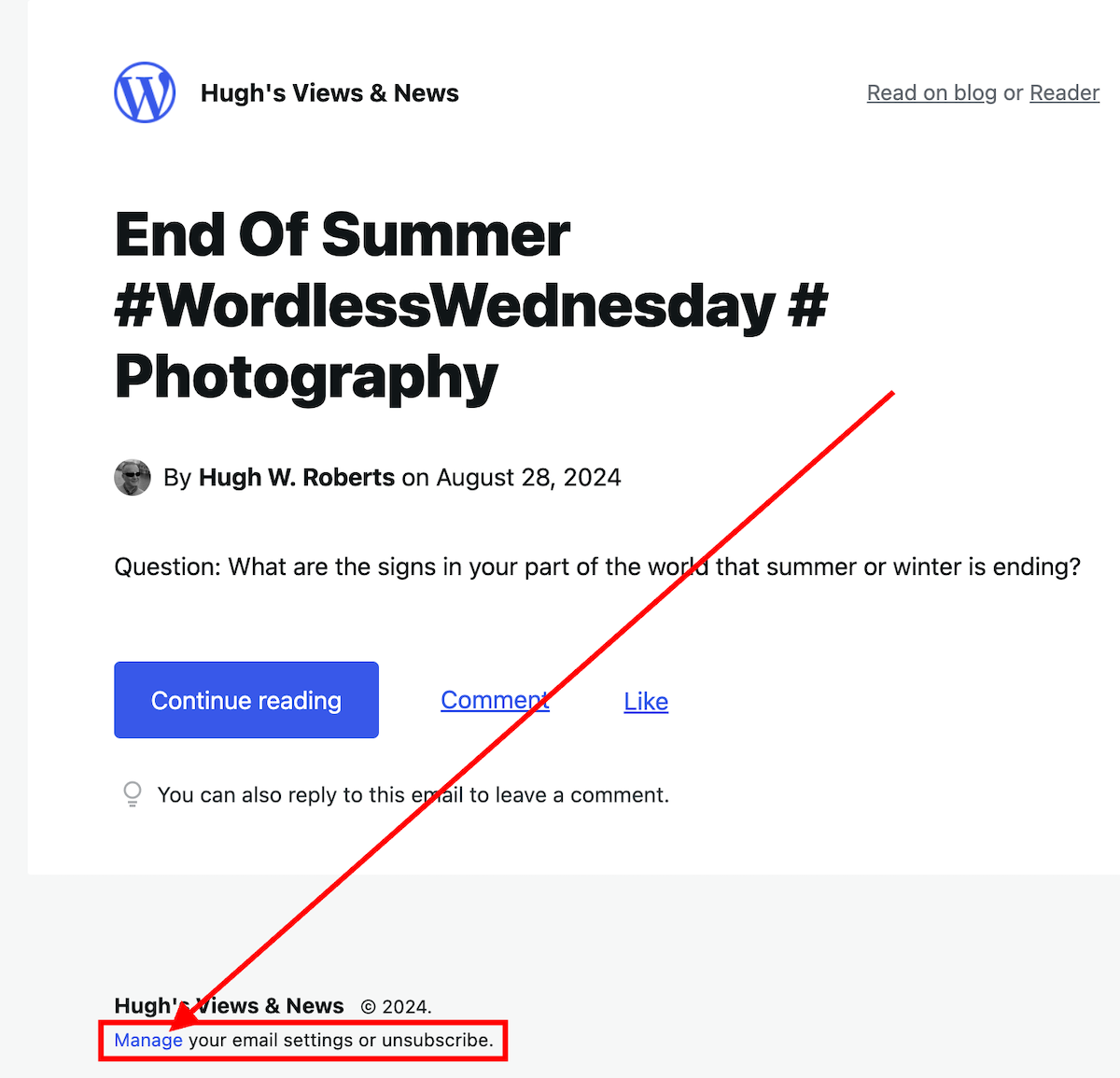
If you get email notifications of new posts, click the ‘Manage your email settings or unsubscribe’ link in the email.

Image highlighting the 'Manage your email settings or unsubscribe' link on a WordPress new post notification email.
Click the ‘Manage your email settings or unsubscribe’ link

On the new page that opens, click the ‘unsubscribe‘ button.

4. From the ‘Manage’ subscriptions list on the WordPress Reader

From the ‘manage‘ section of the blogs you’re following, click on the ‘Manage‘ link (next to ‘Subscriptions‘).

Image highlighting the 'Manage' link in the WordPress Reader page
Click the ‘Manage’ link.

A list of all the blogs you’re following will show.

Click the three horizontal dots (meatball menu) next to the blog you want to unfollow and click the ‘Unsubscribe‘ button.

5. From a WordPress Web Address

Ensure you are signed into WordPress.

Type or click on the following URL address https://wordpress.com/following/edit

A list of all the blogs you are following will show.

Click the three horizontal dots (meatball menu) next to the blog you want to unfollow.

Click the ‘Unsubscribe‘ button.

If you have any questions, please leave them in the comments section.

More blogging tips posts from Hugh

Click the buttons below to follow Hugh on Social Media

Copyright @ 2024 hughsviewsandnews.com – All rights reserved.

7 Common Mistakes To Avoid When Deciding Whether To Follow A Blog

How many blogs do you follow?

How many of those blogs do you regularly visit and comment on?

How many of those blogs do you never visit? I bet most of you never visit at least a few. Yes? Then why are you still following them?

I used to follow over 500 blogs! I merely followed many because they followed me first.

What a big mistake that was!

New blog posts were continually dropping onto my WordPress reader and email box.

It wasn’t long before I started to feel overwhelmed by it all and realised I couldn’t possibly read and comment on every new blog post. Only fools try doing that.

Then, I started feeling guilty about not having enough time to visit and comment on every blog I followed.

Something had to change.

I decided to go through all the blogs I followed and unfollow some of them – gulp! Shock horror. Wouldn’t that upset somebody?

Today, I’m following 55 blogs, and I’ve set myself a target of never exceeding a total of 75.

For some, that may seem like a lot of blogs to follow. For others, not enough. But it’s the perfect balance for me.

But what mistakes did I make when following blogs?

1. Following blogs that publish content I had no interest in

Seems obvious, doesn’t it? But look through the list of blogs you follow and count how many of them publish content you’re not interested in reading.

Then, ask yourself why you are following them.

Many of the blogs I unfollowed were blogs that followed my blog first. I felt it polite to follow back even though I had no idea what content they published.

It was like buying a car without having test-driven it first.

Before following a blog, check out some of the posts and ask yourself these two questions.

Does the content interest me enough to keep me coming back?

Does the content motivate me enough to leave engaging comments? 

If you answer ‘No’ to the first question, then don’t follow.

Some bloggers you unfollow may unfollow you but don’t get yourself all worked up about it. It’s no big deal.

My blog loses followers almost every day. If readers no longer find my content interesting, they have every right to unfollow me.

2. Following unfriendly blogs

Two things that I dislike in blog posts are lots of swearing and belittling others. Even worse is swearing in blog post titles. There’s no need for it.

I’m adult enough to know that most adults do swear, but when there’s too much of it in blog posts, or there isn’t any need for it, then I won’t follow.

The same goes for bloggers who publish content that belittles other people or criticises them for how they live, look, write or talk.

By all means, warn readers at the beginning that a post contains swear words or may offend, but never swear at or criticise others in the post or comments section.

If you think you’ll be offended by the content on a blog or in its comments section, don’t follow it.

3. Following non-engaging blogs.

While reading blog posts, remember to check the comments section to see if the blogger responds to them. If the comments are all one-way, think seriously before following and commenting.

If they don’t respond to comments (especially on their ‘about‘ page), ask yourself if the blog is worth following.

If the content is interesting, then, by all means, follow, but think hard about whether it’s worth trying to engage with the blog host.

If they do respond, look at the way they respond. Are they lazily interacting with their readers? Do they respond to all comments in the same dull, non-engaging manner (e.g. ‘Thanks for reading!’)?

Even though a blogger may respond to all the comments, if they are not engaging with their audience, ask yourself if it’s worth leaving comments and following their blog. 

4. Following blogs that could damage your health

There are lots of things that can damage your health when online. For example, too much screen time, addiction to social media and reading too many negative articles or comments.

One of the worst things that can happen to a blogger is feeling overwhelmed, stressed or guilty. This usually occurs when they can’t keep up with reading blog posts or leaving comments. It also happens when a blogger feels obliged to read and comment on other blogs simply because that blogger follows and comments on their blog.

Don’t feel obliged, guilty, or stressed because certain bloggers comment on your posts. 

If you’re following blogs that you believe publish too many daily posts, think about unfollowing them or turning off notifications for those posts when they are published.  

Of course, we can ignore all those posts, but don’t fall into the trap of thinking you could miss out on something if you don’t read or comment on them all.

Remember to make the most of setting up to receive notifications on a daily or weekly basis rather than every time somebody publishes a new post. This gives you the power to pick and choose which posts to read.

5. Following ghost blogs

I’ve mentioned it many times before, but the first thing I now do before deciding whether or not to follow a blog is to visit its ‘about’ page. If there isn’t one, I consider it a ‘ghost blog.’

If there isn’t an ‘about’ page, it isn’t easy to find, is outdated, or doesn’t contain any interesting information, I won’t follow.

Why? I want to find out about the person behind the blog before deciding whether to follow it.

If the site owner doesn’t care about having an ‘about’ page or updating it, the rest of their blog could also be outdated and not worth your time.

A blogger who does not care about their blog won’t care about their audience.

6. Following uncared-for or neglected blogs

If a new blog I’m visiting is eye-catching, well-organised, easy to navigate, has excellent content, feels friendly, and seems a great place to be, I will press the follow button.

After all, if it looks and feels good and the content is interesting, I will likely read posts and leave engaging comments.

If a blog’s design is poor, it takes too long to download, it uses a font that is too small to read, it has a brightly lit background that produces stars in front of my eyes, it hasn’t been updated in years, or it has lots of broken links, then I’ll move on quickly.

If a blogger doesn’t care about their blog, they are unlikely to care about their audience.

7. Following the blogs of trolls

We talked about checking out responses a blogger leaves to comments on their posts, but are those responses written in a friendly manner? And do they leave unfriendly comments elsewhere?

Because we blog or leave reviews, not everyone will agree with what we have to say.

I’ve witnessed many rude comments from the host and readers on many blogs.

I’ve been the victim of rude and unfriendly comments on other blogs where I’ve left a friendly comment. If the host of a blog responds to me in an unfriendly manner, I’ll unfollow their blog.

If a blog host allows other followers to attack readers without taking action, I will unfollow them.

I always respond to comments in a friendly, courteous, and professional manner, even if a reader disagrees with my words.

If there’s evidence of a blogger attacking somebody because they have not agreed with all or some of the content in a post or in the comments section, consider whether it’s worth following that blog.

Blog hosts should do all they can to prevent trolls from commenting on their posts. If they don’t, they probably don’t care much or have any concern about the welfare of their audience.

By all means, if the content of that blog still interests you, you can still follow and never leave any comments, but be careful when reading negative responses to comments, as they can often affect your mood.

Whatever you do, though, never respond to unfriendly comments by attacking the person who has left them. Leave the trolls alone. They’ll soon get fed up with not getting the attention they crave and will move on.

#blogging

I’m looking for 20 new blogs to follow. If you’d like to recommend any, please leave a link to that blog and a couple of sentences about why I should follow. Please do not just leave a link as it will be deleted.

How many blogs do you follow? Is that number the right balance, or do you need to reduce the number? What factors are important to you when deciding whether or not to follow a blog? Join the discussion by leaving a comment.

Looking for blogging tips from Hugh?

WordPress Problems: Don’t Panic! How To Solve Issues Quickly

WordPress users often face problems, but they may not always be caused by their blogging platform. Device issues, internet browsers, poor blog housekeeping and retired themes can all contribute to problems.

My post outlines what to do if you’re experiencing issues with using WordPress.

WordPress: How To Close Comments: What You Need To Know

WordPress has relocated the ‘Discussion’ setting to a more visible and accessible position, simplifying the control of comments and pingbacks.

My post outlines where to find the ‘discussion setting’ and when you should consider turning comments off on specific posts.

To follow Hugh on Social Media, click on the buttons below.

Copyright @ 2024 hughsviewsandnews.com – All rights reserved.

WordPress Problems: Don’t Panic! How To Solve Issues Quickly

Do you encounter problems using WordPress? Are your posts not aligning correctly, or are you unable to leave comments on certain blogs? What’s causing these problems? Is it WordPress, or are you or your device causing them?

Light blue image with the words 'WordPress Problems: Don't Panic! How To Solve Issues Quickly' in white text
Don’t panic when WordPress causes you problems. The problem could be you!

Like any online website, the WordPress platform experiences problems. Bugs occur. They can often cause havoc for users. Sometimes, things don’t go to plan when new updates are released.

But what causes these problems, and how can they be fixed?

Case 1 – Your posts are not displaying correctly.

A few years ago, a reader informed me that my blog posts were not displaying correctly.

I checked my blog and couldn’t see any problems. I used another device and couldn’t see any issues.

I contacted the WordPress Happiness Engineers. They assured me that from what they saw, there were no problems with how my blog posts were displaying. They even sent me screenshots and some short video clips showing me what they were seeing at their end.

But I was still not happy.

I decided to write and publish a post about the problem.

I asked my followers to check some of my blog posts and let me know if there were any problems with how they were displaying. Over 100 people came to my call for help. Only one person said there was a problem with how my posts were displayed, and this was the person who reported the problem to me.

It turned out that the problem wasn’t my blog or WordPress. The problem was the device belonging to the reader who reported the issue.

I asked them to make sure their device had the latest updates. They never informed me that my blog was displaying incorrectly again.

Case 2 – I can’t leave comments on certain blogs.

I recently saw a post from a blogger who said he had problems leaving comments on certain blogs.

He named the blogs so they knew who they were and apologised, saying that his comments were being cut off as he wrote them.

He asked if anybody else was having the same problem when leaving comments.

By the time the responses came in (and all were saying ‘No’), he’d gone to another device. He tried leaving comments on the same blogs. They all worked, and he came back and apologised.

The problem was caused by the device he was using. He updated the device’s software and also tried using another internet browser, and his comments worked.

Case 3 – When was the last time you cleaned your house?

Some of my WordPress data and stats were not displaying. ‘Have you tried clearing your browser history, cookies and cache on your computer?” somebody asked?

I did the clear-out, and the data all showed up.

Like your home, your blog device needs some housekeeping to keep it working correctly.

Case 4 – Have you tried the most popular advice when things go wrong?

A user contacted me saying they could not leave comments or ‘likes’ on any blog posts. She was using the Jetpack app on her mobile phone.

I told her to try signing out of the Jetpack app, delete it, reinstall it and sign in again.

Problem solved.

Case 5 – Has the blog theme you’re using been retired?

Another WordPress user was experiencing many problems with her blog. Her posts were not aligning correctly, and some readers contacted her to say they couldn’t leave comments. The sharing buttons at the end of her posts were also not working. There were also other issues like certain tools no longer working.

She contacted WordPress, which informed her that her blog theme was retired and was no longer supported. The advice was to change her theme. She didn’t want to change the theme; she liked it. She tried working around the problems. That worked for a while. Then, the issues worsened, and she eventually gave up on her blog.

The WordPress platform wasn’t the problem. The device she was using wasn’t the problem. She was the problem for refusing to change to a theme that WordPress supported.

If your theme has been retired, you will find this notice on the theme’s info page:

Image showing the message 'This theme has been retired' on WordPress
Has your WordPress theme been retired?

When a theme is retired, it no longer appears in the list of themes at Appearances – Themes or at Appearance – Theme Showcase if using the Classic Editor.  

But, if the theme is already active on your site, you can continue to use it. Some retired themes will usually stay available for the lifetime of your site or blog without any issues. However, if you continue using a retired theme, you should note the following:

  • A retired theme no longer receives WordPress updates or new features. This includes security updates that protect your blog from spammers and hackers.
  • A retired theme should continue functioning on your site. However, WordPress does not guarantee that it will always work well with its ever-evolving software.
  • You may lose access to certain features like sharing and reblog buttons, blocks, writing tools and clicking the ‘like’ button.

If you still use a retired theme, you will likely encounter problems at some point. Visitors to your blog may also experience problems viewing it correctly or engaging with you.

How do I change my WordPress theme?

Some bloggers are terrified of changing the theme of their WordPress blog. It can seem like a daunting task.

Once upon a time, changing your WordPress blog theme was a nightmare. I recall the first time I changed the theme of my blog. It took a whole weekend to finish.

But changing the theme of your WordPress blog is now easy and quick. WordPress provides full details on how to do it on the ‘Change your theme‘ page.

Have you checked the WordPress forum?

A user experiencing problems with their WordPress blog does not necessarily mean that other users are experiencing the same problems. Sometimes, problems can be exclusive to one blog (as in some of the above cases).

The WordPress forum page is great for determining if problems affect other users. Here, you can report issues and check what other issues users are experiencing.

Another way to find out if other users are experiencing the same problems with their WordPress blog is to ask them (as I did in Case Number One). Sometimes, issues can be theme-related. Once reported and provided the theme has not been retired, WordPress quickly fixes theme-related problems.

Let’s Wrap It Up!

  • Like any website, the WordPress platform will suffer from bugs and problems.
  • While some problems are widespread, many problems can be caused by a user’s device when blogging, especially if the device is old and does not have the latest updates installed.
  • If you can access another device, try using it to determine whether the problem is only related to one device or a certain web browser.
  • Some problems are related to themes. If a theme has been retired, consider changing to one WordPress support.
  • Changing your blog theme is now easier and quicker.
  • You can check if other bloggers are experiencing the same problems you’re having with your blog by asking them, posting on the WordPress forum, or doing both.
  • Consider that any issues lie outside of WordPress first before blaming them solely.
  • Ensure all devices you use to blog have the latest updates.
  • Report issues and problems to WordPress. They may not know about issues unless you report them.

Are you experiencing any problems using WordPress? Have you checked if the issues are sitewide or only affecting you? How do you deal with issues using the WordPress platform?

Layout, content, settings, and format might differ on self-hosted blogs.

More blogging tips posts from Hugh

Click the buttons below to follow Hugh on Social Media

Copyright @ 2024 hughsviewsandnews.com – All rights reserved.

Blogging Simplified: Adding Images From Your Phone To A WordPress Post

Do you draft blog posts on a desktop computer or laptop? If so, did you know you can now add photos to your post directly from your mobile phone? No more having to download photos to your computer or laptop.

Light blue image with the words 'Blogging Simplified: Adding Images From Your Phone To A WordPress Post' in white text
Now you can add images and photos directly from your phone to a WordPress post.

Here’s how to do it: 

Ensure you have the Jetpack app on your phone. If not, download it from the app store.

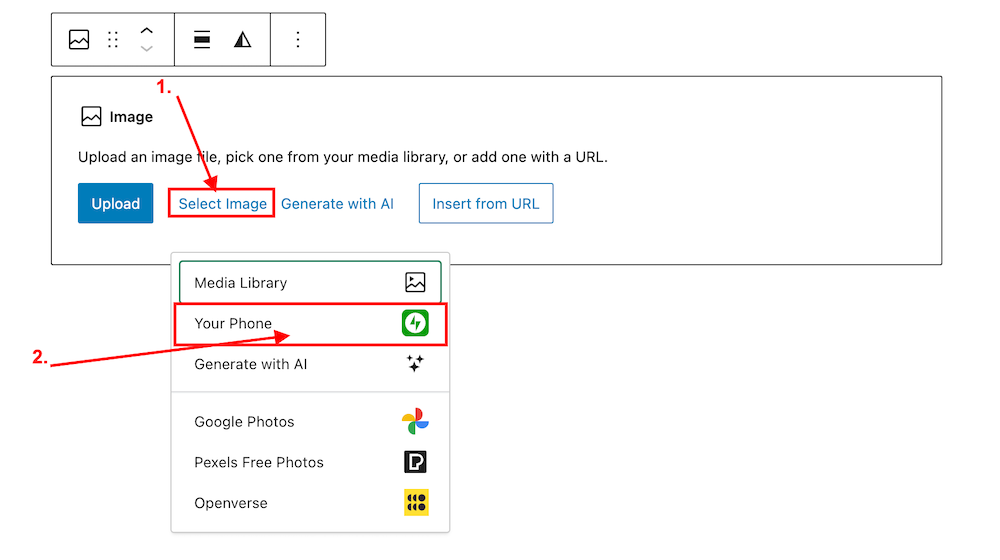
  1. Insert an ‘Image‘ or ‘Gallery‘ Block on your post/page. 
  2. Click ‘Select Image.‘ 
  3. From the dropdown menu, select ‘Your Phone.’ A message will pop up on your phone with a QR code.
Image highlighting the 'Select Image' and 'Your Phone' links on an Image block on WordPress
Click ‘Select Image’ and ‘Your Phone.’
Image showing the QR code that pops up on WordPress when selecting 'Your Phone' when selecting an image or photo.
Scan the QR code.

4. Use your phone’s camera to scan the QR code. This will automatically open the Jetpack app on your phone and then your photo library. 

5. Choose the image(s) you want to use: From there, simply click the image or images you wish to add to your post/page.

6. Click ‘Add‘ (top right corner): Watch your image(s) automatically appear in your desktop/laptop editor. Here’s one I added directly from my phone.

img_0529-1

Can I adjust the size of images in the Jetpack app?

Yes. This is important to do to prevent images from taking up too much storage space in your blog’s media library. By default, the “Optimise Images” option is turned on. You can set the ‘Max Image Upload Size‘ so the original file is resized automatically when you upload it.

Here’s how to do it:

In the Jetpack app for iPhone and the Jetpack app for Android, to adjust the settings, follow these steps:

  1. Log into the Jetpack app on your phone.
  2. Click your profile icon in the bottom right.
  3. Click ‘App Settings‘.

You can toggle ‘Optimize Images‘ off (not recommended) or adjust the ‘Max Image Upload Size‘. The default is 2000 x 2000px.

img_0527-1

As you can see from the above image, I’ve set the maximum image upload size to 1000 x 1000px. I recommend not going any higher than this.

Is there anything to remember when uploading images directly from your phone?

Yes. If you add copyright information to images and photos on your computer or laptop (something I recommend you do), remember to add copyright information to your images and photos on your phone before you add them to your blog posts.

Remember to also complete the ‘Alt-Text‘ and ‘Description‘ details of the images in your blog’s media library. My blog post ‘Adding Images Or Photos To Your Blog Posts? 4 Essential Things To Do,’ gives full details as to why this information should always be completed.

Would you use this method for adding photos and images to your blog posts? If you have questions, please leave me a comment.

Layout, content, settings, and format might differ on self-hosted blogs.

Click the buttons below to follow Hugh on Social Media

Copyright @ 2024 hughsviewsandnews.com – All rights reserved.

WordPress: How To Close Comments: What You Need To Know

WordPress has managed to do it once more! It’s relocated a setting I frequently use, seemingly without informing anyone about it.

Light blue image with the words 'WordPress: How To Close Comments: What You Need To Know' in white text.
Turning comments off is simple to do. But WordPress has moved the settings!

During a recent post-drafting session, I attempted to disable comments on a post. I encountered difficulty locating the ‘Discussion‘ setting, which is the usual place for enabling or disabling comments on individual posts.

Why turn comments off?

I consistently close comments whenever I share another blogger’s post or a guest post I’ve written on another blog. This strategy ensures that new comments appear on the original post, consolidating the discussion in one place rather than being split between two posts. Kinda makes sense, doesn’t it?

Some bloggers also choose to close comments on older posts as a proactive measure. This practice became popular when WordPress faced a significant spam issue. Specific posts received hundreds of spam comments daily, making it challenging for bloggers to sift through the spam in their WordPress folders to find authentic comments that can sometimes end up there.

The installation of the updated Askimet anti-spam software in 2023 has led to a significant improvement in the spam situation. Thanks to Askimet’s enhanced functionality, the previously prevalent issue of hundreds of visible spam comments daily has been effectively curtailed to just a few a week. Consequently, there is no longer a necessity to close comments on these posts.

Where has the ‘Discussion’ setting gone?

The ‘Discussion’ setting used to be located at the bottom of the settings box of a post.

Image highlighting where on WordPress the 'Discussion' setting used to be.
The ‘Discussion’ setting used to sit under ‘Tags.’

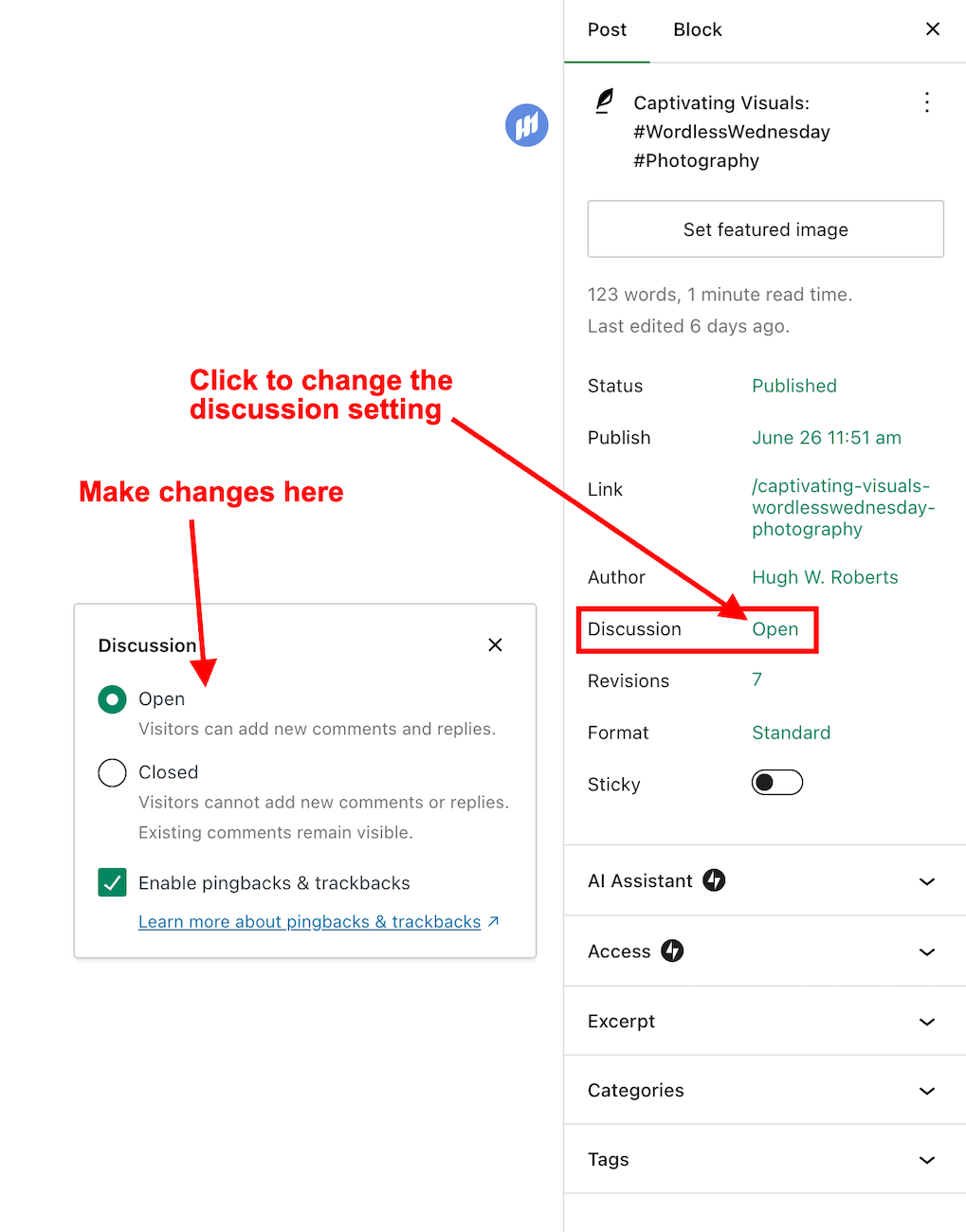
Now, the discussion setting has been conveniently relocated to a more prominent position at the top of the post settings panel rather than at the bottom. This new placement, coupled with the clear indication of whether comments on a post are open or closed, significantly enhances the ease and user-friendliness of managing comments and pingbacks.

Changing the discussion setting is straightforward. Click on ‘open‘ or ‘closed‘ to make the change.

Image highlighting where a WordPress post's 'Discussion' setting is now located.
The ‘Discussion’ setting is now further up the ‘draft post’ section of a post.

This simple, user-friendly system also allows you to control comments, pingbacks, and trackbacks.

Image highlighting where to enable or switch off pingbacks and trackbacks on a WordPress post.
This is where to turn on or switch off pingbacks on your WordPress posts.

Pingbacks and trackbacks are methods for alerting other blogs that you have linked to them. However, they only work when the blog you’re linking to has enabled pingbacks and trackbacks and you do not link to a blog’s home page. My post, ‘The Power Of Pingbacks: How To Create One‘, has more details.

Do you disable comments on posts? If so, which posts? Do you have any questions about the ‘Discussion’ setting on WordPress? Please leave them in the comments box.

Layout, content, settings, and format might differ on self-hosted blogs.

Click the buttons below to follow Hugh on Social Media

Copyright @ 2024 hughsviewsandnews.com – All rights reserved.
Blogging Simplified: Engagement. Am I Doing It Right?

Imagine having a blog where nobody wants to engage. It’s a thought that’s hard to fathom. After all, what’s the point of writing and publishing blog posts if there’s no one to interact with?

Light blue image with the words 'Blogging Simplified: Engagement. Am I Doing It Right?' in white text
How do you engage with your readers and other bloggers?

As bloggers, we can spark curiosity and questions in our readers, even when publishing informative posts. And that’s where the actual engagement begins. It’s our responsibility to set the stage for meaningful interactions. One way to do this is by asking open-ended questions at the end of your posts or inviting readers to share their thoughts or experiences related to the post’s topic. It can encourage more in-depth and meaningful discussions.

Those bloggers who blog to make money will only care a little about the interaction. For them, making a living out of blogging is more important. Good for them if they are successful, but take your readers seriously, especially if they want to engage with you. Consider removing the comments section from your blog if you’re going to refrain from engaging or responding to questions.

What’s the right way to engage with readers? Is there a right way?

I’ve always craved engagement, but over the ten years I’ve been blogging, the type of engagement I crave has changed.

I’ve become more of a ‘discussion’ blogger. By that, I mean a blogger who likes to discuss the subject of a post rather than just leaving a comment that only confirms I visited. It’s about sparking a conversation, sharing different perspectives, and learning from each other. This type of engagement is more valuable than a simple ‘I agree’ comment, as it adds depth and richness to the post’s content.

Over the past year, I’ve made a conscious effort to reduce the number of non-engaging comments on my blog, a decision I’m proud of. I’ve aimed to break free from the cycle of leaving comments solely to prove a visit or just for the sake of doing so.

This shift has decreased the overall number of comments I get but has made me feel like a more thoughtful and influential blogger. It’s not about the number of comments but the quality of the interactions. This change has helped my personal growth in writing and blogging.

Should we always try to engage? No!

Of course, just because I don’t leave a comment on a blog post does not mean I’ve not read it. Likewise, I know many people read my posts but want to avoid engaging. There’s nothing wrong with that. These silent readers are still part of the blogging community; their support is as important as active engagement. So, let’s recognise their presence and continue to create content that resonates with them.

If you’re new to blogging, leaving an engaging comment every once in a while is far more beneficial than leaving short, non-engaging comments on every post you read in an attempt to get noticed.

Are you approving spam comments without realising it?

Imagine my concern when I came across this comments section on a recently read post.

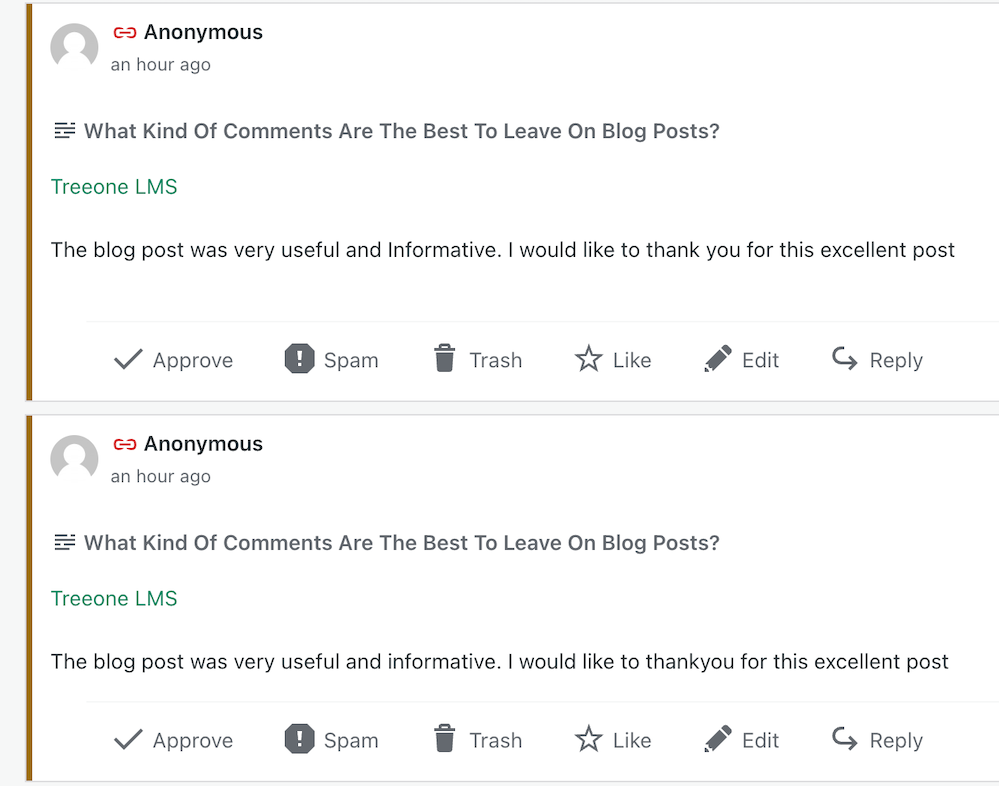
Image showing three spam comments in the comments section of a blog post
Never approve these types of comments

I was appalled to see these comments and could not understand why they’d been approved. Given that the blog’s posts would probably be full of these types of comments, I also decided not to follow it.

Spam comments not only detract from the quality of a blog but also discourage meaningful interactions. Let’s keep the blogging community free from such spam and focus on producing meaningful engagement. Your thoughts and ideas are too valuable to be drowned out by spam.

Other examples of spam comments.

Image showing spam comments on a WordPress blog

Some may look genuine, but they’re not. Spammers and spambots are getting cleverer at fooling us into approving their comments, so beware.

Thank you

I want to express my deep appreciation to all of you who support and interact with me here. Your engagement is not just a number on a screen but a vibrant testament to the joys and value of blogging. I especially want to acknowledge those who actively interact with me, as your contributions are the lifeblood of my blog.

Remember, it’s not just about the numbers but the profound connections we build through interactions. For instance, when a reader shares a personal experience related to a blog post or when we engage in a thoughtful debate about a controversial topic, these are the types of interactions that genuinely enrich the blogging community.

Let’s wrap it up.

This post delves into the importance of engaging with readers and other bloggers, offering insightful strategies to spark meaningful interactions.

Avoid leaving short, non-engaging comments on all the posts you read. Instead, leave a thoughtful comment every now and again.

Don’t leave a comment just to leave a comment or prove you’ve visited.

Never feel obligated to comment because they always comment on your posts.

There’s nothing wrong with not wanting to engage. Some readers are more comfortable reading a post without saying anything.

Take your readers seriously by responding to or acknowledging their comments.

Never approve spam comments. Mark them as spam and delete them.

Consider closing comments off if you do not want to engage with your readers or respond to any questions.

If you crave engagement, ask open-ended questions at the end of your posts or invite readers to share details of their experiences with the subject you’ve discussed in the post.

Do you enjoy engaging with your readers and other bloggers? What type of commenter are you? How do you deal with spam comments and the spammers? Share your knowledge and ideas in the comments section.

Click the buttons below to follow Hugh on Social Media

Copyright @ 2024 hughsviewsandnews.com – All rights reserved.

How To Make Categorising And Tagging Blog Posts Powerful

Categorising and tagging blog posts are some of the most potent ways for bloggers to get their posts noticed. However, some bloggers don’t bother with either, meaning they’re losing the potential for new readers and followers. Are you one of them?

But what are categories and tags, and how do they work?

Light blue image with the words 'How To Make Categorising And Tagging Blog Posts Powerful' in white text
Do you categorise and add tags to all your blog posts?

What are blogging categories?

Blogging categories act like groups where blog posts that have a connection with each other are stored.

For example, if you’re a travel blogger, you could have The United Kingdom category and list the sub-categories Scotland, Wales, England, and Northern Ireland

Categories are important because they make finding specific blog posts more straightforward for visitors to your blog (especially first-time visitors).

Every blog post should have at least one category.

Unfortunately, if you don’t categorise blog posts, they will be uncategorised, which is no help to anyone.

Imagine going into a shop to find a particular book about dinosaurs and finding that none of the books has been categorised. You’d leave and go to another shop that helps customers by categorising its books to find what you’re looking for much easier.

I never return to blogs that do not categorise posts.

How to add a category to your WordPress blog post

This tutorial uses an Apple iMac desktop computer and the WordPress ‘Default’ dashboard.

  • While drafting a blog post, you’ll see a toolbar in the settings area on the right-hand side of the page. This is where you can add categories.
Image highlighting where to find the category box on the draft page of a WordPress blog
Every blog post should have at least one category.

If a blog post doesn’t fit into one of your existing categories, click ‘Add New Category‘ and create a new one.

Remember to do some housekeeping regularly for the categories on your blog. For example, delete categories that are no longer being used or update categories by giving them a new name if something works better. 

How to edit the categories on your blog.

  • On your blog’s dashboard, click on Posts to open a submenu, and click on Categories.
Image highlighting where to find Categories on the dashboard of a WordPress blog.
Click Posts and Categories.
  • To edit a category, click the three verticle dots (meatball menu) next to the category you want to edit.
Image highlighting the meatball menu in Categories on a WordPress blog.
Click the meatball menu to edit a category.
  • The meatball menu displays four options: edit, delete, view posts, and set as a default.
  • Edit – Edit the name or description of the category.
  • Delete – Delete the category.
  • View posts – View a list of all your posts under the category.
  • Set as default – Useful when most posts fall under a particular category.
  • Remember to click the ‘Update‘ button to save any changes you make.

The number next to each category tells you how many posts are under that category. I recommend deleting any categories that are not being used.

Any sub-categories will show under each category.   

Tip: Setting your default category to ‘Uncatorigised‘ allows you to search for any blog posts you may have forgotten to categorise.

What are tags?

Tags are popular keywords that can be added to a blog post. For example, some of the tag words I’ve added to this post are –

  • blogging
  • bloggingtips
  • categories
  • tags
  • WordPress
  • HowTo

Each tag should be separated with a comma or by pushing ‘Enter’ on your keyboard.

Tags containing more than one word (such as ‘Blogging tips’) act as one tag word, but you must add them without any space between the words, i.e., ‘ blogging tips’ becomes ‘bloggingtips.’

Generally, tags do not need to connect with each other, but when used correctly, they can generate a lot of extra traffic to a blog post.

Like categories, tags can be added to blog posts in the settings area toolbar on the right side of a draft post. 

Image highlighting where to add tags on a WordPress blog post
Always add keywords (Tags) to your blog posts.

When adding tags to your post, consider the keywords somebody would add to the WordPress search bar when looking for specific blog posts. Or think of words you would use to search for your post.

Check out the tags I’ve added for this blog post. They appear at the end of every post.  

Important information – Did you know this…?

The cardinal tagging rule on WordPress.com is that you should never add more than 15 tags and categories (combined) to your post; otherwise, it won’t appear in the WordPress Reader. This cap prevents spam posts from appearing on the reader list, as spammers and spambots tend to use many categories and tags to lure readers in

15 tags and categories can seem like a lot, but you don’t need to use all of them.

Never tag your blog post with words that have nothing to do with the post’s subject. Otherwise, visitors will come to your blog under false pretences and probably won’t return.

Generally, I add no more than three categories and between six and ten tags to my blog posts. 

As with categories, it’s also essential to do some housekeeping for the tags you use on your blog. 

How to delete and update tags

  • On the dashboard of your blog, click on Posts – Tags.
  • A page showing your tags and how many blog posts containing each tag appears.
  • To edit, view and delete posts containing a tag word, hover your mouse over each tag word and click edit, quick edit, view or delete.
  • You can also view the posts containing the tag word by clicking the number in the ‘Count’ column. I recommend deleting any tag words that are no longer being used.

Let’s wrap it up!

  • All blog posts should be categorised and tagged.
  • Categorising and tagging your blog posts makes them user-friendly, meaning people will likely return to your blog.
  • Not categorising your blog posts means they’ll be challenging to find.
  • When tagging posts, think of keywords others will use when searching for your blog post.
  • Don’t use tag words that have nothing to do with the subject of your blog post.
  • WordPress users – never add more than 15 tags and categories (combined) to your posts; otherwise, they won’t appear on the WordPress Reader.
  • Remember to perform regular housekeeping of categories and tags on your blog.
  • Adding the proper tags to your blog posts will increase the number of readers who find them. More readers mean higher stats, more comments, and new followers.

Do you categorise and add tags to all your blog posts? If not, why not? Which tags-words work best for you? Is there anything you’d like to add or ask regarding categories and tags in blog posts? Join the discussion by leaving a comment.


Did you enjoy reading this post? Then you may also like…

Layout, content, settings, and format might differ on self-hosted blogs.

Follow Hugh on social media. Click the buttons below.

Copyright @ 2024 hughsviewsandnews.com – All rights reserved.

How To Use This New Easy Feature For Your Blog’s Settings On WordPress.

Have you noticed the new feature WordPress has added to your blog’s dashboard? It’s located on the ‘My Home‘ page in the top right corner.

But what does this new feature do?

Light blue image with the words 'How To Use This New Easy Feature For Your Blog's Settings On WordPress' in white text.
This new ‘settings’ feature is easy to use. But what does it do?

For this post, I’m using an Apple iMac desktop computer and the ‘Default‘ view setting of my blog’s dashboard.

Image highlighting the new blog settings feature on WordPress
You’ll find this new feature on the ‘My Home’ page of your blog’s dashboard

Let’s get started

  • Click on the meatball menu (three horizontal dots) to open a new menu.
Image highlighting the kebab settings and new menu on the new blog settings feature on WordPress
Click the kebab menu to open a new menu

The menu contains two options – Settings and Manage Domains.

Let’s take a look at the two options

  1. Settings – this option takes you to the General Settings page of your blog.

You can make many changes to your blog on this page, including your blog’s icon (photo or image), name, and tagline.

Image highlighting where to edit your WordPress blog's icon, title and tagline
Edit your blog’s icon, title and tagline
  • Click the ‘Save Settings‘ button if you make any changes.

On the same page, you can also create a logo for your blog via Fiverr logo maker (note that there is a charge for this) and set/change your blog’s primary language and timezone. Remember to save any changes you make.

Another option includes setting privacy settings for your blog.

Privacy – This is where you can set your blog to public viewing (anyone can view it) or private viewing (only visible to you and logged-in members you have approved to view it). There is also a ‘Coming Soon‘ option, so your blog is hidden from view until it’s ready for viewing.

Image showing the 'Privacy' settings on a WordPress blog
Set privacy settings for your blog

Two other options are also available.

If ticked, the ‘Discourage search engines from indexing this site‘ option will prevent search engines from indexing your blog, but note that it is up to search engines to honour your request.

The ‘Prevent third-party sharing‘ option should be ticked if you want to restrict your blog’s content from AI training and third-party use. It will exclude your blog’s public content from WordPress’s network of third-party content and research partners. It also adds known AI bots to the ‘disallow’ list in your blog’s robots.txt file to stop them from crawling your site, though it is up to AI platforms to honour this request.

Click the ‘Save Settings‘ button if you make any changes.

Other settings include –

Accept a gift subscription – turn this setting on to accept gift subscriptions from visitors to your blog.

Footer credit: Here, you can choose or edit a footer credit that appears at the bottom of your blog’s pages and posts.

Site tools – this section allows you to do the following.

  • Register a new domain or change your blog’s URL address.
  • Transfer your blog to another blogging provider.
  • You can reset your blog and start afresh while keeping the same domain/blog name. (If you choose this option, all your posts, pages, and media will be deleted).
  • Delete your blog and give up your blog’s domain/address.

2. Manage Domains — This option takes you to the part of your blog where you can manage your blog’s domains.

It’s worth checking this page to see what domains you have and to see offers for other domains you may be interested in purchasing for your blog.

While you may not visit your blog’s settings page regularly, it’s worth knowing that there is now an even quicker way to find these settings.

Any questions? Leave them in the comments section.

Did you enjoy this post? Then you may also like –

Layout, content, settings, and format might differ on self-hosted blogs.

Click the buttons below to follow Hugh on Social Media

Copyright @ 2024 hughsviewsandnews.com – All rights reserved.
3 Quick And Easy Ways To Promote Your Old Blog Posts

Are there easy ways to promote your old blog posts, and should you feature them on your blog again?

Can old blog posts bring in more visitors, followers and comments?

The answer is YES.

Light blue image with the words '3 Quick And Easy Ways To Promote Your Old Blog Posts' in white text
Have you killed off your old blog posts?

One of the biggest mistakes many bloggers make is forgetting their old blog posts. They publish posts and quickly forget about them.

Yet, If they’ve been regularly publishing blog posts, their blog archive will be a treasure trove of opportunities waiting for them to bring posts alive again. Just think about all those followers, readers and visitors who have never seen those posts.

Rather than ignoring these old blog posts, there are ways to bring them back to the attention of your audience.

These old blog posts probably never got anywhere near as many views and comments as your recent blog posts, but did you know that they could quickly bring you many more views, comments and followers?

My three quick and easy tips for bringing these old blog posts back to life are easy to follow and will deliver results as soon as you implement them.

1. Display ‘related’ posts at the end of all your blog posts. 

I’m always surprised by how many WordPress bloggers don’t have this feature switched on.

Here’s a screenshot of the related posts that featured at the end of one of my recent blog posts. 

Image highlighting 'related' blog posts at the end of a blog post.
Promote similar older blog posts at the end of new blog posts.

WordPress automatically chooses which of your posts to display. 

If you’re not already showing related blog posts at the end of newly published blog posts, follow this guide.

  • On the dashboard of your blog, click on Settings and Reading
Image highlighting 'Settings - Reading' on the dashboard of a WordPress blog.
Select ‘Settings’ – ‘Reading’
  • On the Reading Settings page, look for Related Posts and ensure ‘Show Related Content After Posts’ is switched on.
Image highlighting the 'Show related content after posts' option on WordPress
Switch on ‘Show related content after posts.’
  • Choose which other settings options you want to use.
Choose which settings options you want to use.
  • At the bottom of the screen, click on the Save Changes button.
  • Future posts will now display three related posts from your archives, resulting in those posts being seen again. 

2. The ‘Blog Posts’ Block

Those using the Block Editor can use a terrific block called the’ Blog Posts’ block. It allows bloggers to choose which of their previous blog posts to promote on newly published posts.

  • Insert the ‘Blog Posts’ block in the place where you’d like to feature it on your upcoming new post. You’ll find the ‘Blog Posts’ block under the ‘Widgets’ section, or you can search for it by entering ‘Blog Posts’ in the search bar.  
Image highlighting the search box when searching for a block, and the Blog Posts block.
Select the ‘Blog Posts’ block
  • The Blog Posts block defaults to showing the last three blog posts you published, but you can change this. You can leave it as it is or switch to other settings.
  • Today, I will show you how to choose the blog posts you want to display.  
  • When you insert the block, a toolbar will open on the right-hand side of the page. Under Display Settings, look for Choose specific posts and slide the button to the ‘on‘ position. 
Image highlighting the 'Choose Specific Posts' option on WordPress
Switch on the ‘Choose Specific Posts’ option
  • In the ‘Posts‘ box, type in the blog post title you want to display. As you type, suggestions for blog posts with the words you are using will appear. 
Image highlighting the search box in the Blog Posts block on WordPress
Search for the posts you want to promote on your new blog post.
  • Select the blog post you want to feature.
  • If you’re going to add more blog posts, search for them by typing in more words in the Posts box.
  • I recommend that you add no more than three posts. 
  • The Blog Posts block has many other settings, which you can read about here.

3. Add pingbacks to previous blog posts. 

If you’re unsure what a pingback is or how to add it to blog posts, my post, ‘The Power Of Pingbacks: How To Create One,’ will help.

There’s nothing wrong with adding pingbacks and linking back to your previous blog posts. Lots of bloggers do it.

In fact, I recommend that you include at least a couple of pingbacks in all your blog posts. However, you should always ensure that what you’re writing about is connected to the post you’re linking back to.

Pingbacks can also be added to images, pictures, and photos in blog posts and captions.

Let’s wrap it up!

  • Your blog’s archives are a treasure trove of blog posts that can attract new visitors, comments, and followers.
  • Don’t allow old blog posts to remain idle and not work for you. Use them.
  • Your previous blog posts may not have been read by new followers. Introduce them to your new audience.
  • People who may have read your older posts are often thankful for the opportunity to read them again, especially if the post includes tips and advice.
  • Ensure you keep old blog posts up to date.
  • WordPress has made several blocks available on the Block editor to promote old blog posts. The ‘Blog Posts’ block is just one of those blocks.
  • Consider switching it on if you’re not already using the ‘Related Posts’ feature.
  • Remember that you can create pingbacks to old blog posts from any images or photos in future blog posts.

Do you promote your old blog posts? If not, why not? How do you promote them? What way(s) of promoting old blog posts have worked best for you? Have you had much success promoting old blog posts?

Did you enjoy reading this post? Then you may also like…

Any questions about this post? Leave them in the comments box.

Layout, content, settings, and format might differ on self-hosted blogs.

Follow Hugh on social media. Click the buttons below.

Copyright @ 2024 hughsviewsandnews.com – All rights reserved.