WordPress Problems: Don’t Panic! How To Solve Issues Quickly

Do you encounter problems using WordPress? Are your posts not aligning correctly, or are you unable to leave comments on certain blogs? What’s causing these problems? Is it WordPress, or are you or your device causing them?

Light blue image with the words 'WordPress Problems: Don't Panic! How To Solve Issues Quickly' in white text
Don’t panic when WordPress causes you problems. The problem could be you!

Like any online website, the WordPress platform experiences problems. Bugs occur. They can often cause havoc for users. Sometimes, things don’t go to plan when new updates are released.

But what causes these problems, and how can they be fixed?

Case 1 – Your posts are not displaying correctly.

A few years ago, a reader informed me that my blog posts were not displaying correctly.

I checked my blog and couldn’t see any problems. I used another device and couldn’t see any issues.

I contacted the WordPress Happiness Engineers. They assured me that from what they saw, there were no problems with how my blog posts were displaying. They even sent me screenshots and some short video clips showing me what they were seeing at their end.

But I was still not happy.

I decided to write and publish a post about the problem.

I asked my followers to check some of my blog posts and let me know if there were any problems with how they were displaying. Over 100 people came to my call for help. Only one person said there was a problem with how my posts were displayed, and this was the person who reported the problem to me.

It turned out that the problem wasn’t my blog or WordPress. The problem was the device belonging to the reader who reported the issue.

I asked them to make sure their device had the latest updates. They never informed me that my blog was displaying incorrectly again.

Case 2 – I can’t leave comments on certain blogs.

I recently saw a post from a blogger who said he had problems leaving comments on certain blogs.

He named the blogs so they knew who they were and apologised, saying that his comments were being cut off as he wrote them.

He asked if anybody else was having the same problem when leaving comments.

By the time the responses came in (and all were saying ‘No’), he’d gone to another device. He tried leaving comments on the same blogs. They all worked, and he came back and apologised.

The problem was caused by the device he was using. He updated the device’s software and also tried using another internet browser, and his comments worked.

Case 3 – When was the last time you cleaned your house?

Some of my WordPress data and stats were not displaying. ‘Have you tried clearing your browser history, cookies and cache on your computer?” somebody asked?

I did the clear-out, and the data all showed up.

Like your home, your blog device needs some housekeeping to keep it working correctly.

Case 4 – Have you tried the most popular advice when things go wrong?

A user contacted me saying they could not leave comments or ‘likes’ on any blog posts. She was using the Jetpack app on her mobile phone.

I told her to try signing out of the Jetpack app, delete it, reinstall it and sign in again.

Problem solved.

Case 5 – Has the blog theme you’re using been retired?

Another WordPress user was experiencing many problems with her blog. Her posts were not aligning correctly, and some readers contacted her to say they couldn’t leave comments. The sharing buttons at the end of her posts were also not working. There were also other issues like certain tools no longer working.

She contacted WordPress, which informed her that her blog theme was retired and was no longer supported. The advice was to change her theme. She didn’t want to change the theme; she liked it. She tried working around the problems. That worked for a while. Then, the issues worsened, and she eventually gave up on her blog.

The WordPress platform wasn’t the problem. The device she was using wasn’t the problem. She was the problem for refusing to change to a theme that WordPress supported.

If your theme has been retired, you will find this notice on the theme’s info page:

Image showing the message 'This theme has been retired' on WordPress
Has your WordPress theme been retired?

When a theme is retired, it no longer appears in the list of themes at Appearances – Themes or at Appearance – Theme Showcase if using the Classic Editor.  

But, if the theme is already active on your site, you can continue to use it. Some retired themes will usually stay available for the lifetime of your site or blog without any issues. However, if you continue using a retired theme, you should note the following:

  • A retired theme no longer receives WordPress updates or new features. This includes security updates that protect your blog from spammers and hackers.
  • A retired theme should continue functioning on your site. However, WordPress does not guarantee that it will always work well with its ever-evolving software.
  • You may lose access to certain features like sharing and reblog buttons, blocks, writing tools and clicking the ‘like’ button.

If you still use a retired theme, you will likely encounter problems at some point. Visitors to your blog may also experience problems viewing it correctly or engaging with you.

How do I change my WordPress theme?

Some bloggers are terrified of changing the theme of their WordPress blog. It can seem like a daunting task.

Once upon a time, changing your WordPress blog theme was a nightmare. I recall the first time I changed the theme of my blog. It took a whole weekend to finish.

But changing the theme of your WordPress blog is now easy and quick. WordPress provides full details on how to do it on the ‘Change your theme‘ page.

Have you checked the WordPress forum?

A user experiencing problems with their WordPress blog does not necessarily mean that other users are experiencing the same problems. Sometimes, problems can be exclusive to one blog (as in some of the above cases).

The WordPress forum page is great for determining if problems affect other users. Here, you can report issues and check what other issues users are experiencing.

Another way to find out if other users are experiencing the same problems with their WordPress blog is to ask them (as I did in Case Number One). Sometimes, issues can be theme-related. Once reported and provided the theme has not been retired, WordPress quickly fixes theme-related problems.

Let’s Wrap It Up!

  • Like any website, the WordPress platform will suffer from bugs and problems.
  • While some problems are widespread, many problems can be caused by a user’s device when blogging, especially if the device is old and does not have the latest updates installed.
  • If you can access another device, try using it to determine whether the problem is only related to one device or a certain web browser.
  • Some problems are related to themes. If a theme has been retired, consider changing to one WordPress support.
  • Changing your blog theme is now easier and quicker.
  • You can check if other bloggers are experiencing the same problems you’re having with your blog by asking them, posting on the WordPress forum, or doing both.
  • Consider that any issues lie outside of WordPress first before blaming them solely.
  • Ensure all devices you use to blog have the latest updates.
  • Report issues and problems to WordPress. They may not know about issues unless you report them.

Are you experiencing any problems using WordPress? Have you checked if the issues are sitewide or only affecting you? How do you deal with issues using the WordPress platform?

Layout, content, settings, and format might differ on self-hosted blogs.

More blogging tips posts from Hugh

Click the buttons below to follow Hugh on Social Media

Copyright @ 2024 hughsviewsandnews.com – All rights reserved.

Did You Miss Any Of These? Monthly Round-Up – July 2024

Did you see these nine blog posts that got readers talking, asking questions and wondering? If you haven’t joined the conversation yet, why not jump in and let us know what you think!

  • After a decade of crafting short stories and flash fiction on my blog, I’ve learned valuable storytelling techniques, which I shared in a guest post. But what helped me write better stories that many readers love? Read on for more details.

How To Write Fantastic Stories That Will Impact Readers

  • Question: Would you swim to the boat or wait by the lamppost for somebody to bring it to you?

An Interesting View #WordlessWednesday #Photography

  • WordPress has relocated the ‘Discussion’ setting to a more visible and accessible position, simplifying the control of comments and pingbacks. My post outlines where to find the ‘discussion setting’ and when you should consider turning comments off on specific posts.

WordPress: How To Close Comments: What You Need To Know

  • Question: What would you have liked to have been behind the shutters?

Behind The Shutters #WordlessWednesday #Photography

  • You can now add images to WordPress posts directly from your phone using the Jetpack app, with simple resizing options. Read my posts for all the details.

Blogging Simplified: Adding Images From Your Phone To A WordPress Post

  • Question: Have you seen signs of nature fighting back?

When Nature Takes Over #WordlessWednesday #Photography

  • Time is the enemy for all of us, especially Mr Kingston, who needs to frantically clean his house before time runs out and his visitors arrive. But why the panic?

Flash Fiction – Has Anyone Seen Felix?

  • Question: What kind of creature is this?

The Nighttime Visitor #WordlessWednesday #Photography

  • Question: Have you ever attended the Olympic games?

Olympic Rings – London 2012 #WordlessWednesday #Photography

Comments are closed here. Please leave any new comments on the original posts.

Image of a desktop computer and camera with the words 'Did you miss any of these? Monthly Round-Up - July 2024.
Did you miss any of these blog posts?

Follow Hugh On Social Media.

If you enjoyed this post and want more like it, enter your email address and click ‘Subscribe’ to stay up-to-date with my latest content.

Copyright @ 2024 hughsviewsandnews.com – All rights reserved.

Blogging Simplified: Adding Images From Your Phone To A WordPress Post

Do you draft blog posts on a desktop computer or laptop? If so, did you know you can now add photos to your post directly from your mobile phone? No more having to download photos to your computer or laptop.

Light blue image with the words 'Blogging Simplified: Adding Images From Your Phone To A WordPress Post' in white text
Now you can add images and photos directly from your phone to a WordPress post.

Here’s how to do it: 

Ensure you have the Jetpack app on your phone. If not, download it from the app store.

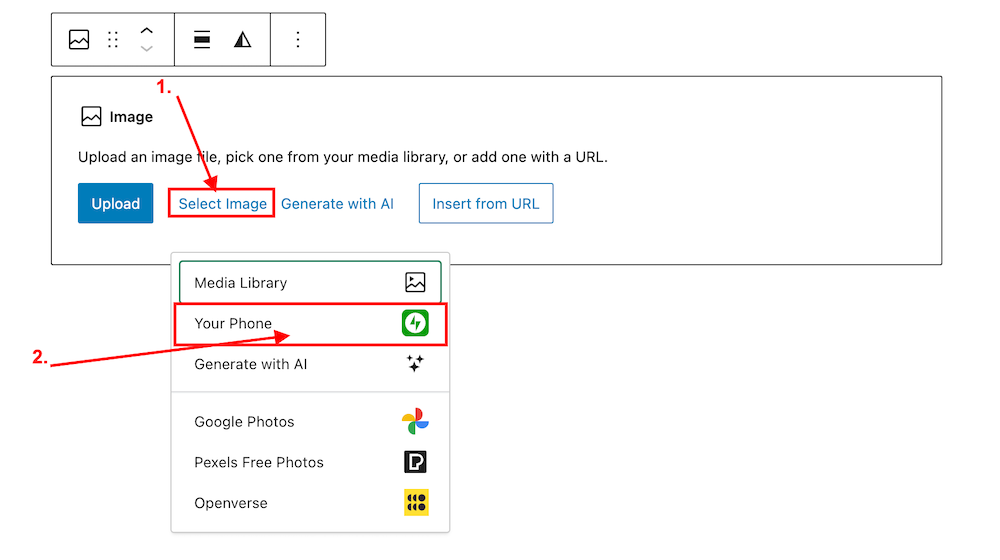
  1. Insert an ‘Image‘ or ‘Gallery‘ Block on your post/page. 
  2. Click ‘Select Image.‘ 
  3. From the dropdown menu, select ‘Your Phone.’ A message will pop up on your phone with a QR code.
Image highlighting the 'Select Image' and 'Your Phone' links on an Image block on WordPress
Click ‘Select Image’ and ‘Your Phone.’
Image showing the QR code that pops up on WordPress when selecting 'Your Phone' when selecting an image or photo.
Scan the QR code.

4. Use your phone’s camera to scan the QR code. This will automatically open the Jetpack app on your phone and then your photo library. 

5. Choose the image(s) you want to use: From there, simply click the image or images you wish to add to your post/page.

6. Click ‘Add‘ (top right corner): Watch your image(s) automatically appear in your desktop/laptop editor. Here’s one I added directly from my phone.

img_0529-1

Can I adjust the size of images in the Jetpack app?

Yes. This is important to do to prevent images from taking up too much storage space in your blog’s media library. By default, the “Optimise Images” option is turned on. You can set the ‘Max Image Upload Size‘ so the original file is resized automatically when you upload it.

Here’s how to do it:

In the Jetpack app for iPhone and the Jetpack app for Android, to adjust the settings, follow these steps:

  1. Log into the Jetpack app on your phone.
  2. Click your profile icon in the bottom right.
  3. Click ‘App Settings‘.

You can toggle ‘Optimize Images‘ off (not recommended) or adjust the ‘Max Image Upload Size‘. The default is 2000 x 2000px.

img_0527-1

As you can see from the above image, I’ve set the maximum image upload size to 1000 x 1000px. I recommend not going any higher than this.

Is there anything to remember when uploading images directly from your phone?

Yes. If you add copyright information to images and photos on your computer or laptop (something I recommend you do), remember to add copyright information to your images and photos on your phone before you add them to your blog posts.

Remember to also complete the ‘Alt-Text‘ and ‘Description‘ details of the images in your blog’s media library. My blog post ‘Adding Images Or Photos To Your Blog Posts? 4 Essential Things To Do,’ gives full details as to why this information should always be completed.

Would you use this method for adding photos and images to your blog posts? If you have questions, please leave me a comment.

Layout, content, settings, and format might differ on self-hosted blogs.

Click the buttons below to follow Hugh on Social Media

Copyright @ 2024 hughsviewsandnews.com – All rights reserved.
WordPress: How To Close Comments: What You Need To Know

WordPress has managed to do it once more! It’s relocated a setting I frequently use, seemingly without informing anyone about it.

Light blue image with the words 'WordPress: How To Close Comments: What You Need To Know' in white text.
Turning comments off is simple to do. But WordPress has moved the settings!

During a recent post-drafting session, I attempted to disable comments on a post. I encountered difficulty locating the ‘Discussion‘ setting, which is the usual place for enabling or disabling comments on individual posts.

Why turn comments off?

I consistently close comments whenever I share another blogger’s post or a guest post I’ve written on another blog. This strategy ensures that new comments appear on the original post, consolidating the discussion in one place rather than being split between two posts. Kinda makes sense, doesn’t it?

Some bloggers also choose to close comments on older posts as a proactive measure. This practice became popular when WordPress faced a significant spam issue. Specific posts received hundreds of spam comments daily, making it challenging for bloggers to sift through the spam in their WordPress folders to find authentic comments that can sometimes end up there.

The installation of the updated Askimet anti-spam software in 2023 has led to a significant improvement in the spam situation. Thanks to Askimet’s enhanced functionality, the previously prevalent issue of hundreds of visible spam comments daily has been effectively curtailed to just a few a week. Consequently, there is no longer a necessity to close comments on these posts.

Where has the ‘Discussion’ setting gone?

The ‘Discussion’ setting used to be located at the bottom of the settings box of a post.

Image highlighting where on WordPress the 'Discussion' setting used to be.
The ‘Discussion’ setting used to sit under ‘Tags.’

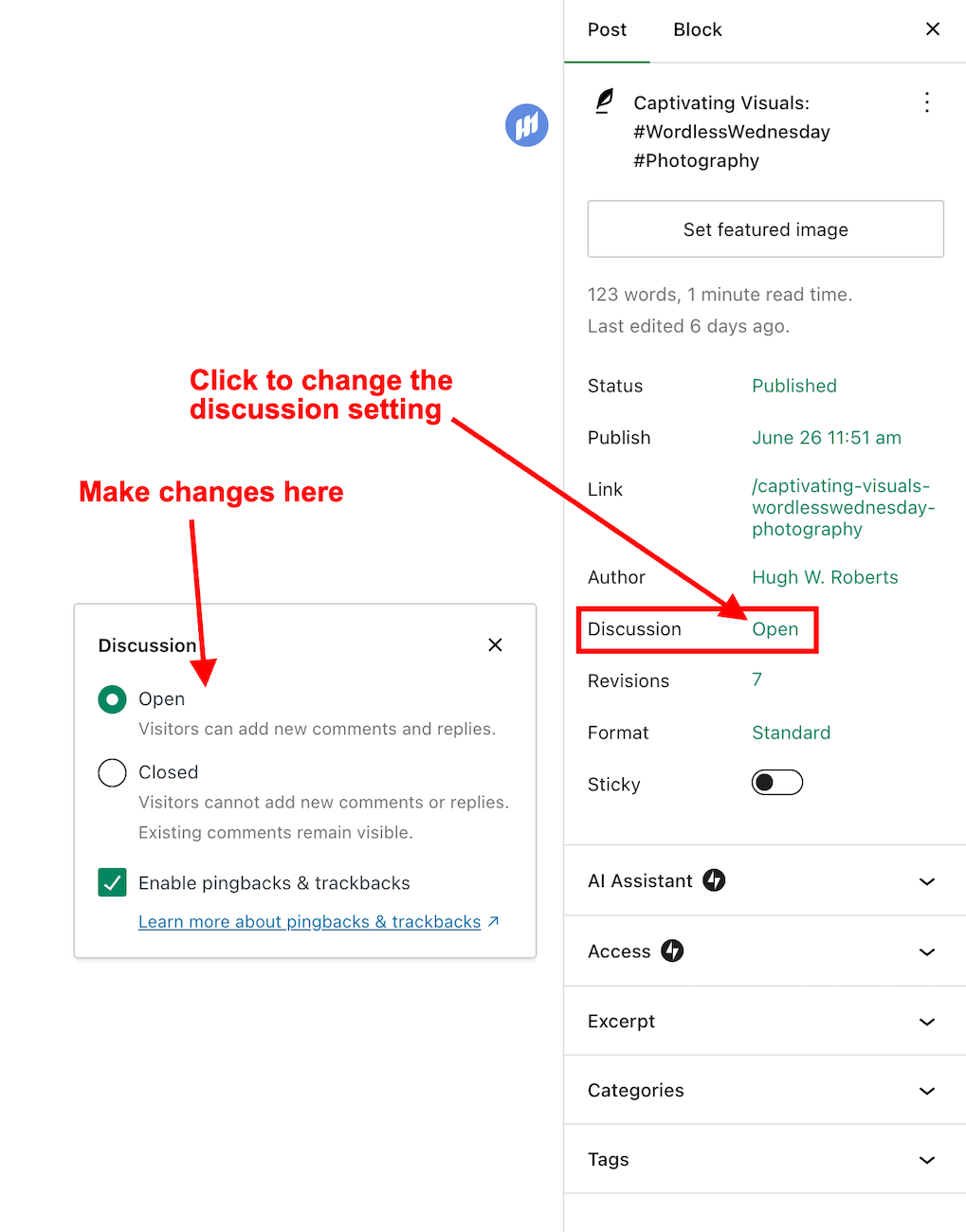
Now, the discussion setting has been conveniently relocated to a more prominent position at the top of the post settings panel rather than at the bottom. This new placement, coupled with the clear indication of whether comments on a post are open or closed, significantly enhances the ease and user-friendliness of managing comments and pingbacks.

Changing the discussion setting is straightforward. Click on ‘open‘ or ‘closed‘ to make the change.

Image highlighting where a WordPress post's 'Discussion' setting is now located.
The ‘Discussion’ setting is now further up the ‘draft post’ section of a post.

This simple, user-friendly system also allows you to control comments, pingbacks, and trackbacks.

Image highlighting where to enable or switch off pingbacks and trackbacks on a WordPress post.
This is where to turn on or switch off pingbacks on your WordPress posts.

Pingbacks and trackbacks are methods for alerting other blogs that you have linked to them. However, they only work when the blog you’re linking to has enabled pingbacks and trackbacks and you do not link to a blog’s home page. My post, ‘The Power Of Pingbacks: How To Create One‘, has more details.

Do you disable comments on posts? If so, which posts? Do you have any questions about the ‘Discussion’ setting on WordPress? Please leave them in the comments box.

Layout, content, settings, and format might differ on self-hosted blogs.

Click the buttons below to follow Hugh on Social Media

Copyright @ 2024 hughsviewsandnews.com – All rights reserved.

Did You Miss Any Of These? Monthly Round-Up – June 2024

Did you check out these nine blog posts that got everyone talking and wondering? If you haven’t joined the conversation yet, why not jump in and let us know what you think!

  • Categorising and tagging your blog posts correctly is one of the most powerful way of getting your blog posts noticed. My post will show you how to add categories and tag words correctly, resulting in more visitors to your blog.

How To Make Categorising And Tagging Blog Posts Powerful

  • Do you enjoy home baking? What do you bake?

Homemade: What Would You Serve With This Pie? #WordlessWednesday #Photography

  • A man deeply connected to the city loses his job and believes the city needs change. This culminates in drastic action. Can he save the city?

Flash Fiction – Life And Death In The City

  • Do you own any strange works of art?

Strange Works Of Art #WordlessWednesday #Photography

  • How do you engage with your readers and other bloggers? Are you taking full advantage of the comments you leave?

Blogging Simplified: Engagement. Am I Doing It Right?

  • A difficult choice of lip colour, comfortable purple shoes, a new green dress, and nostalgic gold nail varnish set the stage for an unexpected encounter.

Flash Fiction – Colours Behind The Mask

  • Question: Do you prefer sunrises or sunsets? Why?

Summer Solstice #WordlessWednesday #Photography

  • The first Gay Pride march in London in 1972 marked a pivotal moment in LGBTQ+ history, paving the way for rights and acceptance. Pride events continue to celebrate progress and advocate for equality, but have changed considerably over the years. Have you ever attended a pride event? Share your Pride stories here.

True Stories: Confessions Of A Gay Man – Pride

  • Question: Do you enjoy a daily walk? If so, where do you usually walk?

Captivating Visuals: #WordlessWednesday #Photography

Comments are closed here. Please leave any new comments on the original posts.

Image of a desktop computer and camera with the words 'Monthly Round-up - June 2024.'
Did you miss any of these blog posts?

Follow Hugh On Social Media.

If you enjoyed this post and want more like it, enter your email address and click ‘Subscribe’ to stay up-to-date with my latest content.

Copyright @ 2024 hughsviewsandnews.com – All rights reserved.
Blogging Simplified: Engagement. Am I Doing It Right?

Imagine having a blog where nobody wants to engage. It’s a thought that’s hard to fathom. After all, what’s the point of writing and publishing blog posts if there’s no one to interact with?

Light blue image with the words 'Blogging Simplified: Engagement. Am I Doing It Right?' in white text
How do you engage with your readers and other bloggers?

As bloggers, we can spark curiosity and questions in our readers, even when publishing informative posts. And that’s where the actual engagement begins. It’s our responsibility to set the stage for meaningful interactions. One way to do this is by asking open-ended questions at the end of your posts or inviting readers to share their thoughts or experiences related to the post’s topic. It can encourage more in-depth and meaningful discussions.

Those bloggers who blog to make money will only care a little about the interaction. For them, making a living out of blogging is more important. Good for them if they are successful, but take your readers seriously, especially if they want to engage with you. Consider removing the comments section from your blog if you’re going to refrain from engaging or responding to questions.

What’s the right way to engage with readers? Is there a right way?

I’ve always craved engagement, but over the ten years I’ve been blogging, the type of engagement I crave has changed.

I’ve become more of a ‘discussion’ blogger. By that, I mean a blogger who likes to discuss the subject of a post rather than just leaving a comment that only confirms I visited. It’s about sparking a conversation, sharing different perspectives, and learning from each other. This type of engagement is more valuable than a simple ‘I agree’ comment, as it adds depth and richness to the post’s content.

Over the past year, I’ve made a conscious effort to reduce the number of non-engaging comments on my blog, a decision I’m proud of. I’ve aimed to break free from the cycle of leaving comments solely to prove a visit or just for the sake of doing so.

This shift has decreased the overall number of comments I get but has made me feel like a more thoughtful and influential blogger. It’s not about the number of comments but the quality of the interactions. This change has helped my personal growth in writing and blogging.

Should we always try to engage? No!

Of course, just because I don’t leave a comment on a blog post does not mean I’ve not read it. Likewise, I know many people read my posts but want to avoid engaging. There’s nothing wrong with that. These silent readers are still part of the blogging community; their support is as important as active engagement. So, let’s recognise their presence and continue to create content that resonates with them.

If you’re new to blogging, leaving an engaging comment every once in a while is far more beneficial than leaving short, non-engaging comments on every post you read in an attempt to get noticed.

Are you approving spam comments without realising it?

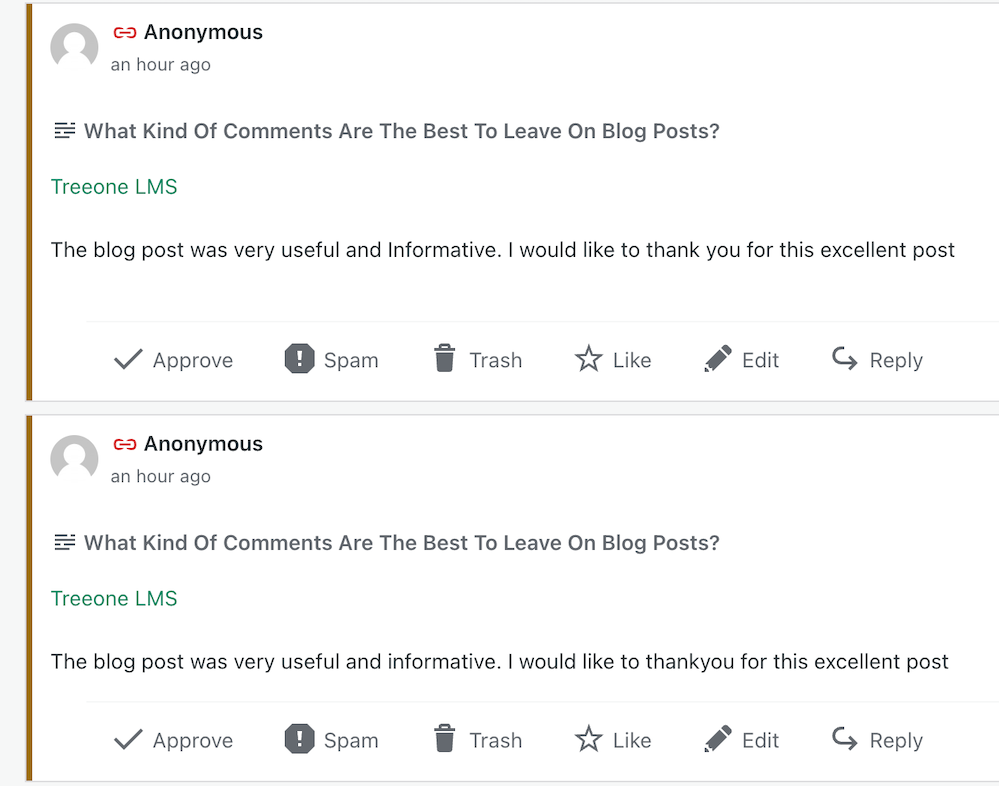
Imagine my concern when I came across this comments section on a recently read post.

Image showing three spam comments in the comments section of a blog post
Never approve these types of comments

I was appalled to see these comments and could not understand why they’d been approved. Given that the blog’s posts would probably be full of these types of comments, I also decided not to follow it.

Spam comments not only detract from the quality of a blog but also discourage meaningful interactions. Let’s keep the blogging community free from such spam and focus on producing meaningful engagement. Your thoughts and ideas are too valuable to be drowned out by spam.

Other examples of spam comments.

Image showing spam comments on a WordPress blog

Some may look genuine, but they’re not. Spammers and spambots are getting cleverer at fooling us into approving their comments, so beware.

Thank you

I want to express my deep appreciation to all of you who support and interact with me here. Your engagement is not just a number on a screen but a vibrant testament to the joys and value of blogging. I especially want to acknowledge those who actively interact with me, as your contributions are the lifeblood of my blog.

Remember, it’s not just about the numbers but the profound connections we build through interactions. For instance, when a reader shares a personal experience related to a blog post or when we engage in a thoughtful debate about a controversial topic, these are the types of interactions that genuinely enrich the blogging community.

Let’s wrap it up.

This post delves into the importance of engaging with readers and other bloggers, offering insightful strategies to spark meaningful interactions.

Avoid leaving short, non-engaging comments on all the posts you read. Instead, leave a thoughtful comment every now and again.

Don’t leave a comment just to leave a comment or prove you’ve visited.

Never feel obligated to comment because they always comment on your posts.

There’s nothing wrong with not wanting to engage. Some readers are more comfortable reading a post without saying anything.

Take your readers seriously by responding to or acknowledging their comments.

Never approve spam comments. Mark them as spam and delete them.

Consider closing comments off if you do not want to engage with your readers or respond to any questions.

If you crave engagement, ask open-ended questions at the end of your posts or invite readers to share details of their experiences with the subject you’ve discussed in the post.

Do you enjoy engaging with your readers and other bloggers? What type of commenter are you? How do you deal with spam comments and the spammers? Share your knowledge and ideas in the comments section.

Click the buttons below to follow Hugh on Social Media

Copyright @ 2024 hughsviewsandnews.com – All rights reserved.

How To Make Categorising And Tagging Blog Posts Powerful

Categorising and tagging blog posts are some of the most potent ways for bloggers to get their posts noticed. However, some bloggers don’t bother with either, meaning they’re losing the potential for new readers and followers. Are you one of them?

But what are categories and tags, and how do they work?

Light blue image with the words 'How To Make Categorising And Tagging Blog Posts Powerful' in white text
Do you categorise and add tags to all your blog posts?

What are blogging categories?

Blogging categories act like groups where blog posts that have a connection with each other are stored.

For example, if you’re a travel blogger, you could have The United Kingdom category and list the sub-categories Scotland, Wales, England, and Northern Ireland

Categories are important because they make finding specific blog posts more straightforward for visitors to your blog (especially first-time visitors).

Every blog post should have at least one category.

Unfortunately, if you don’t categorise blog posts, they will be uncategorised, which is no help to anyone.

Imagine going into a shop to find a particular book about dinosaurs and finding that none of the books has been categorised. You’d leave and go to another shop that helps customers by categorising its books to find what you’re looking for much easier.

I never return to blogs that do not categorise posts.

How to add a category to your WordPress blog post

This tutorial uses an Apple iMac desktop computer and the WordPress ‘Default’ dashboard.

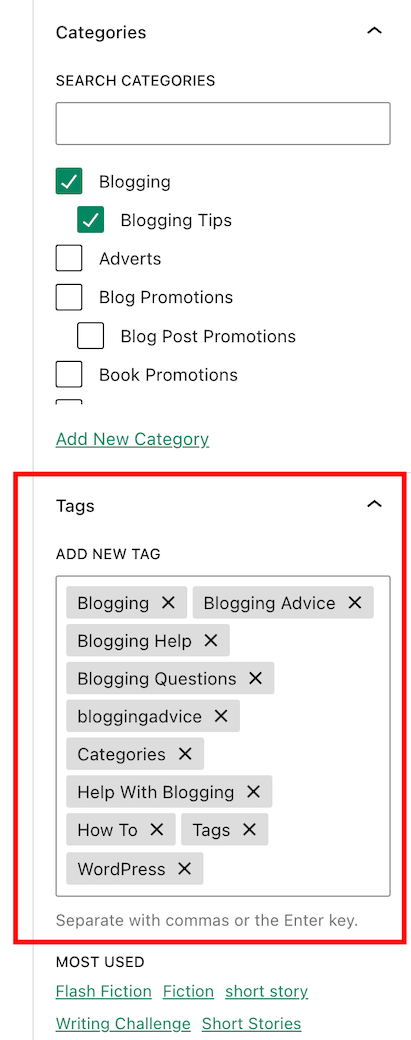
  • While drafting a blog post, you’ll see a toolbar in the settings area on the right-hand side of the page. This is where you can add categories.
Image highlighting where to find the category box on the draft page of a WordPress blog
Every blog post should have at least one category.

If a blog post doesn’t fit into one of your existing categories, click ‘Add New Category‘ and create a new one.

Remember to do some housekeeping regularly for the categories on your blog. For example, delete categories that are no longer being used or update categories by giving them a new name if something works better. 

How to edit the categories on your blog.

  • On your blog’s dashboard, click on Posts to open a submenu, and click on Categories.
Image highlighting where to find Categories on the dashboard of a WordPress blog.
Click Posts and Categories.
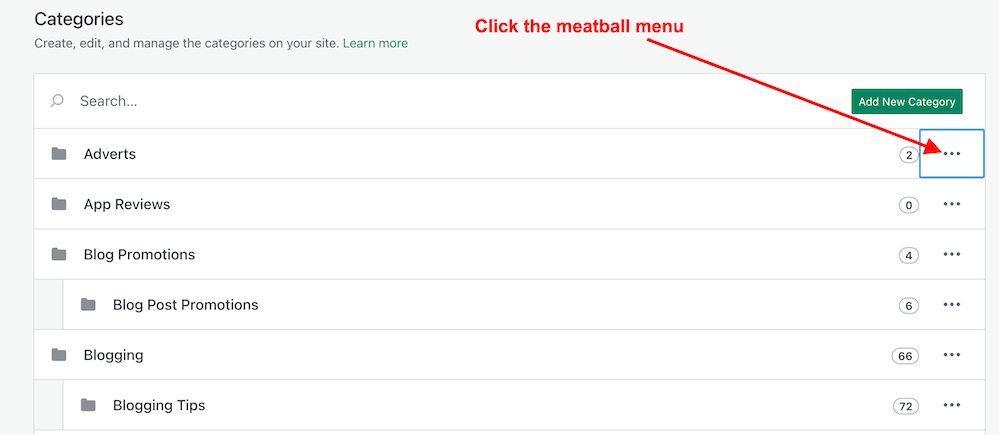
  • To edit a category, click the three verticle dots (meatball menu) next to the category you want to edit.
Image highlighting the meatball menu in Categories on a WordPress blog.
Click the meatball menu to edit a category.
  • The meatball menu displays four options: edit, delete, view posts, and set as a default.
  • Edit – Edit the name or description of the category.
  • Delete – Delete the category.
  • View posts – View a list of all your posts under the category.
  • Set as default – Useful when most posts fall under a particular category.
  • Remember to click the ‘Update‘ button to save any changes you make.

The number next to each category tells you how many posts are under that category. I recommend deleting any categories that are not being used.

Any sub-categories will show under each category.   

Tip: Setting your default category to ‘Uncatorigised‘ allows you to search for any blog posts you may have forgotten to categorise.

What are tags?

Tags are popular keywords that can be added to a blog post. For example, some of the tag words I’ve added to this post are –

  • blogging
  • bloggingtips
  • categories
  • tags
  • WordPress
  • HowTo

Each tag should be separated with a comma or by pushing ‘Enter’ on your keyboard.

Tags containing more than one word (such as ‘Blogging tips’) act as one tag word, but you must add them without any space between the words, i.e., ‘ blogging tips’ becomes ‘bloggingtips.’

Generally, tags do not need to connect with each other, but when used correctly, they can generate a lot of extra traffic to a blog post.

Like categories, tags can be added to blog posts in the settings area toolbar on the right side of a draft post. 

Image highlighting where to add tags on a WordPress blog post
Always add keywords (Tags) to your blog posts.

When adding tags to your post, consider the keywords somebody would add to the WordPress search bar when looking for specific blog posts. Or think of words you would use to search for your post.

Check out the tags I’ve added for this blog post. They appear at the end of every post.  

Important information – Did you know this…?

The cardinal tagging rule on WordPress.com is that you should never add more than 15 tags and categories (combined) to your post; otherwise, it won’t appear in the WordPress Reader. This cap prevents spam posts from appearing on the reader list, as spammers and spambots tend to use many categories and tags to lure readers in

15 tags and categories can seem like a lot, but you don’t need to use all of them.

Never tag your blog post with words that have nothing to do with the post’s subject. Otherwise, visitors will come to your blog under false pretences and probably won’t return.

Generally, I add no more than three categories and between six and ten tags to my blog posts. 

As with categories, it’s also essential to do some housekeeping for the tags you use on your blog. 

How to delete and update tags

  • On the dashboard of your blog, click on Posts – Tags.
  • A page showing your tags and how many blog posts containing each tag appears.
  • To edit, view and delete posts containing a tag word, hover your mouse over each tag word and click edit, quick edit, view or delete.
  • You can also view the posts containing the tag word by clicking the number in the ‘Count’ column. I recommend deleting any tag words that are no longer being used.

Let’s wrap it up!

  • All blog posts should be categorised and tagged.
  • Categorising and tagging your blog posts makes them user-friendly, meaning people will likely return to your blog.
  • Not categorising your blog posts means they’ll be challenging to find.
  • When tagging posts, think of keywords others will use when searching for your blog post.
  • Don’t use tag words that have nothing to do with the subject of your blog post.
  • WordPress users – never add more than 15 tags and categories (combined) to your posts; otherwise, they won’t appear on the WordPress Reader.
  • Remember to perform regular housekeeping of categories and tags on your blog.
  • Adding the proper tags to your blog posts will increase the number of readers who find them. More readers mean higher stats, more comments, and new followers.

Do you categorise and add tags to all your blog posts? If not, why not? Which tags-words work best for you? Is there anything you’d like to add or ask regarding categories and tags in blog posts? Join the discussion by leaving a comment.


Did you enjoy reading this post? Then you may also like…

Layout, content, settings, and format might differ on self-hosted blogs.

Follow Hugh on social media. Click the buttons below.

Copyright @ 2024 hughsviewsandnews.com – All rights reserved.

Did You Miss Any Of These? Monthly Round-Up – May 2024

Did you see these 9 blog posts that got people talking, discussing, and wondering? Maybe you joined the conversation, but if not, jump in and let us know what you think!

  • Do you have a favourite place to eat?

Would You Eat Here? #WordlessWednesday #Photography

  • Do you like talking about blogging? I do, and I’ve lots to say about it. What about you?

Blogging Simplified: It’s Easy, Isn’t It? Things I’ve Learned

  • Are you in this photo? If so, let me know in the comments. If not, have you ever met a group of bloggers?

What Do You Call A Group Of Bloggers? #WordlessWednesday #Photography

  • Where’s your favourite place to daydream?

Flash Fiction – Life On The Edge Of Dreams

  • Can you guess which famous writer used to live in the house in this photo?

Which Famous Writer Lived Here? #WordlessWednesday #Photography

  • I’m terrified of water. But the swimming instructor had other ideas.

Flash Fiction – Swimming Lessons

  • Can you guess how old my antique vase is and how much it’s worth?

Antiques: Do You Own Any? #WordlessWednesday #Photography

  • Three contrasting nights out reveal the challenges and joys of a gay man’s life. Incidents highlight the struggle for acceptance as well as a changing societal attitude towards the LGBT community in the 1980s and 1990s. You may laugh, you may cry, but these three true stories about gay nightlife are very different.

True Stories: Confessions Of A Gay Man – Nightlife

  • Savoury or sweet? What’s your preference?

Do You Have A Sweet Tooth? #WordlessWednesday #Photography

Comments are closed here. Please leave any new comments on the original posts.

Image of a desktop computer and camera with the words 'Monthly Round-up - May 2024.'
Your change to catch up on blog posts from Hugh’s Views And News

Follow Hugh On Social Media.

If you enjoyed this post and want more like it, enter your email address and click ‘Subscribe’ to stay up-to-date with my latest content.

Copyright @ 2024 hughsviewsandnews.com – All rights reserved.

Blogging Simplified: It’s Easy, Isn’t It? Things I’ve Learned

How obsessed are you with your blog stats and blogging? And what essential points have you learned about blogging?

Light blue image with the words 'Blogging Simplified: It's Easy, Isn't It? Things I've Learned' in white text
How obsessed are you with your blog?

When I first started blogging in 2014, I was obsessed with my blog stats. I checked them almost hourly to see if anybody had visited my blog. We all know that wonderful feeling when somebody clicks the ‘like’ button, or better still, when somebody leaves a comment on one of our posts for the first time.

It didn’t matter what that comment said. Even if it was, ‘Great post,’ it made my day. How times have changed!

Taking the advice of other bloggers

When another more experienced blogger and somebody who had been blogging much longer than me told me that most of the hits my posts were getting were probably from people who didn’t stay more than a few seconds on my blog, my whole blogging world began caving in.

Even worse, that blogger told me that many of those who hit the ‘like’ button probably didn’t even read the post. What?

I was so deflated that I thought, ‘Why bother?’ It wasn’t until another blogger told me to stop obsessing over my blog stats and to put the energy of stat-watching into writing blog posts that I took that advice.

More trouble

A few months later, I found myself in trouble again. ‘Concentrate on the comments rather than how many people have visited your blog or how many have hit the ‘like’ button,’ another blogger told me. ‘Most importantly, don’t forget to visit, read and leave engaging comments on other blogs.’

But I took that last bit of information to heart and soon found myself spending all my blogging time reading and leaving engaging comments instead of writing posts. I was following over 500 blogs and I believed I had to read and comment on every single post.

Blogging guilt and stress crept up on me, and I thought I’d upset people if I didn’t read their posts and leave them comments, or, even worse, people would unfollow me if I stopped reading and leaving comments on their posts. After all, they were reading and commenting on all my posts.

Once again, I found myself on the edge of packing in blogging. I was going to delete my blog and find something else to do that was more fun and enjoyable.

How do you find the right blogging balance?

Thankfully, I never deleted my blog, but I know of bloggers who have done so, some of whom came back and started afresh. Unfortunately, it doesn’t always work out, and some of these bloggers went on to abandon their blogs for the same reasons they left blogging in the first place.

Finding a balance between writing blog posts and reading and commenting on other blogs can be a significant task. Thankfully, I found it.

I know some bloggers who balance blogging by reading as many posts as possible in as short a time as possible. They’ll often leave short, non-engaging comments on all those posts. It works for them, but not for me, but good for them if that’s what works.

What works for some won’t work for others.

Then there are the bloggers who reduce the number of blogs they follow without worrying that they’ll probably lose followers in the process (and they will), giving them more time to write. Good for them.

Why do bloggers suddenly stop leaving comments?

I’ve lost followers because I cut down on the number of blogs I followed. Now, I’m following around 75 blogs, all of which I’m interested in. That gives me more time to write, more time to read and more time to leave engaging comments on the blogs I follow.

I no longer get comments from people who always used to leave me comments, however, the fall in non-engaging comments is something I’m delighted with.

Some bloggers seem to have disappeared from the blogging world while others are still around, but have lost interest in what I have to say or no longer have anything interesting to add in a comment. But there’s nothing wrong with that. It’s not worth worrying about.

Are you more of an engaging or non-engaging blogger?

Someone once told me that a non-engaging comment indicates that the person who left it does not want to engage with you (or anybody else). This is usually because they’ll say they don’t have the time to engage. All they want to do is say, ‘Hello, I visited,’ before moving on quickly. They may not have even read the post.

And then there are the bloggers who leave comments like ‘Subscribe to my blog!’ or ‘Nice’ without saying anything else. Do they want to engage, or are they simply number/follower-hunting? I often wonder how would they react if I left them an engaging comment on one of their posts.

Of course, blogging isn’t only about engagement. Many people blog just to express their thoughts online. Some bloggers do not respond to comments. Some bloggers simply thank people for leaving a comment without engaging with them, even if the comment they’re responding to shouts, ‘I want to engage with you!’ thus taking the person who wants to engage down a dead-end.

Many bloggers want to engage, yet I’ve heard from some bloggers who say the comments section of blogs is a waste of time and should be removed. I don’t agree with that, but if a blogger does not want to engage then there is the option to turn off comments.

How often should you blog?

I’ve learned the only answer to this question is – ‘blog as often as you like without feeling obliged to publish something.’

It took me a while to find that I’m happier publishing two or three posts weekly. Any more than that, and I find I’m forcing myself to write posts, which makes blogging less enjoyable. Sometimes, I may only publish once a week.

I do not want to get myself feeling stressed because I haven’t got a post ready, so my advice is not to blog to any schedule of when you’re going to publish posts. If readers are interested in what you write and publish, they’ll read your posts regardless of how often or when you publish and sometimes that could mean days, weeks or even months after the publication of a post, so don’t close comments off to force your audience to read your posts within a particular time-frame. Blogging should always be a leisurely activity.

I also witnessed a drop in the quality of the posts I publish when publishing more than a few times a week. For me, quality is much more important than quantity, but it may not be the same for you.

I also tend to stay clear of blogs that publish more than once daily as they tend to bring an overwhelming feeling that I don’t like. Once again, it’s about finding the perfect balance that works best for you.

Blogging! It’s a fascinating subject, isn’t it? I could go on, but it’s now over to you. Can we discuss blogging honestly without fearing upsetting other people? What do you think? Let me know in the comments section. Let’s discuss blogging.

Did you enjoy this post? Then you may also like –

Follow Hugh on social media. Click the buttons below.

Copyright @ 2024 hughsviewsandnews.com – All rights reserved.

Did You Miss Any Of These? Monthly Round-Up – April 2024

Did you catch these 9 blog posts that got everyone talking, discussing, and wondering? Maybe you were part of the conversation, but if not, jump in and share your thoughts!

  • Have weddings changed much over the years?

What Is The Best Time Of The Year For A Wedding? #WordlessWednesday #Photography

  • What can you see in the blink of an eye? You may be surprised.

Flash Fiction – In The Blink Of An Eye

  • Are you making use of your old blog posts? My three quick and easy tips to bring old blog posts alive again are easy to follow and will deliver results.

3 Quick And Easy Ways To Promote Your Old Blog Posts

  • Two window views, but which one do you prefer?

Which Window View Do You Prefer? #WordlessWednesday #Photography

  • This new WordPress dashboard feature includes settings like privacy, site tools, and domain management for your blog. My post tells you where to find it and how to use it.

How To Use This New Easy Feature For Your Blog’s Settings On WordPress.

  • A standing ovation and a round of applause, but can you guess who’s on stage?

When Was The Last Time You Gave A Standing Ovation And A Round Of Applause? #WordlessWednesday #Photography

  • Pick a door, any door, and tell me which one you like the most and why.

Beach Huts #ThursdayDoors #Photography

  • Do you have a favourite view of planet Earth?

What’s Your Favourite View Of Planet Earth? #WordlessWednesday #Photography

  • Where would we be without friends in our lives? We all need them, don’t we? As a gay man, I’ve had my fair share of both male and female friends over the years, but some of those friendships were not what I thought the true meaning of friendship was all about. Meet Tasmin, Neville and Janet. Which one would you like to be friends with?

True Stories: Confessions Of A Gay Man – Friends

Comments are closed here. Please leave any new comments on the original posts.

Image of a desktop computer and camera with the words 'Did You Miss Any Of These? Monthly Round-Up - April 2024' in dark red text.
Did you miss any of these blog posts in April 2024?

Follow Hugh On Social Media.

If you enjoyed this post and want more like it, enter your email address and click ‘Subscribe’ to stay up-to-date with my latest content.

Copyright @ 2024 hughsviewsandnews.com – All rights reserved.