I don’t use the WordPress Reader nearly as much as I should.

I get email notifications when new blog posts are published by the bloggers I follow. This makes sense as I only follow around 55 blogs, most of which publish no more than a few times a week.

Am I missing out on not using the WordPress Reader? I think so, yes! But why?

Light blue image with the words 'Why Do You Use The WordPress Reader?' in white text.
Tell me why you use or don’t use the WordPress Reader.

One of the reasons I stopped using the WP Reader was that when I was following over 500 blogs, I felt like a hamster constantly running around a wheel in my endless battle to reach the top of the reader. I never reached the top, so I thought I was missing out!

However, I occasionally use the WordPress Reader to search for posts on subjects I enjoy reading. In my opinion, this is where the WordPress Reader is at its best!

For example, I recently entered the word ‘WordPress’ into the reader search bar and was presented with a long list of blog posts in which ‘WordPress’ had been used as a category or tag (this shows how important categorising and tagging your posts is).

But before I discuss some of the search results, let me first say that, unlike some bloggers who seem to think WordPress has deleted the ‘Reader,’ the WP Reader has moved.

Where is the WordPress Reader?

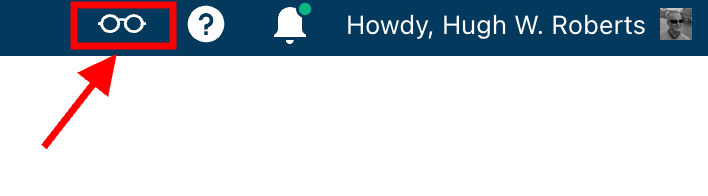
If you’re using a desktop computer, the WP Reader is now located in the top right corner of your blog. Look for the pair of spectacles icon.

Image highlighting the WordPress Reader icon and where to find it.
The WordPress Reader icon has changed and moved.

Click on it, and you’ll be taken to the WordPress Reader.

On mobile phones and tablets (using the Jetpack app), the WP Reader icon (spectacles) is located at the bottom of the screen.

What I found in the search results!

I was delighted to see some of my posts appear in the search results. However, I was more interested in the posts from blogs I don’t currently follow.

One of those posts that grabbed my attention was from Mitch, who blogs at The Power Of Story. Mitch’s post, ‘What’s Up WordPress?‘, was about the sudden ups and downs of his blog’s number of subscribers/followers. Indeed, I’ve noticed the same thing happening with my blog.

Image showing the ups and downs of subscriber/follower numbers on WordPress

My subscriber/follower stats have become like a fairground rollercoaster ride. Some days, I lose a lot of subscribers/followers, and then the numbers suddenly return, although not the same subscribers.

I did some digging and found that WordPress are now actively deleting spam blogs and blogs run by spambots. That’s a good thing, especially since I’ve been manually unsubscribing them for many months. WordPress is unsubscribing these blogs for me, although I will unsubscribe any I find myself.

Have you noticed your subscriber/follower numbers going on a rollercoaster ride recently?

Another post that grabbed my attention from the results page was from Kevin, who blogs at Chef Kevin Ashton. Kevin’s post, titled ‘The Thorny Issue Of WordPress Likes.’ touched on a subject I’ve often written about – the ‘like’ button!

Love it or hate it, the ‘like’ button is something just about every WordPress user and visitor will use. However, Kevin touched on the subject of ‘guilt’ by not using it, especially when he doesn’t have enough time to visit and read blogs.

I’ve been there, Kevin. Many bloggers feel guilty or stressed about not clicking ‘like’, visiting blogs that follow them, or leaving comments. Yet, in my opinion, nobody really cares that you can’t always visit their blog. I’ve discovered that leaving one engaging comment occasionally that shows you read the post is much more appreciated than leaving short, non-engaging comments just to prove you visited. However, you may not have read their post.

I’ve written many posts about blogging guilt and stress. In my last post on the subject, ‘Stressed Or Feeling Guilty About Blogging? Please Read This Post. Let’s Keep Blogging Fun,’ many readers spoke up about how bad they feel when they don’t have the time to read blogs, click ‘like,’ and leave comments, often resulting in blogging feeling like a chore rather than something that should be enjoyed.

Nobody should ever feel obliged to read posts, click the ‘like’ button or leave comments. Keep blogging fun.

How do you deal with blogging stress or guilt?

The happy and sad sides of blogging!

It was also lovely to see blog posts celebrating milestones on WordPress in the results. From celebrating 15 years of blogging on WordPress to publishing their 100th post and some folks being notified that their blogs had achieved half a million visits, these posts brought a smile to my face.

Of course, posts complaining about how bad WordPress is and the problems bloggers are having also appeared in the results. Although I only read a few, most of the reported issues were related to WordPress’s changes, and the author often confirmed in the comments section that the issue(s) had now been resolved.

Personally, I’m pleased that WordPress does make changes. If they left things alone, the platform would quickly become outdated and dull, as would all our blogs. WordPress would lose many paying customers, and we’d all lose our blogs if they went out of business. I used to hate change but learned that adapting to it is much less stressful than fighting it

Are you encountering any issues with WordPress? My recent post, ‘WordPress Problems: Don’t Panic! How To Solve Issues Quickly,’ may be of some help.

Are your blog posts appearing on the WordPress Reader?

I always check that my blog posts appear in the WordPress reader. To do this, I follow my blog and check the reader immediately after publishing a post. If it’s not there, I know there’s a problem.

There are several reasons why your posts may not appear in the WordPress Reader. The main reason is that you add too many categories and tags to a post. WordPress allows up to 15 categories and tags combined. Your post could be marked as spam and won’t appear if you add more, so ensure you do not add more than 15 tags and categories (combined).

There may also be technical reasons why your posts don’t show in the reader. If you don’t see your posts, contact WordPress. They’ll be able to help.

That’s it for today. I’ll share other interesting posts when I do more searches on the WordPress Reader.

Why Do You Use The WordPress Reader?

Did you enjoy reading this post? Then you may also like…

Colorful illustration highlighting essential blogging tips for success

WordPress: How To Close Comments: What You Need To Know

WordPress has relocated the ‘Discussion’ setting to a more visible and accessible position, simplifying the control of comments and pingbacks.

My post outlines where to find the ‘discussion setting’ and when you should consider turning comments off on specific posts.

Keep reading

Layout, content, settings, and format might differ on self-hosted blogs.

Click the buttons below to follow Hugh on Social Media

Copyright @ 2024 hughsviewsandnews.com – All rights reserved.


Discover more from Hugh’s Views & News  

Subscribe to get the latest posts sent to your email.

91 responses to “Why Do You Use The WordPress Reader? This Is Why You Should Use It.”

  1. Danny Watts avatar

    WP is autosubscribing spam followers, I love t and it explains some of the craziness with subscribers I was seeing. Thanks for the update Hugh.

    1. Hugh W. Roberts avatar

      You’re welcome, Danny. Glad this post helped.

  2. Paul Ariss avatar
    Paul Ariss

    I had no idea I could follow my own blog to check if it is loading up properly, but I’ve now subscribed. I presumed because I got responses all was fine, but as the responses tend to come from the same people I’m probably best to check. Thanks again Hugh.

    1. Hugh W. Roberts avatar

      And those people may be reading your posts from email notifications, Paul. Providing you’re not adding too many tags and categories to your posts, they should show up on the reader.

  3. Esther Chilton avatar

    I’ve had to cut back on the blogs I read. I think you’re so right – it’s easy to get sucked into reading more than you can cope with and then you just feel stressed and don’t enjoy it any more.

    1. Hugh W. Roberts avatar

      Exactly, Esther. There’s nothing wrong with not reading every blog post somebody publishes. Blogging should never become a chore or make us feel stressed. It’s all about the enjoyment.

  4. Terri Webster Schrandt avatar

    You’ve made a great case for using the Reader, Hugh. I echo what Liesbet wrote and you touched on, preferring to read from email notifications. BUT, I use the reader to search for certain challenges like Lens-Artists for example.

    Huge thanks for reminding us about too many tags/Categories! I didn’t realize that 16 combined is too much. I tend to keep my tags to 12, with Categories to 3. I see a lot of unnecessary tags on some posts, which may explain why they may have fewer readers. Also good to know the spambots are working hard.

    Thanks again for the useful info! Have a great week!

    1. Hugh W. Roberts avatar

      I don’t mind email notifications of new posts, especially from the bloggers who only publish a few times a week, Terri. I don’t feel so overwhelmed. Where I follow blogs that publish more than once a day (and there are very few I follow), I get an email once a week with all their posts. I can then pick and choose which ones to read.

      Some bloggers add way too many tags and categories, and I especially dislike coming across a post that has a certain keyword tagged to it and finding that the post has nothing to do with that keyword. ‘Blogging’ is one such keyword that I think gets overused. I won’t follow blogs that get you there under false pretences.

      Glad this post has helped.

  5. Cathy avatar

    I do use the reader. It’s easy to scroll down, especially since I deleted blogs I don’t want to follow. But now I seem to be having an issue where I keep having to sign when I want to comment and even when I do sign in I keep getting the message so often I go back the reader to comment.

    1. Hugh W. Roberts avatar

      I heard about the ‘comment’ problem, Cathy. From what I know, it seems to be connected to certain browsers. Have you tried using a different browser when using WordPress? That may help. I use the Chrome browser, and whenever I get that message (which isn’t very often), I clear the browser cookies and search history settings, which also seems to help. Another way to find out is to try using another device to comment (if you have one). I use a desktop iMac, and when I get the comments message, I’ve tried using my iPhone to comment, and it always seems to work.

      1. Cathy avatar

        It’s just on certain blogs, Hugh. Even when I’ve signed in and ticked the remember me box, it still asks for a sign in. Thanks for the tips though, I’ll give them a go.

        1. Alison avatar

          Have the same issue too!

          1. Hugh W. Roberts avatar

            I’m not sure if you saw this post, but it may help concerning the problems you’re having with leaving comments.

            WordPress Problems: Don’t Panic! How To Solve Issues Quickly

          2. Cathy avatar

            So frustrating, isn’t it.

  6. Kymber Hawke avatar

    I use the Reader, but feel like I’m on that hamster wheel, never reaching the top. I need to rethink things, I guess. Great article!

    1. Hugh W. Roberts avatar

      Yes, I certainly recommend rethinking the hamster wheel. Honestly, the only place it leads is to feeling overwhelmed, which is one reason why I cut back on the number of blogs I followed.

      1. Kymber Hawke avatar

        Yes, that’s exactly how I feel. Like no matter how much I read, I just can’t catch up.

        I will sort this out soon, thanks your article. :)

        1. Hugh W. Roberts avatar

          You’re welcome. I’m always delighted when my posts help.

  7. Alison avatar

    I always feel so much better after reading your posts Hugh. I should use the reader more instead of the notifications page. Going ton search WordPress now 😊

    1. Hugh W. Roberts avatar

      That’s great to hear, Alison. Happy hunting on the WordPress Reader. It’s a treasure trove, but beware of the rabbit holes.

  8. philosophy through photography avatar

    I regularly use the reader, since I follow less than 60 blogs and I find it an easy and faster way to read. However I am disappointed when I have to click the 2nd time, the link the blogger provides which takes us to their URL.
    Thank you, Hugh.

    1. Hugh W. Roberts avatar

      I understand why some bloggers want us to visit their blogs, especially as the reading experience can be much better than on the WP Reader. However, I guess it’s all down to preferences. I enjoy poking around somebodies blog, especially when looking for more of their posts and their ‘about’ page if I’m visiting for the first page.

      1. philosophy through photography avatar

        Thank you, Hugh, for sharing your thoughts.

  9. satyam rastogi avatar

    WordPress reader is great 👍 when you search for your interest blogs🌹🌹

    1. Hugh W. Roberts avatar

      Yes, as I’ve now discovered.

  10. Liesbet @ Roaming About avatar

    Good morning from Newburyport, Hugh!

    I don’t use the WordPress reader, because I don’t want to get sucked into more blog reading. I prefer the email notifications, as then I get new blogs of bloggers I like straight into my inbox and read them accordingly. I delete them when I’m really short on time or the topic doesn’t interest me. Or I save them for later and keep them in my inbox.

    I can see that the Reader comes in handy to look for certain stories or topics and I like your take on “change.” I hadn’t looked at it that way yet.

    1. Hugh W. Roberts avatar

      I prefer getting email notifications of new posts, too, Liesbet. And I won’t go higher than following 75 blogs. If I followed any more than 75, I know it would become somewhat overwhelming. Only so many hours a day can anyone read blog posts and comment.

      I read many comments and posts where people rant about changes on WordPress. I agree that not all changes may suit us individually, but that does not mean nobody likes them. I lead a much less stressful life, accepting and adapting to change rather than fighting it.

Feel free to leave a comment. Engagement helps keep blogs alive and forms community.

This site uses Akismet to reduce spam. Learn how your comment data is processed.

I’m Hugh

Welcome to my blog. I’m delighted to have you here. This is the place to discover tips on blogging and WordPress, flash fiction, photography, and more. I enjoy engaging with my readers, so please feel free to explore, join discussions, and contact me. I’m happy to assist! Find out more about me and my blog by clicking the ‘Meet Hugh’ button.

Let’s connect

Subscribe to Hugh’s Views And News

Latest Posts

Looking for your next quick read? Try my books

An image of book covers, book, tablet and mobile phone, for the book Glimpses.
An image for the book More Glimpses - showing a book cover, tablet and mobile phone.

Follow Hugh in the Fediverse

Hugh's Views & News  
Hugh's Views & News  
@hughsviewsandnews.com@hughsviewsandnews.com

WordPress & Blogging tips, flash fiction, photography and lots more!

314 posts
10 followers
A widget with the words 'Team Effort - Story Chat Digest - Where Authors Meet - Author'

Most Viewed Posts & Pages Over The Last 24 Hours

Recommend Blogs To Follow


Roaming About
A Life Less Ordinary

Second Wind Leisure Perspectives
Fun, Photography & Friends

Spo-Reflections
Spo-Reflections
To live is to battle with trolls in the vaults of heart and brain. To write; this is to sit in judgment over one's Self. Henrik Ibsen

Boomer Eco Crusader
Boomer Eco Crusader
Live Green | Declutter | Simplify Life

SONGS AND SCRIPTS AND DUNKING BISCUITS
Every day tales of a winging-it creative

Jacqueline Lambert
Jacqueline Lambert
Award-Winning Travel Humour Writer

Anne R. Allen’s Blog… with Ruth Harris
Writing about writing. Mostly.

Fancying France
The musings of a ‘femme d’un certain âge’ who divides her time between SW France and SE England

Marsha Ingrao         Always Write
Marsha Ingrao Always Write
Having fun blogging with friends

Curiosities, Castles and Coffee Shops
The musings of a curious mind

WrookieSchU
WrookieSchU
Live life 🙌🏼

WPcomMaven
WPcomMaven
Helping you make the most of your free WordPress.com website since 2011

Share Your Light
Share Your Light
You are a miracle – Let it happen

No Facilities
No Facilities
Random thoughts, life lessons, hopes and dreams

Esther Chilton
Writer, Tutor and Editor

Saying nothing in particular
Jan … JT Twissel

The Chicago Files
The Chicago Files
A Canadian Perspective on Living in the Windy City!

Thank you to all my visitors

489,099 hits

268,325 visitors

Scan the QR code to follow me on Bluesky

Copyright Protected Blog

COPYRIGHT ©2011-2031 Hugh’s Views And News BLOG – All Rights Reserved.

This work by Hugh W. Roberts, and/or Hugh’s Views And News blog, is licensed under a Creative Commons Attribution-Noncommercial-NoDerivatives 4.0 International License. Unauthorised use and/or duplication of this material (text and images) without express and written permission from this blog’s author and/or owner is strictly prohibited. If you want to use posts, excerpts, photos and links, you may contact me first. You must give full and clear credit to Hugh W. Roberts and Hugh’s Views And News dot com with links to the original content.