Do you draft blog posts on a desktop computer or laptop? If so, did you know you can now add photos to your post directly from your mobile phone? No more having to download photos to your computer or laptop.

Light blue image with the words 'Blogging Simplified: Adding Images From Your Phone To A WordPress Post' in white text
Now you can add images and photos directly from your phone to a WordPress post.

Here’s how to do it: 

Ensure you have the Jetpack app on your phone. If not, download it from the app store.

  1. Insert an ‘Image‘ or ‘Gallery‘ Block on your post/page. 
  2. Click ‘Select Image.‘ 
  3. From the dropdown menu, select ‘Your Phone.’ A message will pop up on your phone with a QR code.
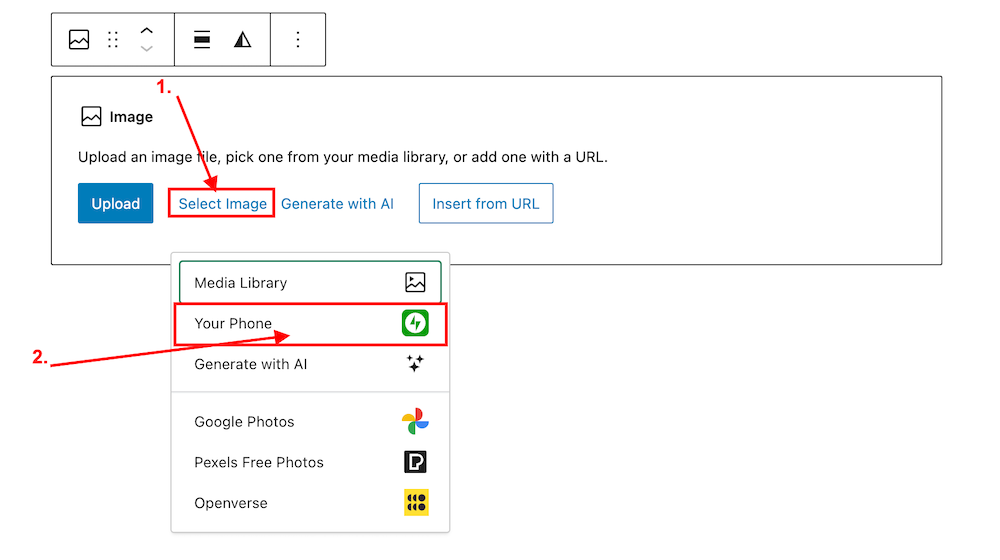
Image highlighting the 'Select Image' and 'Your Phone' links on an Image block on WordPress
Click ‘Select Image’ and ‘Your Phone.’
Image showing the QR code that pops up on WordPress when selecting 'Your Phone' when selecting an image or photo.
Scan the QR code.

4. Use your phone’s camera to scan the QR code. This will automatically open the Jetpack app on your phone and then your photo library. 

5. Choose the image(s) you want to use: From there, simply click the image or images you wish to add to your post/page.

6. Click ‘Add‘ (top right corner): Watch your image(s) automatically appear in your desktop/laptop editor. Here’s one I added directly from my phone.

img_0529-1

Can I adjust the size of images in the Jetpack app?

Yes. This is important to do to prevent images from taking up too much storage space in your blog’s media library. By default, the “Optimise Images” option is turned on. You can set the ‘Max Image Upload Size‘ so the original file is resized automatically when you upload it.

Here’s how to do it:

In the Jetpack app for iPhone and the Jetpack app for Android, to adjust the settings, follow these steps:

  1. Log into the Jetpack app on your phone.
  2. Click your profile icon in the bottom right.
  3. Click ‘App Settings‘.

You can toggle ‘Optimize Images‘ off (not recommended) or adjust the ‘Max Image Upload Size‘. The default is 2000 x 2000px.

img_0527-1

As you can see from the above image, I’ve set the maximum image upload size to 1000 x 1000px. I recommend not going any higher than this.

Is there anything to remember when uploading images directly from your phone?

Yes. If you add copyright information to images and photos on your computer or laptop (something I recommend you do), remember to add copyright information to your images and photos on your phone before you add them to your blog posts.

Remember to also complete the ‘Alt-Text‘ and ‘Description‘ details of the images in your blog’s media library. My blog post ‘Adding Images Or Photos To Your Blog Posts? 4 Essential Things To Do,’ gives full details as to why this information should always be completed.

Would you use this method for adding photos and images to your blog posts? If you have questions, please leave me a comment.

Layout, content, settings, and format might differ on self-hosted blogs.

Click the buttons below to follow Hugh on Social Media

Copyright @ 2024 hughsviewsandnews.com – All rights reserved.


Discover more from Hugh’s Views & News  

Subscribe to get the latest posts sent to your email.

42 responses to “Blogging Simplified: Adding Images From Your Phone To A WordPress Post”

  1. Did You Miss Any Of These? Monthly Round-Up - July 2024 avatar

    […] Blogging Simplified: Adding Images From Your Phone To A WordPress Post […]

  2. Dan Antion avatar

    Thanks for this post, Hugh. I’ve always avoided uploading directly from my phone because of the size. I didn’t know you could set a maximum upload size. That’s perfect!

    1. Hugh W. Roberts avatar

      I was delighted to hear there was an option to set a maximum size for photos, Dan. It would have been a shame if WordPress had not included it as part of this new feature.

  3. junedesilva avatar

    I did know about adding photos from your phone – very useful – but not how to optimise images, so thank you for another invaluable tip, Hugh!

    1. Hugh W. Roberts avatar

      You’re welcome. I’m glad the bit of optimising photos helped, June.

  4. seaangel4444 avatar

    Extremely helpful, Hugh! Thank you so much for sharing this with us! Defo a “I learned something new” moment for me! Cher xoxoxo

    1. Hugh W. Roberts avatar

      I love those ‘learning something new’ days, Cher. And in the blogging world, I’m learning something new every day.

      1. seaangel4444 avatar

        Me too, Hugh, on all accounts!

  5. Eugi avatar

    This is a useful feature, Hugh, and thank you for your explanation. I don’t use Jetpack and prefer to use my laptop but it is nice to know about the photo options.

    1. Hugh W. Roberts avatar

      It’s useful for those images and photos you don’t need to copyright, Eugi. Going forward, I’ll certainly be using it for those images.

  6. AM avatar

    Thank you. Very useful. I’ve been wondering about that feature, but so far I’d never had to use it.

    1. Hugh W. Roberts avatar

      I used it for the first time while drafting this post and loved it. It’s so quick.

      1. AM avatar

        Yeah, it seems to go very smoothly indeed. I could’ve used that for my old blog, since I uploaded new selfies taken with my cameras for basically each post.

        1. Hugh W. Roberts avatar

          I’ll certainly use this feature to upload images I don’t need to watermark on my blog.

  7. Paul Ariss avatar
    Paul Ariss

    Another day, another useful Hugh Roberts post! I didn’t know this, thanks.

    1. Hugh W. Roberts avatar

      I hope you’ll find this feature helpful, Paul. I thought many people may not know about it, hence this post.

Feel free to leave a comment. Engagement helps keep blogs alive and forms community.

This site uses Akismet to reduce spam. Learn how your comment data is processed.

I’m Hugh

A high-angle, overhead portrait of a man standing on a green grass lawn, looking straight up toward the camera with a gentle smile. He is wearing a light blue Gant polo shirt, dark blue jeans with his hands in his pockets, and clean white sneakers.

Welcome to my blog. I’m delighted to have you here. This is the place to discover tips on blogging and WordPress, flash fiction, photography, and more. I enjoy engaging with my readers, so please feel free to explore, join discussions, and contact me. I’m happy to assist! Find out more about me and my blog by clicking the ‘Meet Hugh’ button.

Let’s connect

Subscribe to Hugh’s Views And News

Latest Posts

  • WordPress.com Comment Problems? Here’s What’s Going On
    Are you suddenly unable to leave comments on WordPress.com blogs, or being asked to log in even when you’re already signed in? I’m sharing details of these current WordPress comment glitches, what engineers have confirmed, and a temporary workaround via the Reader.
  • Sunday Stills Photo Challenge: Steps & Stairs
    Explore the playful side of steps and stairs in this week’s Sunday Stills photo challenge. From optical-illusion doorways and autumn-leafed stone steps to a corgi “research assistant” and a mysterious figure at the top of the stairs. Plus simple guidelines to share your own creative images. Everyone is welcome to join in.
  • Sunday Stills Photo Challenge: Capturing Ephemeral Moments
    Explore the beauty of what doesn’t last: double rainbows, coffee-foam creatures, funhouse-style mirror reflections, beach footprints swept away by the tide, and fireworks fading into the dark. As your temporary Sunday Stills host, I explain how to join this week’s “Ephemeral” Sunday Stills photo challenge and share your own creative take.
  • Stop Spam Now: How To Clean Spambots Off Your WordPress Blog Fast
    Spam comments and bogus followers don’t just clutter your blog; they can damage your blog’s rankings and put your readers at risk. Learn how to recognise suspicious comments and Gravatars, spot ‘like’ button abuse, and use the improved Jetpack Subscribers page to block and remove spammers for good.
  • The Writing Slump That Led to ‘The Most Beautiful Woman in the World’
    What do you do when struggling to write a blog post or piece of fiction? I turn to writing prompts or photos, but a vivid memory from the 1980s of a stylish young woman in a London department store has also recently helped me. That decades-old image has now become a haunting new tale featured on Marsha Ingrao’s Story Chat Digest. Have you seen the most beautiful woman in the world recently?
  • From Fear to Fix: Letting AI Redesign My WordPress About Page
    Your About page might be one of the most visited parts of your blog—so why is it often the last thing we update? In this post, I share how I overcame fear of “breaking” my ‘Meet Hugh’ page by letting WordPress’s AI assistant suggest and implement layout changes, saving me hours of frustration.

Looking for your next quick read? Try my books

An image of book covers, book, tablet and mobile phone, for the book Glimpses.
An image for the book More Glimpses - showing a book cover, tablet and mobile phone.

Follow Hugh in the Fediverse

Hugh's Views & News  
Hugh's Views & News  
@hughsviewsandnews.com@hughsviewsandnews.com

WordPress & Blogging tips, flash fiction, photography and lots more!

318 posts
10 followers
A widget with the words 'Team Effort - Story Chat Digest - Where Authors Meet - Author'

Most Viewed Posts & Pages Over The Last 24 Hours

Recommend Blogs To Follow


Roaming About
A Life Less Ordinary

Second Wind Leisure Perspectives
Fun, Photography & Friends

Spo-Reflections
Spo-Reflections
To live is to battle with trolls in the vaults of heart and brain. To write; this is to sit in judgment over one's Self. Henrik Ibsen

Boomer Eco Crusader
Boomer Eco Crusader
Live Green | Declutter | Simplify Life

SONGS AND SCRIPTS AND DUNKING BISCUITS
Every day tales of a winging-it creative

Jacqueline Lambert
Jacqueline Lambert
Award-Winning Travel Humour Writer

Anne R. Allen’s Blog… with Ruth Harris
Writing about writing. Mostly.

Fancying France
The musings of a ‘femme d’un certain âge’ who divides her time between SW France and SE England

Marsha Ingrao         Always Write
Marsha Ingrao Always Write
Having fun blogging with friends

Curiosities, Castles and Coffee Shops
The musings of a curious mind

WrookieSchU
WrookieSchU
Live life 🙌🏼

WPcomMaven
WPcomMaven
Helping you make the most of your free WordPress.com website since 2011

Share Your Light
Share Your Light
You are a miracle – Let it happen

No Facilities
No Facilities
Random thoughts, life lessons, hopes and dreams

Esther Chilton
Writer, Tutor and Editor

Saying nothing in particular
Jan … JT Twissel

The Chicago Files
The Chicago Files
A Canadian Perspective on Living in the Windy City!

Thank you to all my visitors

494,141 hits

272,258 visitors

Scan the QR code to follow me on Bluesky

Copyright Protected Blog

COPYRIGHT ©2011-2031 Hugh’s Views And News BLOG – All Rights Reserved.

This work by Hugh W. Roberts, and/or Hugh’s Views And News blog, is licensed under a Creative Commons Attribution-Noncommercial-NoDerivatives 4.0 International License. Unauthorised use and/or duplication of this material (text and images) without express and written permission from this blog’s author and/or owner is strictly prohibited. If you want to use posts, excerpts, photos and links, you may contact me first. You must give full and clear credit to Hugh W. Roberts and Hugh’s Views And News dot com with links to the original content.