Encouraging visitors to join the conversation on my blog posts and those of other bloggers is a must for me. Personally, if I can’t quickly leave a comment on a blog post, I’ll move on to the next one.

It’s one of the reasons why I use WordPress, as I’ve found it difficult to leave comments on other blogging platforms. What about you?

I firmly believe that we should prioritise making it effortless for blog visitors to leave comments. It’s crucial not to burden them with unnecessary obstacles when they want to engage with us. But that comes with the cost of receiving comments from anonymous readers. But is that a problem?
Light blue image with the words 'Are You Getting 'Anonymous' Blog Comments? How To Stop Them.' in white text.
Or should you make it easier for visitors to leave comments?

I’ve always received comments on my blog posts from visitors using ‘Anonymous’ or ‘Someone’ as their display names. But it has never bothered me because I can spot spam comments easily and guarantee that none will reach the comments section of my posts.

Here’s an anonymous comment I received recently.
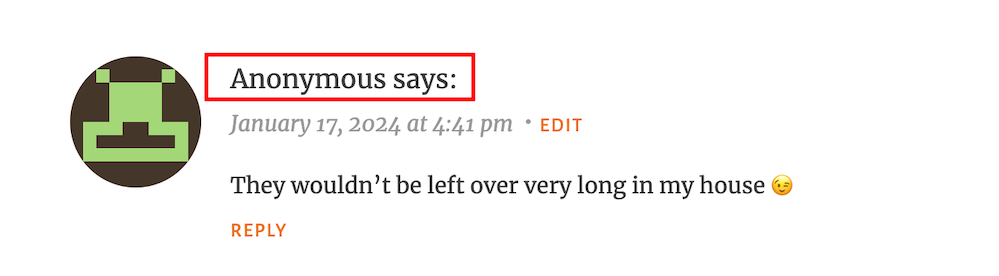
Image showing what an 'anonymous' comment on WordPress
Do anonymous comments annoy you?

I wasn’t concerned when it appeared because it was left on one of my recent Wordless Wednesday posts about leftover chocolate, so I knew it was genuine.

Not knowing who the comment is from could pose a problem, but if it sounds genuine and has no uninvited or suspicious links, I’ll reply and approve the comment.

However, I’ll mark it as spam if it looks or sounds like a spam comment or contains any uninvited links. Oh! And I never approve comments that say ‘Nice Post.’ ‘Nice’ or ‘Great photo,’ regardless of who left them.

How do I make it easier for visitors to leave comments on my posts or prevent them from being anonymous?

In the blog settings of WordPress.Com blogs, there are settings which users can turn on or off to make it easier for visitors to leave comments or to prevent comments from being shown as anonymous.

  • To find these settings on your blog’s dashboard, go to SettingsDiscussion and scroll down to the ‘Comments‘ section on the ‘Discussion Settings‘ page. I’m using WordPress on an Apple iMac desktop computer in these screenshots.
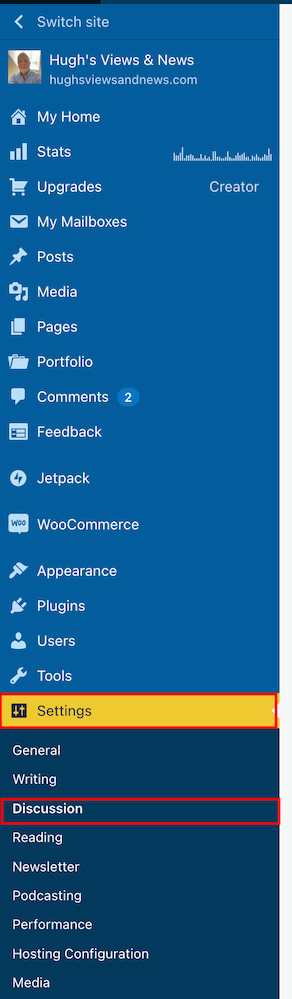
Image highlighting 'Settings' - 'Discussion' on a WordPress blog.
Click on Settings – Discussion
Image highlighting the 'Comments' section on the discussions settings page of a WordPress blog.
Scroll to the ‘Comments’ section.
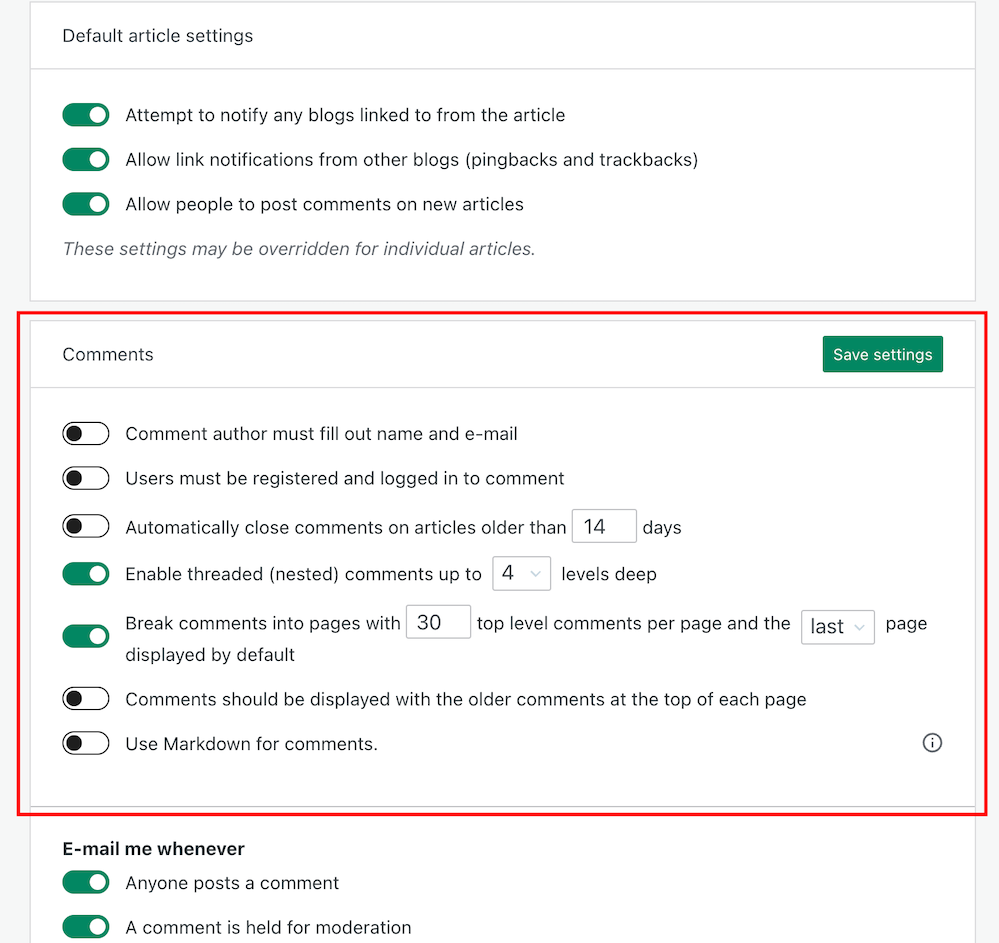
  • If you want to make it easy for visitors to your blog to be able to leave comments, ensure you have the first two settings in the ‘Comments‘ section, ‘Comment author must fill out name and email‘ and ‘User must be registered and logged in to comment,’ switched off.
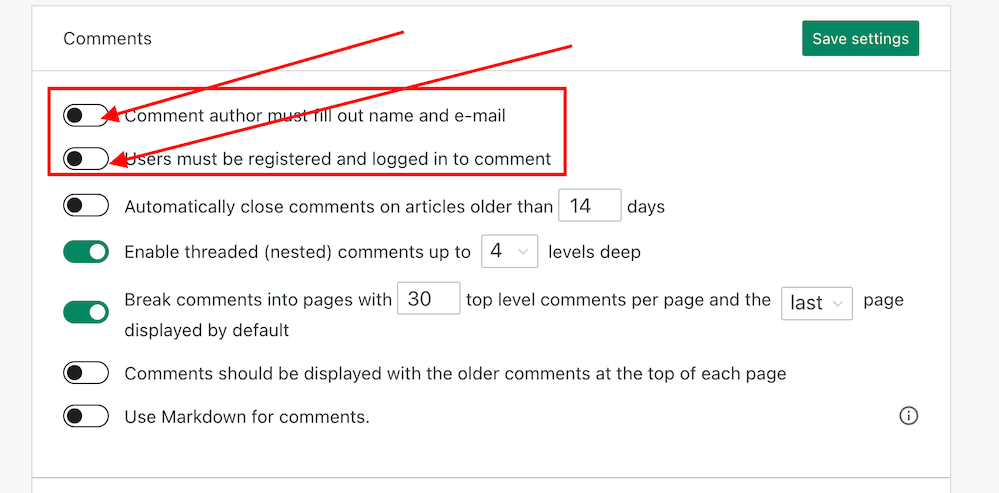
Image showing the settings to turn on or off depending how easy you want to make it for visitors to your blog to leave comments.
Switch on or off depending on how easy you want it to be for visitors to leave comments on your blog.
  • If you do not want comments on any posts showing as ‘Anonymous’, ensure those two settings are switched on. However, beware that turning these settings on will make it more difficult for some users to leave comments.
  • Turning these settings on means that users must either fill out their name and email address or be registered as a WordPress user and logged in to be able to leave a comment. Some users may not like giving this information to be able to comment.
  • Make sure you click the ‘Save Settings’ button if you make any changes.

And that’s it. Only you can choose whether to have these settings on or off. Go with what you feel most comfortable with.

Do you make it easy for visitors to your blog to comment, or do you prefer to only allow those willing to give their information to be able to leave comments? Is WordPress the best platform for engagement and for leaving comments? Let me know in the comments.

Is your blog as secure as it can be? Take this final step to make sure nobody can hack it. Take a look at my recent post for more details.

Is Your Blog Safe? One Security Feature You Must Have

Layout, content, settings, and format might differ on self-hosted blogs.

Click the buttons below to follow Hugh on Social Media

Copyright @ 2024 hughsviewsandnews.com – All rights reserved.


Discover more from Hugh’s Views & News  

Subscribe to get the latest posts sent to your email.

97 responses to “Are You Getting ‘Anonymous’ Blog Comments? How To Stop Them.”

  1. Sunday Stills: February is Feed the #Birds Month – Second Wind Leisure Perspectives avatar

    […] “Could you do the same on your blog and ask ‘anonymous’ commentators what method they used to leave their comments?” ~ Hugh Roberts […]

  2. Forestwood avatar

    I agree we need to make it easy for people to leave comments. Akismet is great at picking up spam, especially if you add keywords but it picks up valid comments too!

    1. Hugh W. Roberts avatar

      Yes, it does, but the huge reduction in the number of visible spam messages means we don’t have to spend hardly any time fishing out the genuine ones so at least they’re much easier to spot now.

  3. Debbie avatar

    Thanks for this Hugh, as I’ve noticed an increase in someone or anonymous comments – but I can usually tell who they’re from. Like others have commented I am loving the decrease in spam!! I wnet looking for the buttons on the jetpack app as per Terri’s comment but can’t seem to find it, I did follow your instructions and my settings were the same as what you recommended. Thanks for keeping us up to date the way you do, it’s much appreciated.

    1. Hugh W. Roberts avatar

      The reduction in spam is very welcoming, Debbie. Whatever WordPress did, I hope we can have some more of that.

      I’m trying to find out what methods anonymous commenters use to leave their comments. I want to find out if there is a connection so I can approach WordPress with the details. I’d like to see faces and Gravatars rather than ‘anonymous’ in the comments section.

  4. dgkaye avatar

    Thanks for this Hugh. I have recently noticed an influx of comments from anonymous and someone. I’ll have a look at those settings in your tutorial. Thanks again. :)

    1. Hugh W. Roberts avatar

      Glad this is helpful, Debby. I’m trying to find out why these anonymous comments are happening. So far, retired themes and the jetpack app seem to be behind the reasons.

  5. Did You Miss Any Of These? Monthly Round-Up - January 2024 avatar

    […] Are You Getting ‘Anonymous’ Blog Comments? How To Stop Them. […]

  6. EsmeSalon avatar
    EsmeSalon

    Thanks so much for participating and sharing at SSPS 295. See you again next week!
    I will have to see if this will apply for self hosted sites as well

    1. Hugh W. Roberts avatar

      You’re welcome, Esme. If you’e not getting any anonymous comments, no need to worry about it. But I’m sure the same settings will be somewhere.

  7. Eugi avatar

    Hi Hugh. I am commenting using Microsoft Edge and without a problem. I feel some of WP’s changes are not compatible with certain browsers.

    1. Hugh W. Roberts avatar

      I used to have awful problems with my blog when using Safari. WordPress recommended I use Chrome, and since then, I’ve never experienced access problems with my blog. I think some browsers can be a bit behind in updating when changes take place. But it’s good to hear that Microsoft Edge seems to be working with WordPress. Thanks for keeping me updated, Eugi.

      1. Eugi avatar

        You’re welcome, Hugh. I mostly use Vivaldi but sometimes it is slow loading. However, today it’s fine. Go figure.

        1. Hugh W. Roberts avatar

          I think it usually more likely to be the browser causing problems than WordPress, Eugi. People tend to panic too quickly when something goes wrong.

          1. Eugi avatar

            I agree, Hugh. Though, I’ve problems with my blog for over a month. I feel it’s the FSE themes so I switched to a classic theme and had even more problems. I contacted the WP HE’s and they informed it was a plugin related to FSE themes. They deactivated the plugin and my site runs much better than it has in the past.

            1. Hugh W. Roberts avatar

              Oh, I agree that WordPress often gets bugs, Eugi. It’s like any online site. I’m glad to hear that WordPress managed to sort out the problems you were having. They’ve always dealt with any problems I’ve had with the site quickly and keep me updated.

              Unfortunately, there are some users who will blame everything on WordPress as if the problems they are experiencing are affecting everyone when they’re not. I also see comments from users claiming that everyone is having problems with WordPress. In my experience, it can sometimes be the user where the fault lays.

            2. Eugi avatar

              I agree that sometimes it is the user. In my case, I didn’t have enough knowledge to recognize the problem and I was most grateful when it was fixed. I’ve always had excellent results from the WP HE’s. Also, there was a recent WP update and my site runs smoothly on all browsers that I use. What a relief. I don’t want to blame my woes on the FSE themes but it seems I am better off using a classic theme.

            3. Hugh W. Roberts avatar

              That’s why I never switched to a FSE theme. I was seriously thinking about it, but I’m staying with a Classic theme now. It doesn’t give me an problems, and if it did, I’d report it to WordPress. I hope they never retire all the Classic themes.

            4. Eugi avatar

              Personally, I feel there will always be classic themes. Even though the FSE themes have become easier to set up, there is still a learning curve that many don’t want to bother with.

  8. Debbie D. avatar

    Interesting post, Hugh! It has never occurred to me to allow anonymous comments, but I’ll give it some thought. (My site is self-hosted.) I’m having a LOT of trouble commenting on WordPress.com blogs and those on self-hosted using the Jetpack comment form that has no email option. Even though it shows me logged in to WordPress, when I click the Reply button, it rejects the comment and says I must be logged in to comment. Drives me nuts!

    1. Hugh W. Roberts avatar

      Have you tried using a different browser when trying to leave comments on WordPress.Com blogs, Debbie? Were you asked to logged in when leaving this comment on my post?

      1. Debbie D. avatar

        Same issue on Chrome, Firefox and Edge, unfortunately, but it’s only some blogs. No problems here, Hugh. It said I was already logged into WordPress and my comment went right through. :)

        1. Hugh W. Roberts avatar

          It could be that those blogs where you’re having this problem have a bug related to the blog theme they’re using, Debbie.

          Good to hear you’ll able to comment on my blog posts, though.

  9. Eugi avatar

    I haven’t seen anonymous comments on blog my in quite some time plus I get very little spam. I try to make it as easy as possible for others to leave comments on my blog. I still have problems commenting on a few blogs and have to refresh the page a few times for the comment box to appear.

    1. Hugh W. Roberts avatar

      WordPress did an update last year which cut the number of visible spam messages, Eugi. Whereas I used to get hundreds of spam comments a day, I now get 1 or 2 at the most a week. It;’s one of the best things they did. From what I hear, the same has happened for the majority of bloggers.

      Do you ever encounter any problems leaving comments on my blog?

      1. Eugi avatar

        Yes, today when I left a comment on your blog, I had to refresh the page several times for the comment box to appear, This seems to happen on a few blogs and only every now and then. With that said, I am going to switch browsers and perhaps that will help.

        1. Hugh W. Roberts avatar

          Can you keep me updated, Eugi? It’ll be interesting to know if the problem is being caused by the browser rather than WordPress. Although if it is WordPress, I’d have thought it would be happening to all users, unless there is a bug causing the problem related to particular theme somebody is using.

  10. Janis @ RetirementallyChallenged.com avatar

    I’ve noticed more Anonymous comments lately. The way they are written, I assume the commenter didn’t really want to be anonymous but it was a default. Anyway, I’m like you, I don’t want to set up barriers for someone to comment so I also have those settings. It really makes me crazy when I have to put in my name and email EVERY TIME I MAKE A COMMENT on certain blogs – even those that I’ve followed – and commented – for years. I wonder if those bloggers realize that are making their followers jump through hoops (I suspect not).

    You mentioned that you were getting many fewer slam comments lately. I have noticed that too and I appreciate whatever WP has done to make that so.

    1. Hugh W. Roberts avatar

      I doubt they do, Janis, not unless someone tells them. But I think there is more to this ‘anonymous’ problem than meets the eye. I’m going to do some more investigations.

      Yes, WordPress did a big update with their anti-spam software last year that resulted in all users getting a huge reduction in the number of visible spam comments. it’s one the best things they did and has certainly given me back the time I used to make for going through those comments to check if any genuine ones ended up there by mistake.

Feel free to leave a comment. Engagement helps keep blogs alive and forms community.

This site uses Akismet to reduce spam. Learn how your comment data is processed.

I’m Hugh

Welcome to my blog. I’m delighted to have you here. This is the place to discover tips on blogging and WordPress, flash fiction, photography, and more. I enjoy engaging with my readers, so please feel free to explore, join discussions, and contact me. I’m happy to assist! Find out more about me and my blog by clicking the ‘Meet Hugh’ button.

Let’s connect

Subscribe to Hugh’s Views And News

Latest Posts

Looking for your next quick read? Try my books

An image of book covers, book, tablet and mobile phone, for the book Glimpses.
An image for the book More Glimpses - showing a book cover, tablet and mobile phone.

Follow Hugh in the Fediverse

Hugh's Views & News  
Hugh's Views & News  
@hughsviewsandnews.com@hughsviewsandnews.com

WordPress & Blogging tips, flash fiction, photography and lots more!

313 posts
10 followers
A widget with the words 'Team Effort - Story Chat Digest - Where Authors Meet - Author'

Most Viewed Posts & Pages Over The Last 24 Hours

Recommend Blogs To Follow


Roaming About
A Life Less Ordinary

Second Wind Leisure Perspectives
Fun, Photography & Friends

Spo-Reflections
Spo-Reflections
To live is to battle with trolls in the vaults of heart and brain. To write; this is to sit in judgment over one's Self. Henrik Ibsen

Boomer Eco Crusader
Boomer Eco Crusader
Live Green | Declutter | Simplify Life

SONGS AND SCRIPTS AND DUNKING BISCUITS
Every day tales of a winging-it creative

Jacqueline Lambert
Jacqueline Lambert
Award-Winning Travel Humour Writer

Anne R. Allen’s Blog… with Ruth Harris
Writing about writing. Mostly.

Fancying France
The musings of a ‘femme d’un certain âge’ who divides her time between SW France and SE England

Marsha Ingrao         Always Write
Marsha Ingrao Always Write
Having fun blogging with friends

Curiosities, Castles and Coffee Shops
The musings of a curious mind

WrookieSchU
WrookieSchU
Live life 🙌🏼

WPcomMaven
WPcomMaven
Helping you make the most of your free WordPress.com website since 2011

Share Your Light
Share Your Light
You are a miracle – Let it happen

No Facilities
No Facilities
Random thoughts, life lessons, hopes and dreams

Esther Chilton
Writer, Tutor and Editor

Saying nothing in particular
Jan … JT Twissel

The Chicago Files
The Chicago Files
A Canadian Perspective on Living in the Windy City!

Thank you to all my visitors

485,402 hits

265,345 visitors

Scan the QR code to follow me on Bluesky

Copyright Protected Blog

COPYRIGHT ©2011-2031 Hugh’s Views And News BLOG – All Rights Reserved.

This work by Hugh W. Roberts, and/or Hugh’s Views And News blog, is licensed under a Creative Commons Attribution-Noncommercial-NoDerivatives 4.0 International License. Unauthorised use and/or duplication of this material (text and images) without express and written permission from this blog’s author and/or owner is strictly prohibited. If you want to use posts, excerpts, photos and links, you may contact me first. You must give full and clear credit to Hugh W. Roberts and Hugh’s Views And News dot com with links to the original content.