Encouraging visitors to join the conversation on my blog posts and those of other bloggers is a must for me. Personally, if I can’t quickly leave a comment on a blog post, I’ll move on to the next one.

It’s one of the reasons why I use WordPress, as I’ve found it difficult to leave comments on other blogging platforms. What about you?

I firmly believe that we should prioritise making it effortless for blog visitors to leave comments. It’s crucial not to burden them with unnecessary obstacles when they want to engage with us. But that comes with the cost of receiving comments from anonymous readers. But is that a problem?
Light blue image with the words 'Are You Getting 'Anonymous' Blog Comments? How To Stop Them.' in white text.
Or should you make it easier for visitors to leave comments?

I’ve always received comments on my blog posts from visitors using ‘Anonymous’ or ‘Someone’ as their display names. But it has never bothered me because I can spot spam comments easily and guarantee that none will reach the comments section of my posts.

Here’s an anonymous comment I received recently.
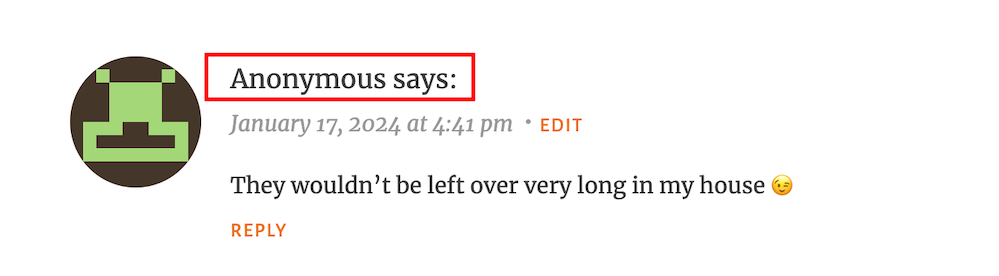
Image showing what an 'anonymous' comment on WordPress
Do anonymous comments annoy you?

I wasn’t concerned when it appeared because it was left on one of my recent Wordless Wednesday posts about leftover chocolate, so I knew it was genuine.

Not knowing who the comment is from could pose a problem, but if it sounds genuine and has no uninvited or suspicious links, I’ll reply and approve the comment.

However, I’ll mark it as spam if it looks or sounds like a spam comment or contains any uninvited links. Oh! And I never approve comments that say ‘Nice Post.’ ‘Nice’ or ‘Great photo,’ regardless of who left them.

How do I make it easier for visitors to leave comments on my posts or prevent them from being anonymous?

In the blog settings of WordPress.Com blogs, there are settings which users can turn on or off to make it easier for visitors to leave comments or to prevent comments from being shown as anonymous.

  • To find these settings on your blog’s dashboard, go to SettingsDiscussion and scroll down to the ‘Comments‘ section on the ‘Discussion Settings‘ page. I’m using WordPress on an Apple iMac desktop computer in these screenshots.
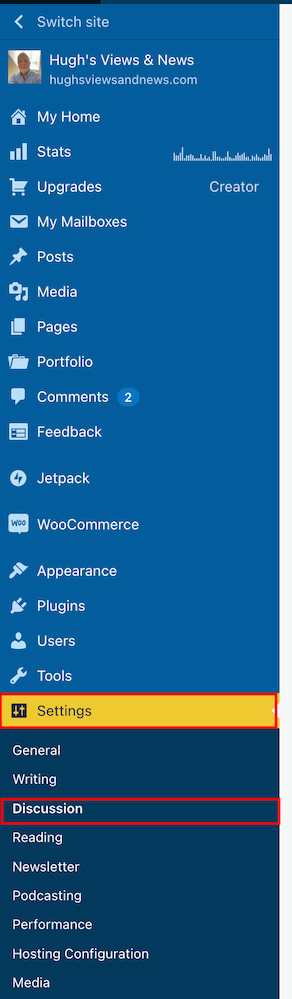
Image highlighting 'Settings' - 'Discussion' on a WordPress blog.
Click on Settings – Discussion
Image highlighting the 'Comments' section on the discussions settings page of a WordPress blog.
Scroll to the ‘Comments’ section.
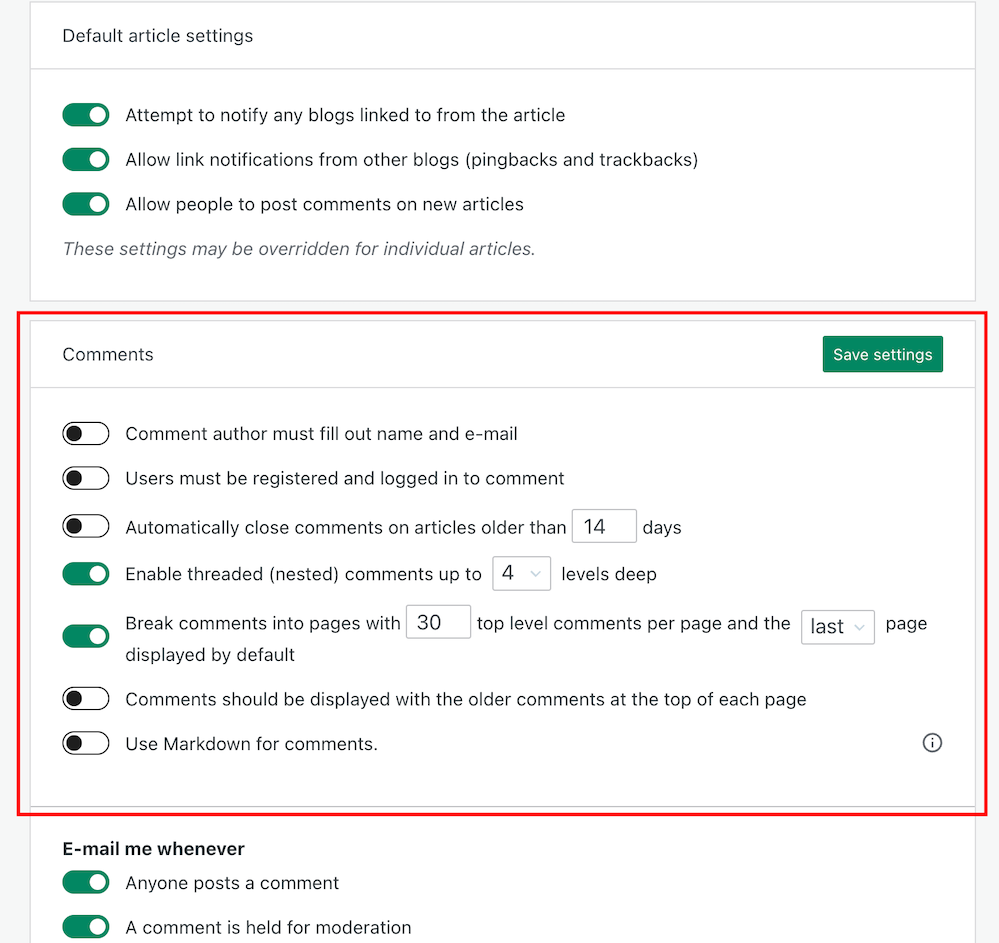
  • If you want to make it easy for visitors to your blog to be able to leave comments, ensure you have the first two settings in the ‘Comments‘ section, ‘Comment author must fill out name and email‘ and ‘User must be registered and logged in to comment,’ switched off.
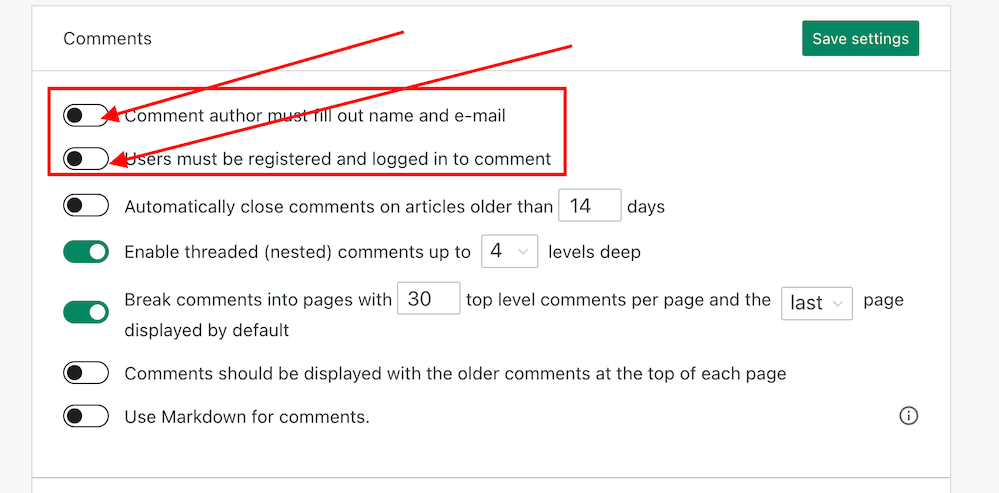
Image showing the settings to turn on or off depending how easy you want to make it for visitors to your blog to leave comments.
Switch on or off depending on how easy you want it to be for visitors to leave comments on your blog.
  • If you do not want comments on any posts showing as ‘Anonymous’, ensure those two settings are switched on. However, beware that turning these settings on will make it more difficult for some users to leave comments.
  • Turning these settings on means that users must either fill out their name and email address or be registered as a WordPress user and logged in to be able to leave a comment. Some users may not like giving this information to be able to comment.
  • Make sure you click the ‘Save Settings’ button if you make any changes.

And that’s it. Only you can choose whether to have these settings on or off. Go with what you feel most comfortable with.

Do you make it easy for visitors to your blog to comment, or do you prefer to only allow those willing to give their information to be able to leave comments? Is WordPress the best platform for engagement and for leaving comments? Let me know in the comments.

Is your blog as secure as it can be? Take this final step to make sure nobody can hack it. Take a look at my recent post for more details.

Is Your Blog Safe? One Security Feature You Must Have

Layout, content, settings, and format might differ on self-hosted blogs.

Click the buttons below to follow Hugh on Social Media

Copyright @ 2024 hughsviewsandnews.com – All rights reserved.


Discover more from Hugh’s Views & News  

Subscribe to get the latest posts sent to your email.

97 responses to “Are You Getting ‘Anonymous’ Blog Comments? How To Stop Them.”

  1. Y3 Story Chat Summary #9: “Arfer Understand Everything” By Doug Jacquier – Marsha Ingrao – Always Write avatar

    […] Hugh’s Views and News – “Doug, you certainly know how to tell a story. You create atmosphere and bring characters to life. At first I didn’t think there was much going on in the story, but when I reread it, I realised how wrong I was. I like how Arfer growled at Justin, but I think it was done in a certain way. I’ve always believed that animals can pick up on bad people. They react differently to when they know somebody who is nice. Let’s just say that a growl is not always a growl.” […]

  2. Are You Getting ‘Anonymous’ Blog Comments? How To Stop Them. avatar

    […] Are You Getting ‘Anonymous’ Blog Comments? How To Stop Them. […]

  3. thomasstigwikman avatar

    Interesting information. I’ve had trouble leaving comments on WordPress sites, not just other platforms. Frequently it wasn’t even possible to leave a comment, even though the comment feature was on. The Happiness Engineers told me they were streamlining the comments, that’s why there were hickups. Typically the poster had no idea that some people had problems leaving comments. It seems to be better lately.

    1. Hugh W. Roberts avatar

      I’ve heard of other bloggers having problems leaving comments on other blogs. It’s only happened to me twice where I could not leave a comment. The first time was because I had not ticked a box saying I was responsible for the comment I was leaving. There was lots of other legal jargon attached to it as well, so I did not leave the comment. The second time was on a self-hosted blog where there was no way of getting the comments box to work. I notified the blogger concerned, but they just brushed it aside and said the problem must be at my end. However, there were no other comments on any of their posts.

      That’s interesting what you say about WordPress streamlining comments on their platform. If you’re seeing signs of it improving, I wonder if they are coming to the end of the changes and updating they are making? I hope so.

      1. thomasstigwikman avatar

        It was not smart of him to brush your information aside, especially since he had no other comments. However, it is a very human thing to do. The comment problems I saw were a lot more frequent. Among the perhaps 40+ blogs that I follow and who post regularly I could not leave a comment on around a third of them, even though some people could leave comments on those blogs. Some people could and some people could not. I would later find out that the same was true for my blog. Most people could leave comments, but some could not. I contacted the Happiness Engineers about the problem, and they told me they were aware of it and were working on it. As I mentioned they said they were streamlining the comment feature, whatever that means. It seems like the problem is gone by now. It seems like I can leave comments on all Worpress.com blogs as long as commenting is turned on. Selfhosted (WordPress.org) or other organizations I don’t have the same luck with.

        1. Hugh W. Roberts avatar

          That is good news that you’re now able to leave comments on all blogs. My fingers are crossed that all users will be able to do the same.

          I’ve not heard from anyone telling me that they’ve had problems leaving comments on my blog, but if I’m not informed, I guess it could be happening.

          And it’s good to hear you contacted the Happiness Engineers about the problem. Some bloggers will complain, but leave it to others to report any problems or bugs with the WordPress platform while they carry on complaining.

          I wonder if the problem with some comments showing as ‘anonymous’ has been sorted, especially for those you have their blog settings switched on so that anyone wanting to comment must be logged into WordPress or have to leave their name and email address?

          1. thomasstigwikman avatar

            Yes I agree, so many people have issues they don’t report and the result is that the “Happiness Engineers” / what a silly name by the way, don’t know what is going on. That’s what they told me. They want people to report it so they know how widespread a problem is.

          2. thomasstigwikman avatar

            I can add about the “anonymous” comments, that I have actually never seen those. I have received 4,530 comments since I started blogging and not one of them is “anonymous”. I don’t know what the difference is,

            1. Hugh W. Roberts avatar

              That’s good to hear the problem of comments showing as ‘anonymous’ do not show up on your blog. I don’t get many, but I’d like to get rid of the ones that do appear so I know who it is leaving me a comment. However, I understand that some people do not want to always give their details online.

            2. thomasstigwikman avatar

              I wish you good luck with a solution to the anonymous comments.

  4. ganga1996 avatar

    Thanks so much! My Dad leaves comments but is shows anonymous and so do some of my friends. This was helpful.

    1. Hugh W. Roberts avatar

      I’m glad it was helpful. But the problem persists. We’re investigating, though.

  5. Kymber Hawke avatar

    Hi, there, Hugh. I’m so glad I found your article. I am not having any trouble commenting (as far as I know lol), and it’s showing me as logged in, which is great. When I had those two settings unchecked, I didn’t mind the anonymous comments at all, but some of my regular commenters said some of the anonymous comments were theirs and they were annoyed that it had shown up as anonymous. I’m a self-hosted wp.org user. Does this make a difference, do you think? I’m wondering why they showed up as anonymous when they’d never had trouble commenting before those settings were unchecked. Would love some insight if you have any. :) Thank you so much.

    1. Hugh W. Roberts avatar

      Hi Kymber, thanks for your comment.

      I don’t have any problems commenting either, but I am getting comments that just say ‘anonymous’ or ‘somebody.’ I have asked WordPress why, but so far have drawn a blank. Now I’m asking anyone whose comments appears as ‘anonymous’ to let me know how they left their comment. Was it via the JetPack app, the WordPress Reader or on a tablet, laptop or desktop computer. I’m going to present the findings to WordPress and have a couple of bloggers also collecting the same information.

      I don’t think the fact that you are a self-hosted users makes any difference as these anonymous comments seem to be appearing everywhere.

      I did think it was connected to bloggers leaving comments who are still using retired themes, but I’m not so sure . This has only started happening late last year (to me), so something has changed to make it happen. And I have people who do not have those setting switched off telling me that they are still getting anonymous comments. It’s a bit of mystery that I hope to get to the bottom of.

      1. Kymber Hawke avatar

        Thank you for such a quick response. I’m so glad you are working on this. I hope WP will take your findings into consideration, along with the other two bloggers, and change some things for the better. I really appreciate a lot of your topics that you write on, and am so glad I started reading. :) I hope you’re having a great Monday.

        1. Hugh W. Roberts avatar

          You’re welcome, and thank you for the feedback.

          One of my blogging friends is going to a WordPress meeting this week where she is going to bring this subject up. WordPress staff will be at the meeting. I’ll share her post on my blog if she gets some answers from WordPress. So, watch this space.

          1. Kymber Hawke avatar

            I sure will. :) Thank you for the head’s up.

  6. Inspire Me Monday Linky Party #454 | Mostly Blogging avatar

    […] Are You Getting ‘Anonymous’ Blog Comments? How To Stop Them […]

  7. Janice Wald avatar

    You won the linky party!

    1. Hugh W. Roberts avatar

      Again? That’s great new. Thanks, Janice.

  8. AM avatar
    AM

    Great post, and this is not spam – I can assure you 😊 .

    I just wrote a post about me getting very weird comments that I thought were fine. They all said “great blog, I will follow” but then they never do. I noticed that they also left multiple comments looking a like on the same post, and after googling a bit I realised that it was all spam! I’m so disappointed, but not I’ve fixed it.

    I had no idea that spammers and bots could do this. Well, you learn something new everyday. Thanks a bunch for sharing this!
    //AM

    1. Hugh W. Roberts avatar

      It took me a while to realise that short comments like ‘great post’ ‘beautiful post’ ‘great blog’ or anything short that does not prove they’ve read your post was nothing but spam.

      And now there are bots that leave slightly longer comments saying how much they like reading your blog, but they never go ito any details about the contents of your posts.

      I now mark all such comments as spam and also remove them as a subscriber if they’ve followed my blog. Of course, they can refollow you, but they soon get fed up of following when I keep unsubscribing them.

      1. AM avatar
        AM

        Yeah, I do have a follower who has a suspicious name, but keeps liking the posts. I guess he can stay for a while at least.

        Scary, though how spammers can follow the blog as well these days… Thanks for that info.

        1. Hugh W. Roberts avatar

          Unfortunately, there are lots of spammers and spambots in the blogging world. And I’ve heard of bloggers being scammed by them. So be very careful. I’d recommend you remove anyone you’re not confident is nothing but a spammer.

          1. AM avatar
            AM

            Thanks. I will try and do that then 😊 I’m very careful otherwise.

  9. Sunday Stills: February is Feed the #Birds Month – Second Wind Leisure Perspectives avatar

    […] “Could you do the same on your blog and ask ‘anonymous’ commentators what method they used to leave their comments?” ~ Hugh Roberts […]

  10. Forestwood avatar

    I agree we need to make it easy for people to leave comments. Akismet is great at picking up spam, especially if you add keywords but it picks up valid comments too!

    1. Hugh W. Roberts avatar

      Yes, it does, but the huge reduction in the number of visible spam messages means we don’t have to spend hardly any time fishing out the genuine ones so at least they’re much easier to spot now.

  11. Debbie avatar

    Thanks for this Hugh, as I’ve noticed an increase in someone or anonymous comments – but I can usually tell who they’re from. Like others have commented I am loving the decrease in spam!! I wnet looking for the buttons on the jetpack app as per Terri’s comment but can’t seem to find it, I did follow your instructions and my settings were the same as what you recommended. Thanks for keeping us up to date the way you do, it’s much appreciated.

    1. Hugh W. Roberts avatar

      The reduction in spam is very welcoming, Debbie. Whatever WordPress did, I hope we can have some more of that.

      I’m trying to find out what methods anonymous commenters use to leave their comments. I want to find out if there is a connection so I can approach WordPress with the details. I’d like to see faces and Gravatars rather than ‘anonymous’ in the comments section.

  12. dgkaye avatar

    Thanks for this Hugh. I have recently noticed an influx of comments from anonymous and someone. I’ll have a look at those settings in your tutorial. Thanks again. :)

    1. Hugh W. Roberts avatar

      Glad this is helpful, Debby. I’m trying to find out why these anonymous comments are happening. So far, retired themes and the jetpack app seem to be behind the reasons.

  13. Did You Miss Any Of These? Monthly Round-Up - January 2024 avatar

    […] Are You Getting ‘Anonymous’ Blog Comments? How To Stop Them. […]

Leave a reply to Sunday Stills: February is Feed the #Birds Month – Second Wind Leisure Perspectives Cancel reply

I’m Hugh

Welcome to my blog. I’m delighted to have you here. This is the place to discover tips on blogging and WordPress, flash fiction, photography, and more. I enjoy engaging with my readers, so please feel free to explore, join discussions, and contact me. I’m happy to assist! Find out more about me and my blog by clicking the ‘Meet Hugh’ button.

Let’s connect

Subscribe to Hugh’s Views And News

Latest Posts

Looking for your next quick read? Try my books

An image of book covers, book, tablet and mobile phone, for the book Glimpses.
An image for the book More Glimpses - showing a book cover, tablet and mobile phone.

Follow Hugh in the Fediverse

Hugh's Views & News  
Hugh's Views & News  
@hughsviewsandnews.com@hughsviewsandnews.com

WordPress & Blogging tips, flash fiction, photography and lots more!

300 posts
6 followers
A widget with the words 'Team Effort - Story Chat Digest - Where Authors Meet - Author'

Recommend Blogs To Follow


Boomer Eco Crusader
Boomer Eco Crusader
Live Green | Declutter | Simplify Life

Jacqueline Lambert
Jacqueline Lambert
Award-Winning Travel Humour Writer

Spo-Reflections
Spo-Reflections
To live is to battle with trolls in the vaults of heart and brain. To write; this is to sit in judgment over one's Self. Henrik Ibsen

Anne R. Allen’s Blog… with Ruth Harris
Writing about writing. Mostly.

Fancying France
The musings of a ‘femme d’un certain âge’ who divides her time between SW France and SE England

SONGS AND SCRIPTS AND DUNKING BISCUITS
Every day tales of a winging-it creative

Marsha Ingrao         Always Write
Marsha Ingrao Always Write
Having fun blogging with friends

Curiosities, Castles and Coffee Shops
The musings of a curious mind

WrookieSchU
WrookieSchU
Live life 🙌🏼

WPcomMaven
WPcomMaven
Helping you make the most of your free WordPress.com website since 2011

Second Wind Leisure Perspectives
Fun, Photography & Friends

Share Your Light
Share Your Light
You are a miracle – Let it happen

No Facilities
No Facilities
Random thoughts, life lessons, hopes and dreams

Esther Chilton
Writer, Tutor and Editor

Roaming About
A Life Less Ordinary

Saying nothing in particular
Jan … JT Twissel

The Chicago Files
The Chicago Files
A Canadian Perspective on Living in the Windy City!

Thank you to all my visitors

471,515 hits

254,478 visitors

Most Viewed Posts & Pages Over The Last 24 Hours

Copyright Protected Blog

COPYRIGHT ©2011-2031 Hugh’s Views And News BLOG – All Rights Reserved.

This work by Hugh W. Roberts, and/or Hugh’s Views And News blog, is licensed under a Creative Commons Attribution-Noncommercial-NoDerivatives 4.0 International License. Unauthorised use and/or duplication of this material (text and images) without express and written permission from this blog’s author and/or owner is strictly prohibited. If you want to use posts, excerpts, photos and links, you may contact me first. You must give full and clear credit to Hugh W. Roberts and Hugh’s Views And News dot com with links to the original content.