Did you catch these 11 blog posts that got everyone talking, discussing, and wondering? Maybe you were part of the conversation, but if not, jump in and share your thoughts!
Would you like to be a part of Hugh’s Views And News in 2024? Plus, what exciting and positive things are happening in 2024 on Hugh’s Views And News. Read on for all the details.
Are you fed up with getting anonymous comments on your blog posts? How to stop them. Plus, how easy is it for visitors to leave comments on your blog posts? You may be making it more difficult than you think.
Did you catch these 6 blog posts that got everyone talking, discussing, and wondering? Maybe you were part of the conversation, but if not, jump in and share your thoughts!
Do you like this tree as much as I do? Share some photos with me of some of your favourite festive trees.
Performing these 7 jobs on your blog now will bring you and your blog excellent results in the New Year. Plus, are you planning to take a blogging break during December?
What, in your opinion, are the best festive colour combinations? Let me know in the comments section. Share a picture of your favourite festive colour combination.
Poetry is the hardest form of writing for me. Yet, this short Christmas poem is one of the first things I published on my blog. Why have I never written and published more poetry? What do you find the most difficult thing to write?
Did you catch these 11 blog posts that got everyone talking, discussing, and wondering? Maybe you were part of the conversation, but if not, jump in and share your thoughts!
What’s your opinion about the object in this photo? Is it a work of art or something that needs to be trashed? Let me know in the comments section. Share a picture of something you consider a work of art that others would trash.
If you use reusable blocks on WordPress, you may be wondering where WordPress has moved them. My post has all the details. Plus, I give my verdict on two new WordPress features you may like to try out.
There is always somebody, isn’t there? Somebody who knows I’m taking a photo. Can you spot them in this crowd? (Hint – You may need to zoom in to find them).
What’s your experience of dealing with WordPress? Are you experiencing problems with WordPress? Have you reported the problems to them? If not, why not? The 6 best ways to contact WordPress.
Did you catch these 10 blog posts that got everyone talking, discussing, and wondering? Maybe you were part of the conversation, but if not, jump in and share your thoughts!
What’s underground may one day control what’s overground. Where do your roots lie?
Is the art of blogging commenting a dying art? Why do many bloggers feel they must leave short, non-engaging comments on every post they read? Two bloggers look into the world of blog commenting and ask some important questions. Join the discussions and have your say.
Does Your Shadow Look Like You? Let me know what your shadow last saw and how it felt in the comments section. Share a picture of your shadow if you have one.
It’s happening again. Bloggers are saying that blogging is stressful or makes them feel guilty.
Blogging is becoming a chore.
They don’t have time to read and comment on all the blog posts of all the blogs they follow.
They’re constantly apologising for not reading, commenting or publishing new blog posts.
They don’t have time to keep up with a blogging schedule they set themselves.
They feel obliged to read and comment on everything because those bloggers read and comment on their blog posts.
Let’s get something straight about blogging. Nobody expects you to read and comment on all their blog posts.
Do you suffer from blogging stress or guilt? Read this post.
Just because Susan and Jenny read and comment on all of each other’s blog posts doesn’t mean you have you. And believe me when I say that Jenny and Susan won’t have always read each other’s blog posts. They may have left comments, but those comments don’t prove they read the post.
Nobody cares if you don’t read and comment on all their posts.
Nobody says it’s your obligation to read and comment on all their posts because they read and comment on all your posts.
Nobody? Well, not quite. The only person who may feel obliged or think they must read and comment on all the posts of the blogs they follow is you.
One of the biggest pitfalls of blogging is feeling obligated.
Once again, I’ve been reading blog posts, comments, and social media posts where people ask for advice because blogging has got to the stage of stressing them out and/or making them feel guilty.
They seem to feel that not reading and commenting on every post is some kind of a blogging crime and will land them in blogging jail.
I’ve written before about the stress and guilt blogging can bring (if you allow it) and know exactly how these bloggers are feeling, having been through the whole blogging ‘feeling guilty’ trip myself.
So, allow me to explain why you never need to feel stressed or guilty about blogging or never need to apologise for not reading, commenting or publishing blog posts.
Why did you start your blog?
One of the reasons why I signed up for WordPress was because I thought blogging would be fun.
One year in, I became very stressed and guilty because I couldn’t keep up with reading all the new blog posts published by the bloggers I was following.
I was following way too many blogs, many of which didn’t interest me anyway.
Some days, I found myself doing little else but reading and leaving non-engaging, spammy comments on blog posts. You know the types of comments. Things like ‘Great post,’ ‘I enjoyed this’, or one-worded comments that meant nothing.
Some of the bloggers I was following were publishing more than one post daily, and I soon found myself apologising to people for not reading their posts or not being on WordPress 24 hours a day!
Then it struck me that I was not doing the main thing I’d come here to do – write!
Although I possess a few superpowers, I’m afraid that one of them is not being able to read every new blog post from bloggers I follow.
I began to see this as a problem. Blogging was becoming a monster, and I was doing everything possible to make me want to fight it.
Then, one morning, I woke up, switched on my computer and got that horrible feeling I would get when I didn’t want to go to school or go to work.
I soon realised that I had two choices about blogging. Either I gave it up, or I had to change the blogger I had become.
It didn’t take me long to make my choice. After all, I’d created my blog to write and share my thoughts with anybody who stopped by and wanted to listen to what I had to say.
I decreased my reading time and began to write more.
I stopped following every single blogger who followed my blog. If they didn’t have an ‘about me‘ page so I could find out more about who they were, or they blogged about subjects that did not interest me, then I did not follow back.
If bloggers kept sending me messages begging me to follow their blog, I ignored them.
I stopped feeling guilty for not following back.
As time passed, I began to unfollow bloggers whose blog content I didn’t find interesting anymore.
I stopped reading blog posts that did not interest me, regardless of who had written and published them.
I unfollowed some bloggers who continued to fail to respond to questions or acknowledge comments other bloggers and I were leaving on posts.
I didn’t feel guilty about this because it freed up time for me to write, read, and comment on blog posts that interested me.
If you find yourself in a situation where blogging makes you feel guilty and/or stresses you out, then you need to face the questions I was asking myself.
I’m afraid there’s no magic answer.
What worked for me may not work for you, but whatever you do, ensure you do all you can to make blogging fun again.
Isn’t that the reason why you came here in the first place?
Take control of your blog and stop feeling guilty about not reading and commenting on every blog post or for unfollowing blogs that you no longer have any interest in.
Sure, you may lose some followers along the way (don’t we all?), but it’s not going to finish you off as a blogger.
In fact, they probably didn’t read your blog posts anyway and will have left short, non-engaging comments just to prove they visited, so it’s no big deal (unless your only interest is how many followers you have).
If, like me, you decide to stay (and I hope you do), your blogging passion will return.
Remember – Blogging is a marathon, not a sprint!
Have you ever found yourself feeling guilty or stressed out because of blogging? Are you somebody who keeps apologising because you’ve been unable to spend as much time as you like reading and commenting on posts? How did you get over feeling guilty or stressed out by blogging? Leave me a comment and join the conversation.
Blogging should always be about enjoyment and fun.
Follow Hugh on Social Media. Click on the links below.
I’ve written about comments a lot over the last few months, so this seems like the ideal opportunity to discuss some problems with commenting on WordPress.
First, I want to discuss a problem with getting email notifications from WordPress whenever comments are left on my blog posts.
Are you experiencing any of these problems with comments on WordPress?
I’ve stopped getting email notifications whenever anyone comments on one of my posts, so I have had to revert to checking for new comments on my blog’s dashboard.
It’s not a huge problem, but the email notifications act as a backup, so I know when comments have been left, and they also serve as a reminder that I have comments to respond to. I don’t delete an email notification until I’ve replied to a comment. That way, I don’t miss any.
I reported the problem on the WordPress Forum. That was over two weeks ago, and whilst I’ve had a lot of contact from WordPress staff, the problem is currently with their developers.
Is anybody else having problems getting email notifications of comments left on their blog posts? Or is it just me?
I’ve also reported another issue to WordPress. I’m wondering if any of the following are happening to you when leaving comments on other blogs?
Other problems with commenting.
Have you noticed that the comments box on WordPress has changed? The old comments box has been replaced with a new one (see the following image), but it seems to be causing me a few problems.
Have you noticed the new comments box on WordPress?
The above new style comments box has gradually been introduced to most blogs on WordPress.
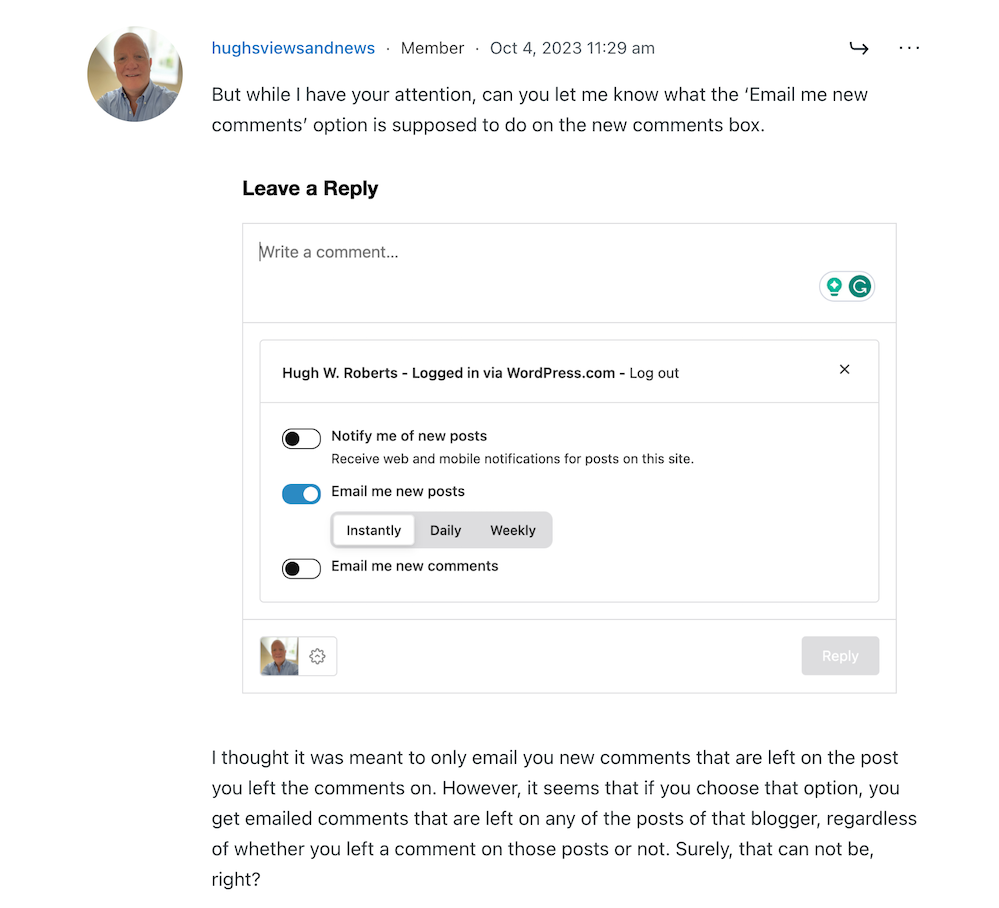
You can write a comment, press the reply button, and move on pretty swiftly, but my concerns are with something hidden behind the settings (cog) button next to the icon that displays your Gravatar image. When you press the cog, you’ll see this.
There are three options to choose from in the new-look comments box.
See those three new options at the bottom of the comments box? Not only can you now get web and phone notifications of new blog posts from the blog you’re leaving a comment on, but you can set how often you get notifications of new posts.
These are not new, though. They’ve been available for use on WordPress for a long time but were buried deep in our blogs’ dashboard settings. Now, they’re much easier to find and use.
So far, so good, you may think, but it’s the ‘email me new comments‘ button that is causing me concern.
You see, I’m one of those bloggers who like to receive an email whenever anyone replies to a comment I’ve left on their blog or when anyone else leaves a comment on the post I’ve already commented on. It’s my way of knowing that not only have they responded to my comment but also a way for me to either reply to or ‘like’ the comment. I do not like the thought of any blogger thinking I’ve ignored their comment.
The problem now is that when you slide the ‘email me new comments‘ button on, not only do you get emailed comments for the posts you’ve left comments on, but you’ll get email notifications of any comment left on any of the posts on that blog regardless of whether you left a comment or not.
If the blog you’ve left a comment on is huge and gets hundreds of comments, this could become a big problem with your email box filling up quickly.
Needless to say, that is something I do want. I only want email notifications of comments left on the posts I left a comment on. Why? Well, I find that reading comments can sometimes be as interesting as the post they’re left on, plus comments often give me new ideas for blog posts.
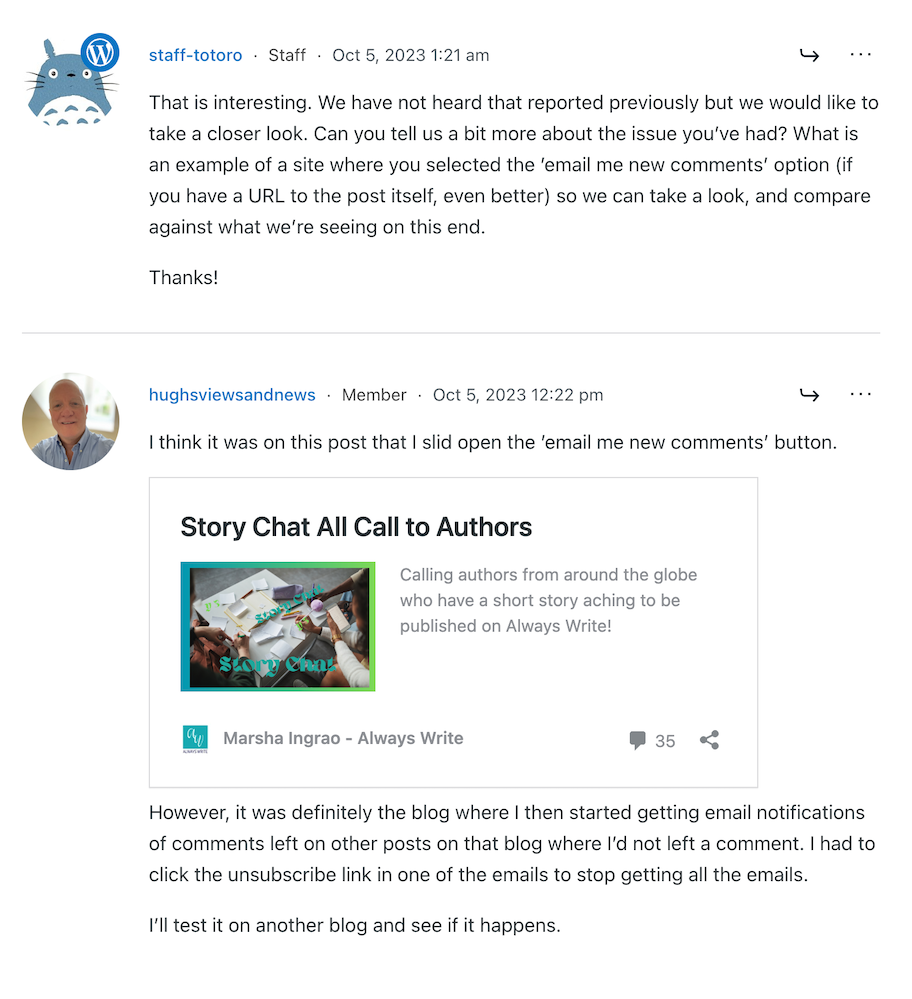
I’ve reported the issue to WordPress, and they’ve replied. See the screenshots below. However, I’m not the only one who reported this particular problem.
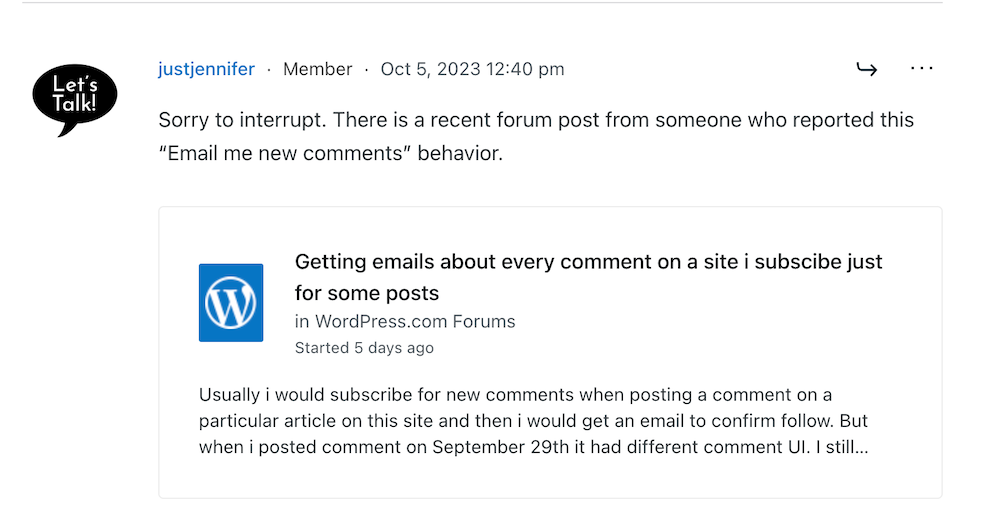
Somebody else has reported the same problem.
A response from a member of staff at WordPress
That was the last response from WordPress, but I’ll update this post with any developments.
Some good news – My spam box is empty!
Is it only me, or has anyone else seen a drastic reduction in spam since the new comment box appeared? I used to get hundreds of spam messages to scroll through every day, but now my spam box is empty almost every day – hooray!
So, there is no need to close comments off posts anymore if WordPress has waved a magic wand and stopped the spam once and for all. Hooray – that means I can leave comments on blog posts that are more than a month old.
Are you having any of the problems described in this post or any issues with leaving comments or receiving WordPress notifications as a whole? Has the amount of spam you’re getting plummeted? Let me know in the comments section.
Follow Hugh on Social Media. Click on the links below.
Did you catch these 10 blog posts that got everyone talking, discussing, and wondering? Maybe you were part of the conversation, but if not, jump in and share your thoughts!
This fiesta was ideal for a celebration, but was there a possibility of someone ruining it?
Many types of comments exist, but what are the best ones to leave on other blogs? Is it no longer trendy to leave blog comments because readers only want information, not the community?
Don’t risk being fined for using copyrighted images or photos on your blog posts. Did you know WordPress offers users access to thousands of free pictures and photos for their blog posts? This is where and how to find them.
Every day, our blogs come under attack from various elements.
Just like protecting our families, pets, and anything else we value, we should do all we can to protect our blogs from threats.
Are you doing enough to protect your blog from threats?
Threats come in all sorts of forms, but there are a few simple steps you can put in place to keep your blog safe.
1. Comments
What do you do if you receive unfriendly comments or comments that do not agree with what you have said in your blog post?
I’ve blogged for nearly ten years, and, in that time, I have received a handful of comments that were not only very personal but were rude, racist or homophobic.
Because I moderate all comments before they appear on my blog, I was able to stop these comments in their tracks. They were of the nature that did not call for a reply, and I simply marked them as spam and deleted them.
And it wasn’t only me that some of these unfriendly comments are aimed at.
I often see rude, unfriendly comments and spam appear on other blogs. Not only can they be shocking in their nature, but in many cases, the very name of the commenter can also be very offensive.
Unfortunately, Akismet, the WordPress software that blocks unwanted spam, doesn’t always catch all of it. So, monitoring all comments before they are published on your blog posts is worth considering.
Follow these steps to set up monitoring comments.
For the purpose of this post, instructions are via the ‘Default” view of your blog’s dashboard.
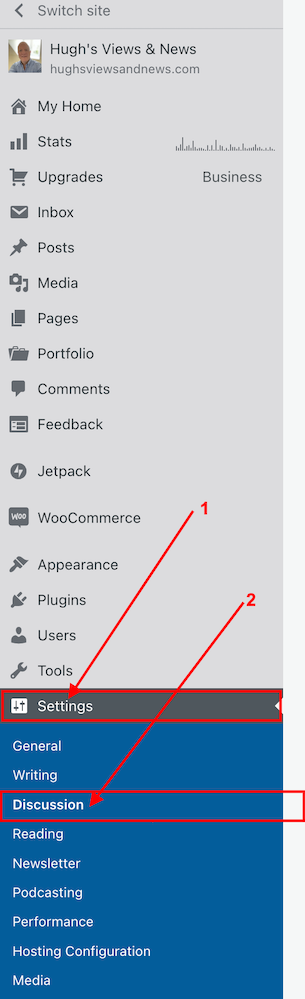
Click Settings – Discussion on your blog’s dashboard.
Click Settings and Discussion
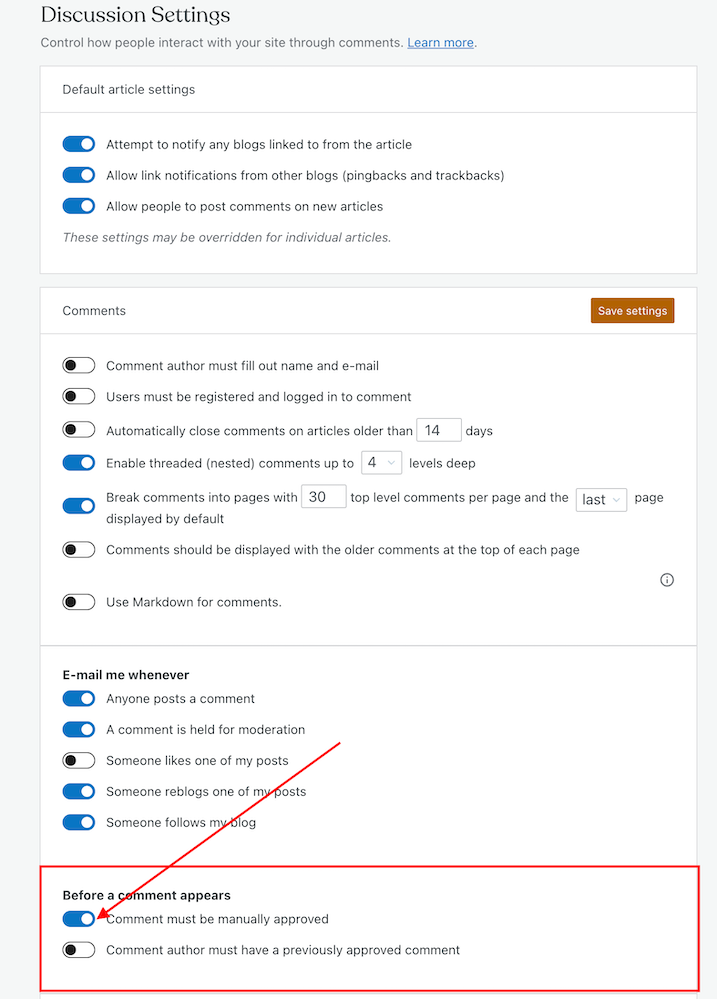
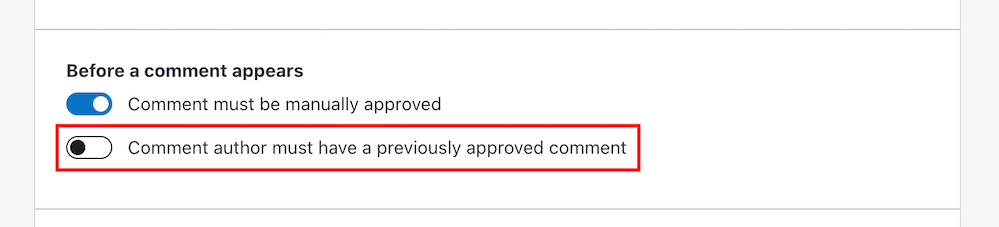
On the Discussion Settings page, scroll down to the ‘Before A Comment Appears‘ box and slide open the button next to ‘Comment must be manually approved.’
To approve all comments, select the ‘Comment must be manually approved’ button
Click on the ‘Save settings‘ button.
You may also have noticed an option to allow comments to be posted straight away from people who have previously had comments approved by you.
Selecting the ‘Comment author must have previously approved comment’ means you don’t need to approve those comments.
For bloggers who are dealing with hundreds of comments daily, this is a great time-saving option as you don’t need to manually approve them.
However, be wary. Somebody who may have left a perfectly friendly comment on an earlier post could also leave an unfriendly comment on a future one.
How to deal with people who don’t agree with you
Sometimes, I receive comments from people who may not agree with what I have to say, but that’s a part of the whole blogging experience.
However, providing their comment has been written in a friendly and professional manner, I will approve it.
Nobody should tolerate rudeness or bad manners, so don’t allow any of these kinds of comments to appear on your blog.
If comments are unfriendly, rude or make you feel threatened, mark them as spam.
Allowing unfriendly, rude comments to appear on your blog can make your blog look unfriendly and unwelcoming, especially to new visitors.
If you see a rude comment or one that is spam on a blog you follow, inform the blog’s owner of the problem. They’ll probably thank you for looking out for them.
How to block certain bloggers or readers from leaving comments
Further down the same page on the Discussion Settings dashboard, you’ll see two boxes entitled ‘Comment Moderation‘ and ‘Disallowed comments.’
This is where you can blacklist other bloggers and comments
These boxes are where you can add certain words, the web address of a blog, the email address or the internet protocol of a user you want to block.
Comments will be held in a moderation queue if they contain anything you have added to the Comment Moderation box.
Comments will be sent to the trash bin if they match anything you have added to the Disallowed Comments box.
2. Internettrolls
If you are unlucky enough to find that an internet troll has decided to try and make your blog their new home, ignore them.
Whatever you do, don’t engage in any conversations with the internet troll. Whether through comments or if they try to contact you through your ‘contact me’ page, ignore them.
Internet trolls will do all they can to get you to react to what they have said. They may even try to get some of your readers to engage with them by responding to comments they have left, so never approve their comments.
Don’t give internet trolls the satisfaction of acknowledging them in any shape or form.
Remove any comments, and don’t allow them to upset you in any way. Add them to the ‘Disallowed Comments‘ box. They’ll soon get the message and move on.
3. Back-Up
How would you feel if you woke up one morning and found that all your blog content had disappeared?
It’s the stuff of nightmares, so be kind to your blog and make sure you back up its content regularly.
Depending on your WordPress plan, your blog can be backed up via Jetpack – Backup on your blog’s dashboard. If you don’t have this facility, consider saving all your blog posts via an external server or hard drive.
If you’re already writing your blog posts on Word, Pages or any other writing software such as Grammarly, ensure you save the documents on the iCloud (if you have access) or on another hard drive.
Don’t lose all your hard work by not backing up your blog.
4. Anti Virus Software
Always update anti-virus software on your device to protect your blog and ensure you have the latest version.
If hackers can get access to well-known websites, then they may be able to get access to your computer\device.
Malware could allow cybercriminals to take control of your computer, log your keystrokes, or access your personal information and financial data, which could lead to identity theft. So, not only could your blog be at risk from hackers, but so could your bank details and other personal information.
Remember to keep all other software on your computer up to date and use the latest software versions of any website you visit regularly.
WordPress.Com users will always have the latest version of WordPress as WordPress download updates directly. Those who have self-hosted blogs should ensure they have the latest updates installed.
This all may sound nightmarish, and you may ask yourself who would want to attack your blog, but every blogger should take it seriously. Don’t become a victim.
However, whatever you do, keep enjoying your blogging experience.
Although attacks on our blogs are happening constantly, your anti-virus software (and the software supplied by WordPress) deals with most threats without you knowing about it.
Let’s Wrap It Up.
Make sure you protect your blog from any online attacks.
Don’t approve any comments that are unfriendly, rude, or racist towards you or any other bloggers.
Consider moderating all comments before they appear on your blog.
People may disagree with what you say in your posts. Only approve their comments if they’ve been written in a friendly and professional manner.
Unsubscribe and or/block trolls and unfriendly readers from your blog.
Never respond to comments from trolls or allow their comments to appear on your blog.
Remember to regularly back up your blog or save your blog posts on an external hard drive.
Keep anti-virus software updated on your devices.
Ensure you’re using the latest version and tools of WordPress.
Is there anything else you’d like to share with us about protecting your blog from unwanted attention and attacks? Do you have any questions? Join the discussion by leaving me a comment with the details.
Layout, content, settings, and format might differ on self-hosted blogs.
Follow Hugh on Social Media. Click on the links below.
In her recent post, Brenda talks about using prompts to get ideas for blog posts, especially when we struggle to find something to write about. She mentions the daily WordPress prompt, which asks a question bloggers can respond to in a blog post.
I won’t go into all the details of Brenda’s excellent advice, but it got me thinking about the subject of comments.
What kind of comments do you leave on blog posts?
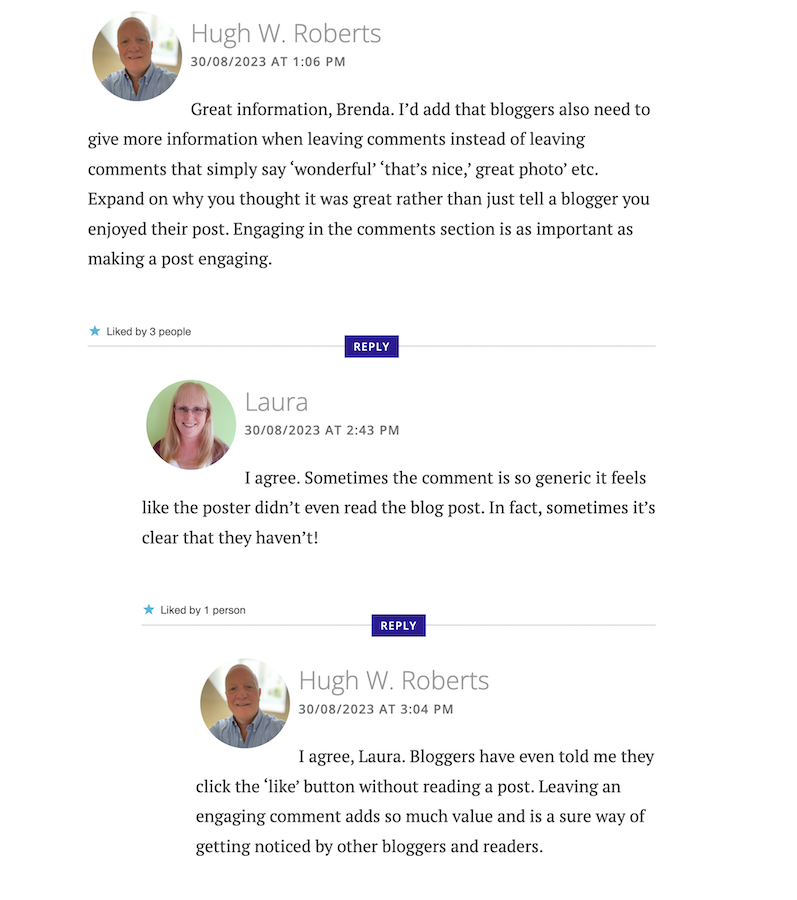
I left a comment on Brenda’s post, which sparked a conversation with another blogger, Laura, who blogs at Keeping It Creative.
The following screenshot is just a small part of the conversation Laura, Brenda, and I had about the subject of comments.
Are your comments engaging?
Our conversation got me thinking about the overall subject of comments and how I’ve noticed a big difference in the comments being left on blogs.
When I first started blogging, the majority of bloggers had conversations and discussions in the comments section with each other about the subject of the post. But over time, that trend seems to be dwindling which had me asking the question –
‘What has happened to the art of conversation and discussion in the comments section of blogs?’
Gone are the days when many readers left comments that not only proved they’d read the post but also gave feedback that opened discussion and conversation.
Now, it seems, some bloggers leave comments with little, if any, way of responding to them other than with a ‘Thank you.’ Comments such as –
‘I enjoyed this.’
‘Wonderful.’
‘This is a great read.’
‘Well done.’
‘Great interview.’
‘You did a great job.’
‘Another great story.’
‘Great authors and books.’
‘Great post.’
‘Thanks for sharing this.’
Or worse, a comment that includes nothing but emojis.
Yes, some of those comments sound encouraging, but as Laura said in her comment, ‘Sometimes a comment is so generic, it feels like the person leaving the comment never read the post.’
None of the above comments mention anything about the contents of the post.
Why do people leave short, non-engaging comments?
There are probably some genuine reasons for leaving non-engaging comments all over the blogging world, but what are they?
I hope some of the reasons will be left in the comments section of this post. I’m interested in knowing.
Some bloggers claim they don’t have the time to leave longer, engaging comments because they don’t have the time to leave them. Some have too many other blogs to visit. Some rush around the blogging world because they only have so much time to visit and comment on as many posts as possible.
But in contrast, if they didn’t feel obliged to visit these blogs to leave short, non-engaging comments, they could free up some time to leave a few engaging comments that open up discussion and conversation.
Is it no longer trendy to leave comments on blogs?
I was shocked by what Janice told me. Is it really no longer trendy to leave comments on blogs? Are readers only wanting information, not a community?
The other side of the blogging coin.
It’s not only some of those visiting posts at fault for leaving short, non-engaging comments. Some bloggers respond to engaging comments that clearly show they want to discuss the contents of a post by saying nothing more than a ‘Thank you.’ They instantly cut off engaging with their audience.
What are engaging comments?
They contain information that proves the post has been read.
They are written in an engaging, friendly manner.
They are at least a couple of sentences long.
They indicate that you want to discuss the contents of a post further with who wrote the post.
Include any questions about the contents of a post.
And let me reassure you that you should never feel guilty for not leaving a comment or feel obliged to leave one on any blog. There is nothing wrong with clicking the ‘like’ button and moving on after reading a post if you’ve nothing of value to add.
I don’t enjoy having to reply to any comment with just a ‘thank you.’ I want to get into a discussion or conversation about the contents of my posts and what made whoever left a comment say what they said.
For example –
Why did they think the post was good?
What was it that made them enjoy reading the post?
Why was it a great read, story or interview?
Was it the way the post was written or some of the answers given? If so, which ones?
Did the post strike a cord? Why?
What parts did they like/dislike the most?
Was it something new they learned? If so, what, and how will they use the new information?
I’ve stopped leaving comments on blogs unless I’ve something of value to add.
And I never feel guilty for not leaving a comment.
I don’t need to prove I’ve visited a blog.
I don’t need to make anyone think I’ve read their post.
I don’t feel obliged to follow and read posts on a blog simply because that blogger follows me and leaves me comments.
And nor should you.
So, what has happened to the art of conversation and discussion in the blogging world? Is it dead, or have I, as a blogger who enjoys discussion and conversation, become a minority in the blogging world? Is it no longer trendy to leave comments? Join the discussion and conversation by letting me know what you think in the comments section.