
WordPress Comment Problems? Here’s What’s Still Going On

The Commenting Problems So Far

If you read my recent post ‘WordPress.Com Comment Problems? Here’s What’s Going On,’ I outlined two problems which many WordPress users were having when attempting to leave comments on other WordPress blogs.

The first problem, an error message saying, ‘This block has encountered an error and cannot be previewed,’ was fixed within a few hours of me reporting it to WordPress. I have to say I was impressed by how quickly it was fixed and how WordPress reached out to ensure I was no longer experiencing the problem.

The second problem, however, remains. This happens when I try to leave a comment on a WordPress blog and am told I need to sign in, even though I’m signed in to WordPress.com.

A Response From WordPress

I wanted to update you all that WordPress has contacted me again with an update on this problem.

Here’s what they said in their email:

‘On the second issue you flagged- being asked to sign in again when you comment on other WordPress.com blogs even though you’re already logged in- you’re right that it isn’t just you. We’ve reproduced it on our side too, and it’s with our developers. It tends to show up on blogs that use their own custom domain, which we’re still working through, so I don’t want to say it’s fully resolved when it isn’t yet.

In the meantime, these all get a comment through without the repeated prompt:

  • Commenting straight from the WordPress.com Reader, under the Conversations section (https://wordpress.com/support/reader/, which you mentioned already works well for you.
  • When you do hit the prompt on a blog, click “Add your name” and pick your WordPress.com profile, as you’ve been doing.
  • Replying from the notification itself when you get one, rather than opening the post in a new tab.

Here’s the general guide to leaving comments for reference: https://wordpress.com/support/comments/comment-on-a-post/

I don’t have a fixed date yet, but please feel free to reply here anytime if the prompts still appear after a WordPress update, and we’ll take another look. Thanks again for your patience and for helping us pin this down.’

Testing the Fixes

All three methods work. I’ve tested them all.

Logging In to Leave a Comment

To help, here’s an image of what happens when clicking the ‘Add your name‘ link in the comments box.
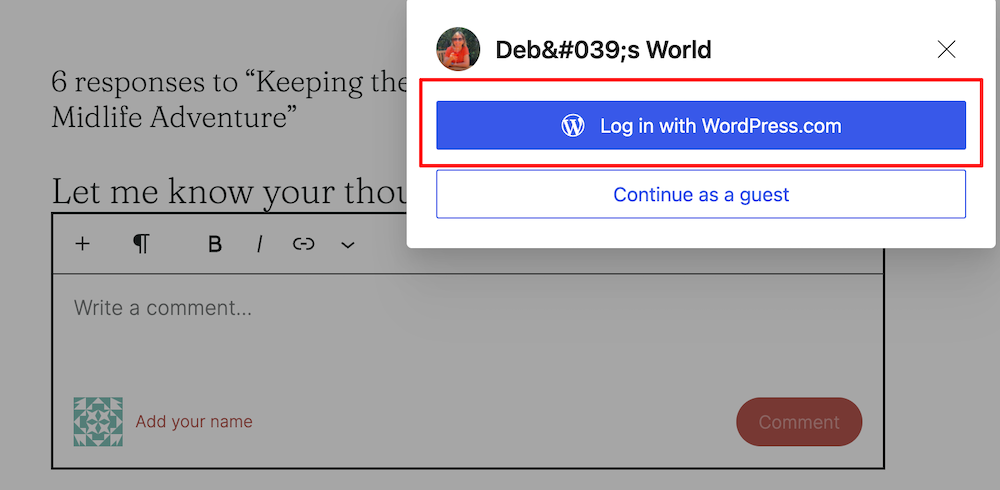
A screenshot of a pop-up prompt over a blog comment section titled "Deb's World." The pop-up offers two sign-in options: a blue button highlighted with a red box reading "Log in with WordPress.com" and a white outline button reading "Continue as a guest." In the background, a dimmed comment field displays the placeholder text "Write a comment..." alongside a red link prompt reading "Add your name."

As you can see, you have two ways to log in.

Click the ‘Log in with WordPress.Com‘ button, and your name and Gravatar profile picture will appear in the comments box. Here’s an image of what happened when I clicked the ‘Add your name’ link on Deb’s, who blogs at Deb’s World, blog.
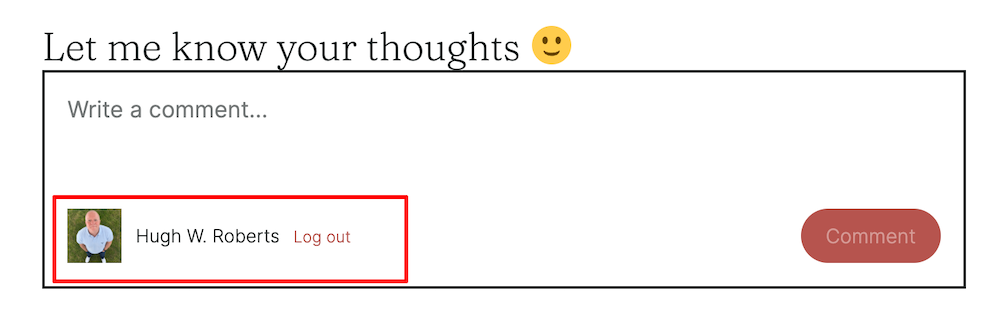
A screenshot of a working blog comment box under the heading "Let me know your thoughts" followed by a yellow smiley face emoji. Inside the framed input box, gray placeholder text reads "Write a comment..." At the bottom left, highlighted by a red outline box, is a profile avatar photo next to the name "Hugh W. Roberts" and a red "Log out" link. A rounded, reddish-brown "Comment" button is positioned in the lower right corner

Final Thoughts

I know it can be frustrating to remember having to log in every time you want to leave a comment, so if you’d rather not have to remember, leave comments via the other two methods WordPress suggested. You can do this via the WordPress Reader or by replying to a WordPress new post email notification without opening the post in a new tab. If you can’t read the whole post in the email, open the post and then, before leaving a comment, close it and reply to the email.

Of course, I’ll keep you all updated on when a fix is in place, but for now, please rest assured that WordPress is aware of the problem and is working on a fix.

This just in from WordPress!

Just as I was going to push the publish button for this post, this email came in.

‘Hi there,

Thanks for your patience on this. I checked on the sign-in prompt issue today and there’s no update from the developers yet. It’s still open on their side, and your ticket will stay open while we wait.

We’ll let you know as soon as we hear back, and you’re welcome to reach out in the meantime.’

Best Regards,

These emails are reassuring that a fix is in the works.

I’ve seen lots of comments across WordPress from bloggers and readers experiencing this problem. If you know somebody having the same problem, please let them know I’m on the case with WordPress to get it fixed. If it helps, point them to this post.

Copyright @ 2026 hughsviewsandnews.com – All rights reserved.


The featured image in this post was created using the WordPress image generator. AI was used to check for grammar and spelling mistakes and to help with the layout of the post.

You can follow me on the following sites.

Please feel free to share this post.


Fediverse reactions


Discover more from Hugh’s Views & News  

Subscribe to get the latest posts sent to your email.

7 responses to “WordPress Comment Problems? Here’s What’s Still Going On”

  1. WordPress.com Comment Problems? Here’s What’s Going On avatar

    […] delighted to say that WordPress have been in touch and has resolved the first problem. Click here to get an update on the second […]

  2. noelleg44 avatar
    noelleg44

    I’ve been having this problem and signed in, but even then, I often can’t ‘like’ a return comment. What the hell is Word Press doing? Or not doing!

    1. Hugh W. Roberts avatar

      I use the Bell Notification icon to like any comments. I’ve found it’s the best place to ‘like’ comments.

      1. noelleg44 avatar
        noelleg44

        Thanks, Hugh!

  3. Michael avatar

    Thanks for the update Hugh. I have noticed that when a wordpress blogger posts an answer to a comment that I made on their blog, the notification doesn’t come through. I wonder if this is all wrapped up in the same problem that you have mentioned.

    1. Hugh W. Roberts avatar

      I’ve noticed the same thing, although not on all blogs, Michael. I think it could be related to the bug that is causing most of us to have to log in every time we want to leave a comment.

      1. Michael avatar

        Hopefully there will be a fix soon.

Feel free to leave a comment. Engagement helps keep blogs alive and forms community.

This site uses Akismet to reduce spam. Learn how your comment data is processed.

I’m Hugh

A high-angle, overhead portrait of a man standing on a green grass lawn, looking straight up toward the camera with a gentle smile. He is wearing a light blue Gant polo shirt, dark blue jeans with his hands in his pockets, and clean white sneakers.

Welcome to my blog. I’m delighted to have you here. This is the place to discover tips on blogging and WordPress, flash fiction, photography, and more. I enjoy engaging with my readers, so please feel free to explore, join discussions, and contact me. I’m happy to assist! Find out more about me and my blog by clicking the ‘Meet Hugh’ button.

Let’s connect

Subscribe to Hugh’s Views And News

Latest Posts

  • WordPress Comment Problems? Here’s What’s Still Going On
    Still being asked to log in when you comment on WordPress.com blogs, even though you’re already signed in? I’m sharing WordPress’s latest update on this known bug, which explains when it happens and demonstrates how to use the “Add your name” option and other workarounds. My post also includes information on the action WordPress is taking to resolve the problem.
  • WordPress.com Comment Problems? Here’s What’s Going On
    Are you suddenly unable to leave comments on WordPress.com blogs, or being asked to log in even when you’re already signed in? I’m sharing details of these current WordPress comment glitches, what engineers have confirmed, and a temporary workaround via the Reader.
  • Sunday Stills Photo Challenge: Steps & Stairs
    Explore the playful side of steps and stairs in this week’s Sunday Stills photo challenge. From optical-illusion doorways and autumn-leafed stone steps to a corgi “research assistant” and a mysterious figure at the top of the stairs. Plus simple guidelines to share your own creative images. Everyone is welcome to join in.
  • Sunday Stills Photo Challenge: Capturing Ephemeral Moments
    Explore the beauty of what doesn’t last: double rainbows, coffee-foam creatures, funhouse-style mirror reflections, beach footprints swept away by the tide, and fireworks fading into the dark. As your temporary Sunday Stills host, I explain how to join this week’s “Ephemeral” Sunday Stills photo challenge and share your own creative take.
  • Stop Spam Now: How To Clean Spambots Off Your WordPress Blog Fast
    Spam comments and bogus followers don’t just clutter your blog; they can damage your blog’s rankings and put your readers at risk. Learn how to recognise suspicious comments and Gravatars, spot ‘like’ button abuse, and use the improved Jetpack Subscribers page to block and remove spammers for good.
  • The Writing Slump That Led to ‘The Most Beautiful Woman in the World’
    What do you do when struggling to write a blog post or piece of fiction? I turn to writing prompts or photos, but a vivid memory from the 1980s of a stylish young woman in a London department store has also recently helped me. That decades-old image has now become a haunting new tale featured on Marsha Ingrao’s Story Chat Digest. Have you seen the most beautiful woman in the world recently?

Looking for your next quick read? Try my books

An image of book covers, book, tablet and mobile phone, for the book Glimpses.
An image for the book More Glimpses - showing a book cover, tablet and mobile phone.

Follow Hugh in the Fediverse

Hugh's Views & News  
Hugh's Views & News  
@hughsviewsandnews.com@hughsviewsandnews.com

WordPress & Blogging tips, flash fiction, photography and lots more!

319 posts
10 followers
A widget with the words 'Team Effort - Story Chat Digest - Where Authors Meet - Author'

Most Viewed Posts & Pages Over The Last 24 Hours

Recommend Blogs To Follow


Roaming About
A Life Less Ordinary

Second Wind Leisure Perspectives
Fun, Photography & Friends

Spo-Reflections
Spo-Reflections
To live is to battle with trolls in the vaults of heart and brain. To write; this is to sit in judgment over one's Self. Henrik Ibsen

Boomer Eco Crusader
Boomer Eco Crusader
Live Green | Declutter | Simplify Life

SONGS AND SCRIPTS AND DUNKING BISCUITS
Every day tales of a winging-it creative

Jacqueline Lambert
Jacqueline Lambert
Award-Winning Travel Humour Writer

Anne R. Allen’s Blog… with Ruth Harris
Writing about writing. Mostly.

Fancying France
The musings of a ‘femme d’un certain âge’ who divides her time between SW France and SE England

Marsha Ingrao         Always Write
Marsha Ingrao Always Write
Having fun blogging with friends

Curiosities, Castles and Coffee Shops
The musings of a curious mind

WrookieSchU
WrookieSchU
Live life 🙌🏼

WPcomMaven
WPcomMaven
Helping you make the most of your free WordPress.com website since 2011

Share Your Light
Share Your Light
You are a miracle – Let it happen

No Facilities
No Facilities
Random thoughts, life lessons, hopes and dreams

Esther Chilton
Writer, Tutor and Editor

Saying nothing in particular
Jan … JT Twissel

The Chicago Files
The Chicago Files
A Canadian Perspective on Living in the Windy City!

Thank you to all my visitors

494,895 hits

272,883 visitors

Scan the QR code to follow me on Bluesky

Copyright Protected Blog

COPYRIGHT ©2011-2031 Hugh’s Views And News BLOG – All Rights Reserved.

This work by Hugh W. Roberts, and/or Hugh’s Views And News blog, is licensed under a Creative Commons Attribution-Noncommercial-NoDerivatives 4.0 International License. Unauthorised use and/or duplication of this material (text and images) without express and written permission from this blog’s author and/or owner is strictly prohibited. If you want to use posts, excerpts, photos and links, you may contact me first. You must give full and clear credit to Hugh W. Roberts and Hugh’s Views And News dot com with links to the original content.