
WordPress Comment Problems? Here’s What’s Still Going On

The Commenting Problems So Far

If you read my recent post ‘WordPress.Com Comment Problems? Here’s What’s Going On,’ I outlined two problems which many WordPress users were having when attempting to leave comments on other WordPress blogs.

The first problem, an error message saying, ‘This block has encountered an error and cannot be previewed,’ was fixed within a few hours of me reporting it to WordPress. I have to say I was impressed by how quickly it was fixed and how WordPress reached out to ensure I was no longer experiencing the problem.

The second problem, however, remains. This happens when I try to leave a comment on a WordPress blog and am told I need to sign in, even though I’m signed in to WordPress.com.

A Response From WordPress

I wanted to update you all that WordPress has contacted me again with an update on this problem.

Here’s what they said in their email:

‘On the second issue you flagged- being asked to sign in again when you comment on other WordPress.com blogs even though you’re already logged in- you’re right that it isn’t just you. We’ve reproduced it on our side too, and it’s with our developers. It tends to show up on blogs that use their own custom domain, which we’re still working through, so I don’t want to say it’s fully resolved when it isn’t yet.

In the meantime, these all get a comment through without the repeated prompt:

  • Commenting straight from the WordPress.com Reader, under the Conversations section (https://wordpress.com/support/reader/, which you mentioned already works well for you.
  • When you do hit the prompt on a blog, click “Add your name” and pick your WordPress.com profile, as you’ve been doing.
  • Replying from the notification itself when you get one, rather than opening the post in a new tab.

Here’s the general guide to leaving comments for reference: https://wordpress.com/support/comments/comment-on-a-post/

I don’t have a fixed date yet, but please feel free to reply here anytime if the prompts still appear after a WordPress update, and we’ll take another look. Thanks again for your patience and for helping us pin this down.’

Testing the Fixes

All three methods work. I’ve tested them all.

Logging In to Leave a Comment

To help, here’s an image of what happens when clicking the ‘Add your name‘ link in the comments box.
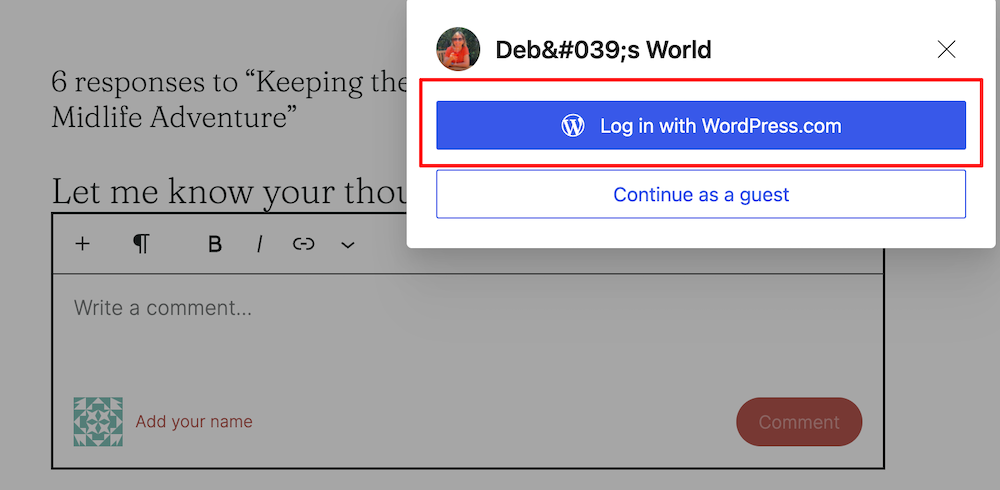
A screenshot of a pop-up prompt over a blog comment section titled "Deb's World." The pop-up offers two sign-in options: a blue button highlighted with a red box reading "Log in with WordPress.com" and a white outline button reading "Continue as a guest." In the background, a dimmed comment field displays the placeholder text "Write a comment..." alongside a red link prompt reading "Add your name."

As you can see, you have two ways to log in.

Click the ‘Log in with WordPress.Com‘ button, and your name and Gravatar profile picture will appear in the comments box. Here’s an image of what happened when I clicked the ‘Add your name’ link on Deb’s, who blogs at Deb’s World, blog.
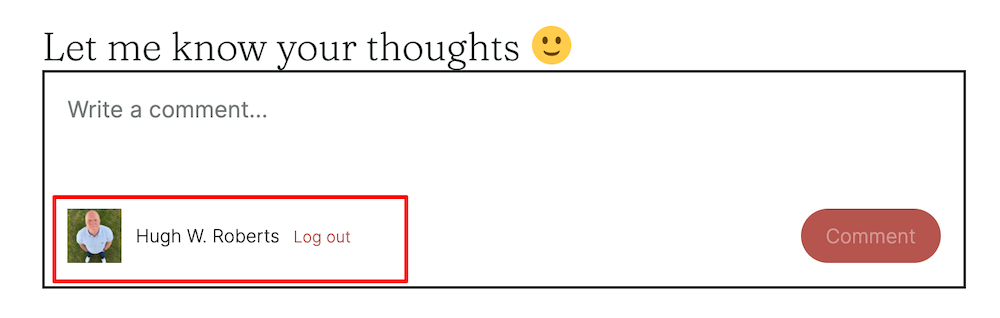
A screenshot of a working blog comment box under the heading "Let me know your thoughts" followed by a yellow smiley face emoji. Inside the framed input box, gray placeholder text reads "Write a comment..." At the bottom left, highlighted by a red outline box, is a profile avatar photo next to the name "Hugh W. Roberts" and a red "Log out" link. A rounded, reddish-brown "Comment" button is positioned in the lower right corner

Final Thoughts

I know it can be frustrating to remember having to log in every time you want to leave a comment, so if you’d rather not have to remember, leave comments via the other two methods WordPress suggested. You can do this via the WordPress Reader or by replying to a WordPress new post email notification without opening the post in a new tab. If you can’t read the whole post in the email, open the post and then, before leaving a comment, close it and reply to the email.

Of course, I’ll keep you all updated on when a fix is in place, but for now, please rest assured that WordPress is aware of the problem and is working on a fix.

This just in from WordPress!

Just as I was going to push the publish button for this post, this email came in.

‘Hi there,

Thanks for your patience on this. I checked on the sign-in prompt issue today and there’s no update from the developers yet. It’s still open on their side, and your ticket will stay open while we wait.

We’ll let you know as soon as we hear back, and you’re welcome to reach out in the meantime.’

Best Regards,

These emails are reassuring that a fix is in the works.

Update: Check my other posts for further updates – ‘WordPress Comment Login Problems: Latest Update and Fix Hopes‘ and WordPress Comment Login Problems: New Answers, No Fix Yet.‘

I’ve seen lots of comments across WordPress from bloggers and readers experiencing this problem. If you know somebody having the same problem, please let them know I’m on the case with WordPress to get it fixed. If it helps, point them to this post.

Copyright @ 2026 hughsviewsandnews.com – All rights reserved.


The featured image in this post was created using the WordPress image generator. AI was used to check for grammar and spelling mistakes and to help with the layout of the post.

You can follow me on the following sites.

Please feel free to share this post.


Fediverse reactions


Discover more from Hugh’s Views & News  

Subscribe to get the latest posts sent to your email.

76 responses to “WordPress Comment Problems? Here’s What’s Still Going On”

  1. Toonsarah avatar

    Thank you for all the information Hugh and for liaising with WP on this issue. I’ve been having it for a few days now but some people had commented that it must be my settings – I’m glad to know I’m not alone! I can live with the need to keep logging on but my main problem is that a lot of people commenting on my site are apparently ignoring that. As a result I’m getting a lot of anonymous comments, all of which need to be moderated even though I’m pretty sure most are from regular commenters on my site and none of which have a name attached so I can’t be sure whom I’m talking to! I await the fix with some impatience 😠

    1. Hugh W. Roberts avatar

      Outdated blog themes can cause many problems, Sarah, but some retired themes can work normally. You can enable a setting that lets anyone comment on posts without signing in. They’ll then show up as anonymous. However, most anonymous comments come from people who haven’t signed in to their blog, or from those still using an unsupported retired WordPress theme with a bug causing the issue.

      Sometimes the clues to who left an anonymous comment are in the comment, but I wouldn’t be afraid to reply and ask who left it. From what I know, the problem I outlined in this post means that if you don’t click the ‘add your name’ link and select your WordPress profile, your comment is lost instead of showing up as anonymous.

      Hopefully, a fix will be in place very soon.

      1. Toonsarah avatar

        Oh I always ask who left the comment but never get an answer! I suspect that maybe those who comment anonymously don’t get any notification of my reply. I do think these two issues must be related as they started at the same time so I’m hoping that when one is fixed they both will be!

        1. Hugh W. Roberts avatar

          I’ve experienced the ‘Anonymous’ comment problem for a few years, as I’ve often written about it on my blog. The problem I outlined in this post only started happening on my blog about two weeks ago. They may be related, but we’ll see when a fix is in place.

  2. Terri Webster Schrandt avatar

    Thanks for another help post, Hugh! In most cases, I’ve had to resort to sitting at my desktop to read many blog posts. This issue makes it difficult to use Jetpack app on my phone. I wondered if it is related to themes? But then I knew some folks have newer themes or Block themes which helps the issue.

    I noticed a lower number of links to my two challenges this week. Could be a result of that issue or when I took my break, a few others did too, who knows? Thanks for being our voice at WordPress.

    So, just as I clicked comment, I got the popup telling me to log in. I stopped to let you know the issue is still plaguing us :(

    1. Hugh W. Roberts avatar

      You’re welcome, Terri.

      Yes, I believe that if you don’t click the ‘add your name’ link, your comment is lost. It happened to me when I hosted my second week of Sunday Stills. However, it taught me to always click that link first before writing my comment.

      I think it’s all related to a new comments box WordPress recently launched. How do I know this? Because someone who works for WordPress asked me for my thoughts on the new comments box WordPress had launched. Apparently, the new comments box is supposed to replicate your blog’s theme. Of course, I don’t know if that is correct, but I’m more concerend at the moment that WordPress get this login comments box issue fixed quickly for all of us.

  3. Dan Antion avatar

    The good news about having to login is that they have made it easier to login when that happens. I’m able to login to a pop-up window and I am given the option to post the comment from there. Much better then when I used to have to have my WP password handy, login and very often lose the comment I had written.

    Thanks for the update and your efforts.

    1. Hugh W. Roberts avatar

      Is that like the pop-up window I showed in this post, Dan? Yes, it’s good to have it, although I have to remember to click on the ‘Add your name’ link; otherwise, I end up losing the comment. Hopefully, they’ll fix the comment login issue soon.

      1. Dan Antion avatar

        No. If I have to login, I get a fairly large window. It asks me to login, and after that, I get the window asking if I want to comment. Then, the comment I wrote is posted.

        1. Hugh W. Roberts avatar

          Is that on your phone, tablet, laptop or desktop, as I don’t get asked to log in unless I click the ‘add your name’ link? I only use a desktop for blogging.

          1. Dan Antion avatar

            It’s on my laptop. I rarely read blogs on my phone. It’s pretty small, and there’s an annoying issue that when I press the Like button, it takes me to some random web page from the past. I do read on my iPad, but not often. I prefer the laptop experience and visiting the blog as opposed to the Reader.

            1. Hugh W. Roberts avatar

              Likewise, Dan, I don’t blog on my phone. I prefer to read and write using a bigger screen.

  4. John avatar
    John

    I wonder if WP is in process of purging abandoned sites? This may explain why I get those login messages…

    1. Hugh W. Roberts avatar

      John, I haven’t heard that WordPress is doing that, but I do understand they have a big clearout of duplicate blogs, especially those run by spambots. That’s why you may sometimes see a sudden drop in follower numbers in one day. I’ve seen it happen twice in the last year.

      I did find this link about inactive WordPress blogs.

      https://wordpress.com/forums/topic/how-long-do-wordpress-sites-remain-activelive/

      The problem seems to be a bug affecting the comment box on most WordPress blogs.

      I’ll keep you all updated here.

      1. John avatar
        John

        Thanks!

  5. Jules avatar

    I’m glad there is someone like you to be able to contact and talk about issues that have happened, and that are being worked on.

    I noticed there were changes either last month or early this month with how my Dashboard area was arranged. But that has since gone back to the way it was. And another issue which had me fuming and gave me a sleepless night – got fixed within a day. So there isn’t any need to rehash that.

    I have always enjoyed ‘Flying with WordPress’ except when the try to fix what isn’t broken. Occasionally there is a tiny pop up that asks for my opinion (in the dashboard area) and I answer that to the best of my ablitiy. I am not very Technically inclinde and I’m not a fan of change. Do you remember the first time WP tried to force added line spaces… way before what I call the “Block E” debolical.

    As long as I can write my posts my way, however simpler they are – I’ll stay with WP. But as soon as my ‘choices’ are taken away I may just jump ship.

    1. Hugh W. Roberts avatar

      Jules, when I encounter any online problem, not just with WordPress, I’m like a dog with a bone in trying to get it sorted out.

      I know a new dashboard is launching soon, since I gave WordPress feedback about it during an online interview and screening I saw of it. I still have a link to it on my blog dashboard, but I’m not sure they have launched the new dashboard yet. It looks different from the current one, with the main focus on letting users choose what they want to see.

      I can not recall the double space issue, but it may have been before my time on WordPress. I used to dislike change, but when somebody told me to embrace it rather than fight it, I soon saw the positivity it brought. I know it can be frustrating sometimes when things change, but I read and watch any tutorials companies give to their customers, which I always find very helpful.

      I am aware that WordPress are working on a new Editor called the ‘Writing Editor,’ which I understand will replace the Classic Editor. I’ve tried it out, and as its name suggests, it’s for users who only want to write without all the bells and whistles the Block Editor offers. It was very easy to use.

      1. Jules avatar

        Some change can be good. When you tried the new ‘Writing Editor’ does it force extra line spaces? I really dislike that. I don’t mind adding a net image (I always give credit). I’m really not sure what all the other bells and whistles might be. As I don’t bother with them. I do add categories (but am unable to take out/edit old ones) so categories with miss-spellings and ones I don’te use any more just stay on the list. A minor bother.

        Frankly I could do without the Reader. I understand how the ‘Classic Editor’ works. Why does it have to change? Just leave it alone. Why fix what isn’t broken? WP may lose folks if they keep making changes that really aren’t needed.

        My main complaint about the Block Editor is that I can’t copy and paste from my own documents and have the same line spaces. When I do transfer to that system all the extra line spaces pop in and any wanted line space between verses disapears. And why should I have to use shift and enter after a line to avoid an extra line space?

        I’m just not technically inclinded. I remember going to a class with my young son oddles of years ago about instructions. The instructor asked the children how to make a peanut butter sandwich. Children raised their hands with suggestions and the instructor did just what they said. Like; put the peanut butter on the bread. So the instructor took the unopened jar of peanut butter and put in right on the unopened loaf of bread. There are more steps obviously. I need all the steps. Not just quick visual lessons. But then I also still like reading real books ;)

        1. Hugh W. Roberts avatar

          It didn’t force anything, Jules. It was just like writing on a blank screen. However, the settings on my blog and computer may be different from yours, so extra line spacing may be turned off. I’m not sure, but I did find the Write Editor very easy to use.

          WordPress have moved away from the old-style Classic Editor. As web design expectations have grown, its single text-box layout struggled to handle complex multi-column designs and rich media. It no longer supports the old Classic Editor, so many bugs will go unfixed. Like all online companies, WordPress has had to keep up with an ever-changing online world. Most paying customers have wanted more tools and changes. If WordPress hadn’t kept up with online changes, they would have lost many paying customers, which could have threatened their very existence.

          Fortunately, as I mentioned, a new writing editor is in the works. You can continue to use the Classic Editor while it is still available, although I feel that once WordPress launches the new Writing Editor, the Classic Editor may only be available via a plugin you would have to install.

          1. Jules avatar

            I do understand that progress is needed. And businesses need all the improvements they can get. And for those who are able to take advantage of those changes – good. But if all you’ve ever eaten was white bread and then all of a sudden it wasn’t available and you had to eat wheat would you be happy? Sure wheat bread is healthy for you, and it may even cost a little bit more, but if you are allergic to wheat… well that wouldn’t be good would it?

            Since I don’t have a business, I’m not worried about all the new layout designs. I have not changed my ‘layout’ in years for fear I counldn’t get it back to the simplicity that it is – for me.

            It would be nice to continue to have choices. I am not even sure how to use plugins, but if WP could tell all of the ‘Classic’ users how to get it. Or even give very detailed instructions on and about the new system… then maybe it would be less of a trial to accept that change?

            I just want to be able to copy and paste my own work from my own documents into the WP post area without any drastic changes. Is that too much to ask for?

            1. Hugh W. Roberts avatar

              Here’s a link from the WordPress site with details about using the Classic editor.

              https://wordpress.com/support/editors/classic-editor-guide/

            2. Jules avatar

              Thank you.

            3. Jules avatar

              So far I am still able to use the Classic Editor but I will keep this link – again thank you.

            4. Jules avatar

              I tried the ‘plugin’ at another site I have and it is the same that comes up with the current site I use. But not as a default, but still as a choice between “B” & “C”. I didn’t see any difference after plugin. But I will keep the link handy. Perhaps by default WP already has given me this ‘Plug-in’. So I can go on writing the way I am used to. Again thank you for your amazing guidance.

            5. Hugh W. Roberts avatar

              You’re welcome, Jules.

  6. Mr. Ohh's Sideways View avatar
    Mr. Ohh’s Sideways View

    Thanks. 🤣😎🙃

  7. Eugi avatar

    Thanks for the update, Hugh. I’ve noticed it’s only on a few blogs now, whereas before it was on all blogs. I comment directly on the blog.

    https://amanpan.com/2026/10/25/dedicated-to-awesome-blogger-hughhughs-views-news-including-updates-on-the-commenting-issues/

    1. Hugh W. Roberts avatar

      That’s some good news, Eugi. Maybe a fix is underway. I’m sure WordPress will contact me once it’s resolved.

      And thank you so much for featuring me as an ‘awesome blogger’ on your blog today. That’s so very kind of you. I’ll certainly be over to respond to any comments.

      1. Eugi avatar

        You’re welcome, Hugh, and so well deserved, my friend.

  8. Aptivi avatar

    I hope they fix the WordPress comment problems soon. I have to log in again here to post a comment.

    1. Hugh W. Roberts avatar

      It’s happening on most of the blogs I comment on, but at least we have a workaround while they look into the issue. But yes, let’s hope they fix the problem soon.

      1. Aptivi avatar

        I agree, there are workarounds, like commenting from the Reader or from the notifications area. I can even make comments from the Jetpack phone app. If I do sign in again to comment directly on the site, my name doesn’t have a link to my site, but if I comment using workarounds, my name has a link to my site. Both my blogs are on the free plan.

        1. Hugh W. Roberts avatar

          That’s good to know and reassuring for those with free plans. Thank you for sharing it with us here.

          1. Aptivi avatar

            You’re most welcome. I hope to keep sharing updates soon. I can see you’re sharing interesting WordPress tips and updates, so I followed you. ☺️

            1. Hugh W. Roberts avatar

              Thank you so much for the follow.

            2. Aptivi avatar

              My pleasure. Have a great day! ☺️

  9. beth avatar

    i’ve been experiencing this off and on as well, recently. i’ve been using one of the work-around options you mentioned. i use the ‘add your name’ option and follow the steps without opening a new window

    1. Hugh W. Roberts avatar

      Good to hear you’re using one of the workarounds, Beth. It’s better than not having any, but hopefully they’ll fix the login problem soon.

      1. beth avatar

        I feel the same way.

  10. JT Twissel avatar

    It can be a very frustrating problem – especially for those of us who’ve been at it a long time!

    1. Hugh W. Roberts avatar

      This problem only started affecting me about two weeks ago, but I hope they fix it soon.

Feel free to leave a comment. Engagement helps keep blogs alive and forms community.

This site uses Akismet to reduce spam. Learn how your comment data is processed.

I’m Hugh

A high-angle, overhead portrait of a man standing on a green grass lawn, looking straight up toward the camera with a gentle smile. He is wearing a light blue Gant polo shirt, dark blue jeans with his hands in his pockets, and clean white sneakers.

Welcome to my blog. I’m delighted to have you here. This is the place to discover tips on blogging and WordPress, flash fiction, photography, and more. I enjoy engaging with my readers, so please feel free to explore, join discussions, and contact me. I’m happy to assist! Find out more about me and my blog by clicking the ‘Meet Hugh’ button.

Let’s connect

Subscribe to Hugh’s Views And News

Latest Posts

  • WordPress Comment Login Problems: New Answers, No Fix Yet
    WordPress has confirmed a bug that forces some users to sign in repeatedly before commenting, caused by changes to the new comment form. There’s no fix date yet, but staying logged in may help some people. This post shares WordPress’s latest answers and temporary workarounds.
  • WordPress Comment Login Problems: Latest Update and Fix Hopes
    Hugh shares the latest on WordPress’s comment sign‑in problems: partial improvements, an official response about changed login sessions and cookie rules, new subscription pop‑ups after commenting, and a workaround that involves staying signed in. He invites bloggers to report whether they’re still affected.
  • WordPress Comment Problems? Here’s What’s Still Going On
    Still being asked to log in when you comment on WordPress.com blogs, even though you’re already signed in? I’m sharing WordPress’s latest update on this known bug, which explains when it happens and demonstrates how to use the “Add your name” option and other workarounds. My post also includes information on the action WordPress is taking to resolve the problem.
  • WordPress.com Comment Problems? Here’s What’s Going On
    Are you suddenly unable to leave comments on WordPress.com blogs, or being asked to log in even when you’re already signed in? I’m sharing details of these current WordPress comment glitches, what engineers have confirmed, and a temporary workaround via the Reader.
  • Sunday Stills Photo Challenge: Steps & Stairs
    Explore the playful side of steps and stairs in this week’s Sunday Stills photo challenge. From optical-illusion doorways and autumn-leafed stone steps to a corgi “research assistant” and a mysterious figure at the top of the stairs. Plus simple guidelines to share your own creative images. Everyone is welcome to join in.
  • Sunday Stills Photo Challenge: Capturing Ephemeral Moments
    Explore the beauty of what doesn’t last: double rainbows, coffee-foam creatures, funhouse-style mirror reflections, beach footprints swept away by the tide, and fireworks fading into the dark. As your temporary Sunday Stills host, I explain how to join this week’s “Ephemeral” Sunday Stills photo challenge and share your own creative take.

Looking for your next quick read? Try my books

An image of book covers, book, tablet and mobile phone, for the book Glimpses.
An image for the book More Glimpses - showing a book cover, tablet and mobile phone.

Follow Hugh in the Fediverse

Hugh's Views & News  
Hugh's Views & News  
@hughsviewsandnews.com@hughsviewsandnews.com

WordPress & Blogging tips, flash fiction, photography and lots more!

321 posts
10 followers
A widget with the words 'Team Effort - Story Chat Digest - Where Authors Meet - Author'

Most Viewed Posts & Pages Over The Last 24 Hours

Recommend Blogs To Follow

Roaming About
A Life Less Ordinary
Second Wind Leisure Perspectives
Fun, Photography & Friends
Spo-Reflections
To live is to battle with trolls in the vaults of heart and brain. To write; this is to sit in judgment over one's Self. Henrik Ibsen
Boomer Eco Crusader
Live Green | Declutter | Simplify Life
SONGS AND SCRIPTS AND DUNKING BISCUITS
Every day tales of a winging-it creative
Jacqueline Lambert
Award-Winning Travel Humour Writer
Anne R. Allen’s Blog… with Ruth Harris
Writing about writing. Mostly.
Fancying France
The musings of a ‘femme d’un certain âge’ who divides her time between SW France and SE England
Marsha Ingrao Always Write
Having fun blogging with friends
Curiosities, Castles and Coffee Shops
The musings of a curious mind
WrookieSchU
Live life 🙌🏼
WPcomMaven
Helping you make the most of your free WordPress.com website since 2011
Share Your Light
You are a miracle – Let it happen
No Facilities
Random thoughts, life lessons, hopes and dreams
Esther Chilton
Writer, Tutor and Editor
Saying nothing in particular
Jan … JT Twissel
The Chicago Files
A Canadian Perspective on Living in the Windy City!

Thank you to all my visitors

Scan the QR code to follow me on Bluesky

Copyright Protected Blog

COPYRIGHT ©2011-2031 Hugh’s Views And News BLOG – All Rights Reserved.

This work by Hugh W. Roberts, and/or Hugh’s Views And News blog, is licensed under a Creative Commons Attribution-Noncommercial-NoDerivatives 4.0 International License. Unauthorised use and/or duplication of this material (text and images) without express and written permission from this blog’s author and/or owner is strictly prohibited. If you want to use posts, excerpts, photos and links, you may contact me first. You must give full and clear credit to Hugh W. Roberts and Hugh’s Views And News dot com with links to the original content.