How to Turn Off WordPress Like Notifications and Comment Likes

In this post, I’m going to show you how to reduce or completely disable WordPress ‘Like’ email notifications, stop serial ‘likers’ from clogging up your comment sections, and take back control of how the ‘Like’ button works on your posts and comments.

Taking control of your WordPress notifications doesn’t have to be complicated. With just a few clicks in your dashboard settings, you can silence the notifications that don’t serve you, put a stop to serial liking on comments, and decide exactly when and where the ‘Like’ button appears on your blog.

A tidier inbox and a more intentional blogging experience are all well within your reach.

Here are some bullet points of frustrations some bloggers have shared with me.

  • Inbox overload — WordPress generating hundreds of notification emails, many of which add no real value.
  • Pointless ‘Like’ alerts — every time someone clicks ‘Like’ on a post or comment, an email notification is sent to the blog owner.
  • Serial likers — some users click ‘Like’ on every single comment, regardless of content, triggering a flood of notifications.
  • Lack of control — many bloggers don’t know they can customise or turn off these notifications and Like buttons entirely. Where are the settings?

Disabling ‘Like’ Email Notifications

  • Go to your blog’s dashboard and click Settings > Discussion.
  • Scroll down to the ‘Email me whenever‘ section.
  • Untick the box next to ‘Someone likes one of my posts‘.
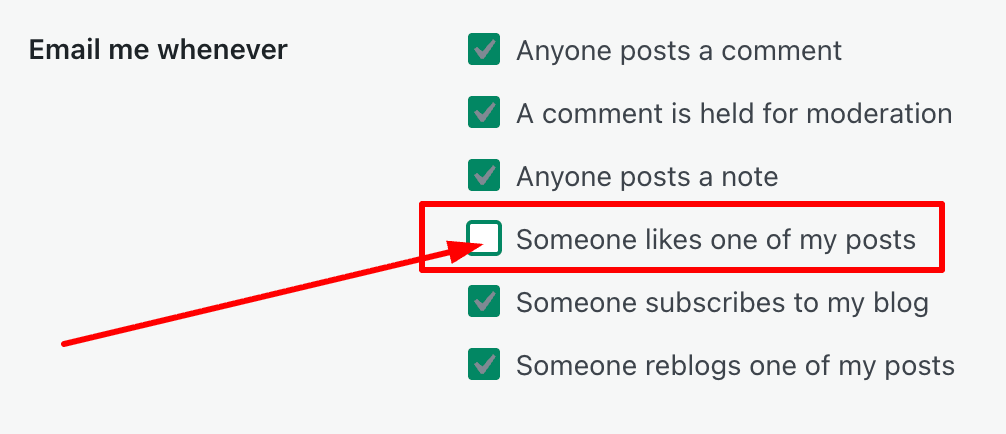
Screenshot of an "Email me whenever" notification settings menu. The options include "Anyone posts a comment", "A comment is held for moderation", "Anyone posts a note", "Someone likes one of my posts", "Someone subscribes to my blog", and "Someone reblogs one of my posts". All options are checked with a green checkmark except for "Someone likes one of my posts", which is unchecked. A red rectangle outlines this unchecked option, and a red arrow points directly to its empty checkbox.
  • While there, review the other email options WordPress offers, and tick or untick the boxes.
  • Scroll to the bottom of the page and click the ‘Save Changes‘ button.

Turning Off Comment Likes

In my recent post, ‘The Truth About WordPress Like Buttons: Support or Empty Gesture?‘, many readers told me how frustrated they are by the constant ‘liking’ of every comment on a post, usually by the same person. I used to have a serial liker who liked all my response comments on my own posts. It didn’t matter what the comment said; even a simple ‘yes’ in response to a question would get a like.

Here’s how to disable the ‘Like’ button for all comments to prevent serial-likers from clicking ‘Like’ on all comments left on your posts.

  • Go to your blog’s dashboard and click Settings > Sharing.
  • Scroll down to the bottom of the page, then look for ‘Comments Likes are‘ and untick the box titled ‘on for all comments‘.
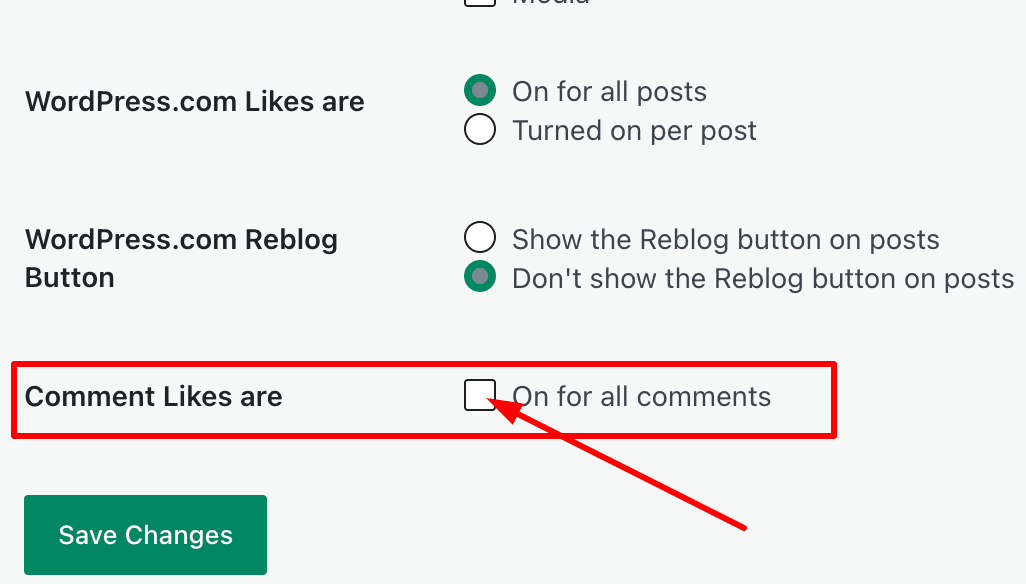
A screenshot of a WordPress settings menu with radio buttons, a checkbox, and a green "Save Changes" button. The section includes options for "WordPress.com Likes are" (set to "On for all posts"), "WordPress.com Reblog Button" (set to "Don't show the Reblog button on posts"), and "Comment Likes are" with an empty checkbox for "On for all comments". A red rectangle highlights the "Comment Likes are" setting, and a red arrow points directly to the unchecked checkbox.
  • Click the ‘Save Changes’ button.

Managing the ‘Like’ Button on Posts

Sadly, this does not stop ‘serial-likers’ from pressing the ‘Like’ button on comments when viewing posts on the WordPress Reader. But you can still switch off getting WordPress email ‘Like’ notifications.

While there, you can also turn off the ‘Like’ button on all posts, or turn it on per post instead. If you turn on ‘per post‘, the ‘Like’ button will disappear from all existing posts until you turn it back on. However, if you use the Block editor, you will be required to create a custom post template to turn the ‘ Like ‘ button on per post. Then, for future posts, you’ll be able to choose whether to show the ‘Like’ button or not.

Over to you

Are WordPress ‘Like’ notifications filling your inbox? Have you encountered serial likers on your posts or comments? Do you prefer to keep the Like button on your blog, or have you decided to switch it off? Most importantly — has tweaking your notification settings improved your blogging experience?

Share your thoughts in the comments. I’d love to hear how you manage Likes and notifications on your blog.

Note: the screenshots in this post were taken on an Apple iMac.

The featured image in this post was created using the WordPress AI Image Generator block. AI was also used for checking spelling and grammar mistakes.

Layout, content, settings, and format might differ on self-hosted blogs.

You can follow me at the following sites.

Copyright @ 2026 hughsviewsandnews.com – All rights reserved.

Please feel free to share this post.

Fediverse reactions


Discover more from Hugh’s Views & News  

Subscribe to get the latest posts sent to your email.

41 responses to “How to Turn Off WordPress Like Notifications and Comment Likes”

  1. Debbie D. avatar

    I turned that email function off years ago, but thanks for pointing this out to others who may not be aware they can do so. I haven’t noticed any serial likes on comments, but don’t really pay attention to that. Post likes are more front and centre, and yes, the serial likers there are a bit frustrating! Still, I’m reluctant to turn the button off. Better than nothing! Wouldn’t it nice if people also took the time to read and comment more, though? Sigh…

    1. Hugh W. Roberts avatar

      It would, Debbie. Sadly, too many people seem to be in a rush to read posts these days. Many skim posts; some read the first few lines and then leave a comment like ‘I enjoyed this.’ I still recall a particular blogger who said in a comment on another blog, ‘I have all day to read posts,’ and then, in another comment on a different post, said she didn’t have time to leave long comments. She is one of those bloggers who leaves short, non-engaging comments everywhere. I’d get so fed up with getting the same comment on every post from the same blogger.

      1. Debbie D. avatar

        Sadly, some bloggers value quantity more than quality, like it’s a race against time! 🙄 A few genuine comments are worth more that multiple “fly by” ones any day. Thank you for emphasizing these points on your blog, Hugh!

  2. Eugi avatar

    Thank you for this reminder, Hugh. We have better things to do than to put up with serial likers. Plus, who needs more emails, especially when someone leaves a like on your post.

    1. Hugh W. Roberts avatar

      I don’t know why anyone would need an email to inform them that somebody had pressed ‘Like’ on their post, Eugi. After all, we can find out simply by visiting our posts (unless we’ve removed the ‘Like’ button).

  3. Linda Schaub avatar

    Hugh, I just had that “serial like syndrome” today. Someone I’ve never seen before went through all of my comments on a fellow blogger’s past month of posts and “liked” them. It made no sense to me at all!

    1. Hugh W. Roberts avatar

      They do it to get attention, Linda. Don’t give them any. There is one serial-liker who carries on with it regardless, though. They do it through the WordPress Reader.

      1. Linda Schaub avatar

        It is silly Hugh – most people have better things to do with their time.

  4. petespringer avatar

    Yeah, I don’t need to be bombarded every time I get a like. I’m not sure what percentage of the time I get notifications of likes, but it certainly seems rather random.

    1. Hugh W. Roberts avatar

      They no longer take up any of my time, apart from when I am writing about them.

  5. Colleen Chesebro avatar

    Thanks so much, Hugh. The emails are insane. There must be a better way to do this. I stopped receiving notifications about likes on posts years ago. Thanks for this great refresher!

    1. Hugh W. Roberts avatar

      Likewise, Colleen. I stopped them many years ago after a blogger asked me why on earth I was getting them. ‘Why on earth do you need to know who has clicked a ‘like’ button on one of your posts?” were her words. It was one of those moments when I really questioned myself hard and thought how silly I must have looked.

  6. Paul Ariss avatar
    Paul Ariss

    I’ve already felt the benefit from not getting notifications on my phone when I get a Like, and this will help further by cutting down on emails especially as I get a notification from my emails on my phone. Thanks again Hugh.

    1. Hugh W. Roberts avatar

      You’re welcome, Paul. Cutting down on the number of emails I get into my email inbox, is like decluttering. It feels very good.

      1. Paul Ariss avatar
        Paul Ariss

        Just as a footnote to my comments Hugh, the very site that continually is liking my posts no matter where they are (on my blog or others) has liked the comment I left yesterday. It is almost as if it is programmed to like every comment I make.

        Do you think I should contact them directly and politely ask them to stop?

        1. Hugh W. Roberts avatar

          Given they do it just for attention, I’d recommend not giving them any, Paul. Switch off notifications to stop getting emails about likes, and consider turning ‘Likes’ off for comments. It won’t stop them clicking ‘like’ in the WordPress reader, but at least you won’t get email notifications.

          1. Paul Ariss avatar
            Paul Ariss

            I’ve done the email stop, but I’ll take the Likes for comments option too. Thanks for the advice Hugh.

  7. Terri Webster Schrandt avatar

    A great refresher, Hugh! Long ago I discovered this feature and have made good use of it. I didn’t see the like button on this post… but I like it! 👍

    1. Hugh W. Roberts avatar

      Thanks, Terri. I’m so fed up with the serial likers, that I decided to remove the ‘Like’ button too, although that was also partly to do with removing the standard sharing buttons and (as recommended by WordPress beacuse I have a Block theme) creating my own Sharing Button block. Boy, do I feel good.

      1. Terri Webster Schrandt avatar

        Now you’ll have to tell us how you created that!

        1. Hugh W. Roberts avatar

          Lol, I used the Sharing buttons block, Terri. It’s the one WordPress recommended I use. It was easy to set up. I’ve save it as a Pattern, so I can just insert it on all my posts. Plus, any changes I make to it will be reflected wherever it is used on my blog.

          1. Terri Webster Schrandt avatar

            Aha, will check it out! I sure wish some other bloggers would update their themes. I may have to abandon liking posts on many of them since doing so shoots me right out of WordPress. 🙄

            1. Hugh W. Roberts avatar

              I’ve decided to no longer use the ‘Like’ button, other than to ‘Like’ a comment via the notification settings (bell icon) to acknowledge it, Terri. I haven’t tried it via the app, though.

  8. Cathy avatar

    Thanks for this, Hugh. I’ve unticked quite a few.

    1. Hugh W. Roberts avatar

      Good to hear. Now less emails coming into your email inbox, Cathy.

      1. Cathy avatar

        Yes, definite bonus :)

  9. beth avatar

    thanks for this! at times i get overloaded with the likes

    1. Hugh W. Roberts avatar

      And they are pointless anyway. Happy to have helped, Beth.

  10. Brenda avatar

    Thanks for the refresher. Now just going through to review all my settings. Ive turned off the email notifications for likes, but I’ll leave them turned on within the posts.

    1. Hugh W. Roberts avatar

      Happy to have helped, Brenda. Less emails can’t be a bad thing.

Feel free to leave a comment. Engagement helps keep blogs alive and forms community.

This site uses Akismet to reduce spam. Learn how your comment data is processed.

I’m Hugh

Welcome to my blog. I’m delighted to have you here. This is the place to discover tips on blogging and WordPress, flash fiction, photography, and more. I enjoy engaging with my readers, so please feel free to explore, join discussions, and contact me. I’m happy to assist! Find out more about me and my blog by clicking the ‘Meet Hugh’ button.

Let’s connect

Subscribe to Hugh’s Views And News

Latest Posts

Looking for your next quick read? Try my books

An image of book covers, book, tablet and mobile phone, for the book Glimpses.
An image for the book More Glimpses - showing a book cover, tablet and mobile phone.

Follow Hugh in the Fediverse

Hugh's Views & News  
Hugh's Views & News  
@hughsviewsandnews.com@hughsviewsandnews.com

WordPress & Blogging tips, flash fiction, photography and lots more!

311 posts
10 followers
A widget with the words 'Team Effort - Story Chat Digest - Where Authors Meet - Author'

Most Viewed Posts & Pages Over The Last 24 Hours

Recommend Blogs To Follow


Roaming About
A Life Less Ordinary

Second Wind Leisure Perspectives
Fun, Photography & Friends

Spo-Reflections
Spo-Reflections
To live is to battle with trolls in the vaults of heart and brain. To write; this is to sit in judgment over one's Self. Henrik Ibsen

Boomer Eco Crusader
Boomer Eco Crusader
Live Green | Declutter | Simplify Life

SONGS AND SCRIPTS AND DUNKING BISCUITS
Every day tales of a winging-it creative

Jacqueline Lambert
Jacqueline Lambert
Award-Winning Travel Humour Writer

Anne R. Allen’s Blog… with Ruth Harris
Writing about writing. Mostly.

Fancying France
The musings of a ‘femme d’un certain âge’ who divides her time between SW France and SE England

Marsha Ingrao         Always Write
Marsha Ingrao Always Write
Having fun blogging with friends

Curiosities, Castles and Coffee Shops
The musings of a curious mind

WrookieSchU
WrookieSchU
Live life 🙌🏼

WPcomMaven
WPcomMaven
Helping you make the most of your free WordPress.com website since 2011

Share Your Light
Share Your Light
You are a miracle – Let it happen

No Facilities
No Facilities
Random thoughts, life lessons, hopes and dreams

Esther Chilton
Writer, Tutor and Editor

Saying nothing in particular
Jan … JT Twissel

The Chicago Files
The Chicago Files
A Canadian Perspective on Living in the Windy City!

Thank you to all my visitors

483,829 hits

263,981 visitors

Copyright Protected Blog

COPYRIGHT ©2011-2031 Hugh’s Views And News BLOG – All Rights Reserved.

This work by Hugh W. Roberts, and/or Hugh’s Views And News blog, is licensed under a Creative Commons Attribution-Noncommercial-NoDerivatives 4.0 International License. Unauthorised use and/or duplication of this material (text and images) without express and written permission from this blog’s author and/or owner is strictly prohibited. If you want to use posts, excerpts, photos and links, you may contact me first. You must give full and clear credit to Hugh W. Roberts and Hugh’s Views And News dot com with links to the original content.