
I don’t use the WordPress Reader nearly as much as I should.
I get email notifications when new blog posts are published by the bloggers I follow. This makes sense as I only follow around 55 blogs, most of which publish no more than a few times a week.
Am I missing out on not using the WordPress Reader? I think so, yes! But why?
One of the reasons I stopped using the WP Reader was that when I was following over 500 blogs, I felt like a hamster constantly running around a wheel in my endless battle to reach the top of the reader. I never reached the top, so I thought I was missing out!
However, I occasionally use the WordPress Reader to search for posts on subjects I enjoy reading. In my opinion, this is where the WordPress Reader is at its best!
For example, I recently entered the word ‘WordPress’ into the reader search bar and was presented with a long list of blog posts in which ‘WordPress’ had been used as a category or tag (this shows how important categorising and tagging your posts is).
But before I discuss some of the search results, let me first say that, unlike some bloggers who seem to think WordPress has deleted the ‘Reader,’ the WP Reader has moved.
Where is the WordPress Reader?
If you’re using a desktop computer, the WP Reader is now located in the top right corner of your blog. Look for the pair of spectacles icon.
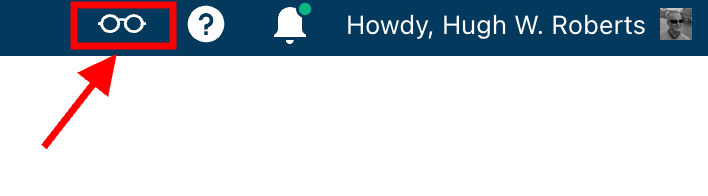
Click on it, and you’ll be taken to the WordPress Reader.
On mobile phones and tablets (using the Jetpack app), the WP Reader icon (spectacles) is located at the bottom of the screen.
What I found in the search results!
I was delighted to see some of my posts appear in the search results. However, I was more interested in the posts from blogs I don’t currently follow.
One of those posts that grabbed my attention was from Mitch, who blogs at The Power Of Story. Mitch’s post, ‘What’s Up WordPress?‘, was about the sudden ups and downs of his blog’s number of subscribers/followers. Indeed, I’ve noticed the same thing happening with my blog.

My subscriber/follower stats have become like a fairground rollercoaster ride. Some days, I lose a lot of subscribers/followers, and then the numbers suddenly return, although not the same subscribers.
I did some digging and found that WordPress are now actively deleting spam blogs and blogs run by spambots. That’s a good thing, especially since I’ve been manually unsubscribing them for many months. WordPress is unsubscribing these blogs for me, although I will unsubscribe any I find myself.
Have you noticed your subscriber/follower numbers going on a rollercoaster ride recently?
Another post that grabbed my attention from the results page was from Kevin, who blogs at Chef Kevin Ashton. Kevin’s post, titled ‘The Thorny Issue Of WordPress Likes.’ touched on a subject I’ve often written about – the ‘like’ button!
Love it or hate it, the ‘like’ button is something just about every WordPress user and visitor will use. However, Kevin touched on the subject of ‘guilt’ by not using it, especially when he doesn’t have enough time to visit and read blogs.
I’ve been there, Kevin. Many bloggers feel guilty or stressed about not clicking ‘like’, visiting blogs that follow them, or leaving comments. Yet, in my opinion, nobody really cares that you can’t always visit their blog. I’ve discovered that leaving one engaging comment occasionally that shows you read the post is much more appreciated than leaving short, non-engaging comments just to prove you visited. However, you may not have read their post.
I’ve written many posts about blogging guilt and stress. In my last post on the subject, ‘Stressed Or Feeling Guilty About Blogging? Please Read This Post. Let’s Keep Blogging Fun,’ many readers spoke up about how bad they feel when they don’t have the time to read blogs, click ‘like,’ and leave comments, often resulting in blogging feeling like a chore rather than something that should be enjoyed.
Nobody should ever feel obliged to read posts, click the ‘like’ button or leave comments. Keep blogging fun.
How do you deal with blogging stress or guilt?
The happy and sad sides of blogging!
It was also lovely to see blog posts celebrating milestones on WordPress in the results. From celebrating 15 years of blogging on WordPress to publishing their 100th post and some folks being notified that their blogs had achieved half a million visits, these posts brought a smile to my face.
Of course, posts complaining about how bad WordPress is and the problems bloggers are having also appeared in the results. Although I only read a few, most of the reported issues were related to WordPress’s changes, and the author often confirmed in the comments section that the issue(s) had now been resolved.
Personally, I’m pleased that WordPress does make changes. If they left things alone, the platform would quickly become outdated and dull, as would all our blogs. WordPress would lose many paying customers, and we’d all lose our blogs if they went out of business. I used to hate change but learned that adapting to it is much less stressful than fighting it
Are you encountering any issues with WordPress? My recent post, ‘WordPress Problems: Don’t Panic! How To Solve Issues Quickly,’ may be of some help.
Are your blog posts appearing on the WordPress Reader?
I always check that my blog posts appear in the WordPress reader. To do this, I follow my blog and check the reader immediately after publishing a post. If it’s not there, I know there’s a problem.
There are several reasons why your posts may not appear in the WordPress Reader. The main reason is that you add too many categories and tags to a post. WordPress allows up to 15 categories and tags combined. Your post could be marked as spam and won’t appear if you add more, so ensure you do not add more than 15 tags and categories (combined).
There may also be technical reasons why your posts don’t show in the reader. If you don’t see your posts, contact WordPress. They’ll be able to help.
That’s it for today. I’ll share other interesting posts when I do more searches on the WordPress Reader.
Why Do You Use The WordPress Reader?
Did you enjoy reading this post? Then you may also like…
Is Your Blog Safe? One Security Feature You Must Have
Are you doing everything you can to protect your blog?
This is one security feature I recommend every blogger have. And it’s easy to set up.
Keep reading
The Power Of Pingbacks: How To Create One
Pingbacks are a vital tool in the blogging world, fostering connections and increasing site traffic. Are you making the most of pingbacks or missing out on their benefits? This post details their benefits, creation, and anti-spam measures.
Keep reading
WordPress: How To Close Comments: What You Need To Know
WordPress has relocated the ‘Discussion’ setting to a more visible and accessible position, simplifying the control of comments and pingbacks.
My post outlines where to find the ‘discussion setting’ and when you should consider turning comments off on specific posts.
Keep reading
Layout, content, settings, and format might differ on self-hosted blogs.
Click the buttons below to follow Hugh on Social Media
Copyright @ 2024 hughsviewsandnews.com – All rights reserved.
Discover more from Hugh's Views & News
Subscribe to get the latest posts sent to your email.
 Hugh's Views & News
There are a few blogs that I receive by email, mainly those where I contribute to their prompts. I use the Reader for other blogs I follow. I prefer the Reader because I can read posts at my leisure rather than have emails which remind me of when I worked. Your posts are very helpful, Hugh, and I appreciate you sharing your experiences and knowledge.
I’m delighted you find these posts so helpful, Eugi.
Thank you for answering the questions in the post. It’s good to hear what other people do with regard the WP Reader and emails.
My pleasure, Hugh.
I don’t follow my own blog and need to rectify this! Thanks for the tips.
You’re welcome. It may seem like a strange thing to do, but it’s great for ensuring that your posts are appearing on the WordPress Reader.
I occasionally use reader to discover new sites and borrow ideas on how to improve my pages.
That’s great to hear. There is so much helpful information out there; it’s always great when we find something useful.
I like the Reader for keeping up with the blogs that I follow — and for the power of the search. Like you mentioned, it’s great to search for stuff that interests me and discover posts from other bloggers out there :)
I agree about finding new blogs via the WordPress Reader when searching. There are so many blogs that finding them can be a problem. This is where the WP Reader search facility comes in handy.
This is a timely post for me considering I am still wrestling with getting my blog to show up in the Reader AND the comment and like buttons often go missing. At times, I want to give up on blogging, but the truth is that I enjoy sharing and don’t want to quit. I am crossing my fingers that eventually the issues will be resolved for me. Your tips are helpful.
Is your blog self-hosted, or a WordPress.com blog? If the latter, and you’re not adding more than 15 tags and categories (combined) to your posts, then I’d certainly report the problem to WordPress or the company that hosts your blog. Likewise, the comment box and sharing buttons going missing; I’d share that with them too. I’d recommend ensuring the theme you use is still supported. Retired themes can cause all sorts of problems for users.
I honestly don’t know if I am self-hosted or not. When it was an external blog, it was self-hosted, but integrated into my website, I don’t know. I am definitely not exceeding the 15 tag limit and I have communicated with the WP happiness engineers several times about the missing comment and like buttons. I am afraid, as you say, the issue may lie within the blog theme that imported in with the integration. Thanks for your help, Hugh!
You’re welcome. I hope you can get those issues sorted soon, Jan.
I do use the reader as email notifications don’t always seem to work. I don’t know if it’s because I did something wrong or if gmail is trying to get me to upgrade! This summer I’ve noted a lot viewer visitors but then social media here in the states is completely absorbed in the elections. Take care Hugh!
Have you checked your email spam folder? They may have ended up in there. I use a separate Gmail account for my WordPress account, so all notifications go there. I don’t seem to have had any problems receiving them (as far as I’m aware, I’m getting them all).
I get a lot of visitors to my blog by sharing posts on social media. I don’t take any notice of the political or religious posts. They just go over my head.
I too couldn’t find the Word Press Reader for several weeks, and now, thanks to your blog, I found it again. Thanks!
You’re welcome. I’m glad this post came to the rescue.
They changed the menu all of a sudden again, but I found the reader button 😂once you are on WP for 10 years, you know it must be somewhere. I used to get email-notifications of new blog posts. But I stopped that. I cannot visit everyone every day anyway, so I simply go through the reader as far as I can, that is less stress and I don’t have to clean up my inbox.
Exactly, Erika. Far too many bloggers seemed to think that WordPress had deleted the WP Reader, and instead of taking a bit of time to find where it had been moved, they spent a lot of time complaining.
It’s good to hear what is less stressful to you when reading blogs. Everyone is different, so it’s always good to listen to a different point of view.
Oh, I agree, Hugh. We are a fastfood society and expect that everything is served on a plate. Just don’t make an effort to find something out.
Yes, I agree, I am glad there are several options.
That’s a great way of saying it, Erika. I like it.
Aside from this, do you know if there is a general problem with cololing texts? For about three weeks I cannot color any paragraphs anymore. As soon as I “put color” on them, the words disappear completely, regardless of the color. Maybe it is only a problem I have but thought I ask you, since you are our blogging expert 😎
I have not heard anything about that problem, Erika. I coloured a few blocks in this post, and the text stayed. It could be a problem with the theme you’re using. If anybody else is having the same issue, it’ll either get fixed quickly, or I’d recommend reporting the problem (just in case it’s just happening to you).
Ok, I see. Maybe it’s the theme indeed. I will report it. Thanks for the recommendation, Hugh.
This is so weird. I wanted to report the problem and therefore make some screenshots. When I tried to change the color it worked again. It did not until yesterday. Maybe it was a temporary bug or whatever… at least, it works again 😄
It sometimes happens, Erika. Somebody else may have reported the problem.
Good to hear it’s all working again, though.
Yes, thank God, I thought, I’d let you know.
I follow mine too, but without notifications on. I see it in the feed, but some of my readers have reported they do not. One reported that they do not receive the emails either. I had to remove them manually and add them again for it to work.
I’m glad that WordPress is finally starting to take care of the spam bots and blogs. Still, my subscriber stats are steady. It’s very rare to see a drop. However, the stats in general are a real roller coaster. Now they’re low again, but sometimes I can get 80+ views without even posting twice daily. It’s quite weird, but I’m grateful for that. At lest as long as the views are real.
I wouldn’t worry about the stats; let them take care of themselves. I only publish, on average, three posts a week, yet I’m always happy with my viewing stats, although far more important are the visitor stats (many bloggers seem to forget that). It takes time to increase visitor numbers; SEO is also important in getting visitors to your blog. That’s where tagging and categorising correctly plays a big part.
It’s the engagement I’d worry about (if I wasn’t getting any). Engagement is far more important for the majority of bloggers. Without it, I’d feel I was talking to an empty room.
Oh, that’s is the truth alright!
I’m so grateful I do get a lot of engagement from the readers. I do get a few Google searches but not a lot, maybe a handful per week? Most of the traffic comes through the Reader. Man, that’s a great tool!
I get most of my visitors from the WP Reader, but I also do well via search engines, with Twitter taking third place in terms of the number of visitors to my blog.
Nice. Social media does not work for me at all. One follower or something like that, so no. Not interested unfortunately. It’s no use. I’m glad it works for you, though.
I’ve found that social media (like blogging) is all about engagement. However, it does take a while to build up followers. I’ve been on Twitter for 12 years and WordPress for 10, so I’ve had plenty of time to make it work.
Yeah, I haven’t gotten that far, at least with this blog. I’ve built up a great following so far though that’s pretty amazing to me. I’m almost at 200 now, and about 20 of those seem to really care about my blog at least. Some more than others.
My routine was the look through the Reader before posted more on my blogs. Then the Reader disappeared so thank you for telling me where it is and I will take a look again,
WordPress seem to like moving things around. But I guess it helps keep us on our toes. Glad this post helped.
WP is autosubscribing spam followers, I love t and it explains some of the craziness with subscribers I was seeing. Thanks for the update Hugh.
You’re welcome, Danny. Glad this post helped.
I had no idea I could follow my own blog to check if it is loading up properly, but I’ve now subscribed. I presumed because I got responses all was fine, but as the responses tend to come from the same people I’m probably best to check. Thanks again Hugh.
And those people may be reading your posts from email notifications, Paul. Providing you’re not adding too many tags and categories to your posts, they should show up on the reader.
I’ve had to cut back on the blogs I read. I think you’re so right – it’s easy to get sucked into reading more than you can cope with and then you just feel stressed and don’t enjoy it any more.
Exactly, Esther. There’s nothing wrong with not reading every blog post somebody publishes. Blogging should never become a chore or make us feel stressed. It’s all about the enjoyment.
You’ve made a great case for using the Reader, Hugh. I echo what Liesbet wrote and you touched on, preferring to read from email notifications. BUT, I use the reader to search for certain challenges like Lens-Artists for example.
Huge thanks for reminding us about too many tags/Categories! I didn’t realize that 16 combined is too much. I tend to keep my tags to 12, with Categories to 3. I see a lot of unnecessary tags on some posts, which may explain why they may have fewer readers. Also good to know the spambots are working hard.
Thanks again for the useful info! Have a great week!
I don’t mind email notifications of new posts, especially from the bloggers who only publish a few times a week, Terri. I don’t feel so overwhelmed. Where I follow blogs that publish more than once a day (and there are very few I follow), I get an email once a week with all their posts. I can then pick and choose which ones to read.
Some bloggers add way too many tags and categories, and I especially dislike coming across a post that has a certain keyword tagged to it and finding that the post has nothing to do with that keyword. ‘Blogging’ is one such keyword that I think gets overused. I won’t follow blogs that get you there under false pretences.
Glad this post has helped.
I do use the reader. It’s easy to scroll down, especially since I deleted blogs I don’t want to follow. But now I seem to be having an issue where I keep having to sign when I want to comment and even when I do sign in I keep getting the message so often I go back the reader to comment.
I heard about the ‘comment’ problem, Cathy. From what I know, it seems to be connected to certain browsers. Have you tried using a different browser when using WordPress? That may help. I use the Chrome browser, and whenever I get that message (which isn’t very often), I clear the browser cookies and search history settings, which also seems to help. Another way to find out is to try using another device to comment (if you have one). I use a desktop iMac, and when I get the comments message, I’ve tried using my iPhone to comment, and it always seems to work.
It’s just on certain blogs, Hugh. Even when I’ve signed in and ticked the remember me box, it still asks for a sign in. Thanks for the tips though, I’ll give them a go.
Have the same issue too!
I’m not sure if you saw this post, but it may help concerning the problems you’re having with leaving comments.
So frustrating, isn’t it.
I use the Reader, but feel like I’m on that hamster wheel, never reaching the top. I need to rethink things, I guess. Great article!
Yes, I certainly recommend rethinking the hamster wheel. Honestly, the only place it leads is to feeling overwhelmed, which is one reason why I cut back on the number of blogs I followed.
Yes, that’s exactly how I feel. Like no matter how much I read, I just can’t catch up.
I will sort this out soon, thanks your article. :)
You’re welcome. I’m always delighted when my posts help.
I always feel so much better after reading your posts Hugh. I should use the reader more instead of the notifications page. Going ton search WordPress now 😊
That’s great to hear, Alison. Happy hunting on the WordPress Reader. It’s a treasure trove, but beware of the rabbit holes.
I regularly use the reader, since I follow less than 60 blogs and I find it an easy and faster way to read. However I am disappointed when I have to click the 2nd time, the link the blogger provides which takes us to their URL.
Thank you, Hugh.
I understand why some bloggers want us to visit their blogs, especially as the reading experience can be much better than on the WP Reader. However, I guess it’s all down to preferences. I enjoy poking around somebodies blog, especially when looking for more of their posts and their ‘about’ page if I’m visiting for the first page.
Thank you, Hugh, for sharing your thoughts.
WordPress reader is great 👍 when you search for your interest blogs🌹🌹
Yes, as I’ve now discovered.
Good morning from Newburyport, Hugh!
I don’t use the WordPress reader, because I don’t want to get sucked into more blog reading. I prefer the email notifications, as then I get new blogs of bloggers I like straight into my inbox and read them accordingly. I delete them when I’m really short on time or the topic doesn’t interest me. Or I save them for later and keep them in my inbox.
I can see that the Reader comes in handy to look for certain stories or topics and I like your take on “change.” I hadn’t looked at it that way yet.
I prefer getting email notifications of new posts, too, Liesbet. And I won’t go higher than following 75 blogs. If I followed any more than 75, I know it would become somewhat overwhelming. Only so many hours a day can anyone read blog posts and comment.
I read many comments and posts where people rant about changes on WordPress. I agree that not all changes may suit us individually, but that does not mean nobody likes them. I lead a much less stressful life, accepting and adapting to change rather than fighting it.