Have you noticed the new style comment box on WordPress?

In line with the Block editor, WordPress has rolled out a new cool comment box on most WordPress blogs. While I’m writing this post, I still see a few blogs with the old-style comments box, but I’m confident all WordPress blogs will soon display the block-style comment box.

The new style comments box appears on blog posts, but not when you add your comment via the comments box on the WordPress Reader.

Light blue image with the words 'The Amazing New WordPress Comments Box: What It Does' in white text
This new comments box can do more than just leave comments

For the purpose of this post, I’m using an iMac desktop computer.

Here is a breakdown of what users can do when leaving comments on blogs with the new block-style comment box.

What does it look like?

This is what the new style comment box looks like.

Image showing the new style block comment box on WordPress
WordPress Block Style Comments Box

It looks very simple, doesn’t it? And it is very easy to use. Your Gravatar image appears in the bottom left corner.

The comments box looks like this as soon you click in the box.

Image showing
Click inside the box to start typing your comment.

Notice the difference? A toolbar has opened along the top, and an ‘+‘ icon has appeared inside the comments box. Let’s examine what they do. I’ve numbered some icons in the following image.

Image highlighting the features of the toolbar on the block style comments box on WordPress
Features of the toolbar
  1. Block being used.
  2. Aline text
  3. Bold
  4. Italic
  5. Pingback link

1 – This is the type of block being used when commenting. It will always be the Paragraph block by default, but you can switch to the List or Quote block by clicking on it. If you change it to the List or Quote block, a new toolbar will appear.

2 – Use this icon to align text to the left, right or centre.

3 – Use this icon to make the text bold.

4 – Use this icon to make the text italic.

5 – Use this icon to create a pingback.

Most readers only use text when leaving comments and they will never feel the need to align it or make it bold. However, many bloggers want more.

You can now insert other blocks into the comments box by clicking the ‘+‘ icon. For example, you can now easily insert an image in your comment by clicking the ‘+‘ icon and choosing the Image block.

Image showing an image placed into the block-style comments box on WordPress.
Copy and paste the URL address of the image you want to add.

How cool is that? (not the photo of me, but the fact that I can add an image to the comments). This is especially good for participating in photography challenges without creating a blog post or when explaining something where including an image or screenshot helps.

I want to mention that you can create pingbacks in your comments. Pingbacks are powerful and can help boost visitors to your blog. We could already add pingbacks when using the Classic view on our blog’s dashboard but we can now finally do it using the Default view.

Image showing how to create a pingback in the comments box on WordPress
Create pingbacks in your comments.

Are you unsure how to create a pingback? My post, The Power Of Pingbacks: How To Create One, provides full details.

Before submitting your comment, remember to click the small settings cog next to your Gravatar photo to open a new menu. Why?
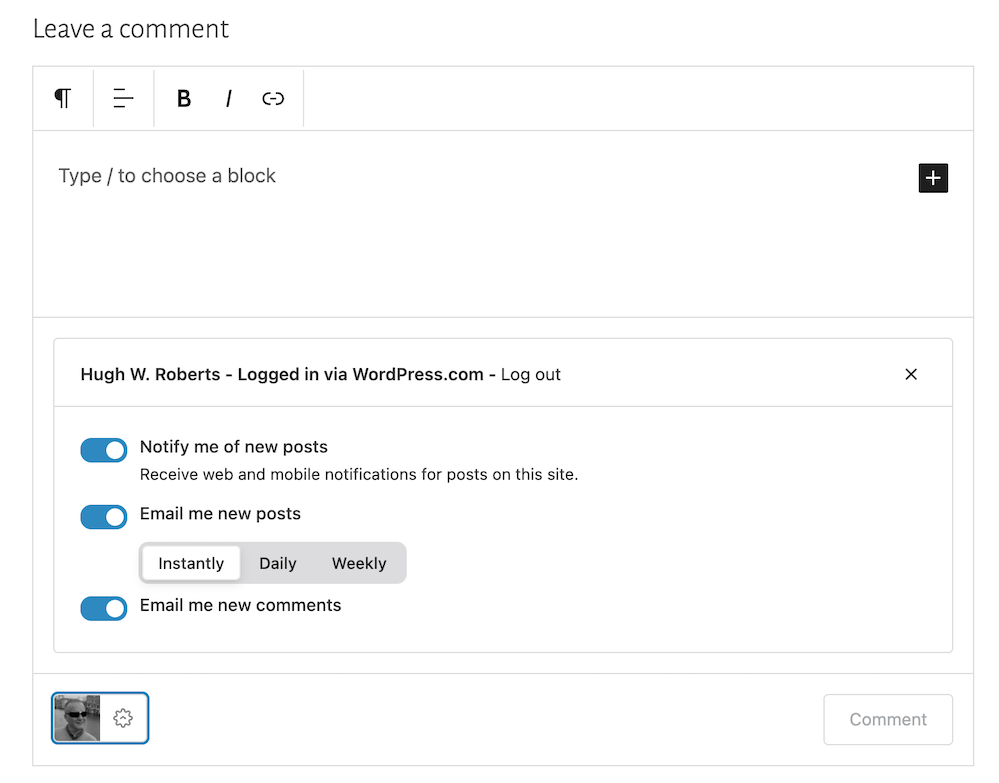
Image showing the new menu that opens when clicking the settings button next to a Gravatar profile in a Block-style comments box on WordPress
Click the settings cog next to your Gravatar picture for a new menu.

Not only will the menu that opens confirm if you are logged into WordPress, but you can also sign up to receive web and mobile notifications for posts on the blog you are leaving your comment on, get email notifications of new posts, and receive email notifications of any new comments left on the post (including a response to your comment from the blog host).

Press the ‘Comment‘ box to submit your comment.

Is this true?

I’ve heard that some bloggers are threatening to stop leaving comments or are thinking of leaving WordPress because of the introduction of the new block-style comment box.

Given that the bare minimum somebody has to do to leave a comment is to type their comment into the box, I find it hard to believe that people are threatening to stop leaving comments or leaving WordPress because of the introduction of this new comments box. If you are, please reconsider your decision.

The new block-style comments box is not hard to use; it’s just a little different!

Update

Users can now disable blocks in comments. Go to Settings – Discussions, and in the ‘Comments‘ section of the page, turn off ‘Enable blocks in comments.’ Remember to save the change.

WordPress’s new comments box style is a refreshing update that enhances the user experience. Its modern and intuitive design makes interacting with comments more enjoyable. If you have any questions about it, feel free to leave them in the comments section. I look forward to hearing your thoughts!

Layout, content, settings, and format might differ on self-hosted blogs.

Click the buttons below to follow Hugh on Social Media

Copyright @ 2024 hughsviewsandnews.com – All rights reserved.


Discover more from Hugh’s Views & News  

Subscribe to get the latest posts sent to your email.

131 responses to “The Amazing New WordPress Comments Box: What It Does”

  1. Bernie avatar

    Thanks for the insight. My problem is that now comments are hidden in who they are from and many, especially in real life friends, don’t leave their names.

    1. Hugh W. Roberts avatar

      Is that a problem, though? Some readers do not like giving their details online. There is a setting on WordPress that you can switch on to force people to leave their details when leaving comments. However, switching it on could reduce the amount of comments you get. This post has all the details. –

      Are You Getting ‘Anonymous’ Blog Comments? How To Stop Them.

      1. Bernie avatar

        I just like to be able to connect with people, and a comment from “someone” isn’t very personal, so it’s hard to always respond appropriately. Once it was my cousin and her next comment made it seem like I should have known that, but there is no way to know. I certainly won’t stop WP because of it.

        1. Hugh W. Roberts avatar

          That’s good to hear. Sometimes, we can guess who the person is from the comment left.

  2. JenT avatar

    Hugh, I’m so glad you were inspired to write this post about the changes to the comment box and happy to know that no one here is leaving because of this change. :)

    The sign-in issue frequently happens when commenting on WordPress.com websites that have their own domain and it’s been like that for a while now. If someone is already signed in to their WordPress.com account, they can “sign in” right from the comment box by clicking the big W icon that appears there once you add something to the box, even if the icon isn’t highlighted.

    I was especially excited to see a blog post embed in the comments.

    Thanks again for the info and insights!

    1. Hugh W. Roberts avatar

      Thanks, Jen.

      You may have seen on one of the comments above that WordPress advised to untick the setting for blocking third party cookies. And it seems it has worked and Terri is now not always getting the ‘sign into’ WordPress; message when she is already signed in. I think that may help a lot of people who are experiencing the problem. But thank you for your advice about signing in too.

      This new comments box is very exciting with all the features it offers. I think it’ll prove a big success amongst the majority of bloggers.

      1. JenT avatar

        I did read that, Hugh, and happy to know it works for Terri. Enabling 3rd party cookies in Firefox hasn’t been a complete solution to the problem for me. I still have to log in again on many WordPress.com sites.

        The new possibilities for sharing content in comments is really wonderful for increasing engagement. More engagement is always better. :)

  3. Xena avatar

    Thanks for this information and tutorial. I didn’t take time to learn about using blocks. I still don’t understand their purpose. Even now, I save my posts as drafts and go back to edit in the classic view. The theme I use is like me — from the Word Press dinosaur age, and I do wonder if the new comment design will appear on my blog. I suppose I’ll find out when some of my older followers from the dinosaur age comments. :-)

    1. Hugh W. Roberts avatar

      The Block editor not only brings blogs into the 21st century, but offers bloggers lots of excellent tools, many of which are time-saving. The Classic editor also has its own block. I’ve seen this new comment block on blogs where the author uses the Classic editor, so it’ll probably appear on your blog soon unless the theme you’re using has been retired and has bugs which prevent its use.

  4. leslieccd215dca1 avatar
    leslieccd215dca1

    Another informative post, I’m learning from you!

    1. Hugh W. Roberts avatar

      I’m happy to help. Thank you.

  5. Eugi avatar

    I love the new comment block, Hugh, and thank you for giving us the rundown on its features. I see it on most blogs, including mine. Your posts are so helpful and I appreciate all you do. 

    1. Hugh W. Roberts avatar

      Good to hear it’s on your blog, Eugi. I don’t think it will be long before it appears on all blogs unless a blogger has a theme that has its own unique comment box.

  6. Terri Webster Schrandt avatar

    Yep, its all here as I comment, Hugh! I’ve seen this option lately on many blogs (not all) and I like it so far. As a photo challenge host, I believe this can open the door for those who don’t want to write a post but take part in the challenge with an image. And I like you can easily make a paragraph break…

    ..Like this! I have to share that I was having huge difficulties logging in to every single post from my desktop (chrome, windows 11, etc). With help from WP engineers, I discovered I had taken some advice from an article I read and blocked third party cookies. Once the H.E. suggested this I changed my settings and I have been mostly OK to leave comments or like without having to log in. Perhaps other bloggers who are experiencing ussies with WP should check their computer settings.

    Well done, Hugh, as always, keeping our blogging community informed!

    1. Hugh W. Roberts avatar

      Terri, I’m pleased what WordPress suggested has just about helped. There are so many settings available to us, and it seems that sometimes we change things without knowing what the consequences may be. It would be good to know where the third party cookies setting is so that if anyone mentions it in the future, we can point them in the right direction. I could hunt around for it, but if you do know, it would be very helpful.

      1. Terri Webster Schrandt avatar

        Ok. Go to Chrome and select the 3 dots. Go to settings and select Privacy and Security. Then click on third party cookies if you dare 😆 it’s defaulted to allow them but you can block them.

        When I did that, reading blog posts
        became a chore to have to log in each time. This is the same area in settings to clear browsing data and cache, which I do from time to time.

        1. Hugh W. Roberts avatar

          Thanks, Terri.

          It reminds me of a problem I had over the weekend where I was not able to access my account for our home phone and broadband. The site keep logging me out. However, after clearing all the cache on Chrome, I was able to log in without any problems. That tells me that it’s not always the fault of the company whose website I am trying to access.

          Thanks again.

          1. Terri Webster Schrandt avatar

            Reboots and clearing the cache seem to be good fixes!

  7. Janis @ RetirementallyChallenged.com avatar

    Thanks for the info, Hugh. I’ve noticed the new comment box but I’m not sure it appears on my blog yet. The only concern I’d have, and maybe it’s not a big one, is that the new comment box might be confusing to non-bloggers or those who don’t use WP.

    I like having the ability to add a photo. I hope people don’t abuse the ability to add a link (adding a link to their blog in all of their comments)… that wouldn’t be good blogging etiquette.

    1. Hugh W. Roberts avatar

      Hi Janis, I checked, and the new comment box does not appear on your blog yet. There could be a number of reasons why, the main one being if your blog is self-hosted. Also, the theme you use may have it’s own unique comment box. Some blogs have had this new style comment box for a long time, whereas my blog only got it a few months ago. Next time you chat with WordPress, maybe ask them.

      And I agree with you about those adding a link to their blog after every comment. Whenever that happens the comments section on my posts, I edit the link out before approving the comment. People soon get the hint.

  8. Esther Chilton avatar

    You always explain things so well, Hugh. Thank you.

    1. Hugh W. Roberts avatar

      I’m glad it all helps, Esther. I enjoy checking out how WordPress works.

  9. Cathy Cade avatar

    It hadn’t occurred to me that I could use different types of block in the comment and add an image – although I did add a url to a comment yesterday and was pleased to find it turned into a link. :)

    I’ve been migrating our u3a website to a new WordPress platform and have learned about new blocks I hadn’t used before. It’s disappointing to come back to my bog-standard blog and find not all of the bells and whistles are available here. :(

    1. Hugh W. Roberts avatar

      You can still add URLs to the new comment box, although I’m not sure if the option to open the link in a new tab is available; otherwise, anyone clicking it will lose the page they’re on.

      There are lots of blocks, although I tend to only use a few. If you’re still using an old theme that is retired or the Classic editor, you’ll miss out on many of the new features now available.

      1. Cathy Cade avatar

        Yep – not only did it open up for me, it opens in a new tab. I don’t recall telling it to when I posted the reply. I didn’t even expect it to convert.

        1. Hugh W. Roberts avatar

          That’s good to know, Cathy. I hate it when I click a link or pingback and it opens on the same page I’m reading.

  10. Annette Rochelle Aben avatar

    I appreciate the walk-through, as it highlights the benefits and options! win/win

    1. Hugh W. Roberts avatar

      You’re welcome, Annette. Enjoy these new features, although (like me) only use the ones you want to use.

Feel free to leave a comment. Engagement helps keep blogs alive and forms community.

This site uses Akismet to reduce spam. Learn how your comment data is processed.

I’m Hugh

Welcome to my blog. I’m delighted to have you here. This is the place to discover tips on blogging and WordPress, flash fiction, photography, and more. I enjoy engaging with my readers, so please feel free to explore, join discussions, and contact me. I’m happy to assist! Find out more about me and my blog by clicking the ‘Meet Hugh’ button.

Let’s connect

Subscribe to Hugh’s Views And News

Latest Posts

Looking for your next quick read? Try my books

An image of book covers, book, tablet and mobile phone, for the book Glimpses.
An image for the book More Glimpses - showing a book cover, tablet and mobile phone.

Follow Hugh in the Fediverse

Hugh's Views & News  
Hugh's Views & News  
@hughsviewsandnews.com@hughsviewsandnews.com

WordPress & Blogging tips, flash fiction, photography and lots more!

311 posts
10 followers
A widget with the words 'Team Effort - Story Chat Digest - Where Authors Meet - Author'

Most Viewed Posts & Pages Over The Last 24 Hours

Recommend Blogs To Follow


Roaming About
A Life Less Ordinary

Second Wind Leisure Perspectives
Fun, Photography & Friends

Spo-Reflections
Spo-Reflections
To live is to battle with trolls in the vaults of heart and brain. To write; this is to sit in judgment over one's Self. Henrik Ibsen

Boomer Eco Crusader
Boomer Eco Crusader
Live Green | Declutter | Simplify Life

SONGS AND SCRIPTS AND DUNKING BISCUITS
Every day tales of a winging-it creative

Jacqueline Lambert
Jacqueline Lambert
Award-Winning Travel Humour Writer

Anne R. Allen’s Blog… with Ruth Harris
Writing about writing. Mostly.

Fancying France
The musings of a ‘femme d’un certain âge’ who divides her time between SW France and SE England

Marsha Ingrao         Always Write
Marsha Ingrao Always Write
Having fun blogging with friends

Curiosities, Castles and Coffee Shops
The musings of a curious mind

WrookieSchU
WrookieSchU
Live life 🙌🏼

WPcomMaven
WPcomMaven
Helping you make the most of your free WordPress.com website since 2011

Share Your Light
Share Your Light
You are a miracle – Let it happen

No Facilities
No Facilities
Random thoughts, life lessons, hopes and dreams

Esther Chilton
Writer, Tutor and Editor

Saying nothing in particular
Jan … JT Twissel

The Chicago Files
The Chicago Files
A Canadian Perspective on Living in the Windy City!

Thank you to all my visitors

483,769 hits

263,936 visitors

Copyright Protected Blog

COPYRIGHT ©2011-2031 Hugh’s Views And News BLOG – All Rights Reserved.

This work by Hugh W. Roberts, and/or Hugh’s Views And News blog, is licensed under a Creative Commons Attribution-Noncommercial-NoDerivatives 4.0 International License. Unauthorised use and/or duplication of this material (text and images) without express and written permission from this blog’s author and/or owner is strictly prohibited. If you want to use posts, excerpts, photos and links, you may contact me first. You must give full and clear credit to Hugh W. Roberts and Hugh’s Views And News dot com with links to the original content.