Do you want to free up the time it takes you to filter through spam looking for genuine comments?
Turn this setting on now.
Does your blog get too much spam? Turn this setting on.
On your blog’s dashboard, go to Jetpack – Akismet Anti-spam.
Click Jetpack – Akismet Anti-spam
On the page that opens, look for the Settings box. Under Spam Filtering, ensure ‘Silently discard the worst and most pervasive spam so I never see it’ is selected.
Ensure ‘Silently discard the worst and most pervasive spam so I never see it’ has been selected.
Click the ‘Save changes‘ button.
You’ll now see much less spam in your blog’s spam folder.
Obviously, you can continue to review all spam, but this can be very time-consuming if your blog gets a lot of spam.
On average, I now see less than 10 spam comments per week in my spam folder. It used to be hundreds. Turning this setting on has helped.
On the same page, you can also see how much good work the Akismet anti-spam software has done in capturing spam comments on your blog. Here’s a snapshot of my blog.
How much spam has been blocked on your WordPress blog?
Akismet has caught over 308,000 spam comments since I started blogging in February 2014!
Occasionally, spam comments will get through, but you can help WordPress by marking them as spam. Likewise, if a genuine comment ends up in the spam folder by mistake, mark it as ‘not spam.’
Something else you may find interesting is that WordPress now deletes spam that is over 15 days old in the spam folder, so you no longer have to do it! Another win! Thank you, WordPress.
Don’t stress about spam!
I’ve come across some bloggers who allow spam to stress them. This does nothing but spoil the enjoyment blogging brings.
If your blog receives too much spam, turn on the setting outlined in this post. You’ll soon see a vast decrease in the amount of spam you see.
How do you deal with spam on your blog?
Layout, content, settings, and format might differ on self-hosted blogs.
Imagine having a blog where nobody wants to engage. It’s a thought that’s hard to fathom. After all, what’s the point of writing and publishing blog posts if there’s no one to interact with?
How do you engage with your readers and other bloggers?
As bloggers, we can spark curiosity and questions in our readers, even when publishing informative posts. And that’s where the actual engagement begins. It’s our responsibility to set the stage for meaningful interactions. One way to do this is by asking open-ended questions at the end of your posts or inviting readers to share their thoughts or experiences related to the post’s topic. It can encourage more in-depth and meaningful discussions.
Those bloggers who blog to make money will only care a little about the interaction. For them, making a living out of blogging is more important. Good for them if they are successful, but take your readers seriously, especially if they want to engage with you. Consider removing the comments section from your blog if you’re going to refrain from engaging or responding to questions.
What’s the right way to engage with readers? Is there a right way?
I’ve always craved engagement, but over the ten years I’ve been blogging, the type of engagement I crave has changed.
I’ve become more of a ‘discussion’ blogger. By that, I mean a blogger who likes to discuss the subject of a post rather than just leaving a comment that only confirms I visited. It’s about sparking a conversation, sharing different perspectives, and learning from each other. This type of engagement is more valuable than a simple ‘I agree’ comment, as it adds depth and richness to the post’s content.
Over the past year, I’ve made a conscious effort to reduce the number of non-engaging comments on my blog, a decision I’m proud of. I’ve aimed to break free from the cycle of leaving comments solely to prove a visit or just for the sake of doing so.
This shift has decreased the overall number of comments I get but has made me feel like a more thoughtful and influential blogger. It’s not about the number of comments but the quality of the interactions. This change has helped my personal growth in writing and blogging.
Should we always try to engage? No!
Of course, just because I don’t leave a comment on a blog post does not mean I’ve not read it. Likewise, I know many people read my posts but want to avoid engaging. There’s nothing wrong with that. These silent readers are still part of the blogging community; their support is as important as active engagement. So, let’s recognise their presence and continue to create content that resonates with them.
If you’re new to blogging, leaving an engaging comment every once in a while is far more beneficial than leaving short, non-engaging comments on every post you read in an attempt to get noticed.
Are you approving spam comments without realising it?
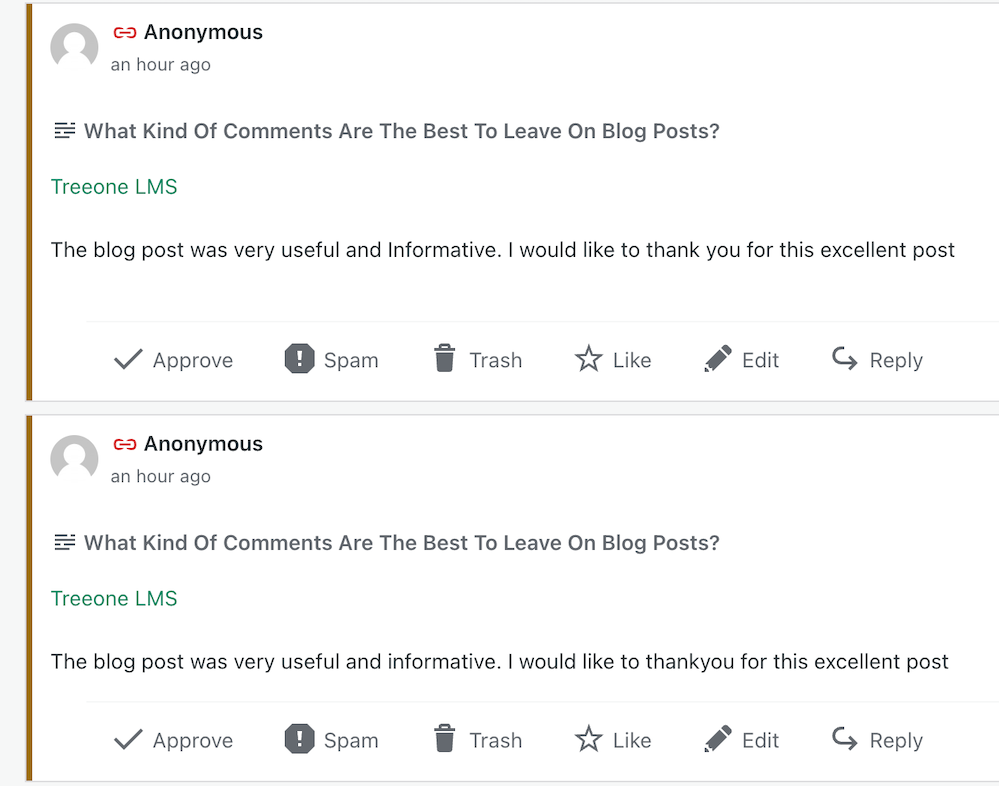
Imagine my concern when I came across this comments section on a recently read post.
Never approve these types of comments
I was appalled to see these comments and could not understand why they’d been approved. Given that the blog’s posts would probably be full of these types of comments, I also decided not to follow it.
Spam comments not only detract from the quality of a blog but also discourage meaningful interactions. Let’s keep the blogging community free from such spam and focus on producing meaningful engagement. Your thoughts and ideas are too valuable to be drowned out by spam.
Other examples of spam comments.
Some may look genuine, but they’re not. Spammers and spambots are getting cleverer at fooling us into approving their comments, so beware.
Thank you
I want to express my deep appreciation to all of you who support and interact with me here. Your engagement is not just a number on a screen but a vibrant testament to the joys and value of blogging. I especially want to acknowledge those who actively interact with me, as your contributions are the lifeblood of my blog.
Remember, it’s not just about the numbers but the profound connections we build through interactions. For instance, when a reader shares a personal experience related to a blog post or when we engage in a thoughtful debate about a controversial topic, these are the types of interactions that genuinely enrich the blogging community.
Let’s wrap it up.
This post delves into the importance of engaging with readers and other bloggers, offering insightful strategies to spark meaningful interactions.
Avoid leaving short, non-engaging comments on all the posts you read. Instead, leave a thoughtful comment every now and again.
Don’t leave a comment just to leave a comment or prove you’ve visited.
Never feel obligated to comment because they always comment on your posts.
There’s nothing wrong with not wanting to engage. Some readers are more comfortable reading a post without saying anything.
Take your readers seriously by responding to or acknowledging their comments.
Never approve spam comments. Mark them as spam and delete them.
Consider closing comments off if you do not want to engage with your readers or respond to any questions.
If you crave engagement, ask open-ended questions at the end of your posts or invite readers to share details of their experiences with the subject you’ve discussed in the post.
Do you enjoy engaging with your readers and other bloggers? What type of commenter are you? How do you deal with spam comments and the spammers? Share your knowledge and ideas in the comments section.
Click the buttons below to follow Hugh on Social Media
Is your blog plagued by spam, spammers and spambots? Do they annoy you? Do you know they’re even there and the damage they could be doing?
Allowing spammers and spambots to follow your blog makes it easier for them to attempt to flood your blog with spam comments. In turn, this opens the floodgates to your readers becoming the victims of scams or having their computer, tablet or phone infected with malware.
Is your blog infected with spammers and spambots?
There are many different types of spammers in the blog world. From those who leave uninvited links, those who flood your posts with pleas to check out their blog and follow them, and comments from spambots; they can all be a nuisance.
Some spammers are easy to spot. The clues are in their name.
The name of some spammers gives them a way straight away.
Some spammers try a little harder to trick you.
Always check the web address of where a comment has come from.
The above comment may sound genuine, but just look at the web address where it’s come from.
I’ve witnessed some bloggers approve and respond to the comments from these spambots. The comments look genuine, but they’re not. Here’s an example of a spam comment from one of the dog breeders.
Comment from a dog breeders spambot
Approving and allowing comments from spammers and spambots onto your blog posts will damage the ranking of your blog. It may also end up resulting in genuine readers clicking on links in comments or visiting the sites of these scammers resulting in them becoming victims of scams or having their computer infected with malware.
These spammers often leave messages on posts that look authentic and nice, but they never mention anything about the contents of the posts (other than saying they like them) and often trick bloggers into believing they are genuine.
Spammers who follow your blog will also click the ‘like’ button on all your posts in the hope that other readers will see their gravatar icon, and visit their site. Once there, the reader puts themselves in danger of being scammed or having their device infected.
How Do You Spot Comments From Scammers and Spambot?
WordPress has recently improved the subscribers’ page of a blog. Not only has this helped spotting spammers and spambots, but it’s easy to remove them as subscribers to your blog.
Here’s a screenshot of a comment from a spambot. I’ve highlighted the spammers name for instructions on how to unsubscribe them from following your blog further down in this post.
Make sure you remove spammers from following your blog.
The Akismet Anti-Spam software that WordPress provides is excellent at dealing with spam, but it doesn’t catch it all.
Comments from spammers rarely have an image in their Gravatar, but spammers are now getting clever and inserting an image in their profile (like the one in the previous image).
Here’s how to spot, check and remove spammers and spambots as subscribers to your blog.
Make sure you are viewing your blog’s dashboard in ‘Default‘ view.
Copy the name of the spammers blog.
On your blog’s dashboard, go to ‘Users‘ – ‘Subscribers.’
Click Users – Subscribers
On the ‘Subscribers‘ page you’re taken to, paste the spammers blog’s name in the ‘search box.’
If the spammer is following your blog, their name will show in the results.
Click the three dots next to the blog you want to remove.
Click the ‘Remove‘ button to unsubscribe the blog from following you.
How to remove a spammer from following your blog.
The spammer has now been unsubscribed from following your blog.
Spammers who follow your blog are more likely to try and flood your blog posts with spam comments because they get notifications when you publish new posts. You can mark any such comments as spam, but I’d recommend you unsubscribe them from following your blog.
Of course, there is nothing stopping spammers from subscribing to your blog again, but every time they follow, unsubscribe them. As I have found out with those dog breeder spammers, they soon get fed up of having to keep subscribing to your blog.
Let’s Wrap It Up
Don’t allow spammers, scammers or spambots invade your blog or stress you out.
Spotting spammers, scammers and spambots is easy to do. Follow the guide in this post.
Never approve or respond to spam comments.
If you’re unsure a comment is from a spammer, check out their website address first.
Always unsubscribe spammers, scammers and spambots from your blog. Follow the guide in this post.
Although the Akismet Anti-Spam software that WordPress provides catches the majority of spam, it won’t catch all of it.
Approving and allowing comments from spammers and spambots onto your blog posts will damage the ranking of your blog. It may also end up resulting in genuine readers clicking on the links in their comments or visiting their website and becoming a victim of scams or having their computer infected with malware.
Look after your readers, not the spammers, scammers or spambots.
How do you deal with spam, spammers and spambots on your blog?Share details in the comments section.
Layout, content, settings, and format might differ on self-hosted blogs.
Follow Hugh on social media. Click the buttons below.






 Hugh's Views & News