Comments play a vital role in fostering vibrant discussions within the blogosphere. They are the lifeblood of meaningful engagement, adding depth and diversity of perspectives to any topic.
But recently, commenting on blogs seems to be going in the wrong direction.
My recent blog post, ‘What Kind Of Comments Are The Best To Leave On Blog Posts?‘ got many of you discussing various types of comments, but more importantly, the non-engaging comments that sadly seem to have become more popular than comments that spark valuable engagement, discussions and conversations.
If you haven’t read the post, please do and add your voice to the various debates.
Today, I have the pleasure of presenting two captivating blog posts penned by talented bloggers about the subject of comments.
These insightful pieces delve into the diverse range of comments they receive on their blogs, offering a glimpse into their personal perspectives and emotional experiences.
The first is from blogger and writer Brenda, who blogs at Curiosities, Castles and Coffee Shops. Click the following link to read Brenda’s post and join the discussions her post has sparked.
I urge those of you who enjoy engagement, discussions and conversations on blog posts to read both posts and add your thoughts to the discussions that Brenda and Erika have ignited on their posts.
I’m closing comments off here so that comments can be left on the posts I’m promoting today.
A big thank you to Brenda and Erika for taking the courage to open up about leaving comments – a subject many bloggers shy away from.
Follow Hugh on Social Media. Click on the links below.
I’ve published many posts about the perils of using copyrighted images and photos. Several bloggers I know have been fined for downloading copyrighted images and photos, including when they reblogged posts.
Did you know that WordPress offers free, high-quality images and photos to enhance the visual appeal of your WordPress website or blog?
You’re searching for the right image for your new blog post. Rather than doing a Google search in a separate tab — and running the risk of using an image you don’t have rights to — use the free images and photos WordPress offers.
Did you know that WordPress offers users free photos and images?
To avoid any chances of being fined for using copyrighted images and photos, the best advice is to always try and use your own photos and images in your blog posts.
Of course, you could choose not to include any images or photos, but given that posts that include photos or images get 70% more traffic, you should add at least one image or photo to all your blog posts.
Where Do I Find The Free Images And Photos WordPress Offers?
Add an Image block to your blog post.
Click on the ‘Select Image‘ link to open a new menu.
The free images and photos are under ‘Pexels Free Photos‘ and ‘Openverse‘.
WordPress offers hundreds of free images and photos to all WordPress users.
Pexels Free Photos
When you click Pexels Free Photos, a new window will open that includes a search bar.
Add a description of the image or photo you are looking for in the search bar and click the ‘Search‘ button.
Look through the results, click the image you want to use and click the ‘Select‘ button.
Click the ‘Load More‘ button at the bottom of the page to see more results.
When you select an image from Pexels Free Photos, it is downloaded to your media library. Remember to add information about the image to help readers with sight impediments and who may use speech software on their devices.
WordPress will have already completed the title of the image or photo and added credit details, so the only information you need to add is Alt Text and Description.
Openverse
Openverse works like Pexels Free Photos. It’s a search engine for openly licensed media, which gives access to over 600 million Creative Commons licensed and public domain image and audio files. All files can be used free of charge.
You can use the search box to find content licensed for commercial use and content that may be modified.
If you use any images or photos from Openverse, they are downloaded to your media library. You’ll need to complete the Alt Text and Description boxes, giving the image/photo details.
It’s Not Only WordPress That Offers Free Images And Photos.
Several websites offer free images that you can use on your WordPress website. These websites curate collections of high-quality images that are free to use, often under various Creative Commons licenses. Here are some popular websites you can explore:
Review and respect the license terms associated with each image when using images from these sites. Providing proper attribution to the photographer or the source is always good practice.
WordPress Plugins
Another convenient way to find free images within your WordPress editor is by using plugins specifically designed for this purpose. These plugins integrate with popular free image websites, allowing you to search and insert images directly from your WordPress dashboard.
Some notable plugins for finding free images include:
Installing and activating these plugins will add additional options to your media library, making browsing and selecting free images for your content effortless.
Note: Plugins are not available on all WordPress plans.
Image SEO Best Practices
While finding free images for your WordPress blog is essential, optimising any images or photos you use for search engines is equally crucial. Following some basic image SEO best practices can improve your blog’s visibility and attract more organic traffic. Here are a few tips:
Use descriptive filenames and alt tags that reflect the image content.
Optimise image file sizes to improve site loading speed.
Add relevant captions and descriptions to provide more context.
Ensure images are responsive and look good on all devices.
By incorporating these strategies, you enhance the visual appeal of your content while improving your blog’s overall SEO performance.
Let’s Wrap It Up.
Finding free images and photos for your WordPress website or blog is easier than ever.
Whether you explore the WordPress options, leverage free image websites, or use dedicated plugins, the possibilities are abundant.
Adhering to image licensing requirements and optimising your images for SEO will ensure a visually appealing and optimised blog.
So go ahead and utilise the resources available to you, and make your WordPress blog shine with stunning images that complement your content!
Remember, a picture is worth a thousand words.
Disclaimer: Always review and respect each image’s terms and conditions and licensing rights. The information provided in this article is for educational purposes only and should not be considered legal advice.
Where do you get the images and photos you use on your blog? If you have any questions about using free images and photos on your blog, leave them in the comments section. Alternatively, please join the discussion and conversation if you’d like to add any information about using free images and photos.
Layout, content, settings, and format might differ on self-hosted blogs.
Follow Hugh on his social media platforms by clicking the buttons below.
Every day, our blogs come under attack from various elements.
Just like protecting our families, pets, and anything else we value, we should do all we can to protect our blogs from threats.
Are you doing enough to protect your blog from threats?
Threats come in all sorts of forms, but there are a few simple steps you can put in place to keep your blog safe.
1. Comments
What do you do if you receive unfriendly comments or comments that do not agree with what you have said in your blog post?
I’ve blogged for nearly ten years, and, in that time, I have received a handful of comments that were not only very personal but were rude, racist or homophobic.
Because I moderate all comments before they appear on my blog, I was able to stop these comments in their tracks. They were of the nature that did not call for a reply, and I simply marked them as spam and deleted them.
And it wasn’t only me that some of these unfriendly comments are aimed at.
I often see rude, unfriendly comments and spam appear on other blogs. Not only can they be shocking in their nature, but in many cases, the very name of the commenter can also be very offensive.
Unfortunately, Akismet, the WordPress software that blocks unwanted spam, doesn’t always catch all of it. So, monitoring all comments before they are published on your blog posts is worth considering.
Follow these steps to set up monitoring comments.
For the purpose of this post, instructions are via the ‘Default” view of your blog’s dashboard.
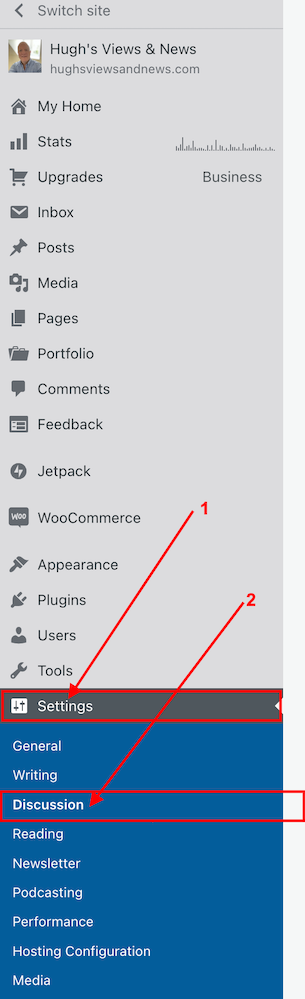
Click Settings – Discussion on your blog’s dashboard.
Click Settings and Discussion
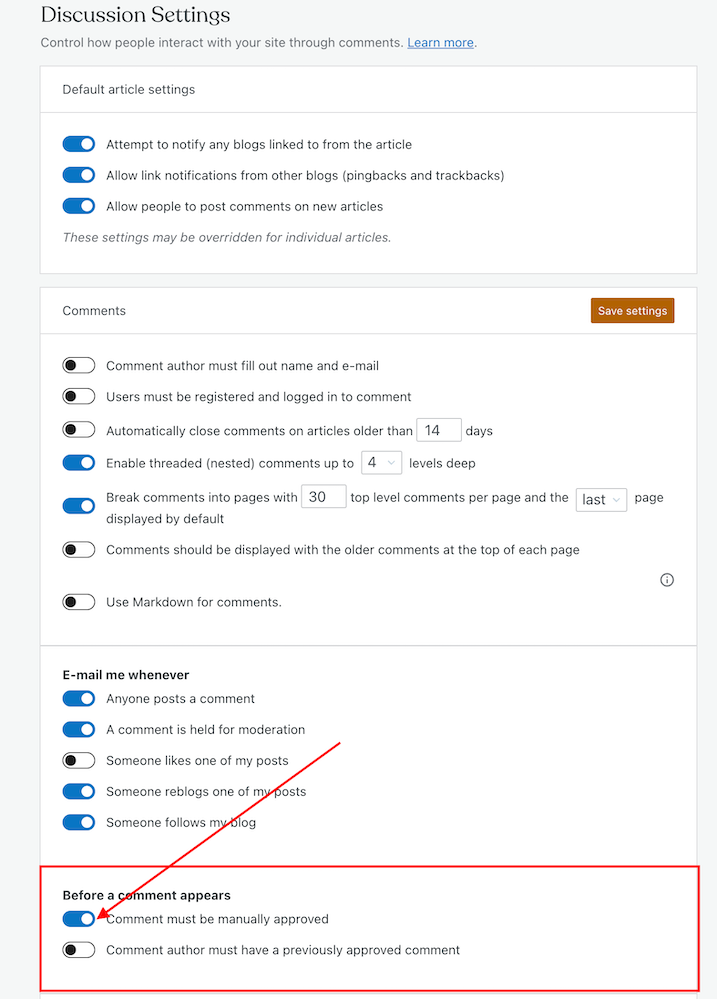
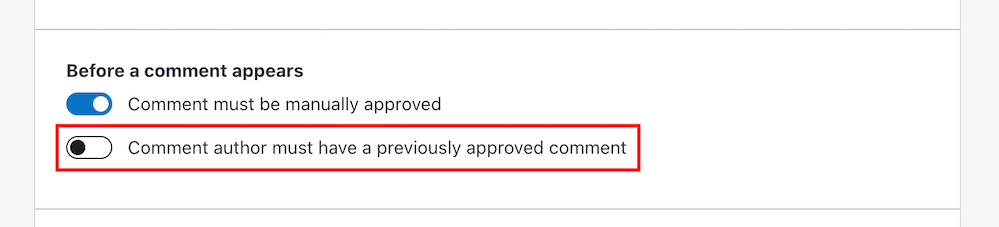
On the Discussion Settings page, scroll down to the ‘Before A Comment Appears‘ box and slide open the button next to ‘Comment must be manually approved.’
To approve all comments, select the ‘Comment must be manually approved’ button
Click on the ‘Save settings‘ button.
You may also have noticed an option to allow comments to be posted straight away from people who have previously had comments approved by you.
Selecting the ‘Comment author must have previously approved comment’ means you don’t need to approve those comments.
For bloggers who are dealing with hundreds of comments daily, this is a great time-saving option as you don’t need to manually approve them.
However, be wary. Somebody who may have left a perfectly friendly comment on an earlier post could also leave an unfriendly comment on a future one.
How to deal with people who don’t agree with you
Sometimes, I receive comments from people who may not agree with what I have to say, but that’s a part of the whole blogging experience.
However, providing their comment has been written in a friendly and professional manner, I will approve it.
Nobody should tolerate rudeness or bad manners, so don’t allow any of these kinds of comments to appear on your blog.
If comments are unfriendly, rude or make you feel threatened, mark them as spam.
Allowing unfriendly, rude comments to appear on your blog can make your blog look unfriendly and unwelcoming, especially to new visitors.
If you see a rude comment or one that is spam on a blog you follow, inform the blog’s owner of the problem. They’ll probably thank you for looking out for them.
How to block certain bloggers or readers from leaving comments
Further down the same page on the Discussion Settings dashboard, you’ll see two boxes entitled ‘Comment Moderation‘ and ‘Disallowed comments.’
This is where you can blacklist other bloggers and comments
These boxes are where you can add certain words, the web address of a blog, the email address or the internet protocol of a user you want to block.
Comments will be held in a moderation queue if they contain anything you have added to the Comment Moderation box.
Comments will be sent to the trash bin if they match anything you have added to the Disallowed Comments box.
2. Internettrolls
If you are unlucky enough to find that an internet troll has decided to try and make your blog their new home, ignore them.
Whatever you do, don’t engage in any conversations with the internet troll. Whether through comments or if they try to contact you through your ‘contact me’ page, ignore them.
Internet trolls will do all they can to get you to react to what they have said. They may even try to get some of your readers to engage with them by responding to comments they have left, so never approve their comments.
Don’t give internet trolls the satisfaction of acknowledging them in any shape or form.
Remove any comments, and don’t allow them to upset you in any way. Add them to the ‘Disallowed Comments‘ box. They’ll soon get the message and move on.
3. Back-Up
How would you feel if you woke up one morning and found that all your blog content had disappeared?
It’s the stuff of nightmares, so be kind to your blog and make sure you back up its content regularly.
Depending on your WordPress plan, your blog can be backed up via Jetpack – Backup on your blog’s dashboard. If you don’t have this facility, consider saving all your blog posts via an external server or hard drive.
If you’re already writing your blog posts on Word, Pages or any other writing software such as Grammarly, ensure you save the documents on the iCloud (if you have access) or on another hard drive.
Don’t lose all your hard work by not backing up your blog.
4. Anti Virus Software
Always update anti-virus software on your device to protect your blog and ensure you have the latest version.
If hackers can get access to well-known websites, then they may be able to get access to your computer\device.
Malware could allow cybercriminals to take control of your computer, log your keystrokes, or access your personal information and financial data, which could lead to identity theft. So, not only could your blog be at risk from hackers, but so could your bank details and other personal information.
Remember to keep all other software on your computer up to date and use the latest software versions of any website you visit regularly.
WordPress.Com users will always have the latest version of WordPress as WordPress download updates directly. Those who have self-hosted blogs should ensure they have the latest updates installed.
This all may sound nightmarish, and you may ask yourself who would want to attack your blog, but every blogger should take it seriously. Don’t become a victim.
However, whatever you do, keep enjoying your blogging experience.
Although attacks on our blogs are happening constantly, your anti-virus software (and the software supplied by WordPress) deals with most threats without you knowing about it.
Let’s Wrap It Up.
Make sure you protect your blog from any online attacks.
Don’t approve any comments that are unfriendly, rude, or racist towards you or any other bloggers.
Consider moderating all comments before they appear on your blog.
People may disagree with what you say in your posts. Only approve their comments if they’ve been written in a friendly and professional manner.
Unsubscribe and or/block trolls and unfriendly readers from your blog.
Never respond to comments from trolls or allow their comments to appear on your blog.
Remember to regularly back up your blog or save your blog posts on an external hard drive.
Keep anti-virus software updated on your devices.
Ensure you’re using the latest version and tools of WordPress.
Is there anything else you’d like to share with us about protecting your blog from unwanted attention and attacks? Do you have any questions? Join the discussion by leaving me a comment with the details.
Layout, content, settings, and format might differ on self-hosted blogs.
Follow Hugh on Social Media. Click on the links below.
Have you seen images and photos in the comments section of blog posts and wondered how they were left there? It’s something I’ve written about before and, given the many changes at WordPress since I last wrote about it, deserves an update.
Yes, it’s possible to leave photos and images in comments on WordPress blogs
When it comes to adding images and photos to comments, we have to be careful with what we add. We should always ensure the photo or image has a connection to the subject of the post we’re leaving the comment on. And not only that.
If a blogger invites readers to leave photos and images (such as in a photography challenge), then go ahead and leave them.
However, leaving an image or photo just for the sake of doing so is frowned upon by many bloggers, who will mark them as spam. And given that blogs are attacked by spammers daily, I don’t blame bloggers marking uninvited images and photos as spam.
I’ve added images and photos to the comments sections on my blog posts and the comments I have left on the blogs of other bloggers. However, unless I’ve been invited to leave an image or photo, I won’t leave them.
While many bloggers will be happy for you to leave images and photos, it’s always polite to ask first.
How to add images and photos to your comments
Add the image or photo to your WordPress media library.
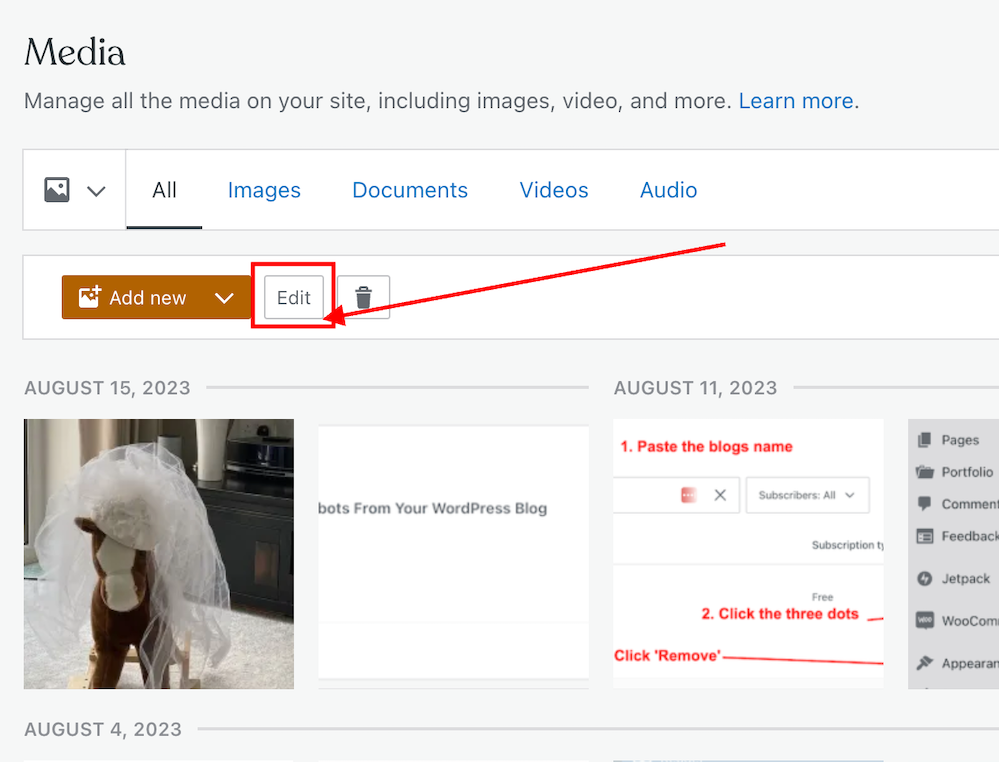
Once the image has been added, click it and click the edit button to open it.
Click the edit button of the photo or image you want to add to a comment.
On the righthand side of the screen, you’ll see a window where you can add details about your image. It’s important to complete these details (see the image below).
Click the ‘Copy‘ button in the URL box.
Copy the URL address of the image or photo.
Paste the URL address into your comment.
Do not, at this stage, submit your comment as you need to edit one part of the text within the link.
Carefully delete the ‘s‘ from the ‘https‘ at the beginning of the link address, so it reads ‘http‘. (If you do not delete the ‘s‘ the image will not show in the comment).
Ensure your link ends with ‘.png’ or ‘.jpg’. If it doesn’t, delete any text after ‘.png’ or ‘.jpg’.
You can now submit your comment.
The image will now show on the comment. However, remember that if you are leaving an image in a comment on another blogger’s blog, they may have to approve it (and may even remove the link to the image) before it shows up.
I’ve only found this to work on WordPress.Com blogs. On self-hosted blogs, only the link to the image is visible rather than the image appearing. However, those clicking on the link will see the image.
Note – Not all images and photos will show if the security settings on your web browser are set high. However, this does not affect the photos or pictures you leave in the comments of your own blog posts. I recommend that you not change the security settings on your web browser.
Let’s wrap it up.
Yes, it is possible to insert images and photos into comments on WordPress.
After inserting the URL address of the image, ensure you remove the ‘s‘ from the beginning of the URL so that ‘https’ becomes ‘http.’
Only leave images and photos in comments if invited to do so or if you have asked for permission to do so first.
If the security settings on your web browser are set high, images and photos may not show. However, this does not affect the photos or pictures you leave in the comments of your own blog posts.
Want to give inserting an image or photo into a comment a go?
Leave me a comment with the link to your image. Perhaps it can be a photo of your latest book cover or of a family pet. I’ll leave it up to you, but only family-friendly images and photos, please.
If you have any further questions about inserting images or photos into the comments, leave them in the comments section.
Layout, content, settings, and format might differ on self-hosted blogs.
Follow Hugh on social media. Click the buttons below.
Is your blog plagued by spam, spammers and spambots? Do they annoy you? Do you know they’re even there and the damage they could be doing?
Allowing spammers and spambots to follow your blog makes it easier for them to attempt to flood your blog with spam comments. In turn, this opens the floodgates to your readers becoming the victims of scams or having their computer, tablet or phone infected with malware.
Is your blog infected with spammers and spambots?
There are many different types of spammers in the blog world. From those who leave uninvited links, those who flood your posts with pleas to check out their blog and follow them, and comments from spambots; they can all be a nuisance.
Some spammers are easy to spot. The clues are in their name.
The name of some spammers gives them a way straight away.
Some spammers try a little harder to trick you.
Always check the web address of where a comment has come from.
The above comment may sound genuine, but just look at the web address where it’s come from.
I’ve witnessed some bloggers approve and respond to the comments from these spambots. The comments look genuine, but they’re not. Here’s an example of a spam comment from one of the dog breeders.
Comment from a dog breeders spambot
Approving and allowing comments from spammers and spambots onto your blog posts will damage the ranking of your blog. It may also end up resulting in genuine readers clicking on links in comments or visiting the sites of these scammers resulting in them becoming victims of scams or having their computer infected with malware.
These spammers often leave messages on posts that look authentic and nice, but they never mention anything about the contents of the posts (other than saying they like them) and often trick bloggers into believing they are genuine.
Spammers who follow your blog will also click the ‘like’ button on all your posts in the hope that other readers will see their gravatar icon, and visit their site. Once there, the reader puts themselves in danger of being scammed or having their device infected.
How Do You Spot Comments From Scammers and Spambot?
WordPress has recently improved the subscribers’ page of a blog. Not only has this helped spotting spammers and spambots, but it’s easy to remove them as subscribers to your blog.
Here’s a screenshot of a comment from a spambot. I’ve highlighted the spammers name for instructions on how to unsubscribe them from following your blog further down in this post.
Make sure you remove spammers from following your blog.
The Akismet Anti-Spam software that WordPress provides is excellent at dealing with spam, but it doesn’t catch it all.
Comments from spammers rarely have an image in their Gravatar, but spammers are now getting clever and inserting an image in their profile (like the one in the previous image).
Here’s how to spot, check and remove spammers and spambots as subscribers to your blog.
Make sure you are viewing your blog’s dashboard in ‘Default‘ view.
Copy the name of the spammers blog.
On your blog’s dashboard, go to ‘Users‘ – ‘Subscribers.’
Click Users – Subscribers
On the ‘Subscribers‘ page you’re taken to, paste the spammers blog’s name in the ‘search box.’
If the spammer is following your blog, their name will show in the results.
Click the three dots next to the blog you want to remove.
Click the ‘Remove‘ button to unsubscribe the blog from following you.
How to remove a spammer from following your blog.
The spammer has now been unsubscribed from following your blog.
Spammers who follow your blog are more likely to try and flood your blog posts with spam comments because they get notifications when you publish new posts. You can mark any such comments as spam, but I’d recommend you unsubscribe them from following your blog.
Of course, there is nothing stopping spammers from subscribing to your blog again, but every time they follow, unsubscribe them. As I have found out with those dog breeder spammers, they soon get fed up of having to keep subscribing to your blog.
Let’s Wrap It Up
Don’t allow spammers, scammers or spambots invade your blog or stress you out.
Spotting spammers, scammers and spambots is easy to do. Follow the guide in this post.
Never approve or respond to spam comments.
If you’re unsure a comment is from a spammer, check out their website address first.
Always unsubscribe spammers, scammers and spambots from your blog. Follow the guide in this post.
Although the Akismet Anti-Spam software that WordPress provides catches the majority of spam, it won’t catch all of it.
Approving and allowing comments from spammers and spambots onto your blog posts will damage the ranking of your blog. It may also end up resulting in genuine readers clicking on the links in their comments or visiting their website and becoming a victim of scams or having their computer infected with malware.
Look after your readers, not the spammers, scammers or spambots.
How do you deal with spam, spammers and spambots on your blog?Share details in the comments section.
Layout, content, settings, and format might differ on self-hosted blogs.
Follow Hugh on social media. Click the buttons below.
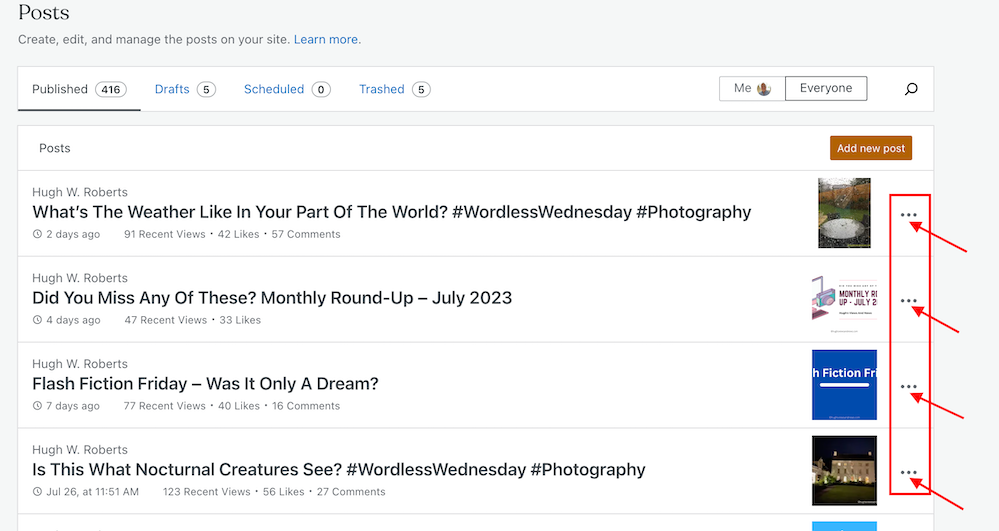
Have you noticed the three horizontal dots next to your blog posts when viewing the ‘Posts‘ page of your blog’s dashboard on WordPress? If not, you’re missing out on some useful tools that will help save you time when blogging and make your blog posts appeal to even more readers.
Have you discovered these 9 hidden blogging tools on WordPress?
For the purpose of this post, I’m viewing my blog’s dashboard in ‘Default‘ view.
These three horizontal dots are known by numerous names, my favourite being a ‘Meatball Menu.’
Not sure what I’m referring to? Here’s a screenshot pointing out the meatball menu on the dashboard of the posts page of my blog.
The Meatball Menu.
When you click on the meatball menu against a post, the three horizontal dots change to three vertical dots (known as a kebab Menu), and nine options appear.
Let’s investigate each option.
Edit
Click this button to edit or update a post. Useful when spotting mistakes. Don’t forget to press the Update button to save any changes you make.
View
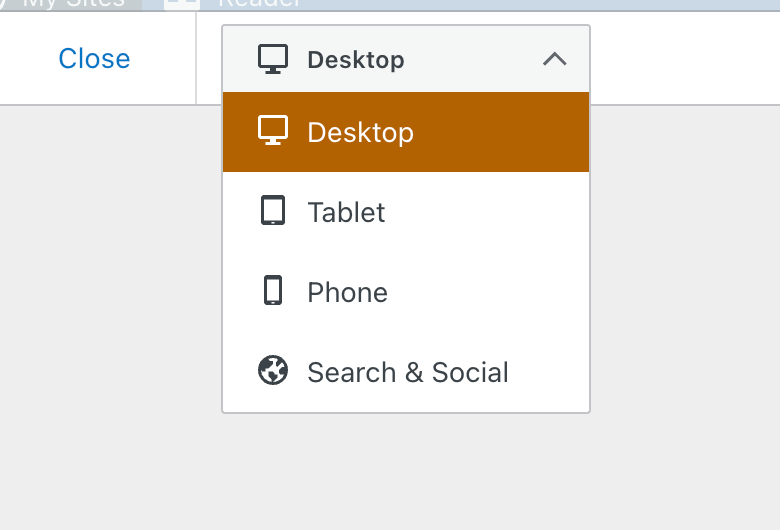
This button does more than just show a preview of your post. It also offers the option of previewing the post as it appears on a desktop computer, tablet and phone. You should always preview your posts before publishing them.
See your post in desktop, tablet and phone form.
The Search & Social button (at the bottom of the menu) allows you to preview your post as it appears on Facebook, Twitter (now known as X), and a Google search.
I recommend you always preview your post first to ensure they are mobile-friendly, especially given that most people now read blog posts on tablets and phones.
Promote With Blaze
Blaze is a way to pay to have a post advertised by WordPress, putting it in front of thousands of new readers.
You can advertise a post or page on some of the millions of pages across WordPress.com and Tumblr from $5 per day. This option is not available to bloggers who have a free WordPress plan.
Stats
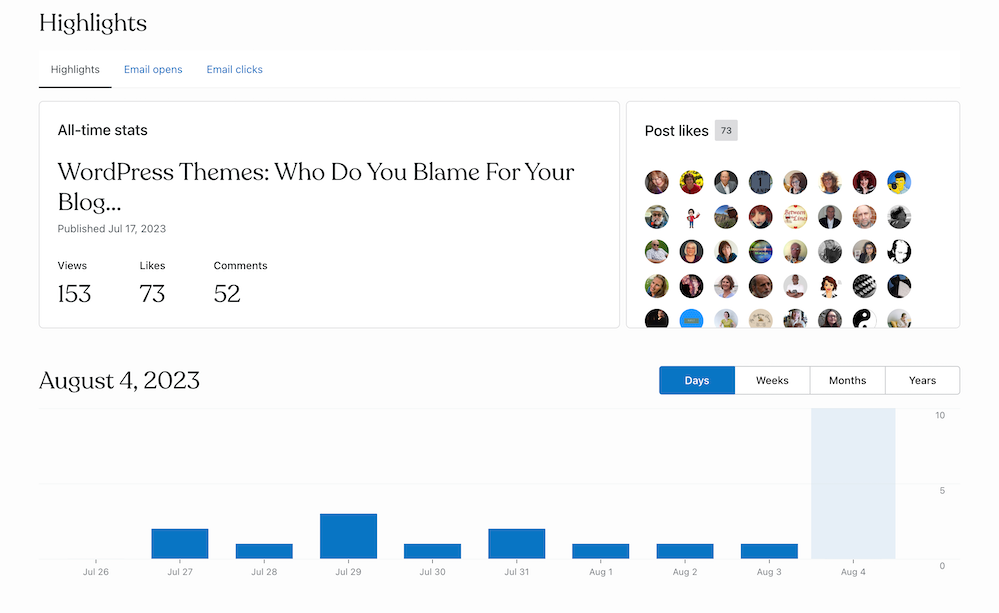
Click ‘Stats‘ to check a post’s latest daily, weekly, monthly, and yearly stats.
For some WordPress plans, you can view a post’s stats for emails opened and how many people who got the email clicked the link to view the post.
You can also view who clicked the ‘like‘ button on the post and how often ‘like‘ has been clicked.
What’s behind the ‘Stats’ option?
Under ‘Post Likes‘, hover your mouse over any of the profile icons to display the blog name of the blogger.
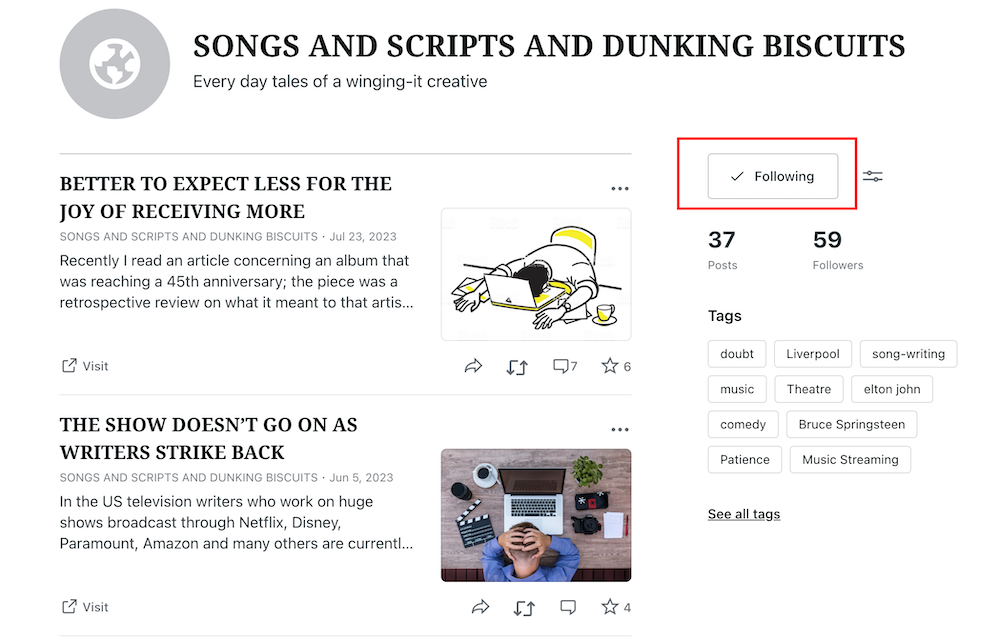
Click on an icon to view a list of that blogger’s blog posts, how many posts they have published, how many followers they have, a list of their most popular tags, and a follow button (WordPress.Com bloggers only). This is a great way to find new blogs to follow.
If you’re already following a blogger who has clicked ‘like‘, the ‘follow‘ button will be replaced with the word ‘following.’
Are you following somebody who clicked ‘like’ on your post?
To unfollow, click the ‘Following‘ button.
Comments
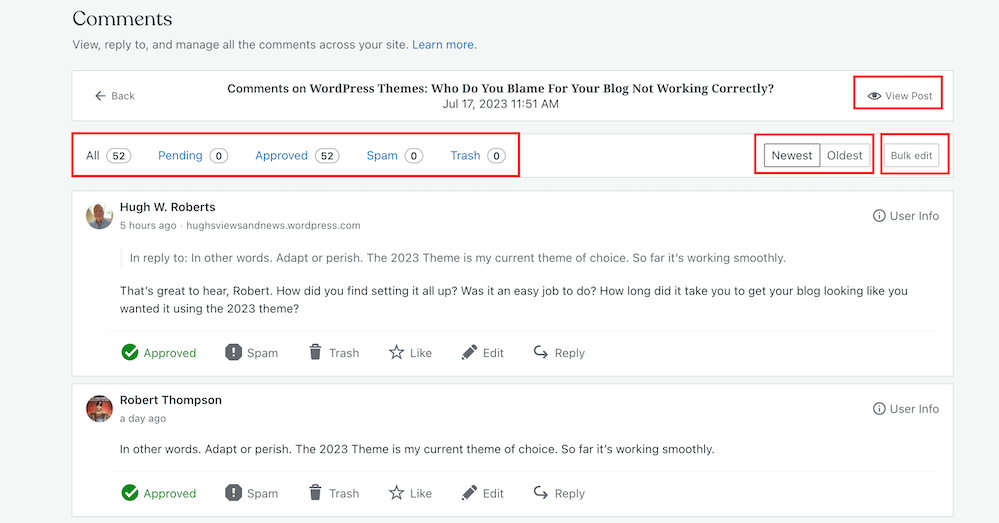
View all the comments that have been left on a post.
Along the top, you can view the following information for a post.
The number of comments it has received.
The number of comments that are pending (waiting for approval).
The number of comments that have been approved.
The number of comments you or WordPress have marked as spam.
The number of comments that have been sent to the trash folder.
Your replies to comments also show on this page.
You can also sort comments by newest first and oldest first.
With just one click, the ‘bulk edit‘ button allows you to perform a command (approve, un-approve, send to spam, send to trash). However, the ‘bulk edit‘ is only done per page, so if the post has many comments, you’ll need to bulk edit each page.
An easier way to view comments on a post.
You can also perform the following under the comments link –
View the post.
Approve a comment.
Mark and send a comment to the spam folder.
Send a comment to the trash bin.
Like a comment.
Edit a comment.
Reply to a comment.
To the right of each comment is a ‘User Info‘ button. Clicking on this button reveals the following information.
The name of the commenter’s WordPress blog.
The commenter’s email address.
A link to the commenter’s blog/website.
The IP address of the commenter.
You’ll also see a ‘Block User‘ button when clicking ‘User Info.’ If you press ‘Block User,’ any further comments from that user on any of your blog posts are sent directly to your WordPress trash folder.
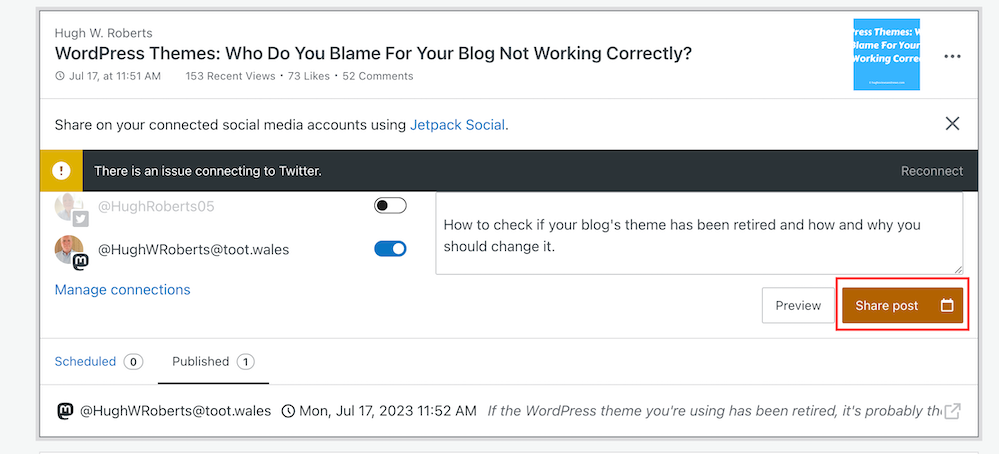
Share
This neat button allows you to auto-share details of the post to the social media accounts WordPress have an auto-share facility with which you have connected to your blog.
Click on the ‘Share Post‘ button to share the post.
You can also manage all your social media auto-share connections by clicking on ‘Manage Connections.’
Copy Post
This is my favourite of all the options on the kebab menu.
Not only will clicking on this button duplicate your post, but the categories and tags of the post are also copied over.
This is especially beneficial if you run a daily/weekly/monthly blog challenge, series, or promotional posts on your blog.
It’s saved me lots of time by not copying, pasting, or redoing links, images, text, tags, and categories.
I also use the ‘copy post‘ function for posts with the same layout (such as my ‘Wordless Wednesday’ posts.
However, if you write excerpts for your blog posts (and I recommend you do), remember to change the excerpt before publishing the post. Otherwise, the excerpt may not make sense.
Copy Link
A link to the post is copied to the clipboard of the device you are using. You can paste the link into an email, message, website, blog post, comment, etc.
Trash
Clicking this button will send your post to the trash folder.
You can reinstate the post from the trash folder if you accidentally clicked it.
Let’s wrap things up.
There are nine hidden options available to WordPress.Com users on the page that displays their blog posts (and pages).
The options are hidden behind a menu known as a meatball menu.
The meatball menu opens up a kebab menu listing all available options.
Some of the options do exactly as they say on the can.
However, other options lead to lots more options and functions.
The comments option has a hidden ‘Block User‘ button – great for blocking comments from spammers or those you don’t want leaving comments anymore.
No need to copy and paste – The copy option copies an existing blog post and copies over the categories, tags and any images you have on that post, saving you lots of time.
It’s worth checking out all the options, especially as some are time-saving functions.
I hope you have found this post useful. If you have any questions, please leave them in the comments section.
Layout, content, settings, and format might differ on self-hosted blogs.
Follow Hugh on social media. Click the buttons below.
Who do you blame when something goes wrong with your blog?
Most of us will probably blame WordPress, yet have you ever thought that the problem could be that the theme of your blog is to blame because you’ve never changed it and it’s been retired?
Is your blog’s theme causing the problems you’re experiencing with your blog?
Many problems can arise on blogs when a theme has been retired.
How Do I Find Out If The Theme I’m Using Has Been Retired?
You’ll see the following image on the themes page of your blog.
Has your theme been retired?
Go to your blog’s dashboard and click Appearance – Themes to determine if your chosen theme has been retired.
Can I Still Use My Retired Theme?
Yes, you can. WordPress won’t remove it from your site. However, when a theme is retired, it no longer appears in the list of themes available on WordPress.
Your retired theme may remain available for the lifetime of your site or blog, but it will no longer be fully supported by WordPress. It won’t receive any updates with new features; hence WordPress won’t guarantee it will always function correctly with their ever-evolving software. If anything goes wrong, it may not be possible to fix it.
You can still contact WordPress support so the Happiness Engineers can take a look, but support will be limited, and they’ll probably recommend switching to a newer theme. In addition, they won’t provide any CSS support for the retired theme.
Why Do Themes Get Retired?
Web technology updates make the visibility and functionality of some themes outdated.
Web design is an area that is continually evolving, thanks to trends, tastes, and new technologies. WordPress has to keep up to date with these changes and is at the forefront of wanting blogs to look fresh and modern.
Retired themes can make blogs look outdated, stale, and uninviting to visitors, especially if you’ve never changed your theme since starting to blog.
Themes may also be retired if their design has become old-fashioned or uses certain no longer supported features.
What Should I Do If The Theme I Am Using Is Retired?
You can continue to use it, but it may no longer be possible for WordPress to fix any issues you encounter.
Some of the issues I have found with blogs that are still using retired themes are –
I can no longer leave comments.
Pingback to the blog no longer work.
Pingbacks from the blog no longer work.
The gravatar image is no longer displayed.
The ‘Notify me of new comments via email’ box is missing.
Pressing the ‘like’ button no longer works.
New blog posts do not appear on the WordPress Reader.
Blog posts are no longer mobile or tablet-friendly.
Comments do not display correctly.
Images, photos and paragraphs do not display correctly.
Sharing buttons no longer work correctly.
In all cases, when I’ve checked the blog’s theme when these problems have happened, it’s an old, retired theme.
Some bloggers find workarounds when problems occur, but all this does is put off the inevitable that one day they will have to change the theme.
My recommended advice is to consider switching to a new theme to ensure your blog has a modern look and feel to its design.
If you’re not bothered about parts of your blog being broken, you may wish to continue using it until you are forced to change the theme. However, that’s not something I recommend.
Not only can finding a new theme be fun, but it can also boost your blog’s ranking.
How Do I Find A New Theme?
On the dashboard of your blog, go to Appearance – Themes. You’ll see all the WordPress themes available. For free themes, click the ‘Free‘ button in the top-right of the page.
You can also use the search field on the themes page to find a replacement theme. Click on the filter options below the search bar or type directly into the search field to filter by specific features or subjects or by the number of columns the theme natively displays to select a new theme similar to your retired theme.
Block Themes Vs Classic Themes
Block (or Full-Site Editing) themes are the new boys on the block.
WordPress recommends switching to a Block theme, as these are the future and what will be supported in the long term.
I have heard of some bloggers encountering problems switching to Block themes. It’s a long learning curve to get used to them, but WordPress has plenty of advice and help for switching to one.
Some bloggers who have already made the switch have reported that not only do their blogs run faster after switching to a Block theme, but problems they were experiencing with their blogs also disappear.
I recommend watching WordPress tutorial videos and reading their guidance page before switching to a Block theme. For information, click the links below.
Contact the WordPress Happiness Engineers by clicking on the ‘question mark’ icon (next to the ‘bell’ notification icon) in the top right of your blog’s dashboard.
Ask for help from your followers and other bloggers by writing and publishing a post or contacting a blogger directly.
Important Information: Do not activate a new theme unless you are absolulty sure you like the theme you have chosen, as it’s impossible to go back to a retired theme once you’ve activated a new theme.
Classic themes were created to work with the old Classic editor, but with the large drop in Classic editor users, WordPress has been retiring them, especially when they no longer work with new functionality software or when updates to the WordPress platform have been released.
Unlike Block themes, Classic themes are heavily loaded with CSS code, meaning many things can go wrong. Block themes are only lightly loaded with CSS code, so are less likely to break.
Currently, WordPress provides 54 Classic themes that are free to use and compatible with the Block editor.
To find current Classic themes, search for them by adding ‘Classic‘ to the search bar on the Themes page, and select ‘Classic Theme‘ from the dropdown menu that appears.
If the theme you’re currently using has been retired, I recommend you switch to one of the Classic themes if you do not want to switch to a Block theme. Doing this will fix some or all of the problems your blog may be experiencing.
If you still experience problems after switching to a current Classic (or Block) theme, report the problems to WordPress. How will WordPress know about a problem unless you report it? Don’t rely on other users reporting the problems you’re having with your blog.
Does WordPress have any plans for new Classic themes?
I asked WordPress the above question. Their response was –
‘No, and we doubt there will be as the industry shifts to the more modern and convenient Full Site Editing (Block) themes that remove most of the need to learn coding to create and customize your theme.’
Is WordPress retiring all Classic themes? If so, when?
Their response –
‘It’s likely, as the focus is shifted to the more modern approach. We do not have specific timelines for each theme or the ones available on our list at this moment.’
So I guess it’s a case of ‘watch this space.’
However, given that the Classic Editor plugin is still available, my guess is that WordPress will retain some of the Classic themes until they stop supporting the Classic Editor plugin. But the choice of Classic themes will become more and more limited as time passes.
I didn’t ask WordPress if there are any plans to stop supporting the Classic Editor plugin, although I have heard rumours that they plan to stop supporting it by the end of 2024.
Let’s wrap it up.
Problems may affect your blog because your theme has been retired.
WordPress may be able to fix some issues, but they will advise you to switch to a new theme if the theme you’re using is retired.
You can continue to use a retired theme you’re using, but it may not work correctly.
Once you activate a new theme, you won’t be able to go back to the retired theme you’ve been using.
Upon publication of this post, WordPress offers Full Site Editing (Block) and Classic themes.
All Classic themes are free to use.
There are no plans to introduce new Classic themes.
The number of available Classic themes will continue to diminish.
I’ve seen some bloggers say they will wait until they are forced to switch themes. Given that switching themes can be a complicated and time-consuming project, all that will do is make them panic when the time comes to switch. Don’t be one of them.
If the theme you’re using has been retired, switch now.
WordPress welcomes feedback on the new Block themes and encourages everyone to contact them with suggestions for improving them.
If you enjoyed this post and want more like it, enter your email address and click ‘Subscribe’ to stay up-to-date with my latest content.
To follow Hugh on social media, click the links below.
‘Help! I’ve run out of media storage space on my blog and can no longer upload new photos, images or videos. What can I do?’
That was a question to me from Micheal, who blogs at Spo-Reflections.
Michael was happy to upgrade his WordPress plan to obtain more media space, but there are other things you could do if you find your blog running out of media space.
Have you run out of media space on your blog? Here are 5 things you can do to obtain more.
1. Upgrade your plan.
WordPress currently offers 6 plans.
The amount of media storage space you get varies. Click the following link to see the plans – ‘There Is A Plan For You.’ Pricing is correct at the time of publication of this post.
Each plan provides the following media storage space.
Name of plan
Storage Amount
Free
1GB
Personal
6GB
Premium
13GB
Business
200GB
Commerce
200GB
Enterprise
N/A
However, only upgrade your WordPress plan if you absolutely need to. Do not get into debt by upgrading unless you can afford it, as there are other things you can do to free up media storage space.
2. Resize the size of your images and photos.
One of the biggest reasons bloggers run out of media space is that they do not resize their images and photos before uploading them to their media library.
There are several ways you can reduce the size of images and photos. You can reduce them using photo editing software or via the tools of your device you use to blog.
I use an Apple iMac and can change the size of photos and images by clicking on Tools – Adjust size on the menubar of my desktop computer. I do this before uploading them to my WordPress media library.
I recommend reducing image and photo sizes to 900 x 675 pixels.
On a Windows computer, you can use Microsoft Paint. Open your image with that program, then click on Resize. You can find this option on the middle-right side of the “Image” section at the top of the Paint window.
The WordPress media library also has editing software, but please note that if you reduce the size of an image or photo using this tool, the original image is kept in your media library when you reduce the size of the picture – thus, you won’t have freed up any storage space.
Large images can also slow down your blog’s downloading speed, negatively impacting your blog’s search engine rankings and overall user experience. So, I recommend you always reduce the size of images and photos before uploading them to your blog.
3. Do not upload videos to your media library.
If you include videos in your blog posts, uploading them to your media library can take up vast amounts of space.
To overcome this problem and free up all the space they take up, upload your videos to YouTube. Then add the YouTube block to your blog post and include the link to the video in the block.
Adding videos to your blog via YouTube helps free up media space for your blog.
Do this for any existing videos you have in your media library. Upload them to YouTube and add them via the YouTube block before deleting the original from your media library. This will free up large amounts of storage in your media library.
4. Delete images from your media library.
We can accumulate vast amounts of images and photos in our media library, many of which will become redundant.
Deleting these images will free up storage space. However, when you delete any images or photos in your media library, they disappear from the blog posts they appear on.
Deleting old, redundant blog posts containing images, photos, and videos frees up storage space. However, delete any images, photos and videos in your media library before deleting the posts.
5. Reduce the number of images and photos you add to blog posts.
While I recommend adding at least one image or photo to a blog post (because blog posts containing images get up to 70% more traffic), reducing the number of images and pictures will help save media space.
Before adding more images or photos, ask yourself if adding them to your post is necessary.
Let’s wrap it up.
Resize your images and photos before uploading them to your blog’s media library.
Upload videos to YouTube and use the YouTube block to show them on your blog posts.
Delete old images and photos from your media library, but remember to remove them from any posts first.
Do not resize images using tools in the media library, as this does not save storage space.
Consider deleting old blog posts that are no longer relevant.
Reduce the number of images and photos on blog posts. Ask yourself if they’re necessary.
How do you free up storage space in your blog’s media library? If you have any questions about this post, leave them in the comments section.
To follow Hugh on social media, click the links below.
Blog posts containing images and photos get up to 70% more traffic than posts without visuals. So why wouldn’t you use them in your posts?
Visual content is an essential component of any successful blog. Adding images, videos, and infographics to your blog posts can make your content more engaging and memorable.
Are you making any mistakes when adding images or photos to blog posts?
If you plan to include images or photos in your blog posts, there are four essential things to remember. These steps will help ensure your content is engaging and visually appealing while avoiding copyright issues.
1. Use High-Quality Images And Photos.
Always use high-quality images that are relevant to your post. Blurry or low-resolution images can detract from your message and make your blog appear unprofessional.
Additionally, using images that are not directly related to your topic can confuse readers and reduce the effectiveness of your post.
2. Ensure Images And Photos Are Not Copyrighted
Ensure you have permission to use any images and photos you include in your posts. This means sourcing images from websites offering free, non-copyrighted images (such as Pixabay) or purchasing the rights to use images from a stock photo website.
Not all images are free to use. And some that are free may only be free for a limited time. Always check the small print.
Don’t think you’ll ever get fined for using copyrighted images or photos. There are copyright bots continually looking for copyrighted images that have been illegally used and downloaded all over the web.
I know of two bloggers who have been fined for using images/photos on their blog posts that were not free to use.
To avoid copyright issues, use your own images and photos and watermark them before adding them to your blog posts. I use a free app called Photobulk to do this. Seeing a watermark is a great deterrent in persuading some thieves not to copy and use them.
Of course, if you’re not concerned about your photos and images being used by anybody else, you don’t need to watermark them.
3. Ensure Images And Photos Are The Correct Sizes.
Optimize your images for web use by compressing them to reduce file size.
Large images can slow down your website’s loading speed, negatively impacting your blog’s search engine rankings and overall user experience.
If you have limited space in your media library, not reducing the size of your images and photos will soon take up all your media space. When that happens, you won’t be allowed to download additional images to your blog unless you free up space or move to a plan that gives you more storage space.
I recommend reducing image and photo sizes to 900 x 675 pixels.
There are several ways you can reduce the size of images and photos. You can reduce them using photo editing software or your device’s software.
The WordPress media library also has editing software, but please note that if you reduce the size of an image or photo using this tool, the original image is kept in your media library when you reduce the size of the image- thus, you won’t save any storage space.
The newly edited image with the reduced size is added as a new file in your media library. You can always revert back to the original image by clicking on the image in the media library, selecting Edit, and then choosing the “Restore Original” button. If you’ve inserted an edited image into other published posts, reverting an image may break this image on those posts.
I use an Apple iMac and can change the size of photos and images by clicking on Tools – Adjust Size on the menubar of my desktop computer. I do this before adding them to my WordPress media library.
On a Windows computer, you can use Microsoft Paint. Open your image with that program, then click on Resize. You can find this option on the middle-right side of the “Image” section at the top of the Paint window.
However, as I mentioned earlier, you can also reduce the size of images and photos on WordPress. But only do this if your WordPress plan has a large storage space allowance.
To do this, ensure you view your media library in Classic view.
Click the editimage button on the image you want to edit.
Click the edit button.
Add the new dimensions in the Scale Image box and click the Scale button.
Add the new dimensions of your image.
Click the save or update button to save the changes.
Your photos and images will be reduced in size, but remember that a copy of the original is also kept, so you won’t save any storage space.
If posting to your site using the Jetpack App, the app can optimise images.
In the Jetpack app for iPhone, you can set the Max Image Upload Size so the original file is resized automatically when you upload it. This option can be found by going to My Site and clicking the profile icon in the top right, then choosing App Settings.
In the Jetpack app for Android, click on your profile icon in the top right corner and choose App Settings. There, enable Optimise Images to resize and compress images on upload.
4. Add information to your images and photos.
Don’t forget to include alt text and captions for your images.
Alt text is a description of the image that allows visually-impaired readers to understand what the image is conveying. At the same time, captions can add context and help readers engage with your content. This is especially important when participating in blog challenges such as Wordless Wednesday and Silent Sunday.
Always add information about your images and photos.
Adding a description of the image or photo also helps with SEO searches.
Click the save or update button to save all the changes.
Following these four essential steps, you can create visually stunning and engaging blog content with images that stand out.
Let’s wrap it up.
Always use high-quality images and photos on your blog.
Never use images and photos that are copyrighted. You may be fined for doing so.
Use your own images and photos. That way, you won’t encounter any copyright issues.
Reduce the size of images and photos before loading them to your blog.
Alternatively, reduce the size of images and photos with WordPress’s tools in the media library, but only if you have a WordPress plan that offers a large amount of storage.
Always add information about images and photos before adding them to blog posts, as this allows visually-impaired readers to understand what the image conveys.
Adding a description of the image or photo also helps with SEO searches.
What do you use to resize images and photos for your blog posts? Do you always complete the details of images and photos in the Alt Text box? If you have any questions about adding images and photos to your blog, please leave them in the comments section.
To follow Hugh on social media, click the links below.
Do you remember how you felt when somebody first pressed the ‘like’ button on one of your early blog posts?
Does the ‘like’ button lose its appeal the longer you blog?
Do you notice who has clicked the ‘like’ button on any posts?
Is the ‘like’ button overrated?
Is it time to remove the ‘like’ button on your blog?
When I first started blogging, the ‘like’ button on blogs was something I thought was one of the best ideas about blogging.
Getting a ‘like’ on one of my posts gave me the best feeling. I thought anybody clicking the ‘like’ button had read my post.
For me, a ‘like’ indicated that somebody had taken the time to read what I had written. Yes, somebody in the big wide world had taken a few minutes to read and like something I had written.
It also motivated me to write more blog posts in the hope that they would attract even more ‘likes.’ Of course, if somebody also left a comment, that was a bonus!
The Like button doesn’t have any disadvantages, does it?
It was not long before I discovered that the ‘like’ button has disadvantages.
Some bloggers said that seeing too many ‘likes’ on a blog post makes them feel demoralised.
In turn, some users go on to delete or abandon their blog or develop ‘blogging envy’ at seeing how well other users are doing compared to themselves.
I know of one user who admitted that, for them, ‘the number of ‘likes’ was more important than the content’; in other words, they saw blogging as more of a popularity contest.
I have never envied seeing bloggers get hundreds of likes, but I understand why some bloggers may envy it.
As I grew the list of the blogs I followed, it wasn’t long before I realised that there was not enough time in my day to read, like, and comment on all the blogs I followed.
Given that some of the bloggers I followed were publishing new blog posts more than once a day I was soon overwhelmed and drowned in a sea of voices, all wanting my attention.
Doing the following is not a solution.
Rather than unfollow any blogs, I began to ‘like’ posts without reading them. I thought that doing this would indicate to the blogger (who had written the post) that I had read their post, and they, in turn, would continue to read and ‘like’ my posts. I was fooling both them and myself.
I soon discovered that other bloggers and readers were playing the same game because they were all in the same boat as me. Some users (including me) were misusing the’ like’ button.
A dilemma. What would you have done?
When I read a blog post about the death of somebodies wife, I asked myself what I should do. Should I click ‘like’ or just leave a thoughtful comment? After all, many readers had already clicked the ‘like’ button on the post. Did those who clicked it not read the post? How could they have pressed the ‘like’ button on a post about somebodies death?
That was the day I left my first comment without clicking the ‘like’ button. Now I’m doing it much more often. Do you leave comments without clicking the ‘like’ button?
Would you press the like button on a post that contained bad news or news of death?
What shocked me the most about the ‘like’ button.
What shocked me the most was why some bloggers and readers click ‘like’ even if they have not read the post. The most surprising reason why bloggers do it was that it ‘shows support’ for the blogger who had written the post, even if they didn’t have time to read it.
Really? Liking a post without reading it is a way to support other bloggers? Are there no better ways to support bloggers? Of course, there are.
Should you remove the ‘Like’ button from your blog?
I did it about four years ago and was inundated with messages from readers who said that they missed seeing the ‘like’ button. When I asked why they missed it, only a few responded, most saying that it was a way to say they’d visited even if they didn’t read the post or leave a comment saying so.
When I enquired what kind of comment they’d leave if they’d not read the post, most said a comment that confirmed they’d visited.
How would you feel if a reader told you they’d clicked ‘like’ on one of your posts, but they’d not read it?
Of course, there’s also the other side of the coin. Just because somebody hasn’t clicked the ‘like’ button does not mean they have not read the post.
Do you notice the gravatar icons next to the ‘like’ button?
These days, I take little if any notice of them. I’d go as far as to say that the ‘like’ button found at the end of blog posts should probably disappear for good.
Not everyone misuses the ‘like’ button. And remember, there are many other ways to support a blogger than clicking ‘like.’
For example, occasionally, leaving a blogger a valuable comment that adds value to their post. Or ask questions about their post’s content to show you’re interested in what they’ve written.
Don’t become a ‘comment spammer‘ by leaving empty comments hoping you’ll get comments back on your posts.
Of course, if you’re happy with the comments section on your blog containing boring comments that serve no purpose other than saying that those who left them visited your blog, click away.
Why do some bloggers press the ‘like’ button on their blog posts?
That’s a question I’d love to know the answer to. Can you help? Does it benefit the post or their blog or make it look odd?
Don’t have time to leave thoughtful comments?
Rather than spend small amounts of time leaving pointless comments on many posts, use the time you save not leaving them by leaving the occasional comment that adds value to the post. Most bloggers will value you more for leaving a thoughtful comment occasionally than leaving many comments that add no value.
One thoughtful comment that adds value to a post is worth hundreds of comments that add no value.
When and for what reasons do you use the ‘like’ button on WordPress? Have you ever misused it, and would you miss it if WordPress removed it from all blogs?
Before you answer my questions or leave a comment, this is what WordPress says about the ‘like’ button.
Let’s say you’ve found a particularly awesome post on WordPress.com. You’d like to tip your hat to the author and give him or her credit. At the bottom of the post, you see the Like button. Press it, and the author will know that you have acknowledged an exceptional, phenomenal blog post.
WordPress.com
Please feel free to answer any of the questions I have asked throughout this post by leaving me a comment.I look forward to hearing what you have to say.
Follow Hugh on Social Media. Click the buttons below.










 Hugh's Views & News