Blogging – Is It All That You Want It To Be?

On February 12th 2026, I passed a blogging milestone. WordPress informed me that I’d been blogging for 12 years! But that notification made me ask myself questions as I looked back on those 12 years.

I know bloggers who have been blogging longer than I and who continue to write and publish posts full of interesting, high-quality content. Not only do they care deeply about what they write, but also about what they publish. That makes all the difference.

I’ve seen thousands of bloggers come and go in those 12 years. Some disappeared without a trace, while others hung up their blogging gloves and announced their departure. The ones I felt the sorriest for were those who stopped blogging because they couldn’t get the engagement, hits, or followers they craved. Many went about it the wrong way.

Some came here solely to make money, while others came more for collecting numbers than for engagement. They don’t last long and end up cluttering the World Wide Web with abandoned blogs in the blog graveyard. It’s a sad sight. I hope you never end up there.

From the beginning

I can count on one hand the number of bloggers who have been with me since that first year. I often ask myself why they’re still reading my posts and leaving comments, but I won’t dwell on that lack of confidence here. All I will say is that I must be doing something right.

Unfollowing blogs

Unfollowing blogs is something I see many shy away from discussing. It’s as if it’s a ‘hush-hush’ subject. Something that gets swept under the carpet. But not me, no. I’ve written about it and had great discussions about it in the comments section of posts, but hardly ever on other blogs. Perhaps I’m looking in the wrong places?

I’ll be honest: I’ve unfollowed many blogs over the years. Why do some bloggers not like talking about unfollowing blogs?

Why do I unfollow blogs?

For many reasons, but mainly when I lose interest in the content.

One of the biggest mysteries is why I stop hearing from many of the bloggers I unfollow. I probably stopped following them because I was no longer interested in their content. But why do they go silent? Surely not for the same reason? Or was it a coincidence that we simultaneously lost interest in each other’s content?

The different faces of bloggers

I’ve had the pleasure of meeting some bloggers face-to-face. For me, that’s been one of the highs of blogging. However, I know that some bloggers like to remain anonymous. And they’ve every right to remain anonymous. Being behind a screen can feel safe, but it isn’t always. I won’t talk about the trolls here because trolls like being talked about.

Ups and downs

I’ve had my ups and I had my downs with blogging. It’s like being on a rollercoaster that some bloggers can’t get off. I’ve alighted from the blogging rollercoaster a few times during blogging breaks.

Some of those breaks lasted months, while others lasted a few weeks. But they all had something in common. They helped me step back, take a look at what I was doing and how I was doing it, and, most importantly, change the way I blogged. I always came back refreshed, and, despite what some say, readers do not stop following you when you take a break.

Like everything else in life, blogging changes. It would be a very dull place if it didn’t change. Can you imagine what life would be like if it never changed?

Changes

Since I first started blogging, things have changed massively. I’m talking about the WordPress platform here. I was never a fan of change, but I’m confident that the changes I’ve seen here on WordPress have made blogging much more fun. Blogging has moved into the 21st century.

Those changes helped propel my blog to an even wider audience. Unfortunately, some bloggers got left behind, but I never wanted to be one of them. There’s too much at stake when remaining stagnant.

At first, the changes looked like they would cause problems, but rather than complain about what I believed were problems, I adjusted to them and saw vast improvements for me, other bloggers, and readers. It’s like climbing a ladder. The higher you get, the more you see and learn, and the more you can make a difference.

Change can make some problems frustrating, but you become stale by taking no action or hoping others will tackle your issues. Don’t allow your sparkle to dim by not adapting to change. I’ve seen too many blogs fade away because they refused to change. I miss many of those blogs.

The two biggest blogging traps to look out for

Most of the people I have encountered in the blogging world are friendly. However, not all help themselves. By this, I mean that some bloggers seem to believe they have to be everywhere at all times. It’s one of the biggest blogging traps bloggers fall into, one that can turn their blogging world upside down and inside out, and leave them feeling stressed or guilty. It’s a horrible place, yet it is easy to escape – if you allow it.

Spreading yourself too thin doesn’t make you more popular. It only makes you less interesting.

Some bloggers apologise for dealing with life outside of the blogging world. Some apologise for not visiting your blog. I recently witnessed a blogger apologising for being late in leaving a comment. The post had only been published the day before she left the comment. I don’t know why they believe they need to apologise. Nobody needs to apologise for dealing with life outside of blogging or for not visiting a blog. And if the comments section of a post is open, you are not too late in commenting.

That’s my quick look at the last 12 years. But, before I end this post, I want to thank everyone who visits my blog, reads my posts, and, most of all, engages with me in a way that sparks discussion.

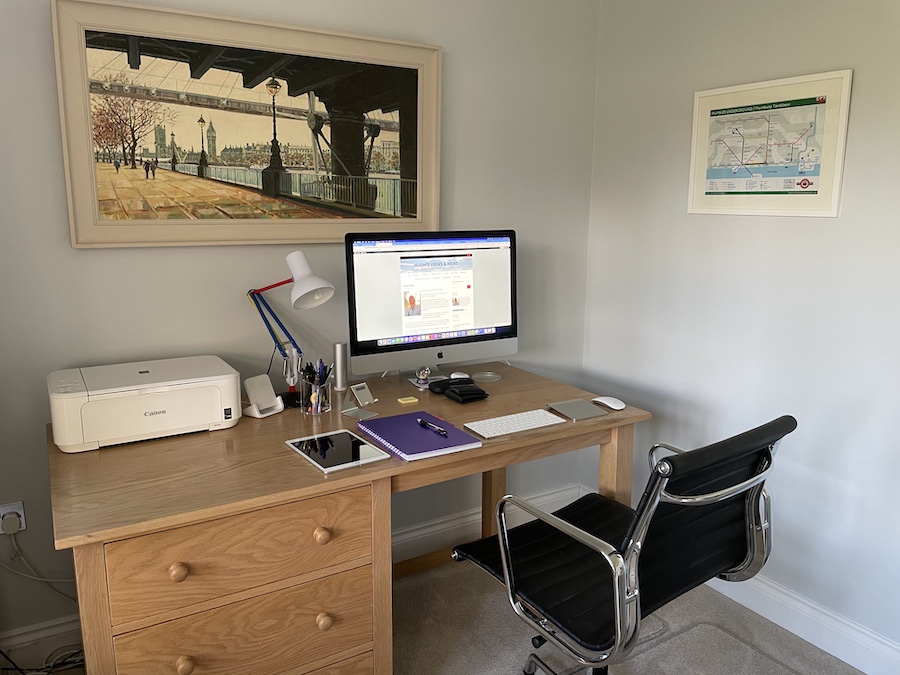
A photo of a neat and tidy desk with a desktop computer, lamp, iPad, keyboard, printer and stationery items on it.
Where I blog from

How long have you been blogging? Is blogging all that you want it to be? Let me know in the comments section.

You can follow me at the following sites.

Copyright @ 2026 hughsviewsandnews.com – All rights reserved.

5 More ‘Questionable’ Photos That Allow You to Say Who You Are

I want to thank everyone who engaged with me (and other bloggers) on my previous photography post. If you missed it, ‘5 ‘Questionable’ Photos That Give You The Chance To Say Who You Are‘ was slightly different from my first photography post in this series, as it asked you questions based on the photos.

I had fun with it! I hope you did.

This month, I’m showcasing five photographs (all of which feature me), so all were taken by somebody else. I am also highlighting another WordPress gallery block you can use to display your photos.

Feel free to leave a comment or write your own post with your responses. If you decide to create a post, you’re welcome to link back to mine so other bloggers can join the discussion.

1. What is the oldest photo in your photo collection?

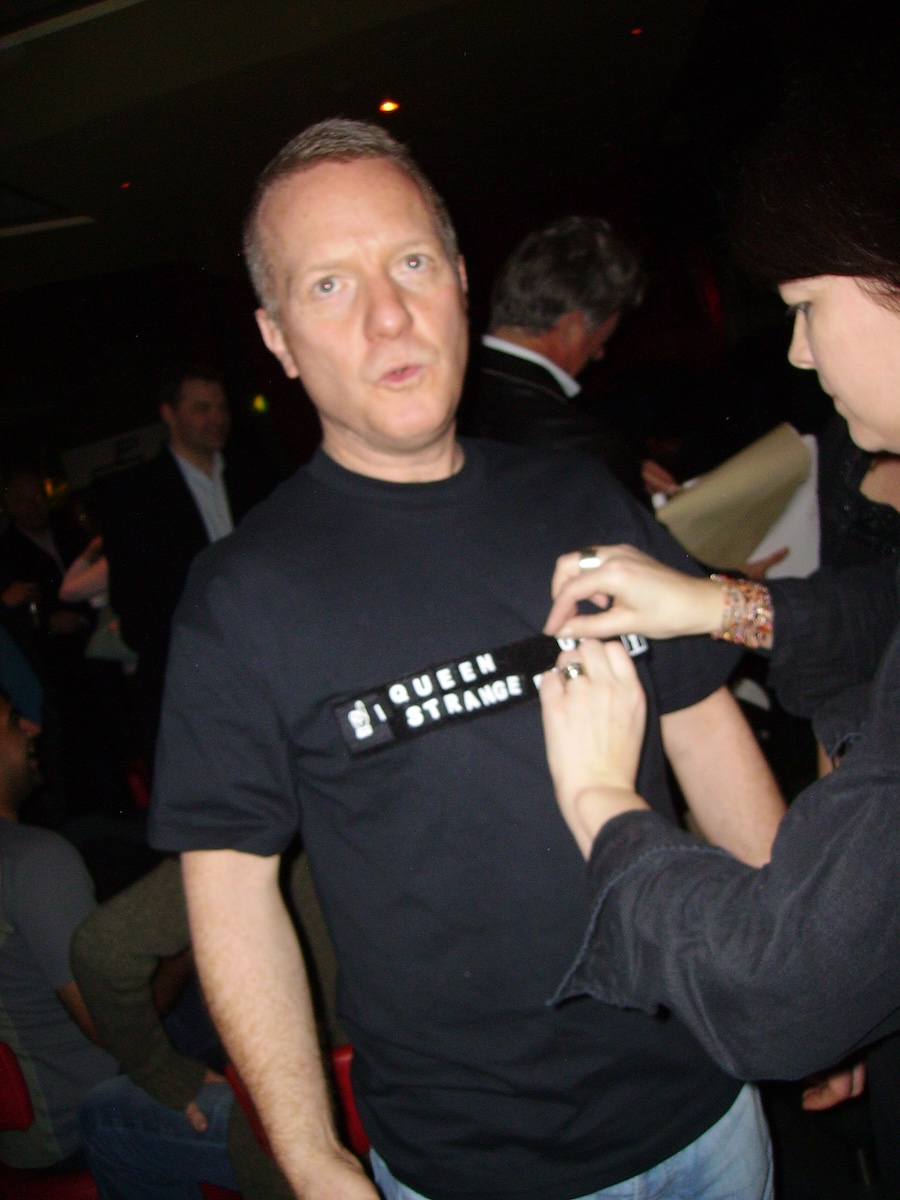
A photo of a woman pinning something onto a man's t-shirt, with writing across the front. The man is looking up towards the ceiling.
Photo taken 23rd February 2006

2006 must have been the year I started an online photo library. I do recall the event when this photo was taken, which was a staggering 20 years ago! Doesn’t time fly?

The photo was taken at my ‘Sten’ party. What’s a ‘Sten’ party? It’s similar to a stag or hen night, but it’s for both men and women. This was a gathering organised by my work colleagues, a few days before my partner and I had our civil partnership.

Civil partnerships for same-sex couples became law in the UK when the Civil Partnership Act 2004 came into force on the 5th December 2005. Elton John and his partner, David Furnish, were among the first to have a Civil Partnership in the UK.

The first couples were able to formally register their partnerships in Northern Ireland on 19 December 2005, followed by the rest of the UK on 21 December 2005. 

Do I remember anything from that night apart from having various slogans pinned to my T-shirt? Yes, quite a lot, but far too much to publish here. I could probably produce a mini-series for Netflix about what happened that evening, but that would only mean a second, third, fourth, fifth, and sixth season.

2. Are you a tourist or a stay-at-home type of person?

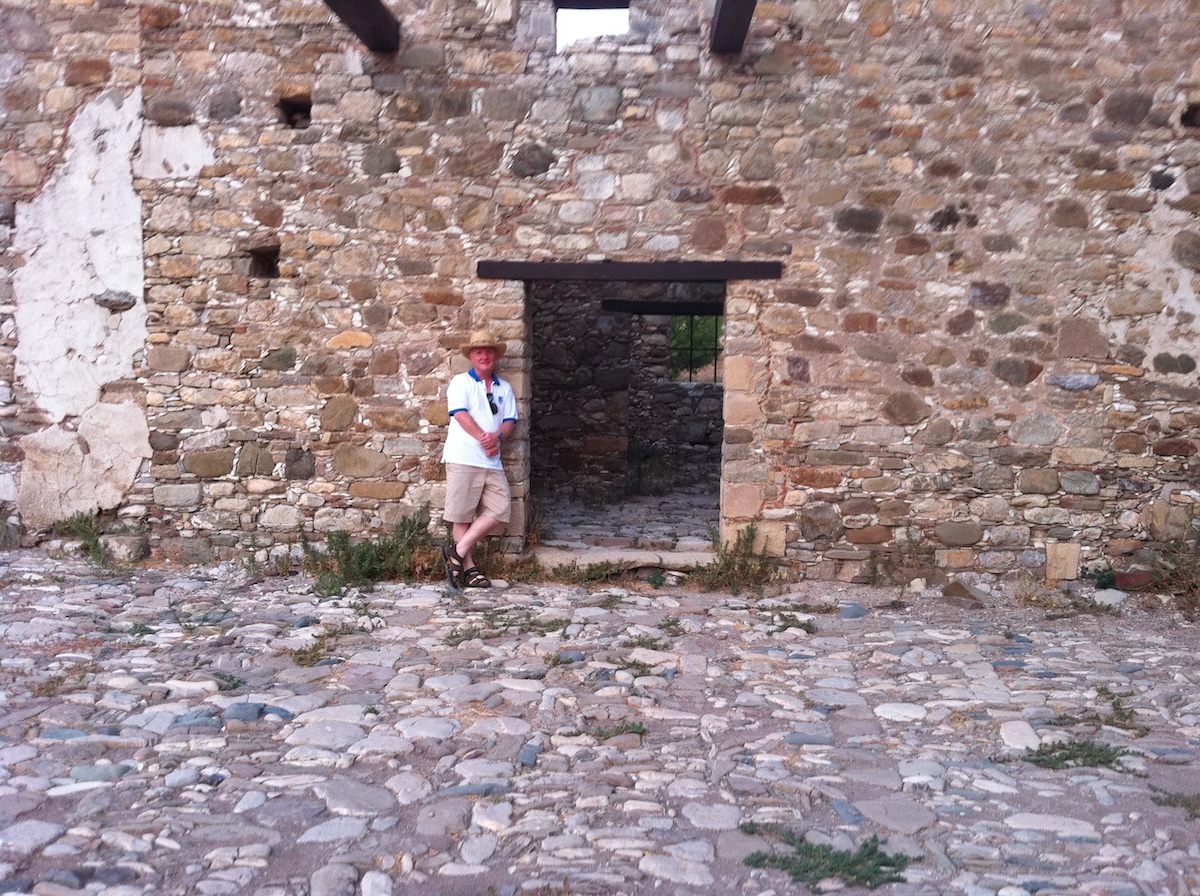
A photo of a man standing next to a gap in a wall that used to have a door.
What happened to the door?

This photo captures the moment a medieval ruin briefly considered becoming a holiday cottage before immediately changing its mind. The stone walls whisper stories of sieges, monks, and mysterious drafts, while I, casually leaning against it, wonder, “Yes, but does it get Wi-Fi?” The contrast is striking: centuries of hardship versus sandals that have clearly never known true suffering. No, I don’t wear sandals like that anymore, and I’ve never worn socks with them!

I love history, but there’s also something heroic about that pose. One foot crossed, arms relaxed, expression calmly confident—like a travel brochure model for Accidental Time Travel Monthly. Can you imagine ‘Time Travel’ holidays? Something for the not-too-distant future, perhaps? You half-expect a guide to announce to the other tourists, “And here we see the rare British Tourist in its natural habitat, pausing to rest after conquering a mildly uneven cobblestone.”

My favourite part of this old building is the doorway beside me, which perfectly frames the scene: step through it, and you’re in the 14th century; step back out, and you’re searching for a café, gift shop and the nearest toilets! It’s a vivid reminder that while history may be ancient and awe-inspiring, it still serves as a perfect backdrop for a relaxed lean and a very modern sense of comfort.

3. What’s your most memorable moment of the 21st century?

A photo of a man standing in the Olympic Park for the 2012 Olympic Games held in London.
What were you doing in 2012?

With the Winter Olympic Games underway at the time of publishing this post, I am privileged to have attended the London 2012 Summer Olympic Games.

The Olympic Park entrance looms behind me as the crowd shuffles forward with the quiet determination of people who’ve accepted they will queue, and they will like it. Yes, we British do seem to enjoy queuing a lot!

That smile says, “I’ve beaten the queues, the weather, and possibly public transport.” The Adidas shirt is doing some serious international diplomacy—it’s covered in flags, symbolising unity and global harmony, all before the first race. It’s the kind of outfit that silently reassures everyone nearby that yes, this is a special day and nobody should be grumpy.

Meanwhile, my background extras are showing peak Olympic spectator behaviour: backpacks adjusted for the 400th time, sunglasses on despite the sun’s best efforts being “meh,” and that universal look of someone thinking, “Did I bring the tickets?” It’s a perfect snapshot of optimism, mild chaos, and the unmistakable feeling that something memorable is about to happen.

4. Which television show would you like to appear on?

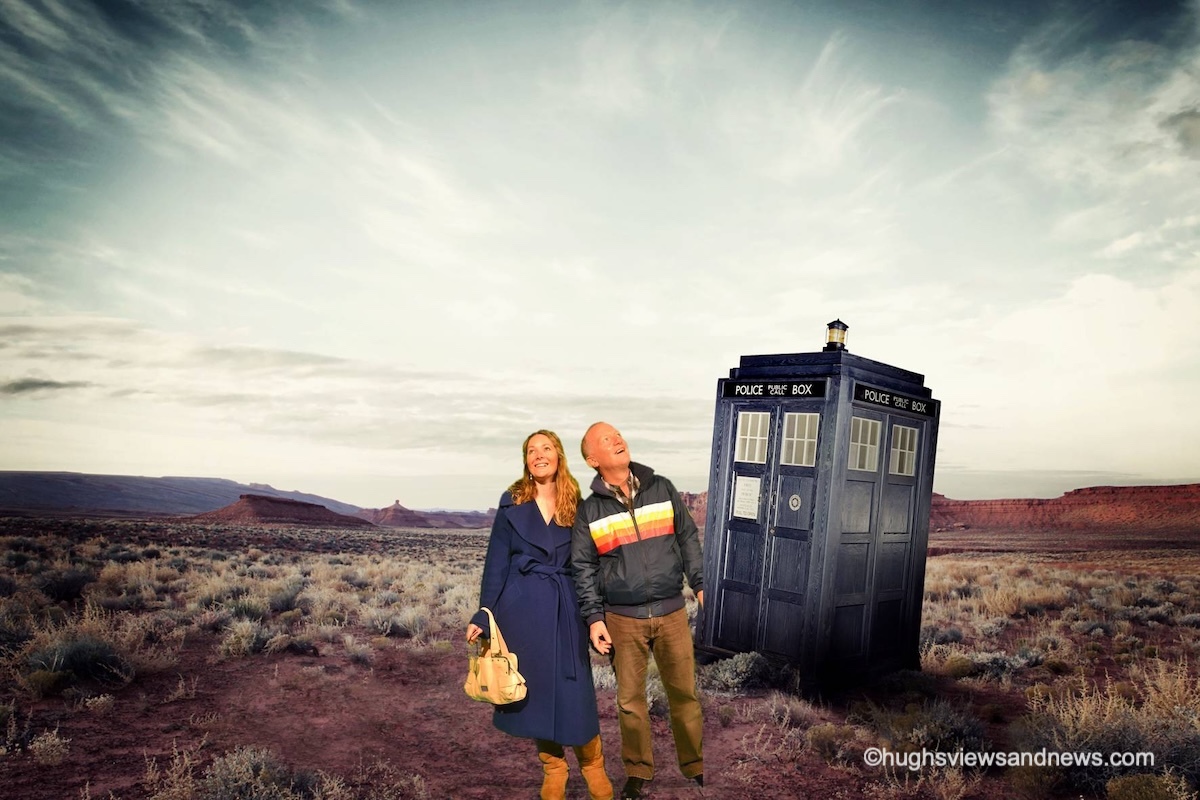
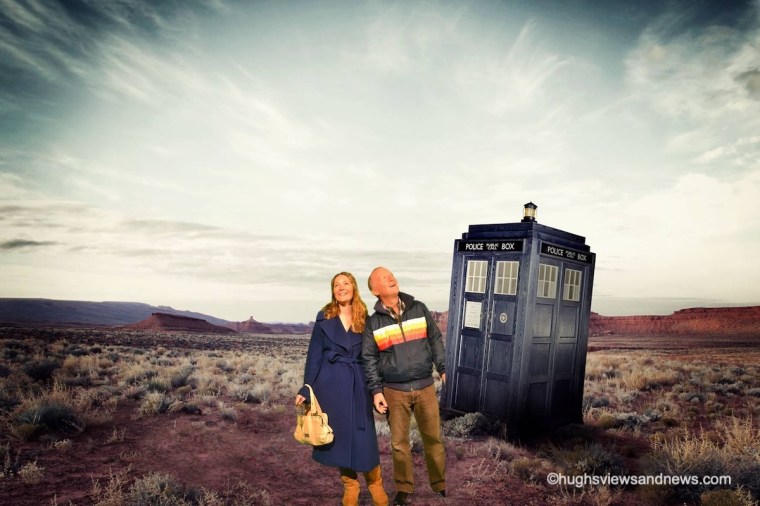
A photo of a man and woman who have just stepped out of Doctor Who's TARDIS onto a strange planet.
Where are we?

Those of you who know me well know how much I love science fiction, especially anything related to time travel. So when I had the opportunity to star in an episode of ‘Doctor Who’ with my niece, I jumped at it.

I have no idea where we landed, but luckily, there were no signs of the Weeping Angels, Daleks, or Cybermen. Those of you with a keen eye will notice that half of my left foot is missing, which suggests this is an edited photo, though I had nothing to do with those edits.

This all happened in Cardiff, before the pandemic, when the ‘Doctor Who Experience’ arrived in town. My niece was quite upset by it all, as she scars easily and couldn’t wait to leave, while I was sad to have to say goodbye to the TARDIS.

If you ever hear that familiar whirring noise the TARDIS makes, you might be quite surprised when I step out of the blue police box.

5. Do you believe in aliens?

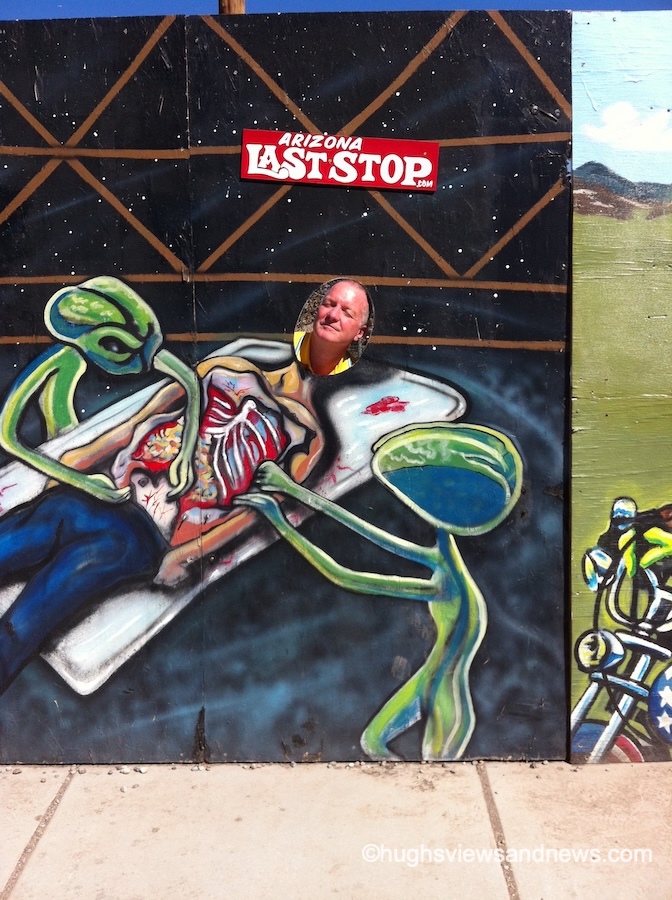
A photo of a man standing behind a large billboard that has a picture of aliens doing an autopsy on a human. The man has stuck his head through a hole, so the human is him.
Have you found a cheese sandwich in there?

Talking of aliens, have you ever met any? Well, as you’ll see in the photo above, I have.

This is what happens when roadside art, aliens, and questionable life choices collide. One moment you’re minding your own business at the ‘Arizona Last Stop,’ the next you’re being casually abducted mid-nap by long-armed extraterrestrials with very flexible elbows.

My expression says, “I did not have this on today’s itinerary,” while the aliens look like they’re just checking the seatbelt before take-off. It’s less ‘Close Encounters of the Third Kind’ and more Close Encounters of the Mildly Inconvenient Kind.

Honestly, if aliens are real, this feels exactly like how they’d introduce themselves to me—confusing, slightly rude, and searching me for proof that I’d eaten that last cheese sandwich.

The Cover Block

This month, I am displaying and featuring the ‘Cover’ block. Here’s one of my featured photos in the Cover block.

A photo of a man and woman who have just stepped out of Doctor Who's TARDIS onto a strange planet.

I’ve always dreamt of writing an episode of Doctor Who, so I came up with a title for the photo I have used.

The WordPress Cover block offers many possibilities. It’s a versatile, visually appealing block that lets users create engaging sections on their pages and posts. It serves as a powerful tool for showcasing images, photos or videos with overlay text, enabling content creators to combine striking visuals with compelling messages.

By using the Cover block, you can add an engaging background image or video that complements your content, while overlaying text to share information, tell a story, or boost your branding. This block is especially useful for creating call-to-action areas, or unique segment dividers that attract attention to key announcements or highlights on your blog.

With options such as text alignment, colour overlays, and the ability to adjust your background image’s focal point, the Cover block enhances your blog’s visual appeal and readability, making it an important component of effective storytelling and design in WordPress.

Click the following link for more information about the Cover block.

How to make a photographer’s day.

Next time you leave a comment on a photography post, instead of saying ‘Great photo,’ describe what about the picture made you think it was great. Was it the subject, the lighting, the scenery, the angle it was taken from, or the emotion it evoked when you saw it?

It only needs to be a few lines, but the people you leave the comment for will appreciate the feedback much more than when all you say, time after time, is that it’s a great photo.

Remember that one genuine, thoughtful comment once in a while is worth thousands of short, non-engaging comments that only prove you visited and that you don’t have the time.

What is the oldest photo in your photo collection, and what is it of? Are you a tourist or a stay-at-home type of person? What’s your most memorable moment of the 21st century? Which television show would you like to appear on? Do you believe in aliens?

The featured image in this blog post is taken from Pixabay. AI checked spelling and grammar mistakes.

You can follow me at the following sites.

Copyright @ 2026 hughsviewsandnews.com – All rights reserved.

Blogrolls: What Happens When Adding One To Your Blog

A blogroll is a curated list of links to other blogs or websites that a blogger recommends, follows, or finds interesting, which they can display on their blog. Usually shown in a blog or website’s sidebar, footer, menu bar, or dedicated page, it helps foster community, share resources, and help readers find related content. Essentially, it is a “roll” of recommended blogs. 

Unfortunately, WordPress deprecated the Links/Blogroll widget several years ago. However, users of the Block Editor can now access the ‘Blogroll’ block to display a list of recommended or followed blogs.

If, like me, your blog has a widget bar, you can show the blogroll there. If you don’t have a widget bar, you can display a blogroll on a page, post, or in the menubar of your blog.

In this post, I will show you how to create a blogroll in a widget bar and on a blog post or page. I’m using an iMac desktop computer for this.

How to add a blogroll to a widget bar.

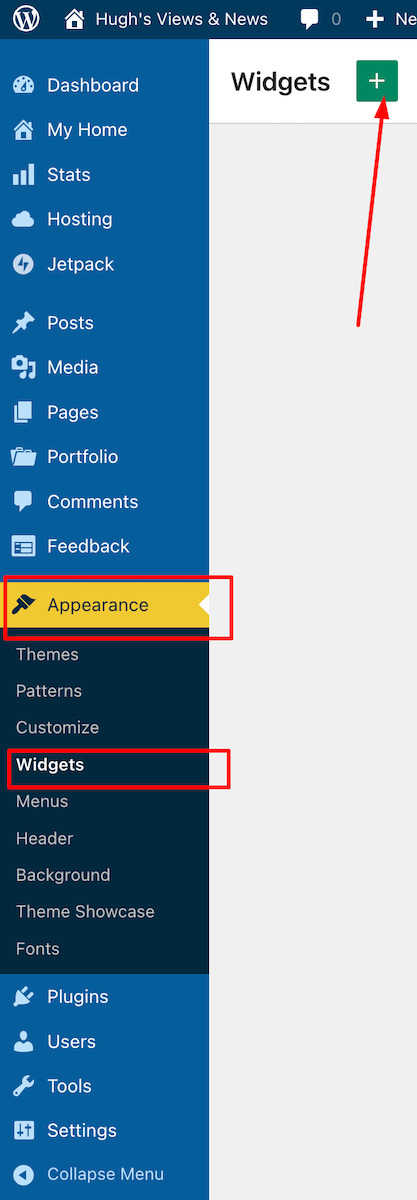
  • On your blog’s dashboard, navigate to AppearanceWidgets and click the ‘+‘ symbol in the top right corner.
An image highlighting where to find 'Appearance' and 'Widgets' on the dashboard of a WordPress blog.
Click Appearance – Widgets
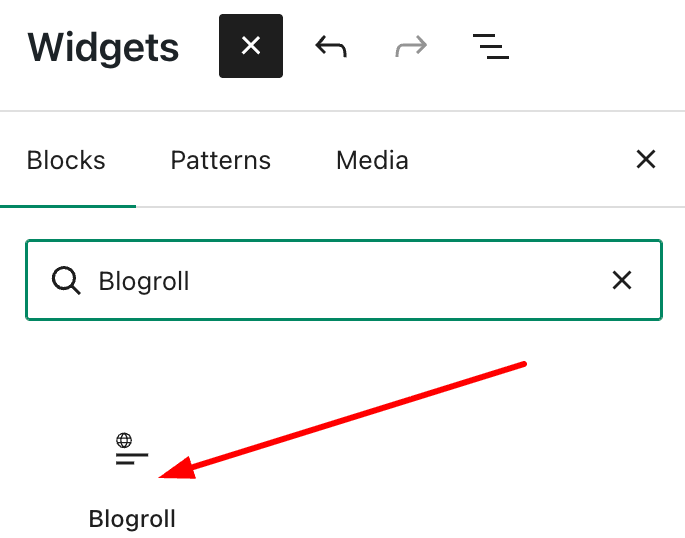
  • Find the Blogroll block by typing ‘Blogroll’ in the search bar. Click on the Blogroll block to add it to your widget bar.
An image showing where and how to find the Blogroll Block on WordPress.
Add the ‘Blogroll’ block

For some reason, when you add a Blogroll block, it automatically populates with several blogs, some of which you may not recognise. I found this quite odd, but it’s simple to remove any unwanted ones.

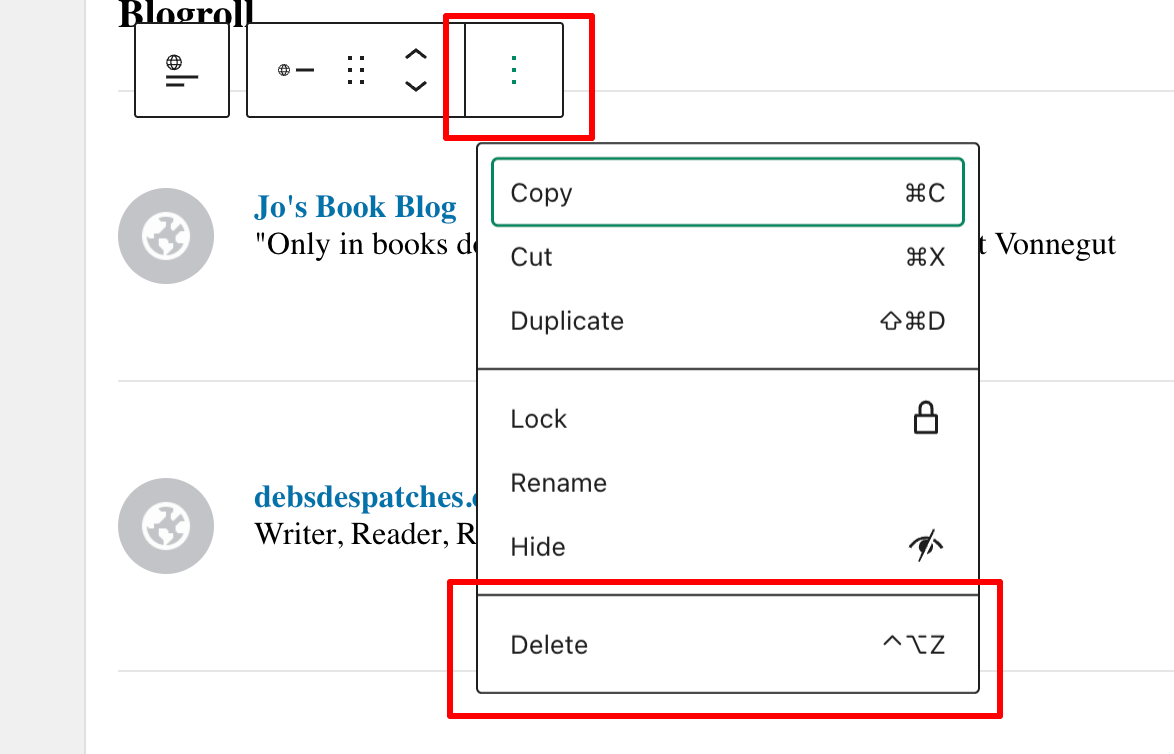
  • To delete a blog, select the blog you wish to remove, then click the three vertical dots (kebab menu) and choose Delete.
An image highlighting the kebab menu and delete button when deleting blogs from a Blogroll on WordPress.
Deleting blogs from a Blogroll is easy
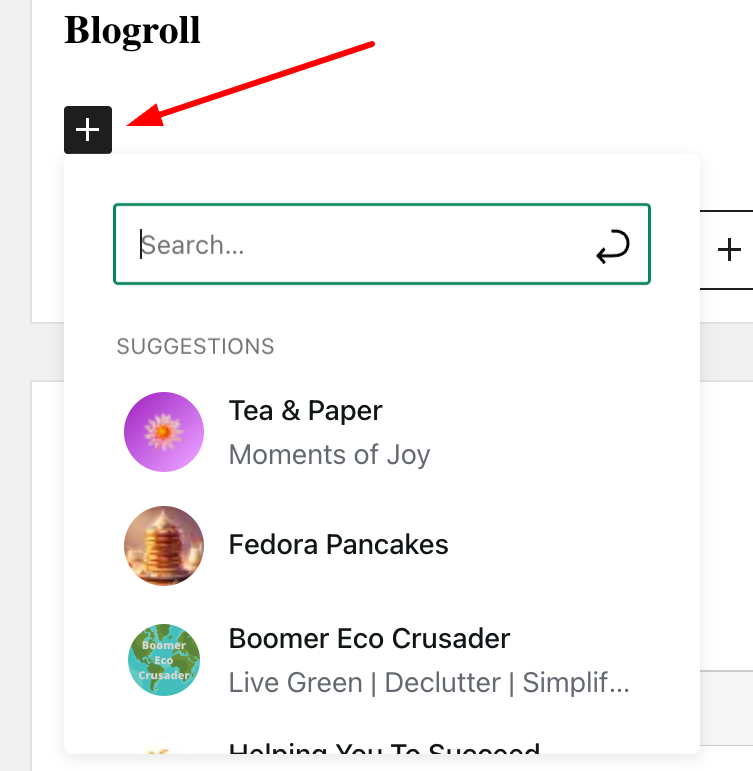
  • To add blogs, click on the ‘+‘ symbol and select from the list that appears or use the search bar to find the blogs you wish to add.
An image highlighting the 'plus' button and a list of blogs when creating a blogroll on WordPress
Add or search for the blogs you want to add to your blogroll.
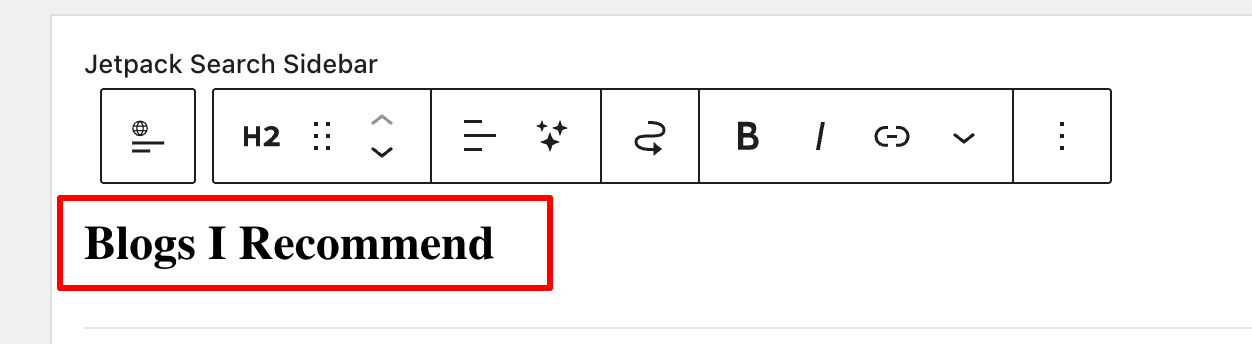
  • To change the name of your blogroll, click next to ‘Blogroll‘ and add your own description.
An image highlighting how to change the name of a Blogroll on WordPress
Rename your blogroll
  • Click the Update button in the top right corner to publish the Blogroll in the widget bar.
  • Check your blog to ensure the Blogroll widget is visible. You can see the blogroll I created towards the bottom of the widget bar on the right side of my blog. It contains the blogs I read the most.

How to add a blog roll to a page or post.

  • Add the Blogroll block anywhere on a page or post.
  • To add or remove blogs from your blogroll list, follow the instructions above.

Remember that you can change the name of your blogroll. However, be aware that if your blogroll contains many blogs, it will take up a lot of space on the post or page.

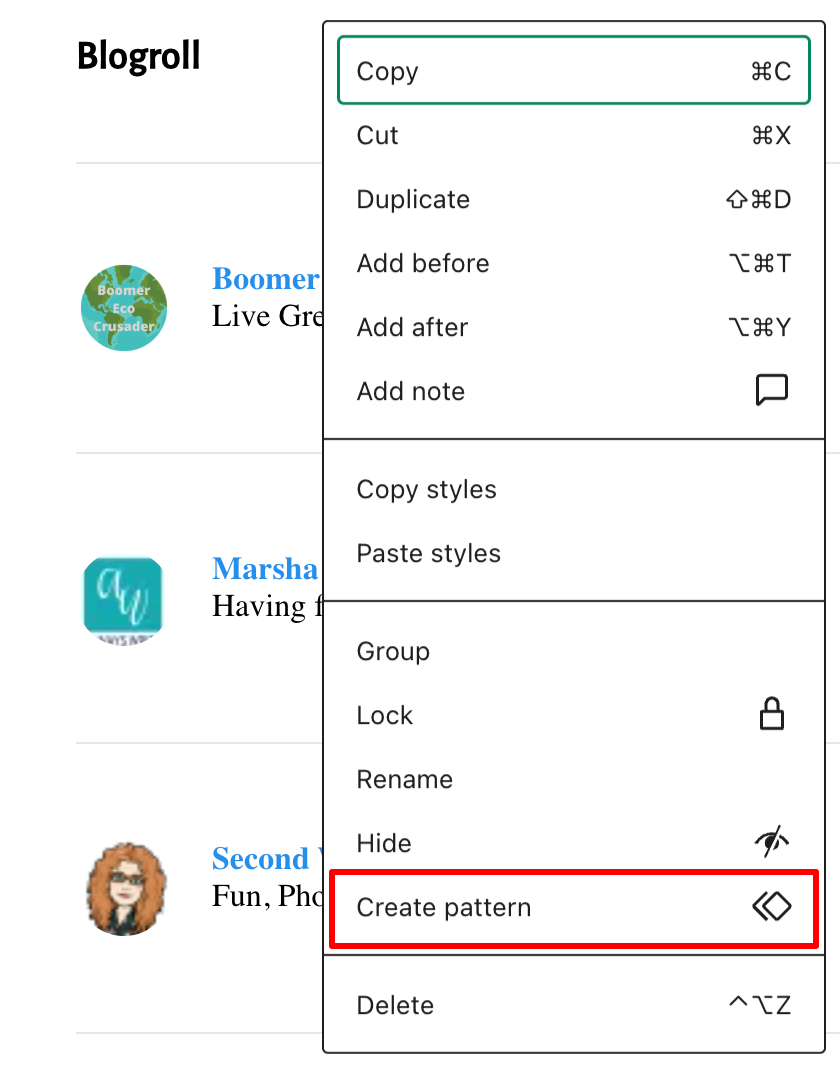
You can also convert your blogroll into a reusable block, now called a Pattern, by clicking on the block, then selecting the three dots (kebab menu) and choosing ‘Create Pattern.’

An image showing how to turn a Blogroll into a 'Reusable Block.'
Turn your blogroll into a reusable block

A reusable block on WordPress, now often called a Synced Pattern, is a feature that allows you to save a specific block or group of blocks for use across multiple posts or pages. This is particularly helpful for those selling items on their blog, such as books. For example, if a link to your books needs updating or the price changes, the updates are automatically reflected everywhere the block appears. Clever stuff!

To answer the question I raised in the title of this post, what happens when you add a blog roll to your site? Well, that’s straightforward. It means you promote the blogs you enjoy reading most. In doing so, you help foster a community and bring its members closer together. In turn, you’ll be supporting them in developing their blogs and community. What better way to say ‘thank you’ to those special people?

I’m looking forward to seeing your blogrolls as I’m looking for some new blogs to follow. If you have a blogroll on your blog, let me know.

Note: Widget bars only show when viewing posts and pages on a desktop computer. When viewing posts on a tablet or mobile phone, click the menu button to see them.

Have you ever created a blogroll on your own blog? Which blogs or websites did you include? How do you think a blogroll can improve the reader’s experience on a blog? How often do you update your blogroll or the blogs you follow? Have you come across any new blogs from fellow bloggers’ blogrolls? If so, which ones?

The featured image on this blog post is sourced from Pixabay. AI reviewed spelling and grammar errors.

Layout, content, settings, and format might differ on self-hosted blogs.

You can follow me at the following sites.

Copyright @ 2026 hughsviewsandnews.com – All rights reserved.

Layout, content, settings, and format might differ on self-hosted blogs.

Reasons to Act Immediately If You Receive This WordPress Email

Back in November 20025, I published a post, ‘The Latest Blogging and Publishing Scams You Need to Be Aware Of Now,‘ which outlined a number of scams aimed at bloggers, writers, and authors.

This week, I received an email that appeared to be from WordPress, but which raised my suspicions.

Firstly, I was fortunate that my email system identified the message as spam and moved it to my spam folder. However, it made me consider other WordPress bloggers who might have received or will receive the email, but whose antivirus or email security software does not recognise it as spam or a scam.

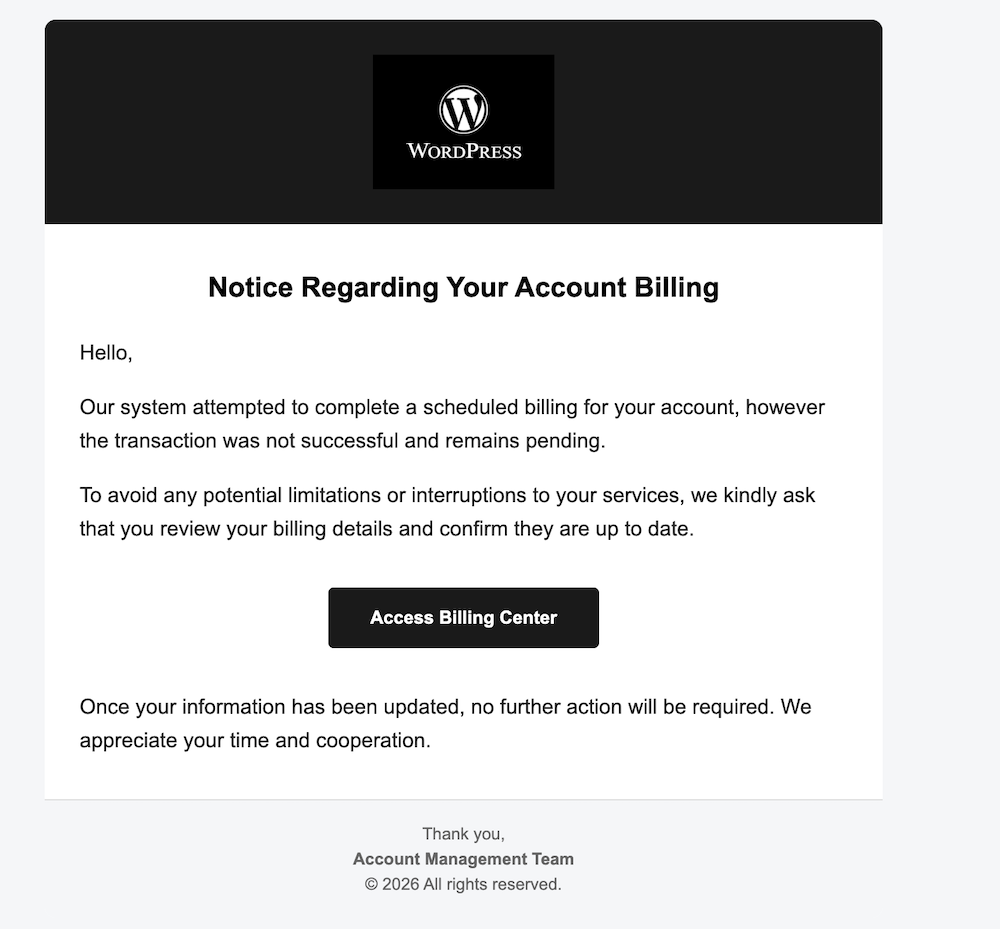
Here are two images of the email’s contents. I’ve highlighted some areas which I encourage you all to check before clicking on any link and risking becoming a victim of a scammer.

An image of a scam email that appears to be from WordPress about a problem with a WordPress account. There is a button to click to access the WordPress account's billing centre.
An image of a scam WordPress email

The image above may seem fine, but one clue indicates it’s not a genuine WordPress email. What is that clue?

  • Not being addressed by name in any company email is a strong clue that the email is not genuine.
  • The scammer simply said ‘Hello,’ which is a tactic used because addressing everyone by name is too time-consuming.
  • Scammers send these emails to thousands of recipients hoping that some will respond.
  • All the scammer needs is for one person to click the link to obtain login and username details.
  • Once they have that information, they can lock you out of your blog and wreak havoc.
  • Scammers are often more interested in obtaining any credit or debit card details you have on your account. If they obtain those details, they could go on a spending spree.

Here’s the next image.

An image of the email details from a scammer pretending to be WordPress. The email address has been sent from a completely different email to that of WordPress
Look for the clues when suspicious of emails
  • The scammer couldn’t even get the correct format for ‘WordPress’.
  • The ‘P’ in ‘WordPress’ is always capitalised; the scammer missed this detail.
  • The details after the first part of the email don’t match WordPress.
  • The email address hidden behind what appears to be a WordPress email does not contain any WordPress information.

I was worried that somewhere out there, a scammer either has a list of email addresses for WordPress bloggers or has taken a chance, sending emails to addresses on a list, probably from the dark web. This email did not go to my private email address, but to the email address I use for my blog. I hate to think of my email address on a scammers’ list anywhere, but unfortunately, it can happen.

I contacted WordPress regarding the scam email, and they requested me to forward it so they could investigate.

If you receive a suspicious email from WordPress, the best way to report it is to forward it to phishing@automattic.com so their security team can investigate and act against the scammers.

As a quick tip:

  • Legitimate WordPress.com emails always come from @wordpress.com or @automattic.com addresses. Note that any mention of WordPress before the ‘@’ will be the correct format of WordPress.
  • They will never ask for passwords or payment info via email or a text message.

In the unlikely event that you click on any links or enter any information from a scam email that claims to be from WordPress, change your WordPress.com password as a precaution by visiting your ‘Profile‘ settings and selecting the ‘Security‘ tab.

If you are not sure or are suspicious of any email, always contact the company the email claims to be from before clicking any links or providing any information.

Summary:

  • Always be aware of suspicious emails, not just from WordPress but from any company, especially if they include links and do not address you by name.
  • Look for spelling mistakes, especially in the sender’s email address.
  • Send any suspicious emails to the company they claim to come from. All reputable companies will have a dedicated email address for scam emails.
  • Companies will never ask you for your passwords or payment information in an email or text message.
  • If you click any suspicious links, change your password immediately.

Have you ever received a suspicious email claiming to be from WordPress or another service? What was your initial reaction? What steps do you take to verify the authenticity of an email before clicking on any links? Can you share any personal experiences with online scams you have encountered?

The featured image on this blog post is sourced from Pixabay. AI reviewed spelling and grammar errors.

You can follow me at the following sites.

Copyright @ 2026 hughsviewsandnews.com – All rights reserved.

How To Avoid Soaring Blogging Overload: 4 Helpful Ways

Just a heads-up: This blog post might make you think I’m talking about you.

A couple of years ago, the following post debuted on this blog.

7 Common Mistakes To Avoid When Deciding Whether To Follow A Blog

It got people rethinking why they follow particular blogs. And that was my aim. Job done! Or so I thought.

It won’t come as a surprise that, having already read many posts this year where the writer outlines how they are already feeling overwhelmed and guilty about not being able to keep up with reading, commenting, and writing posts (and we’re only a few days into the 2026), I thought it a good point to say a few things that some bloggers find difficult to talk about.

Is this you?

Not only is following too many blogs something that can have an adverse effect on your mental health, but it can also have a negative effect on your writing and creativity.

Some people act immediately when they start to feel overwhelmed, stressed, or guilty about blogging, but sadly, some leave the world of blogging, sometimes without giving any notice of their intention to do so.

Of course, some people also give up blogging on a positive note.

As I already mentioned, following too many blogs is one of the biggest pitfalls of blogging because many bloggers believe they have to follow every blogger that follows them, read their posts and leave comments on every post. Sure, some of those bloggers only ever leave short, non-engaging comments more as proof they’ve visited, but sadly, some go on to abandon their blogs when it all becomes too much.

Let me be clear. If anyone suggests it’s only polite to follow the blogs of everyone who follows your blog, they are talking nonsense. If I took that advice, I’d be following over 7,000 blogs. Can you imagine how overwhelming that would be and the effect it would have on my mental health, especially if I felt I had to read and comment on every post?

Thankfully, I only read and comment on posts that interest me.

Before following any blog, ask yourself these questions.

1. How often are new posts published?

The frequency at which posts are published is important. Some bloggers publish a new post once a month; others publish weekly; some publish daily; and then there are those who publish more than one post a day.

I once followed a blog where the host was publishing up to five new posts daily.

I could have ignored how often she published new posts, but because I found some of her posts interesting and she was following my blog, I felt obliged not only to follow her blog but also to read and comment on all her posts. Yes, those comments were short and non-engaging because I was not able to keep up.

This led to guilt when I missed any of her posts, left comments only to prove I visited and to feeling overwhelmed by it all.

Check how often posts are published before pressing the ‘subscribe’ button. If posts are published daily, and that’s too much for you, consider not following or do not feel obliged to read all the posts.

If you receive email notifications for new posts, consider getting one email a week with the posts they publish. Yes, there’s an option for that. You can then choose which of those posts you want to read.

How To Change How often You receive New Post Notifications

On the ‘Manage Subscriptions‘ page of your blog (under the ‘Reader‘ button), click on the three dots (Kebab menu) next to any of the WordPress.com blogs you follow and choose how frequently you get email notifications of new posts.

The choices are Instantly, Daily or Weekly.

An image highlighting the settings for changing the frequently of new post notifications from WordPress
Click the three dots (kebab menu) then select how often you receive new post emails

Consider getting new post notifications via web and mobile notifications if getting email notifications become too overwhelming.

If you are happy with the frequency of new posts, by all means, subscribe and enjoy.

2. Is the content interesting enough?

Time is something many of us cannot manage when reading blogs, usually because we feel we do not have time to read everything, yet we feel obliged to and often leave a comment as proof. It’s a surefire way to get yourself on a slippery slope toward blogging burnout.

If none of the content interests you, don’t feel obliged to follow or read.

Don’t become a ‘ghost’ follower by subscribing to blogs you know you’ll never visit. After all, would you read a book on a subject that did not interest you? Be honest and ask yourself, ‘will I actually read this blog, or will it just add guilt to my unread list?

Time is precious, and wasting it on reading content you have no interest in is one of the main blogging mistakes you can make.

Spend time on reading content that interests you and which may inspire you to leave genuine, thoughtful comments.

Leaving a thoughtful, genuine comment occasionally far outweighs the impact of posting brief, unengaging comments on every post simply to show you were there. Make your comments count, ensuring that “thank you” isn’t the only response that resonates.

Thoughtful comments show you are interested and want to engage. Short, non-engaging comments simply prove you visited. They do not prove you read the post.

And remember that if a blog you follow publishes posts on various subjects, you are under no obligation to read everything they publish. Read only what interests you.

3. Does the host look after their blog?

  • Would you shop on a website with lots of broken links, a poor layout, or where you have difficulty finding what you are looking for?
  • Would you follow a blog that is broken because the host keeps blaming WordPress or anybody else but themselves for the faults?
  • Would you follow a poorly designed blog or one full of errors, broken links, and no sense of organisation?
  • Would you follow a blog that no longer has security updates because of it’s outdated theme or has a comments section full of spam and unverified links?

I hope you answered ‘No’ to all of those questions.

Just as taking care of your home creates a warm, inviting, friendly, comfortable, and safe place for family and friends to visit, maintaining your blog is equally important. Bloggers who prioritise maintaining their blogs demonstrate their commitment to making a positive impression on visitors, showing that they truly care about their audience.

Unmaintained blogs present a significant security threat to visitors. Bloggers utilising unsupported WordPress themes are not receiving crucial security updates, jeopardising the safety of their audience, particularly when clicking links.

Consider carefully before following or engaging with any blog that presents itself as outdated, disorganised, unsafe, or uninviting due to its poor layout. This caution extends to blogs that permit hostile or inappropriate comments in the comment section.

4. What do you know about the hosts(s)?

  • Who is the individual behind this blog?
  • What is their name, and what is their geographical location?
  • What topics do they cover in their writing?

These are critical questions to consider before deciding to follow any blog. Reflect thoroughly on the implications of following a blog that fails to provide sufficient information about its author(s). While their posts may appear engaging, the absence of identifiable information raises concerns regarding the safety and credibility of your decision to follow.

I have misjudged by following various blogs based on the appeal of their content, only to discover particulars of the hosts that were quite disconcerting. A more sensible approach would have been to inquire about the blog’s authorship and to consider why I should place my trust in them.

More often than not, some bloggers adopt a seemingly friendly manner to attract visitors, only to later reveal their true intentions, often by posting derogatory comments directed at you or fellow bloggers.

I’ve discovered that with time, I can quickly judge what people are like from their blog posts before deciding to follow their blogs. However, if I can’t find any information about who they are and what they blog about, I won’t follow.

A simple rule of thumb

If, after reading 3–5 posts, you’d be disappointed not to see the next post, it’s probably worth subscribing.

What has been your experience with following too many blogs? Have you felt overwhelmed? Do you prefer quantity or quality in blog subscriptions? How do you choose which blogs are worth your time? How important is it to know about the host behind a blog before following? What tips do you have for bloggers feeling overwhelmed by subscriptions? How do you balance reading, commenting, and writing?

You can follow me at the following sites.

The featured image on this blog post is sourced from Pixabay. AI reviewed spelling and grammar errors.

Copyright @ 2026 hughsviewsandnews.com – All rights reserved.

Celebrating 2025: 12 Most Inspiring Posts That Defined the Year!

If you happen to be reading this in January, then it’s officially ‘Happy New Year!’ If it’s any other month, well, ‘Happy New Year’ anyway—because let’s face it, every day is just a chance to start fresh, much like your New Year’s resolution to stop binge-watching shows… which you’ve probably already forgotten by now!

I’m diving headfirst into 2026 with a parade of my 12 most beloved posts from 2025, all crafted by yours truly. Maybe they slipped under your radar, or perhaps you’re just itching to relive them—feel free to leave a fresh comment, even if you’ve already showered them with praise before. Because, let’s be honest, who doesn’t love a little comment déjà vu?

Click the links to view the posts.

January

Navigating the Social Media Landscape: My Journey with Five Platforms

I kicked the year off talking ‘Social Media,’ a subject that became a hot topic during 2025, sometimes for the wrong reasons.

Not only can social media be a ravenous beast in eating up a lot of your time, but it’s also a fantastic way to promote your blog posts, the posts of other bloggers (a great way to support other bloggers), and, best of all, it’s free to use unless you decide to pay for a subscription.

I not only shouted out the three social media platforms I’m still romancing, but I also gave a little eulogy for the ones I’ve ghosted. After all, as someone hilariously pointed out, ‘spreading yourself too thinly on social media is like trying to butter a piece of toast with a frozen brick of butter—good luck with that!’

February

Why Every Blogger Needs an Engaging ‘About’ Page: Key Elements and Tips

Do you know who you are? I hope most of you chimed in with a confident ‘Yes!’ But how well do you know the owners of the blogs you follow? I mean, do you really know them, or are they just mysterious internet wizards pulling strings from their lairs?

I’m still somewhat bemused by the number of bloggers who have an ‘About’ page that says, ‘This is the template for telling your audience a little about yourself and what you blog about,’ – well, something along those lines.

It’s truly wonderful to share a bit about yourself on your blog! You don’t need to provide a lot of information—a first name and a little insight into your location can go a long way. Plus, letting visitors know what your blog is about will help create a friendly connection and encourage them to explore your unique perspective!

As you’ll see in the comments section of the post, many bloggers won’t engage, let alone follow a blog that has no information about its host(s).

March

The Ultimate Guide to Engaging on Bluesky: Tips, Features, and Strategies for Success

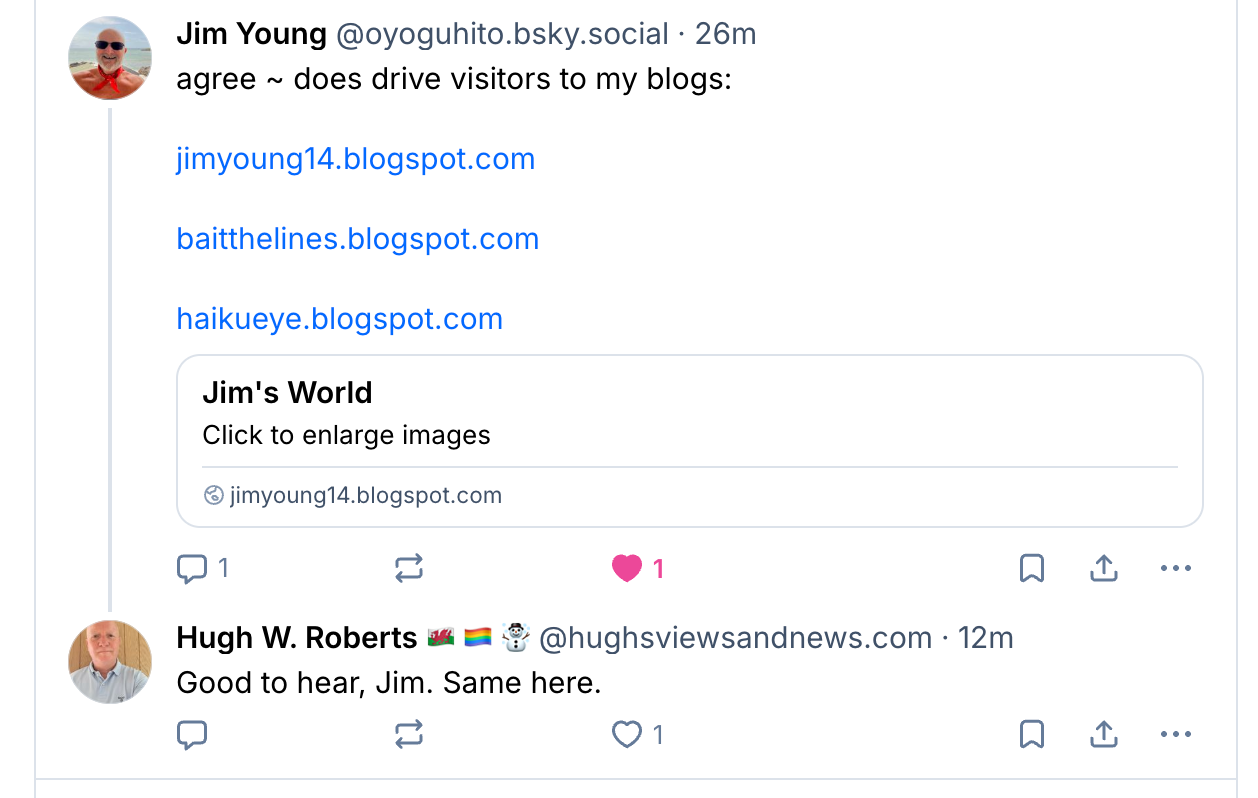
Although published 10 months ago, this post from March 2025 is still attracting attention, making it my top pick of the month! If you’re a BlueSky user, this post is an absolute gem, offering you the fantastic opportunity to not just get your blog posts read but also to inspire meaningful engagement from your readers.

An image of a reply to a post on Bluesky confirming that Bluesky has boosted traffic and visitors to their blog.
Bluesky can boost traffic and visitors to your blog.

Even if you don’t have a Bluesky account yet, it’s worth a read, as the information contained within the post can apply to other social media platforms.

April

Astonishing! Some Bloggers Kill Off Comments On Their Blogs. Why?

Talking of engagement, imagine my shock when, in April, there was a lot of talk amongst bloggers about killing off commenting on their blogs.

Most of the talk was on social media, but I also noticed that some bloggers had decided to disable commenting on their posts, citing the amount of time it took to respond.

But isn’t that what blogging is all about? Being able to engage, discuss and ask questions? Check the comments for the answers.

May

The Best Ultimate Guide To Why Alt-Text Is Important

It’s a sad fact that not everyone who visits your blog can see images or photos. Fortunately, WordPress allows users to add Alt-Text to all images in blog posts. This helps visitors who use screen readers and other software that describe images to know what’s in them. Sadly, many bloggers don’t help these visitors by not adding Alt-Text to their pictures.

Don’t know what Alt-Text is? Check out the post for details. And once you read it, make it a mission to welcome everyone to your blog.

June

This Is The One Thing You Can Do To Help Bloggers

What’s the one thing you could do to help other bloggers?

I’m sure there are many different answers to that question, but the answer I give in my post is one that I’m positive the majority of bloggers want! Yes, there will be exceptions, and I’m sure one or two will tell me, but if you’re somebody who gives excuse after excuse as to why you can’t do this, then you’ve allowed the problem to beat you.

July

Flash Fiction – Crossroads Of Desire

I didn’t write as much flash fiction during 2025 as I had intended, but this piece of flash fiction was my favourite of the year. It involves two people you’d probably pass in the street most days. Meet Bill and his wife, both in the autumn years of their lives. Are they a normal couple you wouldn’t give a second look at, or are they two people who each come with a dark secret? Only you can decide, but only if you read the piece of flash fiction that gives you a glimpse into their lives.

This 4-minute read packs a punch.

I’ll be making amends and writing more flash fiction during 2026, so you better watch out!

August

5 Reasons Why Every Blogger Should Have a Contact Page and How to Build One

August was the flattest month for me, blogging-wise, in 2025. It felt like I was on a plateau with no way up or down. There was little to choose from in terms of blog posts because I didn’t publish much, but thankfully, this post got a lot of engagement, proving it wasn’t as quiet out there as I thought.

Ask yourself these questions. Why would anybody want to contact you? But more importantly, how easy is it to contact you via your blog other than by leaving you a comment? Remember that leaving a comment isn’t always the right way to contact someone. After all, anyone visiting your blog can read comments. Are you missing out on any golden opportunities? Check the post for full details. You may be surprised.

September

This New WordPress Feature Helps Promote The Blogs You Love

I had to take an unexpected blogging break in September, but thankfully, this post had already been published before I departed. And I wasn’t disappointed with the reaction in the comments section to something the majority of WordPress users had no idea existed.

Short but sweet, this blog post from September 2025 packed as much of a punch as Bill and his wife did in July.

October

Where To Legally Source Amazing Images For Your Blog Posts

The latter quarter of 2025 saw me focusing very much on copyright issues, with many bloggers believing that their blogs are so small and private, nobody will care if they use images, photographs, or any material, including song lyrics, that are copyrighted. How wrong they are.

If you can not guarantee that the material or images you are using in your blog posts are free to use, then are you breaking the law? And, even worse, could you be fined?

November

The Latest Blogging and Publishing Scams You Need to Be Aware Of Now

How many of you believe that you’d never get scammed online?

With the advent of AI, the perpetration of scams has become significantly more sophisticated, leading to an alarming increase in the number of individuals who are susceptible to such deceit.

Different scams are emerging continuously, yet it appears increasingly challenging to identify them. Are you equipped to recognize a scam?

December

5 ‘Questionable’ Photos That Give You The Chance To Say Who You Are

In November, I shared my exciting decision to dive back into my passion for photography blogging, but this time with a fresh perspective. Although I had paused my photography posts in the past due to engagement challenges, I’m now thrilled to explore new ways to connect and inspire my audience.

This post not only showcased more of my own photography but also offered readers a wonderful opportunity to share a bit about themselves. Success! Engagement flourished, and I ended the year just as I hoped, fostering genuine connections rather than mere visits masked by guilt.

Finally, a glimpse into the inside of 2025 for my blog.

An image showing various stats for Hugh's Views and News for 2025.
How well did your blog perform in 2025?
  • 43 posts published
  • 32,600 words written
  • 2,700 clicked the ‘like’ button on my posts
  • 2,100 comments left

A busy blogging year full of creativity and engagement.

What was your favourite blog post of 2025 on your blog? Why did it resonate with you? What’s the most significant lesson you learned about blogging and engaging with your audience in 2025?

You can follow me at the following sites.

The featured image on this blog post is sourced from Pixabay. AI reviewed spelling and grammar errors.

Copyright @ 2026 hughsviewsandnews.com – All rights reserved.

5 ‘Questionable’ Photos That Give You The Chance To Say Who You Are

Last month, I published the first post of my ‘photography-themed’ series. If you missed it, you can read ‘4 Never Before Seen Photos And Why You Need To See Them‘ and join the many readers who have already joined the conversations.

I want to thank everyone who left a comment and those who started conversations about the photos I featured. Honestly, the post’s success exceeded my expectations. I have a dedicated group of readers who love to engage, and for that, I am genuinely grateful.

December 2025

This month, I am not only showcasing five photographs (some of which I appear in), all with a Christmas theme, but I am also highlighting another WordPress gallery block you can use to display your photos and photography.

So, here we go. I’m excited to share five photos, three of which are new to my blog, each one posing a question. Feel free to leave a comment or write your own post with your answers. If you choose to write a post, you’re welcome to link back to mine so other bloggers can join the discussion.

1. When did you first meet Father Christmas?

A photo of a smiling man standing next to Father Christmas
When was the last time you bumped into Father Christmas?

I have to dig deep into the archives of my memory to recall the first time I encountered Father Christmas. I was six years old, and meeting the man I thought was the ultimate VIP (Very Important Person) was like waiting for the last biscuit in the jar.

It happened in a department store’s Christmas grotto, a place where the air smelled like gingerbread and desperation—not just mine, but also my sister’s, who was so terrified of Father Christmas that she screamed like we were evacuating from a man-eating, zombie, giant snowman! The whole store was probably questioning their Christmas spirit as they listened to her wails echo off the walls, rattling every bauble and piece of tinsel in the store.

However, on Christmas Eve, she had no problem with Father Christmas making his grand entrance into our home, as if he owned the place, and dropping off presents. After all, she was fast asleep, blissfully convinced that if she couldn’t see him, he mustn’t be able to see her!

The above photo was snapped one June while I was on a cruise, proving that you might just find Father Christmas on a beach holiday! So remember to be nice all year long, because you never know when you may be teetering on the edge of his nice list.

Do you have a photo of you with Father Christmas?

2. Have you ever baked a Christmas cake?

A photo taken from above of an iced Christmas cake. On top of the cake are some stars, Santa, a Christmas tree, and a snowman.
Have you ever baked a Christmas cake?

I distinctly recall my grandmother turning into a Christmas cake factory every year. I adored being her little helper, especially during the cake decoration extravaganza a few days before Christmas.

It was quite the spectacle watching her bake the cakes in September, then patiently unwrap them from their greaseproof swaddling every few weeks for a little “brandishing” with brandy. Who knew a cake could get an alcoholic makeover before the Christmas festivities even started?

I would sit there, as she dramatically stabbed the cake bases with a fork and spooned what seemed like an endless supply of brandy into the tiny holes. Of course, she’d also help herself to a few swigs of brandy while waiting for the cakes to soak up what she’s already spooned in. It was like she was giving them a little boozy makeover and joining in the festivities early.

The cake in the above photo was baked by me, but it wasn’t made the traditional way my grandmother prepared her Christmas cakes. I cheated by using a box with all the ready-prepared ingredients for making a Christmas cake. However, the magic of icing and decorating the cake was still present. And, of course, I carried on the tradition of a few glasses of brandy while feeding and decorating it.

If you’re wondering why it’s just a photo of the top of the cake, I decided it was the only part of it I felt I hadn’t cheated at. However, this made me start looking at all the different angles you can take photos, giving them a new dimension.

Do you make your own Christmas cake or do you buy a shop-bought one? And what’s inside your cake? Is it fruit-based, or filled with sponge, jam, and buttercream?

3. What’s your go-to karaoke song?

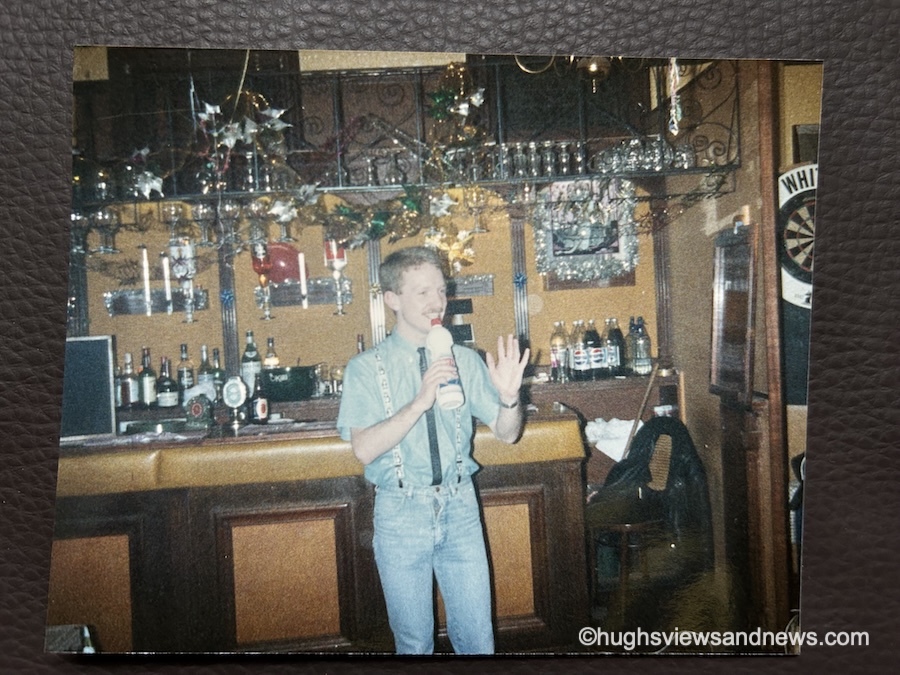
An old 1980s photo of a young man at a Christmas party in a bar, singing into a plastic bottle?
What’s your go-to song at a party?

Get ready to cringe! I’ve totally lost track of how many Christmas parties I’ve attended over the years—seriously, it’s like my life turned into a never-ending Netflix series focused on festive cheer, and most of them were work parties, where the eggnog flows like water, and the awkward small talk is the real gift! From fancy dress to black tie, I’ve always got into the spirit of Christmas celebrations. And the above photo is no exception.

Taken in the late 1980s, I’m not entirely sure why I decided a bottle of bleach was the ideal choice for a microphone, but let’s chalk it up to a few too many festive glasses of sherry or eggnog that night! My outfit is a glorious testament to the era; I mean, who could resist the charm of penguins proudly dancing on my braces? Clearly, I was ahead of my time in fashion… or maybe just in silliness!

However, I still know the song I was singing when the photo was taken.

This song has become my ‘go-to’ whenever anyone puts a microphone in my hand. So, if you ever meet me, never give me a bottle of bleach or a microphone!

What’s your go-to karaoke song?

4. What’s your favourite Christmas tree ornament?

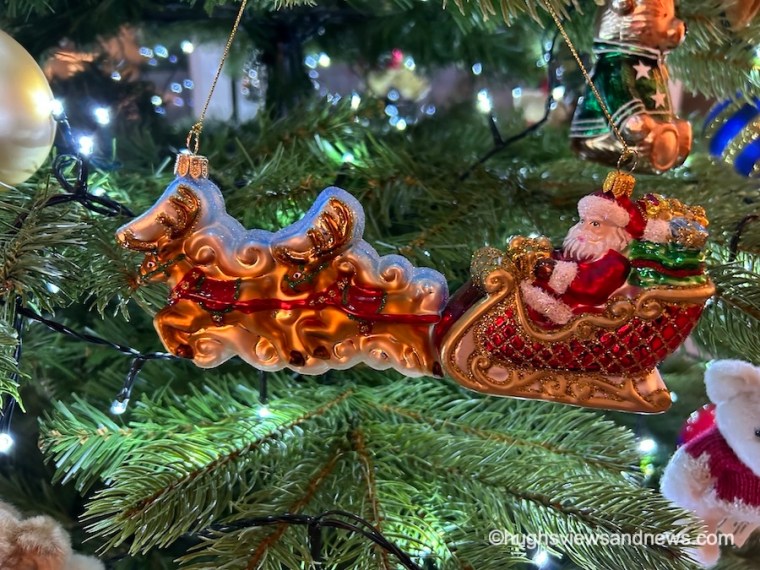
A photo of a Christmas tree ornament of Father Christmas in his sleigh being pulled by reindeer.
What’s your favourite Christmas tree ornament?

My favorite Christmas tree ornament is a jolly old Father Christmas in his sleigh, dramatically being yanked along by two reindeer who have clearly lost the plot; they’re now engaged in an epic showdown over who gets the last carrot that all the kids left out, while Father Christmas just sits back, chuckling with a mince pie in one hand and a glass of brandy in the other, thinking, “This is the real Christmas spirit!”

As Father Christmas steers his sleigh joyfully, all those glasses of brandy would probably get him into trouble if he were caught by a traffic officer. However, as he’s flying, rather than driving on roads, hopefully he won’t get into any trouble.

Over the years, I have collected many Christmas tree ornaments. This one is only a few years old and was bought online from a well-known London store. Yes, it was expensive, but the joy it has brought is worth every penny.

Do you have a favourite Christmas tree ornament? Share the details or a photo with us.

5. Is this how Christmas makes you feel?

And finally, is this how Christmas makes you feel?

A photo of a festive Christmas reindeer that appears to have collapsed onto the ground after a busy Christmas.
Does the thought of Christmas make you feel like this?

Whether it’s before or after Christmas, most of us will find ourselves feeling deflated, like a poor reindeer caught napping three days after the big day—let’s just say, even Rudolph looks like he needs a strong cup of cocoa at this point!

The look on its face says it all and reminds me of those confusing days between Christmas and New Year, when the days of the week all blend into one. “Is it Monday or Tuesday? No, it’s Wednesday, isn’t it, or was Wednesday yesterday? Hang on, wasn’t it Thursday yesterday?”

The Slideshow Block

This month, I am displaying and featuring the ‘Slideshow’ block. Here are my five photos, all in the slideshow block.

  • A photo of a smiling man standing next to Father Christmas
  • A photo taken from above of an iced Christmas cake. On top of the cake are some stars, Santa, a Christmas tree, and a snowman.
  • An old 1980s photo of a young man at a Christmas party in a bar, singing into a plastic bottle?
  • A photo of a Christmas tree ornament of Father Christmas in his sleigh being pulled by reindeer.
  • A photo of a festive Christmas reindeer that appears to have collapsed onto the ground after a busy Christmas.

You can select as many photos as you like for your slideshow. Captions you have added to your photos also appear, but unfortunately, and this is something I dislike, the captions cannot be centred.

You can set the slideshow to manual, so readers must click to view the next image, or select an autoplay option. If you choose autoplay, you can also decide how many seconds pass between each photo (I chose 4 seconds).

Another option is to add a transition. You can choose slide or fade for your photos. You can also select the image size: small, medium, large, or extra large. I decided on the ‘Large’ option.

All of these options can be found by clicking on the image and choosing the ‘Block‘ option.

An image showing the different options of the Slideshow block on WordPress
The Slideshow Block options.

Click the following link for more information about the Slideshow Block.

How to make a photographer’s day.

Next time you leave a comment on a photography post, instead of saying ‘Great photo,’ explain what it was about the picture that made you think it was great. Was it the subject, the lighting, the scenery, the angle it was taken from, or the emotion it evoked when you saw it?

It only needs to be a few lines, but the people you leave the comment for will appreciate the feedback much more than when all you say, time after time, is that it’s a great photo.

Do you have a photo of you with Father Christmas? Do you make your own Christmas cake or do you buy a shop-bought one? What’s your go-to karaoke song? Do you have a favourite Christmas tree ornament? How does Christmas make you feel?

Linking to Sunday Stills hosted by Terri Webster Schrandt – Theme: Festive Red and Green.

The featured image in this blog post is taken from Pixabay. AI checked spelling and grammar mistakes.

You can follow me at the following sites.

Copyright @ 2025 hughsviewsandnews.com – All rights reserved.
How to Enable or Disable the Falling Snow Effect on Your WordPress Blog

Have you noticed that snow is falling on some WordPress blogs? As you read the post, small flakes of snow gently drift down. Meanwhile, on other blogs, like mine, there’s no snow.

WordPress introduced the festive snowfall feature a few years ago. It only works when reading a post via the WordPress website. You won’t see it if you’re reading a post in the WordPress Reader or the Jetpack App unless you click through to the website. This time, it runs until 4th January 2026. But how do you turn the feature on or off? Easy – follow my instructions.

  • Go to your blog’s dashboard and click Settings – General.
  • Scroll down the page until you come to ‘Snow.’
  • You’ll see a box with the words ‘Show falling snow on my site until January 4th.’
An image highlighting how to turn on/off the falling snow feature on the dashboard of a WordPress blog.
Where to turn on/off falling snow on your WordPress blog
  • If you want snow to fall on your blog, tick the box. If you don’t want snow falling on your blog, untick the box.
  • Click the ‘Save Changes‘ box at the bottom of the page.
  • Ensure the changes are effective by opening one of your posts on the WordPress website.

I’m not a lover of anything moving onscreen while I’m reading, as I find it distracting. However, I know that many bloggers love the idea of gently drifting snowflakes while they read blog posts during the festive season.

The choice is yours. And now you know how to switch on or turn off snow falling on your blog.

For the above instructions, I’m using a desktop computer. The falling snow effect is only controlled through your WordPress.com dashboard, not the Jetpack mobile app.

Is it snowing on your blog? If not, do you want it to snow? Let me know why you like or dislike the idea of snowflakes drifting on WordPress blogs.

The featured image on this blog post is sourced from Pixabay. AI reviewed spelling and grammar errors.

You can follow me at the following sites.

Copyright @ 2025 hughsviewsandnews.com – All rights reserved.

Essential December Blog Housekeeping to Keep Your Site Safe and Functional!

Over the past few years, I’ve published a post around this time of year outlining some jobs all bloggers can do to ensure their blog not only looks good but also functions correctly.

If you’re interested in what some of those crucial jobs are, my post from this time last year, ‘7 Essential, Easy Ways to Help You Blog Through December‘ gives full details.

One thing bloggers who never do any blog housekeeping refuse to believe is that many problems on their blogs originate from a lack of maintenance. They’ll blame WordPress, instead of themselves. Continuing to use an outdated theme can also cause issues and create a security risk.

One job all bloggers are recommended to do

One important task I am currently working on in the housekeeping aspect of my blog is reviewing posts and removing any images that I cannot be certain are entirely free to use. But why am I doing this?

If you have read my recent posts, ‘Where To Legally Source Amazing Images For Your Blog Posts‘ and ‘The Latest Blogging and Publishing Scams You Need to Be Aware Of Now‘, you’ll understand why.

The comments sections of both posts offer interesting reading, so I recommend taking a look.

I’m a personal blogger, so this won’t affect me!

Wrong! Just because you are a personal blogger, don’t think you are exempt from being fined for copyright infringement. Downloading and using copyrighted images, photos, song lyrics, and some GIFs in your blog posts is illegal; therefore, nobody should encourage bloggers to download or publish any copyrighted material.

Most of the images I deleted are from flash fiction challenges I used to participate in. However, I have also found some images in other posts where I either failed to give proper attribution to the source or used images from the host blogger that I could not guarantee were free to use when taking part in their link-up.

And don’t forget to delete those images and photos from your media library, too. Not only are they proof that you downloaded them illegally, but deleting them will free up valuable storage space.

Unless you are completely certain that images, photos, song lyrics and GIFs are not copyrighted and free to use, avoid using them. Sure, you might get away with it, but why risk a hefty fine?

Back to why December is the ideal time for some blog housekeeping

I’ve already had the pleasure of seeing bloggers bid farewell to their blogs and followers for the festive season, joyfully extending warm wishes to their readers for a Merry Christmas while eagerly expressing their intention to return promptly in the New Year.

An image of a festive sign that says 'back in 2026
Image created using the WordPress AI image generator.

Some have published their final posts of 2025, while others have happily shared their anticipated dates for a well-earned blogging break.

And who can blame them? Blogging is enjoyable, but all bloggers need a break from the blogging world. I’m taking a blogging break during the last few weeks of December.

For those who do not celebrate Christmas, December still provides a valuable opportunity to focus on blog maintenance and security. This can include reviewing and updating posts, auditing existing content for accuracy and relevance, fixing broken links, and improving website speed and SEO.

Furthermore, it’s an excellent time to review your blog’s design and user experience, making necessary adjustments to improve accessibility and engagement. By investing time in these areas, bloggers can keep a polished, secure platform ready to impress their audience in the upcoming year.

As December rolls in and its days dwindle, you’ll probably witness how much of the blogging world falls into a hush. So why let your blog languish in neglect? This is your golden opportunity to roll up your sleeves and give it the fierce love and attention it deserves, ensuring it runs flawlessly for another year.

Let’s wrap it up!

  • At least once a year, focus on housekeeping tasks to enhance your blog’s appearance and functionality.
  • Many blog issues stem from a lack of maintenance; outdated themes can pose security risks.
  • One essential task is reviewing and removing any images from posts and your blog’s media library that may not be free to use to avoid copyright infringement.
  • Personal bloggers are not exempt from potential copyright-related legal issues when downloading or using copyrighted materials.
  • December is an ideal time for blog maintenance as many bloggers take breaks. It’s an opportunity for bloggers to give their blogs the attention they deserve before the New Year.

Are you excited about some upcoming blog housekeeping or maintenance? If so, what fantastic plans do you have in store? Perhaps you’ve already tackled some blog maintenance—if that’s the case, I’d love to hear about the wonderful jobs you accomplished!

The featured image in this post was created using the WordPress AI Image Generator block. AI was also used for checking spelling and grammar mistakes.

Click the buttons below to follow Hugh on Social Media

Copyright @ 2025 hughsviewsandnews.com – All rights reserved.

The Latest Blogging and Publishing Scams You Need to Be Aware Of Now

Let me begin with a new scam that is unrelated to blogging or publishing. It’s a scam that comes via a voicemail message on mobile phones.

I’ve lost track of how many times I’ve had the same call and message saying, ‘Please add my number to WhatsApp.’ Each time, the number the scammer uses is slightly different, but it’s always the voice of the same woman.

Thanks to Apple’s advanced AI, my phone now does a great job at identifying spam calls and sends them straight to voicemail. It doesn’t even ring. The spammers’ numbers then show in my call list, which I mark as ‘Spam – Delete and send details to Apple.’ I should add that since I enabled AI on my phone, the number of spam calls I receive has dropped significantly.

The latest Blogging scams

Recently, I encountered a concerning blogging email scam. It purportedly originated from WordPress, claiming that my payment details were incorrect in my account and included a link for me to click to rectify them.

I immediately recognised the email as fraudulent because the email failed to address me by name. All it said was ‘Dear WordPress User,’ But what alarmed me was that the same scammer went on to also send me the same email through the ‘Contact Hugh‘ form on my blog, neglecting to begin the message with ‘Dear Hugh.’ It’s important to note that I request anyone using the form to begin their message with ‘Dear Hugh,’ as this practice helps identify potential spam, particularly from automated spam bots.

I don’t know how the scammer obtained my email address, but it must have appeared on a list with some connection to WordPress. This is likely how they discovered I had a WordPress blog, although nowhere on my blog do I provide an email address. Anyone wanting to contact me must go via the ‘Contact Hugh’ form.

Although this was an easy scam for me to spot, I still feel bad for any blogger who falls for it. If you are unsure whether an email from WordPress is genuine, always log in to your WordPress account to verify any details. Never click on any uninvited links and never give an email address anywhere on your blog.

An image highlighting the word 'Scam'
Image generated using WordPress AI

However, more concerning was news of a blogging scam that involved using royalty-free platforms, such as Pixabay. Author, writer and blogger Jacqueline Lambert left a comment on my recent post, Where To Legally Source Amazing Images For Your Blog Posts.’ outlining how she was almost scammed by a company after using a royalty-free image from Pixabay on one of her posts.

I strongly encourage you to read Jacqueline’s insightful post ‘Bloggers Beware The Copyright Trolls – Even If You Use Royalty-Free Images‘ to glean valuable lessons from her experience. It is imperative to remain vigilant and not become a target of such scams that specifically seek to exploit bloggers.

I would also like to reiterate that downloading and publishing copyrighted images or photographs on your blog is strictly prohibited. Always verify that such materials are free for use. This also applies to reblogging blog posts from other bloggers that contain images or photos. If you share copyrighted images from another blogger’s post, you could be fined.

A plea to you – yes, you!

Despite my recent post addressing copyright infringement, I continue to observe bloggers (you know who you are) using images and photos in their posts without proper attribution regarding their sources. They probably believe that nobody will come after them for downloading and using copyrighted images, but I know of two bloggers who have been fined for doing so. Never believe that it will never happen to you.

Even if the images and photos are your own, I recommend that you indicate in your post that they are your property. If you don’t believe me, read Jacqueline’s post. As she elaborates, numerous companies are employing image recognition technology to scan the internet for unauthorised use of images and photographs, especially in blogging posts. Some bloggers have even been threatened with legal action and fines for using their own pictures.

The latest publishing scam

My thanks again to Jacqueline, who recently published a guest post by author Peter Barber about a publishing scam he fell for. Titled ‘Publish and Be Damned: How I Got Scammed, Learned My Lesson, and Came Out Fighting‘, Peter details how he fell head-over-heels for a scam many authors will probably encounter at some point in their writing lives. I urge you to read his post and learn from it because it could happen to you.

Are you aware of any current scams related to blogging or publishing? Please share details in the comments section. Have you ever fallen victim to a blogging or publishing scam? If so, what happened?

The featured image on this blog post is sourced from Pixabay. AI reviewed spelling and grammar errors.

You can follow me at the following sites.

Copyright @ 2025 hughsviewsandnews.com – All rights reserved.