My name is Hugh. I live in the city of Swansea, South Wales, in the United Kingdom.
My blog covers a wide range of subjects, the most popular of which are my blogging tips posts.
If you have any questions about blogging or anything else, please contact me by clicking on the 'Contact Hugh' button on the menu bar of my blog.
Click on the 'Meet Hugh' button on the menu bar of my blog to learn more about me and my blog.
Wordless Wednesday – No words, just pictures. Allow your photo(s) to tell the story.
Can you tell it’s me?
Not sure what Wordless Wednesday is or how to participate? Click here for full details.
Are you participating in Wordless Wednesday? Although I am not hosting this challenge, you can leave a link or pingback to your post in the comments section to help promote it to other bloggers.
To help those with eyesight-impaired vision, please remember to complete a description of your photo in the ‘alt-text’ and description boxes of the picture in the WordPress media library. For more details, check my post, Adding Images Or Photos To Your Blog Posts? 4 Essential Things To Do.’
If you want to know more about the photo featured on this post, ask me in the comments section.
Wordless Wednesday – No words, just pictures. Allow your photo(s) to tell the story.
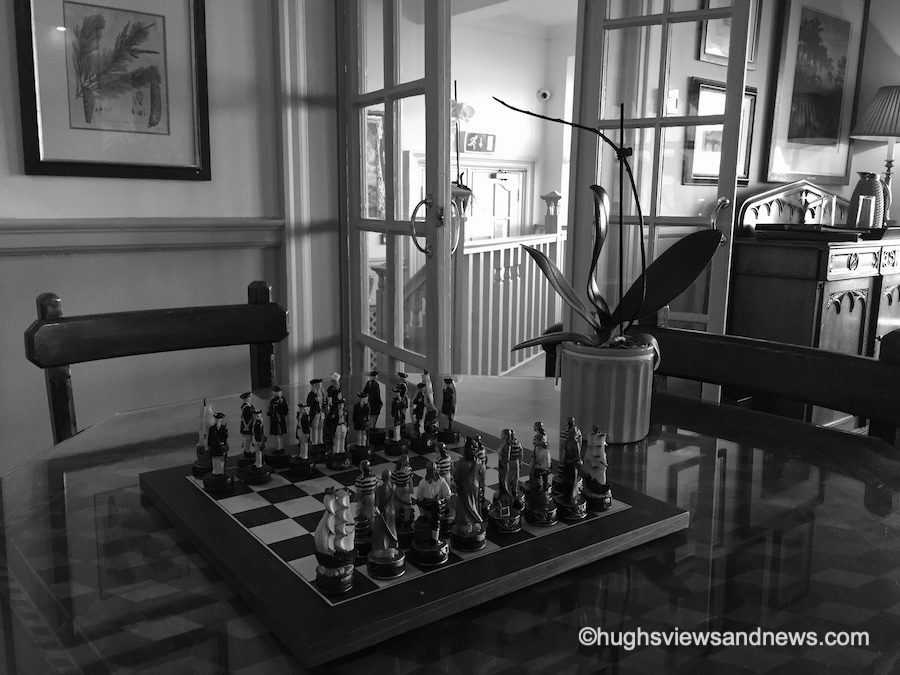
Can you guess what this is?
Not sure what Wordless Wednesday is or how to participate? Click here for full details.
Are you participating in Wordless Wednesday? Although I am not hosting this challenge, you can leave a link or pingback to your post in the comments section to help promote it to other bloggers.
To help those with eyesight-impaired vision, please remember to complete a description of your photo in the ‘alt-text’ and description boxes of the picture in the WordPress media library. For more details, check my post, Adding Images Or Photos To Your Blog Posts? 4 Essential Things To Do.’
If you want to know more about the photo featured on this post, ask me in the comments section.
This is post number one hundred and four this year. It was meant to be my one-hundredth post, but life got in the way (I’m not going to bore you with the details), and my Wordless Wednesday post from a few weeks ago earned the honour of being post number 100.
When you think about it, one hundred and four posts in ten mouths seem like an awful lot. Am I overwhelming readers with too many posts, or do you want more? I’m averaging nine monthly posts, which appears to have become a good balance.
If you asked me, ‘Am I publishing too many posts?’ I’d respond, ‘Do what feels best for you.’ However, we should never forget our audience, so there’s no harm in reaching out and asking. Without you (my audience) reading these posts and engaging with me, this blog would be like arriving on a barren planet. And nobody wants that.
I’d be interested to know how many posts you have published in 2024 and if you’re happy with that number. Let me know in the comments.
Let’s discuss other blogging topics
Did you see my recent post about whole blog posts being shown in emails? No? It’s titled ‘WordPress: Excerpts Are Working Again!‘ It’s worth reading if you only want an excerpt of your posts to show in email notifications and want visitors to visit your blog to read them. Reading posts by visiting a blog is a much better experience than reading them by email, especially since some blocks do not appear in emails, making posts look odd and broken.
There are many reasons to encourage visitors to visit your blog, one of which is that they are more likely to engage with you if they are on your blog (rather than reading from an email). Furthermore, visitors can explore your blog, catch up on posts they have not read, and check any links. This brings me nicely to the subject of engagement.
Are you engaging or comment spamming?
As regular visitors to my blog know, I am passionate about engagement in the blogging world. Recently, I came across an alarming article stating that engagement has decreased to an all-time low in blogging. How sad is that? However, when you look at some blogs with low engagement or, conversely, blogs with numerous non-engaging comments, it is evident that this is happening.
Here’s an example. I recently discovered a writing challenge blog and wanted to get involved. But when I checked out some of the comments left, I knew that participating would not be worthwhile. With lots of non-engaging comments such as ‘Nice one’ and ‘great attempt” being left on stories, nobody wanted to engage with one another. It was a barren planet. I left with a heavy heart.
When I publish a post, it’s the engagement I crave. So when I publish a short story or piece of flash fiction, I look for feedback beyond being told it was a great story. Engaging feedback is critical for all of us to improve our writing.
Do you agree? Do engaging comments help to improve your writing?
Take action if you want engagement
This may seem like a shock-horror move, but I’m now marking comments such as ‘nice’ and ‘beautiful post’ as spam. Leaving short comments all over the blogging world is like leaving spam everywhere. We all know how spam can cause frustration and diminish the enjoyment of blogging.
One main reason readers do not leave engaging comments is a lack of time. However, many who offer that excuse leave non-engaging comments everywhere. They spend the time they could have used to leave an engaging comment, posting numerous non-engaging comments everywhere. The flash fiction challenge I mentioned earlier seems to confirm this.
Some bloggers believe that nobody will leave comments on their blogs if they don’t comment, so they leave short, non-engaging comments everywhere. Honestly, that’s a crazy thought.
Before I finish discussing engagement, I want to reassure everyone that they should not feel obliged to leave comments on any of my posts. I won’t be upset if you don’t comment, but I will mark comments as spam if they are those pesky, non-engagement comments I mentioned. One engaging comment every once in a while is worth a thousand non-engaging comments.
I don’t know about you, but it makes all the difference if somebody wants to engage with me and does so in a way that proves they’ve read the post and are interested. Do you agree?
Please preview your posts before publishing them!
Did you know you can preview your posts before publishing them? It seems that some bloggers do not know they can do this. From seeing upside-down images to posts with a terrible and hard-to-read layout, there is no excuse for anyone not to preview their posts before publishing them. It’s so simple to do.
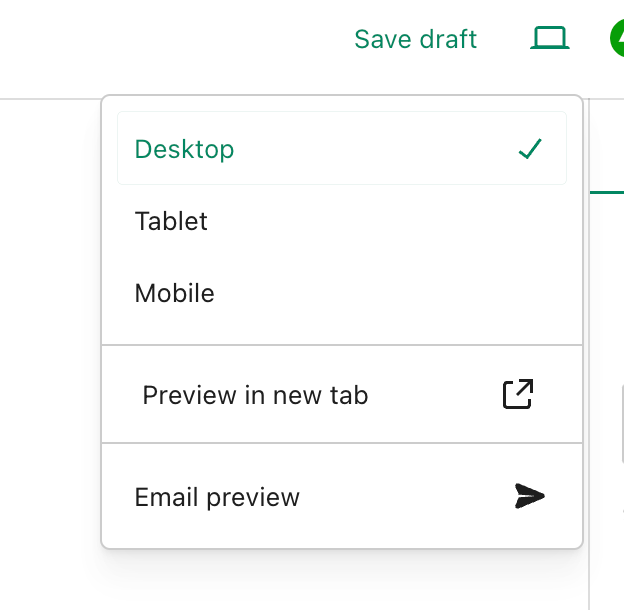
Before publishing a post, click the little ‘laptop computer’ symbol at the top right of the page on which you are drafting the post. You will be able to see a preview of your post as it will look on a desktop computer, tablet, and mobile phone. Plus, and this is fantastic news, WordPress has now moved the ‘preview email’ option to the same menu for how your post will look in an email.
Always preview your posts and WordPress notification emails before publishing them.
Thank you for making that option more accessible to find, WordPress.
There is no excuse for sloppiness in ensuring your posts and WordPress notification emails are at their best for your audience.
Finally, how are your blogging stats performing?
I’m delighted that my blogging statistics have rocketed this year. I’ve surpassed last year’s total number of visitors and views to my blog. But to make things even better, 2024 is on track to be my best year ever (in the ten years I’ve blogged) in terms of viewing statistics and engagement. I believe this disproves those who tell you that you must publish posts every day for your blog to be successful. You don’t need to force yourself to blog every day.
A blog’s success depends not on how often it publishes posts but on the quality of those posts.
Thank you to everyone who visits my blog, reads my posts, and engages with me. Without you, Hugh’s Views and News would never have reignited my passion for writing and engaging with others.
How are your blogging stats this year? Tell me in the comments section.
Layout, content, settings, and format might differ on self-hosted blogs.
Click the buttons below to follow Hugh on Social Media
Wordless Wednesday – No words, just pictures. Allow your photo(s) to tell the story.
Light up your life by looking up.
Not sure what Wordless Wednesday is or how to participate? Click here for full details.
Are you participating in Wordless Wednesday? Although I am not hosting this challenge, you can leave a link or pingback to your post in the comments section to help promote it to other bloggers.
To help those with eyesight-impaired vision, please remember to complete a description of your photo in the ‘alt-text’ and description boxes of the picture in the WordPress media library. For more details, check my post, Adding Images Or Photos To Your Blog Posts? 4 Essential Things To Do.’
If you want to know more about the photo featured on this post, ask me in the comments section.
Here’s your chance to catch up on the nine blog posts published in October 2024.
Hugh’s Views and News is at the heart of great conversations and engagement. Did you join the debates and conversations? If not, why not jump in and let us know what you think?
Question: Do you know the name of this strange-looking fruit on this tree?
Are you seeing too much spam on your blog? How To activate Akismet’s spam setting in WordPress to significantly reduce spam comments and streamline your blogging experience.
Do you use excerpts in your WordPress blog posts? If so, there’s an ongoing issue with them. WordPress has now fixed this problem. Read on for more details.
Do you use excerpts in your WordPress blog posts? If so, there has been an ongoing issue with them that has now been fixed. However, for the fix to work, you must take action. Read on for more details.
Are you participating in Wordless Wednesday? Although I am not hosting this challenge, you can leave a link or pingback to your post in the comments section to help promote it to other bloggers.
To help those with eyesight-impaired vision, please remember to complete a description of your photo in the ‘alt-text’ and description boxes of the picture in the WordPress media library. For more details, check my post, Adding Images Or Photos To Your Blog Posts? 4 Essential Things To Do.’
If you want to know more about the photo featured on this post, ask me in the comments section.
Are you participating in Wordless Wednesday? Although I am not hosting this challenge, you can leave a link or pingback to your post in the comments section to help promote it to other bloggers.
To help those with eyesight-impaired vision, please remember to complete a description of your photo in the ‘alt-text’ and description boxes of the picture in the WordPress media library. For more details, check my post, Adding Images Or Photos To Your Blog Posts? 4 Essential Things To Do.’
If you want to know more about the photo featured on this post, ask me in the comments section.
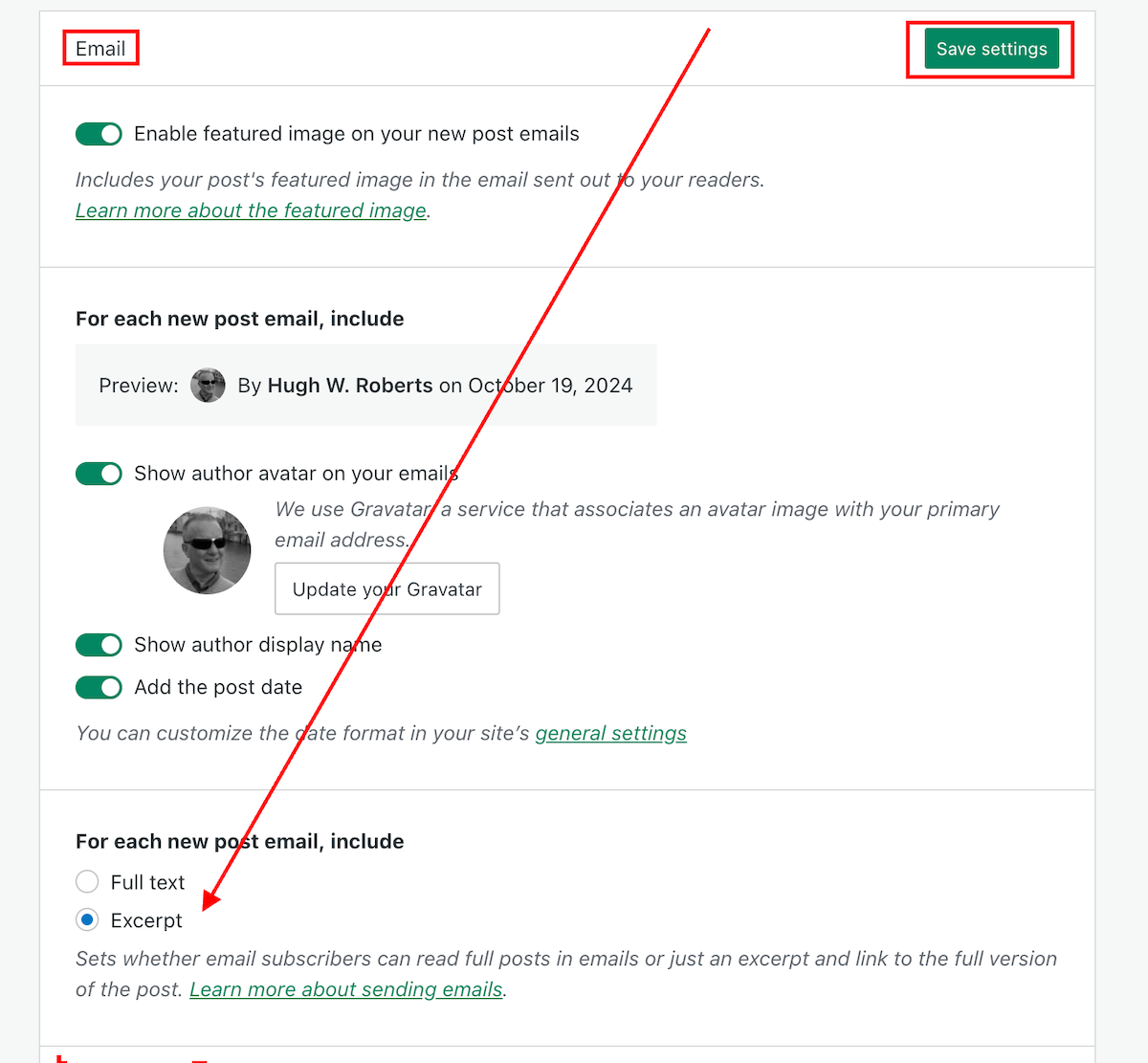
I’m delighted to say that the problem has now been fixed. Unfortunately, users will need to change the ‘For each new post email, include‘ setting back to ‘Excerpt,’ as the fix has caused the setting to default back to ‘Full text.’
Do the following now if you want your new post email notifications to only show an excerpt.
On the dashboard of your blog, go to Settings – Newsletter.
Scroll down to the Emails sections of the Newsletter settings page, and change the ‘For each new post email, include‘ setting back to ‘Excerpt.’
Click the ‘Save Settings‘ button.
Change this setting to ‘Excerpt.’
Your new post notification emails will now only show an excerpt rather than the full post.
The ‘For each new post email, include‘ setting can also be found on your blog’s dashboard under Settings—Reading.
My thanks to Dave Martin at Automattic and WordPress for fixing this problem.
Layout, content, settings, and format might differ on self-hosted blogs.
Any questions? Leave them in the comments section.
Follow Hugh on social media. Click the links below.
Wordless Wednesday – No words, just pictures. Allow your photo(s) to tell the story.
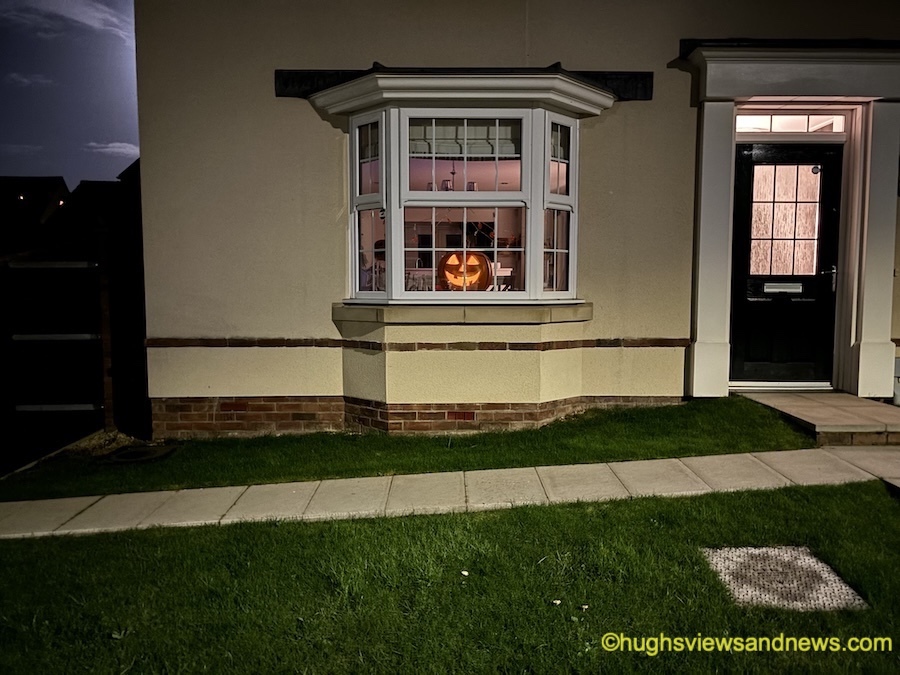
Have you ever seen more than one ghost at the same time?
Not sure what Wordless Wednesday is or how to participate? Click here for full details.
Are you participating in Wordless Wednesday? Although I am not hosting this challenge, you can leave a link or pingback to your post in the comments section to help promote it to other bloggers.
To help those with eyesight-impaired vision, please remember to complete a description of your photo in the ‘alt-text’ and description boxes of the picture in the WordPress media library. For more details, check my post, Adding Images Or Photos To Your Blog Posts? 4 Essential Things To Do.’
If you want to know more about the photo featured on this post, ask me in the comments section.
Do you want to free up the time it takes you to filter through spam looking for genuine comments?
Turn this setting on now.
Does your blog get too much spam? Turn this setting on.
On your blog’s dashboard, go to Jetpack – Akismet Anti-spam.
Click Jetpack – Akismet Anti-spam
On the page that opens, look for the Settings box. Under Spam Filtering, ensure ‘Silently discard the worst and most pervasive spam so I never see it’ is selected.
Ensure ‘Silently discard the worst and most pervasive spam so I never see it’ has been selected.
Click the ‘Save changes‘ button.
You’ll now see much less spam in your blog’s spam folder.
Obviously, you can continue to review all spam, but this can be very time-consuming if your blog gets a lot of spam.
On average, I now see less than 10 spam comments per week in my spam folder. It used to be hundreds. Turning this setting on has helped.
On the same page, you can also see how much good work the Akismet anti-spam software has done in capturing spam comments on your blog. Here’s a snapshot of my blog.
How much spam has been blocked on your WordPress blog?
Akismet has caught over 308,000 spam comments since I started blogging in February 2014!
Occasionally, spam comments will get through, but you can help WordPress by marking them as spam. Likewise, if a genuine comment ends up in the spam folder by mistake, mark it as ‘not spam.’
Something else you may find interesting is that WordPress now deletes spam that is over 15 days old in the spam folder, so you no longer have to do it! Another win! Thank you, WordPress.
Don’t stress about spam!
I’ve come across some bloggers who allow spam to stress them. This does nothing but spoil the enjoyment blogging brings.
If your blog receives too much spam, turn on the setting outlined in this post. You’ll soon see a vast decrease in the amount of spam you see.
How do you deal with spam on your blog?
Layout, content, settings, and format might differ on self-hosted blogs.












 Hugh's Views & News