
I don’t use the WordPress Reader nearly as much as I should.
I get email notifications when new blog posts are published by the bloggers I follow. This makes sense as I only follow around 55 blogs, most of which publish no more than a few times a week.
Am I missing out on not using the WordPress Reader? I think so, yes! But why?
One of the reasons I stopped using the WP Reader was that when I was following over 500 blogs, I felt like a hamster constantly running around a wheel in my endless battle to reach the top of the reader. I never reached the top, so I thought I was missing out!
However, I occasionally use the WordPress Reader to search for posts on subjects I enjoy reading. In my opinion, this is where the WordPress Reader is at its best!
For example, I recently entered the word ‘WordPress’ into the reader search bar and was presented with a long list of blog posts in which ‘WordPress’ had been used as a category or tag (this shows how important categorising and tagging your posts is).
But before I discuss some of the search results, let me first say that, unlike some bloggers who seem to think WordPress has deleted the ‘Reader,’ the WP Reader has moved.
Where is the WordPress Reader?
If you’re using a desktop computer, the WP Reader is now located in the top right corner of your blog. Look for the pair of spectacles icon.
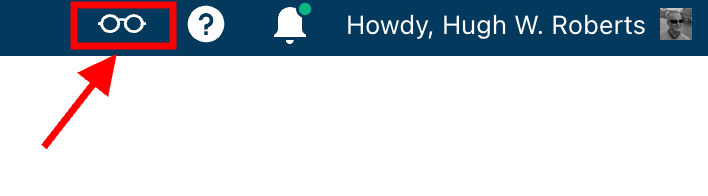
Click on it, and you’ll be taken to the WordPress Reader.
On mobile phones and tablets (using the Jetpack app), the WP Reader icon (spectacles) is located at the bottom of the screen.
What I found in the search results!
I was delighted to see some of my posts appear in the search results. However, I was more interested in the posts from blogs I don’t currently follow.
One of those posts that grabbed my attention was from Mitch, who blogs at The Power Of Story. Mitch’s post, ‘What’s Up WordPress?‘, was about the sudden ups and downs of his blog’s number of subscribers/followers. Indeed, I’ve noticed the same thing happening with my blog.

My subscriber/follower stats have become like a fairground rollercoaster ride. Some days, I lose a lot of subscribers/followers, and then the numbers suddenly return, although not the same subscribers.
I did some digging and found that WordPress are now actively deleting spam blogs and blogs run by spambots. That’s a good thing, especially since I’ve been manually unsubscribing them for many months. WordPress is unsubscribing these blogs for me, although I will unsubscribe any I find myself.
Have you noticed your subscriber/follower numbers going on a rollercoaster ride recently?
Another post that grabbed my attention from the results page was from Kevin, who blogs at Chef Kevin Ashton. Kevin’s post, titled ‘The Thorny Issue Of WordPress Likes.’ touched on a subject I’ve often written about – the ‘like’ button!
Love it or hate it, the ‘like’ button is something just about every WordPress user and visitor will use. However, Kevin touched on the subject of ‘guilt’ by not using it, especially when he doesn’t have enough time to visit and read blogs.
I’ve been there, Kevin. Many bloggers feel guilty or stressed about not clicking ‘like’, visiting blogs that follow them, or leaving comments. Yet, in my opinion, nobody really cares that you can’t always visit their blog. I’ve discovered that leaving one engaging comment occasionally that shows you read the post is much more appreciated than leaving short, non-engaging comments just to prove you visited. However, you may not have read their post.
I’ve written many posts about blogging guilt and stress. In my last post on the subject, ‘Stressed Or Feeling Guilty About Blogging? Please Read This Post. Let’s Keep Blogging Fun,’ many readers spoke up about how bad they feel when they don’t have the time to read blogs, click ‘like,’ and leave comments, often resulting in blogging feeling like a chore rather than something that should be enjoyed.
Nobody should ever feel obliged to read posts, click the ‘like’ button or leave comments. Keep blogging fun.
How do you deal with blogging stress or guilt?
The happy and sad sides of blogging!
It was also lovely to see blog posts celebrating milestones on WordPress in the results. From celebrating 15 years of blogging on WordPress to publishing their 100th post and some folks being notified that their blogs had achieved half a million visits, these posts brought a smile to my face.
Of course, posts complaining about how bad WordPress is and the problems bloggers are having also appeared in the results. Although I only read a few, most of the reported issues were related to WordPress’s changes, and the author often confirmed in the comments section that the issue(s) had now been resolved.
Personally, I’m pleased that WordPress does make changes. If they left things alone, the platform would quickly become outdated and dull, as would all our blogs. WordPress would lose many paying customers, and we’d all lose our blogs if they went out of business. I used to hate change but learned that adapting to it is much less stressful than fighting it
Are you encountering any issues with WordPress? My recent post, ‘WordPress Problems: Don’t Panic! How To Solve Issues Quickly,’ may be of some help.
Are your blog posts appearing on the WordPress Reader?
I always check that my blog posts appear in the WordPress reader. To do this, I follow my blog and check the reader immediately after publishing a post. If it’s not there, I know there’s a problem.
There are several reasons why your posts may not appear in the WordPress Reader. The main reason is that you add too many categories and tags to a post. WordPress allows up to 15 categories and tags combined. Your post could be marked as spam and won’t appear if you add more, so ensure you do not add more than 15 tags and categories (combined).
There may also be technical reasons why your posts don’t show in the reader. If you don’t see your posts, contact WordPress. They’ll be able to help.
That’s it for today. I’ll share other interesting posts when I do more searches on the WordPress Reader.
Why Do You Use The WordPress Reader?
Did you enjoy reading this post? Then you may also like…
Is Your Blog Safe? One Security Feature You Must Have
Are you doing everything you can to protect your blog?
This is one security feature I recommend every blogger have. And it’s easy to set up.
Keep reading
The Power Of Pingbacks: How To Create One
Pingbacks are a vital tool in the blogging world, fostering connections and increasing site traffic. Are you making the most of pingbacks or missing out on their benefits? This post details their benefits, creation, and anti-spam measures.
Keep reading
WordPress: How To Close Comments: What You Need To Know
WordPress has relocated the ‘Discussion’ setting to a more visible and accessible position, simplifying the control of comments and pingbacks.
My post outlines where to find the ‘discussion setting’ and when you should consider turning comments off on specific posts.
Keep reading
Layout, content, settings, and format might differ on self-hosted blogs.
Click the buttons below to follow Hugh on Social Media
Copyright @ 2024 hughsviewsandnews.com – All rights reserved.
Discover more from Hugh's Views & News
Subscribe to get the latest posts sent to your email.
 Hugh's Views & News
I use the WordPress Reader because I don’t have a choice. WP stopped notifying me by email of new posts.
Have you checked that you have the correct email address on your WordPress account? You can also check that email notifications are switched on for each blog you follow. Sometimes, they can get turned off for various reasons. It’s also worth checking that the emails are not going straight to spam, but I expect that’s something you will have already checked.
Yes, I’ve checked those things. At this point, I’ve gotten used to using the Reader.
Very useful, as usual, Hugh. I remember that at some point I was having problems commenting on blogs, but I could comment on them if I used the reader, so I’m more aware of it now. Thanks for the tip about the glasses as well!
Yes, when bloggers had problems leaving comments on their blogs, the WordPress Reader came to the rescue. I think more bloggers discovered it then. I don’t use it nearly as much as I should, but it’s excellent for finding posts on subjects that interest me, Olga.
I’m new to blogging and WordPress. This is an excellent piece. Thank you. 😊
You’re welcome. I’m glad it helped. Welcome to the world of blogging.
I always appreciate your WP posts Hugh. As always, excellent tips – especially about where the Reader has turned into glasses icon. I will include in my October writer’s tips. :) <3
Thank you for including a link to this post in an upcoming post, Debby. I was surprised by how many people thought WordPress had deleted the ‘Reader’ without first checking what had happened.
We’re glad to have you on top of WP issues Hugh. Thank you. :) x
This was very helpful, thank you for the insight!
You’re welcome. I’m glad it helped.
I tend to use a combination of the reader and email notifications but it’s easy to fall behind and I agree, trying to keep up with the reader can cause stress. When that happens I tend to just read the current day’s posts and move forward from there.
I also agree with your comments about guilt, its counter-productive and my experience is people are happy to see you when you return. The only person really judging us is ourselves, and we wouldn’t judge others in the same way
Very true, Brenda, and a sensible way of handling change.
Likewise, I’ll delete email notifications if I don’t get around to reading them rather than allow them to build up in my email box. It removes all the pressure.
I use the reader, but I also get email notifications about the blogs I follow. My first “go to” is usually the reader but the emails are great if I ever miss a post by one of my favourite bloggers.
As for WordPress changes, they don’t bother me and I usually adapt to them fairly quickly.
That’s exactly the right attitude towards WordPress changes, Michelle. I see so many bloggers get stressed by changes that WordPress make rather than read and find out more about them. Some claim they don’t have time to find out more about the changes, so they invest that time in ranting and stressing about them instead.
Isn’t that true about most things in life, Hugh? People waste so much time and energy ranting about things rather than getting on with it. I wish you a wonderful weekend!
Very true, Michelle. In the time it takes them to write and publish a post about how WordPress is rubbish, they could have easily probably found out how to fix whatever it is they’re complaining about.
Happy weekend.
Thank you for your post. I am new to blogging and because of your post I will contain myself to only using 15 hashtags.
Remember that’s it tags and categories combined. No More than 15, and you should be fine.
Your tips are always helpful Hugh. I have followed my own blog for a long time because I had the issue a while back where a post didn’t publish (and when it published a day later, it was behind in the Reader queue so it was missed by many who keep up in Reader), so now if I see them in Reader, I know it is “out there”!
Yes, it’s one of the reasons why it’s good to follow one’s own blog, Linda.
I’m pleased the tips help. Thank you.
I can see the value of using the WP reader when I want to find specific topics but for following blogs I aleady know about I prefer Feedly.
I’ve heard about Feedly but never investigated because I imagine it’s like that hamster wheel with me never reaching the top. It’s good that it works for you, though.
That’s wise Hugh.