

Encouraging visitors to join the conversation on my blog posts and those of other bloggers is a must for me. Personally, if I can’t quickly leave a comment on a blog post, I’ll move on to the next one.
It’s one of the reasons why I use WordPress, as I’ve found it difficult to leave comments on other blogging platforms. What about you?
I firmly believe that we should prioritise making it effortless for blog visitors to leave comments. It’s crucial not to burden them with unnecessary obstacles when they want to engage with us. But that comes with the cost of receiving comments from anonymous readers. But is that a problem?
I’ve always received comments on my blog posts from visitors using ‘Anonymous’ or ‘Someone’ as their display names. But it has never bothered me because I can spot spam comments easily and guarantee that none will reach the comments section of my posts.
Here’s an anonymous comment I received recently.
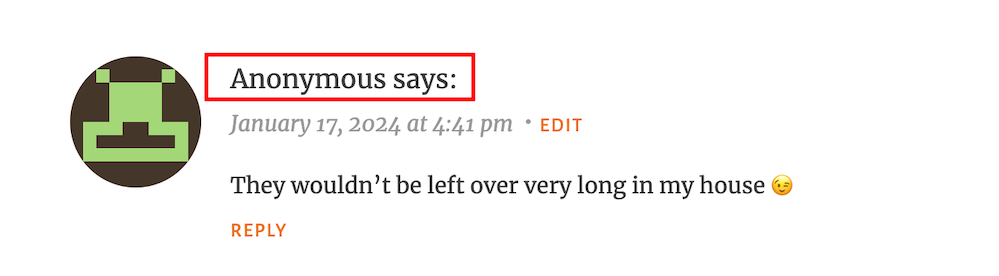
I wasn’t concerned when it appeared because it was left on one of my recent Wordless Wednesday posts about leftover chocolate, so I knew it was genuine.
Not knowing who the comment is from could pose a problem, but if it sounds genuine and has no uninvited or suspicious links, I’ll reply and approve the comment.
However, I’ll mark it as spam if it looks or sounds like a spam comment or contains any uninvited links. Oh! And I never approve comments that say ‘Nice Post.’ ‘Nice’ or ‘Great photo,’ regardless of who left them.
How do I make it easier for visitors to leave comments on my posts or prevent them from being anonymous?
In the blog settings of WordPress.Com blogs, there are settings which users can turn on or off to make it easier for visitors to leave comments or to prevent comments from being shown as anonymous.
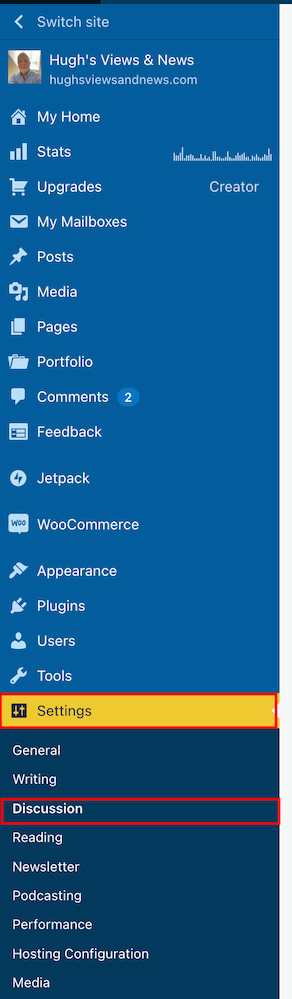
- To find these settings on your blog’s dashboard, go to Settings – Discussion and scroll down to the ‘Comments‘ section on the ‘Discussion Settings‘ page. I’m using WordPress on an Apple iMac desktop computer in these screenshots.
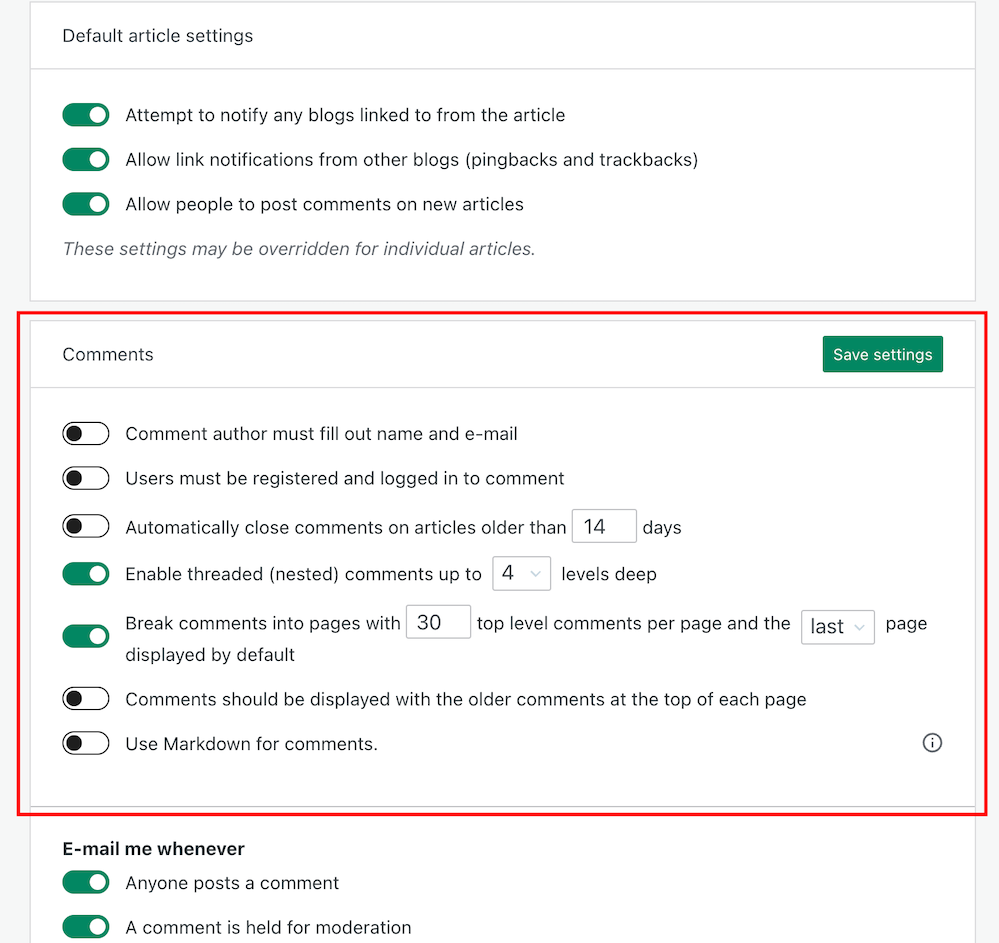
- If you want to make it easy for visitors to your blog to be able to leave comments, ensure you have the first two settings in the ‘Comments‘ section, ‘Comment author must fill out name and email‘ and ‘User must be registered and logged in to comment,’ switched off.
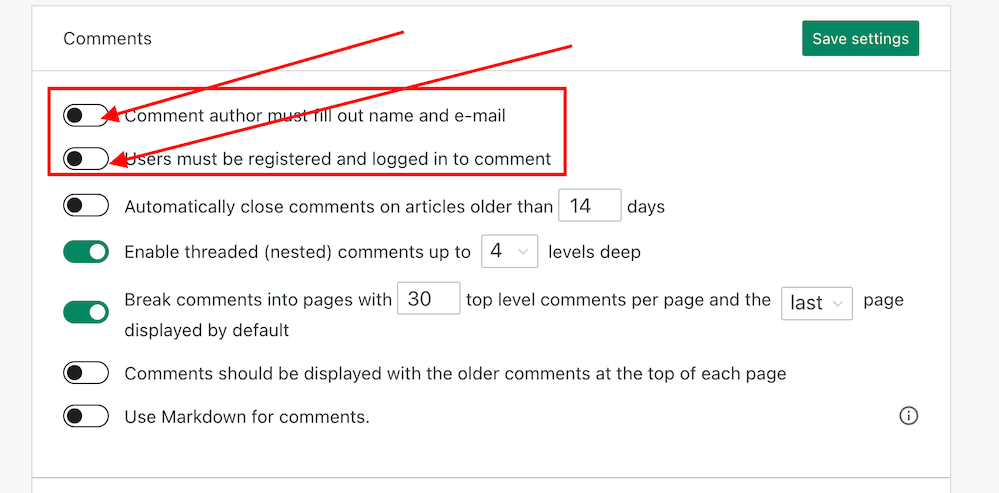
- If you do not want comments on any posts showing as ‘Anonymous’, ensure those two settings are switched on. However, beware that turning these settings on will make it more difficult for some users to leave comments.
- Turning these settings on means that users must either fill out their name and email address or be registered as a WordPress user and logged in to be able to leave a comment. Some users may not like giving this information to be able to comment.
- Make sure you click the ‘Save Settings’ button if you make any changes.
And that’s it. Only you can choose whether to have these settings on or off. Go with what you feel most comfortable with.
Do you make it easy for visitors to your blog to comment, or do you prefer to only allow those willing to give their information to be able to leave comments? Is WordPress the best platform for engagement and for leaving comments? Let me know in the comments.
Is your blog as secure as it can be? Take this final step to make sure nobody can hack it. Take a look at my recent post for more details.
Is Your Blog Safe? One Security Feature You Must Have
Layout, content, settings, and format might differ on self-hosted blogs.
Click the buttons below to follow Hugh on Social Media
Copyright @ 2024 hughsviewsandnews.com – All rights reserved.
Discover more from Hugh's Views & News
Subscribe to get the latest posts sent to your email.
 Hugh's Views & News
I agree we need to make it easy for people to leave comments. Akismet is great at picking up spam, especially if you add keywords but it picks up valid comments too!
Yes, it does, but the huge reduction in the number of visible spam messages means we don’t have to spend hardly any time fishing out the genuine ones so at least they’re much easier to spot now.
Thanks for this Hugh, as I’ve noticed an increase in someone or anonymous comments – but I can usually tell who they’re from. Like others have commented I am loving the decrease in spam!! I wnet looking for the buttons on the jetpack app as per Terri’s comment but can’t seem to find it, I did follow your instructions and my settings were the same as what you recommended. Thanks for keeping us up to date the way you do, it’s much appreciated.
The reduction in spam is very welcoming, Debbie. Whatever WordPress did, I hope we can have some more of that.
I’m trying to find out what methods anonymous commenters use to leave their comments. I want to find out if there is a connection so I can approach WordPress with the details. I’d like to see faces and Gravatars rather than ‘anonymous’ in the comments section.
Thanks for this Hugh. I have recently noticed an influx of comments from anonymous and someone. I’ll have a look at those settings in your tutorial. Thanks again. :)
Glad this is helpful, Debby. I’m trying to find out why these anonymous comments are happening. So far, retired themes and the jetpack app seem to be behind the reasons.
Thanks so much for participating and sharing at SSPS 295. See you again next week!
I will have to see if this will apply for self hosted sites as well
You’re welcome, Esme. If you’e not getting any anonymous comments, no need to worry about it. But I’m sure the same settings will be somewhere.
Hi Hugh. I am commenting using Microsoft Edge and without a problem. I feel some of WP’s changes are not compatible with certain browsers.
I used to have awful problems with my blog when using Safari. WordPress recommended I use Chrome, and since then, I’ve never experienced access problems with my blog. I think some browsers can be a bit behind in updating when changes take place. But it’s good to hear that Microsoft Edge seems to be working with WordPress. Thanks for keeping me updated, Eugi.
You’re welcome, Hugh. I mostly use Vivaldi but sometimes it is slow loading. However, today it’s fine. Go figure.
I think it usually more likely to be the browser causing problems than WordPress, Eugi. People tend to panic too quickly when something goes wrong.
I agree, Hugh. Though, I’ve problems with my blog for over a month. I feel it’s the FSE themes so I switched to a classic theme and had even more problems. I contacted the WP HE’s and they informed it was a plugin related to FSE themes. They deactivated the plugin and my site runs much better than it has in the past.
Oh, I agree that WordPress often gets bugs, Eugi. It’s like any online site. I’m glad to hear that WordPress managed to sort out the problems you were having. They’ve always dealt with any problems I’ve had with the site quickly and keep me updated.
Unfortunately, there are some users who will blame everything on WordPress as if the problems they are experiencing are affecting everyone when they’re not. I also see comments from users claiming that everyone is having problems with WordPress. In my experience, it can sometimes be the user where the fault lays.
I agree that sometimes it is the user. In my case, I didn’t have enough knowledge to recognize the problem and I was most grateful when it was fixed. I’ve always had excellent results from the WP HE’s. Also, there was a recent WP update and my site runs smoothly on all browsers that I use. What a relief. I don’t want to blame my woes on the FSE themes but it seems I am better off using a classic theme.
That’s why I never switched to a FSE theme. I was seriously thinking about it, but I’m staying with a Classic theme now. It doesn’t give me an problems, and if it did, I’d report it to WordPress. I hope they never retire all the Classic themes.
Personally, I feel there will always be classic themes. Even though the FSE themes have become easier to set up, there is still a learning curve that many don’t want to bother with.
Interesting post, Hugh! It has never occurred to me to allow anonymous comments, but I’ll give it some thought. (My site is self-hosted.) I’m having a LOT of trouble commenting on WordPress.com blogs and those on self-hosted using the Jetpack comment form that has no email option. Even though it shows me logged in to WordPress, when I click the Reply button, it rejects the comment and says I must be logged in to comment. Drives me nuts!
Have you tried using a different browser when trying to leave comments on WordPress.Com blogs, Debbie? Were you asked to logged in when leaving this comment on my post?
Same issue on Chrome, Firefox and Edge, unfortunately, but it’s only some blogs. No problems here, Hugh. It said I was already logged into WordPress and my comment went right through. :)
It could be that those blogs where you’re having this problem have a bug related to the blog theme they’re using, Debbie.
Good to hear you’ll able to comment on my blog posts, though.
I haven’t seen anonymous comments on blog my in quite some time plus I get very little spam. I try to make it as easy as possible for others to leave comments on my blog. I still have problems commenting on a few blogs and have to refresh the page a few times for the comment box to appear.
WordPress did an update last year which cut the number of visible spam messages, Eugi. Whereas I used to get hundreds of spam comments a day, I now get 1 or 2 at the most a week. It;’s one of the best things they did. From what I hear, the same has happened for the majority of bloggers.
Do you ever encounter any problems leaving comments on my blog?
Yes, today when I left a comment on your blog, I had to refresh the page several times for the comment box to appear, This seems to happen on a few blogs and only every now and then. With that said, I am going to switch browsers and perhaps that will help.
Can you keep me updated, Eugi? It’ll be interesting to know if the problem is being caused by the browser rather than WordPress. Although if it is WordPress, I’d have thought it would be happening to all users, unless there is a bug causing the problem related to particular theme somebody is using.
I’ve noticed more Anonymous comments lately. The way they are written, I assume the commenter didn’t really want to be anonymous but it was a default. Anyway, I’m like you, I don’t want to set up barriers for someone to comment so I also have those settings. It really makes me crazy when I have to put in my name and email EVERY TIME I MAKE A COMMENT on certain blogs – even those that I’ve followed – and commented – for years. I wonder if those bloggers realize that are making their followers jump through hoops (I suspect not).
You mentioned that you were getting many fewer slam comments lately. I have noticed that too and I appreciate whatever WP has done to make that so.
I doubt they do, Janis, not unless someone tells them. But I think there is more to this ‘anonymous’ problem than meets the eye. I’m going to do some more investigations.
Yes, WordPress did a big update with their anti-spam software last year that resulted in all users getting a huge reduction in the number of visible spam comments. it’s one the best things they did and has certainly given me back the time I used to make for going through those comments to check if any genuine ones ended up there by mistake.
I updated my settings after a previous post of yours to allow anonymous comments. I’ve only had a few anonymous comments since then. Interestingly one was from a regular reader and WordPress follower who couldn’t figure out why it showed her comment as anonymous.
And I agree with you that WordPress makes it easy for readers to leave comments. I refuse to create an account and sign in on any platform to leave a comment.
It’s a bit of a mystery as to why some comments show as ‘anonymous’ and others from the same blogger do not,Michelle. It’s never happened to me when leaving a comment, not as far as I’m aware anyway. My gravatar always shows up next to any comments I leave. I can understand it happening maybe once or twice when we think we are logged in and are not, but usually you then get a message asking you to log in.
I’ll be checking this out more on the WordPress forums.
I have my settings turned on for name and e-mail. I find a lot of spam comes through with it set to off. At least on my site, it does.
Another way to look at it is that if they can’t take the extra 4-5 seconds to type in an Alias and email, then their comment will probably be closed-ended and very short like the “Nice post!”
PS: Nice post! ;)
Last year, WordPress updated their anti-spam software, and I’ve gone from receiving hundreds of spam comments a day to just one or two a week. So turning off those settings hasn’t resulted in getting more spam for me.
I don’t agree with your last point. I get far more bloggers who are logged in trying to leave short non-engaging comments than those who are not logged in. And I understand why some users do not want to share their details to be able to leave a comment.
Just wanted to chime in here. I follow a lot of blogs and love to write and receive comments (that’s where the magic of blogging starts). I never leave a simple “Nice post” comment. I really resent having to fill in all that info before leaving a comment, especially on a blog that I’ve followed for a while. I hope you will reconsider putting up that barrier.
I completely agree with you, Janis. Having to enter details to be able to leave a comment on a blog is not something I want to do. Plus, where I see that happens, there are less comments on blog posts (if any at all). And spam is no longer a problem given that WordPress has largely reduced the amount of visible spam we now get in our spam folders. Let’s make it as easy as possible for our readers to engage with us and with other bloggers.
Thanks for the tips, Hugh!
Did they help, Jan? There’s a bit of a mystery around why some comments show as ‘anonymous.’
Thanks Hugh This was help[ful 🤣🙃😎
That’s wonderful to hear. Thanks for letting me know.
This is perfect timing, Hugh, because I am engaging with comments via Jetpack. Not only do I appear as anonymous or someone on some blogs when I comment, these same ones appear on my posts. I can also guess who they are, and I try to leave my name when I comment in case that happens. Hans is driving now as we head for home, so I will take a look and see if I can adjust my discussion settings now or when we get to our hotel tonight. Thanks for helping us with this issue, I’m seeing it more often lately!
Now I’m wondering if some of the anonymous comments are from some bloggers commenting from the Jetpack app, Terri. Although, I’ve never seen a comment from you on any of my posts as ‘Anonymous.’
I can sometimes guess who anonymous comments are from, but not always. But I can always tell when an anonymous comment is spam.
Have a great trip back home. That time sure did fly.
I think the Jetpack app might be the culprit. I just checked my settings through the app and I had already disabled those two choices. I rarely have issues when I comment from my computer. Luckily, I can distinguish a legit someone comment from spam 😁
When I’ve had to log in to WP to leave a comment, it’s frustrating because I know I’m logged in due to previous engagement just moments before on another blog. There must be a nexus within the app that allows us to comment without issue. I also think this issue could be related to outdated themes on others blogs, but I recently commented on Marsha Ingrao’s post like I always do and it posted me as someone,.and her comment on mine did the same. So weird and inconsistent 🙄
Did Marsha and you both use the Jetpack app to posts those comments that showed as ‘Someone?’ I do agree that I think some retired themes may have a bug that shows comments as ‘anonymous’ or ‘someone’ instead of the Gravatar profile. I know of some bloggers who have never changed their theme in the 10 years I’ve been blogging, and their comments sometimes show as ‘anonymous.’
What I think I will do is ask in the forums why some comments show as ‘anonymous.’ I expect WordPress will say it’s because of those two settings I have turned off, but it’ll be interesting to hear from other users too. Sometimes, other WordPress users come up with the answers.
I’m sure we each used the Jetpack app to comment, Hugh. On my end, I clicked both settings to off so who knows what’s going on? I’ve two more days of travel so I’ll be using the app. I appreciate you checking the forums. I’m sure this glitch is happening to others via the app. We travel through western Utah today then overnight in Boise, ID. Have a great day!
That was my comment, Hugh. I hadn’t realised I have to keep logging in to WordPress to leave a comment. Sometimes I’m asked to log in and at the same time it tells me I’m logged in. I don’t know if I’m missing something on my blog.
I’ve heard of other bloggers having the same problem, Cathy. But it hasn’t happened to me so I’ve not been able to take screenshots to send to WordPress to find out what is going on. If I do find out, I’ll let you know.
In the meantime, if it says you’re not logged in when trying to send me a comment, I’d recommend leaving your name and name of your blog at the end of the comment. That way, I’ll know who the comment is from.
I was able to login to reply but I’ll leave my details if I have a problem in future. Thanks Hugh
I completely agree that there must not be any obstacles that keep people from interacting. There is a lovely blogger who switched to a different platform, and since I had to register over and over again to comment, eventually, I stopped. It is just too time-consuming.
I don’t think there has been an anonymous blogger commenting on my posts yet. And if there was one, it might have been genuine too. But thank you for the reminder regarding the settings, Hugh!
Is that blogger by any chance on the Blogger platform, Erika? That is one blogging platform that I dislike because it makes it so hard to leave comments. Like you, I gave up trying to leaving comments in the end. It’s no wonder I hardly ever see any comments on posts over there.
If you’re getting no anonymous comments, that’s great news, Erika.
If I see it correctly then the platform might be “Ghost”.
Oh, yes, I just figured that I must be lucky. I was not even aware that there are anonymous comments.
I’ve heard of Ghost, but never tried it. It sounds as bad as Blogger if you want to engage with other bloggers, so not for me either, Erika.
For me neither. It is sad when you lose followers due to a bad blog platform.
Yes, it must be. I can’t imagine moving to a blogging platform that makes it hard for readers to engage with you. I also heard of another blogging platform where you have to pay to read a whole post. The first few paragraphs are free to read, then you get a hit with a demand to pay to read the rest.
I cannot imagine that this works for longer or at all. This is no alternative unless you already have “a name” still, this mihght not work.
Thanks Hugh, I might try it.
How many more spam comments would you estimate enters your inbox?
I get about one spam comment a week, Kevin. I used to get hundreds a day, but WordPress updated their anti-spam software last year which resulted in the number of spam comments being cut dramatically. It’s one of the best updates they did.
Hugh, if I might ask you a follow up question.
At the settings – discussion settings page there is a switch for Fediverse. My switch is off. Is this path worth pursuing?
Btw, I have a Mastodon account set up. I just haven’t done anything more with it.
Thank you,
Kevin.
Fell free to ask questions, Kevin.
I’ve haven’t noticed any big difference in having the Fediverse setting switched on. In fact, my posts now appear twice on my Mastodon account as I also have the direct sharing setting to Mastodon also switched on which has bought me traffic from Mastodon. Not a huge amount of traffic, but it’s better that nothing at all.
I hope that helps. And let me know when you become more active on Mastodon, as I’ll follow you there too.
I’ll let you know.
Thanks for replying.
I have always had both of those Discussion settings switched off, yet I still get at least 2 Anonymous comments every day, if not more. This has got a lot worse lately, and I have resorted to asking regular followers to add their name at the end of the comment so I can reply personally.
I tried contacting WP Help about the issue but was answered by a ‘Happiness-Bot’ that failed to comprehend the problem and send me down a ‘Live-Chat’ rabbit hole.
Best wishes, Pete.
It could be a bug connected to the WordPress theme you have. If your theme has been retired, WordPress won’t support it anymore. It’s worth checking out the WordPress forum too. It’s the place where the majority of my questions get answered and any bugs get fixed, although I do use Live Chat too, but it’s not available to everyone. If you have those two settings switched on, you shouldn’t be getting any anonymous comments, unless there is another setting somewhere that I’ve not discovered yet.
On the forums, both WordPress staff and other WordPress users can come to your aid without the interference of any bots.
Thanks, Hugh. :)
I am OK with anonymous comments, but what drives me crazy is when I’m leaving a comment, I see my avitar, but the comment shows as anonymous. I don’t know why that happens, and i frequently get comments saying “I was ‘Anonymous’ above.” As for other platforms, you are 100% correct. I moved my technical blog from Blogger to WordPress, and the number of comments I received increased significantly. I still comment on Blogger blogs that I follow, but they don’t make it easy.
That’s something that has never happened to me, Dan. Although I have heard of a problem other bloggers have in not being able to leave a comment because WordPress thinks they are not logged in, when they are. That’s never happened to me apart from on a self-hosted blog I tried leaving a comment on. The comments box was ghosted out, so I figured the blogger had turned comments off.
I’m not a fan of the Blogger platform. It’s a terrible blogging platform that makes it difficult for readers to leave comments. Plus, all the blog themes look terrible, like they have been left behind. I’m not sure what themes are available there, but the ones I’ve seen look very outdated. I gave up trying to leave comments on it years ago. It’s no wonder I never see hardly any comments on posts over there. The art of conversation is something the Blogger platform seems to dislike. But I guess if you’re a blogger who is not into comment conversation or somebody that responds to comments, it’ll suit your needs.
It’s cheap, Hugh. I thought it was a great place to start, but I noticed other bloggers, who were talking about the same topics, getting way more comments. I found out a conference that people liked my blog, but wished it was on WordPress. That was in 2009!
And that’s how you moved over to WordPress, Dan?
From what I hear, the Blogger platform has never changed. I could be wrong, but it looks very outdated to me.
That’s when I moved. I don’t think it’s changed. I still have a blog (only one page) over there because they allow JavaScript. So I have a place to test some scripts.