You wouldn’t leave your doors unlocked if you were the last one to leave the house, would you?

Would you give a stranger the password to your online banking account?

Would you share or give a stranger the password to your blog?

Protecting your blog is just as important as protecting your home and online bank accounts, yet many bloggers share personal details about themselves on their blogs and on social media, which can be a treasure trove for scammers. Be careful what information you share.

Before sharing any information, ask yourself, ‘Would I share this information with a complete stranger?’
Light blue image with the words 'Is Your Blog Safe? One Security Feature You Must Have' in white text.
Adding this feature will give your blog an extra layer of security.

Although we’re all encouraged to use a strong password to protect our blogs, did you know that many blogging platforms, including WordPress, offer users an extra layer of security when it comes to protecting their blogs?

Two-factor authentication adds an extra layer of security by requiring you to enter a code or use another device in addition to your password. For example, you can use an app like Microsoft Authenticator or Google Authenticator to generate access codes for your blog.

WordPress offers users two-factor authentication security. Follow the guide below to set it up for your WordPress blog. For this example, I’m using an Apple iMac desktop computer.

How to set up two-step authentication for your WordPress blog.

  • In the top right of your blog, click on your profile picture/avatar.
  • Click on ‘Security‘ in the menu on the page’s left side.
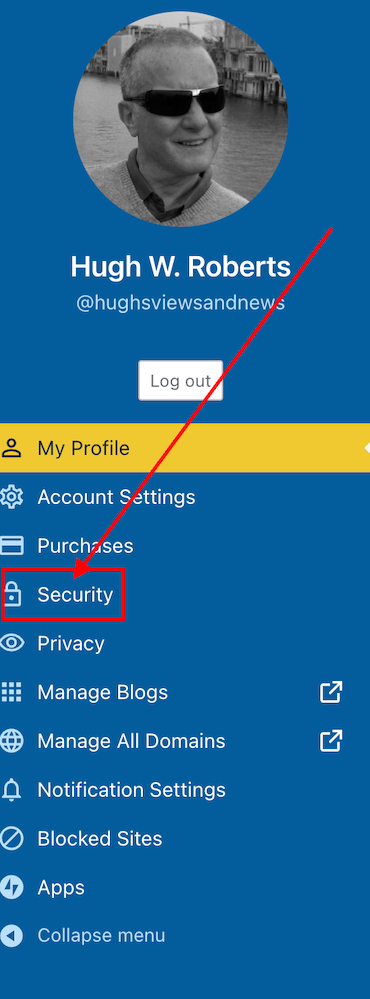
Image highlighting the 'Security' tab on a WordPress blog.
Click on the ‘Security’ tab.
  • Select the ‘Two-step Authentication‘ option.
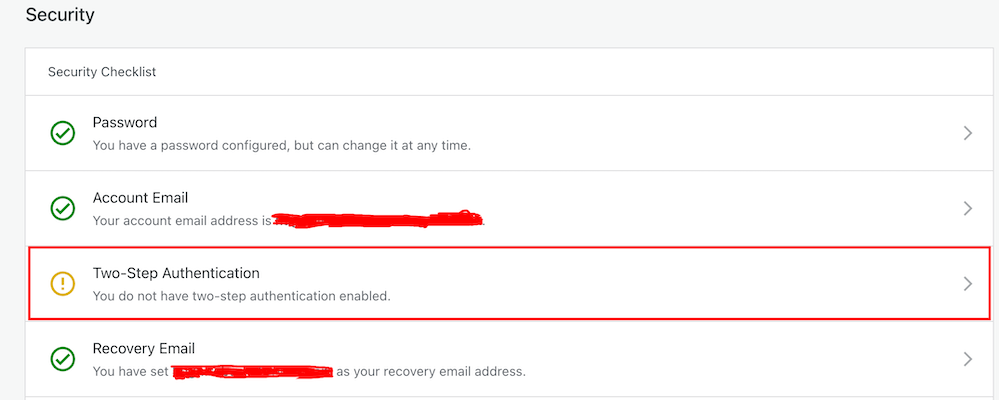
Image highlight the Two-Step Authentication tab on a WordPress blog.
Select Two-Step Authentication
  • Select which method you would like to receive the two-step passcode generated by WordPress, and click the ‘Get Started‘ button.
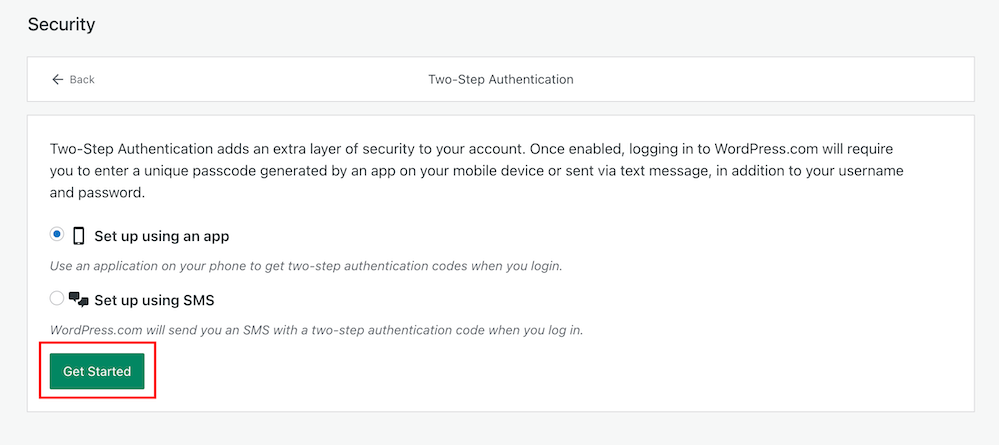
Image highlighting the 'Get Started' button when setting up Two-Step Authentication on WordPress.
Click the ‘Get Started’ button.
  • Follow the onscreen instructions depending on your selected method to receive the WordPress two-step authentication passcode.
  • Once enabled, logging into WordPress.com will require you to enter a unique passcode generated by an app on your mobile device or sent via text after adding your username and password.
  • You will receive an email from WordPress confirming that two-step authentication has been enabled.
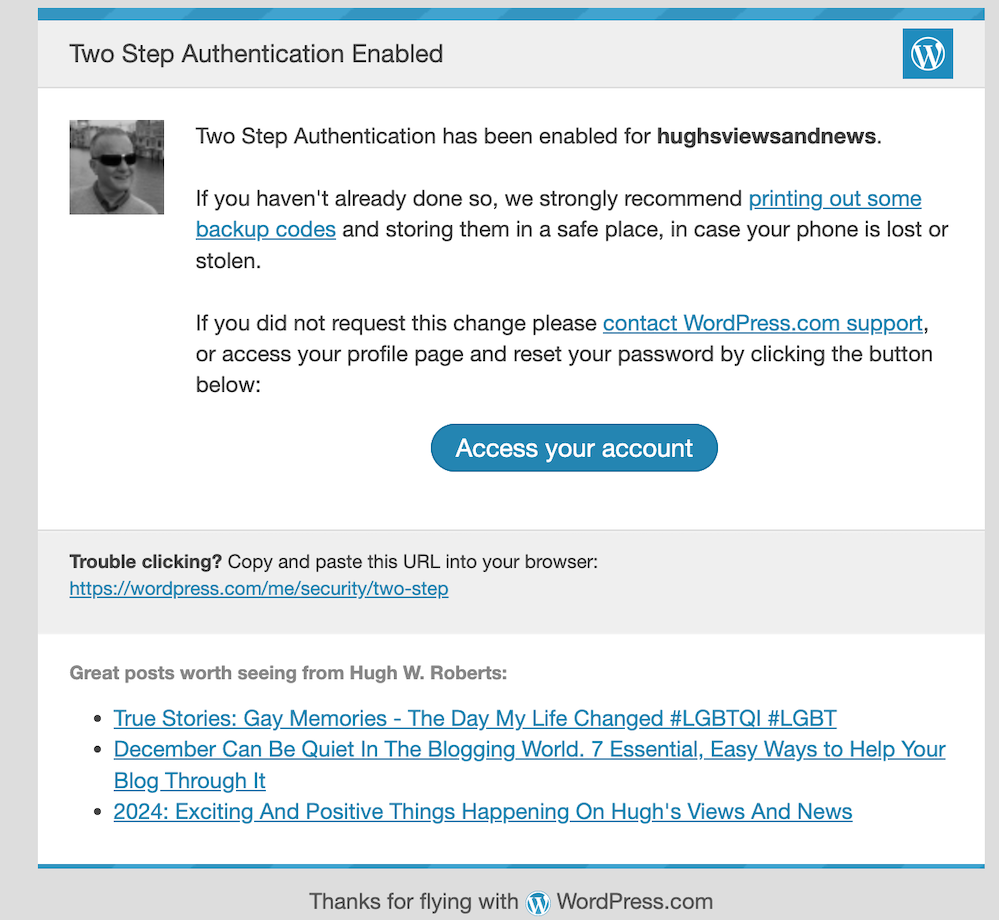
Image showing an email confirmation from WordPress confirming that two-step authentication has been set up.
You’ll get an email from WordPress confirming that two-step authentication has been set up for your blog.
  • That’s it! Access to your blog is now protected by an extra layer of security.

I’d recommend adding or checking that the recovery email address and recovery SMS number for your WordPress blog/account are also correct when switching on two-step authentication.

Are you making the most of Two-Step Authentication to safeguard your blog? Need guidance on setting it up? Share your best practices for securing your blog in the comments below.

Did you miss my post giving details of what plans I have for my blog in 2024? Check out my post, ‘2024: Exciting And Positive Things Happening On Hugh’s Views And News‘, for complete details.

Follow Hugh on social media. Click the buttons below.

Layout, content, settings, and format might differ on self-hosted blogs.

Copyright @ 2024 hughsviewsandnews.com – All rights reserved.


Discover more from Hugh’s Views & News  

Subscribe to get the latest posts sent to your email.

63 responses to “Is Your Blog Safe? One Security Feature You Must Have”

  1. Erika avatar

    Once again, you made me ponder. I have not thought of going more secure with my blog. Now, seeing the options is a great support. Thank you, Hugh!

    1. Hugh W. Roberts avatar

      Good to hear, Erika. We have to do all we can to protect blogs and ourselves when online.

      1. Erika avatar

        You are so right!

  2. seaangel4444 avatar

    Thank you so much for this excellent advice, Hugh! I’m setting it up immediately! Cher xoxoxo

    1. Hugh W. Roberts avatar

      Great. Let me know if you run into any problems when setting it up, Cher.

      1. seaangel4444 avatar

        I appreciate it, Hugh. Thank you! Because of your excellent instructions, I think I was able to set it up correctly. I also found several things that I did not have in place, so that prompted me to take a look at those as well (backup email address, verifying such, etc.)

        Thank you, Hugh! Cher xoxoxo

        1. Hugh W. Roberts avatar

          You’re welcome. Good to hear you checked all those other details and updated them, Cher.

          1. seaangel4444 avatar

            Thank you, Hugh! I really appreciate it! Cher xoxoxo

  3. Author Jan Sikes avatar

    Fantastic advice, Hugh. I’m off to set it up!

    1. Hugh W. Roberts avatar

      If you run into any problems setting it up, feel free to ask questions, Jan.

  4. beth avatar

    good to know!

  5. Cathy avatar

    Certainly makes sense, Hugh.

    1. Hugh W. Roberts avatar

      And gives so much piece of mind knowing you have that extra layer of security on your blog, Cathy.

      1. Cathy avatar
  6. Dan Antion avatar

    When I was working in support of technology, we required 2FA for everything that supported it. This is very good advice.

    1. Hugh W. Roberts avatar

      I use it for everything online, Dan. Adding that extra piece of security always gives me extra piece of mind.

      1. Dan Antion avatar

        My only concern, and it’s a minor one these days, is when I’m flying. I’ve had problems logging into services on my iPad, because I can’t get the authentication code on my phone. Then again, in most cases, whatever it is I have to do can wait a few hours. Some services we used allowed you to switch to an email code for things like that, but not all.

        1. Hugh W. Roberts avatar

          That’s true, Dan. I’ve now set it up so that the notification comes to my Apple Watch. And as I do not fly anymore, there is usually wifi on trains and buses, so no problem for me. However, I tend to enjoy watching the world go by when travelling.

          1. Dan Antion avatar

            Me, too. Now that I’m only flying for personal reasons (and only once or twice a year) it’s not an issue.

  7. philosophy through photography avatar

    Very much informative Hugh.
    The problem is people are too lazy to opt for 2f authentication.
    As for the DOB, year etc one need not be Frank on online matters especially social media platforms.
    Thank you

    1. Hugh W. Roberts avatar

      Laziness doesn’t get anyone anywhere, and I’d have thought that everyone who goes online would want to protect themselves. I guess ‘it’ll never happen to me’ also plays a big part.

      I’m shocked by how much personal information bloggers and those on social media give out online. I always ask myself ‘would I give this information to a complete stranger?’ before putting anything online.

      1. philosophy through photography avatar

        Agree about giving strangers personal details believing them unconditionally.
        As you have rightly suggested, one must opt for 2F authentication without delay wherever there is a provision.

  8. willowdot21 avatar

    Thank you Hugh that’s great advice 💜💜

    1. Hugh W. Roberts avatar

      I’d recommend every blogger using two-step-authentication for their blog, Willow. That extra layer of security give more piece of mind.

      1. willowdot21 avatar

        Thank you Hugh 🙂

  9. JenT avatar

    So easy to do and well explained. Thank you, Hugh. I can’t emphasize enough that part about printing out your 2FA backup codes and keeping them in a safe place! They’re also useful should you ever need to recover your WordPress.com account.

    1. Hugh W. Roberts avatar

      Yes, those backup codes are so important, Jen. I have mine safely stored, and I know where I can access them should the need a rise. Hopefully not.

  10. Brenda avatar

    This is something I was looking at just yesterday.
    Also, we must be on the same wavelength as I’ve been writing a post along similar lines … being safe online

    1. Hugh W. Roberts avatar

      Good to hear you’re writing that post, Brenda. I’m often astonished at how much personal information people give out online – the main one being their date of birth when giving their age and announcing their birthday. Put that together with their real name and where they live, and a scammer has some free personal information to get scamming or stealing an identity. I think the biggest problem are those who think it’ll never happen to them.

      I look forward to reading your post.

      1. Brenda avatar

        Thanks Hugh. I agree. I’ve seen people posting name, address, telephone number and, as you say DoB. Crazy, you wouldn’t do it anywhere else

Feel free to leave a comment. Engagement helps keep blogs alive and forms community.

This site uses Akismet to reduce spam. Learn how your comment data is processed.

I’m Hugh

Welcome to my blog. I’m delighted to have you here. This is the place to discover tips on blogging and WordPress, flash fiction, photography, and more. I enjoy engaging with my readers, so please feel free to explore, join discussions, and contact me. I’m happy to assist! Find out more about me and my blog by clicking the ‘Meet Hugh’ button.

Let’s connect

Subscribe to Hugh’s Views And News

Latest Posts

Looking for your next quick read? Try my books

An image of book covers, book, tablet and mobile phone, for the book Glimpses.
An image for the book More Glimpses - showing a book cover, tablet and mobile phone.

Follow Hugh in the Fediverse

Hugh's Views & News  
Hugh's Views & News  
@hughsviewsandnews.com@hughsviewsandnews.com

WordPress & Blogging tips, flash fiction, photography and lots more!

315 posts
10 followers
A widget with the words 'Team Effort - Story Chat Digest - Where Authors Meet - Author'

Most Viewed Posts & Pages Over The Last 24 Hours

Recommend Blogs To Follow


Roaming About
A Life Less Ordinary

Second Wind Leisure Perspectives
Fun, Photography & Friends

Spo-Reflections
Spo-Reflections
To live is to battle with trolls in the vaults of heart and brain. To write; this is to sit in judgment over one's Self. Henrik Ibsen

Boomer Eco Crusader
Boomer Eco Crusader
Live Green | Declutter | Simplify Life

SONGS AND SCRIPTS AND DUNKING BISCUITS
Every day tales of a winging-it creative

Jacqueline Lambert
Jacqueline Lambert
Award-Winning Travel Humour Writer

Anne R. Allen’s Blog… with Ruth Harris
Writing about writing. Mostly.

Fancying France
The musings of a ‘femme d’un certain âge’ who divides her time between SW France and SE England

Marsha Ingrao         Always Write
Marsha Ingrao Always Write
Having fun blogging with friends

Curiosities, Castles and Coffee Shops
The musings of a curious mind

WrookieSchU
WrookieSchU
Live life 🙌🏼

WPcomMaven
WPcomMaven
Helping you make the most of your free WordPress.com website since 2011

Share Your Light
Share Your Light
You are a miracle – Let it happen

No Facilities
No Facilities
Random thoughts, life lessons, hopes and dreams

Esther Chilton
Writer, Tutor and Editor

Saying nothing in particular
Jan … JT Twissel

The Chicago Files
The Chicago Files
A Canadian Perspective on Living in the Windy City!

Thank you to all my visitors

489,661 hits

268,756 visitors

Scan the QR code to follow me on Bluesky

Copyright Protected Blog

COPYRIGHT ©2011-2031 Hugh’s Views And News BLOG – All Rights Reserved.

This work by Hugh W. Roberts, and/or Hugh’s Views And News blog, is licensed under a Creative Commons Attribution-Noncommercial-NoDerivatives 4.0 International License. Unauthorised use and/or duplication of this material (text and images) without express and written permission from this blog’s author and/or owner is strictly prohibited. If you want to use posts, excerpts, photos and links, you may contact me first. You must give full and clear credit to Hugh W. Roberts and Hugh’s Views And News dot com with links to the original content.