
Every day, our blogs come under attack from various elements.
Just as we protect our families, pets, and anything else we value, we should do all we can to protect our blogs from threats.
Threats come in many forms, but you can take a few simple steps to keep your blog safe.
1. Comments
What do you do if you receive unfriendly comments or comments that disagree with what you said in your blog post?
I’ve blogged for nearly ten years, and, in that time, I have received a handful of comments that were not only very personal but were rude, racist or homophobic.
Because I moderate all comments before they appear on my blog, I could stop these comments in their tracks. They weren’t worth replying to, so I marked them as spam and deleted them.
And it wasn’t just me those unfriendly comments were aimed at.
I often see rude, unfriendly comments and spam appear on other blogs. Not only can they be shocking, but in many cases, the commenter’s name can also be very offensive.
Unfortunately, Akismet, the WordPress software that blocks unwanted spam, doesn’t always catch everything. So, monitoring all comments before they are published on your blog posts is worth considering.
Follow these steps to set up monitoring comments.
For this post, instructions are in the “Default” view of your blog’s dashboard.
- Click Settings – Discussion on your blog’s dashboard.
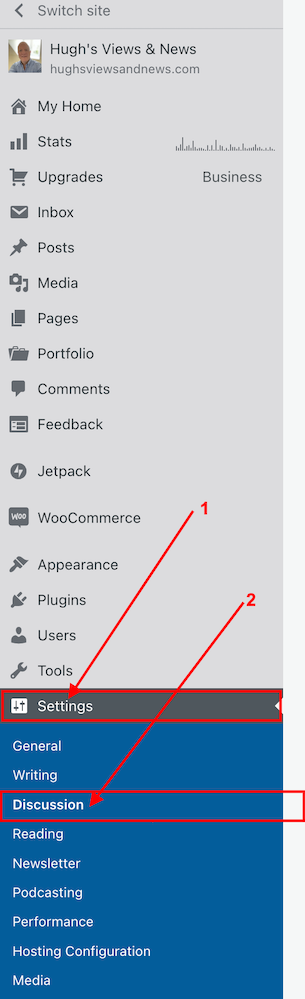
- On the Discussion Settings page, scroll down to the ‘Before A Comment Appears‘ box and slide open or tick the button next to ‘Comment must be manually approved.’
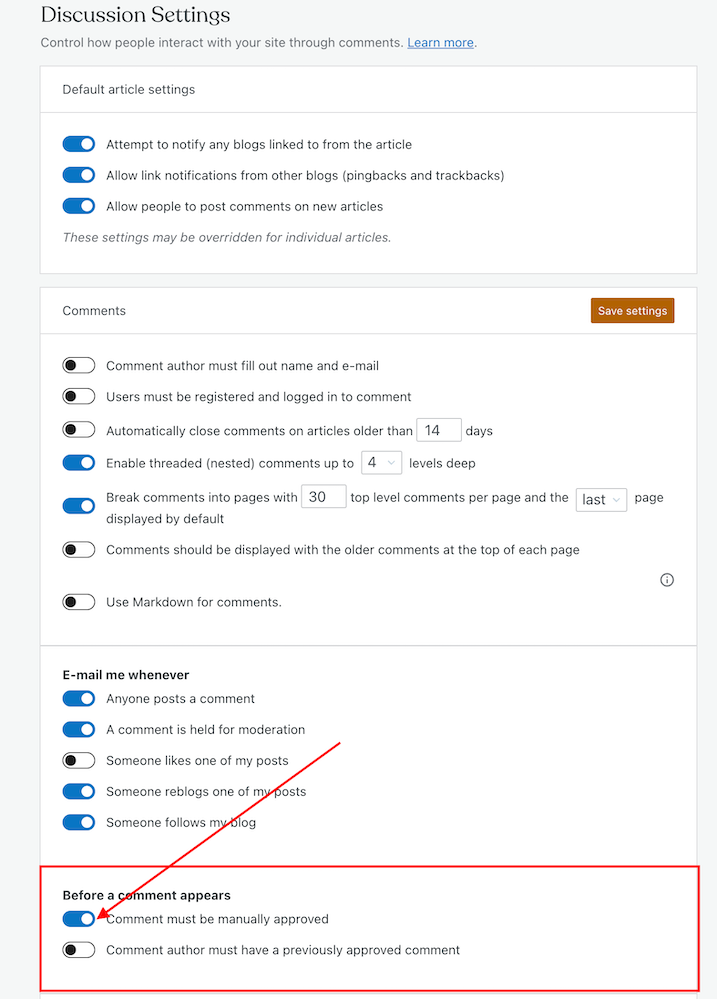
- Click on the ‘Save settings‘ button.
You may also have noticed an option to allow comments to be posted straight away from people who have previously had comments approved by you.
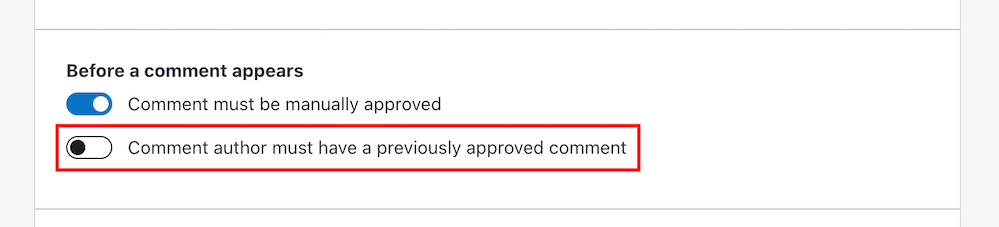
For bloggers dealing with hundreds of comments daily, this is a great time-saving option because you don’t need to approve them manually.
However, be wary. Someone who left a perfectly friendly comment on an earlier post could also leave an unfriendly comment on a future one.
How to deal with people who don’t agree with you
Sometimes I receive comments from people who may not agree with what I say, but that’s part of the blogging experience.
However, since their comment is written in a friendly, professional manner, I will approve it.
Nobody should tolerate rudeness or bad manners, so don’t let these kinds of comments appear on your blog.
If comments are unfriendly, rude or make you feel threatened, mark them as spam.
Allowing unfriendly, rude comments on your blog can make it look unwelcoming, especially to new visitors.
And consider removing anyone who leaves a rude comment, or one that threatens you or another blogger, from your subscriber list. My post ‘How To Spot And Remove Spammers And Spambots From Your WordPress Blog‘ gives full details.
Look after your fellow bloggers
If you see a rude comment or spam on a blog you follow, let the blog owner know. They’ll probably thank you for looking out for them.
How to block certain bloggers or readers from leaving comments
Further down the same page on the Discussion Settings dashboard, you’ll see two boxes entitled ‘Comment Moderation‘ and ‘Disallowed comments.’

These boxes let you add specific words, a blog’s web address, an email address, or a user’s Internet Protocol address to block.
Comments will be held in a moderation queue if they contain anything you have added to the Comment Moderation box.
Comments will be sent to the trash bin if they match anything you have added to the Disallowed Comments box.
2. Internet trolls
If you are unlucky enough to find that an internet troll has decided to make your blog their new home, ignore them.
Whatever you do, don’t engage in any conversations with the internet troll. Whether through comments or if they try to contact you through your ‘contact me’ page, ignore them.
Internet trolls will do everything they can to get you to react to what they say. They may even try to get some of your readers to engage by responding to comments they left, so never approve their comments.
Don’t give internet trolls the satisfaction of acknowledging them in any way.
Remove any comments, and don’t let them upset you. Add them to the ‘Disallowed Comments‘ box. They’ll soon get the message and move on.
3. Back-Up
How would you feel if you woke up one morning and found all your blog content gone?
It’s the stuff of nightmares, so be kind to your blog and back up its content regularly.
Depending on your WordPress plan, your blog can be backed up via Jetpack – Backup on your blog’s dashboard. If you don’t have this facility, consider saving all your blog posts to an external server or hard drive.
If you’re already writing your blog posts in Word, Pages, or other writing software like Grammarly, make sure you save your documents to iCloud (if you have access) or to another hard drive.
Don’t lose all your hard work by failing to back up your blog.
4. Anti Virus Software
Always update your device’s antivirus software to protect your blog and keep it up to date.
If hackers can access well-known websites, they may be able to access your computer or device.
Malware could let cybercriminals take control of your computer, log your keystrokes, or access your personal and financial information, which could lead to identity theft. So, not only could hackers target your blog, but they could also access your bank details and other personal information.
Remember to keep all other software on your computer up to date, and use the latest versions of any websites you visit regularly.
WordPress.com users always have the latest version of WordPress because WordPress downloads updates directly. Self-hosted blog owners should make sure they have the latest updates installed.
This all may sound nightmarish, and you may ask yourself who would want to attack your blog, but every blogger should take it seriously. Don’t become a victim.
However, whatever you do, keep enjoying your blogging experience.
Although attacks on our blogs happen constantly, your antivirus software (and the software supplied by WordPress) handles most threats without you even knowing.
Let’s Wrap It Up.
- Make sure you protect your blog from any online attacks.
- Don’t approve any comments that are unfriendly, rude, or racist towards you or any other bloggers.
- Consider moderating all comments before they appear on your blog.
- People may disagree with what you post. Only approve their comments if they’re written in a friendly, professional manner.
- Unsubscribe and or/block trolls and unfriendly readers from your blog.
- Never respond to trolls’ comments or allow them to appear on your blog.
- Remember to back up your blog regularly or save your blog posts to an external hard drive.
- Keep antivirus software updated on your devices.
- Ensure you’re using the latest version and tools of WordPress.
Is there anything else you’d like to share with us about protecting your blog from unwanted attention and attacks? Do you have any questions? Join the discussion by leaving me a comment with the details.
The featured image in this post was created using the WordPress image generator. AI was used to check for grammar and spelling mistakes and to help with the layout of the post.
Layout, content, settings, and format might differ on self-hosted blogs.
Follow Hugh on Social Media. Click on the links below.
If you enjoyed this post and want more like it, enter your email address and click ‘Subscribe’ to stay up to date with my latest content.
Copyright @ 2024 hughsviewsandnews.com – All rights reserved.













Feel free to leave a comment. Engagement helps keep blogs alive and forms community.