How easily can all visitors engage with you on your blog?

Is it as easy as you think it is?
Banner for the blog post 'Do You Crave More People To Engage With On Your Blog? Check These Settings Now.'
Did you know that you could be preventing some visitors to your blog from leaving you comments?

After receiving an e-mail from Jean, who blogs at DelightfulRepast.com, who had seen one of my posts at the Senior Salon Pitstop weekly linky party hosted by Esme and Julie, I was somewhat concerned when she mentioned that it wasn’t easy for her to engage with me on my blog.

Jean explained that she didn’t want to leave her e-mail address, create a WordPress account or use social media to be able to leave me comments. I understand why she didn’t want to leave any of those details. After all, our information is private and shouldn’t be given out if we don’t want to give it out.

WordPress offers ‘Discussions‘ options where users can decide how easily readers can engage with them without leaving any personal details. I thought I already had this option switched off, so nobody needed to leave any personal details, and I was right, but it didn’t explain why Jean thought she had to leave her personal details if she wanted to comment on my posts.

Upon further checking my discussion settings, I saw where the confusion was coming from and want to highlight it so those who wish to engage with me without personal details can still leave comments knowing they do not need to give any personal information.

Let’s Look At The Discussion Settings On WordPress.

  • Ensure you’re viewing your blog’s dashboard in the Default view. To do this, click on the View button in the top right of the screen when viewing your blog’s dashboard.
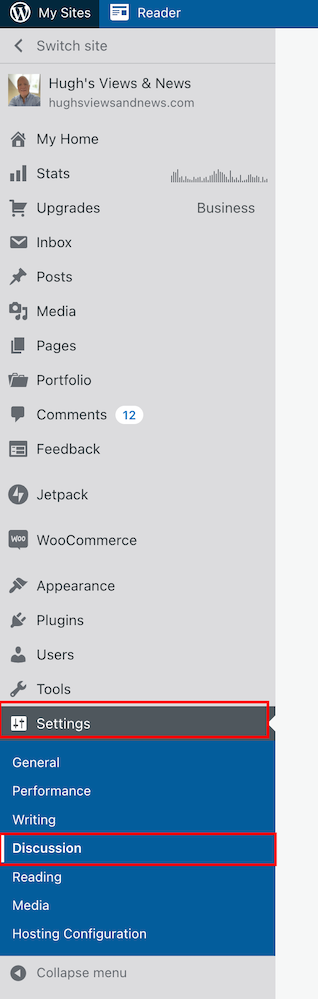
  • Go to Settings – Discussion.
Screenshot highlighting the discussion setting on the dashboard of a WordPress blog
Make sure you’re viewing your blog’s dashboard in the Default view.
  • On the Discussions Settings page, look for the Comments box.
Image highlighting the Comments settings on the Discussion Settings page of a WordPress blog.
Look for the comments settings box.

As you will see from the above screenshot, I have turned off both the ‘Comment author must fill out name and e-mail‘ and ‘Users must be registered and logged in to comment‘ options. So why wasn’t Jean able to leave me a comment?

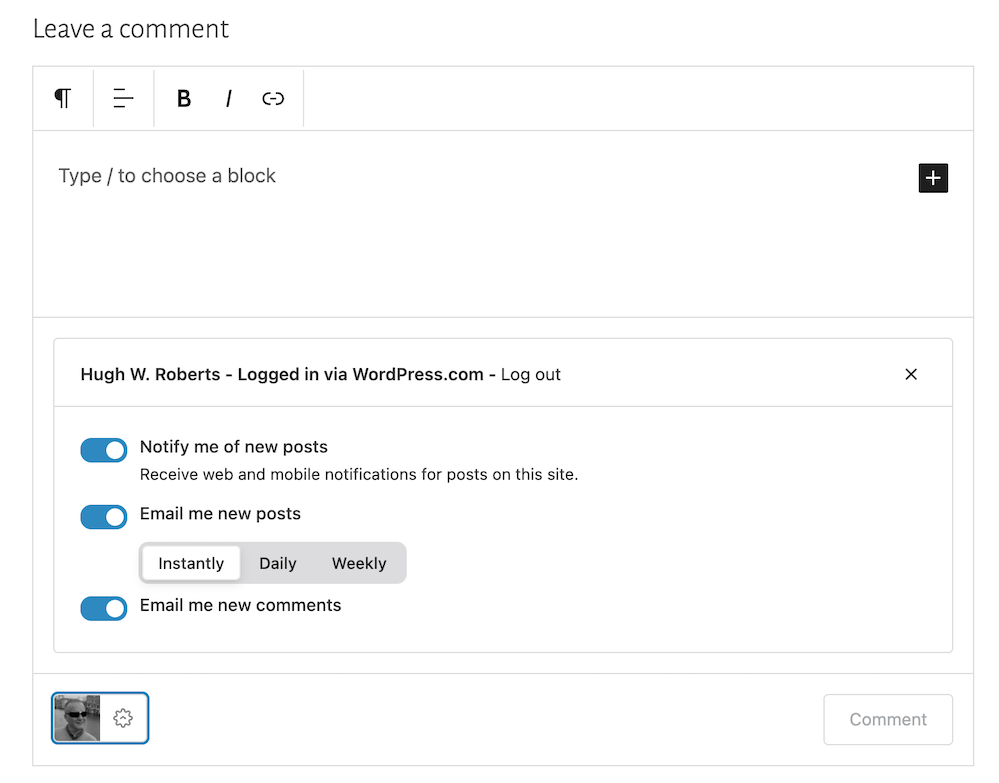
It seems that, for whatever reason, in their wisdom, WordPress has decided to still show visitors a login box when these options have been switched off. This is what Jean and visitors who are not logged in see.
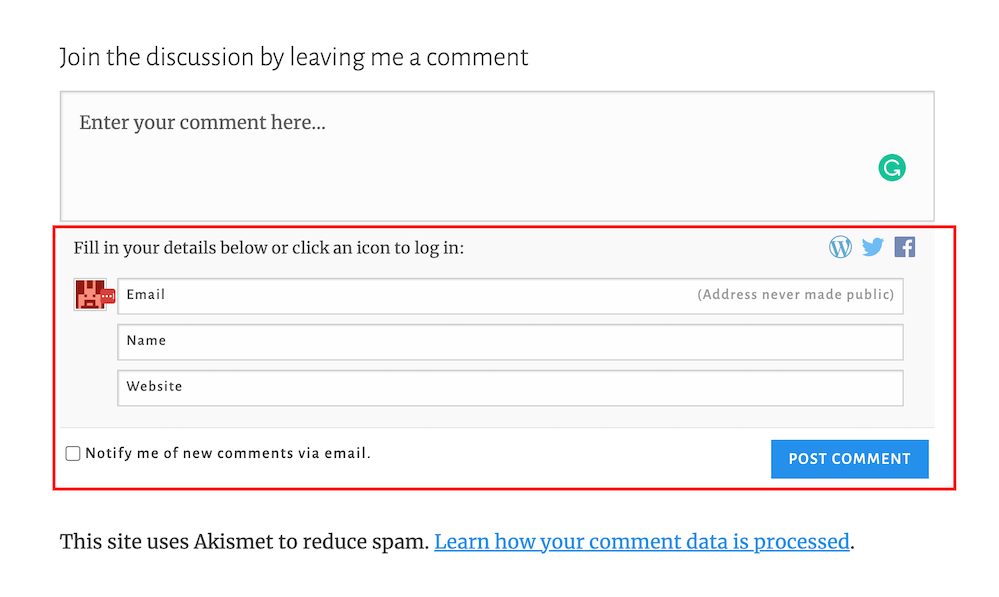
Screenshot highlighting the login box when wanting to leave a comment on a WordPress blog.
The log in box tricks visitors into believing they have to leave personal details to be able to leave comments.

And this is what WordPress say –

Comment author must fill out name and e-mail: When this setting is on, anyone leaving a comment will be forced to leave a name and a valid e-mail address. If the setting is off, visitors can leave anonymous comments. While your commenters do not have to fill in the e-mail field if you’ve turned this setting off, it will still be visible to them when they comment.

So I understand why Jean thought I wasn’t making it easy for her to engage with me.

If you only want readers to engage with you who must leave their name and email address, ensure you have this option switched on.

If you only want comments from readers who are logged in and registered, ensure you have the ‘Users must be registered and logged in to comment‘ setting switched on.

If you want comments from both, ensure both settings are switched on.

However, if, like me, you’re happy to allow anyone to leave you a comment, then switch both of these settings off.

Don’t forget to click the ‘Save‘ button in the Comments settings box if you make any changes.

Are There Any Disadvantages To Switching These Discussion Settings Off?

The main disadvantage is that it could open the gates for spammers and trolls to leave you comments. However, the Akismet antispam software on WordPress catches and places the majority of spam into your blog’s spam folder, so you’ll never see it unless you check what’s in it.

Further down on the Discussion Settings page, there is more help to filter out spam and troll comments.

  • Look for the ‘Before A Comment Appears‘ box, and you’ll see these two options.
  1. Comment must be manually approved: If this setting is on, all comments will go into moderation, and they will need to be approved by you before appearing on your blog.
  2. Comment author must have a previously approved comment: If this option is on, any visitors that have had a comment approved on your blog in the past will get a free pass through approval and only comments from new visitors will go into moderation.

As you will see from the following screenshot, my blog is set for manually approving all comments before they appear on any of my posts.

Screenshot highlighting the 'Comments moderation' settings on WordPress
Decide which level of protection you want to stop the comments of spammers and trolls from appearing on your blog posts.

This helps me stop unprofessional, rude, nasty comments from appearing on any of my posts, even if they’re from somebody who has previously left a friendly comment.

My thanks to Jean for contacting me about discussion settings on blogs. And apologies for the confusion WordPress causes in insisting a login box shows when visitors do not need to leave any personal details when wanting to engage or leave a comment.

If you see a login box or are asked to leave your name and email address when leaving a comment, try leaving a comment without filling in personal details or logging in. If the blogger you’re engaging with has switched off the ‘Comment author must fill out name and e-mail‘ and ‘Users must be registered and logged in to comment.‘ options, your comment will go through.

If either or one of those options is switched on, you’ll need to follow the instructions to be able to leave a comment.

Let’s wrap it up.

  • Check the discussion settings on your blog to see if you’re preventing visitors from leaving comments.
  • Decide whether you want only certain visitors to be able to leave comments or if you’re happy for all visitors to leave comments.
  • The majority of spam comments will go straight to your spam folder. Remember to empty your spam folder regularly.
  • To stop comments from trolls appearing on your blog posts, switch on the ‘Comment must be manually approved‘ setting.
  • Consider whether comments from those who have previously left you a friendly comment do not need to be manually approved by you.

If you have questions about the discussion settings on your WordPress blog, leave them in the comments section.

Layout, content, settings, and format might differ on self-hosted blogs.

Follow Hugh on Social Media. Click the buttons below.

Want more posts like this? Enter your email address and click Subscribe.

Copyright @ 2024 hughsviewsandnews.com – All rights reserved.


Discover more from Hugh’s Views & News  

Subscribe to get the latest posts sent to your email.

83 responses to “Do You Crave More People To Engage With On Your Blog? Check These Settings Now.”

  1. Linda Schaub avatar

    Good info Hugh and I’m going to tuck this away. I have not set up my e-mail yet. I had a strange thing happen over the weekend. I got an e-mail from someone I don’t know who read a post I wrote on Memorial Day 2016 about a soldier’s name that had been posted on one of the war-dead memorials at Memorial Park near my home. He asked how I got the info for my post as this was an uncle of his. I explained in detail and gave him some leads to get more info at our City’s historical society and then in the last line I asked how he found my e-mail address. He wrote back today (after allowing this many days to elapse), thanked me, but didn’t answer my question.

    1. Hugh W. Roberts avatar

      That’s strange how he got your email address, Linda. I’m guessing you don’t display it anywhere on your blog, do you? It might be worth a check. People can only contact me via the contact Hugh form on my blog. However, if I reply, they then have my email address.

      1. Linda Schaub avatar

        I find it odd too Hugh. My e-mail address is not anywhere on my blog. However, as I typed that sentence to you, it dawned on me that I always put a link to a Jacquie Lawson e-card at holidays embedded in my blog post. Most people comment on the card and blog post in the comments section like usual, but some people hit “reply” at the end and reply to me – my e-mail address is in there. That never occured to me. .I Googled myself and my address, age and as for the e-mail address, it gave “lin” and the rest of the letters (my first and last name run together) in asterisks. So I am wondering if he just counted the asterisks and used my whole name at internet provider. I think that is more likely as I’ve not sent a Jacquie Lawson card since 12/31/22.

        1. Hugh W. Roberts avatar

          Some people can be clever in figuring out an email address if they have clues, Linda. We must be careful about what information we give out about ourselves online. I get lots of spam through the ‘Contact Hugh’ button via my blog, but I never reply to it.

          1. Linda Schaub avatar

            I worry about leaving online “tracks” – I resent that the landline has been unlisted since we moved here in 1966, yet it is online with my name. The phone company says registering for events (which I have done – 5Ks) will cause your name, address and phone number to be Googleable. Had I known, I would not have participated or done so by mailing them a check.

  2. dgkaye avatar

    Another excellent tutorial Hugh. Your WP posts are well explained. :) x

    1. Hugh W. Roberts avatar

      Thanks for the terrific feedback, Debby.

  3. Jennie avatar

    Hugh, you are a master of this.

    1. Hugh W. Roberts avatar
      1. Jennie avatar

        You are welcome, Hugh.

  4. Eugenia avatar

    This is so helpful, Hugh! I changed a few of my settings. Thank you for all you do.

    1. Hugh W. Roberts avatar

      Good to hear, Eugenia. I’m always happy to help.

  5.  avatar
    Anonymous

    PS I didn’t fill in the form and my first comment went through. Top advice as per…

  6.  avatar
    Anonymous

    Just a thought Hugh. I see you don’t link the age of posts on which comments can be made. Does choosing to moderate all comments keep the amount of spam that slips into the spam box under comments reduce to nothing that way. I’ve begun a fixed limit of time which reduces to a dribble rather than moderating which I have avoided without feeling exposed.

    1. Hugh W. Roberts avatar

      I’m not a fan of closing off comments on any blog post that is still live. For me, it’s like having the door slammed in your face.
      The threat of too much spam shouldn’t prevent anyone from leaving a comment. What I tend to do with posts that attract a lot of spam is either delete the post (if it’s no longer relevant) or update and republish it. That stops spam in its tracks.
      The anti-spam system on WordPress also places most of the spam straight into the spam folder, where it can be deleted with just one click. So I never allow spam to defeat me or stop readers from leaving comments, regardless of how old a post is.

      The moderation setting I use prevents any nasty comments from appearing or stops any spam from somebody who may have previously left a genuine, friendly comment from appearing.

      I hope that helps?

  7. LitforQueers avatar

    Thanks for this, definitely updated my settings!

    1. Hugh W. Roberts avatar

      You’re welcome. Good to hear.

  8. Audience of One avatar
    Audience of One

    Very, very helpful! Thank you!

    1. Hugh W. Roberts avatar
  9. Jean | DelightfulRepast.com avatar

    Hugh, thanks so much for addressing this topic. I’m sure it will help a great many bloggers get more comments and engagement with their readers. Even if they are not on WordPress, bloggers on other platforms can pick up tips to make their commenting system/settings more inviting. I know I’ve learned a lot from your blog.

    1. Hugh W. Roberts avatar

      You’re welcome, Jaen. And thank you for reaching out with your questions about discussion settings. As you can see from the comments, it’s an excellent subject for discussion.

  10. Mo' avatar

    Thanks for this. I needed this as a beginner in blogging.

    1. Hugh W. Roberts avatar
  11. Janis @ RetirementallyChallenged.com avatar

    Great info, Hugh. I noticed that you have “Email me whenever someone likes my posts” switched off. I’m thinking about doing this since I’m inundated with email in my inbox. Any reason you can think of to not do this?

    1. Hugh W. Roberts avatar

      None at all, Janis. Given that some readers click the ‘like’ button without reading the posts, those notifications are more of a nuisance. I don’t know about you, but I have serial likers who press the like button on all my posts and comments. For me, one email notification of a genuine comment is worth no-end of email notifications that tell me that somebody has pressed the ‘like’ button on a post or comment.

      1. Janis @ RetirementallyChallenged.com avatar

        Haha! I almost pressed the “Like” button for your reply, then realized you wouldn’t see it :)

        1. Hugh W. Roberts avatar

          I take little, if any notice of the ‘likes’ on my blog or those of other bloggers. However, I do press ‘like’ on posts I’ve enjoyed reading.

  12. Susanne Leist avatar

    Thank you for the helpful article where I didn’t have to leave my email address to comment.

    1. Hugh W. Roberts avatar

      You’re welcome, Susanne.

  13. Brenda avatar

    Thanks Hugh. Now off to check my settings. I didn’t receive notification of this post, so I’m glad its appeared in the Reader.

    1. Hugh W. Roberts avatar

      I wonder why you didn’t get an email notification, Brenda? Did you check your spam folder? Good to hear that the post appeared on the WordPress Reader, though.

      1. Brenda avatar

        I’ll check once I get home. Its been a hectic couple of days. Get to work from home tomorrow 😁

  14. Barbara Harper avatar

    Thanks for the tip. I have one friend who has not been able to comment, though she used to be able to. I turned off the setting requiring a name and email, so maybe that will help. It’s odd WordPress keeps the box there. I ave had some commenters put obviously fake emails there.

    Another problem I have run into is that if a commenter has registered with WordPress before in any way, they tell me WP wants their password before allowing them to log in–even though I don’t require that in my settings. If they put in an email that they used for an old WP blog, even if the blog is no longer online, WP defaults to the box asking for their user name and password. I guess one solution to that would be using a different email address when commenting. Or, with this changed setting, not using an email address at all.

    I’ve also had some trouble commenting on other WP sites in that it makes me log in every time I comment–even sites I have been commenting on for years and sites where I click “Remember me” when I fill in my information. Have you encountered that? Any ideas what to do about it?

    1. Hugh W. Roberts avatar

      Hi Barbara,

      First, I must tell you that your comment went straight to my WordPress spam folder. I think this may have happened before with comments from you. I’d recommend you check with other bloggers you’re leaving comments for if the same thing is happening to your comments. If it is, I’d recommend you contact WordPress about it. I marked your comment as ‘Not Spam’, so hopefully, that will help.

      If you have now turned these settings off, nobody should have to give any personal information when leaving you comments. You’ll need to contact WordPress and inform them if it still happens. One possibility is that it could have something to do with the WordPress theme you’re using on your blog. If it’s an old theme that has been retired, WordPress will have stopped supporting it, and you may have to select a new theme. If it’s still a current theme, it could have a bug which WordPress will inform the developer of the theme about.

      Regarding your last question, again, it could be theme related. However, do you have the latest version of WordPress on the device you’re using? Ensure you have the latest version and are using all the latest software they provide. Usually, it all downloads automatically, but you may have settings on your device that need updating. In any case, the Happiness Engineers at WordPress will be able to help.

  15. thoughtsnlifeblog avatar

    Great post, and good to highlight this. I was thinking of writing a blog post to hight the same. I have them switched off, I did years back, because I thought it would be annoying and it not necessary.

    1. Hugh W. Roberts avatar

      Thank you.

      Like you, I turned these settings off years ago. However, it’s a shame that WordPress still insists on displaying the login box when those settings are turned off. No wonder some readers get confused.

      1. thoughtsnlifeblog avatar

        True. Oh maybe I should mention to wp.com. cause that is silly

Feel free to leave a comment. Engagement helps keep blogs alive and forms community.

I’m Hugh

Welcome to my blog. I’m delighted to have you here. This is the place to discover tips on blogging and WordPress, flash fiction, photography, and more. I enjoy engaging with my readers, so please feel free to explore, join discussions, and contact me. I’m happy to assist! Find out more about me and my blog by clicking the ‘Meet Hugh’ button.

Let’s connect

Subscribe to Hugh’s Views And News

Latest Posts

Looking for your next quick read? Try my books

An image of book covers, book, tablet and mobile phone, for the book Glimpses.
An image for the book More Glimpses - showing a book cover, tablet and mobile phone.

Follow Hugh in the Fediverse

Hugh's Views & News  
Hugh's Views & News  
@hughsviewsandnews.com@hughsviewsandnews.com

WordPress & Blogging tips, flash fiction, photography and lots more!

301 posts
6 followers
A widget with the words 'Team Effort - Story Chat Digest - Where Authors Meet - Author'

Recommend Blogs To Follow


Boomer Eco Crusader
Boomer Eco Crusader
Live Green | Declutter | Simplify Life

Jacqueline Lambert
Jacqueline Lambert
Award-Winning Travel Humour Writer

Spo-Reflections
Spo-Reflections
To live is to battle with trolls in the vaults of heart and brain. To write; this is to sit in judgment over one's Self. Henrik Ibsen

Anne R. Allen’s Blog… with Ruth Harris
Writing about writing. Mostly.

Fancying France
The musings of a ‘femme d’un certain âge’ who divides her time between SW France and SE England

SONGS AND SCRIPTS AND DUNKING BISCUITS
Every day tales of a winging-it creative

Marsha Ingrao         Always Write
Marsha Ingrao Always Write
Having fun blogging with friends

Curiosities, Castles and Coffee Shops
The musings of a curious mind

WrookieSchU
WrookieSchU
Live life 🙌🏼

WPcomMaven
WPcomMaven
Helping you make the most of your free WordPress.com website since 2011

Second Wind Leisure Perspectives
Fun, Photography & Friends

Share Your Light
Share Your Light
You are a miracle – Let it happen

No Facilities
No Facilities
Random thoughts, life lessons, hopes and dreams

Esther Chilton
Writer, Tutor and Editor

Roaming About
A Life Less Ordinary

Saying nothing in particular
Jan … JT Twissel

The Chicago Files
The Chicago Files
A Canadian Perspective on Living in the Windy City!

Thank you to all my visitors

471,942 hits

254,809 visitors

Most Viewed Posts & Pages Over The Last 24 Hours

Copyright Protected Blog

COPYRIGHT ©2011-2031 Hugh’s Views And News BLOG – All Rights Reserved.

This work by Hugh W. Roberts, and/or Hugh’s Views And News blog, is licensed under a Creative Commons Attribution-Noncommercial-NoDerivatives 4.0 International License. Unauthorised use and/or duplication of this material (text and images) without express and written permission from this blog’s author and/or owner is strictly prohibited. If you want to use posts, excerpts, photos and links, you may contact me first. You must give full and clear credit to Hugh W. Roberts and Hugh’s Views And News dot com with links to the original content.