Astonishing! Some Bloggers Kill Off Comments On Their Blogs. Why?

I’ve always believed that engaging with comments is at the core of what makes blogging so vibrant and interactive.

While I won’t reiterate what has been said about bloggers who choose not to respond to comments, I was taken aback to learn that some bloggers are opting to turn off comments entirely. Some claim that it’s the future of blogging, where people no longer want to engage, mainly because they don’t have the time.

Wait a minute. A silent blog? No comments? No space for discussion or interaction with fellow bloggers and readers? Will these blogs be relegated to ‘library’ status – a place for reading but not engaging?

Is it possible that some of those who neglect to respond to comments are also the ones shutting down comments altogether?

What drives the decision to turn off comments?

The leading reason appears to be time constraints. Many bloggers argue that responding to comments diverts precious time away from creating new content. This perspective honestly frustrates me.

If your content generates a lot of comments, managing responses can indeed feel overwhelming. While it’s true that time spent responding might seem more effectively allocated to writing new posts, with proper time management, it doesn’t have to be a significant issue.

Is there a limit to how many comments are too many?

In my 11 years of blogging, I’ve managed and replied to over 25,000 comments. Whether that’s excessive is debatable, but as a blogger, I continuously seek more engagement. I always feel sad for those blogs that generate little to no comments from readers. What are they doing wrong?

At times, responding to comments might take up an entire morning, time I could dedicate to crafting additional blog posts or short stories. Nevertheless, I’ve always believed that if someone takes the time to read my work and leave a comment, it’s only courteous to return the favour with a response.

“Treat every visitor to your blog, just as you would a guest in your home.”

This advice stuck with me early in my blogging journey, given by a blogger with an awe-inspiring follower count. She made it a point to respond to each comment (except comments from spammers or trolls), a lesson that remains ingrained in my approach.

A priority every morning when I log into my blog is to respond to comments. Not only does this affirm that my writing is resonating with readers, but it also establishes a friendly atmosphere, showing visitors and commenters that their contributions are valued.

Are all comments created equal?

Absolutely not. Comments vary widely. Some reflect that the commenter has read the entire post, generating fresh ideas for future content. Others, however, leave you wondering if they merely clicked the ‘like’ button without engaging deeply with your work. Some find it difficult not to leave a comment, regardless of what it is. Perish the thought that they may upset a blogger by not leaving a comment every time.

I acknowledge these lighter comments by liking them. At the very least, it signifies that I’ve read their input. However, I’ve grown tired of the short, non-engaging comments from the same bloggers all the time, especially those who obviously have not read the posts and who see my blog as a quick way to get some free marketing for their own blog.

Do I have a meaningful quote about comments?

Indeed, I do! This quote has resonated with many over the years:

“Not addressing comments left on your blog is akin to inviting someone over for coffee and ignoring their presence.”

The broader impact of comments.

Comments can spark rich debates among readers. It’s always enlightening to see two or more bloggers engage in discussions about the subject I’ve tackled in my post. I regard this as a ‘healthy debate.’ A blogger once told me that encouraging dialogue through comments showcases your engagement with the audience, even if not every comment is directly addressed to you.

But let’s revisit the question posed in the title: Why should bloggers eliminate comments from their blogs? I understand why some might temporarily disable comments (e.g. when they’re taking a blogging break), but turning them off completely seems contrary to the essence of blogging.

After all, don’t comments facilitate communication between the reader and the author? Isn’t that what most bloggers aspire to do—to connect with their audience?

Are you thinking about turning off comments on your blog? Are you somebody who can’t resist leaving a comment on every single post you check out, or do you just never bother to comment at all? Jump into the chat!

The featured image in this blog post is taken from Pixabay. Spelling and grammar mistakes were checked with the help of AI.

I’m getting tough with non-engaging comments. Any non-engaging comments, such as ‘Nice post’, are marked as spam.

Click the buttons below to follow Hugh on Social Media

Copyright @ 2025 hughsviewsandnews.com – All rights reserved.

Blogging Simplified: Engagement. Am I Doing It Right?

Imagine having a blog where nobody wants to engage. It’s a thought that’s hard to fathom. After all, what’s the point of writing and publishing blog posts if there’s no one to interact with?

Light blue image with the words 'Blogging Simplified: Engagement. Am I Doing It Right?' in white text
How do you engage with your readers and other bloggers?

As bloggers, we can spark curiosity and questions in our readers, even when publishing informative posts. And that’s where the actual engagement begins. It’s our responsibility to set the stage for meaningful interactions. One way to do this is by asking open-ended questions at the end of your posts or inviting readers to share their thoughts or experiences related to the post’s topic. It can encourage more in-depth and meaningful discussions.

Those bloggers who blog to make money will only care a little about the interaction. For them, making a living out of blogging is more important. Good for them if they are successful, but take your readers seriously, especially if they want to engage with you. Consider removing the comments section from your blog if you’re going to refrain from engaging or responding to questions.

What’s the right way to engage with readers? Is there a right way?

I’ve always craved engagement, but over the ten years I’ve been blogging, the type of engagement I crave has changed.

I’ve become more of a ‘discussion’ blogger. By that, I mean a blogger who likes to discuss the subject of a post rather than just leaving a comment that only confirms I visited. It’s about sparking a conversation, sharing different perspectives, and learning from each other. This type of engagement is more valuable than a simple ‘I agree’ comment, as it adds depth and richness to the post’s content.

Over the past year, I’ve made a conscious effort to reduce the number of non-engaging comments on my blog, a decision I’m proud of. I’ve aimed to break free from the cycle of leaving comments solely to prove a visit or just for the sake of doing so.

This shift has decreased the overall number of comments I get but has made me feel like a more thoughtful and influential blogger. It’s not about the number of comments but the quality of the interactions. This change has helped my personal growth in writing and blogging.

Should we always try to engage? No!

Of course, just because I don’t leave a comment on a blog post does not mean I’ve not read it. Likewise, I know many people read my posts but want to avoid engaging. There’s nothing wrong with that. These silent readers are still part of the blogging community; their support is as important as active engagement. So, let’s recognise their presence and continue to create content that resonates with them.

If you’re new to blogging, leaving an engaging comment every once in a while is far more beneficial than leaving short, non-engaging comments on every post you read in an attempt to get noticed.

Are you approving spam comments without realising it?

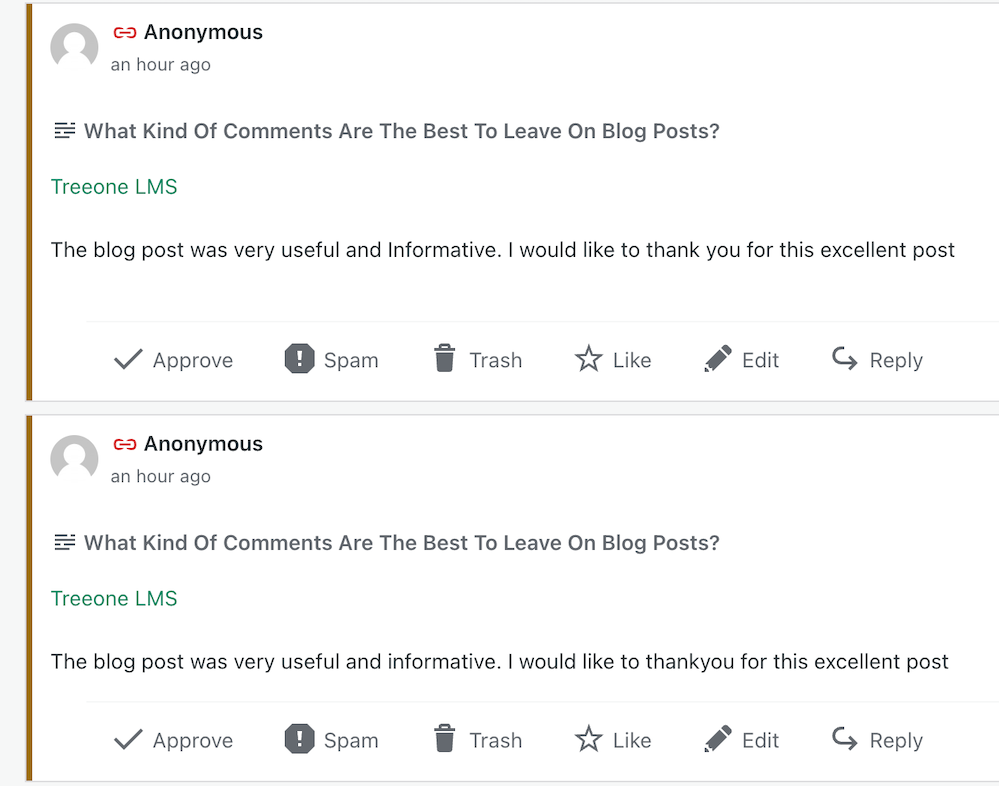
Imagine my concern when I came across this comments section on a recently read post.

Image showing three spam comments in the comments section of a blog post
Never approve these types of comments

I was appalled to see these comments and could not understand why they’d been approved. Given that the blog’s posts would probably be full of these types of comments, I also decided not to follow it.

Spam comments not only detract from the quality of a blog but also discourage meaningful interactions. Let’s keep the blogging community free from such spam and focus on producing meaningful engagement. Your thoughts and ideas are too valuable to be drowned out by spam.

Other examples of spam comments.

Image showing spam comments on a WordPress blog

Some may look genuine, but they’re not. Spammers and spambots are getting cleverer at fooling us into approving their comments, so beware.

Thank you

I want to express my deep appreciation to all of you who support and interact with me here. Your engagement is not just a number on a screen but a vibrant testament to the joys and value of blogging. I especially want to acknowledge those who actively interact with me, as your contributions are the lifeblood of my blog.

Remember, it’s not just about the numbers but the profound connections we build through interactions. For instance, when a reader shares a personal experience related to a blog post or when we engage in a thoughtful debate about a controversial topic, these are the types of interactions that genuinely enrich the blogging community.

Let’s wrap it up.

This post delves into the importance of engaging with readers and other bloggers, offering insightful strategies to spark meaningful interactions.

Avoid leaving short, non-engaging comments on all the posts you read. Instead, leave a thoughtful comment every now and again.

Don’t leave a comment just to leave a comment or prove you’ve visited.

Never feel obligated to comment because they always comment on your posts.

There’s nothing wrong with not wanting to engage. Some readers are more comfortable reading a post without saying anything.

Take your readers seriously by responding to or acknowledging their comments.

Never approve spam comments. Mark them as spam and delete them.

Consider closing comments off if you do not want to engage with your readers or respond to any questions.

If you crave engagement, ask open-ended questions at the end of your posts or invite readers to share details of their experiences with the subject you’ve discussed in the post.

Do you enjoy engaging with your readers and other bloggers? What type of commenter are you? How do you deal with spam comments and the spammers? Share your knowledge and ideas in the comments section.

Click the buttons below to follow Hugh on Social Media

Copyright @ 2024 hughsviewsandnews.com – All rights reserved.

The Amazing New WordPress Comments Box: What It Does

Have you noticed the new style comment box on WordPress?

In line with the Block editor, WordPress has rolled out a new cool comment box on most WordPress blogs. While I’m writing this post, I still see a few blogs with the old-style comments box, but I’m confident all WordPress blogs will soon display the block-style comment box.

The new style comments box appears on blog posts, but not when you add your comment via the comments box on the WordPress Reader.

Light blue image with the words 'The Amazing New WordPress Comments Box: What It Does' in white text
This new comments box can do more than just leave comments

For the purpose of this post, I’m using an iMac desktop computer.

Here is a breakdown of what users can do when leaving comments on blogs with the new block-style comment box.

What does it look like?

This is what the new style comment box looks like.

Image showing the new style block comment box on WordPress
WordPress Block Style Comments Box

It looks very simple, doesn’t it? And it is very easy to use. Your Gravatar image appears in the bottom left corner.

The comments box looks like this as soon you click in the box.

Image showing
Click inside the box to start typing your comment.

Notice the difference? A toolbar has opened along the top, and an ‘+‘ icon has appeared inside the comments box. Let’s examine what they do. I’ve numbered some icons in the following image.

Image highlighting the features of the toolbar on the block style comments box on WordPress
Features of the toolbar
  1. Block being used.
  2. Aline text
  3. Bold
  4. Italic
  5. Pingback link

1 – This is the type of block being used when commenting. It will always be the Paragraph block by default, but you can switch to the List or Quote block by clicking on it. If you change it to the List or Quote block, a new toolbar will appear.

2 – Use this icon to align text to the left, right or centre.

3 – Use this icon to make the text bold.

4 – Use this icon to make the text italic.

5 – Use this icon to create a pingback.

Most readers only use text when leaving comments and they will never feel the need to align it or make it bold. However, many bloggers want more.

You can now insert other blocks into the comments box by clicking the ‘+‘ icon. For example, you can now easily insert an image in your comment by clicking the ‘+‘ icon and choosing the Image block.

Image showing an image placed into the block-style comments box on WordPress.
Copy and paste the URL address of the image you want to add.

How cool is that? (not the photo of me, but the fact that I can add an image to the comments). This is especially good for participating in photography challenges without creating a blog post or when explaining something where including an image or screenshot helps.

I want to mention that you can create pingbacks in your comments. Pingbacks are powerful and can help boost visitors to your blog. We could already add pingbacks when using the Classic view on our blog’s dashboard but we can now finally do it using the Default view.

Image showing how to create a pingback in the comments box on WordPress
Create pingbacks in your comments.

Are you unsure how to create a pingback? My post, The Power Of Pingbacks: How To Create One, provides full details.

Before submitting your comment, remember to click the small settings cog next to your Gravatar photo to open a new menu. Why?

Image showing the new menu that opens when clicking the settings button next to a Gravatar profile in a Block-style comments box on WordPress
Click the settings cog next to your Gravatar picture for a new menu.

Not only will the menu that opens confirm if you are logged into WordPress, but you can also sign up to receive web and mobile notifications for posts on the blog you are leaving your comment on, get email notifications of new posts, and receive email notifications of any new comments left on the post (including a response to your comment from the blog host).

Press the ‘Comment‘ box to submit your comment.

Is this true?

I’ve heard that some bloggers are threatening to stop leaving comments or are thinking of leaving WordPress because of the introduction of the new block-style comment box.

Given that the bare minimum somebody has to do to leave a comment is to type their comment into the box, I find it hard to believe that people are threatening to stop leaving comments or leaving WordPress because of the introduction of this new comments box. If you are, please reconsider your decision.

The new block-style comments box is not hard to use; it’s just a little different!

Update

Users can now disable blocks in comments. Go to Settings – Discussions, and in the ‘Comments‘ section of the page, turn off ‘Enable blocks in comments.’ Remember to save the change.

WordPress’s new comments box style is a refreshing update that enhances the user experience. Its modern and intuitive design makes interacting with comments more enjoyable. If you have any questions about it, feel free to leave them in the comments section. I look forward to hearing your thoughts!

Layout, content, settings, and format might differ on self-hosted blogs.

Click the buttons below to follow Hugh on Social Media

Copyright @ 2024 hughsviewsandnews.com – All rights reserved.
Experiencing Problems With Leaving Comments On WordPress? This Is What I Found. Read This Post Now

I’ve written about comments a lot over the last few months, so this seems like the ideal opportunity to discuss some problems with commenting on WordPress.

First, I want to discuss a problem with getting email notifications from WordPress whenever comments are left on my blog posts.

Light blue image with the words 'Experiencing Problems With Leaving Comments On WordPress? This Is What I Found. Read This Post Now' in white text.
Are you experiencing any of these problems with comments on WordPress?

I’ve stopped getting email notifications whenever anyone comments on one of my posts, so I have had to revert to checking for new comments on my blog’s dashboard.

It’s not a huge problem, but the email notifications act as a backup, so I know when comments have been left, and they also serve as a reminder that I have comments to respond to. I don’t delete an email notification until I’ve replied to a comment. That way, I don’t miss any.

I reported the problem on the WordPress Forum. That was over two weeks ago, and whilst I’ve had a lot of contact from WordPress staff, the problem is currently with their developers.

Is anybody else having problems getting email notifications of comments left on their blog posts? Or is it just me?

I’ve also reported another issue to WordPress. I’m wondering if any of the following are happening to you when leaving comments on other blogs?

Other problems with commenting.

Have you noticed that the comments box on WordPress has changed? The old comments box has been replaced with a new one (see the following image), but it seems to be causing me a few problems.

Image showing the new-look comments box on WordPress.
Have you noticed the new comments box on WordPress?

The above new style comments box has gradually been introduced to most blogs on WordPress.

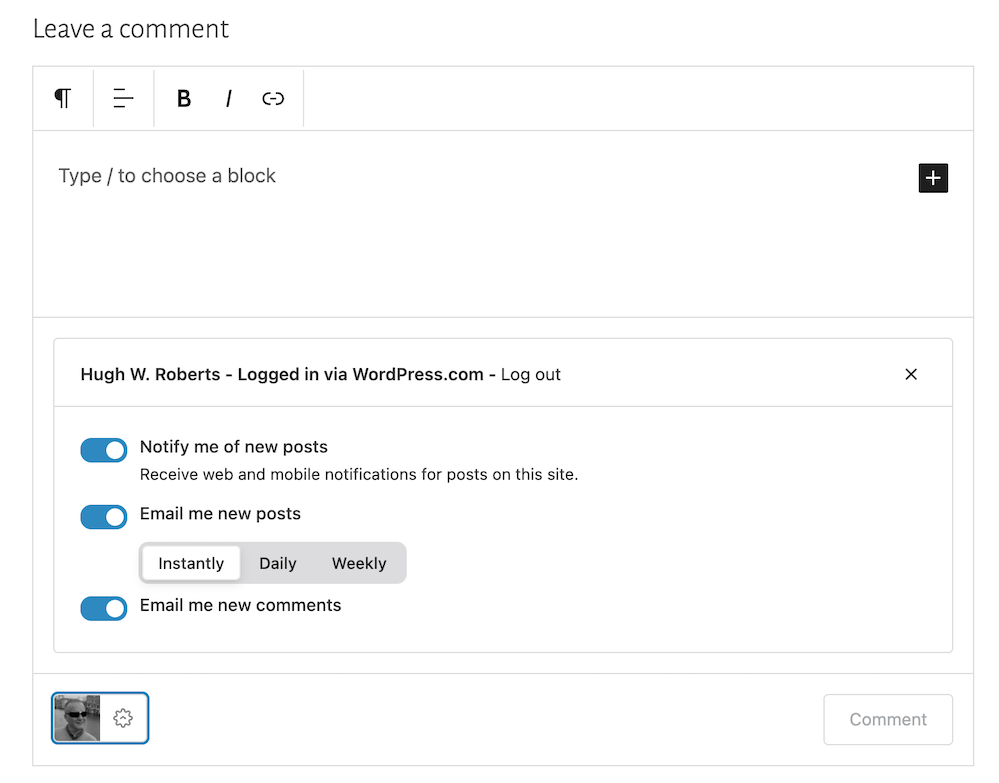
You can write a comment, press the reply button, and move on pretty swiftly, but my concerns are with something hidden behind the settings (cog) button next to the icon that displays your Gravatar image. When you press the cog, you’ll see this.

Image showing the tree options available on the new-look comments box on WordPress.
There are three options to choose from in the new-look comments box.

See those three new options at the bottom of the comments box? Not only can you now get web and phone notifications of new blog posts from the blog you’re leaving a comment on, but you can set how often you get notifications of new posts.

These are not new, though. They’ve been available for use on WordPress for a long time but were buried deep in our blogs’ dashboard settings. Now, they’re much easier to find and use.

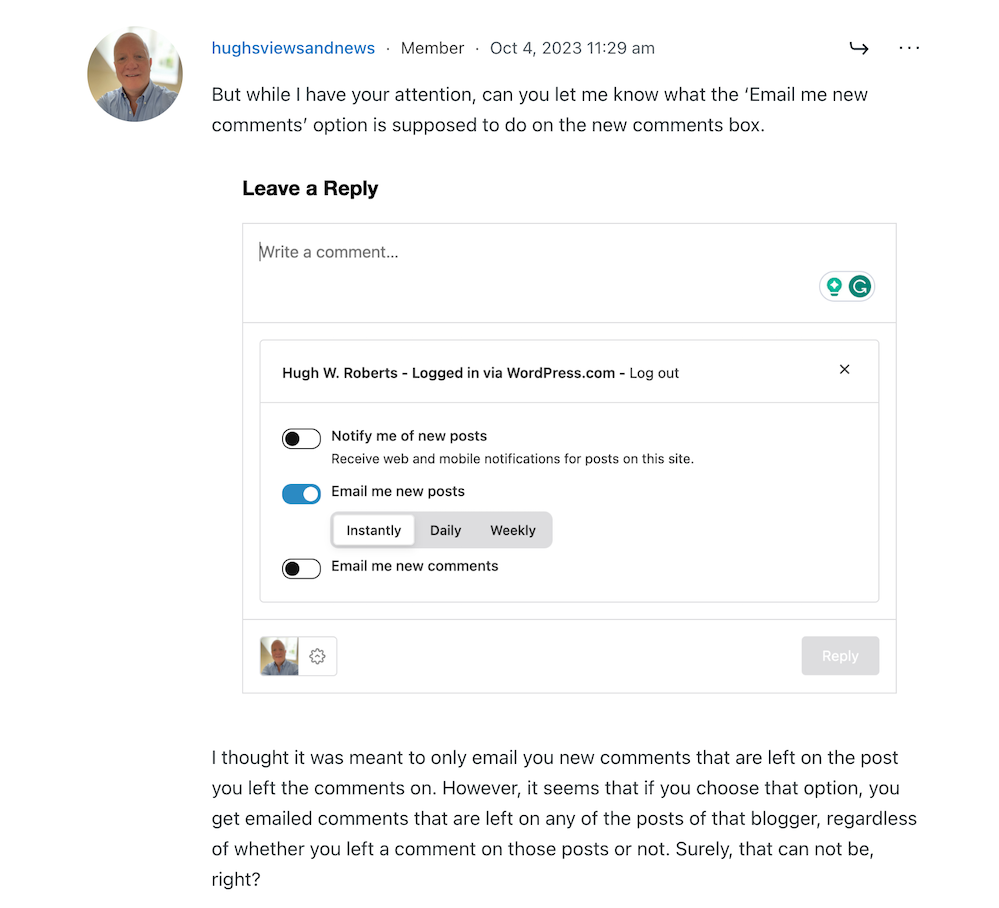
So far, so good, you may think, but it’s the ‘email me new comments‘ button that is causing me concern.

You see, I’m one of those bloggers who like to receive an email whenever anyone replies to a comment I’ve left on their blog or when anyone else leaves a comment on the post I’ve already commented on. It’s my way of knowing that not only have they responded to my comment but also a way for me to either reply to or ‘like’ the comment. I do not like the thought of any blogger thinking I’ve ignored their comment.

The problem now is that when you slide the ‘email me new comments‘ button on, not only do you get emailed comments for the posts you’ve left comments on, but you’ll get email notifications of any comment left on any of the posts on that blog regardless of whether you left a comment or not.

If the blog you’ve left a comment on is huge and gets hundreds of comments, this could become a big problem with your email box filling up quickly.

Needless to say, that is something I do want. I only want email notifications of comments left on the posts I left a comment on. Why? Well, I find that reading comments can sometimes be as interesting as the post they’re left on, plus comments often give me new ideas for blog posts.

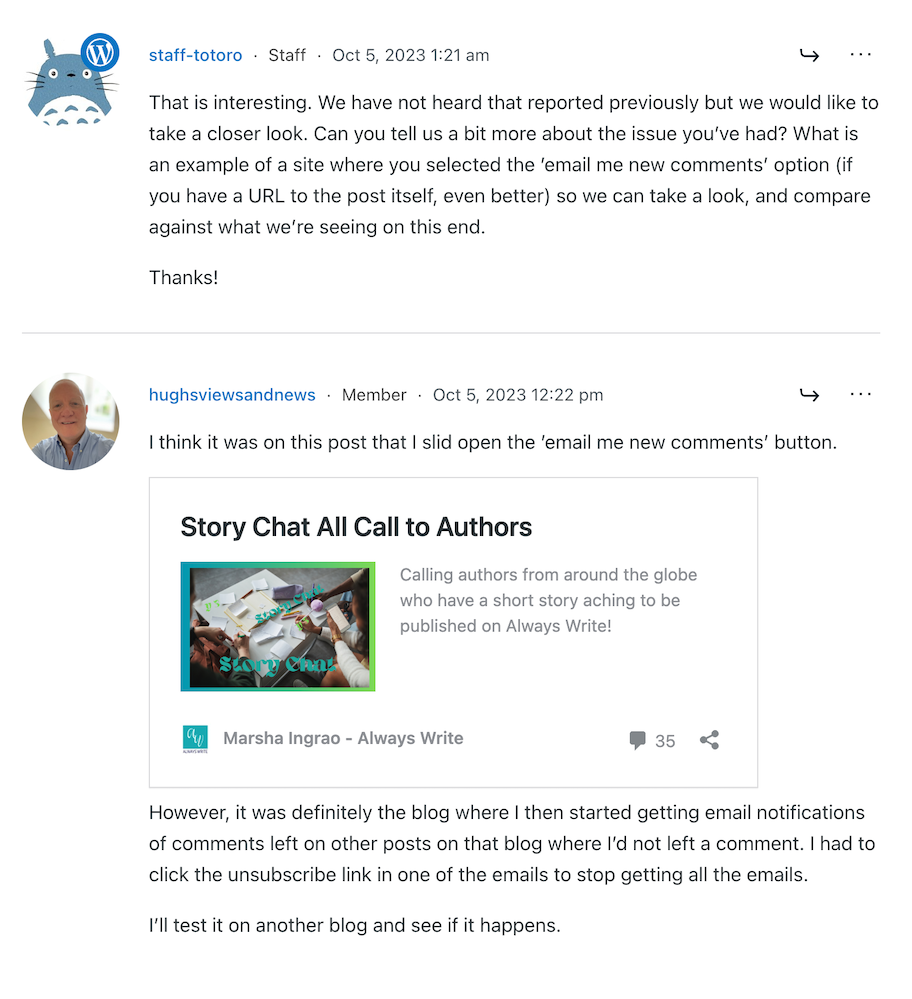
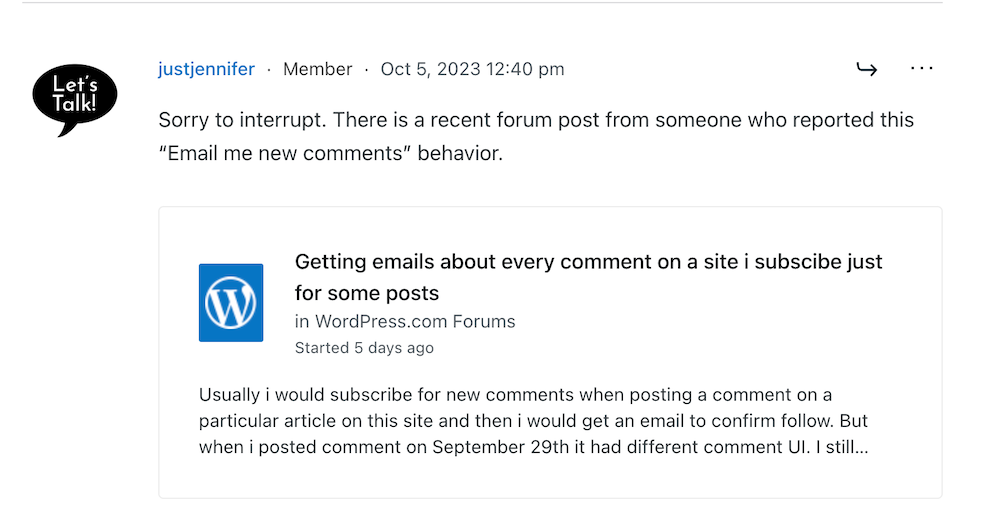
I’ve reported the issue to WordPress, and they’ve replied. See the screenshots below. However, I’m not the only one who reported this particular problem.

Image showing discussion on WordPress forum regarding email notifications about comments
Images showing a discussion on WordPress forum about emails and commenting.
Image showing another blogger who has reported email notification problems on WordPress
Somebody else has reported the same problem.
Image showing a response from WordPress to my concerns regarding problems with email notifications from WordPress
A response from a member of staff at WordPress

That was the last response from WordPress, but I’ll update this post with any developments.

Some good news – My spam box is empty!

Is it only me, or has anyone else seen a drastic reduction in spam since the new comment box appeared? I used to get hundreds of spam messages to scroll through every day, but now my spam box is empty almost every day – hooray!

So, there is no need to close comments off posts anymore if WordPress has waved a magic wand and stopped the spam once and for all. Hooray – that means I can leave comments on blog posts that are more than a month old.

Are you having any of the problems described in this post or any issues with leaving comments or receiving WordPress notifications as a whole? Has the amount of spam you’re getting plummeted? Let me know in the comments section.

Follow Hugh on Social Media. Click on the links below.

If you enjoyed this post and want more like it, enter your email address and click ‘Subscribe’ to stay up-to-date with my latest content.

Layout, content, settings, and format might differ on self-hosted blogs.

Copyright @ 2024 hughsviewsandnews.com – All rights reserved.

What Kind Of Comments Are The Best To Leave On Blog Posts?

My blogging friend Brenda, who blogs at Curiosities, Castles and Coffee Shops, publishes a series of blog posts where she introduces a new blogger and shares some wonderful blogging tips.

In her recent post, Brenda talks about using prompts to get ideas for blog posts, especially when we struggle to find something to write about. She mentions the daily WordPress prompt, which asks a question bloggers can respond to in a blog post.

I won’t go into all the details of Brenda’s excellent advice, but it got me thinking about the subject of comments.

Light blue image with the words 'What Kind Of Comments Are The Best To Leave On Blog Posts?' in white text.
What kind of comments do you leave on blog posts?

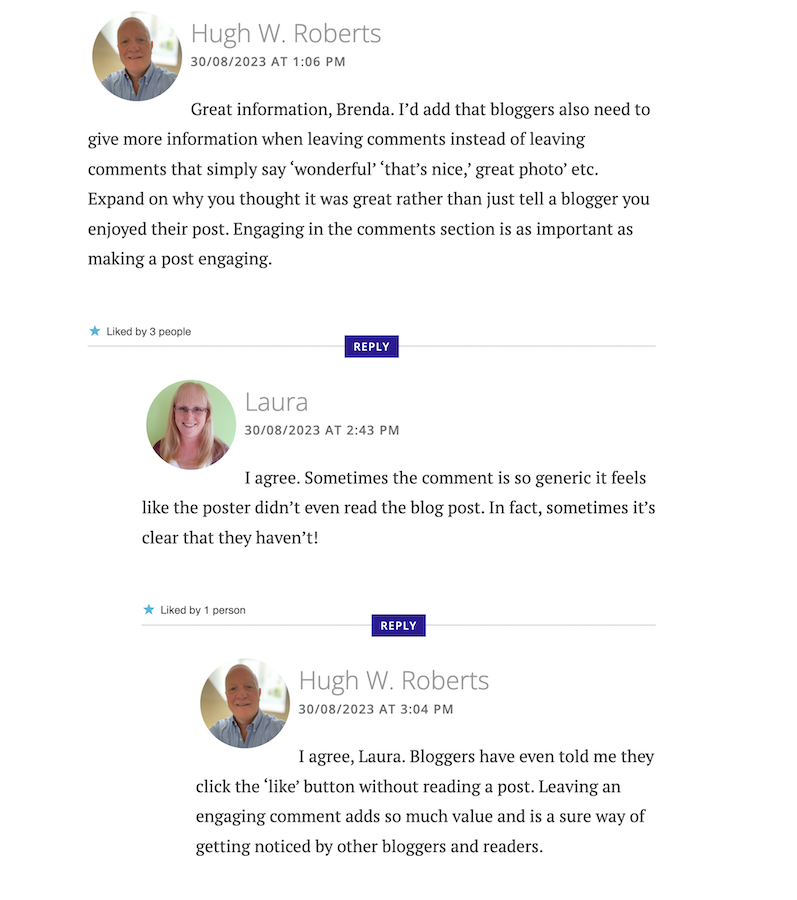
I left a comment on Brenda’s post, which sparked a conversation with another blogger, Laura, who blogs at Keeping It Creative.

The following screenshot is just a small part of the conversation Laura, Brenda, and I had about the subject of comments.

Image showing engaging comments between bloggers on a blog post.
Are your comments engaging?

Our conversation got me thinking about the overall subject of comments and how I’ve noticed a big difference in the comments being left on blogs.

When I first started blogging, the majority of bloggers had conversations and discussions in the comments section with each other about the subject of the post. But over time, that trend seems to be dwindling which had me asking the question –

‘What has happened to the art of conversation and discussion in the comments section of blogs?’

Gone are the days when many readers left comments that not only proved they’d read the post but also gave feedback that opened discussion and conversation.

Now, it seems, some bloggers leave comments with little, if any, way of responding to them other than with a ‘Thank you.’ Comments such as –

  • ‘I enjoyed this.’
  • ‘Wonderful.’
  • ‘This is a great read.’
  • ‘Well done.’
  • ‘Great interview.’
  • ‘You did a great job.’
  • ‘Another great story.’
  • ‘Great authors and books.’
  • ‘Great post.’
  • ‘Thanks for sharing this.’

Or worse, a comment that includes nothing but emojis.

Yes, some of those comments sound encouraging, but as Laura said in her comment, ‘Sometimes a comment is so generic, it feels like the person leaving the comment never read the post.’

None of the above comments mention anything about the contents of the post.

Why do people leave short, non-engaging comments?

There are probably some genuine reasons for leaving non-engaging comments all over the blogging world, but what are they?

I hope some of the reasons will be left in the comments section of this post. I’m interested in knowing.

Some bloggers claim they don’t have the time to leave longer, engaging comments because they don’t have the time to leave them. Some have too many other blogs to visit. Some rush around the blogging world because they only have so much time to visit and comment on as many posts as possible.

But in contrast, if they didn’t feel obliged to visit these blogs to leave short, non-engaging comments, they could free up some time to leave a few engaging comments that open up discussion and conversation.

Then I got this comment from Janice, who blogs at Mostly Blogging.Com.

Image of a conversation saying that it is no longer trendy to leave comments on blog post.
Is it no longer trendy to leave comments on blogs?

I was shocked by what Janice told me. Is it really no longer trendy to leave comments on blogs? Are readers only wanting information, not a community?

The other side of the blogging coin.

It’s not only some of those visiting posts at fault for leaving short, non-engaging comments. Some bloggers respond to engaging comments that clearly show they want to discuss the contents of a post by saying nothing more than a ‘Thank you.’ They instantly cut off engaging with their audience.

What are engaging comments?

  • They contain information that proves the post has been read.
  • They are written in an engaging, friendly manner.
  • They are at least a couple of sentences long.
  • They indicate that you want to discuss the contents of a post further with who wrote the post.
  • Include any questions about the contents of a post.

And let me reassure you that you should never feel guilty for not leaving a comment or feel obliged to leave one on any blog. There is nothing wrong with clicking the ‘like’ button and moving on after reading a post if you’ve nothing of value to add.

I don’t enjoy having to reply to any comment with just a ‘thank you.’ I want to get into a discussion or conversation about the contents of my posts and what made whoever left a comment say what they said.

For example –

  • Why did they think the post was good?
  • What was it that made them enjoy reading the post?
  • Why was it a great read, story or interview?
  • Was it the way the post was written or some of the answers given? If so, which ones?
  • Did the post strike a cord? Why?
  • What parts did they like/dislike the most?
  • Was it something new they learned? If so, what, and how will they use the new information?

I’ve stopped leaving comments on blogs unless I’ve something of value to add.

And I never feel guilty for not leaving a comment.

I don’t need to prove I’ve visited a blog.

I don’t need to make anyone think I’ve read their post.

I don’t feel obliged to follow and read posts on a blog simply because that blogger follows me and leaves me comments.

And nor should you.

So, what has happened to the art of conversation and discussion in the blogging world? Is it dead, or have I, as a blogger who enjoys discussion and conversation, become a minority in the blogging world? Is it no longer trendy to leave comments? Join the discussion and conversation by letting me know what you think in the comments section.

My post, This Is Why It’s Important To Leave The Right Comments On Blogs: 9 Ways, may also help you to improve the types of comments you’re leaving.

Follow Hugh on social media. Click the buttons below.

If you enjoyed this post and want more like it, enter your email address and click ‘Subscribe’ to stay up-to-date with my latest content.

Copyright @ 2024 hughsviewsandnews.com – All rights reserved.

This Is Why It’s Important To Leave The Right Comments On Blogs: 9 Ways

Leaving comments on other blogs is a great way to connect with other bloggers, build relationships, and drive traffic to your blog. But it’s essential to do it the right way to be effective.

Banner for the blog post 'This Is Why It’s Important To Leave The Right Comments On Blogs: 9 Ways'
Are you making the most of your comments?

Here are nine essential points about comments (including what kind of comments to leave) that will help you get the most out of this strategy:

  • 1. Read the blog post first. It may seem obvious, but ensure you’ve read the whole blog post before leaving a comment. This will help you avoid leaving comments that are off-topic or that have already been addressed by the blogger. If you have a question unrelated to the post’s topic, contact the blogger via their contact page
  • 2. Be thoughtful and constructive. When you leave a comment, add something of value to the conversation. Share your own thoughts and experiences, Ask questions and start conversations. If you think the post is excellent, expand on why rather than saying, ‘Great post’ and rushing off.
  • 3. You can build relationships with other bloggers. When you leave a thoughtful comment on another blog, you show the blogger that you appreciate their work and are interested in what they say. This can help you build relationships with other bloggers, leading to the possibility of guest posts, interviews, and other forms of collaboration. Friendships can also be made.
  • 4. You can drive traffic to your own blog. If you leave a helpful or insightful comment on another blog, other readers may be interested in checking out your blog. This can drive traffic to your blog and increase your readership. However, ensure you’ve linked your blog to your Gravatar; otherwise, it won’t work.
  • 5. You can improve your own writing skills. When you leave comments on other blogs, think about your own writing and how you can improve it. Don’t rush to leave a comment; check for any mistakes before leaving it. This can help you become a better writer overall. Other bloggers and readers will determine how much time you have for them by the type of comments you leave.
  • 6. You can learn new things. You are exposed to new ideas and perspectives when reading other blogs’ comments section. This can help you learn new things and expand your knowledge base. It will also open up ideas for new blog posts.
  • 7. You can have fun. Leaving comments on other blogs can be a fun and rewarding experience. It’s a great way to connect with others who share your interests and learn new things. However, always ensure your comments are thoughtful and constructive. And only leave comments if you are genuinely interested in the post’s subject. Don’t force yourself to leave comments or feel obliged to leave one.
  • 8. Be respectful. There’s a difference between constructive criticism and just being rude or negative. If you have a genuine issue with something in the post, try to approach it in a respectful and constructive manner. If you can’t find anything positive to say, it’s probably best not to leave a comment at all. The same goes for rude comments to or about other bloggers. Be respectful.
  • 9. Be patient. It may take some time to build relationships with other bloggers through comments. You may see results later. Give it time; remember that not everyone will be interested in your blog’s content. Just because you comment on other blogs does not mean they’ll enjoy and want to leave comments on your blog.

An important message to new bloggers about responding to comments

I’ve recently followed a handful of new bloggers. However, although I’ve read their posts, left them thoughtful comments, and asked questions about their posts, only two of them replied.

To those that didn’t respond: Don’t ignore comments left on your blog posts. Always reply to them or acknowledge them. You’ll gain more followers and readers by engaging with other bloggers rather than lose followers and probably end up abandoning your blog when followers fail to materialise.

Now an important message to all bloggers about leaving comments

Avoid leaving spam comments on other people’s blogs. This includes comments that have nothing to do with the post or are clearly just an attempt to promote your blog or product. Not only is this annoying, but it can also damage your reputation and credibility as a blogger.

If you need help with something, contact the blogger directly rather than leaving a link to your blog asking for help.

Don’t have time to leave comments?

Some bloggers will tell you they don’t have time to leave thoughtful and constructive comments.

I say – If you don’t have time, click the ‘like’ button and move on. After all, isn’t that what the ‘like button is for?

Nobody will care if you don’t leave comments on all their blog posts. I certainly do not expect everyone who reads my posts to leave a comment.

What’s the worst type of comment somebody can leave?

My answer: Bloggers who leave nothing but a link to their blog as a comment. Those comments all go straight to my spam folder.

Leaving a link as a comment shows that you’re only interested in promoting yourself and not adding value to the conversation. Instead, leave a genuine comment that shows you actually read the post and have something meaningful to contribute.

Let’s wrap it up

In conclusion, leaving the right comments on blogs is essential for building relationships, engaging with other bloggers, and growing your own audience.

By following these tips, you can ensure that your comments add value to the conversation and help you establish yourself as a thoughtful and respected blogging community member.

What’s the worst type of comment somebody can leave you? Do you have any tips you’d like to add about leaving comments on blogs? Leave them in the comments section?

Follow Hugh on Social Media. Click the buttons below.

Want more posts like this? Enter your email address and click Subscribe.

Copyright @ 2024 hughsviewsandnews.com – All rights reserved.