Look! Blame Me For A Painful Drop In Blog Subscribers

Do you know who follows your blog? Do you care about who is following you? If not, you ought to.

I’ve recently gained many new followers. Delighted, you may ask? Far from it. You see, I’ve noticed a trend among these followers. They all have a lot of random numbers (sometimes mixed with letters) in their profile names. Here’s an example:

An image displaying the details of a spam bot account that follows my blog. The profile name is made up of a combination of random numbers and a few letters.
An example of a recent spam-bot subscriber.

Not only that, but all of them ended with @gmail.com or @hotmail.com. And they follow in batches.

They not only seemed strange to me, but I also had no way of discovering who these new followers were, as none of them had any links in their Gravatar profile apart from their email address.

I soon realised that most of these new followers were spam-bots. What’s wrong with that, you may ask? There are several reasons why permitting spam-bots to follow and subscribe to your blog is not advisable.

Reasons to Not Allow Spam-Bots to Follow Your Blog

  1. Reduced Engagement
    • Spam followers do not contribute meaningful interactions, which can skew your engagement metrics and give a false impression of your blog’s popularity. They will, however, try to bombard your blog with spam comments and try to spam the comments box of your readers, too.
  2. Dilution of Community
    • Genuine followers are lost in a sea of spam accounts, making it harder to build a real community around your blog.
  3. Potential Security Risks
    • Spam-bots may pose security threats, as they can be linked to malicious activities such as hacking attempts or phishing schemes.
  4. Impact on SEO
    • Search engines may see high numbers of spam accounts as a sign of poor-quality content, which can negatively affect your blog’s search ranking.
  5. Email Spam
    • Spam-bots can lead to unwanted comments and email communication, and may even compromise your email’s reputation if they harvest your blog’s content.
  6. Negative Perception
    • A blog with many spam followers can create a negative impression on potential genuine followers, who may question the legitimacy of your content, especially if lots of spam comments show up on your posts.
  7. Lack of Valuable Feedback
    • Engaging with real readers provides valuable feedback and insights, whereas spam accounts offer no legitimate input on your content.

It’s simple to unsubscribe anyone (including spam-bots) from following your blog. Here’s how to do it. I’m doing this using an iMac Desktop computer.

  • On your blog’s dashboard, select Jetpack – Subscribers.
An image showcasing Jetpack - Subscribers on a WordPress blog's dashboard.
Click on Jetpack – Subscribers
  • You will see a list of all your subscribers.
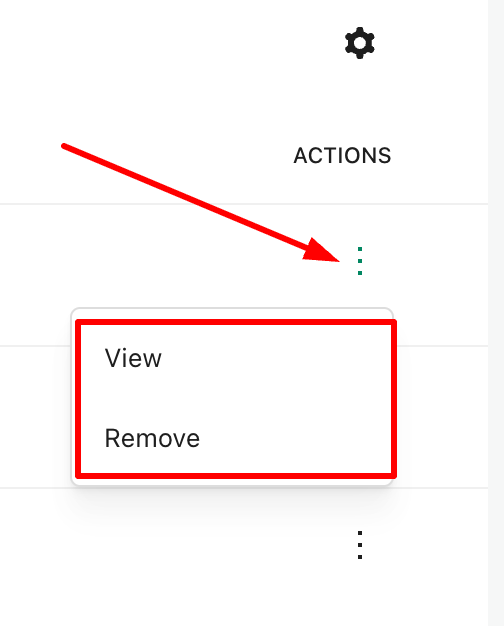
  • Click on the three dots (also known as a kebab menu) next to the subscriber you wish to delete and select ‘Remove.’ You have now unsubscribed the account from your blog.
  • If you wish to discover more about the subscriber, click the ‘View‘ button. Doing so allows you to gather further information about the subscriber, including whether they have a WordPress blog.
An image displaying the Remove and About links on a subscriber list of a WordPress blog.
Click the view or remove button.

While removing these spam-bots from my blog, I noticed that WordPress had also been busy informing me of purged subscribers.

An image of a suspended WordPress account.
WordPress has also been working to suspend suspicious accounts on my behalf.

I had no idea WordPress did this. However, I still had to unsubscribe the purged accounts and remove them from following my blog.

By being vigilant in monitoring your followers, you can help ensure that your blog remains a vibrant and secure space for genuine interaction.

And here’s what happened when I unsubscribed these spam-bot and purged accounts.

An image depicting a sudden decline in subscribers on a WordPress blog.
Sometimes, a drop in subscribers is a sensible thing.

Summary

  • Allowing spam-bots to follow your blog can lead to several issues.
  • They don’t contribute meaningfully, skewing your metrics.
  • Genuine followers can be lost among fake accounts.
  • Spambots may be linked to malicious activities.
  • High numbers of spam followers may harm your blog’s search rankings.
  • They can lead to unwanted communication and damage your email reputation.
  • Many spam accounts can diminish your blog’s legitimacy.
  • Real readers provide insights; spam accounts do not.
  • Unsubscribing spam-bots is straightforward through the Jetpack – Subscribers section on your blog’s dashboard.
  • After removing these accounts, you may notice a decline in subscribers, which, although concerning, can be a healthy sign of clearing out ineffective followers.
  • Staying vigilant about your follower base is key to maintaining a genuine and engaging blog.

Are you aware of who is following your blog? How do you protect your blog from unwanted subscribers?

Layout, content, settings, and format might differ on self-hosted blogs.

The featured image in this blog post is taken from Pixabay. AI checked spelling and grammar mistakes.

I’m getting tough with non-engaging comments. Comments such as ‘Nice post’ are marked as spam.

Click the buttons below to follow Hugh on Social Media

Copyright @ 2025 hughsviewsandnews.com – All rights reserved.

    Is Your Blog Safe? One Security Feature You Must Have

    You wouldn’t leave your doors unlocked if you were the last one to leave the house, would you?

    Would you give a stranger the password to your online banking account?

    Would you share or give a stranger the password to your blog?

    Protecting your blog is just as important as protecting your home and online bank accounts, yet many bloggers share personal details about themselves on their blogs and on social media, which can be a treasure trove for scammers. Be careful what information you share.

    Before sharing any information, ask yourself, ‘Would I share this information with a complete stranger?’

    Light blue image with the words 'Is Your Blog Safe? One Security Feature You Must Have' in white text.
    Adding this feature will give your blog an extra layer of security.

    Although we’re all encouraged to use a strong password to protect our blogs, did you know that many blogging platforms, including WordPress, offer users an extra layer of security when it comes to protecting their blogs?

    Two-factor authentication adds an extra layer of security by requiring you to enter a code or use another device in addition to your password. For example, you can use an app like Microsoft Authenticator or Google Authenticator to generate access codes for your blog.

    WordPress offers users two-factor authentication security. Follow the guide below to set it up for your WordPress blog. For this example, I’m using an Apple iMac desktop computer.

    How to set up two-step authentication for your WordPress blog.

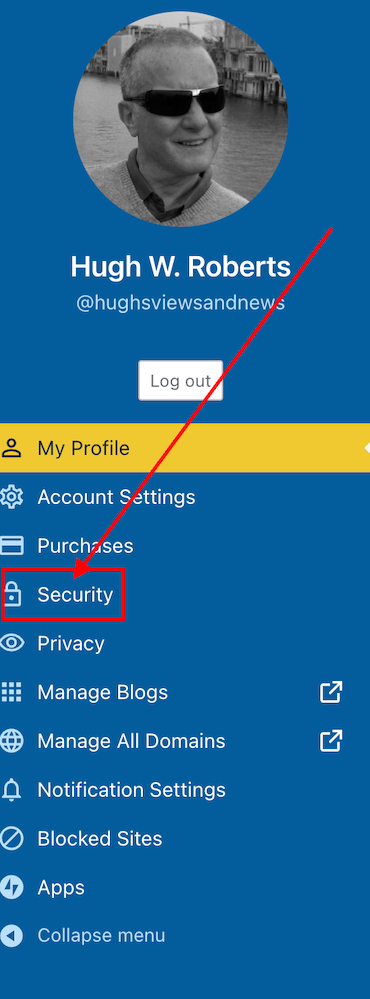
    • In the top right of your blog, click on your profile picture/avatar.
    • Click on ‘Security‘ in the menu on the page’s left side.
    Image highlighting the 'Security' tab on a WordPress blog.
    Click on the ‘Security’ tab.
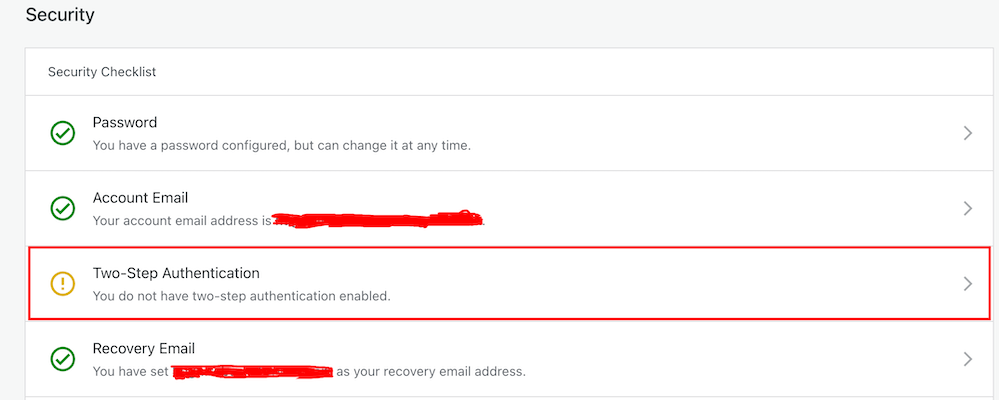
    • Select the ‘Two-step Authentication‘ option.
    Image highlight the Two-Step Authentication tab on a WordPress blog.
    Select Two-Step Authentication
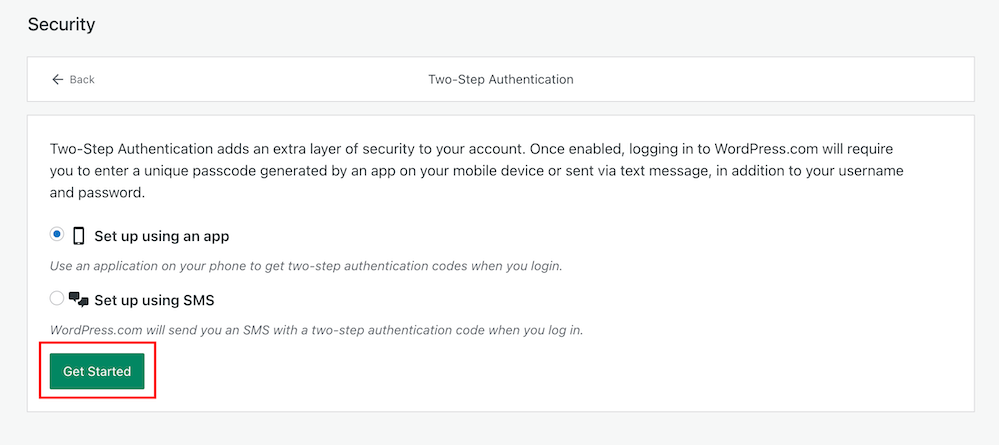
    • Select which method you would like to receive the two-step passcode generated by WordPress, and click the ‘Get Started‘ button.
    Image highlighting the 'Get Started' button when setting up Two-Step Authentication on WordPress.
    Click the ‘Get Started’ button.
    • Follow the onscreen instructions depending on your selected method to receive the WordPress two-step authentication passcode.
    • Once enabled, logging into WordPress.com will require you to enter a unique passcode generated by an app on your mobile device or sent via text after adding your username and password.
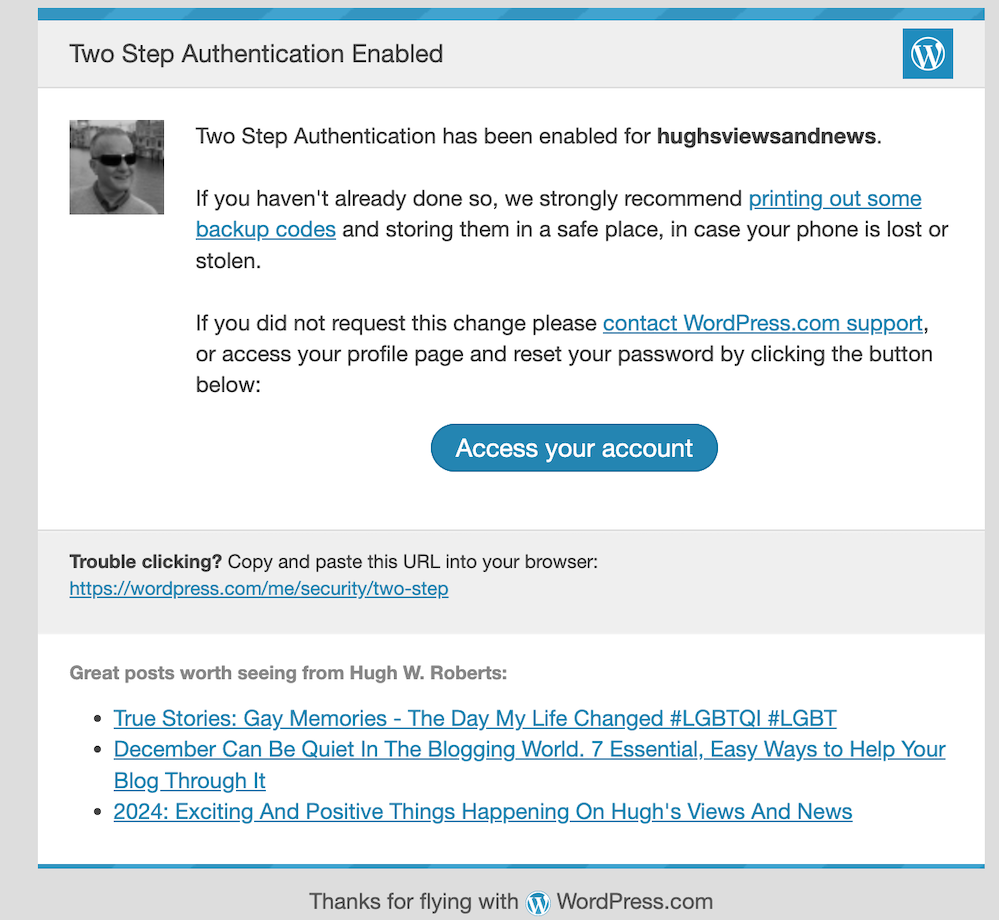
    • You will receive an email from WordPress confirming that two-step authentication has been enabled.
    Image showing an email confirmation from WordPress confirming that two-step authentication has been set up.
    You’ll get an email from WordPress confirming that two-step authentication has been set up for your blog.
    • That’s it! Access to your blog is now protected by an extra layer of security.

    I’d recommend adding or checking that the recovery email address and recovery SMS number for your WordPress blog/account are also correct when switching on two-step authentication.

    Are you making the most of Two-Step Authentication to safeguard your blog? Need guidance on setting it up? Share your best practices for securing your blog in the comments below.

    Did you miss my post giving details of what plans I have for my blog in 2024? Check out my post, ‘2024: Exciting And Positive Things Happening On Hugh’s Views And News‘, for complete details.

    Follow Hugh on social media. Click the buttons below.

    Layout, content, settings, and format might differ on self-hosted blogs.

    Copyright @ 2024 hughsviewsandnews.com – All rights reserved.