WordPress & Blogging tips, flash fiction, photography and lots more!
403 posts
5 followers
Follow Hugh's Views & News
My Profile
Paste my profile into the search field of your favorite open social app or platform.
Your Profile
Or, if you know your own profile, we can start things that way! Why do I need to enter my profile?
This site is part of the ⁂ open social web, a network of interconnected social platforms (like Mastodon, Pixelfed, Friendica, and others). Unlike centralized social media, your account lives on a platform of your choice, and you can interact with people across different platforms.
By entering your profile, we can send you to your account where you can complete this action.
When I joined Bluesky in November 2024, I thought it might be just another social media platform, but I was mistaken. It has now become a place where I visit and engage every day. Plus, it’s already driving traffic to my blog and has introduced me to many amazing people worldwide.
Bluesky is a friendly, easy-to-use platform for interacting with other users, and many bloggers, writers, authors, and photographers have already joined.
However, it’s not all plain sailing. Bluesky has its fair share of bots and scammers, but they’re easy to deal with.
How does Bluesky work?
If you have ever used Twitter or X, the Bluesky platform runs similarly. However, Bluesky is the new kid on the social media block, so it doesn’t do everything you could do on Twitter/X. However, it does have a couple of features that Twitter/X does not have.
Since it has over 33 million users (as of this post), it’s a social media platform every blogger, writer, and author should consider joining.
How Bluesky Works
Users publish posts (known by some as Skeets), including links to blog articles, books, images, and photos. Other users can view these posts and engage by commenting, clicking the ‘like’ button, and resharing the post (a ‘reskeet’). It’s very similar to what occurs in the blogging world.
The more you interact with other users, the more rewarding and effective your results from Bluesky will be.
Here are the key components of how Bluesky functions:
User Registration: To start, users must create a quick and straightforward account. A missing banner, avatar or profile description makes you look like one of those quickly thrown-together bot/scam accounts that frequent many social media platforms. Be sure to include that you’re a writer, blogger, author or photographer in the description. That helps ensure you connect with fellow writers or photographers rather than those who post about subjects you’re not interested in.
Publishing Posts: Users can share content, including text posts, links to blog entries, images, videos and photos. They can also reshare (known as reskeeting) the posts of other users.
Engagement Mechanisms: Other users can engage with posts by commenting, liking, and resharing. This interaction helps foster a sense of community and encourages dialogue.
Discoverability: Bluesky’s algorithm allows users to discover posts that may not be directly connected to the author, broadening the audience reach. For example, I am also interested in astronomy and have connected with users who publish images, photos and posts about space.
User-Friendly Interface: The platform is designed to be intuitive, making it easy for users to navigate and effectively use its features. I quickly learned how the platform works.
Building Connections: Users can follow others, creating a network of connections that enhances the engagement on the platform.
Community Guidelines: Bluesky implements guidelines that users are encouraged to follow to maintain a friendly environment. These guidelines help minimise conflicts and foster positive interactions. Unlike other social media platforms, Bluesky does not tolerate any hate speech.
With over 33 million users at the time of writing, Bluesky is emerging as a significant platform for bloggers and content creators seeking to broaden their reach and engage with a broader audience.
What not to do on Bluesky
I’ve seen numerous bloggers share links to their posts and then leave immediately. They do not interact with any other users.
It’s no surprise that their posts receive little, if any, engagement or shares.
Unsurprisingly, in the four months I’ve been on Bluesky, I’ve not seen any increase in the number of users who follow them or the number of accounts they follow.
Their accounts resemble stepping onto a new planet that could rapidly be populated but is desolate due to a lack of visitors and engagement.
Avoid dropping links to your own posts and then running away. The general advice for any social media platform is that 80% of your posts should feature the content of other users, while the remaining 20% can be your own material.
Avoid overlooking comments on your posts (except those from scammers or bots). At the very least, show appreciation to anyone who leaves a comment.
Be friendly, helpful, and positive toward others. Remember that Bluesky differs from X/Twitter. Avoid seeking out or engaging in arguments. Ignore, delete, and block any comments from spammers, bots, or troll accounts.
How to spot bot accounts and scammers on Bluesky
The majority of bot and scammer accounts can be easily spotted.
They generally have a high following count but a very low follower count, while the number of published posts is low and primarily consists of posts shared from other users.
Lots of numbers will appear after their BlueSky user name – e.g. hughblogger123456789.bsky.
The account will have a generic, poorly written Al bio and posts.
The account will primarily feature reposts, with very few original posts.
If you accidentally follow one, they will immediately send you a direct message saying ‘Hello’ or asking how you are or where you are from.
They will continue to bombard you with direct messages.
Their bio may sometimes indicate they are seeking love, a partner, or requesting a donation. Some will also claim to be experts in book/blog marketing or able to make you lots of money with little effort.
Their profile pictures may seem too good to be true and are often taken from other sources online. Be cautious of accounts featuring military uniforms and those revealing body parts you might not anticipate seeing in their bio picture.
Here’s an image of a scam account that recently followed me. I immediately blocked it.
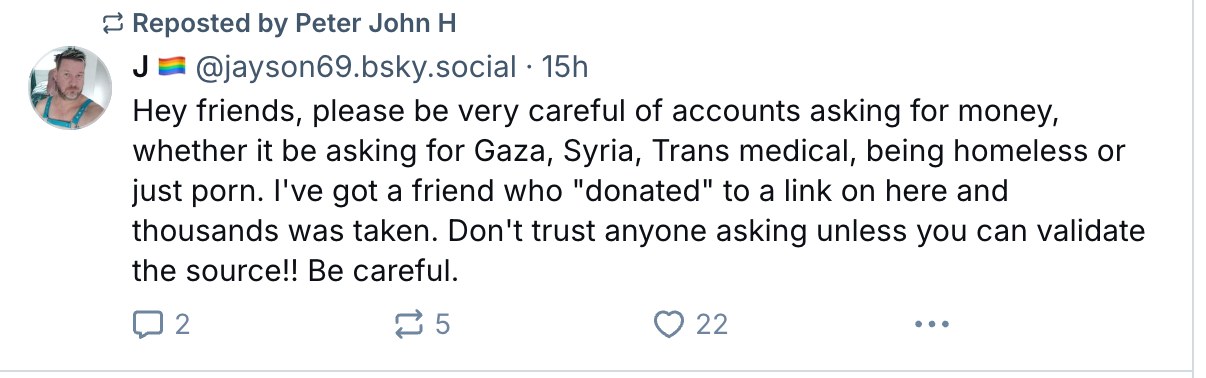
Beware of scam accounts asking for donations.
Sadly, 338 people are following this account, some of which will have donated.
Here’s a warning from one Bluesky user about the type of scam account I mentioned.
Never donate to any accounts asking for these kinds of donations.
More helpful tips from other Bluesky users.
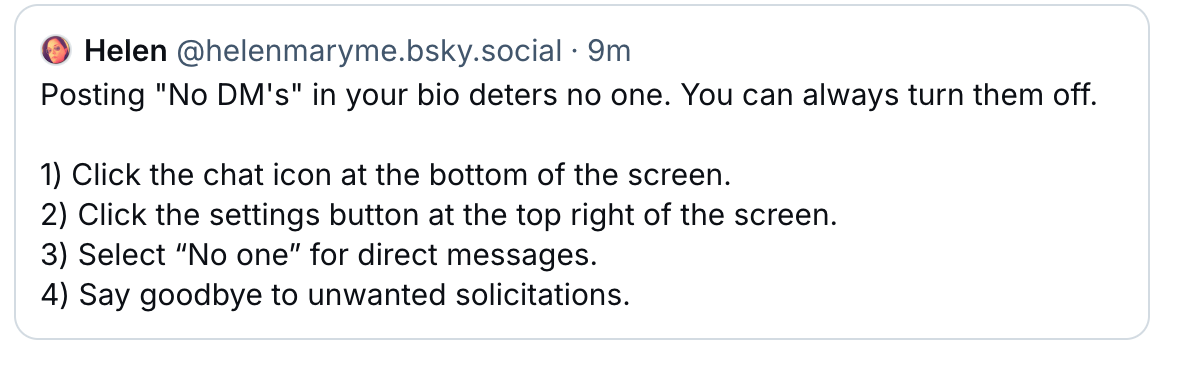
Helen describes ways to stop receiving direct messages (DMs).
Don’t want direct messages on Bluesky? Follow this advice.
Follow Helen on Bluesky at @helenmaryme.bsky.social.
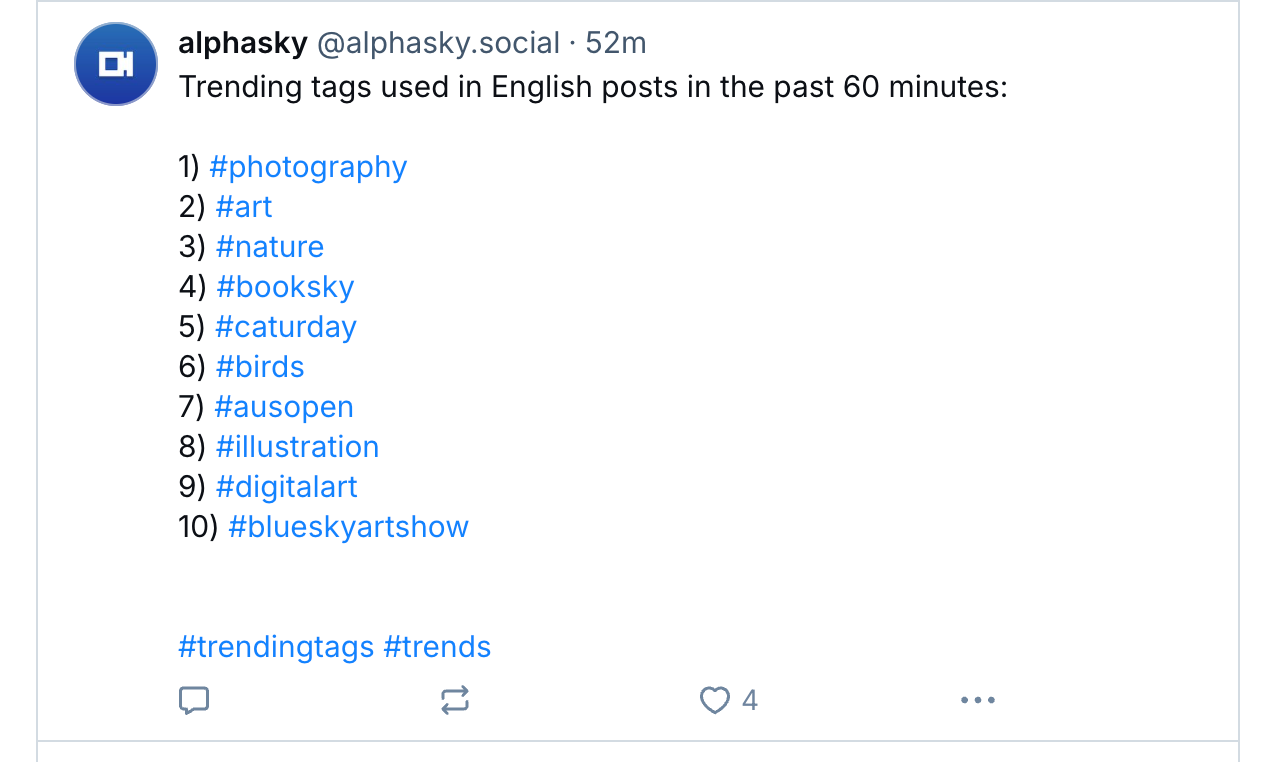
Follow these two accounts on Bluesky to discover which hashtags are trending: @trendtags.bsky.social and @alphasky.social.
Follow these accounts to discover trending hashtags on BlueSky.
Bluesky encourages the use of hashtags, so I recommend using them.
Curious about who has blocked you or added you to lists or starter packs on Bluesky? Follow @listifications.app.
For authors, some Bluesky users offer to add details about your books to their author websites. While this may initially seem suspicious, I recommend sending information only to those you have been following or believe are trustworthy. Here are the details of one author who recently posted, inviting other authors to send him details of their books so he could add them to his author’s website. As you can see, I took up his kind free offer.
Free marketing offers on Bluesky.
Follow JP (James) at @pangeanchronicles.bsky.social. Visit James’ author’s website by clicking the following link.
Create and get yourself added to BlueSky Starter Packs.
I highly recommend creating at least one starter pack and trying to get added to the starter packs of other Bluesky users. This will allow you to connect with numerous other Bluesky users who share similar interests, thereby increasing your exposure and that of your blog.
For more information about the benefits of Starter Packs on Bluesky, click the following link.
Ready to dive into Bluesky? Share your best tips for navigating the platform! If you have questions or want some help with its features, don’t hesitate to reach out. Feel free to drop your Bluesky handle here so others can easily connect with you.
Click the buttons below to follow Hugh on Social Media
Since BlueSky is new and (at the time of this post) has over 30 million users, it’s an exciting opportunity for WordPress bloggers to enhance their posts by adding a BlueSky sharing button at the end of their posts!
Let me empower your blog by showing you how to connect it to BlueSky. Many blogs have yet to embrace this fantastic feature (and it’s not only BlueSky that you can connect to your blog).
On the dashboard of your blog, go to Tools – Marketing.
On the Marketing and Integrations page, click on the Sharing Buttons icon.
click the Sharing Buttons icon.
Click on the Edit sharing buttons icon.
Click the Edit Sharing Buttons icon.
In the Edit visible buttons box, click on the BlueSky sharing button. If you do not already have it as a sharing button, it will be ghosted out.
Select the BlueSky sharing button.
Click the Save Changes button.
The BlueSky sharing button will now appear on your blog posts.
Visitors can now share your posts with BlueSky.
Click the Reorder button to rearrange the order of the sharing buttons on your blog posts. To do so, click on one of them and drag the button to where you want it to sit.
Click the Save Changes button.
How To Connect Your BlueSky Account To Your WordPress Blog
On the dashboard on your blog, go to Tools – Marketing.
On the Marketing and Integrations page, click on the Connections icon.
Click the Connections icon.
In the Share posts with Jetpack social box, look for BlueSky and click the connect button.
Click the BlueSky connect button.
Add your BlueSky Handle and BlueSky app password in the boxes and click the Connectaccount button.
Add your BlueSky details.
You’ll be asked to confirm your BlueSky account by clicking another Connect button.
Confirm your BlueSky account.
Your BlueSky account is now connected to your WordPress blog. WordPress will share your posts directly with your BlueSky account whenever you publish a new post.
Remember to connect other social media accounts to your WordPress blog by following the same instructions.
Are you on BlueSky? I’d love to connect! Please share your BlueSky details in the comments so I can follow you. If you have questions about BlueSky, adding a sharing button, or linking your BlueSky account to your blog, feel free to drop them in the comments section—I’m here to help!
Social media is a powerful tool. When used correctly, it can connect us with thousands of individuals and bring visitors to our blogs, resulting in new followers and connections.
However, social media is a ravenous beast. Before you realise it, it’ll consume all your time while scattering you far and wide without delivering results. It’ll take everything from you and give little back.
One of the first pieces of advice I received from another blogger was to join as many social media platforms as possible to attract visitors. It turned out to be one of the worst pieces of advice I followed, as it wasn’t long before I found myself spending too much time on numerous platforms.
I realised that spreading myself too thinly on social media was not the solution, so I reduced the number of accounts I managed. This freed up significant time, allowing me to engage more on those platforms. Before long, I noticed increased visitors coming to my blog from various social media sites. Social media was finally paying me back for the time I was investing in it.
Since starting my blog in 2014, I’ve tried most social media platforms. Today, I will discuss five of them and explain why they have worked or not for me.
I joined BlueSky in November 2024. It’s one of the new kids on the block. When this post was written, it had gone past the 27 million milestone of the number of users. That number is rising fast.
Not only have I found BlueSky a friendly place to engage with other users, but it’s simple to use, running a similar platform to X. Like any social media platform, the more you engage with other BlueSky users, the better the results.
I’ll write more about BlueSky in an upcoming post, but early indications are that it’s a rising social media platform that all authors, writers and bloggers should seriously consider joining.
I’ve also found a lot of photographers on BlueSky. If you have a photography blog or host a photography challenge, ensure you join BlueSky.
Don’t forget to add the BlueSky sharing button to the sharing buttons on your blog posts so visitors can share your posts to BlueSky.
I joined Flipboard in 2019. It has brought incredible amounts of traffic to my blog and has an excellent customer service team that reaches out whenever problems occur.
Users add information to magazines, so, as in blogging, setting up categories is essential. My most popular magazines are Blogging Tips, Entertaining (short) Stories You’ll Enjoy, LGBTQI, and Writing Tips.
Mastodon is a big part of the Fediverse, which WordPress promotes heavily. The Fediverse is a global, open social network of independent servers that communicate with each other using a common protocol.
Users create posts in much the same way as on X and BlueSky. Posts appear on the timelines of those who follow the person who created and published the post, but other users can also see them.
I’ve had a steady flow of traffic from Mastodon to my blog, although out of the three social media accounts I use, it’s the one I use the least.
X/Twitter
After 14 years, I deleted my X account on December 31st, 2024, for reasons I won’t go into. This means that I will no longer share my blog posts or other bloggers’ posts on X.
Given that I had over nine thousand followers on X, I hope those who followed me there will now follow me on BlueSky. Some already have, but given that this post is my first mention of joining BlueSky, many will not know I am now active there.
I recently gave Instagram another chance. I did my best to boost engagement, but I struggled significantly. While some people interacted with my posts, it was difficult to stand out amidst all the self-promotion on the platform.
There is nothing wrong with self-promoting your own books and blogs, but I find it too overwhelming when it’s every post. I only saw a little of others promoting the posts of others.
Maybe I was following the wrong accounts?
Instagram wasn’t for me. I deleted my account in December 2024.
Avoid following the accounts of those who only promote their own work and who give nothing back to others.
Other Social Media Platforms
There are many other social media platforms that I have not mentioned, and other bloggers, writers, and authors use them successfully. But how?
I would love to know which social media platforms you use and which ones have been the most successful. In the comments section, feel free to share which platforms you use and your username so that anyone reading the comments can follow and connect with you.
Click the buttons below to follow Hugh on Social Media

















 Hugh's Views & News