WordPress Comment Login Problems: Latest Update and Fix Hopes

The Commenting Problems So Far

If you read my recent posts ‘WordPress.Com Comment Problems? Here’s What’s Going On,’ and ‘WordPress Comment problems? Here’s What’s Still Going On,’ I outlined problems which many WordPress users are having when attempting to leave comments on other WordPress blogs.

I’ve another update for you, and although it’s not news that the main problem has been fixed, I feel we’re moving in the right direction.

First, I want to let you know that I have noticed I am being asked to sign in less often when leaving a comment. So we may be moving closer to a solution. Secondly, I’ve noticed that once I sign in to leave a comment, if I visit another post on the same blog, I am not being asked to sign in again when commenting.

Now I don’t know how many of you sign out of WordPress (and your device) at the end of the day, but I’ve always been advised that not logging out of sites you’re signed into and leaving your computer on overnight is like leaving the front door of your home unlocked when you go to bed. So I always log out of WordPress and switch off my computer when I’m finished for the day.

When I come back the following day, I switch on my computer and sign in to WordPress again. It kinda makes sense. But then I find I have to keep signing in again when leaving comments on some blogs.

Another Response From WordPress

Here’s the latest response I have from WordPress.

‘Hi Hugh,

Hope your day is going well. We heard back from the developers on the sign-in prompts, and there are two things going on.

  1. We recently changed how signing in for commenting works. Even though you were already logged in, you’ll need to sign in once more so your browser picks up the new session. That part should only be a one-time thing.
  2. The second is the custom domain piece we mentioned in an earlier email. When a blog uses its own domain, like estherchilton.co.uk, your browser sees it as a separate website from WordPress.com, so your login can’t follow you over. That’s a browser rule around cookies rather than anything in your settings, which is why it started happening without you changing a thing. We’ve logged a request with the team to make this more user-friendly, though there’s no date on it yet.

Would you mind trying something for us? Next time you get the prompt, sign in, leave your comment, then go back to that same blog in a day or two. If it asks you to sign in all over again, please send us the link and we’ll share that info with our developers.

Thanks again for sticking with us on this one, and enjoy the rest of your week.’

What I expected (that WordPress have changed how signing in for commenting works) is true. I was also suspicious this had happened when someone from WordPress recently asked me what I thought of the new comment box design they rolled out. I went back with my thoughts but didn’t hear back.

This begs the question: has the new-style comment box caused the sign-in issue? I think it may have.

So, I did what WordPress asked in their reply and told them I still have to log in again when leaving a comment on a blog I visited and commented on the previous day. As requested, I sent links to two blogs where I’m still having the problem.

However, I noticed something different when leaving comments. I got this pop-up box after leaving a comment.
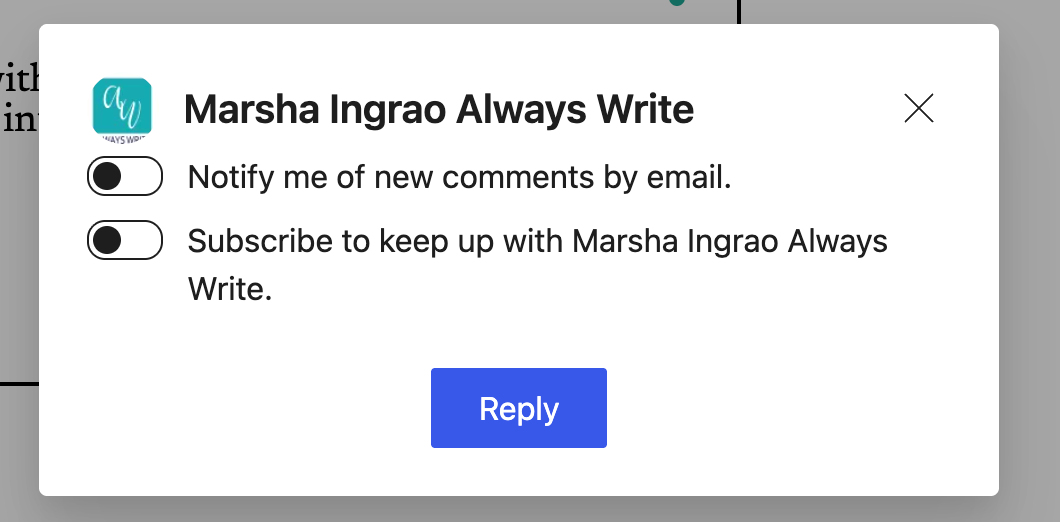
A screenshot of a white pop-up modal box over a dimmed webpage, titled "Marsha Ingrao Always Write" next to a turquoise site logo. The window includes two toggle switches set to off: "Notify me of new comments by email" and "Subscribe to keep up with Marsha Ingrao Always Write." At the bottom center, there is a blue button labeled "Reply," with a close icon (X) in the upper right corner.

Although I have seen these prompts before when leaving comments (before the current sign-in problem), I went back to WordPress to ask why I am being asked to subscribe to a blog I am already subscribed to. Is this all part of the same problem?

Here’s what I said in my reply to WordPress.

‘Okay, I’ve now had a chance to do what was suggested: sign in once, leave a comment, and then go back the following day. I left comments on two blogs and went back today to reply to their replies, but unfortunately I had to sign in again to leave further comments. Here are the links to both blogs.

However, I did notice a new box appear after leaving my reply comments this time. I have attached a screenshot of what I saw. Nothing unusual, because I’ve seen these prompts before, but I don’t know why I am being asked to subscribe to these blogs again when I am already subscribed.

I’ve been blogging with WordPress since 2014, and when I signed in to WordPress at the beginning of my day, it didn’t happen until I recently reported this problem to WordPress: I’m being asked to sign in again to leave comments.  I can understand being asked to sign in again if I’ve signed out, but has something changed on the platform that’s causing it to keep asking me to sign in? As I’m sure you’ll agree, signing into my blog at the beginning of the day makes sense, but there is no sense in having to keep signing in when I’ve already signed in.

You may be pleased to know I don’t have to sign in again to every blog when I want to leave a comment. Here’s a link to one blog that seems to know I am signed in.

Why does this blog know I am signed in, yet others don’t?

There must be a reason why the sign-in problem isn’t happening on all blogs.

I await their reply.

More thoughts

Yesterday, I did the unthinkable and did not sign out of WordPress or my computer at the end of the day. When I returned today, I wasn’t asked to sign in when leaving comments on blogs I commented on yesterday.

However, when I signed out of WordPress and signed back in, I was asked to sign in to leave comments.

So it seems another way to avoid the sign-in commenting issue is not to sign out of your WordPress account, but to keep signing out of your device. Could this be the solution?

Final Thoughts and Some Questions

I know it can be frustrating to have to log in every time you want to leave a comment, but I firmly believe we’re getting there with a solution. For now, remember to sign in when leaving a comment (if you’re asked to).

In the meantime, I have a few questions I’d appreciate you answering in the comments section of this post so I can see how many users are still having to sign in to leave comments on some blogs.

  1. Are you experiencing problems being asked to sign in again (when you’re already signed in) when leaving comments on WordPress blogs?
  2. Did you have to sign in again to leave a comment on this post?
  3. Have you noticed a decline in the number of blogs where you’re asked to sign in to leave a comment?
  4. Do you sign out of WordPress when you’re finished using it, or do you stay signed in?
  5. Do you switch off the device you use to blog at the end of your day (or before going to bed)?

I’ve seen lots of comments across WordPress from bloggers and readers experiencing sign-in problems when leaving comments. If you know somebody having the same problem, please let them know I’m working with WordPress to fix it. If it helps, point them to this post.

Copyright @ 2026 hughsviewsandnews.com – All rights reserved.


The featured image in this post was created using the WordPress image generator. AI was used to check for grammar and spelling mistakes and to help with the layout of the post.

You can follow me on the following sites.

Please feel free to share this post.


Fediverse reactions


Discover more from Hugh’s Views & News  

Subscribe to get the latest posts sent to your email.

63 responses to “WordPress Comment Login Problems: Latest Update and Fix Hopes”

  1. Debbie D. avatar

    Thanks for keeping on top of this, Hugh! My laptop goes into hibernation, but I rarely turn it off completely, unless I’m travelling with it. I generally don’t log out of WP.com. but sometimes clear cookies, which logs me out automatically. I am often asked to log in to comment on WP.com blogs even though I’m already logged in, but it has never happened with your site. At least, it’s a one click operation now, and the comment doesn’t get lost, like it did before. Can’t say I’ve noticed a difference in frequency with the log in issue.

    As Terri mentioned, the Jetpack mobile app can be problematic regarding commenting, so I rarely use it. As for the Reader, that is good to have as a last resort, but I always prefer to visit the actual website.

    1. Hugh W. Roberts avatar

      Thank you for answering my questions, Debbie.

      From what others have said, staying logged into WordPress doesn’t seem to solve the problem of being asked to sign in when leaving comments on some blogs. I’m glad to hear you don’t have to log in to comment on my posts.

      I’m like you and prefer to actually visit a blog rather than read posts on the WordPress Reader, although the Reader does have its benefits.

  2. Fedora Pancakes avatar

    Interesting. I’ve been so bad this past year being active in the comments with others and writing posts myself. I’m slowly coming back, but it’s still a bit irregular, unfortunately. When I do leave a comment, It’s mostly through the reader and I hope it works well. The like button seems to have vanished, though…

    1. Hugh W. Roberts avatar

      Welcome back.

      This problem isn’t affecting commenting through the WordPress Reader.

      I disabled the ‘like’ button in my blog’s settings, so that’s something I did myself.

      1. Fedora Pancakes avatar

        Good to know. Thanks!

  3. Terri Webster Schrandt avatar

    Thanks for taking this issue to the higher ups of WP, Hugh! I’ve resorted to reading posts on my laptop or desktop so I can log in easier. It’s nearly impossible to comment via Jetpack app on my phone, because when prompted to log in, I get taken away from the post and a tiny message appears and I am completely lost trying to get back to the post.

    Yes, almost every time I need to when I read a post, or read a linked post to one of my challenges. Thanks for using mine and Marsha’s blogs as examples.

    OK, two things: First, as I type this reply on my laptop, for which I had to log in to WP since I haven’t used the laptop for a few weeks, I have had to log in to several blog posts today. FYI, both my blog and Marsha’s are block editor themes. And this log in issue happens on what I see as older themes as well. And, then I can comment on other posts without logging in. WEIRD!!!

    Second, I can already see in the comment box that I am being asked to log in to post a reply to your post. More evidence for your case to WP. I don’t log out of WP either, but turn off my computer and devices for the night.

    I hope WP can properly fix this. I now know of over half dozen bloggers have quit. Who knows why, but this issue isn’t helping matters. Thank you for everything you do to keep the ear of the WP engineers, Hugh!

    1. Hugh W. Roberts avatar

      Thanks for all the details, Terri.

      I hardly ever use my phone to blog, so I’ve not looked at what’s happening there, but your experience with the JetPack app sounds dire. And given that WordPress encourage us to blog on the move, that’s not good.

      So, from your comment, I wonder if this problem is theme-related? WordPress certainly introduced a new commenting box in October, and I’ve been experiencing the problems outlined in my post since then. The blogger of the third blog I mentioned in this post uses the Classic editor and still has a Classic theme, yet I never have to sign in when commenting on his blog. His blog seems to know it’s me.

      I’ve since had another reply from WordPress, this time very detailed. I’m going to digest it over the next day or so and will come back to you all with any update. Let’s hope it has a solution.

      1. Terri Webster Schrandt avatar

        Wishing us all good luck, thanks, Hugh!

  4. Darlene avatar

    BTW I did not have to login when I placed my previous comment.

    1. Hugh W. Roberts avatar

      Phew! That’s good to hear.

  5. Darlene avatar

    I also am seeing less requests to log in when making comments. I never log out of WordPress but always turn off my computer before I go to bed or if I leave the house for an extended period of time.

    1. Hugh W. Roberts avatar

      Thanks, Darlene. So it seems that not signing out of WordPress isn’t helping with having to sign in again to comment. It looks like I’ll have to go back to square one again. Still, I’m getting used to having to sign in to comment now.

      1. Darlene avatar

        I am used to sighing in as well, although it is nice when I don’t have to. Thanks for responding to my question so quickly.

  6. Marsha avatar

    P.S. I didn’t have to sign in to comment, but I’m on my computer. My biggest problem with signing on is when I use my phone.

    1. Hugh W. Roberts avatar

      Good to hear you didn’t need to sign in, Marsha. I haven’t even looked at what’s happening on the Jetpack app on my phone, since I rarely use my phone to blog. I like to blog on a big screen with a keyboard big enough that my fingers don’t press too many buttons at once.

      1. Marsha avatar

        It takes me three or four times as long to do it, but when I’m on a long trip, I will use my phone some. Or waiting at doctor’s offices. those are the two times. I’m with you about my fingers, and it’s easier to correct the mistakes my undisciplined fingers make on the computer and on a small keyboard.

  7. Marsha avatar

    I never sign out of WordPress, but I shut down my computer every night, and sometimes during the day. I had no idea that I had a pop-up on my blog! I hate those. That is done without my knowledge or permission. I don’t know if it’s in the settings, but it wasn’t something I set up. Thanks for letting me know. The newsletter that WP does with ever post is relatively new, I think. You’ve given me another thing to research, my friend.

    1. Hugh W. Roberts avatar

      Hi Marsha, the prompts in the pop-up used to be at the bottom of every comment box. However, if you were already subscribed to the blog you were commenting on, the prompt was already enabled.

      WordPress recently changed the comment box, so this pop-up is new, but I haven’t seen anywhere in my blog’s settings where I can turn it off. That doesn’t mean it’s not there, though. From what I can see, it’s only appearing on the blogs where I have to sign in again when commenting.

      1. Marsha avatar

        I just checked my settings. The button is clicked to have commenters leave the name of their blog and their email, which I think used to be automatic. If that one is not clicked can anyone just leave a comment with no identifying information? I never noticed it before.

        1. Hugh W. Roberts avatar

          Yes, if you untick that box, anyone can leave comments on your blog without logging in or identifying themselves.

          1. Marsha avatar

            But do you want that?

            1. Hugh W. Roberts avatar

              I’ve made it easy for people to comment on my posts, so readers don’t need to log in or provide an email address to comment. This opens me up to spam, but Askimet’s anti-spam software seems to do a great job spotting and deleting it, so I don’t see it.

  8. Egídio avatar

    Hugh,

    I am a recent subscriber of your blog. Thanks for your diligent work on this WP issue addressed here.

    My Mac stays on all the time, and I never log off WP. I follow around 60 blogs, and the log-in issue is erratic. Some blogs that never asked me to log in are now doing so. Then, the next day, the log in box disappears. Maybe I’ll stay logged in on those blogs. I’ll keep tabs on that now. I don’t mind having to log in to post a comment because it’s just a simple click to log in. I don’t have to enter my full credentials. It no longer annoys me.

    Thanks for your hard work with the Happy Engineers.

    1. Hugh W. Roberts avatar

      Hi Egidio,

      Thank you for subscribing to my blog. A big, warm welcome from me.

      Thanks for letting me know that even though you never log out of WordPress, you still have to sign in to comment, even though it’s intermittent.

      I’ve got used to having to sign in to comment too, so it’s starting to feel normal. But I’d still like to get to the bottom of it and know what is causing the problem.

      I’ll continue to liaise with WordPress and keep you all updated.

  9. John avatar
    John

    The sign in requests don’t bother me and I never sign out of WP…

    1. Hugh W. Roberts avatar

      But are you still being asked to sign in to comment on some blogs even though you never sign out of WordPress?

      1. John avatar
        John

        Exactly, that just happened a moment ago as I was going through my emails.

        1. Hugh W. Roberts avatar

          I’m still going to try it out and keep my fingers crossed that staying signed in means I don’t have to sign in whenever I want to comment.

          I’ll keep you all posted.

          1. John avatar
            John

            Thank you, Hugh.

  10. Dan Antion avatar

    Thanks for your work and reporting, Hugh. You really are a benefit to this community.

    Although I am mildly annoyed by having to login, I would point out that even that process is way better than before. I remember having to copy my comments to the clipboard in case I was asked to login, as the comment would often be lost in the process.

    So far, every time I’ve been asked to login, once I do, the comment is posted.

    I do hope they work this out, and I’d love it if they could figure out a way to avoid using third-party cookies since most browsers don’t allow them unless you make an exception. Some don’t allow individual exceptions, so you have to allow all or none.

    Thanks again for the work you do.

    1. Hugh W. Roberts avatar

      Thanks so much, Dan.

      I’m like a dog with a bone when I encounter WordPress problems. I won’t let go.

      For now, I’m going to stay signed in to WordPress to avoid having to sign in to comment (unless it’s the first time I am commenting on a blog since the problem arose). I recently forgot to sign in again and lost a reply comment, so I learned to always check that ‘sign-in’ box. It’s horrible to lose a comment you spent a lot of time on (as you know). I’m not so bothered with short comments.

      The moment I published this post, I got a much longer reply from WordPress. I’m going to digest what they say, try what they say out and report back to you all.

Feel free to leave a comment. Engagement helps keep blogs alive and forms community.

This site uses Akismet to reduce spam. Learn how your comment data is processed.

I’m Hugh

A high-angle, overhead portrait of a man standing on a green grass lawn, looking straight up toward the camera with a gentle smile. He is wearing a light blue Gant polo shirt, dark blue jeans with his hands in his pockets, and clean white sneakers.

Welcome to my blog. I’m delighted to have you here. This is the place to discover tips on blogging and WordPress, flash fiction, photography, and more. I enjoy engaging with my readers, so please feel free to explore, join discussions, and contact me. I’m happy to assist! Find out more about me and my blog by clicking the ‘Meet Hugh’ button.

Let’s connect

Subscribe to Hugh’s Views And News

Latest Posts

  • WordPress Comment Login Problems: Latest Update and Fix Hopes
    Hugh shares the latest on WordPress’s comment sign‑in problems: partial improvements, an official response about changed login sessions and cookie rules, new subscription pop‑ups after commenting, and a workaround that involves staying signed in. He invites bloggers to report whether they’re still affected.
  • WordPress Comment Problems? Here’s What’s Still Going On
    Still being asked to log in when you comment on WordPress.com blogs, even though you’re already signed in? I’m sharing WordPress’s latest update on this known bug, which explains when it happens and demonstrates how to use the “Add your name” option and other workarounds. My post also includes information on the action WordPress is taking to resolve the problem.
  • WordPress.com Comment Problems? Here’s What’s Going On
    Are you suddenly unable to leave comments on WordPress.com blogs, or being asked to log in even when you’re already signed in? I’m sharing details of these current WordPress comment glitches, what engineers have confirmed, and a temporary workaround via the Reader.
  • Sunday Stills Photo Challenge: Steps & Stairs
    Explore the playful side of steps and stairs in this week’s Sunday Stills photo challenge. From optical-illusion doorways and autumn-leafed stone steps to a corgi “research assistant” and a mysterious figure at the top of the stairs. Plus simple guidelines to share your own creative images. Everyone is welcome to join in.
  • Sunday Stills Photo Challenge: Capturing Ephemeral Moments
    Explore the beauty of what doesn’t last: double rainbows, coffee-foam creatures, funhouse-style mirror reflections, beach footprints swept away by the tide, and fireworks fading into the dark. As your temporary Sunday Stills host, I explain how to join this week’s “Ephemeral” Sunday Stills photo challenge and share your own creative take.
  • Stop Spam Now: How To Clean Spambots Off Your WordPress Blog Fast
    Spam comments and bogus followers don’t just clutter your blog; they can damage your blog’s rankings and put your readers at risk. Learn how to recognise suspicious comments and Gravatars, spot ‘like’ button abuse, and use the improved Jetpack Subscribers page to block and remove spammers for good.

Looking for your next quick read? Try my books

An image of book covers, book, tablet and mobile phone, for the book Glimpses.
An image for the book More Glimpses - showing a book cover, tablet and mobile phone.

Follow Hugh in the Fediverse

Hugh's Views & News  
Hugh's Views & News  
@hughsviewsandnews.com@hughsviewsandnews.com

WordPress & Blogging tips, flash fiction, photography and lots more!

320 posts
10 followers
A widget with the words 'Team Effort - Story Chat Digest - Where Authors Meet - Author'

Most Viewed Posts & Pages Over The Last 24 Hours

Recommend Blogs To Follow


Roaming About
A Life Less Ordinary

Second Wind Leisure Perspectives
Fun, Photography & Friends

Spo-Reflections
Spo-Reflections
To live is to battle with trolls in the vaults of heart and brain. To write; this is to sit in judgment over one's Self. Henrik Ibsen

Boomer Eco Crusader
Boomer Eco Crusader
Live Green | Declutter | Simplify Life

SONGS AND SCRIPTS AND DUNKING BISCUITS
Every day tales of a winging-it creative

Jacqueline Lambert
Jacqueline Lambert
Award-Winning Travel Humour Writer

Anne R. Allen’s Blog… with Ruth Harris
Writing about writing. Mostly.

Fancying France
The musings of a ‘femme d’un certain âge’ who divides her time between SW France and SE England

Marsha Ingrao         Always Write
Marsha Ingrao Always Write
Having fun blogging with friends

Curiosities, Castles and Coffee Shops
The musings of a curious mind

WrookieSchU
WrookieSchU
Live life 🙌🏼

WPcomMaven
WPcomMaven
Helping you make the most of your free WordPress.com website since 2011

Share Your Light
Share Your Light
You are a miracle – Let it happen

No Facilities
No Facilities
Random thoughts, life lessons, hopes and dreams

Esther Chilton
Writer, Tutor and Editor

Saying nothing in particular
Jan … JT Twissel

The Chicago Files
The Chicago Files
A Canadian Perspective on Living in the Windy City!

Thank you to all my visitors

496,744 hits

274,448 visitors

Scan the QR code to follow me on Bluesky

Copyright Protected Blog

COPYRIGHT ©2011-2031 Hugh’s Views And News BLOG – All Rights Reserved.

This work by Hugh W. Roberts, and/or Hugh’s Views And News blog, is licensed under a Creative Commons Attribution-Noncommercial-NoDerivatives 4.0 International License. Unauthorised use and/or duplication of this material (text and images) without express and written permission from this blog’s author and/or owner is strictly prohibited. If you want to use posts, excerpts, photos and links, you may contact me first. You must give full and clear credit to Hugh W. Roberts and Hugh’s Views And News dot com with links to the original content.