
The Best Ultimate Guide To Why Alt-Text Is Important

What answers would you provide if I asked you what alt-text means and what advantages it offers to bloggers?

What is alt-text, and why is it important?

Alt-Text (short for alternative text) is a commonly used term. It is essential to include it in posts that contain pictures, images or photographs. This unsung hero of the digital world ensures that everyone can access and benefit from the images included in your blog posts.

Blog posts that contain images, pictures, or photos attract, on average, 70% more traffic and clicks than those that do not. However, how many bloggers include alt-text information for these images, pictures, and photos? Unfortunately, the answer is not many. Furthermore, bloggers who fail to add alt-text to the images in their posts are missing out on providing some visitors with additional and important information.

Alt-Text assists those with vision impairments understand the content of the images and photos used in your blog post. Without it, they would be unaware, potentially missing out on crucial information. Imagine you’re showing off a brand new cover for your next book and don’t add alt-text to the image. They won’t have any idea what that new book-cover looks like. But that’s not all.

Utilising alt-text enhances your blog’s SEO rankings and helps search engines understand the content of your images. How will search engines determine what your pictures depict if no information is provided?

Search engine crawlers extract several key details from an image, including its file name, captions, title, and alt-text. When these details are absent, the post containing the images is ranked significantly lower. Visitors using a screen reader or other devices that inform them of the image’s content will remain unaware of what those images depict.

How to write alt-text.

When writing alt-text, keep it descriptive and straightforward—ensure it aligns with the content on the page. Include some keywords where appropriate, but avoid overdoing it. Keyword stuffing is not advisable, as it disrupts the user experience and can lead search engines to consider your site spam. Trust me, you don’t want that!

But where and how should you add alt text to your images, photographs, and pictures?

How to add alt-text to your images, photos, and pictures.

  • Click on the image you have uploaded to the media library.
  • On the right-hand side, you will see several boxes to which you need to add information.
  • Alternative Text – In this box, add information that describes what is in the image.
  • Title – Give the image a title.
  • Caption — Add a caption to the image, although you don’t need to if it’s unnecessary.
  • Description — Describe what’s in the image. You can use the same information you added for alternative text if you like.
  • File URL – This information will already be populated.

Here’s an example from my media library for the following photo.
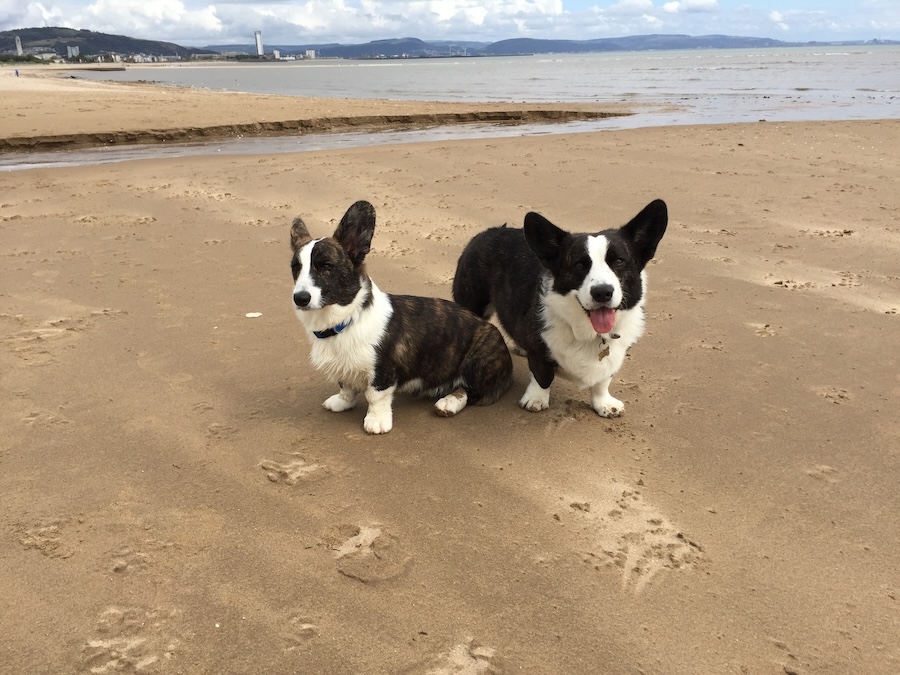
A photo of two Welsh Cardigan Corgis sitting on a sandy beach, gazing towards the camera. In the background, there are several buildings of a city and some mountains. There are a few white clouds in the sky.
A walk on the beach with Toby and Austin, the Welsh Cardigan Corgis.
  • Here are the details of the alt-text and information I added to the photo.
An image provides information about the Alt-Text added to a photo in the WordPress media library.
Always add Alt-Text information to images, pictures and photos

The next time you add an image, photo, or picture to your blog post, don’t just add the image and run. Make sure you include the details outlined in this post.

Summary

  • Alt-Text, or alternative text, is crucial for bloggers who include images in their posts.
  • It enhances accessibility for those with vision impairments, ensuring they understand the content represented in images.
  • Additionally, it plays a significant role in improving SEO rankings by helping search engines identify image content.
  • Despite these advantages, many bloggers neglect to add alt-text to their images, missing out on valuable audience engagement and search engine visibility.
  • To effectively write alt-text, it should be descriptive, straightforward, and relevant to the content, with a mindful inclusion of keywords.
  • Bloggers can easily add alt-text by accessing the media library and providing a title, caption, and description of the images.
  • Overall, including alt-text enhances the user experience and optimises blog performance.

Do you add alt-text and other details to the images and photos included in your blog posts? If not, what’s holding you back?

The featured image in this blog post is taken from Pixabay. AI checked spelling and grammar mistakes.

I’m getting tough with non-engaging comments. Comments such as ‘Nice post’ are marked as spam.

Layout, content, settings, and format might differ on self-hosted blogs.

Click the buttons below to follow Hugh on Social Media

Copyright @ 2025 hughsviewsandnews.com – All rights reserved.


Discover more from Hugh’s Views & News  

Subscribe to get the latest posts sent to your email.

47 responses to “The Best Ultimate Guide To Why Alt-Text Is Important”

  1. Janis @ RetirementallyChallenged.com avatar

    Good info as usual, Hugh! I haven’t made adding Alt Text a habit, but maybe I should.

    1. Hugh W. Roberts avatar

      I think of Alt-Text as including everybody who visits my blog, Janis. I don’t want to leave anybody out, so adding alt-text is a must for me. It’s something that comes naturally whenever I write a post.

  2. Eugi avatar

    Great post, and thank you for this valuable information, Hugh. I never paid attention to alt-text, but I will now that I understand its benefits. I appreciate you sharing your helpful tips.

    1. Hugh W. Roberts avatar

      I believe many bloggers are in the same position and don’t realise how vital Alt-Text is, especially those who use screen readers, Eugi.

  3. Erika avatar

    That is a very good information. I have to admit, I never paid attention to that box. Ok, I actually don’t share a lot of photos. Those I share are part of my quotes. But I will keep it in mind for future potos because it makes complete sense to provide some information. Thans a lot, Hugh.

    1. Hugh W. Roberts avatar

      I’m glad you think so, Erika. Some bloggers won’t see the need to complete alt-text information, which would prevent some visitors to their blog from obtaining information. As bloggers, we should always be inclusive and include everyone.

      1. Erika avatar

        You said that so well, Hugh! If we don’t want to share fully what we share then why blogging at all, right?

        1. Hugh W. Roberts avatar

          Absolutely, Erika. Blogging is all about inclusivity.

  4. Jacqueline Lambert @WorldWideWalkies avatar

    Thank you for the great tip, Hugh. I have just started adding alt text, but wasn’t sure how it differed from ‘description’. I can see it’s pretty similar.

    Is there a quick way of generating alt text for an image, such as via AI?

    1. Hugh W. Roberts avatar

      Hi Jacqueline, yes, Alt-Text plugins are available, including the “Image Alt Text” plugin on WordPress. However, there may be a charge for downloading and using some of them.

      1. Jacqueline Lambert @WorldWideWalkies avatar

        Ah, that would be very useful. Unfortunately, I chose the wrong WP to use plugins… an elementary mishtayke, but not one that is easy to rectify. I don’t think I can migrate my hard won blog!

        I shall keep composing my own Alt-Text!

  5. Cathy avatar

    Thanks for bringing this to my attention, Hugh

    1. Hugh W. Roberts avatar

      You’re very welcome, Cathy.

  6. Esther Chilton avatar

    I didn’t know this, Hugh. Once again, you bring us some interesting and very useful information. Thank you.

    1. Hugh W. Roberts avatar

      I’m glad it has helped, Esther. I figured that many bloggers do not know the importance of adding alt-text to the images, photos and pictures they add to their blog posts. I have a number of followers who are blind and who often thank me for adding alt-text information to the images I add to posts. It’s where I got the idea for this post from.

  7. Paul Ariss avatar
    Paul Ariss

    Wasn’t aware of this Hugh, thanks for the information. Would this apply to a Wordless Wednesday post too?

    1. Hugh W. Roberts avatar

      Hi Paul, yes, it applies to any photo, picture or image you add to any post unless it is for decorative purposes only and does not warrant any information. In the case of Wordless Wednesday posts, a visitor viewing your post using a screen reader would not know what was in the photo unless you had added alt-text and a description to the photo.

      Hope that helps.

      1. Paul Ariss avatar
        Paul Ariss

        It does, thanks again Hugh

  8. Darlene avatar

    Thank you for this valuable information, Hugh. This answers a few questions for me.

    1. Hugh W. Roberts avatar

      I’m delighted this post helped answer some questions, Darlene. Feedback like that goes a long way in telling me to write and publish more posts like this.

  9. Paul - Cawston Greenway avatar

    I never even knew that this was a thing!! :D

    1. Hugh W. Roberts avatar

      I guess we learn something new everyday.

  10. wrookieschu avatar

    Great post Hugh and informative as always. I have to admit I do not do this and had completely forgotten about it. I think it’s a great idea, although for me it’s just an extra thing I to have to do. I will try my best to remember, especially if it helps other readers. Many thanks for the reminder and info.

    1. Hugh W. Roberts avatar

      Adding alt-text will certainly help visitors to your blog who use a screen-reader, Wayne. Otherwise, they won’t know what is in your photos.

      For those unconcerned about SEO helping their blogs reach new audiences, then it won’t matter.

      However, for those with vision impairments, it will certainly help a lot if you include alt-text on your images, photos and pictures so they know what other readers are seeing and what you want to show.

Feel free to leave a comment. Engagement helps keep blogs alive and forms community.

This site uses Akismet to reduce spam. Learn how your comment data is processed.

I’m Hugh

Welcome to my blog. I’m delighted to have you here. This is the place to discover tips on blogging and WordPress, flash fiction, photography, and more. I enjoy engaging with my readers, so please feel free to explore, join discussions, and contact me. I’m happy to assist! Find out more about me and my blog by clicking the ‘Meet Hugh’ button.

Let’s connect

Subscribe to Hugh’s Views And News

Latest Posts

Looking for your next quick read? Try my books

An image of book covers, book, tablet and mobile phone, for the book Glimpses.
An image for the book More Glimpses - showing a book cover, tablet and mobile phone.

Follow Hugh in the Fediverse

Hugh's Views & News  
Hugh's Views & News  
@hughsviewsandnews.com@hughsviewsandnews.com

WordPress & Blogging tips, flash fiction, photography and lots more!

311 posts
10 followers
A widget with the words 'Team Effort - Story Chat Digest - Where Authors Meet - Author'

Most Viewed Posts & Pages Over The Last 24 Hours

Recommend Blogs To Follow


Roaming About
A Life Less Ordinary

Second Wind Leisure Perspectives
Fun, Photography & Friends

Spo-Reflections
Spo-Reflections
To live is to battle with trolls in the vaults of heart and brain. To write; this is to sit in judgment over one's Self. Henrik Ibsen

Boomer Eco Crusader
Boomer Eco Crusader
Live Green | Declutter | Simplify Life

SONGS AND SCRIPTS AND DUNKING BISCUITS
Every day tales of a winging-it creative

Jacqueline Lambert
Jacqueline Lambert
Award-Winning Travel Humour Writer

Anne R. Allen’s Blog… with Ruth Harris
Writing about writing. Mostly.

Fancying France
The musings of a ‘femme d’un certain âge’ who divides her time between SW France and SE England

Marsha Ingrao         Always Write
Marsha Ingrao Always Write
Having fun blogging with friends

Curiosities, Castles and Coffee Shops
The musings of a curious mind

WrookieSchU
WrookieSchU
Live life 🙌🏼

WPcomMaven
WPcomMaven
Helping you make the most of your free WordPress.com website since 2011

Share Your Light
Share Your Light
You are a miracle – Let it happen

No Facilities
No Facilities
Random thoughts, life lessons, hopes and dreams

Esther Chilton
Writer, Tutor and Editor

Saying nothing in particular
Jan … JT Twissel

The Chicago Files
The Chicago Files
A Canadian Perspective on Living in the Windy City!

Thank you to all my visitors

482,216 hits

262,778 visitors

Copyright Protected Blog

COPYRIGHT ©2011-2031 Hugh’s Views And News BLOG – All Rights Reserved.

This work by Hugh W. Roberts, and/or Hugh’s Views And News blog, is licensed under a Creative Commons Attribution-Noncommercial-NoDerivatives 4.0 International License. Unauthorised use and/or duplication of this material (text and images) without express and written permission from this blog’s author and/or owner is strictly prohibited. If you want to use posts, excerpts, photos and links, you may contact me first. You must give full and clear credit to Hugh W. Roberts and Hugh’s Views And News dot com with links to the original content.