
Performing housekeeping on your blog has many benefits. After all, who doesn’t want their blog to look like a friendly, easy-to-use and inviting place old and new visitors will want to keep coming back to?
If you’re a blogger looking to expand their readership, performing housekeeping on your blog is something you should seriously consider.
But what blog housekeeping jobs should you consider doing?

During a 4-day heatwave last month, I couldn’t venture outside, so I took the opportunity to do some blog housekeeping. Here’s what I did.
1. Delete old, out-of-date blog posts.
I always feel that old, out-of-date blog posts that can not be updated or rewritten do nothing but drag down my blog.
They hang around like some uninvited members of the family you hardly ever see or have contact with. You know they are there but feel afraid to ask them to leave.
I had over 400 blog posts on my blog, some of which were doing nothing apart from attracting spam comments. They were dead ducks. They were not attracting any new views, visitors or comments.
I ended up deleting over 80 posts. Not only did I feel good getting rid of what I considered clutter, but it made my blog look much better with no more outdated information.
Some bloggers claim that deleting old posts is not a good idea because they can look back and see how much they have improved since those early posts. I disagree! When you’re somebody who never goes back to read old posts, mainly because you don’t have the time to do so, deleting these old blog posts is like cutting away the string tied to the brick holding your blog down.
2. Fixing broken links.
A downside of deleting old blog posts is that any pingback and links you have to them will become broken.
I used Broken Link Check to run a report showing me broken links on my blog. It’s free to use.
Since SEOs like Google rank blogs that have broken links lower, cleaning up and fixing broken links is a job every blogger should consider.
That first broken link report could be long and overwhelming, but once you start running a broken link report every month, you’ll soon conquer that job.
Fixing broken links was the best bit of blog housekeeping I did because it improves your blog’s overall ranking, meaning more traffic and visitors to your blog.
3. Categories and tags
When I checked how many categories and tags I had on my blog, I was shocked by the number.
What amazed me was that many categories and tags were no longer active. Like some of my old blog posts, they were deadwood.
Checking which categories and tags are no longer active is easy.
Follow this guide.
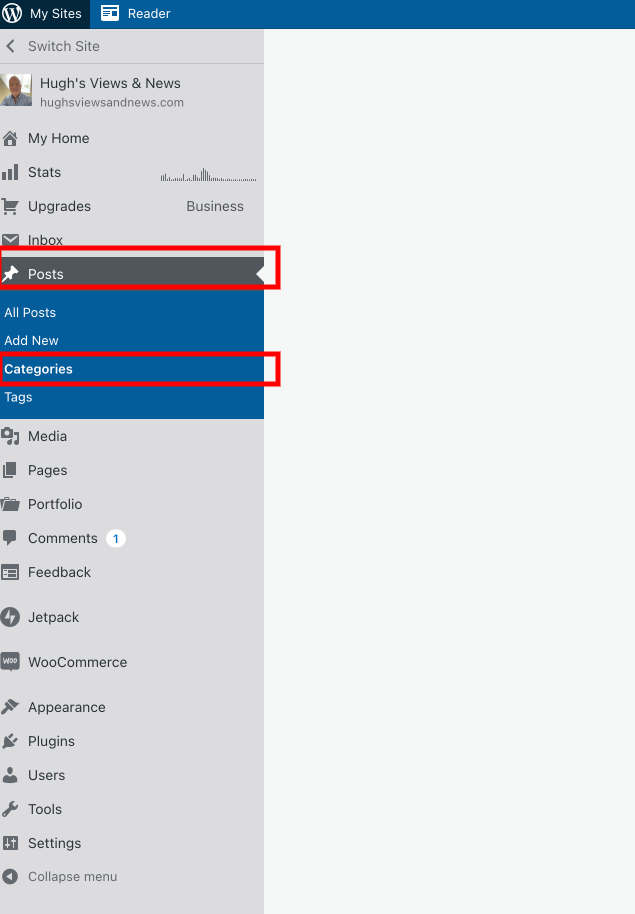
- On your blog’s dashboard, click on Posts and then Categories. (Click on Tags to manage Tags).
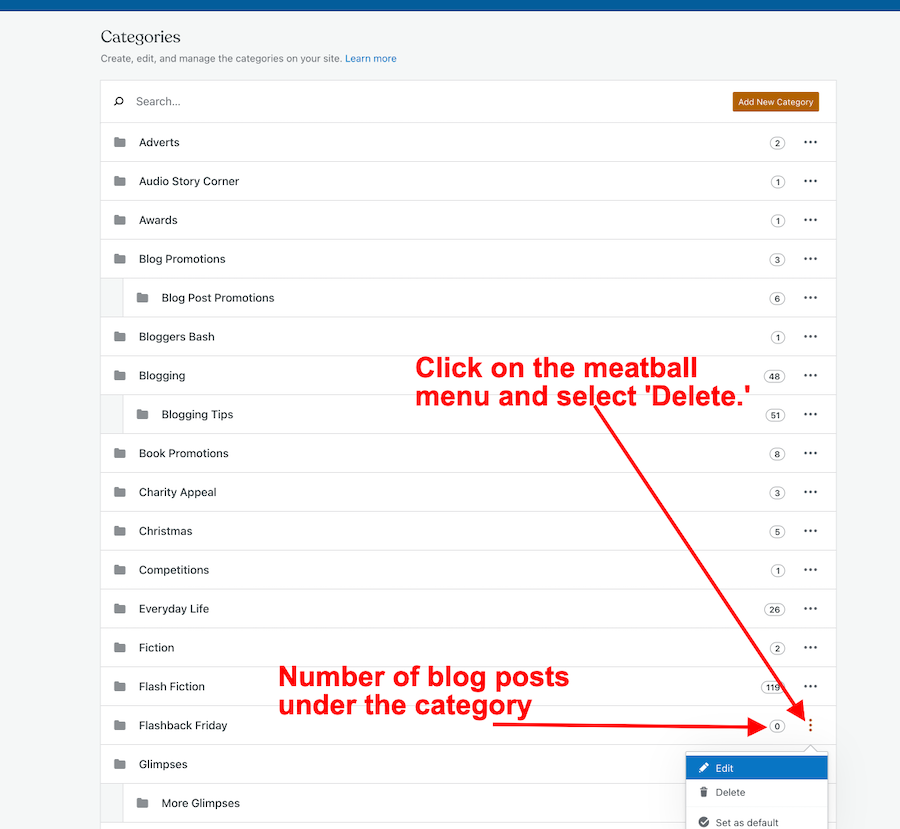
A list of all your categories will show how many posts you have under each category.
- To delete a category, click on the meatball menu next to the number and click on ‘delete.’
Follow the same process for managing the Tags on your blog.
4. Menu Bar
I also took the opportunity to tidy up the menubar on my blog. Although it was not what I considered ‘top heavy’, I moved some items to sub-categories.
Here’s an example. I moved some fictional stuff to sub-categories under ‘Fiction.’ When you hover over ‘Fiction‘ on the menu, you’ll see the sub-categories pop up.
Blogs with top-heavy menus can look overwhelming and messy to visitors.
For more information about menus on your blog, see ‘Menus‘ by WordPress.
Once you start housekeeping your blog, it will make you feel much more positive about blogging.
Try and get into the habit of housekeeping your blog at least once every six months, although I’d recommend running a broken links report at least once a month.
Let’s wrap it up
- Performing housekeeping on your blog is something every blogger should perform at least once every six months.
- A well-kept blog is one that old and new visitors will want to keep returning to.
- Fixing broken links on your blog will improve your blog’s SEO rating.
- Run a broken link report for your blog once a month. Fix any broken links.
- Delete categories and tags that are no longer being used on your blog. Too many categories and tags can confuse readers.
- Delete old out-of-date blog posts, especially if all they are doing is attracting lots of spam.
- Try and keep the menu of your blog to a minimum. Top-heavy menus can look messy and overwhelming.
How often do you perform blog housekeeping? What do those jobs involve? Do you have any simple tips for housekeeping your blog? Share them in the comments.
Remember that a well-kept blog is a positive and friendly place for your visitors and readers.
Follow Hugh on social media. Click on the links below.
Copyright © 2022 hughsviewsandnews.com – All rights reserved.
Discover more from Hugh's Views & News
Subscribe to get the latest posts sent to your email.
 Hugh's Views & News
Good job Hugh, you are doing a job of webmaster yourself, impressive
Thank you.
Thank you! I was just wondering, should I keep a list (or tag cloud) of my tags in the sidebar? Or is that too messy, and confusing for my visitors? Does a tag cloud help with SEO?
I think it’s a good idea, but don’t clutter the sidebar, as it can make a blog look messy.
Tag clouds tend to help readers find what they’re looking for. Adding tags to your blog posts helps with SEO.
Great reminder about keeping our blogs up to date, Hugh.
I tried using the broken link checker, but I keep getting a pop up that says ‘URLs with slashes are not supported in the FREE version’. I’ve removed all the slashes I can from the links but still get that message. Any ideas?
Hi Deborah.
Try adding http://www.deborahjay.wordpress.com
Hopefully, that will work. Let me know.
Thanks Hugh – I had to input that, but without the http://
I’ve reached the page check limit, and found 128 broken links, so I have a bit of work ahead of me!
My advice is to fix those links in batches, Deborah. I do them in batches of 20 over a month. It helped stop me from feeling overwhelmed about fixing them all in one go.
Great idea, thanks!
Thanks, Hugh for this informative post! :)
You’re welcome, Carol.
Great post links, Debby! Xo
Thanks for the dead link checker.
Having moved multiple times since 05 I’ve got a lot of dead links.
I guess I know what my next blog project is going to be!
Don’t try and do it all in one go, though. I tend to check and fix about 20 links a day. Spreading out the job works much better.
Yeah, my last project took me about 5 years :-)
Goodluck with the next project.
I have never even thought of tidying up my blog site or blog posts…partly because I’ve written only about 30!. But good tips, thanks Hugh.
There’s never a time not to do some blog housekeeping, Paul. It pays to start doing it as soon as you have a few blog posts up and running. For some reason, links are known to break for no reason, so it’s worth doing those checks at least once every few months.
Funnily enough earlier today I looked at my first blog, which occasionally I get visitors to, and a gap had opened up on it that made it look odd and disjointed. I easily got rid of the gap but it proves your point. I’ll start looking at the links now as you advise. Thanks again
I didn’t know about subcategories. I write a lot about gratitude and positive mindset. I have gratitude as a category in my menu right now because I plan on doing a LOT more posts about it, but it could really be a subcategory really. So you are saying, I think, that I could have subcategories that can be under the main heading? And so what would I do (if I figure out how to do that) if I write a post about gratitude? Do I click BOTH positive mindset AND gratitude?
Yes, exactly; you could have sub-categories under the main category. For example, suppose I was writing blog posts about the geography of the United Kingdom. In that case, I’d have ‘The United Kingdom’ as the main category and then England, Scotland, Wales and Northern Ireland as sub-categories underneath it. If my post was about a visit to a town in Wales, I’d click ‘The United Kingdom and ‘Wales.’
I hope that helps?
I think it does. I’ll just have to figure out how to put those in there. When I figure it out, it should help me with quite a bit!
This post may help.
https://hughsviewsandnews.com/2020/06/22/how-to-make-categorising-and-tagging-blog-posts-more-powerful/
Internal link boost performance. Thanks for sharing.
You’re welcome.
Very helpful tips for housekeeping our blogs to make them look tidy.
I’m glad they have helped. Thank you.
Thanks for these great tips Hugh. The broken links one is overwhelming but as you say once you get it under control it should be easy to stay that way. I’ve just gone and looked at categories and tags and had a cleanup as I read your post and will start deleting posts and tackling the subsequent broken links. Do you know if when you delete a post and the images in the post as well I presume, does that free up space in your media section?
Hi Debbie, good to hear you’ve started some blog housekeeping. Unfortunately, when you delete old blog posts, the images from that post are not deleted from the media library. You have to go in and delete them yourself. I think it’s something WordPress need to take a look at so that images are deleted when posts get trashed. I’ll send them a suggestion about it. Also, before deleting old posts, disable any links in them first before deleting the post. That way, they won’t show up on any broken link reports.
Oh that’s a great idea to disable links before deleting posts Hugh. Thanks for the tips! I think it would be good if photos were deleted when the posts get trashed, so suggesting it to them makes sense. You are always so helpful – thank you!
Hugh, Congratulations, you have made the top three for last week’s entries and will be featured on my FB Page. Bloggers: Share, Care & Inspire.
That’s fantastic news; thank you, Esmé.
Congratulations Hugh! You won the Inspire Me Monday Linky Part with this post! I am especially intrigued by Tip 1.
Janice
Thanks again, Janice. That’s great news.
Have a great week.
Good tips, Hugh, something I need to schedule more regularly.
You’re welcome.
I’m happy that I now know how I can get rid of old tags and posts categories – thank you Hugh. I would like to make the categories and tags more uniform. For some reason, some are all in lower case and I don’t think I intentionally put them that way. Something to do over the Winter when I have a little more time.
Yes, the winter is a great time to do some blog housekeeping, although the recent heatwave was also a great time to get some of my blog housekeeping done, Linda. I dislike the heat, so it allowed me to do some blog cleaning.
I don’t like this intense heat either Hugh – it saps your energy. As an avid walker with a goal of 2,022 kms/1,256 miles to reach before year-end, I have resorted to walking in a large grocery store on the really hot and humid days.
In your post you mentioned freshening up your blog – I am guilty here as I have not tweaked my blog theme as it is old and I suspect if I experimented with it, that theme is obsolete, so there would be no going back. My blog is set up fairly simple and I may do some tweaking when I am retired and have more time. I have left early posts on for now … I wrote my initial long post about walking and entering “The Blogosphere”, then we had bad weather, I went on no walks, so I just put a few quotations for blog posts. (???)
Then I got this idea that it would be clever to have a one-word title and a one-paragraph post, with no photo or a stock photo. So now I have morphed into long, picture-laden posts. I like looking back sometimes to see the progress as I near the 10th anniversary of my blog which will be in February 2023.
If you’re happy with how your blog looks, keep it that way, Linda. I always say, ‘do whatever works best for you.’ The tips and recommendations I give are there for help and guidance. There may come a time when something goes wrong with your theme. If it has been retired, then WordPress won’t offer any support or fix anything that has gone wrong. But that may never happen.
I see a lot of people with the same theme Hugh and I suspect they went with the 2010 theme like me … just because it was simple and straightforward. I’m guessing (hoping) that we will get notice about the retirement of a theme, either in an e-mail or in a notice like we receive in our Reader feed.
I’m afraid WordPress does not tell users when a theme is retired, Linda. I only find out if I report a problem to the Happiness Engineers, and they inform me that the problem can not be fixed because the theme I’m using is retired, and they no longer support it.
The Themes page also used to let you know if the theme you are using is retired, but that opinion seems to have disappeared to be moved elsewhere. I’ll let you know if I find out where it has been moved. I searched for the 2010 theme, but nothing came back, so it could be that it’s already been retired. Next time to speak to the Happiness Engineers, ask them if it’s been retired. They’ll certainly know the answer.
Thank you for your insight Hugh and for checking the themes info as well. I have not looked at any themes since I created my blog but I do see many people are using the same theme as me. I will ask the Happiness Engineers the status the next time I have to contact them. Knock on wood, I have not had any WP issues in a while.
Thank you Hugh for this post, I just saw what housekeeping duty I can perform on my website and blog. Indeed it is crucial to keep the menu to a minimum🔥🔥🔥🙏
You’re welcome. I’m glad it has helped.
Clean, check, check, and check. Thanks for the reminders, Hugh!
You’re welcome, Liesbet.
I have heard about deleting dead wood/posts but then also not to do it as you may have pins or SM with that link so always hesitant to delete those posts. What’s your opinion on just marking them private not to attract attention or do you feel deleting them is best
It’s a personal choice, Esmé. I much rather delete old posts.
All the recent ones I deleted were well over a year old, so the links to social media platforms would be old and way down anyone’s timeline. They say the average lifespan of a tweet is 20 minutes. I have tweets going out on posts for 12 months after publication dates, so I never delete posts under 12 months old. I concentrate more on Twitter because it’s where most of the traffic to my blog comes from, other than the WordPress Reader and search engines.