Performing housekeeping on your blog has many benefits. After all, who doesn’t want their blog to look like a friendly, easy-to-use and inviting place old and new visitors will want to keep coming back to?

If you’re a blogger looking to expand their readership, performing housekeeping on your blog is something you should seriously consider.

But what blog housekeeping jobs should you consider doing?

Banner for the blog post '4 Tips For Housekeeping Your Blog And Improving Its SEO Rating
This is why blog housekeeping is essential.

During a 4-day heatwave last month, I couldn’t venture outside, so I took the opportunity to do some blog housekeeping. Here’s what I did.

1. Delete old, out-of-date blog posts.

I always feel that old, out-of-date blog posts that can not be updated or rewritten do nothing but drag down my blog.

They hang around like some uninvited members of the family you hardly ever see or have contact with. You know they are there but feel afraid to ask them to leave.

I had over 400 blog posts on my blog, some of which were doing nothing apart from attracting spam comments. They were dead ducks. They were not attracting any new views, visitors or comments.

I ended up deleting over 80 posts. Not only did I feel good getting rid of what I considered clutter, but it made my blog look much better with no more outdated information.

Some bloggers claim that deleting old posts is not a good idea because they can look back and see how much they have improved since those early posts. I disagree! When you’re somebody who never goes back to read old posts, mainly because you don’t have the time to do so, deleting these old blog posts is like cutting away the string tied to the brick holding your blog down.

2. Fixing broken links.

A downside of deleting old blog posts is that any pingback and links you have to them will become broken.

I used Broken Link Check to run a report showing me broken links on my blog. It’s free to use.

Since SEOs like Google rank blogs that have broken links lower, cleaning up and fixing broken links is a job every blogger should consider.

That first broken link report could be long and overwhelming, but once you start running a broken link report every month, you’ll soon conquer that job.

Fixing broken links was the best bit of blog housekeeping I did because it improves your blog’s overall ranking, meaning more traffic and visitors to your blog.

3. Categories and tags

When I checked how many categories and tags I had on my blog, I was shocked by the number.

What amazed me was that many categories and tags were no longer active. Like some of my old blog posts, they were deadwood.

Checking which categories and tags are no longer active is easy.

Follow this guide.

  • On your blog’s dashboard, click on Posts and then Categories. (Click on Tags to manage Tags).
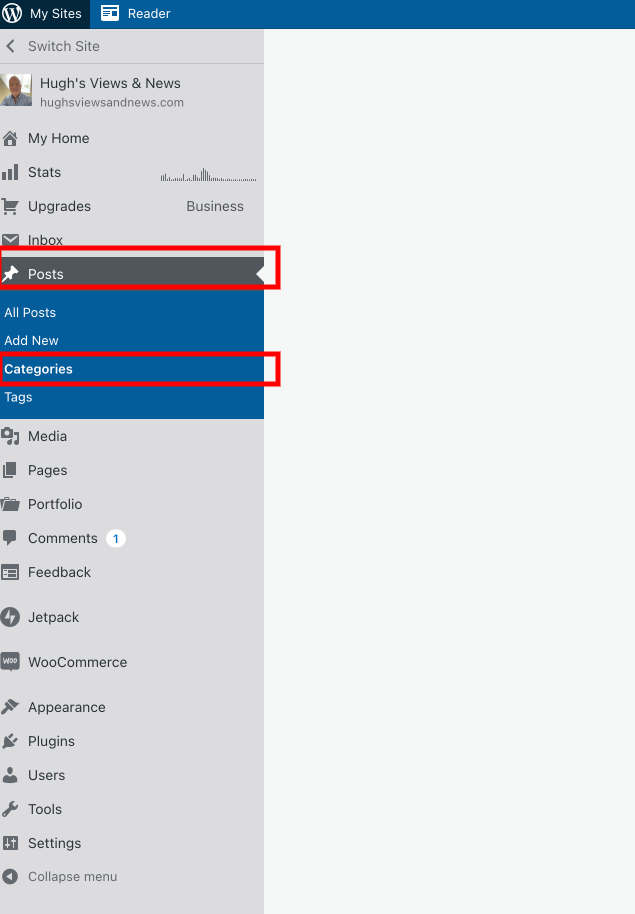
Image highlighting where to manage categories and tags on your WordPress blog
How to manage categories and tags on your WordPress blog

A list of all your categories will show how many posts you have under each category.

  • To delete a category, click on the meatball menu next to the number and click on ‘delete.’
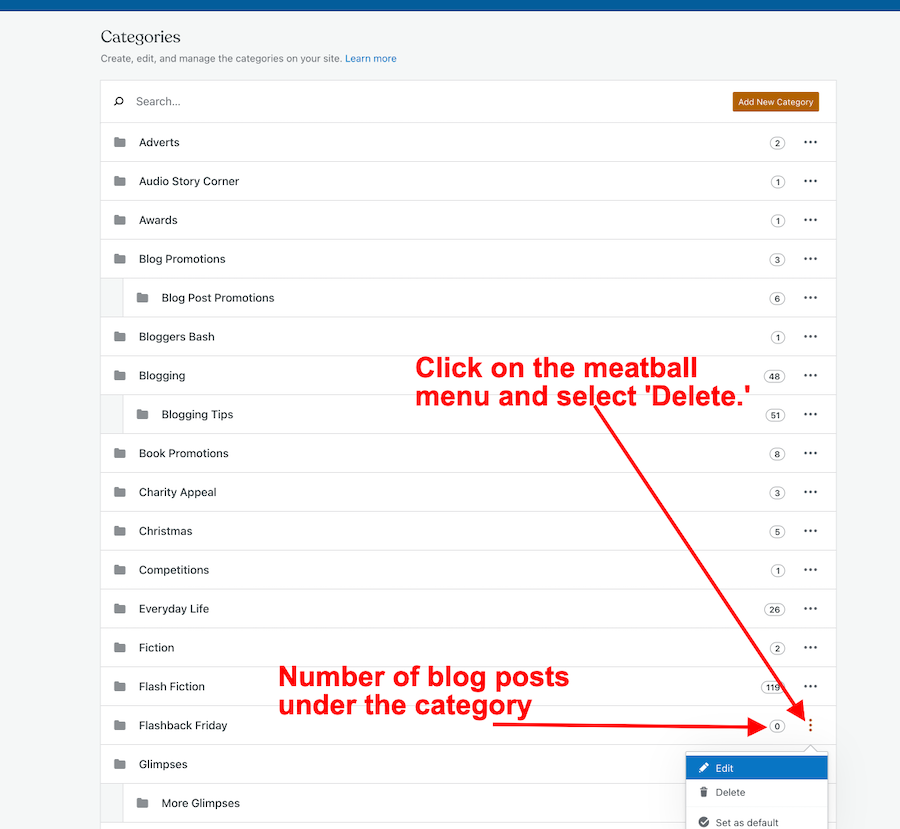
Image showing how to delete categories on a WordPress blog
How to delete categories on your WordPress blog

Follow the same process for managing the Tags on your blog.

4. Menu Bar

I also took the opportunity to tidy up the menubar on my blog. Although it was not what I considered ‘top heavy’, I moved some items to sub-categories.

Here’s an example. I moved some fictional stuff to sub-categories under ‘Fiction.’ When you hover over ‘Fiction‘ on the menu, you’ll see the sub-categories pop up.

Blogs with top-heavy menus can look overwhelming and messy to visitors.

For more information about menus on your blog, see ‘Menus‘ by WordPress.

Once you start housekeeping your blog, it will make you feel much more positive about blogging.

Try and get into the habit of housekeeping your blog at least once every six months, although I’d recommend running a broken links report at least once a month.

Let’s wrap it up

  • Performing housekeeping on your blog is something every blogger should perform at least once every six months.
  • A well-kept blog is one that old and new visitors will want to keep returning to.
  • Fixing broken links on your blog will improve your blog’s SEO rating.
  • Run a broken link report for your blog once a month. Fix any broken links.
  • Delete categories and tags that are no longer being used on your blog. Too many categories and tags can confuse readers.
  • Delete old out-of-date blog posts, especially if all they are doing is attracting lots of spam.
  • Try and keep the menu of your blog to a minimum. Top-heavy menus can look messy and overwhelming.

How often do you perform blog housekeeping? What do those jobs involve? Do you have any simple tips for housekeeping your blog? Share them in the comments.

Remember that a well-kept blog is a positive and friendly place for your visitors and readers.

Follow Hugh on social media. Click on the links below.

Copyright © 2022 hughsviewsandnews.com – All rights reserved.


Discover more from Hugh’s Views & News  

Subscribe to get the latest posts sent to your email.

115 responses to “4 Tips For Housekeeping Your Blog And Improving Its SEO Rating”

  1. Brenda avatar

    Thank you Hugh. I think I’ll install and start using the broken link checker while my blog is still in the baby stage :)

    1. Hugh W. Roberts avatar

      That’s a great time to start using it and checking for broken links, Brenda. Hopefully, you won’t have any to fix, but keep checking them.

      1. Brenda avatar

        1 broken link – but it seems to be a person posting a comment – the link back to his own blog site

        1. Hugh W. Roberts avatar

          I’d tell that person that the link to their Gravatar is broken. And I’d recommend that you remove the link in the meantime. Any kind of broken links is not good.

          1. Brenda avatar

            Thanks Hugh. I’ll do that :)

  2. dgkaye avatar

    This is a great post Hugh. I am currently, slowly in the process of operation blog cleanup. I’m halfway done on my menu – which became a nightmare after moving from my old self hosted blog back to paid WordPress. And yes! Omg, I get at least 60 spams daily. I noticed that they are coming in on oldddddddddd blog posts. What’s up with that and why? That will be my next mission! Thanks for the broken link checker! <3

    1. Hugh W. Roberts avatar

      Thank you, Debby.

      The spammers tend to go for old posts. That’s why some bloggers close off comments on them after a certain amount of time has passed. I’m not a fan of preventing visitors from joining the discussion on my blog posts by closing off comments, so if an old post is attracting nothing but spam and can not be updated, I choose to delete it instead. I feel much better about getting rid of dead posts that are not attracting new life other than spam. It works best for me.

      1. dgkaye avatar

        Thanks again Hugh. :)

  3. Janis @ RetirementallyChallenged.com avatar

    I’ve made a few changes lately, but I think my blog could use a good fall housekeeping session. I hadn’t thought about cleaning up the categories and tags. Thanks for the great info!

    1. Hugh W. Roberts avatar

      You’re welcome, Janis. It’s good to hear that you have already made a few changes.

  4. Afriant Ishaq avatar

    Now I’m doing some cleaning on the blog. A little confused by the first point. Does deleting a post not cause broken ink?

    1. Hugh W. Roberts avatar

      Only if there are pingbacks or links in them, yes. It is best to delete old posts first before running a broken link report.

  5. Terri Webster Schrandt avatar

    Well, I must laugh now, Hugh. I ran the broken link report and 28 of 30 were yours, LOL! You were definitely busy!

    1. Hugh W. Roberts avatar

      Yes, some of those posts were attracting nothing but huge amounts of spam, Terri. It was time to say goodbye to them (and the spam). I got the same thing on the reports I run in that reblogs and pingbacks links in comments sections of posts are broken because those sharing the posts have deleted them from their blog. Many bloggers have been doing some housekeeping (which is a good thing).

      1. Terri Webster Schrandt avatar

        I had to reduce the days comments would be allowed on old posts. Sometimes I wonder if bloggers realize that admin and blog maintenance is necessary even with a hosted blog. When I self-hosted, there was lot to do, but any blog needs looking after. Thanks again!

        1. Hugh W. Roberts avatar

          The blogs that don’t have any housekeeping performed on them stand out like a sore thumb, Terri. I’ve learned to spot them from miles away. Now, I seldom visit them. They tend to look stale and dull and give the impression of overwhelmingness. Finding many broken links on a blog is a sign that you need to move on quickly, as the host obviously does not care about looking after their blog (or their readers).

          As you know, I’m not a fan of closing off comments on my posts. I like to keep the door open for any further discussion. That’s why when an old post stops receiving any hits, likes or comments, I feel it’s time to thank it for its work and wave it goodbye. But, as I always recommend, we should do what works best for us.

          1. Terri Webster Schrandt avatar

            I’ve still got work to do on checking the links, so I appreciate your how-to on these. Thanks again, Hugh!

  6. Terri Webster Schrandt avatar

    Beyond helpful, Hugh! I’d been wondering how to delete categories and tags. Deleting old posts helps delete the old images as well that take up space in our media files. Housekeeping is super important and this is a great reminder as we move into the autumn season where blogging tends to pick up :) I’m going to check on the broken links, too. This will apply to the Sunday Stills challenge as many links are left in the comments, good call! I also like to refresh my appearance and theme with new colors and headers seasonally. That can do a lot for a fresh appearance. Always delighted to read your how-to posts! Thanks!

    1. Hugh W. Roberts avatar

      Hi Terri, when deleting old posts, sadly, any images on those posts do not get deleted from the media library. You must go in and delete those images; otherwise, they remain there. I tend to check what images on a post I want to delete and delete those images in the media library first. Then delete the post.

      I think refreshing the look of a blog is an excellent thing to do. Otherwise, blogs can look dull and uninviting. I know a few blogs that haven’t changed since I started blogging. I seldom view them now because they’ve lost their appeal from their appearance. They haven’t moved on with the times. Sitting still and doing nothing isn’t good for anything.

      I’m glad this post has been helpful.

  7. JenT avatar

    Excellent advice, Hugh, as always. Sites that have been around for a long time can also benefit from a complete rethink and redesign. Not to be undertaken lightly, of course, but sometimes what worked when you first set up a website doesn’t work any longer after years of adding content.

    1. Hugh W. Roberts avatar

      Thank you, Jen.

      I agree with what you say about those sites that have been around for years and have not changed. After a while, they look dull, uninviting, and the ‘same old, same old…’ A refresh is something I undertake on my blog about once every 18 months (or when the theme I’m using is retired). Many of the problems I hear other bloggers blaming on WordPress is because the theme they are using has been retired and is no longer supported, yet they still refuse to change it.

      1. JenT avatar

        Technically, if you’re using a retired theme on your site you can continue to use it. You just won’t be able to activate it on a new or existing site. But with older themes, eventually something will break, so future-proofing one’s site with a currently available theme is a good idea.

  8. petespringerauthor avatar
    petespringerauthor

    I always appreciate these posts because I learn something new every time. I had no idea there was such a thing as Broken Link Check. What a time saver!

    1. Hugh W. Roberts avatar

      And it works great, Pete. That first report will be somewhat overwhelming, but if you fix any broken links in chunks (rather than try and do it all in one go), you’ll soon whizz through them.

  9. Robert J Jr. avatar

    Great advice Hugh!

    1. Hugh W. Roberts avatar
  10. Simon avatar

    There’s some good tips here, thanks Hugh! :-)

    1. Hugh W. Roberts avatar

      You’re welcome, Simon.

Feel free to leave a comment. Engagement helps keep blogs alive and forms community.

This site uses Akismet to reduce spam. Learn how your comment data is processed.

I’m Hugh

Welcome to my blog. I’m delighted to have you here. This is the place to discover tips on blogging and WordPress, flash fiction, photography, and more. I enjoy engaging with my readers, so please feel free to explore, join discussions, and contact me. I’m happy to assist! Find out more about me and my blog by clicking the ‘Meet Hugh’ button.

Let’s connect

Subscribe to Hugh’s Views And News

Latest Posts

Looking for your next quick read? Try my books

An image of book covers, book, tablet and mobile phone, for the book Glimpses.
An image for the book More Glimpses - showing a book cover, tablet and mobile phone.

Follow Hugh in the Fediverse

Hugh's Views & News  
Hugh's Views & News  
@hughsviewsandnews.com@hughsviewsandnews.com

WordPress & Blogging tips, flash fiction, photography and lots more!

312 posts
10 followers
A widget with the words 'Team Effort - Story Chat Digest - Where Authors Meet - Author'

Most Viewed Posts & Pages Over The Last 24 Hours

Recommend Blogs To Follow


Roaming About
A Life Less Ordinary

Second Wind Leisure Perspectives
Fun, Photography & Friends

Spo-Reflections
Spo-Reflections
To live is to battle with trolls in the vaults of heart and brain. To write; this is to sit in judgment over one's Self. Henrik Ibsen

Boomer Eco Crusader
Boomer Eco Crusader
Live Green | Declutter | Simplify Life

SONGS AND SCRIPTS AND DUNKING BISCUITS
Every day tales of a winging-it creative

Jacqueline Lambert
Jacqueline Lambert
Award-Winning Travel Humour Writer

Anne R. Allen’s Blog… with Ruth Harris
Writing about writing. Mostly.

Fancying France
The musings of a ‘femme d’un certain âge’ who divides her time between SW France and SE England

Marsha Ingrao         Always Write
Marsha Ingrao Always Write
Having fun blogging with friends

Curiosities, Castles and Coffee Shops
The musings of a curious mind

WrookieSchU
WrookieSchU
Live life 🙌🏼

WPcomMaven
WPcomMaven
Helping you make the most of your free WordPress.com website since 2011

Share Your Light
Share Your Light
You are a miracle – Let it happen

No Facilities
No Facilities
Random thoughts, life lessons, hopes and dreams

Esther Chilton
Writer, Tutor and Editor

Saying nothing in particular
Jan … JT Twissel

The Chicago Files
The Chicago Files
A Canadian Perspective on Living in the Windy City!

Thank you to all my visitors

484,570 hits

264,631 visitors

Scan the QR code to follow me on Bluesky

Copyright Protected Blog

COPYRIGHT ©2011-2031 Hugh’s Views And News BLOG – All Rights Reserved.

This work by Hugh W. Roberts, and/or Hugh’s Views And News blog, is licensed under a Creative Commons Attribution-Noncommercial-NoDerivatives 4.0 International License. Unauthorised use and/or duplication of this material (text and images) without express and written permission from this blog’s author and/or owner is strictly prohibited. If you want to use posts, excerpts, photos and links, you may contact me first. You must give full and clear credit to Hugh W. Roberts and Hugh’s Views And News dot com with links to the original content.