Have you heard of the saying, ‘Don’t put off today what can be done tomorrow’? I should tell myself that more often because tomorrow becomes tomorrow, and that tomorrow becomes another tomorrow. Before you know it, weeks, months or even years have passed you by, and you still haven’t done what you were putting off until tomorrow.
Last week, after visiting some blogs, I asked myself, ‘Why haven’t I done what they have done yet?’ And the simple and truthful answer was ‘Because of me.’ But what am I referring to?
‘What if?’ moments. Do you ever have them?
A ‘What if’ moment is those moments in life when you believe something is holding you back from doing something you know needs to be done, but you have doubts about it. The problem is that it isn’t the doubts that are holding you back.
The ‘What if’ moment I’ve been having has lasted for the best part of two years.
‘What if changing the theme of my blog from Classic to Block causes problems?’
Given that thousands of other bloggers have done it, I know that, while problems may occur, they can be resolved!
When WordPress introduced the Block Editor, which now seems like many years ago, I disliked it and did everything I could to avoid giving it a chance. I fought myself, declaring I’ll never use it and that I hated the change. And there was my downfall – ‘change.’ I wasn’t willing to accept it.
Then another blogger said in one of her posts, ‘The Block Editor isn’t hard to use; it’s just different.’ That got me thinking, and it was not long before I realised that the reason I didn’t like the change was that I hadn’t set aside any time to read tutorials and watch them, and to give the Block editor a try.
It wasn’t long before I was telling myself that trying out the Block Editor was like switching up from black-and-white to colour television.
Why then has it taken me so long to begin the switch from a Classic to a Block theme? The answer to that question is ‘Me.’ What if something goes wrong? What if I break my blog? What if all my posts disappear? What if my blog disappears without a trace?’ Why if, what if, what if?
The problem with all those questions is that they are not problems. They are excuses. Excuses to stop myself from making changes. And I have found in life that change opens new doors and brings new opportunities. And that’s what switching to using the Block editor did.
But why fix what’s not broken?
I hear people say, ‘Why fix what’s not broken?’ But nobody is fixing anything. All websites have to keep up with technological changes; they would lose many paying customers if they didn’t adapt. It’s paying customers who keep companies alive by buying their products or services, allowing some users to use the site for free.
Now, replace the question ”Why fix what’s not broken?’ with, ‘Why update what is not broken?’ You now have your answer.
Not all WordPress users are lucky enough to have had a choice between a Classic and a Block editor. Many have never known anything but the Block Editor, and they all seem to be doing a great job. However, did you know that the Block editor includes a Classic block that allows users to use the Classic editor?
What’s about to happen on my blog?
Over the next few weeks, you may notice a few changes with my blog as I switch from a Classic to a Block theme. If you notice anything wrong, please let me know, so I can resolve it. There’s plenty of support available on WordPress when you take the time to find it. Part of the excitement for me is choosing a new theme, but another reason I am making the switch is that I gain access to many more blogging tools and options, many of which help users save time.
Finally, I’m pleased to say I’ve changed concerns into excitement. I’m no longer allowing change to stop me from moving ahead on my blogging journey. I want my blog to become part of today’s technology, rather than remain stuck in yesterday’s.
This is my final post using a Classic theme on my blog. Bear with me while I make the changes to a Block theme. Hopefully, it won’t be long before I see you on the other side.
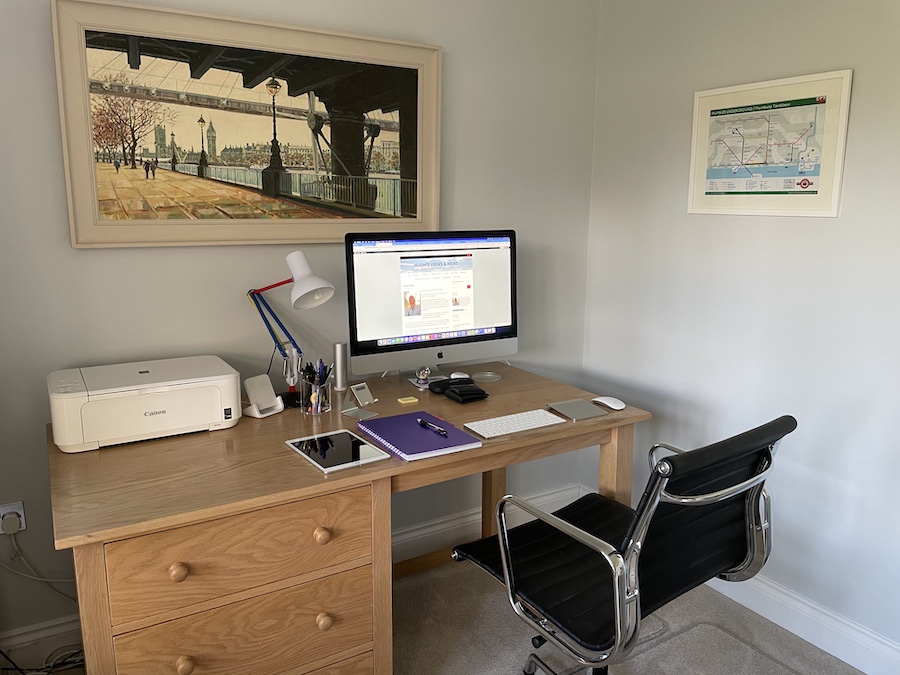
Where I blog from
Have you changed the theme of your WordPress blog from Classic to Block? Did you encounter any problems? What were they, and how did you resolve them?
The featured image on this blog post is sourced from Pixabay. AI reviewed spelling and grammar errors.
The past three months have been busy outside the world of blogging, so much so that I didn’t get the chance to write and publish monthly round-up posts for September or October.
Did I feel bad? Did I apologise? No. Sometimes life gets in the way of schedules, and my blogging routine was thrown off course, but it happens to everyone, and nobody needs to apologise. From what I saw, my posts from September, October and November continued to receive engagement, and for me, it’s all about interacting with other bloggers, writers, and readers.
Better late than never. Without further ado, here is the monthly round-up for the past three months on Hugh’s Views and News.
WordPress has introduced a new blog recommendation feature that displays recommended blogs on your Gravatar profile, improving visibility. My post details how to add the blogs you love the most.
Here’s a fresh writing challenge that everyone is encouraged to try. Can you write a story using only 101 words (no more, no less) based on a featured image?
How easy do you make it for visitors to share your blog posts and boost the visibility of your blog? Take action: These nine options are easy to find and activate.
This post outlines various scams affecting bloggers, including voicemail scams and email phishing claims that appear to come from WordPress. Don’t become a victim of a scam or fined for downloading copyrighted material.
Something strange happened this month. For the first time since I’ve been blogging, one of my blog posts received more engagement on social media (Mastodon) than on the actual post. I wasn’t sure how to feel about it, but could it be that claims of real engagement in the world of blogging are on the decline?
However, August turned out to be a bumper month for me. Although I only published three blog posts, four if you include this one, my stats soared. August 2025 was the highest month for views of any August since I started blogging in 2014. And to top it all off, engagement remained high.
How was your August blogging-wise?
Here’s your opportunity to catch up on my three blog posts from August 2025.
Did you know that keeping old, outdated blog posts can damage your blog? What do you do with your old blog posts? Join the discussion.
I’ve always believed that the summer months are quieter in the blogging world because many of us are off doing better things and making the most of the weather, provided it’s not too hot and humid. Yet, I have been proved wrong this summer, with my stats for June being significantly higher compared to June 2024, and they remained much the same for July. But how are your stats doing for the year so far?
Including this post, I’ve published 31 posts so far this year, which is significantly fewer than I’ve ever done, except for 2014, my first year of blogging. My blogging tips posts remain popular, although I’m pleased that both my flash fiction posts received much more engagement than previous flash fiction posts.
When was the last time you backed up your blog? Don’t need to back it up? Think again. I’d recommend reading the last post on the following list.
Here’s your opportunity to catch up on my four blog posts from July 2025.
Bill faces a crucial decision at a crossroads, ultimately choosing a hidden path that leads to complicated consequences for him and his wife.
Would you know what to do if your blog vanished without explanation? My post describes how you can prevent the nightmare of losing all your blog’s content.
WordPress has introduced a useful new feature that benefits all users, including those with a ‘Free’ plan.
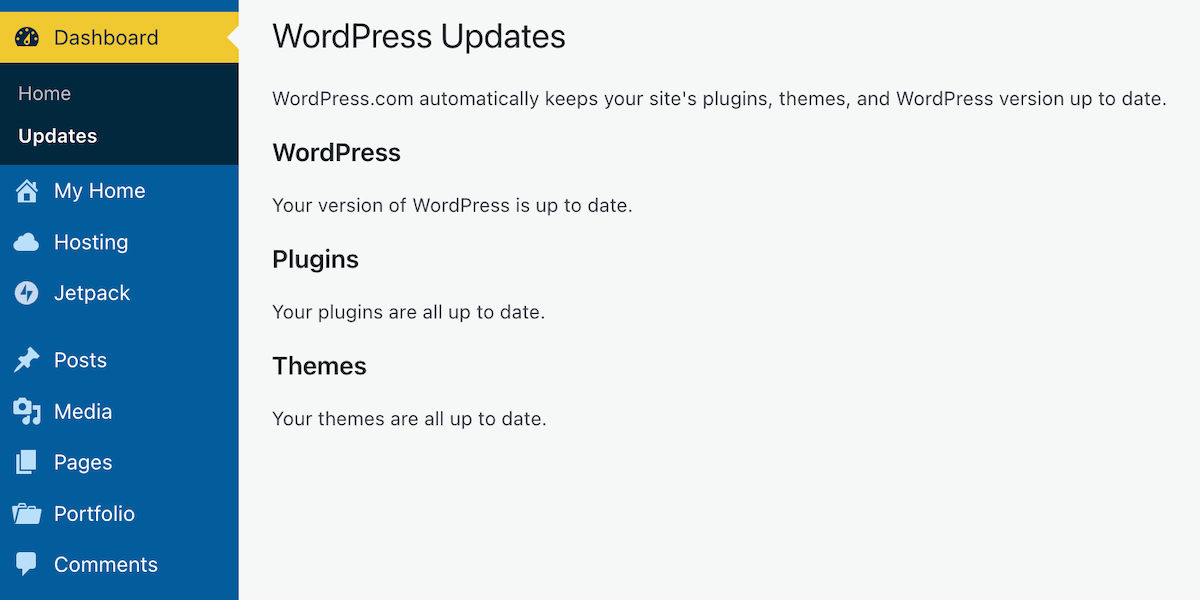
With just a few clicks, you can check whether the version of WordPress you are using is up to date, whether any plugins you have installed are current, and if the theme of your WordPress site is the latest release.
Here’s how to verify that all your WordPress installations are up to date. I am using an Apple iMac desktop computer for this guide.
Go to the dashboard of your blog and click on Dashboard – Updates.
Click the ‘Update’ button.
After clicking on Updates, you will see a page that informs you whether you are using the latest version of WordPress, plugins, and the WordPress theme you have installed.
Is everything on your WordPress blog updated?
If, like me, you are a WordPress.com user, WordPress will keep all these items up to date for you. So, why am I then informing you of this feature? Well, it’s all about retired themes and plugins that cause problems.
If you are using any plugins or a theme that has been retired, even if it appears you have the latest versions, any bugs affecting the theme or plugin since the final update will no longer be fixed because WordPress has withdrawn support.
How do I find out if the WordPress theme I’m using is still supported?
To find out if the WordPress theme you are using is still supported (and receiving updates), visit your blog’s dashboard and click Appearance – Themes. You will see a message indicating your theme is retired if it is no longer supported by WordPress. As we all know, using outdated themes can cause numerous problems for users.
Although a retired theme might not cause problems now, it could in the future. Some users attempt to use a workaround to avoid issues, but this is not advised, as it may lead to further problems. Instead of a workaround, switch to a current theme fully supported by WordPress. You don’t have to move to a Block theme if you prefer not to, since many Classic themes remain supported by WordPress. I am still using a Classic theme (Toujours) on my blog, which is fully supported.
Using an outdated, unsupported theme can lead to several issues. Here are a few.
1. Security vulnerabilities: Without ongoing updates, the theme may become prone to security risks that could compromise your blog. 2. Compatibility issues: As plugins and WordPress itself update, an outdated theme may not function correctly with newer versions, causing layout glitches, functional problems such as not being able to leave comments and issues with WordPress believing you are not logged in. 3. Lack of support: You won’t have access to official support for troubleshooting any issues or queries that arise with the theme. WordPress will advise you to change to a supported theme. 4. Performance issues: Unsupported themes may not be optimised for speed and performance, leading to slower load times. 5. Missed features: Regular updates often include new features and improvements; sticking with an unsupported theme means missing out on these enhancements, which could benefit your blog’s features and user experience.
If you are using a retired theme and refuse to switch to a supported one, there’s no point in blaming WordPress for any problems with your blog. It’s not their fault if you continue to use something they no longer support.
The best approach is to find a new plugin that provides similar functionality. You can search the WordPress plugin repository or other trusted sources for alternatives.
Conclusion:
Many users often blame WordPress for blog-related issues, which are frequently due to user error or outdated software on their devices.
WordPress has introduced a new feature that allows users, even on the free plan, to check if their WordPress version, plugins, and theme are up to date.
To check for updates, navigate to Dashboard – Updates in your blog’s dashboard. If everything is updated, great!
However, if you’re using retired themes or plugins, you won’t receive support or fixes for any issues that arise.
Unsupported themes can lead to security vulnerabilities, compatibility issues with newer updates, a lack of support, performance problems, and the omission of key features.
To determine if your theme is still supported, navigate to Appearance – Themes in the dashboard.
If it’s retired, consider switching to a supported theme or plugin for better performance and security.
Have you ever faced issues with outdated themes or plugins on your WordPress blog? How did you go about resolving them? Which themes are you currently using, and have you checked if they are still supported? Do you have any WordPress tips to share with others?
Layout, content, settings, and format might differ on self-hosted blogs.
I’m getting tough with non-engaging comments. Comments such as ‘Nice post’ are marked as spam.
The featured image in this blog post is taken from Pixabay. AI checked spelling and grammar mistakes.
Click the buttons below to follow Hugh on Social Media
Occasionally, I receive questions or comments about blogging and social media that inspire me to share key insights with my readers. Here are three recent examples of those topics. Hopefully, you’ll learn something from them.
How to get less spam!
In my recent post, “Astonishing! Some Bloggers Disable Comments on Their Blogs. Why?” many readers mentioned that they turn off comments due to the overwhelming number of spam comments that often come through. This is a valid concern! However, it’s worth noting that WordPress offers a setting that can help prevent you from seeing most spam comments. Activating this feature is simple.
On your blog’s dashboard, go to Jetpack – Akismet Anti-spam.
Click Jetpack – Akismet Anti-spam
On the page that opens, look for the Settings box. Under Spam Filtering, ensure ‘Silently discard the worst and most pervasive spam so I never see it‘ is selected.
Ensure ‘Silently discard the worst and most pervasive spam so I never see it’ has been selected.
Click the ‘Save changes‘ button.
You’ll now see much less spam in your blog’s spam folder. On average, I’m seeing no more than a few spam comments every week.
I asked Liz if she had checked out the Bluesky Starter Pack directory, where users can search for other users with similar interests. I included a link to the directory. This is how Liz replied.
Job done!
If you’re a Bluesky user, I recommend checking out the information about Starter Packs. They are an excellent way to discover other bloggers, writers, authors, photographers, and more. Starter Packs are also great for getting noticed and connecting with other users. Click the following link.
I recently passed a milestone on Bluesky: getting over 5,000 followers. Given that I’ve only been on Bluesky since November 2024 and it took me nearly 12 years to reach 9,000 followers on X, I can’t emphasise enough how every blogger and writer should consider using Bluesky.
If you haven’t already, give Bluesky a go.
How to stop the theme you’re using from crashing your blog.
Amanda, who blogs at ForestWood, recently published a post titled ‘It’s Time For A Change Of Theme.’ She was referring to a change of blog theme. I’d recently published a post about WordPress themes, so I was interested in what Amanda had to say. Needless to say, Amanda’s post inspired me (and many others) to leave a comment.
You’ll have to read Amanda’s post to find out what she and I had to say, but it contained an important lesson some readers may have forgotten or may not know about regarding WordPress themes. Do not attempt to change your WordPress blog’s theme unless you’re using a theme still supported by WordPress.
If, like Amanda, you are using a retired theme and click ‘activate’ on any of the current themes WordPress offers, you won’t be able to return to your retired theme!
If you are using a retired WordPress theme that isn’t causing you any issues, you can continue using it. However, be cautious, as there are drawbacks to using a retired theme, including those related to online security. For more information, check out my recent post, “WordPress Themes: Something Exciting Is Happening,” which provides further details.
Let’s wrap it up!
Use WordPress’s Jetpack – Akismet Anti-spam feature to significantly reduce spam comments. By enabling the option to “silently discard the worst and most pervasive spam,” users can keep their spam folder manageable.
Use the Bluesky Starter Pack Directory to connect with other users with similar interests. This resource helps you discover other bloggers, writers, authors and photographers and gain visibility.
If you are thinking of changing the theme of your WordPress blog, be aware that if the current theme you are using is retired and no longer supported by WordPress, you won’t be able to return to it.
Do you have any questions about blogging or social media? Leave them in the comments section.
The featured image in this blog post is taken from Pixabay. AI checked spelling and grammar mistakes.
I’m getting tough with non-engaging comments. Comments such as ‘Nice post’ are marked as spam.
Layout, content, settings, and format might differ on self-hosted blogs.
Click the buttons below to follow Hugh on Social Media
Who do you blame when something goes wrong with your blog?
Most of us will probably blame WordPress, yet have you ever thought that the problem could be that the theme of your blog is to blame because you’ve never changed it and it’s been retired?
Is your blog’s theme causing the problems you’re experiencing with your blog?
Many problems can arise on blogs when a theme has been retired.
How Do I Find Out If The Theme I’m Using Has Been Retired?
You’ll see the following image on the themes page of your blog.
Has your theme been retired?
Go to your blog’s dashboard and click Appearance – Themes to determine if your chosen theme has been retired.
Can I Still Use My Retired Theme?
Yes, you can. WordPress won’t remove it from your site. However, when a theme is retired, it no longer appears in the list of themes available on WordPress.
Your retired theme may remain available for the lifetime of your site or blog, but it will no longer be fully supported by WordPress. It won’t receive any updates with new features; hence WordPress won’t guarantee it will always function correctly with their ever-evolving software. If anything goes wrong, it may not be possible to fix it.
You can still contact WordPress support so the Happiness Engineers can take a look, but support will be limited, and they’ll probably recommend switching to a newer theme. In addition, they won’t provide any CSS support for the retired theme.
Why Do Themes Get Retired?
Web technology updates make the visibility and functionality of some themes outdated.
Web design is an area that is continually evolving, thanks to trends, tastes, and new technologies. WordPress has to keep up to date with these changes and is at the forefront of wanting blogs to look fresh and modern.
Retired themes can make blogs look outdated, stale, and uninviting to visitors, especially if you’ve never changed your theme since starting to blog.
Themes may also be retired if their design has become old-fashioned or uses certain no longer supported features.
What Should I Do If The Theme I Am Using Is Retired?
You can continue to use it, but it may no longer be possible for WordPress to fix any issues you encounter.
Some of the issues I have found with blogs that are still using retired themes are –
I can no longer leave comments.
Pingback to the blog no longer work.
Pingbacks from the blog no longer work.
The gravatar image is no longer displayed.
The ‘Notify me of new comments via email’ box is missing.
Pressing the ‘like’ button no longer works.
New blog posts do not appear on the WordPress Reader.
Blog posts are no longer mobile or tablet-friendly.
Comments do not display correctly.
Images, photos and paragraphs do not display correctly.
Sharing buttons no longer work correctly.
In all cases, when I’ve checked the blog’s theme when these problems have happened, it’s an old, retired theme.
Some bloggers find workarounds when problems occur, but all this does is put off the inevitable that one day they will have to change the theme.
My recommended advice is to consider switching to a new theme to ensure your blog has a modern look and feel to its design.
If you’re not bothered about parts of your blog being broken, you may wish to continue using it until you are forced to change the theme. However, that’s not something I recommend.
Not only can finding a new theme be fun, but it can also boost your blog’s ranking.
How Do I Find A New Theme?
On the dashboard of your blog, go to Appearance – Themes. You’ll see all the WordPress themes available. For free themes, click the ‘Free‘ button in the top-right of the page.
You can also use the search field on the themes page to find a replacement theme. Click on the filter options below the search bar or type directly into the search field to filter by specific features or subjects or by the number of columns the theme natively displays to select a new theme similar to your retired theme.
Block Themes Vs Classic Themes
Block (or Full-Site Editing) themes are the new boys on the block.
WordPress recommends switching to a Block theme, as these are the future and what will be supported in the long term.
I have heard of some bloggers encountering problems switching to Block themes. It’s a long learning curve to get used to them, but WordPress has plenty of advice and help for switching to one.
Some bloggers who have already made the switch have reported that not only do their blogs run faster after switching to a Block theme, but problems they were experiencing with their blogs also disappear.
I recommend watching WordPress tutorial videos and reading their guidance page before switching to a Block theme. For information, click the links below.
Contact the WordPress Happiness Engineers by clicking on the ‘question mark’ icon (next to the ‘bell’ notification icon) in the top right of your blog’s dashboard.
Ask for help from your followers and other bloggers by writing and publishing a post or contacting a blogger directly.
Important Information: Do not activate a new theme unless you are absolulty sure you like the theme you have chosen, as it’s impossible to go back to a retired theme once you’ve activated a new theme.
Classic themes were created to work with the old Classic editor, but with the large drop in Classic editor users, WordPress has been retiring them, especially when they no longer work with new functionality software or when updates to the WordPress platform have been released.
Unlike Block themes, Classic themes are heavily loaded with CSS code, meaning many things can go wrong. Block themes are only lightly loaded with CSS code, so are less likely to break.
Currently, WordPress provides 54 Classic themes that are free to use and compatible with the Block editor.
To find current Classic themes, search for them by adding ‘Classic‘ to the search bar on the Themes page, and select ‘Classic Theme‘ from the dropdown menu that appears.
If the theme you’re currently using has been retired, I recommend you switch to one of the Classic themes if you do not want to switch to a Block theme. Doing this will fix some or all of the problems your blog may be experiencing.
If you still experience problems after switching to a current Classic (or Block) theme, report the problems to WordPress. How will WordPress know about a problem unless you report it? Don’t rely on other users reporting the problems you’re having with your blog.
Does WordPress have any plans for new Classic themes?
I asked WordPress the above question. Their response was –
‘No, and we doubt there will be as the industry shifts to the more modern and convenient Full Site Editing (Block) themes that remove most of the need to learn coding to create and customize your theme.’
Is WordPress retiring all Classic themes? If so, when?
Their response –
‘It’s likely, as the focus is shifted to the more modern approach. We do not have specific timelines for each theme or the ones available on our list at this moment.’
So I guess it’s a case of ‘watch this space.’
However, given that the Classic Editor plugin is still available, my guess is that WordPress will retain some of the Classic themes until they stop supporting the Classic Editor plugin. But the choice of Classic themes will become more and more limited as time passes.
I didn’t ask WordPress if there are any plans to stop supporting the Classic Editor plugin, although I have heard rumours that they plan to stop supporting it by the end of 2024.
Let’s wrap it up.
Problems may affect your blog because your theme has been retired.
WordPress may be able to fix some issues, but they will advise you to switch to a new theme if the theme you’re using is retired.
You can continue to use a retired theme you’re using, but it may not work correctly.
Once you activate a new theme, you won’t be able to go back to the retired theme you’ve been using.
Upon publication of this post, WordPress offers Full Site Editing (Block) and Classic themes.
All Classic themes are free to use.
There are no plans to introduce new Classic themes.
The number of available Classic themes will continue to diminish.
I’ve seen some bloggers say they will wait until they are forced to switch themes. Given that switching themes can be a complicated and time-consuming project, all that will do is make them panic when the time comes to switch. Don’t be one of them.
If the theme you’re using has been retired, switch now.
WordPress welcomes feedback on the new Block themes and encourages everyone to contact them with suggestions for improving them.
If you enjoyed this post and want more like it, enter your email address and click ‘Subscribe’ to stay up-to-date with my latest content.
To follow Hugh on social media, click the links below.











 Hugh's Views & News