How To Make Yourself Safe Online: 7 Ways

In this digital age, sharing personal stories and experiences has become a hallmark of blogging, but it comes with its dangers.

It’s not something I do much, as I prefer to keep my personal life offline. However, I also don’t want to share personal information that anyone could use to scam me, others or steal my identity. Additionally, I don’t want that to happen to anyone who visits or leaves comments on my blog posts.

However, while authenticity can resonate with readers, there can be hidden dangers in revealing too much personal information in blog posts.

1. The Privacy Risks

When you share intimate details about your life, you may inadvertently attract unwanted attention. After all, do you know the identity of everyone who visits your blog? No! And how many of you get unwanted direct messages?

Scammers and trolls are always on the lookout for information that users freely share about themselves online. This could lead to online harassment, being scammed or identity theft, particularly if you disclose sensitive information such as your full name, location, birthdate, or financial details.

I’ve no problem with bloggers announcing it’s their birthday, but when they also disclose their age, I ask myself if they would give out their name and full date of birth to a room full of strangers.

A dark image of a sponge cake with candles that spell out 'Happy Birthday.'
Image by Pexels from Pixabay

Of course, if they don’t use their real name on their blog, then it’s not a problem; however, some bloggers seem to want to share as many details about themselves as possible online, believing they are only talking to family and friends, when the reality is that many people reading their posts are likely strangers.

Always remember that the internet is a public space, and once information is shared, it can be challenging to retract.

Don’t be tempted. Keep in mind who is reading your posts. Keep your personal details safe.

2. The Professional Consequences

Many bloggers use their platforms to advance their careers, but sharing too much personal information can harm their professional reputation, especially when they leave comments or say things considered discriminatory or hateful towards others. Potential employers or clients may judge you based on your blog and the comments you leave, including those on social media.

I’ve witnessed professional people leave discriminatory comments on various social media platforms, despite their bio listing the name of their employer. It’s important to ensure that your personal narratives align with your professional image. Maintaining professionalism in your blogging and online presence can protect your career and help you present yourself in a positive light.

3. Impact on Relationships

Blogging about personal experiences can impact your relationships, as friends, family, and work colleagues may be uncomfortable with how you portray them. It’s important to seek their consent before sharing their stories and to communicate openly about your blogging intentions to maintain healthy relationships.

If you are considering blogging about personal experiences that affect family, friends or anybody from your past, consider using a pseudonym for those people so that visitors to your blog cannot trace themselves or people they know to what has been said about them.

Also, think about any photos you publish on these kinds of posts and whether they show the identity of the people you are talking about in your posts.

4. Legal Implications

Just because your blog is small, don’t believe that facing legal implications will never happen to you.

While you may be familiar with the defamation laws in your country, they can vary by region. Sharing certain personal details about others without their consent can result in legal action.

Now, I do not want to alarm anyone, but please exercise caution when discussing events or situations that might portray someone in a negative light. Always consider the potential legal implications of your content before publishing it. If you are not happy with it, don’t publish it.

If you want to write and publish a post about another blogger, always ask for their permission first, even if what you want to write is giving them lots of praise. After all, they may not want any praise or be in the limelight.

Ask first, then consider your actions.

5. Images and photos

Be careful with what images or photos you include in blog posts. They may contain personal information about you that you never considered unsafe. For example, I’ve seen pictures on blogs that show a blogger standing by the front door of their home. On the wall next to the door is a number and the name of the street on which they live. Nothing too bad, you may think, but on their ‘about’ page, they inform visitors of the city, town and country where they live. Now, anyone visiting that post and checking their ‘about’ page will have their full home address.

Think before you include any images or photos and ask yourself, ‘Does this reveal any personal information about me or my family that I do not want revealed?’

6. Going away?

If you are taking a break from blogging, there is nothing wrong with informing your readers that you will be away from the blogging world for a while. A simple notice can help maintain transparency and keep your audience informed about any pauses in your content schedule.

However, you do not need to disclose any personal reasons for taking a break to them, especially if it means you are going away; it’s perfectly acceptable to keep the specifics private.

Your readers likely understand that life can get busy. Amid daily activities, it’s essential to communicate concisely while maintaining clarity. However, suppose you have disclosed personal information about your location on your blog (including in photos) and informed readers that you will be away from home for an extended period. In that case, there is a potential for anyone reading the post to know your home is empty.

An image of a burglar holding a SWAG bag and a torch.
Image by katigori from Pixabay

This can inadvertently expose you to risks, as not only are you sharing your plans, but you are also providing a crucial piece of information that can be misused. This is why it’s vital to exercise discretion when discussing your travel plans publicly; consider omitting specific details about dates and duration to ensure your privacy and security remain intact. Ultimately, while it’s important to engage with your audience and keep them informed, maintaining your home’s safety should always be a priority.

7. Moving Forward

Connecting with your audience is essential, but just as when checking comments on your blog, moderation is key. Share relatable experiences without revealing too much personal information. Consider using pseudonyms or altered details to disguise identities while still sharing relatable stories. Consider the potential consequences of your content before publishing it.

Summary

  • Over-sharing personal details can attract unwanted attention and increase the risk of scams, harassment, or identity theft. The internet is public, and once shared, it’s hard to retract information.
  • Excessive personal sharing can affect your professional reputation. Employers may judge you based on your blog content, including comments that could be seen as discriminatory.
  • Blogging about personal experiences may strain relationships, especially if friends, family or work colleagues are depicted in ways that make them uncomfortable. It’s important to obtain consent and clearly communicate your intentions.
  • Even small blogs can face legal consequences for sharing personal information about others without consent. Be cautious when discussing sensitive topics or portraying individuals in a negative light.
  • Photographs can inadvertently reveal personal information. Consider whether photos might disclose details about your location or identity before including them in posts.
  • Informing readers about breaks is fine, but keep personal reasons private. Avoid sharing details about travel plans that could risk your home security.
  • Engage your audience while being mindful of privacy. Use pseudonyms or alter details to protect identities and think through the consequences of your posts.
  • While blogging fosters connection, it’s essential to share experiences without compromising privacy or safety. A balanced approach helps maintain your integrity as a blogger.

Are you disclosing too much personal information regarding yourself and your family online, or do you consider what you are disclosing to be safe? What safeguards have you implemented to shield both yourself and your audience from potential scams, identity theft, and unwarranted scrutiny?

The featured image in this blog post is taken from Pixabay. AI checked spelling and grammar mistakes.

I’m getting tough with non-engaging comments. Comments such as ‘Nice post’ are marked as spam.

Click the buttons below to follow Hugh on Social Media

Copyright @ 2025 hughsviewsandnews.com – All rights reserved.

The Best Ultimate Guide To Why Alt-Text Is Important

What answers would you provide if I asked you what alt-text means and what advantages it offers to bloggers?

What is alt-text, and why is it important?

Alt-Text (short for alternative text) is a commonly used term. It is essential to include it in posts that contain pictures, images or photographs. This unsung hero of the digital world ensures that everyone can access and benefit from the images included in your blog posts.

Blog posts that contain images, pictures, or photos attract, on average, 70% more traffic and clicks than those that do not. However, how many bloggers include alt-text information for these images, pictures, and photos? Unfortunately, the answer is not many. Furthermore, bloggers who fail to add alt-text to the images in their posts are missing out on providing some visitors with additional and important information.

Alt-Text assists those with vision impairments understand the content of the images and photos used in your blog post. Without it, they would be unaware, potentially missing out on crucial information. Imagine you’re showing off a brand new cover for your next book and don’t add alt-text to the image. They won’t have any idea what that new book-cover looks like. But that’s not all.

Utilising alt-text enhances your blog’s SEO rankings and helps search engines understand the content of your images. How will search engines determine what your pictures depict if no information is provided?

Search engine crawlers extract several key details from an image, including its file name, captions, title, and alt-text. When these details are absent, the post containing the images is ranked significantly lower. Visitors using a screen reader or other devices that inform them of the image’s content will remain unaware of what those images depict.

How to write alt-text.

When writing alt-text, keep it descriptive and straightforward—ensure it aligns with the content on the page. Include some keywords where appropriate, but avoid overdoing it. Keyword stuffing is not advisable, as it disrupts the user experience and can lead search engines to consider your site spam. Trust me, you don’t want that!

But where and how should you add alt text to your images, photographs, and pictures?

How to add alt-text to your images, photos, and pictures.

  • Click on the image you have uploaded to the media library.
  • On the right-hand side, you will see several boxes to which you need to add information.
  • Alternative Text – In this box, add information that describes what is in the image.
  • Title – Give the image a title.
  • Caption — Add a caption to the image, although you don’t need to if it’s unnecessary.
  • Description — Describe what’s in the image. You can use the same information you added for alternative text if you like.
  • File URL – This information will already be populated.

Here’s an example from my media library for the following photo.

A photo of two Welsh Cardigan Corgis sitting on a sandy beach, gazing towards the camera. In the background, there are several buildings of a city and some mountains. There are a few white clouds in the sky.
A walk on the beach with Toby and Austin, the Welsh Cardigan Corgis.
  • Here are the details of the alt-text and information I added to the photo.
An image provides information about the Alt-Text added to a photo in the WordPress media library.
Always add Alt-Text information to images, pictures and photos

The next time you add an image, photo, or picture to your blog post, don’t just add the image and run. Make sure you include the details outlined in this post.

Summary

  • Alt-Text, or alternative text, is crucial for bloggers who include images in their posts.
  • It enhances accessibility for those with vision impairments, ensuring they understand the content represented in images.
  • Additionally, it plays a significant role in improving SEO rankings by helping search engines identify image content.
  • Despite these advantages, many bloggers neglect to add alt-text to their images, missing out on valuable audience engagement and search engine visibility.
  • To effectively write alt-text, it should be descriptive, straightforward, and relevant to the content, with a mindful inclusion of keywords.
  • Bloggers can easily add alt-text by accessing the media library and providing a title, caption, and description of the images.
  • Overall, including alt-text enhances the user experience and optimises blog performance.

Do you add alt-text and other details to the images and photos included in your blog posts? If not, what’s holding you back?

The featured image in this blog post is taken from Pixabay. AI checked spelling and grammar mistakes.

I’m getting tough with non-engaging comments. Comments such as ‘Nice post’ are marked as spam.

Layout, content, settings, and format might differ on self-hosted blogs.

Click the buttons below to follow Hugh on Social Media

Copyright @ 2025 hughsviewsandnews.com – All rights reserved.

Simple Blogging Tips And Insights Every Blogger Needs To Know

Occasionally, I receive questions or comments about blogging and social media that inspire me to share key insights with my readers. Here are three recent examples of those topics. Hopefully, you’ll learn something from them.

How to get less spam!

In my recent post, “Astonishing! Some Bloggers Disable Comments on Their Blogs. Why?” many readers mentioned that they turn off comments due to the overwhelming number of spam comments that often come through. This is a valid concern! However, it’s worth noting that WordPress offers a setting that can help prevent you from seeing most spam comments. Activating this feature is simple.

  • On your blog’s dashboard, go to Jetpack – Akismet Anti-spam.
Image highlighting Jetpack - Akismet Anti-spam on the dashboard of a WordPress blog
Click Jetpack – Akismet Anti-spam
  • On the page that opens, look for the Settings box. Under Spam Filtering, ensure ‘Silently discard the worst and most pervasive spam so I never see it‘ is selected.
Image highlighting the 'Silently discard the worst and most pervasive spam so I never see it' setting on WordPress.
Ensure ‘Silently discard the worst and most pervasive spam so I never see it’ has been selected.
  • Click the ‘Save changes‘ button.

You’ll now see much less spam in your blog’s spam folder. On average, I’m seeing no more than a few spam comments every week.

For more details, check out my post, ‘Turn This Setting On To Stop Seeing Too Much Spam On Your WordPress Blog.’

How do you find the people you want to follow?

Author Liz Gauffreau recently left a comment on my post, ‘The Ultimate Guide to Engaging on Bluesky: Tips, Features, and Strategies for Success,’ saying she was struggling to find other users on Bluesky who read or write literary fiction.

I asked Liz if she had checked out the Bluesky Starter Pack directory, where users can search for other users with similar interests. I included a link to the directory. This is how Liz replied.

An image showing a reply from a blogger thanking me for the information I sent her.
Job done!

If you’re a Bluesky user, I recommend checking out the information about Starter Packs. They are an excellent way to discover other bloggers, writers, authors, photographers, and more. Starter Packs are also great for getting noticed and connecting with other users. Click the following link.

What are Bluesky Starter Packs?

And click the following link to check the Bluesky Starter Pack directory I sent to Liz.

Bluesky Starter Pack Directory.

I recently passed a milestone on Bluesky: getting over 5,000 followers. Given that I’ve only been on Bluesky since November 2024 and it took me nearly 12 years to reach 9,000 followers on X, I can’t emphasise enough how every blogger and writer should consider using Bluesky.

If you haven’t already, give Bluesky a go.

How to stop the theme you’re using from crashing your blog.

Amanda, who blogs at ForestWood, recently published a post titled ‘It’s Time For A Change Of Theme.’ She was referring to a change of blog theme. I’d recently published a post about WordPress themes, so I was interested in what Amanda had to say. Needless to say, Amanda’s post inspired me (and many others) to leave a comment.

You’ll have to read Amanda’s post to find out what she and I had to say, but it contained an important lesson some readers may have forgotten or may not know about regarding WordPress themes. Do not attempt to change your WordPress blog’s theme unless you’re using a theme still supported by WordPress.

If, like Amanda, you are using a retired theme and click ‘activate’ on any of the current themes WordPress offers, you won’t be able to return to your retired theme!

If you are using a retired WordPress theme that isn’t causing you any issues, you can continue using it. However, be cautious, as there are drawbacks to using a retired theme, including those related to online security. For more information, check out my recent post, “WordPress Themes: Something Exciting Is Happening,” which provides further details.

Let’s wrap it up!

  • Use WordPress’s Jetpack – Akismet Anti-spam feature to significantly reduce spam comments. By enabling the option to “silently discard the worst and most pervasive spam,” users can keep their spam folder manageable.
  • Use the Bluesky Starter Pack Directory to connect with other users with similar interests. This resource helps you discover other bloggers, writers, authors and photographers and gain visibility.
  • If you are thinking of changing the theme of your WordPress blog, be aware that if the current theme you are using is retired and no longer supported by WordPress, you won’t be able to return to it.

Do you have any questions about blogging or social media? Leave them in the comments section.

The featured image in this blog post is taken from Pixabay. AI checked spelling and grammar mistakes.

I’m getting tough with non-engaging comments. Comments such as ‘Nice post’ are marked as spam.

Layout, content, settings, and format might differ on self-hosted blogs.

Click the buttons below to follow Hugh on Social Media

Copyright @ 2025 hughsviewsandnews.com – All rights reserved.

Astonishing! Some Bloggers Kill Off Comments On Their Blogs. Why?

I’ve always believed that engaging with comments is at the core of what makes blogging so vibrant and interactive.

While I won’t reiterate what has been said about bloggers who choose not to respond to comments, I was taken aback to learn that some bloggers are opting to turn off comments entirely. Some claim that it’s the future of blogging, where people no longer want to engage, mainly because they don’t have the time.

Wait a minute. A silent blog? No comments? No space for discussion or interaction with fellow bloggers and readers? Will these blogs be relegated to ‘library’ status – a place for reading but not engaging?

Is it possible that some of those who neglect to respond to comments are also the ones shutting down comments altogether?

What drives the decision to turn off comments?

The leading reason appears to be time constraints. Many bloggers argue that responding to comments diverts precious time away from creating new content. This perspective honestly frustrates me.

If your content generates a lot of comments, managing responses can indeed feel overwhelming. While it’s true that time spent responding might seem more effectively allocated to writing new posts, with proper time management, it doesn’t have to be a significant issue.

Is there a limit to how many comments are too many?

In my 11 years of blogging, I’ve managed and replied to over 25,000 comments. Whether that’s excessive is debatable, but as a blogger, I continuously seek more engagement. I always feel sad for those blogs that generate little to no comments from readers. What are they doing wrong?

At times, responding to comments might take up an entire morning, time I could dedicate to crafting additional blog posts or short stories. Nevertheless, I’ve always believed that if someone takes the time to read my work and leave a comment, it’s only courteous to return the favour with a response.

“Treat every visitor to your blog, just as you would a guest in your home.”

This advice stuck with me early in my blogging journey, given by a blogger with an awe-inspiring follower count. She made it a point to respond to each comment (except comments from spammers or trolls), a lesson that remains ingrained in my approach.

A priority every morning when I log into my blog is to respond to comments. Not only does this affirm that my writing is resonating with readers, but it also establishes a friendly atmosphere, showing visitors and commenters that their contributions are valued.

Are all comments created equal?

Absolutely not. Comments vary widely. Some reflect that the commenter has read the entire post, generating fresh ideas for future content. Others, however, leave you wondering if they merely clicked the ‘like’ button without engaging deeply with your work. Some find it difficult not to leave a comment, regardless of what it is. Perish the thought that they may upset a blogger by not leaving a comment every time.

I acknowledge these lighter comments by liking them. At the very least, it signifies that I’ve read their input. However, I’ve grown tired of the short, non-engaging comments from the same bloggers all the time, especially those who obviously have not read the posts and who see my blog as a quick way to get some free marketing for their own blog.

Do I have a meaningful quote about comments?

Indeed, I do! This quote has resonated with many over the years:

“Not addressing comments left on your blog is akin to inviting someone over for coffee and ignoring their presence.”

The broader impact of comments.

Comments can spark rich debates among readers. It’s always enlightening to see two or more bloggers engage in discussions about the subject I’ve tackled in my post. I regard this as a ‘healthy debate.’ A blogger once told me that encouraging dialogue through comments showcases your engagement with the audience, even if not every comment is directly addressed to you.

But let’s revisit the question posed in the title: Why should bloggers eliminate comments from their blogs? I understand why some might temporarily disable comments (e.g. when they’re taking a blogging break), but turning them off completely seems contrary to the essence of blogging.

After all, don’t comments facilitate communication between the reader and the author? Isn’t that what most bloggers aspire to do—to connect with their audience?

Are you thinking about turning off comments on your blog? Are you somebody who can’t resist leaving a comment on every single post you check out, or do you just never bother to comment at all? Jump into the chat!

The featured image in this blog post is taken from Pixabay. Spelling and grammar mistakes were checked with the help of AI.

I’m getting tough with non-engaging comments. Any non-engaging comments, such as ‘Nice post’, are marked as spam.

Click the buttons below to follow Hugh on Social Media

Copyright @ 2025 hughsviewsandnews.com – All rights reserved.

WordPress Themes: Something Exciting Is Happening

Have you ever found yourself lost in the rabbit hole of themes while setting up your WordPress blog? Are you an existing blogger who needs to change an outdated, unsupported theme? Many bloggers embark on this journey—one filled with excitement, anxiety, and the quest for the perfect layout.

As I look back on my blogging evolution, I can’t help but recall the days of choosing that first simple theme, a decision that would shape my entire online presence. Little did I know, this was just the beginning of an adventure that would change with every new theme and update!

How did it all begin?

The first theme I chose was straightforward. It featured a space to add a profile picture and little else. It targeted first-time bloggers who sought a simple layout and a quick start. It got me off to a great start.

As the years progressed, I became more confident in changing the theme of my blog. I wanted a side widget bar to add information, such as a follow button, links to my social media accounts, and a box with links to previous posts.

That first theme change took me a whole weekend to complete. It wasn’t particularly complicated, but it required much work to ensure everything was as I wanted. After all, my followers had increased, and more people were visiting my blog, and I didn’t want anyone to think I was stuck in 2014 or going backwards in the blogging world.

Other theme changes occurred; each time, I found it easier and took less time to change themes. Then it came to a grinding halt.

Full-Site editing themes

Fast-forward a few years, and I considered changing my blog’s theme from the Classic theme I had been using to a new Full-Site-Editing (Block) theme. However, it seemed too complicated, and I was reading posts from other bloggers detailing the difficult transition they had gone through and a list of problems they faced. It reminded me of stories I’d read when some bloggers switched from WordPress.com to self-hosting their blogs.

Today, I’m still using a supported WordPress Classic theme (Toujours), and even though I have thought long and hard about switching to a Block theme, I haven’t jumped ship.

Future themes are here, but there’s a catch!

Last week, WordPress announced that anyone using WordPress could build a blog theme using AI for free. All you have to do is give AI some information about the type of layout you are looking for, and it’ll build the theme and do all the work for you.

Not only was I excited by this news, but it got me thinking about all those bloggers experiencing problems with their blogs because the theme they use is outdated and no longer supported by WordPress. These bloggers could let AI build a theme for their blog and eliminate all the problems they’re experiencing once and for all.

But what about those who won’t use AI? Would they rather continue using outdated, unsupported themes than allow AI to help them?

Using an outdated, unsupported theme can lead to several issues. Here are a few.


1. Security vulnerabilities: Without updates, the theme may become prone to security risks that could compromise your blog.
2. Compatibility issues: As plugins and WordPress itself update, an outdated theme may not function correctly with newer versions, causing layout glitches, functional problems such as not being able to leave comments and issues with WordPress believing you are not logged in.
3. Lack of support: You won’t have access to official support for troubleshooting any issues or queries that arise with the theme. WordPress will advise you to change to a supported theme.
4. Performance issues: Unsupported themes may not be optimised for speed and performance, leading to slower load times.
5. Missed features: Regular updates often include new features and improvements; sticking with an unsupported theme means missing out on these enhancements, which could benefit your blog’s features and user experience.

We’re not quite there yet!

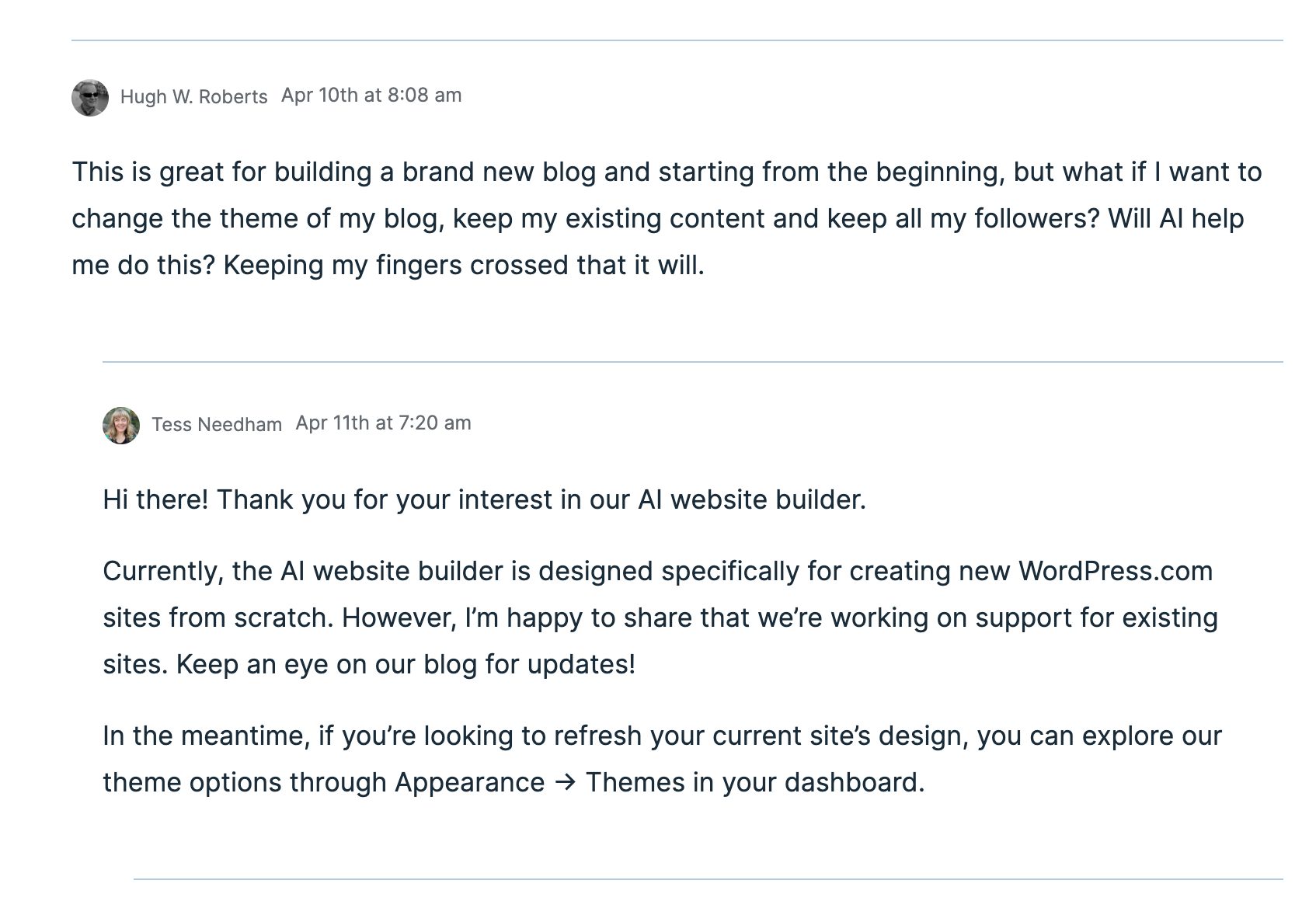
Unfortunately, after a few messages exchanged between a member of WordPress staff and me, I discovered that this new service of AI creating a theme for your blog is only available to those who want to start afresh with a brand new blog. The AI software can not change themes for an existing blog. However, WordPress is working on this, and it will become available sometime in the future.

An image showing a message conversation about the AI theme building.
Would you allow AI to help you change the theme of your blog?

Given that I’m not confident about changing my blog’s theme from my current theme to a full-site-editing theme, I’m looking forward to AI doing the work for me. I just hope it’s something I’ll be able to do sooner rather than later.

Recommended reading about AI in blogging from other bloggers.

If you want a guide on AI on WordPress, check out this excellent article from Fedora, ‘A Guide To WordPress.Com’s AI Assistant.’

This post from Debbie at Deb’s World, “Reinventing Blogging: A Look into the Future,” dives into the controversial realm of AI in blogging, and trust me, it’s a must-read that has ignited plenty of debate. Are you ready to jump into the fray and add your voice to the discussion?

Would you use and trust AI to help change your blog’s theme? Are you still using an outdated, unsupported theme and experiencing problems? Are you someone who will never use AI, even if it means the problems you’re experiencing with your blog will continue? Drop your thoughts in the comments, and let’s chat!

The featured image of this blog post was generated using the WordPress AI blocks.

I’m getting tough with non-engaging comments. Any non-engaging comments such as ‘Nice post’ are marked as spam.

Click the buttons below to follow Hugh on Social Media

Copyright @ 2025 hughsviewsandnews.com – All rights reserved.

7 Common Blogging Mistakes and How to Avoid Them for a Successful Blog

We’re all human, so we all make mistakes. When it comes to blogging, whether bloggers are just starting out or have been writing for a while, some make more mistakes than others.

But what are those mistakes? And do some bloggers not make any mistakes at all?

1. Not Defining a Target Audience

One of the most critical mistakes of bloggers is not clearly understanding their target audience. Writing for everyone often leads to writing for no one.

Solution:

Take some time to define your ideal reader. Consider their demographics, interests, and problems they want to solve. Tailoring your content to a specific audience will make your blog more focused and engaging. For example, I target most of my posts at other bloggers by giving blogging tips and helping to solve problems users are experiencing with WordPress.

2. Ignoring SEO (Search Engine Optimization) Best Practices

SEO might seem daunting, but ignoring it can severely limit your blog’s visibility. Many bloggers neglect to use relevant keywords or proper formatting that can help their posts rank better in search results.

Solution:

Invest some time in mastering the essentials of SEO. Consider creating blog post titles with keywords that appeal to visitors and make them want to read your posts.

If you’re not interested in attracting more traffic or followers to your blog, you can disregard SEO.

3. Inconsistent Posting Schedule

Consistency is key in the blogging world. Many new bloggers either post too sporadically or overwhelm their readers with too much content at once. I’m guilty of this mistake, having cut back on how often I publish posts.

Solution:

Develop a realistic posting schedule that you can maintain. Whether it’s once a week or biweekly, staying consistent helps build an audience that knows when to expect new content. Some will not publish any posts for many weeks or months and then suddenly publish many posts within a short time as if they are in a race. Space the publication of posts out to give readers time to read and engage before publishing your next post.

4. Failing to Promote Content

Creating great content is only half the battle; the other half is getting that content in front of readers. Many bloggers publish their posts and assume readers will find them, which rarely happens unless you have a loyal audience who reads all your posts.

Solution:

Share your blog posts across various social media platforms, engage in relevant online communities, and consider using email marketing to reach your audience directly. Never believe that an audience will find you.

5. Not Engaging with Their Audience

Some bloggers overlook the importance of conversing with their readers through blog comments, social media, or emails. Never ignore your audience.

Solution:

Make it a priority to respond to comments and questions, ask for feedback, and create a community around your blog. Engaging with your audience not only builds loyalty but also provides you with valuable insights into what they want to see.

6. Neglecting the Visual Aspect

A blog’s visual appeal can significantly impact reader retention in the internet age. A blog that looks outdated or cluttered can deter visitors.

Solution:

Invest a little time learning about basic design principles, using user-friendly blogging tools and updating your blog’s theme. Choose clean layouts, appealing colour schemes, and high-quality images to enhance your blog’s aesthetic.

You don’t need to spend tens of thousands on re-branding, but if your website still looks stuck in 2015, it’s worth updating. People judge quickly. A blog’s look and design play an enormous role in how professional (or trustworthy) it looks.

7. Writing Without a Clear Purpose

Blogs that lack direction can confuse readers and fail to deliver value. Having a clear purpose behind each post is essential.

Solution:

Before writing, outline what you want to achieve with your content. Are you aiming to inform, entertain, or persuade? Staying focused on your purpose will guide your writing and make it more effective.

Conclusion

Recognising these common mistakes is the first step toward becoming a successful blogger. By defining your audience, optimising for SEO, maintaining consistency, actively promoting your content, engaging with readers, improving your blog’s design, and writing with a clear purpose, you can significantly improve your blogging experience and expand your reach.

Keep these tips in mind as you continue your blogging journey. Good luck!

Do you have any blogging mistakes you’d like to share? If you’ve faced challenges or learned valuable lessons throughout your blogging journey, I would love to hear about them! Please leave the details in the comments section and join the discussion. By sharing your insights, you can help others avoid similar pitfalls and foster a supportive community of bloggers eager to enhance their craft. Let’s learn from each other and make our blogging experiences even more rewarding!

The featured image and title of this blog post were generated using the WordPress AI blocks.

I’m getting tough with non-engaging comments. Any non-engaging comments such as ‘Nice post’ are marked as spam.

Click the buttons below to follow Hugh on Social Media

Copyright @ 2025 hughsviewsandnews.com – All rights reserved.
Harnessing AI in Blogging: Benefits, Challenges, and Personal Insights

In today’s digital landscape, artificial intelligence (AI) is emerging as a progressively popular tool across various domains, including blogging.

WordPress integrated AI into its platform a few years ago, joining numerous other sites that now offer AI as an option.

I have witnessed many bloggers who are afraid of what AI can do, but I have also seen many bloggers embrace AI and utilise it for the benefits it can offer.

However, like any tool, there are pros and cons to consider.

What are your thoughts about using AI to blog?

This post examines the advantages and disadvantages of integrating AI into your blogging process.

Pros of Using AI in Blogging

1. Improved Efficiency

AI tools can streamline the writing process. From generating topic ideas to creating content drafts, AI can save bloggers considerable time, allowing them to focus on refining their unique voice and style.

This may prove beneficial to bloggers who publish daily, but those bloggers who publish less often may not see any benefit.

2. Enhanced Creativity

AI can assist in brainstorming and generating creative content ideas. With access to vast databases and algorithms that identify trends, AI can offer fresh perspectives and innovative suggestions.

However, some consider this to be plagiarism, a term that specifically refers to taking another person’s work—words, ideas, and so forth—and presenting it as one’s own without proper attribution.

Did you know that WordPress users can choose to stop their blog’s content from being shared with a WordPress-licensed network of content and research partners, including those that train AI models? To achieve this, navigate to your blog’s dashboard, select Settings—Reading, and tick the box next to ‘Prevent third-party sharing...’.

An image highlighting the box to tick on a WordPress dashboard to prevent AI tools from scraping your site.
Tick this box to stop AI from using your blog content.

3. SEO Optimization

Numerous AI-based tools can analyse keywords and optimise content for search engines. They offer insights into the types of content that rank well, assisting bloggers in enhancing their visibility and reach.

I utilise AI to generate titles for blog posts when I struggle to think of a captivating title that will entice readers to read and engage further. Consequently, I have observed a significant increase in engagement and visitors to my blog.

4. Data-Driven Decisions

AI can analyse reader behaviour and feedback to inform content strategy. By understanding what resonates with the audience, bloggers can create more targeted and engaging content.

However, your WordPress statistics can also provide this information by analysing the stats of posts that receive higher engagement. Typically, you’ll observe a correlation between those posts that engage readers more and those that attract less engagement.

5. Consistency

AI can assist in maintaining a consistent posting schedule by automating aspects of the content creation process. This guarantees that the blog stays active and engaging for readers.

It is widely known that blogs which publish on a schedule tend to retain readers; however, it is unwise to publish content merely for the sake of it. There is nothing wrong with occasionally missing the publication of a blog post or taking a break from blogging. Nevertheless, if you choose to take the latter route, ensure that you inform your readers.

Cons of Using AI in Blogging

1. Lack of Personal Touch

AI-generated content often lacks the emotional depth and personal touch that human writers naturally provide. Readers tend to connect more readily with personal stories and unique experiences that AI is unable to replicate.

If you let AI compose all your posts, you’ll soon notice a decline in visitors and engagement.

2. Quality Control

While AI can generate content rapidly, the quality does not always meet high standards. Bloggers must review and edit AI-generated content to ensure it aligns with their voice and is factually accurate. Remember, it is your blog, not that of AI. Your voice matters.

3. Dependence on Technology

Over-reliance on AI can hinder writing skills. Bloggers may grow overly dependent on tools, stifling creative development and originality. This is particularly evident in the fiction world, where I have observed AI produce stories that lack emotion or feeling, thus making them dull and unappealing.

My advice is that if you use AI, mix it with your written content.

4. Ethical Concerns

The use of AI raises ethical questions, such as plagiarism (which I discussed earlier) and authenticity. Bloggers must ensure that their use of AI does not compromise their integrity or mislead their audience. Always check (and check again) what AI produces.

5. Costs

Although some AI tools are free, many come with a cost. For bloggers on a tight budget, investing in AI technology might not be practical. However, this won’t affect those who choose not to use AI.

Do I use AI in blogging?

Yes, I utilise AI to assist with spelling and grammar corrections. I have also used AI to verify if I have omitted anything essential from a post, as well as for generating titles for blog posts.

The featured images I use in my blog posts (including this one) are primarily created using the WordPress AI image tool. However, I have found that the tool is not always particularly effective at generating images, especially when more than a few words are included. More work is needed to improve it.

Conclusion

Utilising AI in blogging offers both exciting opportunities and significant challenges. While it can enhance efficiency, creativity, and data-driven decisions, it is crucial to maintain a balance and preserve the unique voice that attracts readers. By carefully weighing the pros and cons, bloggers can make informed choices about incorporating AI into their writing process.

If you wish to utilise AI, do so with your own writing rather than generating posts entirely composed by AI.

Finally, we must never forget that we all have a choice regarding AI. We can either use it or leave it be. What we must never do is persuade other users to use it or not. It’s a personal decision. Never criticise those who choose to use AI if you are against any use of AI in writing. Likewise, don’t criticise anyone who refuses to use AI if you use it.

Recommended reading about AI in blogging from other bloggers.

If you want a guide on AI on WordPress, check out this excellent article from Fedora, ‘A Guide To WordPress.Com’s AI Assistant.’

This post from Debbie at Deb’s World, “Reinventing Blogging: A Look into the Future,” dives into the controversial realm of AI in blogging, and trust me, it’s a must-read that has ignited plenty of debate. Are you ready to jump into the fray and add your voice to the discussion?

Are you hopping on the AI train in your blogging adventure? If so, what tools are you using, and what benefits has AI brought you and your blog? Does the use of AI in the blogging world concern you? Are you against using AI in Blogging? If so, what are your reasons? We want to hear your thoughts if you’re for or against AI. Drop your thoughts in the comments, and let’s chat!

I’m getting tough with non-engaging comments. Any non-engaging comments such as ‘Nice post’ are marked as spam.

Click the buttons below to follow Hugh on Social Media

Copyright @ 2025 hughsviewsandnews.com – All rights reserved.

11 Tips to Craft Irresistible Blog Post Titles That Attract New Visitors

What do you consider the most crucial factor in attracting new visitors to your blog or website?

Many may immediately say, ‘content.’

However, content is not always king.

An essential element that nearly every visitor encounters first before deciding to read a blog post in depth exists.

Crafting Compelling Titles for Your Blog Posts

Why Great Blog Post Titles Are Essential…

“On average, 5x as many people read the title as read the body copy. When you’ve written your headline, you’ve spent eighty cents out of your dollar.”
David Ogilvy

Indeed, the secret lies in your blog post titles. Craft captivating titles, and you will witness a surge in new visitors eager to read your posts and explore your website.

I don’t know about you, but some blog post titles can make me sleepy, especially when they have been used repeatedly.

Blog Post Titles: The Equivalent of Book and Movie Titles

I consider blog post titles akin to the titles of books or movies. If a title captures my interest, I am likely to begin reading the book or watch the film.

Titles are as significant as the content itself, yet many bloggers give their blog post titles little, if any, thought. Master both, and you’re on the path to success.

If your blog post title isn’t engaging, how many potential new and existing visitors will scroll past it without a second thought?

I often find myself doing the same. If a title fails to grab my attention, I quickly move on.

Think about this: how many visitors to your blog are likely to do the same?

Tip: When creating titles for your blog posts, consider what title would motivate you to click on the ‘read more’ link.

Strategies to Make Your Blog Post Titles More Enticing

Certain words in blog post titles can attract readers’ interest in learning more. Here are a few examples:

  • How
  • How to
  • When
  • Have
  • Have you
  • Don’t
  • Did
  • Do you
  • This
  • This is
  • Who
  • Why
  • What
  • Where

Additional Techniques to Enhance Your Blog Post Titles

Incorporate Numbers

Numbers can greatly affect the effectiveness of your titles. Think about these two examples:

My thoughts on Ways to Get People to Read Your Blog Posts.

7 Blogging Tips That Will Boost Your Post Engagement And Get Visitors Reading Your Blog.

According to Janice Wald of MostlyBlogging.com, odd numbers generally perform better than even numbers in titles, with prime numbers yielding even greater results.

Odd numbers tend to attract more attention as they seem less predictable compared to even numbers.

Tip: Opt for numerals instead of spelling them out when using numbers. Digits tend to stand out more in headlines and require less space.

Utilise Hashtags

Hashtags can enhance your blog post titles, aiding both SEO and drawing in visitors seeking specific topics.

Explore trending hashtags around your post’s publication time. Bluesky and X are great resources for identifying these trends, but always ensure your hashtags are relevant to your content.

Warning: Excessive hashtags can lead to search engines flagging your post as spam. To maintain a professional appearance, limit yourself to no more than three hashtags in your blog post title.

Incorporate Bluesky and X Usernames

If you mention someone in your blog post with a Bluesky or X account, including their handle in the title can be beneficial. When your post is shared, the individual mentioned receives a notification and may expand your reach by resharing it.

For example, when writing a book review, in the blog post title, include the Bluesky or X handle of the author.

Optimise Word Count

Research from CoSchedule.Com suggests that blog post titles around 55 characters long typically earn the highest click-through rates. Titles within six to ten words also tend to yield better engagement.

To establish a foundation for creating your blog post titles, consider these templates:

  1. How To ____
  2. How To Find ____
  3. How To Completely Change ____
  4. How To Create ____
  5. How To Use ____
  6. How To Get Rid Of ____
  7. How I Made ____
  8. How To Save ____
  9. How To Help ____
  10. How To Develop ____
  11. What To Do With ____
  12. Here’s How To ____
  13. Where To Find ____
  14. What No One Tells You About ____
  15. (#) Questions You Should Ask Before ____
  16. (#) Secrets To ____
  17. (#) Signs You Might ____
  18. (#) Rules For ____
  19. (#) Facts About ____
  20. (#) Ideas For/To ____
  21. (#) Essential Steps For/To ____
  22. (#) Foolproof Tips For ____
  23. (#) Handy Tips For ____
  24. (#) Tricks For ____
  25. (#) Key Benefits For ____
  26. (#) Reasons You ____
  27. (#) Wrong Ways To ____
  28. (#) Most Popular ____
  29. (#) Tips For ____
  30. (#) ____ Mistakes You Won’t Make Again
  31. (#) Things I’ve Learned This Month
  32. Why My Weekend Was Amazing
  33. You’ll Never Believe What Happened Last Week
  34. Why This Is The Only Chocolate Chip Recipe You Need
  35. Meet ____ ____ Who Reveals Their Writing Secrets
  36. Why I’m Recommending These (#) TV Shows to Fans of ____
  37. Book Review: (#) Reasons I’m Giving ____ by ____ ____ (insert Bluesky or X username) 5 Stars

(Remember to insert a number in place of (#).)

I’ve used many of these title ideas and seen excellent results. My titles frequently include words that draw readers in.

Warning: Always remember to add a title to your blog post. Any title is better than having none. WordPress replaces empty titles with a five-digit number, which does not encourage visitors to click the ‘read more’ link.

AI can it help with blog post titles?

Yes, it can.

Did you know that WordPress has an AI block? Just ask it to suggest a title for your post, and see the result.

Not sure how to use AI on WordPress? Check out this excellent post from Fedora, who blogs at Fedora Pancakes – ‘A Guide to WordPress.com’s AI Assistant.

Conclusion

  • Blog post titles are the first impression for visitors; make them as compelling as possible.
  • Titles are as important as the content of your posts.
  • Consider what would encourage you to click ‘read more’ when crafting a title.
  • A poorly chosen title could mean missing out on countless new readers, likes, and comments.
  • Ensure every post has a title; it doesn’t have to be perfect—just better than a default number.
  • Use engaging words like How, What, Why, and Where to entice clicks.
  • Odd numbers usually outperform even numbers in titles, making them more appealing.
  • Use numerals for numbers in titles for better visibility.
  • Keep hashtags limited to three to avoid looking spammy.
  • Mentioning Bluesky and X usernames can help boost your post’s visibility on social media.
  • Use AI to help generate blog post titles.

How do you generate titles for your blog posts? Are there any extra strategies you would like to share or questions about title creation? Join the conversation in the comments!

Click the buttons below to follow Hugh on Social Media

Copyright @ 2025 hughsviewsandnews.com – All rights reserved.

How to Fix Commenting Issues on WordPress Email Notifications: A Simple Solution

If you receive email notifications from WordPress about new blog posts, you might face difficulties leaving comments on certain blogs.

When I attempt to leave a comment, I receive an error message.

Image of an error message that appears when trying to leave a comment on WordPress.
The error message.

This issue only impacts comments made when opening posts from email, not those via the WordPress Reader or the bell icon in the notification centre of my blog.

The issue still exists at the time of this post. However, I have found that comments go through when replying to the You can also reply to this email to leave a comment message (see the image below).

Image highlighting the 'You can also reply to this email to leave a comment' link on a new post notification from WordPress.
Leave your comment via the ‘You can also reply to this email to leave a comment’ link.

You’ll see that it’s like replying to an email rather than leaving a comment on the post, so press the reply button to the email, draft your comment and click the send button. When you check the post, you’ll see your comment unless it’s waiting for approval by the blogger for which you’re leaving the comment.

I recently came across this message. I’m unsure how long it’s been appearing in WordPress emails, whether WordPress has temporarily added it to email notifications to address the issue, or whether it’s a permanent fix. Next time I talk with WordPress, I’ll ask them and update this post.

The important thing is that this method of leaving comments works, so there’s no longer a need to remember to copy comments before submitting them.

Update: See the below response from a staff member at WordPress to me.

An image of a comment from a member of staff at WordPress about the problem involving not be able to leave comments via the WordPress new blog post notification email.
WordPress is working on the problem that is causing some comments to fail.

I inquired with WordPress about whether the text ‘You can also reply to this email to leave a comment at the bottom of their notifications is a recent addition. They confirmed that this specific wording is new; however, the ability to leave comments by replying to emails has been available for a long time.

Update 2

WordPress has now resolved this problem. I’m no longer seeing the error message.

However, if you still get the ‘Sorry, this comment could not be posted’ message when leaving comments, please contact WordPress.

Is this commenting problem affecting you? Please feel free to ask any questions by leaving a comment.

Click the buttons below to follow Hugh on Social Media

Copyright @ 2025 hughsviewsandnews.com – All rights reserved.

Why Every Blogger Needs an Engaging ‘About’ Page: Key Elements and Tips

It never ceases to amaze me how many bloggers do not have a page on their blog where they can introduce themselves to their audience.

Sometimes, their ‘About’ page is blank or hasn’t been updated for years.

Given that a blog’s ‘About’ page is one of the most visited areas, it’s no wonder that all bloggers should have one and ensure it is regularly updated.

I’ve previously written about the importance of an ‘About’ page. This new post is an important reminder.

What is an ‘About’ Page?

An ‘About’ page is one of the most critical components of your blog.

It serves as an introduction to your readers, offering insights into who you are, what your blog is about, and why you started it.

It also helps you connect with your audience, establish credibility, and set the tone for your content.

Here is why it’s important and what to include in it.

Why the ‘About’ Page Matters

  1. Personal Connection: Readers love to know the person behind the blog. An engaging ‘About’ page humanises your content, making it relatable and fostering community.
  2. Establishing Credibility: Sharing your background, expertise, and experiences can enhance your credibility. It shows that you know your niche or what you write about, which can attract more readers and followers.
  3. Setting Expectations: It informs visitors about the blog’s purpose, the type of content they can expect, and how often you post. This clarity can help keep readers coming back.
  4. Encouraging Interaction: An inviting ‘About’ page can motivate readers to engage with you through comments, emails, or social media. It opens the door for dialogue and connection.

Have you seen my ‘About ‘page? Take a look and let me know what you think.

What to Include on Your ‘About’ Page

  1. Your Story: Share your personal journey. Explain why you started the blog and what motivates you to write. This could include anecdotes that resonate with your audience.
  2. What’s Your Name?: While you do not need to give your full name, it’s essential to include and tell visitors a name by which you want to be known. Not only does this make you come over as approachable, but it also gives the impression that you are friendly. Use a pseudonym if you do not want to provide your real name.
  3. Your Expertise: Highlight your knowledge or experience in your niche or what you write about or publish. This may include your education, career background, or significant achievements related to your blog’s topic.
  4. Blog Mission Statement: Clearly state the purpose of your blog. What topics do you cover? What value do you aim to provide to your readers? A concise mission statement can help readers understand your blog’s focus.
  5. Target Audience: Briefly mention who your blog is created for. Understanding who will benefit from your content can help new visitors feel more connected and engaged.
  6. Call to Action: Encourage readers to explore your blog further. This could be a suggestion to read your latest posts, subscribe to your newsletter, or follow you on social media.
  7. Professional Photo: Including a personal photo can make your page more inviting and relatable. Choose a high-quality image that reflects your personality.
  8. Contact Information: Allowing readers to contact you through a ‘contact’ page, email, or social media links can facilitate interaction and community building. However, never give your telephone number, address, or personal email details.

Conclusion

Your ‘About’ page is not merely a formality but a crucial point of engagement for your blog.

Sharing your story, expertise, and mission creates a welcoming atmosphere for readers and cultivates a loyal community. Crafting a compelling and authentic ‘About’ page can significantly enhance your blog’s impact and strengthen your connection with your audience.

Don’t forget to keep your ‘About’ page updated. I update mine at least once every six months.

Don’t hesitate. Write and publish your ‘About’ page now.

Do you have an ‘About’ page on your blog? What information does it include, and when was the last update you made? Any questions? Leave them in the comments section.

Click the buttons below to follow Hugh on Social Media

Copyright @ 2025 hughsviewsandnews.com – All rights reserved.