Blogrolls: What Happens When Adding One To Your Blog

A blogroll is a curated list of links to other blogs or websites that a blogger recommends, follows, or finds interesting, which they can display on their blog. Usually shown in a blog or website’s sidebar, footer, menu bar, or dedicated page, it helps foster community, share resources, and help readers find related content. Essentially, it is a “roll” of recommended blogs. 

Unfortunately, WordPress deprecated the Links/Blogroll widget several years ago. However, users of the Block Editor can now access the ‘Blogroll’ block to display a list of recommended or followed blogs.

If, like me, your blog has a widget bar, you can show the blogroll there. If you don’t have a widget bar, you can display a blogroll on a page, post, or in the menubar of your blog.

In this post, I will show you how to create a blogroll in a widget bar and on a blog post or page. I’m using an iMac desktop computer for this.

How to add a blogroll to a widget bar.

  • On your blog’s dashboard, navigate to AppearanceWidgets and click the ‘+‘ symbol in the top right corner.
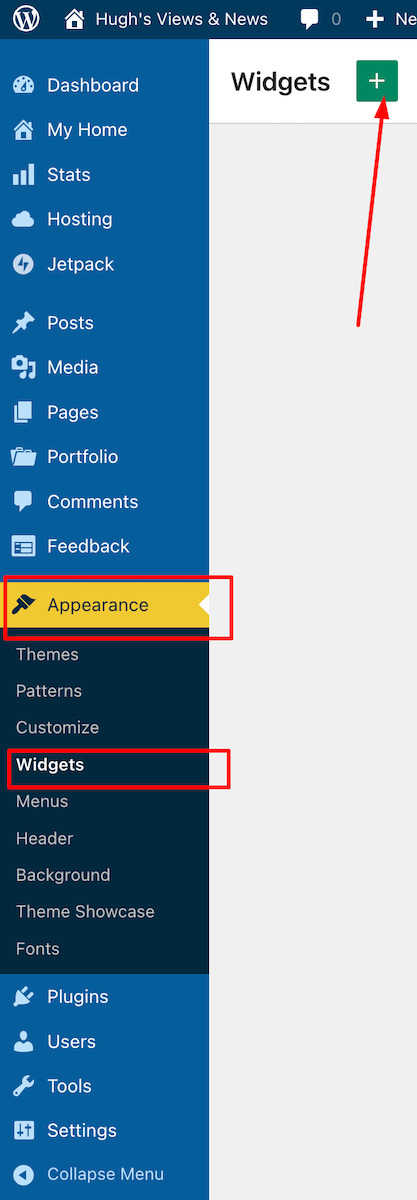
An image highlighting where to find 'Appearance' and 'Widgets' on the dashboard of a WordPress blog.
Click Appearance – Widgets
  • Find the Blogroll block by typing ‘Blogroll’ in the search bar. Click on the Blogroll block to add it to your widget bar.
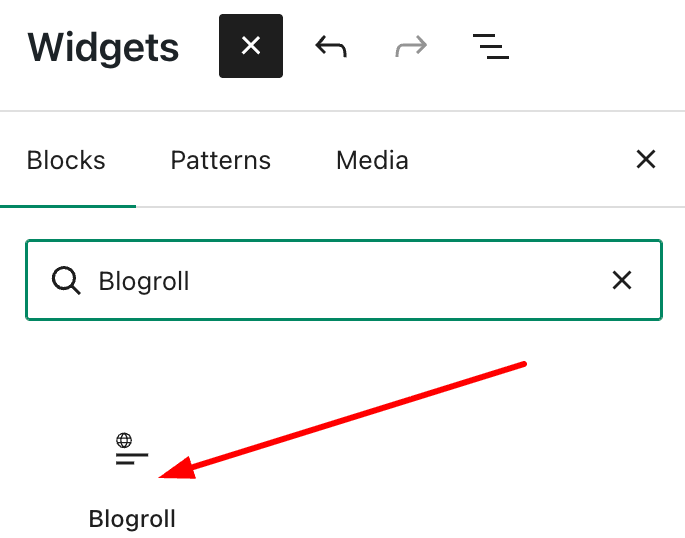
An image showing where and how to find the Blogroll Block on WordPress.
Add the ‘Blogroll’ block

For some reason, when you add a Blogroll block, it automatically populates with several blogs, some of which you may not recognise. I found this quite odd, but it’s simple to remove any unwanted ones.

  • To delete a blog, select the blog you wish to remove, then click the three vertical dots (kebab menu) and choose Delete.
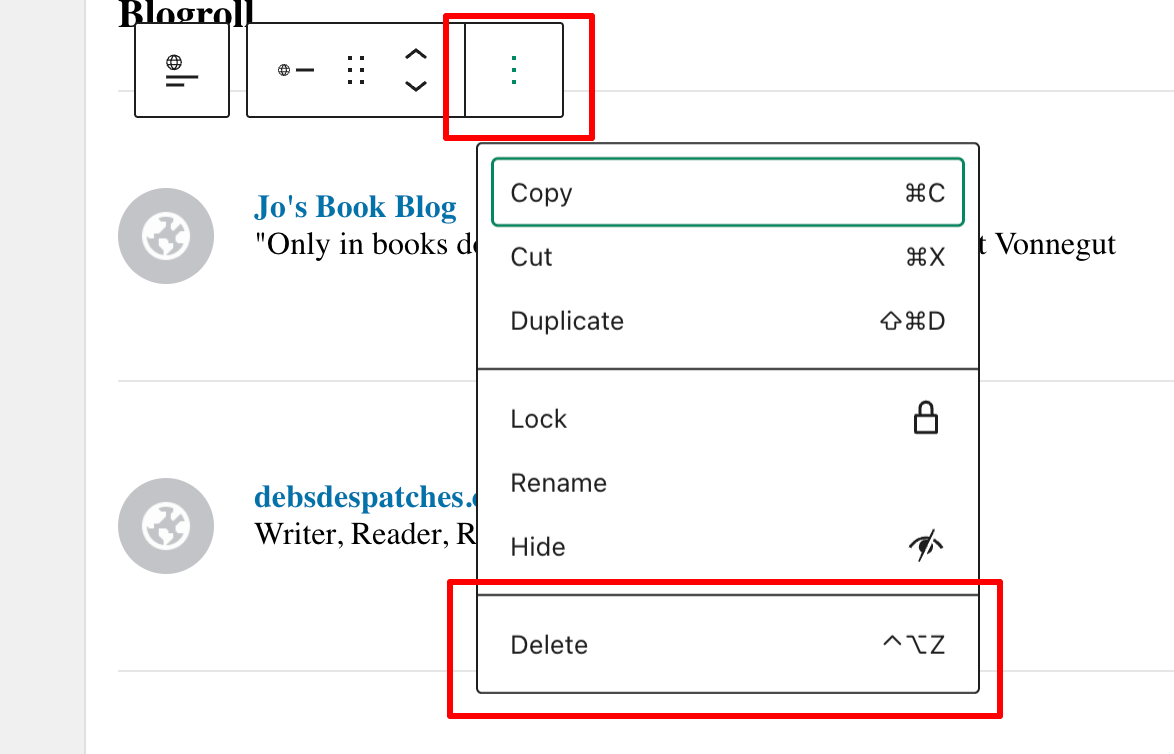
An image highlighting the kebab menu and delete button when deleting blogs from a Blogroll on WordPress.
Deleting blogs from a Blogroll is easy
  • To add blogs, click on the ‘+‘ symbol and select from the list that appears or use the search bar to find the blogs you wish to add.
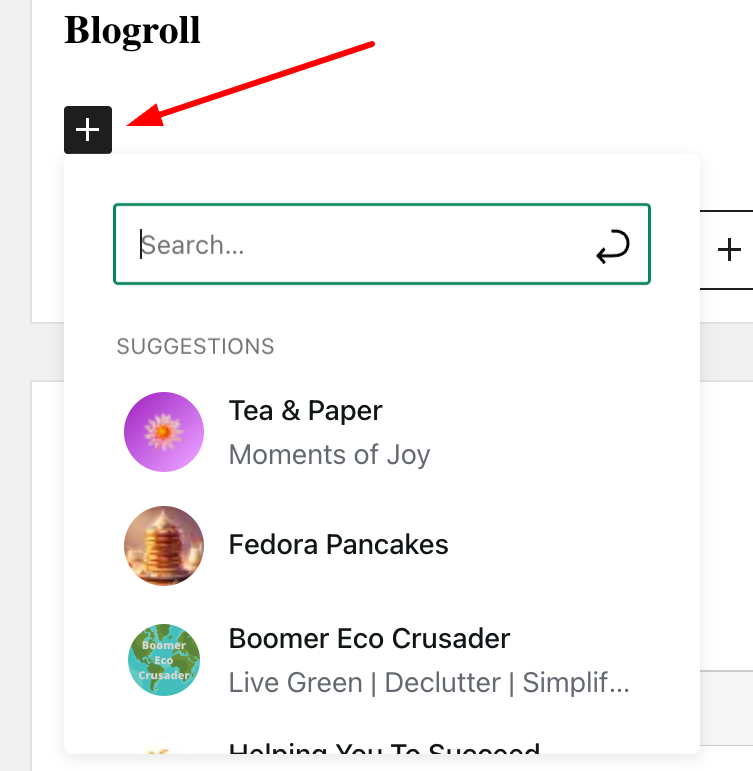
An image highlighting the 'plus' button and a list of blogs when creating a blogroll on WordPress
Add or search for the blogs you want to add to your blogroll.
  • To change the name of your blogroll, click next to ‘Blogroll‘ and add your own description.
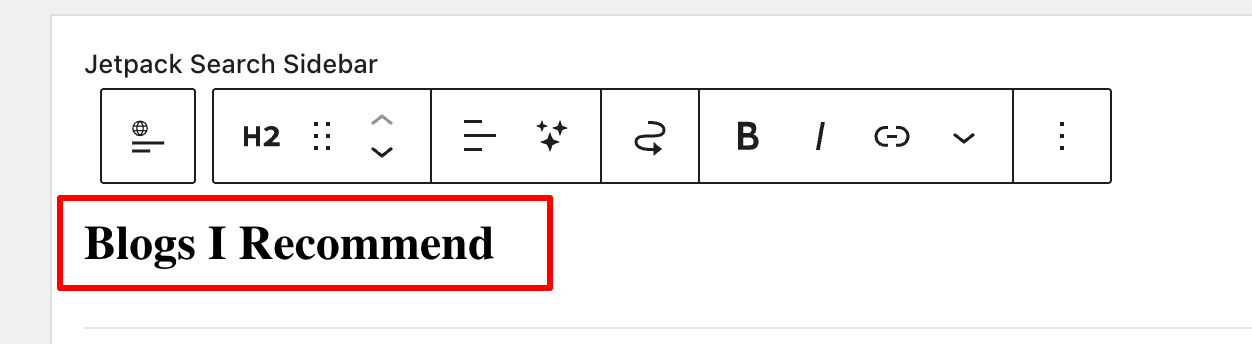
An image highlighting how to change the name of a Blogroll on WordPress
Rename your blogroll
  • Click the Update button in the top right corner to publish the Blogroll in the widget bar.
  • Check your blog to ensure the Blogroll widget is visible. You can see the blogroll I created towards the bottom of the widget bar on the right side of my blog. It contains the blogs I read the most.

How to add a blog roll to a page or post.

  • Add the Blogroll block anywhere on a page or post.
  • To add or remove blogs from your blogroll list, follow the instructions above.

Remember that you can change the name of your blogroll. However, be aware that if your blogroll contains many blogs, it will take up a lot of space on the post or page.

You can also convert your blogroll into a reusable block, now called a Pattern, by clicking on the block, then selecting the three dots (kebab menu) and choosing ‘Create Pattern.’
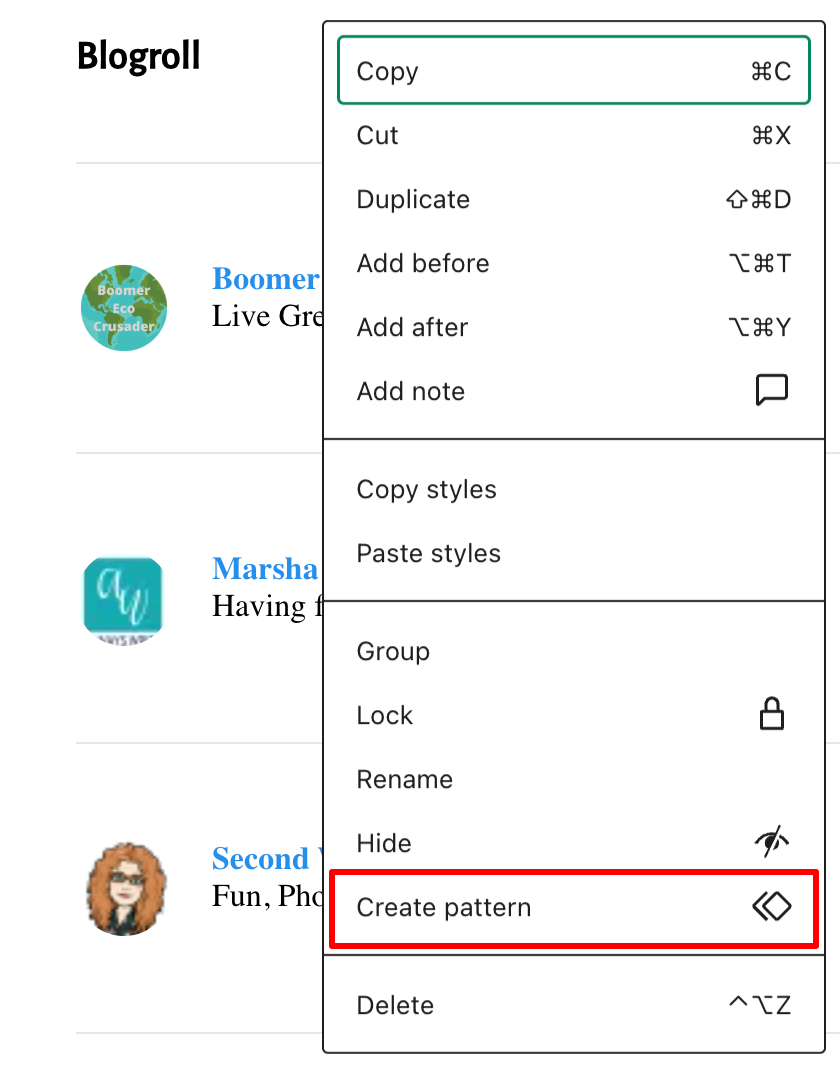
An image showing how to turn a Blogroll into a 'Reusable Block.'
Turn your blogroll into a reusable block

A reusable block on WordPress, now often called a Synced Pattern, is a feature that allows you to save a specific block or group of blocks for use across multiple posts or pages. This is particularly helpful for those selling items on their blog, such as books. For example, if a link to your books needs updating or the price changes, the updates are automatically reflected everywhere the block appears. Clever stuff!

To answer the question I raised in the title of this post, what happens when you add a blog roll to your site? Well, that’s straightforward. It means you promote the blogs you enjoy reading most. In doing so, you help foster a community and bring its members closer together. In turn, you’ll be supporting them in developing their blogs and community. What better way to say ‘thank you’ to those special people?

I’m looking forward to seeing your blogrolls as I’m looking for some new blogs to follow. If you have a blogroll on your blog, let me know.

Note: Widget bars only show when viewing posts and pages on a desktop computer. When viewing posts on a tablet or mobile phone, click the menu button to see them.

Have you ever created a blogroll on your own blog? Which blogs or websites did you include? How do you think a blogroll can improve the reader’s experience on a blog? How often do you update your blogroll or the blogs you follow? Have you come across any new blogs from fellow bloggers’ blogrolls? If so, which ones?

The featured image on this blog post is sourced from Pixabay. AI reviewed spelling and grammar errors.

Layout, content, settings, and format might differ on self-hosted blogs.

You can follow me at the following sites.

Copyright @ 2026 hughsviewsandnews.com – All rights reserved.


Discover more from Hugh’s Views & News  

Subscribe to get the latest posts sent to your email.

58 responses to “Blogrolls: What Happens When Adding One To Your Blog”

  1. Mr. Ohh's Sideways View avatar

    Thanks Hugh. I’ve been trying to find out how to do that. 🤣😎🙃

    1. Hugh W. Roberts avatar

      And now you know how. You’re welcome.

  2. Michelle (Boomer Eco Crusader) avatar

    This is great, Hugh. I’ve seen this on other blogs but didn’t know how to add it. I am going to look at adding this feature to my site. And thank you for including my blog on your blog roll. 😀

    1. Hugh W. Roberts avatar

      You’re welcome, Michelle. I’m new to your blog, but I’ve enjoyed reading some of your recent posts, which have prompted me to leave some comments.

      1. Michelle (Boomer Eco Crusader) avatar

        I appreciate every comment! The engagement is what makes blogging worthwhile.

        1. Michelle (Boomer Eco Crusader) avatar

          Well that was easy! I just added a blogroll to my site. Thanks again for the tip, Hugh!

          1. Hugh W. Roberts avatar

            You’re welcome, Michelle.

  3. Debbie D. avatar

    Thanks for explaining about the Blogroll widget, Hugh. I will definitely explore more about it. For now, I’m still using classic widgets in my sidebar, and there is a list of frequent commenters, with a link to their blogs, which I copied from the old Top Commentators widget. I’m sure the new Blogroll widget is a better option.

    1. Hugh W. Roberts avatar

      Hi Debbie, I saw your frequent visitors’ widget, which is another great way to showcase and promote other bloggers. With the Blogroll widget, you have more control over which bloggers are showcased, and you can remove any you do not want to appear there.

  4. Terri Webster Schrandt avatar

    First, I enjoy having a sidebar on my blog site, Hugh. The blog roll widget is a great idea! But the more I use Jetpack app to read posts, I rarely see these widgets on other blogs. As soon as I get my internet service back, I’ll look into this feature for my blog. Thanks for doing the heavy lifting to show us how!

    1. Hugh W. Roberts avatar

      Hi Terri, I’ve updated my post after realising that when viewing posts on a tablet or mobile, widget bars are hidden behind a ‘Menu’ button. They only show immediately when viewing posts and pages on a desktop computer.

      Sorry to hear you’ve had no internet service. I hope it’s now fixed.

      1. Terri Webster Schrandt avatar

        Great to hear, Hugh! I’ll have time this week to check out the Blogroll widget. Internet is back, what a relief!

  5. Paul Ariss avatar
    Paul Ariss

    Thanks Hugh, I’ve added this as brilliantly explained, though it looks as though it only appears way down at the bottom of my blog. I’ll have another look through my phone.

    1. Hugh W. Roberts avatar

      Paul, it sounds like you have a widget footer. It depends on the theme you are using, so a widget bar at the foot of your blog may be the only one available. However, it’s worth checking whether your theme also offers a sidebar widget bar.

      1. Paul Ariss avatar
        Paul Ariss

        Okay will do, thank-you

  6. Eugi avatar

    Thank you for this, Hugh. I have a block theme with a sidebar, and the blogroll widget is available to add. The name of my theme is Crafted. I agree it is a great way to support the community.

    Also, I have a question, and are you noticing a strange spike in your stats? I have an ongoing chat with WordPress, because my stats don’t make sense, and other bloggers have noticed this, as well. I’m an US blogger, and my stats show 53,000 + visitors from China, which 2 days ago was 27,000 + visitors. My visitors from the US show 28,000 +, so this doesn’t compute in my mind. Do you have any ideas? Thank you.

    1. Hugh W. Roberts avatar

      I’m not noticing any spikes in my stats, but I have heard of other bloggers reporting similar issues, much like what has happened to yours, Eugi. From what I understand, these spikes are caused by spambots attempting to exploit WordPress. They flood various blogs with hits in an effort to bring the platform down. Fortunately, WordPress has measures in place to prevent this, but sadly, they haven’t been able to do anything about how it affects the stats. Not good news for anyone who depends on their stat figures.

      1. Eugi avatar

        Thank you so much for your explanation, Hugh. I sincerely appreciate it.

  7. Brenda avatar

    Thanks Hugh. I’ll check this out. Im not sure about my theme, but I’ll check if i can add a sidebar. Recommended sites sounds like a great idea

    1. Hugh W. Roberts avatar

      It’s a great feature, but more so if we can display those recommended blogs all the time rather than hide them behind another clickable box or a menubar, Brenda. I hope your theme allows a widget bar. Many of the Block themes do have access to widget bars, but sadly many hide them away behind another box a reader has to click to access them.

  8. Walt Walker avatar

    A blogroll is a great way to connect, promote, and share. Yet over the years, it seems that WordPress has only made it harder to build a sense of community, when community used to be a very big and obvious part of the WP culture. Why do you think this drift continues to happen, Hugh?

    1. Hugh W. Roberts avatar

      Oh, it’s down to a move towards corporate blogs, Walt. This is where the money is for WordPress and why there has been so many changes over the years. WordPress don’t make any money out of the majority of personal blogs anymore. They had to keep up with their competitors and shift their focus more towards business. However, those personal bloggers that adapted to the changes have survived and there is still a community out there, although nowhere near as big as it once was.

  9. Suzanne avatar

    A fun thing to add: acknowledging the bloggers we enjoy communicating with via their blogs.

    1. Hugh W. Roberts avatar

      I agree, it’s a fun Block, Suzanne. Plus, it helps promote the blogs we love.

  10. junedesilva avatar

    When I started my blog, using a different theme from my current one, I had a blog roll. Thanks to your clear and practical post, I should be able to reinstate this with my latest theme. Thank you for including Fancying France in your blog roll. I find your new header image optimistic and cheerful, much needed at the moment.

    1. Hugh W. Roberts avatar

      I’m glad you like the header, June. I try and change it at the beginning of every month. I like that the theme I use allows this.

      The blogroll widget disappeared without any notice (unless I missed it) but thankfully WordPress replaced it with a Block. Good for us that use the Block Editor, not so good for those that still use the Classic editor.

  11. JT Twissel avatar

    I’ve got a widget that shows visitors (I think!) which I really should change. Thanks (once again!) Hugh!

    1. Hugh W. Roberts avatar

      I’ve seen that widget on quite a few blogs. It’s a good one, unless you get somebody on there you do not want being displayed. Some of those avatars can be eye-popping.

  12. Michael avatar

    I am glad you wrote this post as I rarely look at my “home” page and the sidebar. I discovered, thanks to you, that the blogroll had disappeared. I followed your easy to read instructions and started another widget on the sidebar. Thank you so much.

    1. Hugh W. Roberts avatar

      I’m glad it helped, Michael.

      1. Michael avatar

        It really did help. I always appreciate your tips.

  13. Esther Chilton avatar

    This is something I need to look into again. When I changed my theme, I couldn’t find it. Thank you for your useful stop by step advice, Hugh.

    1. Hugh W. Roberts avatar

      Many of the widgets we all know and love have since become Blocks, so it’s good that they are back, Esther.
      I’m glad this helped.

  14. Johnbritto Kurusumuthu avatar

    This post clearly explains what a blogroll is and why it still matters. I especially liked how you showed that adding a blogroll helps build connections and supports the blogging community. The step-by-step explanation makes it easy to understand and apply. Thanks for sharing this useful insight.

    1. Hugh W. Roberts avatar

      You’re welcome. I’m glad it helped.

  15. Dan Antion avatar

    Thanks for this post, Hugh. I had given up on this feature after moving to a Block theme. As you say, it is one way to help support the community, and that support is so important.

    1. Hugh W. Roberts avatar

      Widget bars seem to be hidden on many themes, Dan. It’s a shame, as I prefer to show a ‘blogroll’ off, rather than hide it away. However, it can also be created on a page and then added to a blog’s menubar, but it’s still hidden away until somebody clicks on it.
      The more support we can give to fellow bloggers, the better.

Feel free to leave a comment. Engagement helps keep blogs alive and forms community.

I’m Hugh

Welcome to my blog. I’m delighted to have you here. This is the place to discover tips on blogging and WordPress, flash fiction, photography, and more. I enjoy engaging with my readers, so please feel free to explore, join discussions, and contact me. I’m happy to assist! Find out more about me and my blog by clicking the ‘Meet Hugh’ button.

Let’s connect

Subscribe to Hugh’s Views And News

Latest Posts

Looking for your next quick read? Try my books

An image of book covers, book, tablet and mobile phone, for the book Glimpses.
An image for the book More Glimpses - showing a book cover, tablet and mobile phone.

Follow Hugh in the Fediverse

Hugh's Views & News  
Hugh's Views & News  
@hughsviewsandnews.com@hughsviewsandnews.com

WordPress & Blogging tips, flash fiction, photography and lots more!

303 posts
7 followers
A widget with the words 'Team Effort - Story Chat Digest - Where Authors Meet - Author'

Recommend Blogs To Follow


Boomer Eco Crusader
Boomer Eco Crusader
Live Green | Declutter | Simplify Life

Jacqueline Lambert
Jacqueline Lambert
Award-Winning Travel Humour Writer

Spo-Reflections
Spo-Reflections
To live is to battle with trolls in the vaults of heart and brain. To write; this is to sit in judgment over one's Self. Henrik Ibsen

Anne R. Allen’s Blog… with Ruth Harris
Writing about writing. Mostly.

Fancying France
The musings of a ‘femme d’un certain âge’ who divides her time between SW France and SE England

SONGS AND SCRIPTS AND DUNKING BISCUITS
Every day tales of a winging-it creative

Marsha Ingrao         Always Write
Marsha Ingrao Always Write
Having fun blogging with friends

Curiosities, Castles and Coffee Shops
The musings of a curious mind

WrookieSchU
WrookieSchU
Live life 🙌🏼

WPcomMaven
WPcomMaven
Helping you make the most of your free WordPress.com website since 2011

Second Wind Leisure Perspectives
Fun, Photography & Friends

Share Your Light
Share Your Light
You are a miracle – Let it happen

No Facilities
No Facilities
Random thoughts, life lessons, hopes and dreams

Esther Chilton
Writer, Tutor and Editor

Roaming About
A Life Less Ordinary

Saying nothing in particular
Jan … JT Twissel

The Chicago Files
The Chicago Files
A Canadian Perspective on Living in the Windy City!

Thank you to all my visitors

474,766 hits

257,065 visitors

Most Viewed Posts & Pages Over The Last 24 Hours

Copyright Protected Blog

COPYRIGHT ©2011-2031 Hugh’s Views And News BLOG – All Rights Reserved.

This work by Hugh W. Roberts, and/or Hugh’s Views And News blog, is licensed under a Creative Commons Attribution-Noncommercial-NoDerivatives 4.0 International License. Unauthorised use and/or duplication of this material (text and images) without express and written permission from this blog’s author and/or owner is strictly prohibited. If you want to use posts, excerpts, photos and links, you may contact me first. You must give full and clear credit to Hugh W. Roberts and Hugh’s Views And News dot com with links to the original content.