
Have you noticed that snow is falling on some WordPress blogs? As you read the post, small flakes of snow gently drift down. Meanwhile, on other blogs, like mine, there’s no snow.
WordPress introduced the festive snowfall feature a few years ago. It only works when reading a post via the WordPress website. You won’t see it if you’re reading a post in the WordPress Reader or the Jetpack App unless you click through to the website. This time, it runs until 4th January 2026. But how do you turn the feature on or off? Easy – follow my instructions.
- Go to your blog’s dashboard and click Settings – General.
- Scroll down the page until you come to ‘Snow.’
- You’ll see a box with the words ‘Show falling snow on my site until January 4th.’
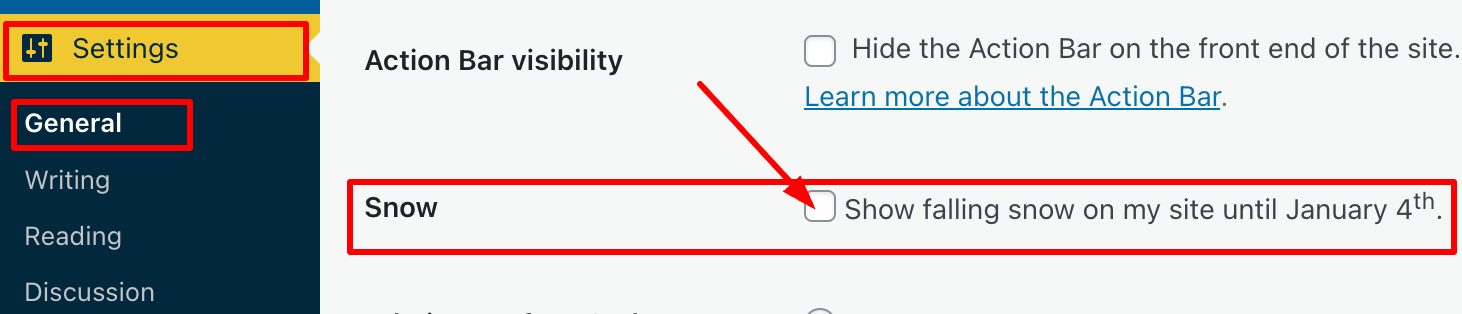
- If you want snow to fall on your blog, tick the box. If you don’t want snow falling on your blog, untick the box.
- Click the ‘Save Changes‘ box at the bottom of the page.
- Ensure the changes are effective by opening one of your posts on the WordPress website.
I’m not a lover of anything moving onscreen while I’m reading, as I find it distracting. However, I know that many bloggers love the idea of gently drifting snowflakes while they read blog posts during the festive season.
The choice is yours. And now you know how to switch on or turn off snow falling on your blog.
For the above instructions, I’m using a desktop computer. The falling snow effect is only controlled through your WordPress.com dashboard, not the Jetpack mobile app.
Is it snowing on your blog? If not, do you want it to snow? Let me know why you like or dislike the idea of snowflakes drifting on WordPress blogs.
The featured image on this blog post is sourced from Pixabay. AI reviewed spelling and grammar errors.
You can follow me at the following sites.
Copyright @ 2025 hughsviewsandnews.com – All rights reserved.
Discover more from Hugh's Views & News
Subscribe to get the latest posts sent to your email.
 Hugh's Views & News
A bit of fun. Thanks for this tip, Hugh although I could see how it might be annoying for the reader, at times.
It’s one of those WordPress features that you either love or hate. I don’t mind it, but thankfully it’s not on all blogs I read.
It’s not available on mine. But that doesn’t surprise me. They keep reducing functionality on the free plans.
I have another WordPress blog which is on the free WordPress plan, and it’s available as an option. Maybe it’s the theme you use that does not allow it.
I suspect it is the theme that does not offer snow.
I think I had it last year, but then I had a WordPress.com site. Since then I bought a domain, so maybe that’s why I’ve not got it automatically.
I don’t believe it’s available on self-hosted sites, but I could be wrong.
It doesn’t bother me on other people’s blogs but in my part of the world we rarely get snow so it would seem a bit odd!
Likewise, we don’t see much snow here on the south coast of Wales, but those drifting flakes make my eyes go very strange while I’m reading.
I had it on for a bit, then I turned it off. The joke being, It got in the way of me viewing my blog – lol. My eyesight has reduced a tad.
Nevertheless, if it helps to switch it off, then you’ve done the right thing.
I do like the snow effect, it makes it fun and seasonal. But my eyes, my eyes,… lol
I love the snow effect, however, it makes my site run slow. When I’m in my site working, I disable it. I think it is a nice option from WordPress. Perfect timing for your tips, Hugh.
I never thought about it affecting a site’s loading speed, so that’s a good point to consider, Eugi.
No snow on my blog. I see enough of it when I look out my window! 😂🌨️😂
Enjoy all that real snow, Michelle. Looks like a White Christmas is on the cards for you.
I hope it sticks around. Although sometimes when it snows this early in the season, it warms up and melts before Christmas.
I hope it sticks around, at least until Santa’s sleigh has left.
That time of year already. I’ll need to think about whether or not I want snow. However, thanks for sharing your input – it might be worth turning it off to make the site/text more accessible
It’s a personal choice, Brenda. Anything moving on a page that I am reading isn’t good for me, as I find it too distracting. If it were a feature on all blogs that we couldn’t switch off, I’d struggle to read posts.
Just checked … no snow here
I think it’s a feature that, if switched on in previous years, it’ll appear automatically. Those who have never turned it on or are new to WordPress won’t see it on their blog.
Nice effect, but why anyone would want it is beyond me. 🤣😎🙃
Thank goodness WordPress gives us a personal choice about whether to use it.
Happy Christmas to you & John, Hugh. Enjoy the holidays. 🎄💖
Thank you, Colleen. Season’s Greetings to you and Ron, too.
Thank you, Hugh! 🎅🏻
Great timing of your post, Hugh. I’d noticed some blogs with the snow, but not mine, until I went into my site and there it was. Glad to know how to disable it.
For now I’ll leave it up. I hope you can still skim through my posts if the snow is distracting to you. Snow fell here yesterday for three hours, you’d think that would be enough! 😁❄️
If it were something on all blogs and something we couldn’t turn off, I’d struggle with it, Terri. But thank goodness it’s a choice WordPress offers us all.
I haven’t done this in years, Hugh, but maybe this year? Thanks for the reminder!
You’re welcome, Noelle. It’s a personal choice.
My problem with the snow is that it’s fun on some of my posts and totally inappropriate on others. So unless I find a way to turn it on or off per post, I’m forced to leave it off all the time.
I’m not aware there is a setting for it to only show on certain posts. Given it’s only available for a limited time, it’s probably something WordPress didn’t think about. It’s worth suggesting it to them for next year, though.