

Are there easy ways to promote your old blog posts, and should you feature them on your blog again?
Can old blog posts bring in more visitors, followers and comments?
The answer is YES.

One of the biggest mistakes many bloggers make is forgetting their old blog posts. They publish posts and quickly forget about them.
Yet, If they’ve been regularly publishing blog posts, their blog archive will be a treasure trove of opportunities waiting for them to bring posts alive again. Just think about all those followers, readers and visitors who have never seen those posts.
Rather than ignoring these old blog posts, there are ways to bring them back to the attention of your audience.
These old blog posts probably never got anywhere near as many views and comments as your recent blog posts, but did you know that they could quickly bring you many more views, comments and followers?
My three quick and easy tips for bringing these old blog posts back to life are easy to follow and will deliver results as soon as you implement them.
1. Display ‘related’ posts at the end of all your blog posts.
I’m always surprised by how many WordPress bloggers don’t have this feature switched on.
Here’s a screenshot of the related posts that featured at the end of one of my recent blog posts.
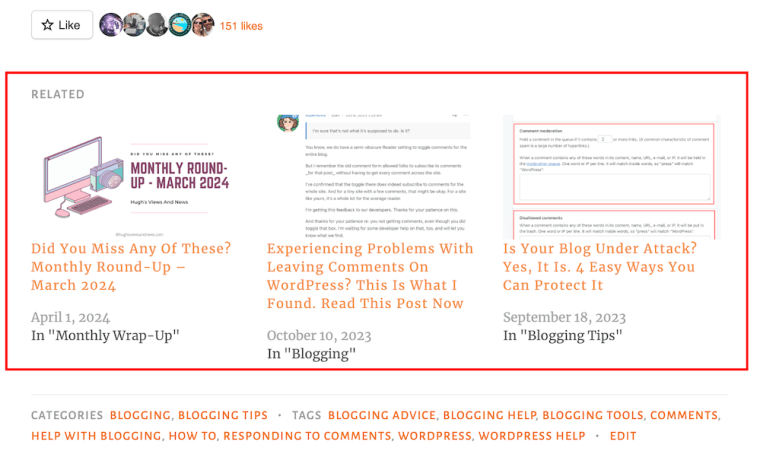
WordPress automatically chooses which of your posts to display.
If you’re not already showing related blog posts at the end of newly published blog posts, follow this guide.
- On the dashboard of your blog, click on Settings and Reading.
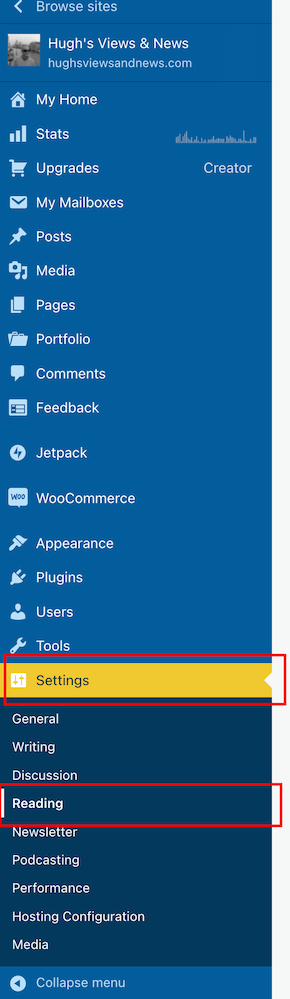
- On the Reading Settings page, look for Related Posts and ensure ‘Show Related Content After Posts’ is switched on.
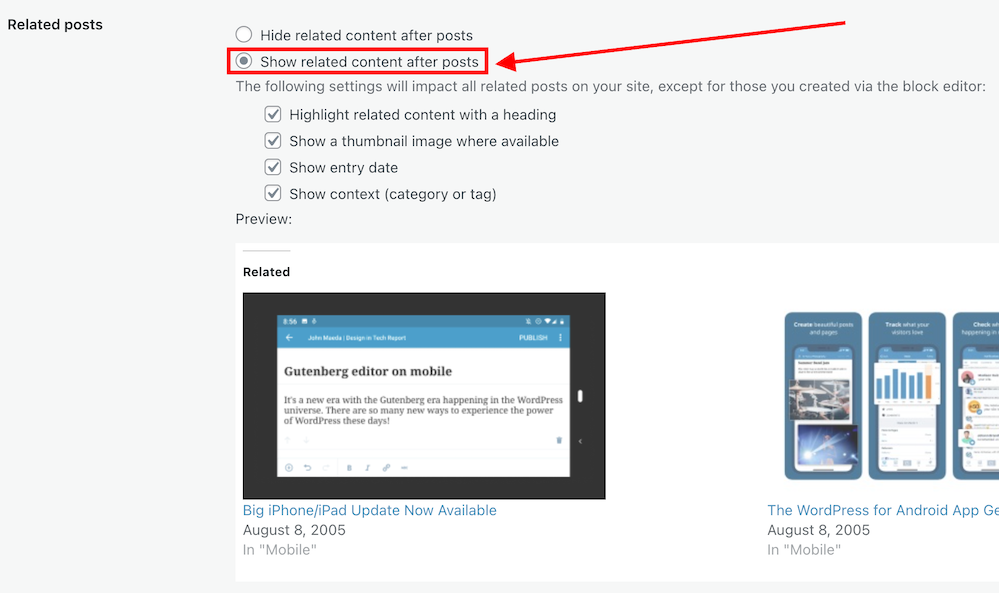
- Choose which other settings options you want to use.

- At the bottom of the screen, click on the Save Changes button.
- Future posts will now display three related posts from your archives, resulting in those posts being seen again.
2. The ‘Blog Posts’ Block
Those using the Block Editor can use a terrific block called the’ Blog Posts’ block. It allows bloggers to choose which of their previous blog posts to promote on newly published posts.
- Insert the ‘Blog Posts’ block in the place where you’d like to feature it on your upcoming new post. You’ll find the ‘Blog Posts’ block under the ‘Widgets’ section, or you can search for it by entering ‘Blog Posts’ in the search bar.
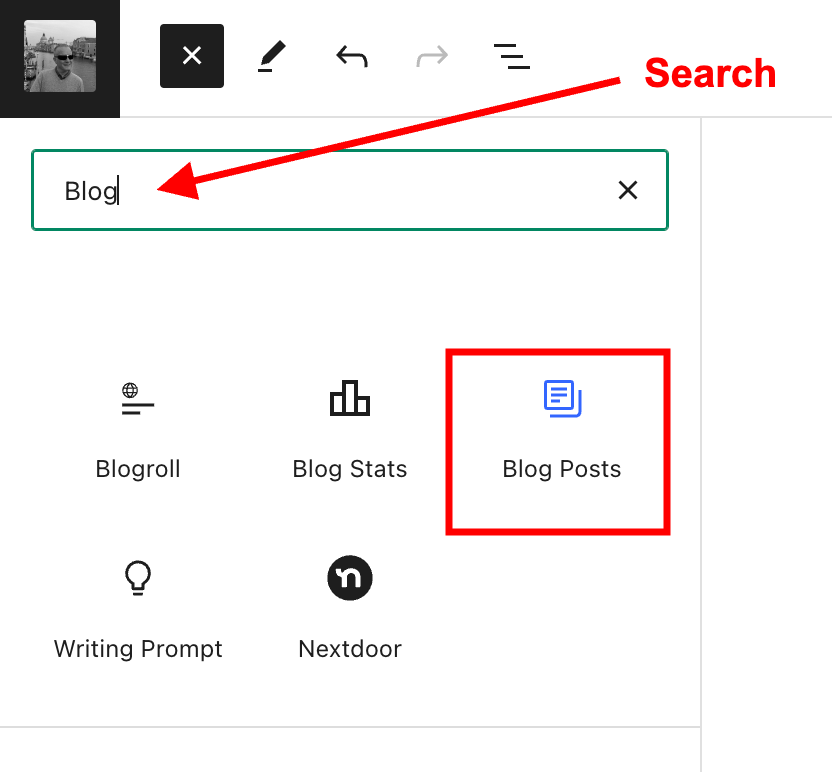
- The Blog Posts block defaults to showing the last three blog posts you published, but you can change this. You can leave it as it is or switch to other settings.
- Today, I will show you how to choose the blog posts you want to display.
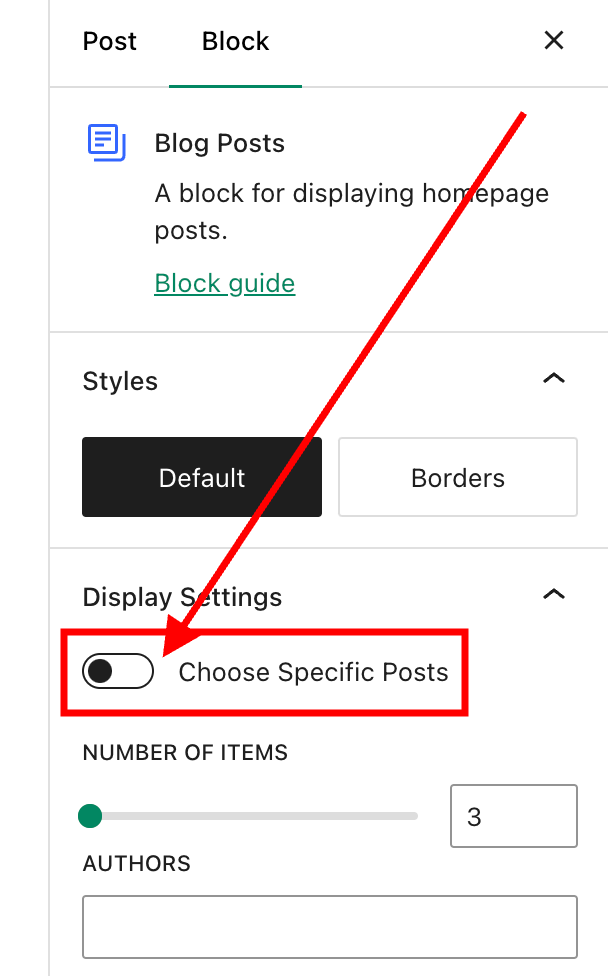
- When you insert the block, a toolbar will open on the right-hand side of the page. Under Display Settings, look for Choose specific posts and slide the button to the ‘on‘ position.
- In the ‘Posts‘ box, type in the blog post title you want to display. As you type, suggestions for blog posts with the words you are using will appear.
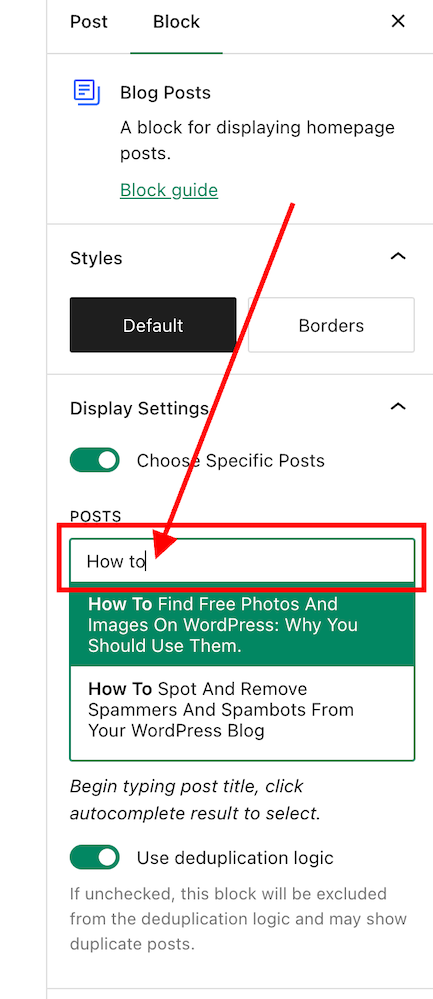
- Select the blog post you want to feature.
- If you’re going to add more blog posts, search for them by typing in more words in the Posts box.
- I recommend that you add no more than three posts.
- The Blog Posts block has many other settings, which you can read about here.
3. Add pingbacks to previous blog posts.
If you’re unsure what a pingback is or how to add it to blog posts, my post, ‘The Power Of Pingbacks: How To Create One,’ will help.
There’s nothing wrong with adding pingbacks and linking back to your previous blog posts. Lots of bloggers do it.
In fact, I recommend that you include at least a couple of pingbacks in all your blog posts. However, you should always ensure that what you’re writing about is connected to the post you’re linking back to.
Pingbacks can also be added to images, pictures, and photos in blog posts and captions.
Let’s wrap it up!
- Your blog’s archives are a treasure trove of blog posts that can attract new visitors, comments, and followers.
- Don’t allow old blog posts to remain idle and not work for you. Use them.
- Your previous blog posts may not have been read by new followers. Introduce them to your new audience.
- People who may have read your older posts are often thankful for the opportunity to read them again, especially if the post includes tips and advice.
- Ensure you keep old blog posts up to date.
- WordPress has made several blocks available on the Block editor to promote old blog posts. The ‘Blog Posts’ block is just one of those blocks.
- Consider switching it on if you’re not already using the ‘Related Posts’ feature.
- Remember that you can create pingbacks to old blog posts from any images or photos in future blog posts.
Do you promote your old blog posts? If not, why not? How do you promote them? What way(s) of promoting old blog posts have worked best for you? Have you had much success promoting old blog posts?
Did you enjoy reading this post? Then you may also like…
The Amazing New WordPress Comments Box: What It Does
WordPress has introduced a new block-style comment box that aligns with the Block editor. But what can users do with it besides leaving comments?
Are some bloggers really refusing to use it and threatening to leave WordPress?
My post contains all the details you need.

Is Your Blog Safe? One Security Feature You Must Have
Are you doing everything you can to protect your blog?
This is one security feature I recommend every blogger have. And it’s easy to set up.
Exploring Multiple Avenues: How to Contact WordPress for Support: 6 Best Ways
What’s your experience of dealing with WordPress?
Are you experiencing problems with WordPress? Have you reported the problems to them? If not, why not?
The 6 best ways to contact WordPress.
Any questions about this post? Leave them in the comments box.
Layout, content, settings, and format might differ on self-hosted blogs.
Follow Hugh on social media. Click the buttons below.
Copyright @ 2024 hughsviewsandnews.com – All rights reserved.
Discover more from Hugh's Views & News
Subscribe to get the latest posts sent to your email.
 Hugh's Views & News
I love this tip, Hugh. I’m featuring it on Story Chat. As long as I have been blogging, I still learn something helpful when I read your tips. Well done, my friend. :)
Good to hear, Marsha. I’m always delighted when somebody tells me that I’ve taught them something new with blogging.
You do a great service for all of us. Most of us don’t take the time to research when things change – for the better or worse. We complain, or we don’t make use of new technology. I’m glad I have Story Chat to highlight some of your great posts, Hugh. :)
These are all very great SEO tactics also. I make sure to link to a previous post within the content of a new post, I always have ‘related’ posts activated that will display thumbnails and excerpts of related posts at the end of my posts.
I keep forgetting that you can actually embed an old post into new ones that are like thumbnail and excerpts and I’ve been meaning to do that in all my newer posts. You just reminded me about them again, LOL! It’s like a card within your newest posts and I keep forgetting to use it.
I used to use the blog post’s block a lot, but somehow fell out with it. It was while drafting this post that I remembered it. Now I just need to remember to keep using it on all posts. So far, so good.
Excellent tips! I hadn’t heard of using the blog post block. Very interesting 😀.
It’s what I call one of WordPress’s little secrets.
Not only did I learn something from your post, Hugh, I learned some good tidbits from some of the comments, Hugh. I also like James’ idea adding “a where to start” in the about me page. I might even add a couple of those into my Sunday Stills page. Great advice as usual.
Hope you’re having a good week. I got too busy with our current trip to Portland, Oregon, to post my WW post I had planned. Can’t wait to share some pics from the tulip farm we visited yesterday. Enjoy the rest of your week!
The comments section can be full of great ideas and inspiration on many blogs, Terri (not those that are just full of the usual non-engaging comments – this was a great post, these are nice photos, etc). People who say they don’t have time to read the comments section are missing out.
Enjoy your trip and have a safe journey back home.
This is so helpful, Hugh. I have the related posts option turned on but I wasn’t aware of the ‘blog post’ block option. We put a lot of effort into our blog posts and to bring them back so easily is a wonderful idea. Thank you for sharing!
The Blog Posts block is great because you can insert it anywhere in your posts, Eugi. The only downside I have found to it is that it does not open in a new tab when clicked. That’s why I put it at the end of my posts.
Good idea, Hugh. Thanks again.
Great tips Hugh, although I do two of these, I’ve never tried the ‘blog post’ block option, definitely going to give that one a go with future posts.
A way I like promoting old posts is to feature them as recommended ones as pages in your menu bar – for example on the ‘About Me’ page knowing new readers check out this page using it as an opportunity to share a few favourites, and in the past I’ve had a ‘where to start’ page picking out a few useful ‘starter’ posts for each of my blogs most common categories.
That’s a great idea, James. I’ll make a change to my ‘about’ page and add a link to one of my favourite posts. Thanks so much for the idea.
I’ve recently discovered a Facebook page that features local travel in the same region, I write about. A page similar to my own blog. I provided a link to one of my old posts and saw a day over day increase in traffic of 364%. Did I get new followers, likes or comments? No. However, I am learning what information readers might require on a day trip. Time to complete trip, food nearby, accessibility, parking, hours of operation and address.
Social media certainly can help bring traffic to a blog, which in turns improves that blog’s SEO rating.
Keep up the great work, Kevin.
Excellent post, Hugh. It’s easy to forget about something that’s out of sight. I don’t look at my blog statistics often, but I’m fascinated when some old post suddenly gets a lot of hits.
Yes, I have one post from 2017 that still gets hits on a daily basis, Pete. Although I think it’s more that SEO picks up on the title of the post that results in daily traffic to it than me promoting the post. That’s why the titles of blog posts are also so important in getting traffic to our blogs.
I’m systematically working my way through all my old blog posts. Some I republish. Others I update and promote on Pinterest or as a Throwback Thursday post. And some I just delete because they are no longer relevant. The best part about the exercise is seeing how I’ve grown as a writer since the early days.
Republishing older posts after updating them is another great way to promote older posts, Michelle. Glad you are already doing that.
Both Throwback Thursday and Flashback Friday are also great ways to promote older posts.
I have used the Sticky app to temporarily display an older post but it’s kind of clunky. I’m going to try your method. Thanks!
I’m glad this post has helped.
Thanks for the reminder, Hugh. I added the related posts block on the post template of my FSE theme. It doesn’t have images, but I’m not sure that can be tweaked. The placement is after the comments on an FSE theme. I’m not sure how many folks read all the way to the bottom of the comments. Hopefully, it will be seen.
You’re probably best using the Blog Posts block then, Colleen. At least with that block you can place it wherever you want on your posts.
Of course you can also limit the number of seen comments on all your posts so that people don’t need to scroll as far. There is a setting for that under settings – discussion.
That’s a great point. My theme shows the recent posts in the side widgets. Related posts allows readers another look on our older works in the same category. I’ll have to play with it some more. I don’t want to limit comments. Thanks for your advice, Hugh. I always appreciate your thoughts.
That was useful – thanks. I didn’t know about those first two. Although I’m not too sure about the relevance of some of the posts WP decides to feature… and I wrote them!
And having checked on posts WP did decided to link, I find one (at least) is no longer linking to the site I was lauding. Time, I think, for a link-check.
I found that when I have deleted posts that may have featured in ‘relevant posts’ at the end of posts, they disappear. However, checking for broken links is something I do regularly so as to keep on top of it. Plus, SEO ranks blogs with lots of broken links lower, so best to keep on top of them.
I am working with Nr. 1 and 3 but the Blog Postss block is new to me. Thanks for the hint, Hugh!
I’m glad to have introduced you to a new block that can bring in more visitors to your blog, Erika. I’ll certainly be using the Blog Posts block a lot more.
I hope I don’t forget the next time I schedule my Monday post. I’d really like to try it out. Again, thank you!
I do all three actually! Thanks for sharing. This is very useful for those who did not know about this.
Good to hear you are already doing all of these tips. Please feel free to add anything else you do to help promote older posts.
I can’t think of any at the moment, but if I will, I’d either write about it or come back here (if I can remember 😂)
Thanks so much for this timely post!
It’s a great topic, but I think you’ve left off the most obvious. You can simply copy and publish old blog posts —possibly revising and updating as appropriate. (For example, my latest is a reblog about a lunar eclipse viewed from the salt flats of the Rann desert in India.) My blog audience has changed since this was first published six years ago, and the response this time has been terrific.
Another approach which has worked well for me is to group blogs with similar focus into books. I’ve done several now, as humorous collections of essays about travel, kids, dogs, the pandemic, etc. So even though it takes years to collect enough posts to make a book, it’s a relatively easy approach to publishing. Plus it has the added bonus of having new blogs on similar topics help advertise and sell the books. (And the fact that it helps monetize my blogging hobby is very welcome too!)
You’re welcome.
I have covered rewriting older blog posts in other posts I’ve published over the years. Here’s a link to just one of those posts.
I could have added more points to this post but didn’t want to make it any longer.
I know of a few bloggers who have published books out of their blog posts. It’s something I’ve considered and done with my flash fiction stories. I’ve also been asked to publish a book with blogging tips, but due to the constant changes in the blogging world, I’d be forever updating that book so decided to continue publishing on my blog instead. And, as you rightly say, I can update older posts and republish them.
Good to hear you’ve made some money from your blog. Keep up the great work.
Thank you for posting this. I’d been wondering how to bring old posts back to life. 🩷🌷🐱
There are lots of other ways to bring old blog posts back to life; these are just a few. What’s important, though, is remembering to promote older blog posts, especially to those who may have not been following our blogs when those posts were first published.
I can definitely see the importance in that, especially after reading your article.
Hi Hugh, I’ve been out of the loop for such a long while due to poor health. But I’m back now and I’m updating/repurposing older blog posts until I get back into the swing of writing new posts. I love seeing related posts and I’m just going to check another of yours out now – blog security! Thanks :)
I’m sorry to hear about your poor health and hope you are making a speedy recovery.
Blog security is an important topic that many bloggers do not take as seriously as they should. I hope that post helps.