Have you noticed the new style comment box on WordPress?

In line with the Block editor, WordPress has rolled out a new cool comment box on most WordPress blogs. While I’m writing this post, I still see a few blogs with the old-style comments box, but I’m confident all WordPress blogs will soon display the block-style comment box.

The new style comments box appears on blog posts, but not when you add your comment via the comments box on the WordPress Reader.

Light blue image with the words 'The Amazing New WordPress Comments Box: What It Does' in white text
This new comments box can do more than just leave comments

For the purpose of this post, I’m using an iMac desktop computer.

Here is a breakdown of what users can do when leaving comments on blogs with the new block-style comment box.

What does it look like?

This is what the new style comment box looks like.

Image showing the new style block comment box on WordPress
WordPress Block Style Comments Box

It looks very simple, doesn’t it? And it is very easy to use. Your Gravatar image appears in the bottom left corner.

The comments box looks like this as soon you click in the box.

Image showing
Click inside the box to start typing your comment.

Notice the difference? A toolbar has opened along the top, and an ‘+‘ icon has appeared inside the comments box. Let’s examine what they do. I’ve numbered some icons in the following image.

Image highlighting the features of the toolbar on the block style comments box on WordPress
Features of the toolbar
  1. Block being used.
  2. Aline text
  3. Bold
  4. Italic
  5. Pingback link

1 – This is the type of block being used when commenting. It will always be the Paragraph block by default, but you can switch to the List or Quote block by clicking on it. If you change it to the List or Quote block, a new toolbar will appear.

2 – Use this icon to align text to the left, right or centre.

3 – Use this icon to make the text bold.

4 – Use this icon to make the text italic.

5 – Use this icon to create a pingback.

Most readers only use text when leaving comments and they will never feel the need to align it or make it bold. However, many bloggers want more.

You can now insert other blocks into the comments box by clicking the ‘+‘ icon. For example, you can now easily insert an image in your comment by clicking the ‘+‘ icon and choosing the Image block.

Image showing an image placed into the block-style comments box on WordPress.
Copy and paste the URL address of the image you want to add.

How cool is that? (not the photo of me, but the fact that I can add an image to the comments). This is especially good for participating in photography challenges without creating a blog post or when explaining something where including an image or screenshot helps.

I want to mention that you can create pingbacks in your comments. Pingbacks are powerful and can help boost visitors to your blog. We could already add pingbacks when using the Classic view on our blog’s dashboard but we can now finally do it using the Default view.

Image showing how to create a pingback in the comments box on WordPress
Create pingbacks in your comments.

Are you unsure how to create a pingback? My post, The Power Of Pingbacks: How To Create One, provides full details.

Before submitting your comment, remember to click the small settings cog next to your Gravatar photo to open a new menu. Why?
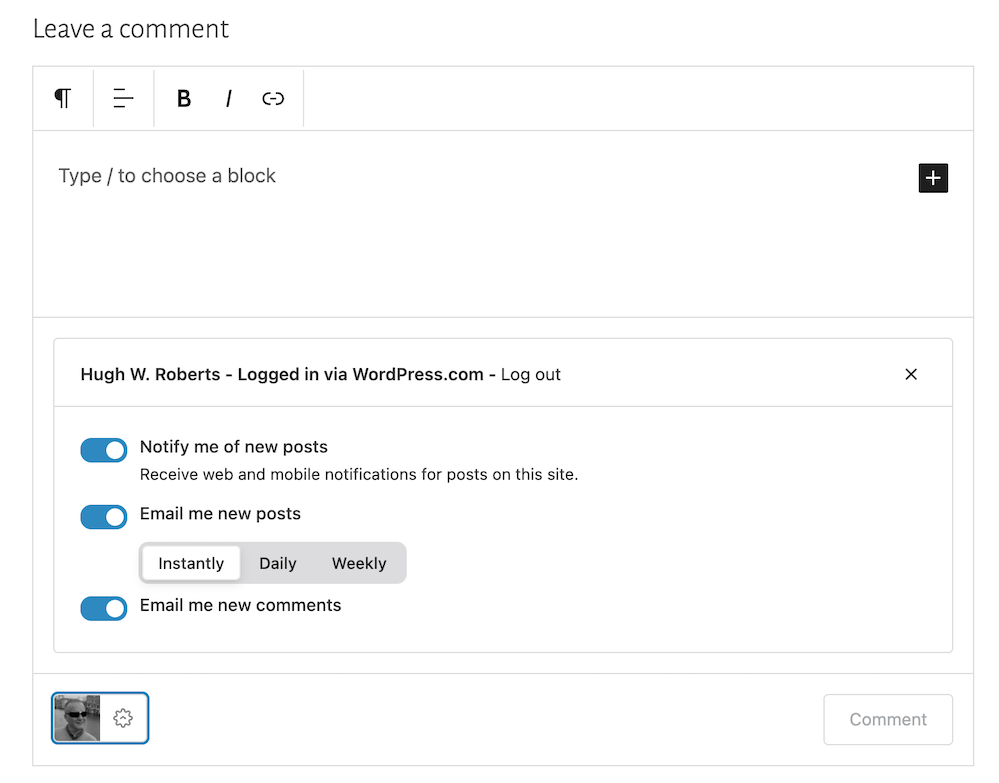
Image showing the new menu that opens when clicking the settings button next to a Gravatar profile in a Block-style comments box on WordPress
Click the settings cog next to your Gravatar picture for a new menu.

Not only will the menu that opens confirm if you are logged into WordPress, but you can also sign up to receive web and mobile notifications for posts on the blog you are leaving your comment on, get email notifications of new posts, and receive email notifications of any new comments left on the post (including a response to your comment from the blog host).

Press the ‘Comment‘ box to submit your comment.

Is this true?

I’ve heard that some bloggers are threatening to stop leaving comments or are thinking of leaving WordPress because of the introduction of the new block-style comment box.

Given that the bare minimum somebody has to do to leave a comment is to type their comment into the box, I find it hard to believe that people are threatening to stop leaving comments or leaving WordPress because of the introduction of this new comments box. If you are, please reconsider your decision.

The new block-style comments box is not hard to use; it’s just a little different!

Update

Users can now disable blocks in comments. Go to Settings – Discussions, and in the ‘Comments‘ section of the page, turn off ‘Enable blocks in comments.’ Remember to save the change.

WordPress’s new comments box style is a refreshing update that enhances the user experience. Its modern and intuitive design makes interacting with comments more enjoyable. If you have any questions about it, feel free to leave them in the comments section. I look forward to hearing your thoughts!

Layout, content, settings, and format might differ on self-hosted blogs.

Click the buttons below to follow Hugh on Social Media

Copyright @ 2024 hughsviewsandnews.com – All rights reserved.


Discover more from Hugh’s Views & News  

Subscribe to get the latest posts sent to your email.

131 responses to “The Amazing New WordPress Comments Box: What It Does”

  1. Terri Webster Schrandt avatar

    Yep, its all here as I comment, Hugh! I’ve seen this option lately on many blogs (not all) and I like it so far. As a photo challenge host, I believe this can open the door for those who don’t want to write a post but take part in the challenge with an image. And I like you can easily make a paragraph break…

    ..Like this! I have to share that I was having huge difficulties logging in to every single post from my desktop (chrome, windows 11, etc). With help from WP engineers, I discovered I had taken some advice from an article I read and blocked third party cookies. Once the H.E. suggested this I changed my settings and I have been mostly OK to leave comments or like without having to log in. Perhaps other bloggers who are experiencing ussies with WP should check their computer settings.

    Well done, Hugh, as always, keeping our blogging community informed!

    1. Hugh W. Roberts avatar

      Terri, I’m pleased what WordPress suggested has just about helped. There are so many settings available to us, and it seems that sometimes we change things without knowing what the consequences may be. It would be good to know where the third party cookies setting is so that if anyone mentions it in the future, we can point them in the right direction. I could hunt around for it, but if you do know, it would be very helpful.

      1. Terri Webster Schrandt avatar

        Ok. Go to Chrome and select the 3 dots. Go to settings and select Privacy and Security. Then click on third party cookies if you dare 😆 it’s defaulted to allow them but you can block them.

        When I did that, reading blog posts
        became a chore to have to log in each time. This is the same area in settings to clear browsing data and cache, which I do from time to time.

        1. Hugh W. Roberts avatar

          Thanks, Terri.

          It reminds me of a problem I had over the weekend where I was not able to access my account for our home phone and broadband. The site keep logging me out. However, after clearing all the cache on Chrome, I was able to log in without any problems. That tells me that it’s not always the fault of the company whose website I am trying to access.

          Thanks again.

          1. Terri Webster Schrandt avatar

            Reboots and clearing the cache seem to be good fixes!

  2. Janis @ RetirementallyChallenged.com avatar

    Thanks for the info, Hugh. I’ve noticed the new comment box but I’m not sure it appears on my blog yet. The only concern I’d have, and maybe it’s not a big one, is that the new comment box might be confusing to non-bloggers or those who don’t use WP.

    I like having the ability to add a photo. I hope people don’t abuse the ability to add a link (adding a link to their blog in all of their comments)… that wouldn’t be good blogging etiquette.

    1. Hugh W. Roberts avatar

      Hi Janis, I checked, and the new comment box does not appear on your blog yet. There could be a number of reasons why, the main one being if your blog is self-hosted. Also, the theme you use may have it’s own unique comment box. Some blogs have had this new style comment box for a long time, whereas my blog only got it a few months ago. Next time you chat with WordPress, maybe ask them.

      And I agree with you about those adding a link to their blog after every comment. Whenever that happens the comments section on my posts, I edit the link out before approving the comment. People soon get the hint.

  3. Esther Chilton avatar

    You always explain things so well, Hugh. Thank you.

    1. Hugh W. Roberts avatar

      I’m glad it all helps, Esther. I enjoy checking out how WordPress works.

  4. Cathy Cade avatar

    It hadn’t occurred to me that I could use different types of block in the comment and add an image – although I did add a url to a comment yesterday and was pleased to find it turned into a link. :)

    I’ve been migrating our u3a website to a new WordPress platform and have learned about new blocks I hadn’t used before. It’s disappointing to come back to my bog-standard blog and find not all of the bells and whistles are available here. :(

    1. Hugh W. Roberts avatar

      You can still add URLs to the new comment box, although I’m not sure if the option to open the link in a new tab is available; otherwise, anyone clicking it will lose the page they’re on.

      There are lots of blocks, although I tend to only use a few. If you’re still using an old theme that is retired or the Classic editor, you’ll miss out on many of the new features now available.

      1. Cathy Cade avatar

        Yep – not only did it open up for me, it opens in a new tab. I don’t recall telling it to when I posted the reply. I didn’t even expect it to convert.

        1. Hugh W. Roberts avatar

          That’s good to know, Cathy. I hate it when I click a link or pingback and it opens on the same page I’m reading.

  5. Annette Rochelle Aben avatar

    I appreciate the walk-through, as it highlights the benefits and options! win/win

    1. Hugh W. Roberts avatar

      You’re welcome, Annette. Enjoy these new features, although (like me) only use the ones you want to use.

  6. Natalie Ducey avatar

    Thanks for sharing this, Hugh! I love the new options/features shown here. It’s a win for blogging engagement for sure. Thanks again for sharing these tips!

    1. Hugh W. Roberts avatar

      Certainly gives readers many more options to use for their comments, Natalie. Like many, I won’t need to use them all, but I certainly like being able to include pingbacks and images in comments.

  7. Colleen Chesebro avatar

    Interesting. I’m on the creator plan and I don’t have that comment box. I’ve only seen the box on free blogs so far, but I’ll pay better attention. Thanks for sharing this information, Hugh. I like that you can add an image.

    1. Hugh W. Roberts avatar

      Do you see the new Comments box on my blog, Colleen? I certainly do, as well as the majority of other blogs, although there are a few that still show the old-style comments box.
      Being able to use the image block within the comments area means no more having to copy and paste URLs and remembering to delete the ‘s’ after http. Phew!

      1. Colleen Chesebro avatar

        Please go to my blog and see if it works for you. It doesn’t for me. I have the Gravatar part but not the drop-down menu. Do you have to select something in settings? Thanks, Hugh.

        1. Hugh W. Roberts avatar

          When I click on the cog next to my Gravatar image in the comments box on your blog, I see the new dropdown menu. But I don’t see the toolbar above the comments box or the ‘+’ symbol inside it, Colleen. It could be that the theme you use has it’s own comments box, but that’s something you’d have to look into via the ‘Themes’ page.

          The new comments box just appeared on my blog one morning, although I saw it on other blogs many weeks before it appeared on mine.

          Here’s an image of what I see on your blog

          1. Colleen Chesebro avatar

            Interesting. I wonder if the comment box you’re describing only works on Classic themes. That’s strange, don’t you think? The FSE themes are all you see in the themes now. Thanks for checking.

            1. Hugh W. Roberts avatar

              Hi Colleen, my blogging friend Dan who blogs at ‘No Facilities’ uses an FSE theme and his blog has the new style block-themed comment box. Here’s a link to his latest blog post.

              I’ll Take Two of These — CFFC

            2. Colleen Chesebro avatar

              Thanks for letting me know, Hugh. It’s very frustrating. I’ll have to consult the bot and see what they say. 🙄

  8. Darlene avatar

    I love this. It is so great to be able to do something with the text. And being able to add a photo is something I have always wanted.

    1. Hugh W. Roberts avatar

      I think being able to add images will come especially helpful when trying to explain something better. I’ve always found including screenshots very helpful.
      I’m glad you like the new comment box. It has many great new features.

  9. satyam rastogi avatar

    Great change WordPress is best for blogging and the quality is awesome.

    1. Hugh W. Roberts avatar

      I agree. That’s why I was somewhat shocked when I heard that some bloggers were thinking of no longer leaving comments or leaving WordPress because of the change to the comments box.

  10. Kymber Hawke avatar

    That is so cool! I didn’t realize that about images.

    My site doesn’t have this cool comment box because I’m using my theme’s comment box. I wish my theme had it.

    Sorry the image of my avatar is so big. Is there are way in comments to resize and image or specify the image size?

    1. Hugh W. Roberts avatar

      I’m afraid there isn’t, Kymber. However, you can reduce the size of images in the media library or via the device you’re using before downloading them into your media library. I use an Apple iMac and am able to reduce the size of images by clicking on Tools – Adjust Size in the toolbar at the top of the page.

      This post gives more details. I hope it helps.

      5 Things You Can Do To Free Up Media Space In Your Blog’s Media Library.

      1. Kymber Hawke avatar

        Thank you so much, Hugh. I’m sorry the image was so large. If you want to delete it, that’s fine with me; whatever you like. :)

        I’m heading to the article you linked right now. :)

        1. Hugh W. Roberts avatar

          No problem. I’ll keep the image there so that other readers can see that it can be done. Well done for trying it out.

      2. Colleen Chesebro avatar

        Hugh… So, I checked and this comment box only works on the Classic themes, not the FSE themes. I find that confusing. I also, can’t add an image on an FSE theme in the comment box. How frustrating is this? I can add a clink but no image! Why would they do this when all the theme selections are FSE themes? 🤔

        1. Hugh W. Roberts avatar

          That’s very odd, Colleen. Although I did check what themes are available to me on another blog I have which is on a WordPress Free plan (I use it for testing), and I see lots of Classic themes available.
          Do you want me to try and add an image to the comments box on your last post?

          1. Colleen Chesebro avatar

            I tried to add an image. It didn’t work. It left a link that you have to click. This is interesting. My other friends on FSE themes don’t have the fancy comment box: https://melissalemay.wordpress.com/2024/03/11/all-of-the-names/. It must have something to do with the theme.

            1. Hugh W. Roberts avatar

              Yes, I think it could well be theme related or just WordPress catching up with implementation to all blogs, Colleen.

            2. Colleen Chesebro avatar

              Thanks, Hugh. I have the comment box on my Unicorn Cats Publishing.wordpress.com site. How interesting. I’m on a premium theme on the creator plan. 😞

  11. philosophy through photography avatar

    A very helpful post on this new feature.
    Thank you, Hugh. W Roberts.

    1. Hugh W. Roberts avatar

      I’m glad it has helped. Thanks for the feedback.

  12. Author Jan Sikes avatar

    I have been seeing the new comment boxes and I like them, but I didn’t realize I had all these options. Thanks for sharing,, Hugh! As always, very informative!

    1. Hugh W. Roberts avatar

      I don’t use all the options, Jan. I just use the ones I like the most, but it’s great that WordPress now gives us the option for all these new features when leaving comments.

      Glad the post helps.

  13. AM avatar
    AM

    I love the new comment box, but it’s a bit inconsistent with if I’m signed in or not on certain sites. Sometimes I constantly have to log back in, but it’s gorgeous. I love that you can login with both WordPress account and FB or just plain email.

    I did not know about the photos, though. That’s super cool!

    1. Hugh W. Roberts avatar

      I’d recommend clearing the cache on the device you’re using if having problems with leaving comments on some blogs. It may or may not work, but worth a try.

      And being able to sign into WordPress to leave comments via a social media account is a great asset. This new comment box has a lot of great features.

      1. A weirdo with... avatar
        A weirdo with…

        I have cleared the cache but that does not help. Still I use Safari and it’s a pretty buggy browser 😂.

        1. Hugh W. Roberts avatar

          I ditched Safari years ago after encountering various problems when using WordPress. The folk at WordPress recommended Chrome, which I switched to. Since then, I encounter little if any problems when using WordPress.

          1. A weirdo with... avatar
            A weirdo with…

            Totally understand.

            I use Chrome for coding, but otherwise I’m sticking to Safari. It works well most of the time and I can learn to live with the weird bugs.

  14.  avatar
    Anonymous

    Thanks, Hugh. Timely information.

    1. Hugh W. Roberts avatar
  15. Betty avatar

    Thanks for the info, Hugh. These posts are helpful to me. Enjoy your day!

    1. Hugh W. Roberts avatar

      I’m delighted they are so helpful, Betty. Thank you for the feedback.

Leave a reply to Terri Webster Schrandt Cancel reply

I’m Hugh

Welcome to my blog. I’m delighted to have you here. This is the place to discover tips on blogging and WordPress, flash fiction, photography, and more. I enjoy engaging with my readers, so please feel free to explore, join discussions, and contact me. I’m happy to assist! Find out more about me and my blog by clicking the ‘Meet Hugh’ button.

Let’s connect

Subscribe to Hugh’s Views And News

Latest Posts

Follow Hugh in the Fediverse

Hugh's Views & News  
Hugh's Views & News  
@hughsviewsandnews.com@hughsviewsandnews.com

WordPress & Blogging tips, flash fiction, photography and lots more!

403 posts
6 followers

Recommend Blogs To Follow


Boomer Eco Crusader
Boomer Eco Crusader
Live Green | Declutter | Simplify Life

Jacqueline Lambert
Jacqueline Lambert
Award-Winning Travel Humour Writer

Spo-Reflections
Spo-Reflections
To live is to battle with trolls in the vaults of heart and brain. To write; this is to sit in judgment over one's Self. Henrik Ibsen

Anne R. Allen’s Blog… with Ruth Harris
Writing about writing. Mostly.

Fancying France
The musings of a ‘femme d’un certain âge’ who divides her time between SW France and SE England

SONGS AND SCRIPTS AND DUNKING BISCUITS
Every day tales of a winging-it creative

Marsha Ingrao         Always Write
Marsha Ingrao Always Write
Having fun blogging with friends

Curiosities, Castles and Coffee Shops
The musings of a curious mind

WrookieSchU
WrookieSchU
Live life 🙌🏼

WPcomMaven
WPcomMaven
Helping you make the most of your free WordPress.com website since 2011

Second Wind Leisure Perspectives
Fun, Photography & Friends

Share Your Light
Share Your Light
You are a miracle – Let it happen

No Facilities
No Facilities
Random thoughts, life lessons, hopes and dreams

Esther Chilton
Writer, Tutor and Editor

Roaming About
A Life Less Ordinary

Saying nothing in particular
Jan … JT Twissel

The Chicago Files
The Chicago Files
A Canadian Perspective on Living in the Windy City!

Thank you to all my visitors

469,983 hits

253,241 visitors

Most Viewed Posts & Pages

Copyright Protected Blog

COPYRIGHT ©2011-2031 Hugh’s Views And News BLOG – All Rights Reserved.

This work by Hugh W. Roberts, and/or Hugh’s Views And News blog, is licensed under a Creative Commons Attribution-Noncommercial-NoDerivatives 4.0 International License. Unauthorised use and/or duplication of this material (text and images) without express and written permission from this blog’s author and/or owner is strictly prohibited. If you want to use posts, excerpts, photos and links, you may contact me first. You must give full and clear credit to Hugh W. Roberts and Hugh’s Views And News dot com with links to the original content.