WordPress constantly changes; some things keep changing and return to where they were before. That’s why I’ve updated and am republishing this post from July 2023.
Light blue image with the words 'WordPress: "Open In New Tab' Box - Where Is It?' in white text.
This is where to find the ‘Open in new tab’ box on WordPress.

If, like me, when you create a pingback, you prefer links to open in a new window rather than in the same window you’re viewing (thus losing the page), it’s vital that you tick the ‘open in new tab‘ box when adding links or pingbacks to a blog post.

The ‘open in new tab‘ box used to be visible when creating a pingback but has reverted to being hidden again. I don’t know why, but I wanted to show you where to find it.

If you’re unsure what a pingback is or how to create one, my post, ‘The Power Of Pingbacks: How To Create One,’ has all the details.

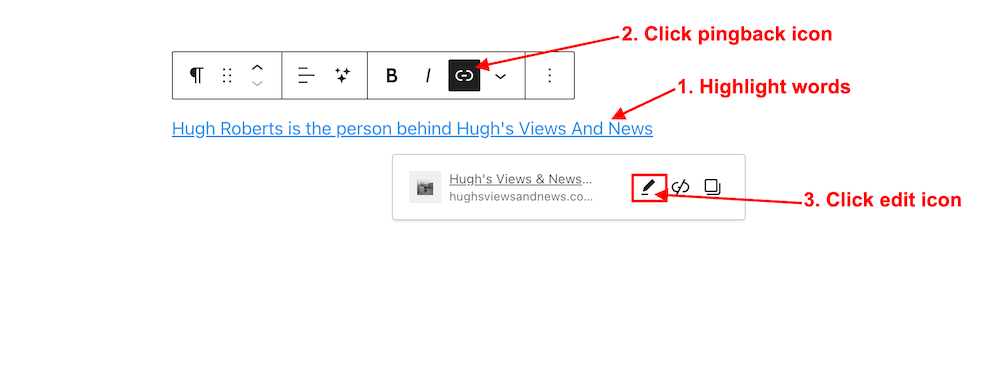
  • Highlight the word(s) to which you want to add your pingback.
  • Click the pingback icon in the open toolbar, and add or search the URL address of the page, post or site you want to link to.
  • Click the ‘edit‘ button.
Image showing the pingback icon and edit button for a pingback on WordPress
After creating the pingback, click the edit button.
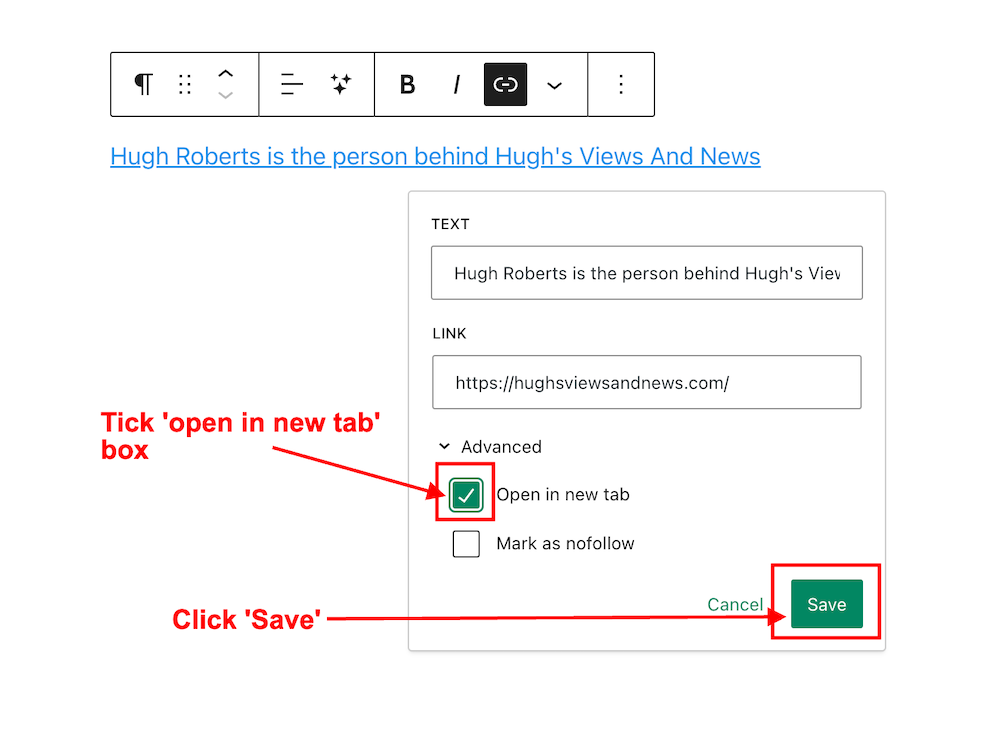
  • In the new window that opens, tick the ‘Open in new tab‘ box.
  • Click the ‘Save‘ button.
Image highlighting the 'open in new tab' box on WordPress
Tick the ‘open in new tab’ box.
  • When a reader clicks the pingback in the post, the link will now open in a new window (not on the same page they’re reading).
  • Want to test it? Click the following link – Meet Hugh. It should open in a new tab on your device.

Let’s hope that WordPress leaves the ‘open in new tab‘ box where it is.

If you have any inquiries about pingbacks or the ‘Open in new tab’ option, please feel free to ask in the comments section.

Click the buttons below to follow Hugh on Social Media

Subscribe to receive further updates from Hugh

Copyright @ 2024 hughsviewsandnews.com – All rights reserved.


Discover more from Hugh’s Views & News  

Subscribe to get the latest posts sent to your email.

61 responses to “WordPress: ‘Open In New Tab’ Box – Where Is It?”

  1. Marsha avatar

    Great tip, Hugh. I didn’t think to check out my links. I assumed that they opened in a new window. You don’t have to do that for every link do you?

    1. Hugh W. Roberts avatar

      I’m afraid you do, Marsha. It seems that most people prefer a link to open in the same window, hence why WordPress have not ticked that box by default. However, the majority of bloggers and readers tell me that they hate it when a link opens in the same window they are reading (I hate it when that happens). Most don’t bother to go back to the page they were reading (including me).

      1. Marsha avatar

        I checked some of my former posts, and all of the ones I checked did open to a new page. I think years ago I check a box when I set up discussions or reading. I’ll go back and check and let you know. :)

        1. Hugh W. Roberts avatar

          It used to be much easier to tick the ‘open in new tab’ box. Why WordPress went and hid it, I’ve no idea. However, it’s just a few more clicks getting to it. Glad to hear your links are opening in a new tab.

          1. Marsha avatar

            Well, I’ve been ticking them anyway, now that I know. You never know when they will stop opening in another tab. :)

            1. Hugh W. Roberts avatar

              Hopefully never, unless a bug starts ruining things.

            2. Marsha avatar

              Let’s hope that doesn’t happen. I don’t think bug have great brains. :)

      2. Marsha avatar

        Well, I checked everything. I couldn’t find where I had set anything about links in general, but mine do open to another tab as far as I can see.

  2. Did You Miss Any Of These? Monthly Round-Up - March 2024 avatar

    […] WordPress: ‘Open In New Tab’ Box – Where Is It? […]

  3. thoughtsnlifeblog avatar

    Thanks for the Tips and how to manage pingbacks.

    I have been away from wordpress.com for sometime. It has changed so much, I feel I am starting a New

    1. Hugh W. Roberts avatar

      Yes, WordPress is constantly changing so there is always something new to learn. Welcome back.

Leave a reply to Writer’s Tips – March Edition – #Editing, #Writing Dialogue, A.I., WordPress, #Writing Gigs, Writer’s Block Hacks – DGKayewriter.com Cancel reply

I’m Hugh

Welcome to my blog. I’m delighted to have you here. This is the place to discover tips on blogging and WordPress, flash fiction, photography, and more. I enjoy engaging with my readers, so please feel free to explore, join discussions, and contact me. I’m happy to assist! Find out more about me and my blog by clicking the ‘Meet Hugh’ button.

Let’s connect

Subscribe to Hugh’s Views And News

Latest Posts

Looking for your next quick read? Try my books

An image of book covers, book, tablet and mobile phone, for the book Glimpses.
An image for the book More Glimpses - showing a book cover, tablet and mobile phone.

Follow Hugh in the Fediverse

Hugh's Views & News  
Hugh's Views & News  
@hughsviewsandnews.com@hughsviewsandnews.com

WordPress & Blogging tips, flash fiction, photography and lots more!

300 posts
6 followers
A widget with the words 'Team Effort - Story Chat Digest - Where Authors Meet - Author'

Recommend Blogs To Follow


Boomer Eco Crusader
Boomer Eco Crusader
Live Green | Declutter | Simplify Life

Jacqueline Lambert
Jacqueline Lambert
Award-Winning Travel Humour Writer

Spo-Reflections
Spo-Reflections
To live is to battle with trolls in the vaults of heart and brain. To write; this is to sit in judgment over one's Self. Henrik Ibsen

Anne R. Allen’s Blog… with Ruth Harris
Writing about writing. Mostly.

Fancying France
The musings of a ‘femme d’un certain âge’ who divides her time between SW France and SE England

SONGS AND SCRIPTS AND DUNKING BISCUITS
Every day tales of a winging-it creative

Marsha Ingrao         Always Write
Marsha Ingrao Always Write
Having fun blogging with friends

Curiosities, Castles and Coffee Shops
The musings of a curious mind

WrookieSchU
WrookieSchU
Live life 🙌🏼

WPcomMaven
WPcomMaven
Helping you make the most of your free WordPress.com website since 2011

Second Wind Leisure Perspectives
Fun, Photography & Friends

Share Your Light
Share Your Light
You are a miracle – Let it happen

No Facilities
No Facilities
Random thoughts, life lessons, hopes and dreams

Esther Chilton
Writer, Tutor and Editor

Roaming About
A Life Less Ordinary

Saying nothing in particular
Jan … JT Twissel

The Chicago Files
The Chicago Files
A Canadian Perspective on Living in the Windy City!

Thank you to all my visitors

471,501 hits

254,465 visitors

Most Viewed Posts & Pages Over The Last 24 Hours

Copyright Protected Blog

COPYRIGHT ©2011-2031 Hugh’s Views And News BLOG – All Rights Reserved.

This work by Hugh W. Roberts, and/or Hugh’s Views And News blog, is licensed under a Creative Commons Attribution-Noncommercial-NoDerivatives 4.0 International License. Unauthorised use and/or duplication of this material (text and images) without express and written permission from this blog’s author and/or owner is strictly prohibited. If you want to use posts, excerpts, photos and links, you may contact me first. You must give full and clear credit to Hugh W. Roberts and Hugh’s Views And News dot com with links to the original content.