I came across some comments recently where somebody asked how to create a pingback to the post they were leaving their comment on. The blog host didn’t know. It got me thinking that I should do an updated post on what pingbacks are and how to create them.
Light blue image with the words 'The Power Of Pingbacks: How To Create One' in white text
Pingbacks are a powerful blogging tool. Don’t miss out on not using them.

What are pingbacks?

A pingback is a type of notification that allows you to inform another blogger that you have linked to a post or article on their blog or website. This notification is typically automated and serves as a way to establish connections between different blogs or websites. Sometimes, pingbacks are also referred to as trackbacks.

If the other blogger has a pingback-enabled website or blog, then they can see a notification that you have linked to their article. They can then choose to allow your link to appear in the comments section of their blog post.

This may drive traffic to your blog when readers click on the pingback notification link.

Pingbacks work well on blog challenge posts such as Thursday Doors or Sunday Stills (to name but a few).

Today, I’m going to show you how to create a pingback.

Let’s get started.

In the screenshots below, I’ve numbered key points and am creating a pingback to my recent blog post, ‘The Power of Feedback: A Writer’s Brief Journey Through Editing and Story Chat.

Image highlighting keypoints in creating a pingback on a blog post
Keypoints on creating a pingback
  1. Highlight the word or words you’ve picked.
  2. Click the pingback link that pops up in the toolbar.
  3. In the URL box, enter the URL address of the blog post you’re linking to, or if it’s one of your own posts, search for the post.
  4. Choose the post you’re linking to.

Finally, and most importantly, tick the box next to the ‘open in new tab‘ box.
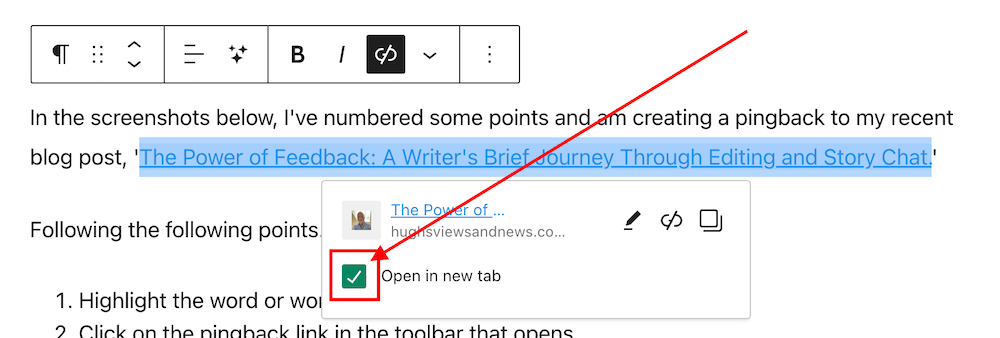
Image highlighting the 'Open in new tab' box
Tick the ‘Open in new tab’ box.

Ticking the ‘open in new tab’ option guarantees that when users click the pingback link, the linked post will open in a new tab or page. This feature effectively retains users on the current page, allowing them to easily return to your post to leave a comment or engage with the content.

Not selecting the “open in new tab” option could result in missed opportunities for comments and likes.

  • Your pingback has been created and will be highlighted in the post.

Tip – You can also highlight the pingback by making the text bold. To do this, highlight the text and click ‘B‘ (bold button in the toolbar).

  • Before publishing your post, preview it first and make sure the pingback works. Does it go to the right location? If not, delete the URL and insert the correct one.
  • Once you are happy that your pingback is working, publish the post.

Pingbacks should be exclusively directed toward blog posts and websites relevant to the subject of the post you are sharing or where you have been specifically invited to link.

Never create a pingback to a post that has no connection with the subject of your post.

Should I ask first before creating a pingback to another blogger’s post?

It’s always nice to ask first, but you’re good to go if the blogger has enabled pingbacks. And if you know the blogger well, there is no need to ask. But it’s best to ask if it’s your first time linking to one of their posts.

However, there’s no guarantee that your pingback requests will get the thumbs up. I receive pingback approval requests every day, and I won’t approve any that seem spammy or are completely unrelated to the post they’re trying to link to.

Are there any advantages of having pingbacks on your blog posts?

Yes. Here are a few advantages.

  • Creates traffic to your blog.
  • SEO-friendly.
  • Search engine optimizations (SEOs) such as Google and Bing rank blog posts that include pingbacks higher.
  • Bloggers may link back to one of your blog posts.
  • Great for promoting older blog posts you have published that some of your followers may not have read.

Caution—It is crucial to refrain from creating a pingback to a blog or website’s home page. This practice is discouraged because it fails to notify the blogger whose post you are referencing.

Do pingbacks attract spam?

Some experts recommend not allowing any pingbacks or trackbacks to a blog because they attract spam. However, by moderating all pingback notifications, you can prevent any spam pingbacks from appearing in the comments section of your blog posts.

Good news from WordPress about spam comments

After an update in 2023, the WordPress anti-spam software has dramatically strengthened its ability to intercept spam. Consequently, there has been a significant decrease in the volume of visible spam comments reaching blogs. Previously, hundreds of spam comments inundated my blog on a daily basis. However, following the update, I only encounter one or two weekly.

Where possible, try and include at least one pingback in every blog post you publish.

You can use a mixture of pingbacks to your posts and those of other bloggers.

Are there any problems with allowing pingbacks on your blog?

None that I am aware of.

An invitation to create a pingback

If you’ve never created a pingback before, try creating one for this post. I’ll be happy to let you know if it works and include it in the comments section.

If you encounter any problems creating a pingback, don’t hesitate to ask me for some help.

Summary: The Power of Pingbacks and How to Create Them

  • This guide explains pingbacks, how to create them, and the best practices to follow.
  • This guide covers everything from creating a pingback to the benefits, staying safe from spam comments, and recent anti-spam updates from WordPress.
  • This post also encourages readers to use pingbacks and shares my positive experience. It’s helpful for new and experienced bloggers, giving them the knowledge and confidence to use pingbacks effectively.
  • In the busy blogging world, pingbacks are important for connecting and getting more site visitors.
  • Pingbacks, sometimes also known as trackbacks, are useful tools for bloggers that let other bloggers know when you link to their posts.
  • It’s polite to ask first before creating a pingback to another blog unless you know the blogger well or have been invited to link to a post.
  • Always tick the ‘open in a new tab’ box so that readers do not lose the page they are reading.
  • Pingbacks do not attract spam.
  • WordPress anti-spam software now eliminates the majority of visible spam, saving you time in checking for comments that may have been marked as spam by mistake.

Layout, content, settings, and format might differ on self-hosted blogs.

I actively utilise pingbacks as part of my content strategy. My experience with using them has been positive, as they help me foster connections with other blogs and websites and enhance engagement. If you have any questions about pingbacks, please leave them in the comments section below, and I’ll be happy to address them.

My thanks to Sylvain Richard for his recent blog post about pingbacks.

Click the buttons below to follow Hugh on Social Media

Copyright @ 2024 hughsviewsandnews.com – All rights reserved.


Discover more from Hugh’s Views & News  

Subscribe to get the latest posts sent to your email.

49 responses to “The Power Of Pingbacks: How To Create One”

  1. WordPress: 'Open In New Tab' Box - Where Is It? avatar

    […] you’re unsure what a pingback is or how to create one, my post, ‘The Power Of Pingbacks: How To Create One,’ has all the […]

  2. Did You Miss Any Of These? Monthly Round-Up - February 2024 avatar

    […] The Power Of Pingbacks: How To Create One […]

  3. Sylvain Richard avatar

    Hello there, very nice artilce, insightfull information, thank you for sharing, In fact I will start to use this information on my Article Directory for bloggers.

    1. Hugh W. Roberts avatar

      Thank you so much, Sylvain. I’m delighted that you will use the information in this post to help others.

  4. EsmeSalon avatar
    EsmeSalon

    Hi there Hugh.
    I am happy to let you know that you are one of the top 6 posts and will be featured on Monday SSPS and I have already shared on Pinterest.

    1. Hugh W. Roberts avatar

      That’s great news, thank you, Esme. Thank you for also sharing the post on other social media channels.

  5.  avatar
    Anonymous

    Way back in the day there was this group called Open Trackback Alliance that I would partake in and it made my blog ranking skyrocket and generated a ton of traffic to my blog. Unfortunately I cannot find another group like that one.

    You were able to put a snippet of PHP code within your WordPress post file (single.php i think) where you wanted the groups pinbacks to appear. Each person who added to it removed the last link and added theirs to the top so every time it was shared there would be a new link.

    It worked as long as everyone followed the process. You could have over 500 pinbacks at any given time until the feed ran long enough where your link would be gone with the newer people adding to it. Worked like a pyramid thingy. But in a good way.

    If anyone knows of another group like that, chime in and let us know.

    1. Hugh W. Roberts avatar

      That sounds very much like the chain letter days I remember back when I was growing up. You had to send a postcard to the person at the top of the list, remove them from the list, add your details to the bottom of the list and then send the letter to six new people. I’ve never seen it happen with pingbacks or in the blogging world, though.

  6. EsmeSalon avatar
    EsmeSalon

    Great tutorial as always Hugh. With self hosting, its a bit different, but its awesome to use
    Thanks so much for participating and sharing at SSPS 298.  See you again next week! 

    1. Hugh W. Roberts avatar

      These tutorials are always for WordPress.Com users as that’s what I use, but I hope it’s as easy to create pingbacks on self-hosted sites as it is on WordPress.com.

      1. EsmeSalon avatar
        EsmeSalon

        Super easy indeed Hugh. Yes I know you do your tutorials for WordPress.com – no problem, You still do an awesome job.

  7. Janis @ RetirementallyChallenged.com avatar

    I like that WP has made it fairly easy to create a pingback. I just wish they’d quit changing the process. It seems that recently, I couldn’t figure out how to have the page open in a new window (after easily doing that before) but then they made another change, and it was easy again.

    1. Hugh W. Roberts avatar

      I’m not sure why they keep chopping and changing things that end back where they were before. What should always be most important is that it’s easy to do. We should never have to go looking for it.

  8. […] just found a post of a blogger I’ve read a few posts already, and he just wrote a post about ping backs and how they’re helpful for SEO and other things. I have had them turned off since I started this blog for two […]

  9. Eugi avatar

    Hugh, this is very helpful! I love pingabacks and they are a necessity for those of us that run a prompt. I forget the option to tick the ‘open in new tab’. Thank you for the reminder.

    1. Hugh W. Roberts avatar

      I’m glad it’s helped, Eugi. The ‘open in new tab’ box is so important, otherwise the reader loses your page. And from experience, most don’t return to that page once they lose it.

      1. Eugi avatar

        So true they don’t return. Thanks again.

  10. AM avatar
    AM

    Thank you. This was very useful. I do not currently accept ping backs, because of two reasons.

    One – they look horrible, like spam but not.

    Two – Everytime I link to a post myself within my own blog I get a lot of comments and believe that they’re from other readers than myself linking to a post 😂. I’m weird that way.

    Still, i might turn them back on now thanks to reading this. I never thought it helped with SEO.

    1. Hugh W. Roberts avatar

      I’d recommend not approving any comments or pingbacks that have nothing to do with the subject of the post they’re being left on.

      Pingbacks are a powerful way to promote your blog and get more traffic to it if that is something you want to do. Otherwise, they won’t serve any purpose other than promoting any of your older posts.

      1. AM avatar
        AM

        Good to know. Yeah, I’ll try and keep that in mind. That would look spammy if it’s unrelated to the post.

  11. Dan Antion avatar

    I like that you added the “for promoting older blog posts you have published that some of your followers may not have read” suggestion. This works well for the purpose you suggest.

    The ongoing changes with comments, links and pingbacks is frustrating. I wish WordPress would settle on one method. I also hope they make it easy to check that “open in new tab” box. Some weeks, when I create the table for the Thursday Doors Recap, the URL’s load with that feature set on (which is desired) Other weeks, I have to visit each link and turn it on. In some weeks, checking that box has been a 2-step process.

    1. Hugh W. Roberts avatar

      I always feel sorry for some of those older posts languishing in the archives of blogs not doing anything, Dan. And given we’re all getting new subscribers daily, these posts are often worth reading for newbies to our bogs.

      Yes, I agree with you about WordPress settling for one method. I especially think that the ‘open in new tab’ box should be easy to find rather than having to click a few more links to find it. I can’t imagine anyone wanting that box to be more difficult to find.

      1. Dan Antion avatar

        I will be rerunning a post I had years ago, Hugh. I looked at it the other day (almost by accident) and I realize that most of the people who liked it are gone from blogging (I miss them) and most of my current followers didn’t see it.

        1. Hugh W. Roberts avatar

          Our blog archives are full of treasure, Dan. Pingbacks are a great way to bring those posts to the surface.

  12. seaangel4444 avatar

    Thank you so much for explaining pingbacks, Hugh. I am making it a point to utilize this function more. Your information is inspiring me to do so. Thanks, Hugh! Cher xoxoxo

    1. Hugh W. Roberts avatar

      I’m always happy when somebody tells me that I have inspired them to do something, Cher. Pingbacks are easy to create and are a great way of supporting other bloggers.

      1. seaangel4444 avatar
  13. Erika avatar

    I think pingbacks are an easy way to support other bloggers and make it easy to take a look at their blog.

    And such good news about the spam comments. Thanks for letting us know!

    1. Hugh W. Roberts avatar

      I agree, Erika. And the lack of spam now coming to my blog is a blessing.

  14. Terri Webster Schrandt avatar

    Hi Hugh, thank you for including Sunday Stills as an example of a pingback to a challenge in your post today! The blogging community is strengthened by using pingbacks, which helps bring new folks to our blogs and others.

    I’m glad you included the final step of selecting “open in new tab.” I noticed last week that this process changed again. Once you add the pingback, then another window opens which you now select in the drop down window, then click to open in new window. I think this last step is important to keep readers on your post instead of clicking away.

    For the first time, Jetpack prompted me to log in on your post today (from my phone). It would have shown me as anonymous, too. I scooted over to my desktop to rad and leave this comment. Sigh…

    Thank you again for publishing this post and teaching and reminding bloggers how to successfully use pingbacks.

    1. Hugh W. Roberts avatar

      Hi Terri, I noticed that change about the ‘open in new tab’ box and wondered if it would change again. I don’t understand why they want to hide that box, although I have heard it said that many bloggers (and readers) prefer it not be ticked. I’ve also noticed that many of the comment boxes now show as a Block when you want to leave a comment. I remember that happening before, before WordPress switched it back again. I’m wondering if there is some tinkering behind the WordPress scenes going on? I’ll be keeping a close check.

      Did you try logging out of the Jetpack app and logging in again?

      1. Terri Webster Schrandt avatar

        Ugh, constant changes! I’m replying to this through jetpack as an experiment. 🙄

        1. Hugh W. Roberts avatar

          They seem to have a habit of chopping and changing things, Terri. Just when you think it’s back to how it was, it changes again.

          Your comment not showing as anonymous, so looks like it’s working.

          1. Terri Webster Schrandt avatar

            Thanks for letting me know. When I opened your post on my phone, I was logged out of WP on my desktop. I logged in to comment from there. Wonder if the app is connected to being logged in on the original account set up on my desktop? Weird.

            1. Hugh W. Roberts avatar

              I always login from my desktop which seems to then log me in if I click on the Jetpack app on my phone.

  15. Kevin avatar

    Thanks Hugh.
    So the Thursday Doors and Sunday Stills are pingbacks?

    1. Hugh W. Roberts avatar

      Thursday Doors and Sunday Stills are photography blogging challenges that use pingbacks, Kevin. Both hosts ask participates to create a pingback to their post so that other participates can also see the posts. It’s a great way of linking up with bloggers participating in the same challenges.

Leave a reply to WordPress: 'Open In New Tab' Box – Where Is It? Cancel reply

I’m Hugh

Welcome to my blog. I’m delighted to have you here. This is the place to discover tips on blogging and WordPress, flash fiction, photography, and more. I enjoy engaging with my readers, so please feel free to explore, join discussions, and contact me. I’m happy to assist! Find out more about me and my blog by clicking the ‘Meet Hugh’ button.

Let’s connect

Subscribe to Hugh’s Views And News

Latest Posts

My Books

An image of book covers, book, tablet and mobile phone, for the book Glimpses.
An image for the book More Glimpses - showing a book cover, tablet and mobile phone.

Follow Hugh in the Fediverse

Hugh's Views & News  
Hugh's Views & News  
@hughsviewsandnews.com@hughsviewsandnews.com

WordPress & Blogging tips, flash fiction, photography and lots more!

300 posts
6 followers
A widget with the words 'Team Effort - Story Chat Digest - Where Authors Meet - Author'

Recommend Blogs To Follow


Boomer Eco Crusader
Boomer Eco Crusader
Live Green | Declutter | Simplify Life

Jacqueline Lambert
Jacqueline Lambert
Award-Winning Travel Humour Writer

Spo-Reflections
Spo-Reflections
To live is to battle with trolls in the vaults of heart and brain. To write; this is to sit in judgment over one's Self. Henrik Ibsen

Anne R. Allen’s Blog… with Ruth Harris
Writing about writing. Mostly.

Fancying France
The musings of a ‘femme d’un certain âge’ who divides her time between SW France and SE England

SONGS AND SCRIPTS AND DUNKING BISCUITS
Every day tales of a winging-it creative

Marsha Ingrao         Always Write
Marsha Ingrao Always Write
Having fun blogging with friends

Curiosities, Castles and Coffee Shops
The musings of a curious mind

WrookieSchU
WrookieSchU
Live life 🙌🏼

WPcomMaven
WPcomMaven
Helping you make the most of your free WordPress.com website since 2011

Second Wind Leisure Perspectives
Fun, Photography & Friends

Share Your Light
Share Your Light
You are a miracle – Let it happen

No Facilities
No Facilities
Random thoughts, life lessons, hopes and dreams

Esther Chilton
Writer, Tutor and Editor

Roaming About
A Life Less Ordinary

Saying nothing in particular
Jan … JT Twissel

The Chicago Files
The Chicago Files
A Canadian Perspective on Living in the Windy City!

Thank you to all my visitors

471,178 hits

254,177 visitors

Most Viewed Posts & Pages Over The Last 24 Hours

Copyright Protected Blog

COPYRIGHT ©2011-2031 Hugh’s Views And News BLOG – All Rights Reserved.

This work by Hugh W. Roberts, and/or Hugh’s Views And News blog, is licensed under a Creative Commons Attribution-Noncommercial-NoDerivatives 4.0 International License. Unauthorised use and/or duplication of this material (text and images) without express and written permission from this blog’s author and/or owner is strictly prohibited. If you want to use posts, excerpts, photos and links, you may contact me first. You must give full and clear credit to Hugh W. Roberts and Hugh’s Views And News dot com with links to the original content.