I’ve written about comments a lot over the last few months, so this seems like the ideal opportunity to discuss some problems with commenting on WordPress.

First, I want to discuss a problem with getting email notifications from WordPress whenever comments are left on my blog posts.

Light blue image with the words 'Experiencing Problems With Leaving Comments On WordPress? This Is What I Found. Read This Post Now' in white text.
Are you experiencing any of these problems with comments on WordPress?

I’ve stopped getting email notifications whenever anyone comments on one of my posts, so I have had to revert to checking for new comments on my blog’s dashboard.

It’s not a huge problem, but the email notifications act as a backup, so I know when comments have been left, and they also serve as a reminder that I have comments to respond to. I don’t delete an email notification until I’ve replied to a comment. That way, I don’t miss any.

I reported the problem on the WordPress Forum. That was over two weeks ago, and whilst I’ve had a lot of contact from WordPress staff, the problem is currently with their developers.

Is anybody else having problems getting email notifications of comments left on their blog posts? Or is it just me?

I’ve also reported another issue to WordPress. I’m wondering if any of the following are happening to you when leaving comments on other blogs?

Other problems with commenting.

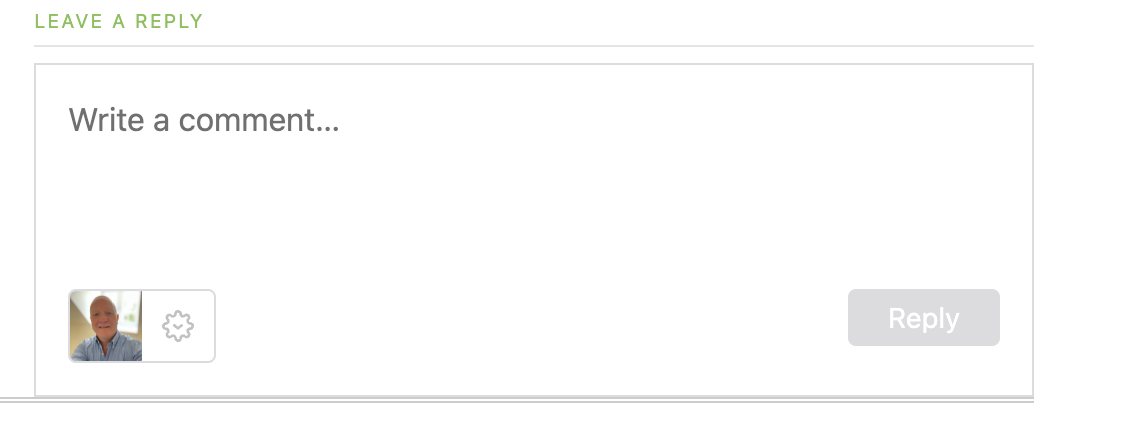
Have you noticed that the comments box on WordPress has changed? The old comments box has been replaced with a new one (see the following image), but it seems to be causing me a few problems.

Image showing the new-look comments box on WordPress.
Have you noticed the new comments box on WordPress?

The above new style comments box has gradually been introduced to most blogs on WordPress.

You can write a comment, press the reply button, and move on pretty swiftly, but my concerns are with something hidden behind the settings (cog) button next to the icon that displays your Gravatar image. When you press the cog, you’ll see this.

Image showing the tree options available on the new-look comments box on WordPress.
There are three options to choose from in the new-look comments box.

See those three new options at the bottom of the comments box? Not only can you now get web and phone notifications of new blog posts from the blog you’re leaving a comment on, but you can set how often you get notifications of new posts.

These are not new, though. They’ve been available for use on WordPress for a long time but were buried deep in our blogs’ dashboard settings. Now, they’re much easier to find and use.

So far, so good, you may think, but it’s the ‘email me new comments‘ button that is causing me concern.

You see, I’m one of those bloggers who like to receive an email whenever anyone replies to a comment I’ve left on their blog or when anyone else leaves a comment on the post I’ve already commented on. It’s my way of knowing that not only have they responded to my comment but also a way for me to either reply to or ‘like’ the comment. I do not like the thought of any blogger thinking I’ve ignored their comment.

The problem now is that when you slide the ‘email me new comments‘ button on, not only do you get emailed comments for the posts you’ve left comments on, but you’ll get email notifications of any comment left on any of the posts on that blog regardless of whether you left a comment or not.

If the blog you’ve left a comment on is huge and gets hundreds of comments, this could become a big problem with your email box filling up quickly.

Needless to say, that is something I do want. I only want email notifications of comments left on the posts I left a comment on. Why? Well, I find that reading comments can sometimes be as interesting as the post they’re left on, plus comments often give me new ideas for blog posts.

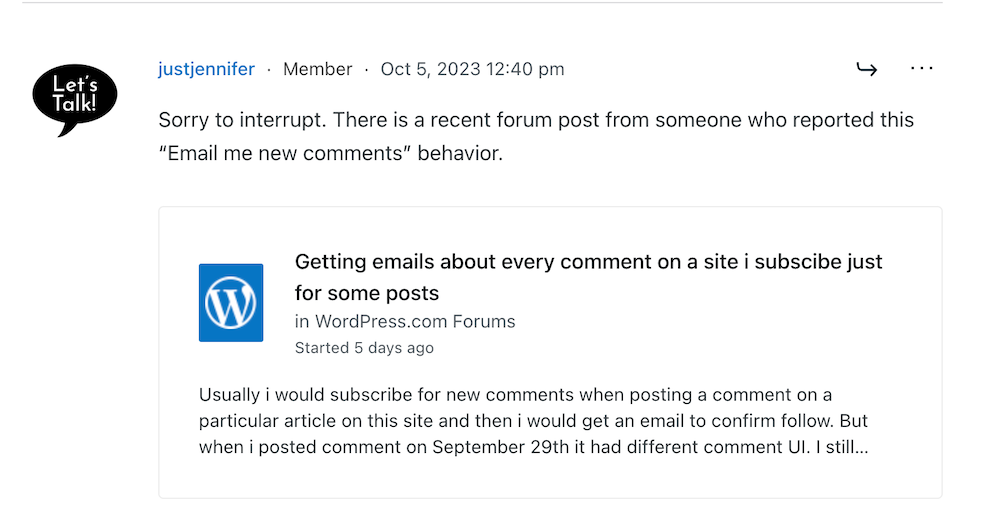
I’ve reported the issue to WordPress, and they’ve replied. See the screenshots below. However, I’m not the only one who reported this particular problem.
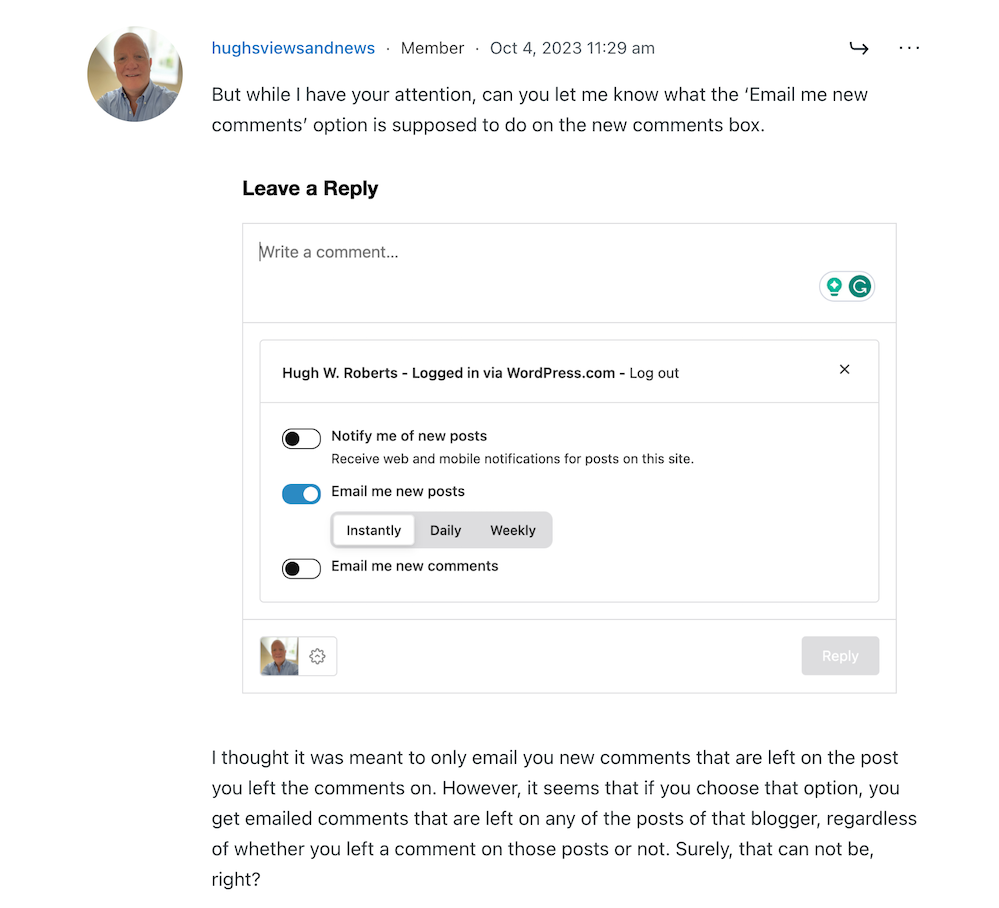
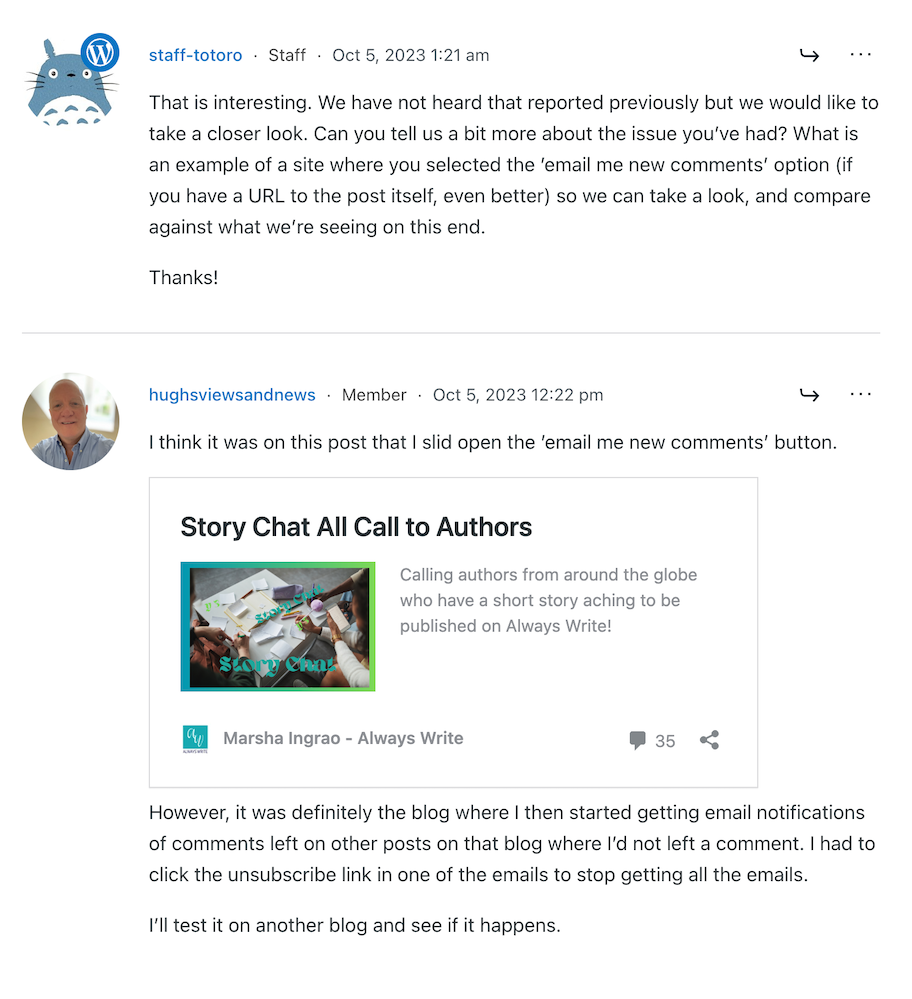
Image showing discussion on WordPress forum regarding email notifications about comments
Images showing a discussion on WordPress forum about emails and commenting.
Image showing another blogger who has reported email notification problems on WordPress
Somebody else has reported the same problem.
Image showing a response from WordPress to my concerns regarding problems with email notifications from WordPress
A response from a member of staff at WordPress

That was the last response from WordPress, but I’ll update this post with any developments.

Some good news – My spam box is empty!

Is it only me, or has anyone else seen a drastic reduction in spam since the new comment box appeared? I used to get hundreds of spam messages to scroll through every day, but now my spam box is empty almost every day – hooray!

So, there is no need to close comments off posts anymore if WordPress has waved a magic wand and stopped the spam once and for all. Hooray – that means I can leave comments on blog posts that are more than a month old.

Are you having any of the problems described in this post or any issues with leaving comments or receiving WordPress notifications as a whole? Has the amount of spam you’re getting plummeted? Let me know in the comments section.

Follow Hugh on Social Media. Click on the links below.

If you enjoyed this post and want more like it, enter your email address and click ‘Subscribe’ to stay up-to-date with my latest content.

Layout, content, settings, and format might differ on self-hosted blogs.

Copyright @ 2024 hughsviewsandnews.com – All rights reserved.


Discover more from Hugh’s Views & News  

Subscribe to get the latest posts sent to your email.

67 responses to “Experiencing Problems With Leaving Comments On WordPress? This Is What I Found. Read This Post Now”

  1.  avatar
    Anonymous

    I had a version of your comment gravitar issue when commenting on a blog yesterday. I typed in my comment but thr reply button remained greyed out until I clicked on the gravitar and brought up the options list you showed. Once I’d opened it – I didn’t change an option – the button went blue.
    Otherwise yes I’ve experienced your changes though I don’t customarily click on the other comments button so I’ve not seen the flood.
    No spam is welcome, isn’t it? I wondered if I could remove the time limit on comments and not reopen an unwelcome door on spam so it’s good to know I can.

    1. Hugh W. Roberts avatar

      That’s strange that the ‘reply’ button remained grey after typing your comment. Has it happened on any other blog where you’ve tried leaving a comment? Werte you logged into WordPress when leaving the comment? Had you commented on that blog before, or was it the first time you were leaving a comment on that particular blog?

      Yes, stopping the flood of spam is a big plus. I’m delighted it has stopped.

  2. Xena avatar

    I’m happy to have an empty spam folder, but the trash has over 52,000 comments. They were comments that all said the same thing in a language other than English, and they were posted daily by the 100’s. It’s so many that it won’t empty.

    1. Hugh W. Roberts avatar

      You may have to bulk delete them over time. Unfortunately, bulk delete only does 20 at a time, so it’s going to take a long time. I’d recommend you contact WordPress and ask if there is a quicker way to delete them. They may even be able to do it for you.

  3. petespringerauthor avatar
    petespringerauthor

    One thing that I don’t understand about this is that when I get ready to leave a comment, the three buttons you referred to are not always marked the same. The email me new posts is usually marked, but occasionally one of the others is as well.

    My inbox is cluttered enough already. I’d prefer to keep things to a minimum.

    1. Hugh W. Roberts avatar

      These buttons are all individual now, Pete. So you may like to follow a blog but only receive web and mobile notifications for posts from the blog rather than get emails notifications. I think having a choice is better, but the email new comments button is certainly a cause for concern.

  4. stevescountry avatar

    I have a slightly different problem, one of my regular readers who likes to comment can’t comment anymore. This began about 3 weeks ago and WP has been no help in figuring out the problem. I have not changed any settings so that is not the problem and it is only one reader that is affected, that I know of anyway. Seems like there is always something that happens.

    1. Hugh W. Roberts avatar

      Has that reader reported the problem to WordPress? If it’s only affecting them, it’s probably something to do with the settings on their blog, or could also be related to the blog theme they’re using. If they’re using an old, retired theme, WordPress won’t be supporting and fixing any bugs anymore. It’s worth them checking with WordPress.

  5. Michelle (Boomer Eco Crusader) avatar

    Thanks for this post, Hugh. I was wondering why I was no longer getting email notifications of comments on my blog!

    That’s good to know about the “Email me new comments”. It makes sense that we’d only want to see comments for the post we’ve commented on.

    1. Hugh W. Roberts avatar

      So it’s happening to you too, Michelle. At least now I know WordPress can not tell me it’s only me it is affecting. Thanks for letting me know.

  6. Erika avatar

    Since I have turned off the e-mail notifications on comments made on my posts, I cannot say anything about it. Yes, I noticed that new comment box too, which confused me initially. Actually, this is the same choice you can find in the “discussion” settings too. And yes, I have no idea how they did it but the spam flood has ended…yippie!!

    1. Hugh W. Roberts avatar

      Good to hear the spam flood has ended, Erika. That’s one good thing that seems to come out of the new comments box.

      1. Erika avatar

        For once a change for the better instantly 😄

  7. JT Twissel avatar

    I had to change browsers a few years back and that caused all sorts of problems with leaving comments that I’m still trying to wade through. I didn’t realize you could alter the frequency of comment notifications! Thanks!

    1. Hugh W. Roberts avatar

      It’s new post notifications that you can change the frequency of. So, if you follow a blog that publishes more than one post every day, you may prefer to receive those notifications weekly, rather than instantly. Then you can wade through them and decide which of those posts to read.

  8. Liesbet @ Roaming About avatar

    Hi Hugh,

    I might be old-fashioned, but I’m getting tired of all the changes WordPress and other technology companies make all the time, especially when something works well (for me) for ages, and now it doesn’t anymore. Updates seem to “break” other existing parts. (On a side note, a recent Windows update messed up my husband’s computer, which is a big deal for us here in Peru, as he needs his computer daily for work, research, finances, and other things.)

    I’m experiencing the same issues as you mention in this post. I’ve noticed the new slider options before leaving comments, I only want to receive comments in my inbox of blogs that I left a comment on (mostly to see the reply of the blog author to my comments and then “like” that reply if possible, for the same reasons you mention), and now I’m getting comments emailed to me of posts I haven’t even read yet, of a blogger I follow.

    In addition, I have had people contact me that they can’t leave comments on my blog anymore, after all these changes. That’s the worst part. I hope WP figures all this out soon. I don’t have the time or energy to figure all this out. Like every blogger, I want the site to work so I can keep writing, posting, and interacting. That alone is time consuming enough.

    1. Hugh W. Roberts avatar

      I don’t mind changes, Liesbet. In fact, I like that WordPress are always updating their platform to bring it up to modern standards, but what I do not like is the lack of testing these changes properly before they launch them. I’ve no idea if they had beta checkers for the changes to comments, but I’m sure some of the beta users would have highlighted the problems I’ve outlined in this post.

      I can’t believe that anyone would want to be bombarded with email notifications of all comments being left on all the posts of a blog (unless they asked for them). Like you, I only want email notifications of comments of posts where I’ve left a comment. Unfortunately, if this is the way WordPress want things to work, I’m going to have to ensure that I check all comments on the Jetpack app or in the notification section of my blog. I still worry that I won’t catch all of them, though.

      With regards some people not being able to comment on your blog, it seems odd that it’s only affecting some people. I certainly have not encountered any problems leaving comments on your blog. The problem may lay with the blog theme those bloggers are using. If their theme is old and been retired, it could be a bug affecting them being able to leave comments. In any case, they should report the problem to WordPress.

  9. Brenda avatar

    Hi Hugh. Yes, I had noticed these changes. I tend to use my notifications for comments rather than relying on emails, so don’t know whether they’re working or not. I had noticed the change to the layout for commenting and the tick box options. I agree, we should be signing up for comments on a particular post rather than the whole blog.

    Lastly, I had noticed the drop in spam, but at the same time, more regular community members’ comments are appearing in my spam folder/

    1. Hugh W. Roberts avatar

      That’s not good if more genuine comments are ending up in your spam folder, Brenda. However, years ago there were cases of all comments going spam. It happened to all my comments and I had to report the problem to WordPress. They fixed it, and the problem went away.

      If I find a genuine comment in my spam folder, I inform the person who sent the comment and recommend that they check that other comments they’re leaving on other blogs are not also doing the same. If they are, they need to report the problem to WordPress.

      1. Brenda avatar

        I usually do let the person know its happened, but I didn’t think of suggesting they check other comments and report it to WP. I’ll bear that in mind

        1. Hugh W. Roberts avatar

          It was big problem a few years ago when the Akismet Anti-Spam software started marking all comments as spam. Thousands of bloggers ended up in the spam jail. And the only way of getting out was by asking WordPress for help.

          1. Brenda avatar

            That sounds like it was a nightmare

  10. Danny Watts avatar

    I use the OS and online versions of WP. I found the same box associated with blogs I follow. I assumed it was a feature oassocaited with Chrome. I’ve switched nearly all the blog post options to emails as the “notifcation” options is blowing up my monitor.

    1. Hugh W. Roberts avatar

      It’s certainly got out of hand, Danny. I don’t want email notifications of all comments left on any post on a blog, just comments for a post where I’ve left a comment. I hope they get it fixed soon.

  11. Janis @ RetirementallyChallenged.com avatar

    Thanks for addressing this issue, Hugh. I don’t have your problem of not getting notifications of comments on my blog, thank goodness, but I’ve started to get more “anonymous” comments since the change. This makes me think that some commenters are having trouble signing in. I would love it if WP gave the option of just getting notified when the blogger responded to my comment only. Sometimes I get this notification, sometimes I don’t. I can’t imagine anyone wanting a notification for EVERY comment… yikes, I wonder what they were thinking?

    1. Hugh W. Roberts avatar

      Hi Janis, there is a setting on your blog which you can turn on to allow people who are not logged into WordPress to leave comments. You must have that setting turned on. To be honest, I believe we have to make it as easy as possible for readers to leave comments. If they find it too difficult and have to jump through loops and hoops to leave one, they’ll give up, so I have that setting switched on too.

      But I certainly do not want email notifications of every comment left on a blog I’ve left a comment on. That’s way too overwhelming, so I hope they’ll make some changes so we only get email notifications on the posts we’ve left comments on (not the whole blog).

  12. Terri Webster Schrandt avatar

    Now that you bring this up, I don’t get emails for the comments, but I may have turned that off, Hugh. Like a couple of folks mentioned, I check the notifications frequently and have been pretty good about not missing any. Many of the comments are links to my challenge which is a good thing! I did notice the comment box with the extra info, which seems helpful.

    WordPress sure is having some growing pains. I’m glad the HEs are on it but like you mentioned to Colleen, I’m sticking with my current classic theme and will wait for FSE, if I even go there. When I self-hosted it was a lot of work and I fear FSE themes will bring back that mess.

    Every time I read one of your helpful posts, I learn something new. So. Much. To. Still. Learn! ;) Thank you again for your super helpful how-to posts!

    1. Hugh W. Roberts avatar

      There’s certainly a setting in all our blogs dashboards where you can switch certain comments off, Terri. For example, I turned the one off for anyone who clicked ‘like’ on any of my posts. But it seems (according to the WordPress staff) that the new comments box is now clashing with the comments settings I have on my blog. I hope they can sort it out, and quickly.

      Likewise, I’m sticking with a Classic theme at the moment especially after hearing from Colleen that WordPress seem to be already retiring some FSE themes and replacing them. All sounds very messy.

      Yes, WordPress certainly keep us on our toes with new things to learn. But I rather change than things never changing. Just imagine how boring and dull it would become if nothing changed.

      1. Terri Webster Schrandt avatar

        I really appreciate how you and other bloggers like Colleen and Eugi share their issues and successes with the rest of us. I have personally found posts and comments very helpful.

  13. Colleen M. Chesebro avatar

    Ugh! Hugh, I can’t keep up with all the issues. LOL! I don’t want all the emails. It’s too much. We used to be able to stop all emails. Then, I could find the comments on the notifications menu. Depending on my work load for the day, I can’t comment or visit everyone I follow. This email me new comments issue is just another example of how WP is not ready for prime time. We pay for this service and we’re the beta testers! By the way, another FSE theme disappeared: Al Dente to be replaced by another remake of the theme. It’s very discouraging to plow through the WP chaos. Thanks for bringing these issues to our attention. You’re appreciated.

    1. Hugh W. Roberts avatar

      This seems to have happened ever since they launched the new-look comments box on my blog, Colleen. I’m glad it’s not only affecting my blog, as those issues are usually harder to fix. I like the comment email notifications because they act as a backup so I don’t miss any comments, plus I usually forget to check the notifications menu.

      I’m glad I’m still using a Classic theme while the issues with the FSE themes are sorted. Plus, I hear they will get easier to set up as time goes on. I do hope so.

      1. Colleen M. Chesebro avatar

        Me too. There are too many moving parts to the themes. It makes it really difficult to use. Thanks again for all the information, Hugh.

  14.  avatar
    Anonymous

    I’ve noticed all these things, Hugh, and have been figuring out ways around them. It’s particularly annoying not to get info on my blog right away. There is a lag time. And I don’t appreciate getting everyone else’s comments on a blog I commented on. Patience, patience with the WordPress idjits.

    1. Hugh W. Roberts avatar

      So, you’re having the same problems as I mentioned in this post? That confirms it’s not just me, which is good.
      Staff at WordPress have been very helpful, but it sounds like the problems are more complicated than I thought. Fingers-crossed, they’ll get sorted.

  15. Cathy avatar

    I haven’t noticed any problems with leaving comments so far, Hugh. I don’t have the email me new posts turned on. I actually though it was for new posts, not comments. If I get a reply to a comment it shows in the jetpack app.

    1. Hugh W. Roberts avatar

      Good to hear you’re not having any problems leaving comments, Cathy.

      Replies also show in the jetpack app for me, but I’ve stopped getting email notifications whenever anybody leave me a comment on one of my posts. I used to get them, but they stopped suddenly a few weeks ago. I like to get them as I don’t always remember to check the app.

      1. Cathy avatar

        I hope it gets sorted out for you, Hugh. It’s good there are several options for notifications though.

        1. Hugh W. Roberts avatar

          Yes, these options have been available before, but WordPress buried them deep in the settings of our blogs, Cathy. I’m glad they’ve made them easier to find. Now my fingers are crossed that they’ll get that email notifications setting fixed.

Feel free to leave a comment. Engagement helps keep blogs alive and forms community.

I’m Hugh

Welcome to my blog. I’m delighted to have you here. This is the place to discover tips on blogging and WordPress, flash fiction, photography, and more. I enjoy engaging with my readers, so please feel free to explore, join discussions, and contact me. I’m happy to assist! Find out more about me and my blog by clicking the ‘Meet Hugh’ button.

Let’s connect

Subscribe to Hugh’s Views And News

Latest Posts

Follow Hugh in the Fediverse

Hugh's Views & News  
Hugh's Views & News  
@hughsviewsandnews.com@hughsviewsandnews.com

WordPress & Blogging tips, flash fiction, photography and lots more!

402 posts
6 followers

Recommend Blogs To Follow


Boomer Eco Crusader
Boomer Eco Crusader
Live Green | Declutter | Simplify Life

Jacqueline Lambert
Jacqueline Lambert
Award-Winning Travel Humour Writer

Spo-Reflections
Spo-Reflections
To live is to battle with trolls in the vaults of heart and brain. To write; this is to sit in judgment over one's Self. Henrik Ibsen

Anne R. Allen’s Blog… with Ruth Harris
Writing about writing. Mostly.

Fancying France
The musings of a ‘femme d’un certain âge’ who divides her time between SW France and SE England

SONGS AND SCRIPTS AND DUNKING BISCUITS
Every day tales of a winging-it creative

Marsha Ingrao         Always Write
Marsha Ingrao Always Write
Having fun blogging with friends

Curiosities, Castles and Coffee Shops
The musings of a curious mind

WrookieSchU
WrookieSchU
Live life 🙌🏼

WPcomMaven
WPcomMaven
Helping you make the most of your free WordPress.com website since 2011

Second Wind Leisure Perspectives
Fun, Photography & Friends

Share Your Light
Share Your Light
You are a miracle – Let it happen

No Facilities
No Facilities
Random thoughts, life lessons, hopes and dreams

Esther Chilton
Writer, Tutor and Editor

Roaming About
A Life Less Ordinary

Saying nothing in particular
Jan … JT Twissel

The Chicago Files
The Chicago Files
A Canadian Perspective on Living in the Windy City!

Thank you to all my visitors

469,277 hits

252,707 visitors

Most Viewed Posts & Pages

Copyright Protected Blog

COPYRIGHT ©2011-2031 Hugh’s Views And News BLOG – All Rights Reserved.

This work by Hugh W. Roberts, and/or Hugh’s Views And News blog, is licensed under a Creative Commons Attribution-Noncommercial-NoDerivatives 4.0 International License. Unauthorised use and/or duplication of this material (text and images) without express and written permission from this blog’s author and/or owner is strictly prohibited. If you want to use posts, excerpts, photos and links, you may contact me first. You must give full and clear credit to Hugh W. Roberts and Hugh’s Views And News dot com with links to the original content.