Astonishing! Some Bloggers Kill Off Comments On Their Blogs. Why?

I’ve always believed that engaging with comments is at the core of what makes blogging so vibrant and interactive.

While I won’t reiterate what has been said about bloggers who choose not to respond to comments, I was taken aback to learn that some bloggers are opting to turn off comments entirely. Some claim that it’s the future of blogging, where people no longer want to engage, mainly because they don’t have the time.

Wait a minute. A silent blog? No comments? No space for discussion or interaction with fellow bloggers and readers? Will these blogs be relegated to ‘library’ status – a place for reading but not engaging?

Is it possible that some of those who neglect to respond to comments are also the ones shutting down comments altogether?

What drives the decision to turn off comments?

The leading reason appears to be time constraints. Many bloggers argue that responding to comments diverts precious time away from creating new content. This perspective honestly frustrates me.

If your content generates a lot of comments, managing responses can indeed feel overwhelming. While it’s true that time spent responding might seem more effectively allocated to writing new posts, with proper time management, it doesn’t have to be a significant issue.

Is there a limit to how many comments are too many?

In my 11 years of blogging, I’ve managed and replied to over 25,000 comments. Whether that’s excessive is debatable, but as a blogger, I continuously seek more engagement. I always feel sad for those blogs that generate little to no comments from readers. What are they doing wrong?

At times, responding to comments might take up an entire morning, time I could dedicate to crafting additional blog posts or short stories. Nevertheless, I’ve always believed that if someone takes the time to read my work and leave a comment, it’s only courteous to return the favour with a response.

“Treat every visitor to your blog, just as you would a guest in your home.”

This advice stuck with me early in my blogging journey, given by a blogger with an awe-inspiring follower count. She made it a point to respond to each comment (except comments from spammers or trolls), a lesson that remains ingrained in my approach.

A priority every morning when I log into my blog is to respond to comments. Not only does this affirm that my writing is resonating with readers, but it also establishes a friendly atmosphere, showing visitors and commenters that their contributions are valued.

Are all comments created equal?

Absolutely not. Comments vary widely. Some reflect that the commenter has read the entire post, generating fresh ideas for future content. Others, however, leave you wondering if they merely clicked the ‘like’ button without engaging deeply with your work. Some find it difficult not to leave a comment, regardless of what it is. Perish the thought that they may upset a blogger by not leaving a comment every time.

I acknowledge these lighter comments by liking them. At the very least, it signifies that I’ve read their input. However, I’ve grown tired of the short, non-engaging comments from the same bloggers all the time, especially those who obviously have not read the posts and who see my blog as a quick way to get some free marketing for their own blog.

Do I have a meaningful quote about comments?

Indeed, I do! This quote has resonated with many over the years:

“Not addressing comments left on your blog is akin to inviting someone over for coffee and ignoring their presence.”

The broader impact of comments.

Comments can spark rich debates among readers. It’s always enlightening to see two or more bloggers engage in discussions about the subject I’ve tackled in my post. I regard this as a ‘healthy debate.’ A blogger once told me that encouraging dialogue through comments showcases your engagement with the audience, even if not every comment is directly addressed to you.

But let’s revisit the question posed in the title: Why should bloggers eliminate comments from their blogs? I understand why some might temporarily disable comments (e.g. when they’re taking a blogging break), but turning them off completely seems contrary to the essence of blogging.

After all, don’t comments facilitate communication between the reader and the author? Isn’t that what most bloggers aspire to do—to connect with their audience?

Are you thinking about turning off comments on your blog? Are you somebody who can’t resist leaving a comment on every single post you check out, or do you just never bother to comment at all? Jump into the chat!

The featured image in this blog post is taken from Pixabay. Spelling and grammar mistakes were checked with the help of AI.

I’m getting tough with non-engaging comments. Any non-engaging comments, such as ‘Nice post’, are marked as spam.

Click the buttons below to follow Hugh on Social Media

Copyright @ 2025 hughsviewsandnews.com – All rights reserved.

The Ultimate Guide to Engaging on Bluesky: Tips, Features, and Strategies for Success

When I joined Bluesky in November 2024, I thought it might be just another social media platform, but I was mistaken. It has now become a place where I visit and engage every day. Plus, it’s already driving traffic to my blog and has introduced me to many amazing people worldwide.

Bluesky is a friendly, easy-to-use platform for interacting with other users, and many bloggers, writers, authors, and photographers have already joined.

However, it’s not all plain sailing. Bluesky has its fair share of bots and scammers, but they’re easy to deal with.

How does Bluesky work?

If you have ever used Twitter or X, the Bluesky platform runs similarly. However, Bluesky is the new kid on the social media block, so it doesn’t do everything you could do on Twitter/X. However, it does have a couple of features that Twitter/X does not have.

Since it has over 33 million users (as of this post), it’s a social media platform every blogger, writer, and author should consider joining.

How Bluesky Works

Users publish posts (known by some as Skeets), including links to blog articles, books, images, and photos. Other users can view these posts and engage by commenting, clicking the ‘like’ button, and resharing the post (a ‘reskeet’). It’s very similar to what occurs in the blogging world.

The more you interact with other users, the more rewarding and effective your results from Bluesky will be.

Here are the key components of how Bluesky functions:

  1. User Registration: To start, users must create a quick and straightforward account. A missing banner, avatar or profile description makes you look like one of those quickly thrown-together bot/scam accounts that frequent many social media platforms. Be sure to include that you’re a writer, blogger, author or photographer in the description. That helps ensure you connect with fellow writers or photographers rather than those who post about subjects you’re not interested in.
  2. Publishing Posts: Users can share content, including text posts, links to blog entries, images, videos and photos. They can also reshare (known as reskeeting) the posts of other users.
  3. Engagement Mechanisms: Other users can engage with posts by commenting, liking, and resharing. This interaction helps foster a sense of community and encourages dialogue.
  4. Discoverability: Bluesky’s algorithm allows users to discover posts that may not be directly connected to the author, broadening the audience reach. For example, I am also interested in astronomy and have connected with users who publish images, photos and posts about space.
  5. User-Friendly Interface: The platform is designed to be intuitive, making it easy for users to navigate and effectively use its features. I quickly learned how the platform works.
  6. Building Connections: Users can follow others, creating a network of connections that enhances the engagement on the platform.
  7. Community Guidelines: Bluesky implements guidelines that users are encouraged to follow to maintain a friendly environment. These guidelines help minimise conflicts and foster positive interactions. Unlike other social media platforms, Bluesky does not tolerate any hate speech.

With over 33 million users at the time of writing, Bluesky is emerging as a significant platform for bloggers and content creators seeking to broaden their reach and engage with a broader audience.

What not to do on Bluesky

I’ve seen numerous bloggers share links to their posts and then leave immediately. They do not interact with any other users.

It’s no surprise that their posts receive little, if any, engagement or shares.

Unsurprisingly, in the four months I’ve been on Bluesky, I’ve not seen any increase in the number of users who follow them or the number of accounts they follow.

Their accounts resemble stepping onto a new planet that could rapidly be populated but is desolate due to a lack of visitors and engagement.

Avoid dropping links to your own posts and then running away. The general advice for any social media platform is that 80% of your posts should feature the content of other users, while the remaining 20% can be your own material.

Avoid overlooking comments on your posts (except those from scammers or bots). At the very least, show appreciation to anyone who leaves a comment.

Be friendly, helpful, and positive toward others. Remember that Bluesky differs from X/Twitter. Avoid seeking out or engaging in arguments. Ignore, delete, and block any comments from spammers, bots, or troll accounts.

How to spot bot accounts and scammers on Bluesky

The majority of bot and scammer accounts can be easily spotted.

They generally have a high following count but a very low follower count, while the number of published posts is low and primarily consists of posts shared from other users.

Lots of numbers will appear after their BlueSky user name – e.g. hughblogger123456789.bsky.

The account will have a generic, poorly written Al bio and posts.

The account will primarily feature reposts, with very few original posts.

If you accidentally follow one, they will immediately send you a direct message saying ‘Hello’ or asking how you are or where you are from.

They will continue to bombard you with direct messages.

Their bio may sometimes indicate they are seeking love, a partner, or requesting a donation. Some will also claim to be experts in book/blog marketing or able to make you lots of money with little effort.

Their profile pictures may seem too good to be true and are often taken from other sources online. Be cautious of accounts featuring military uniforms and those revealing body parts you might not anticipate seeing in their bio picture.

Here’s an image of a scam account that recently followed me. I immediately blocked it.

An image of a scammer account on BlueSky where a donation link is visible.
Beware of scam accounts asking for donations.

Sadly, 338 people are following this account, some of which will have donated.

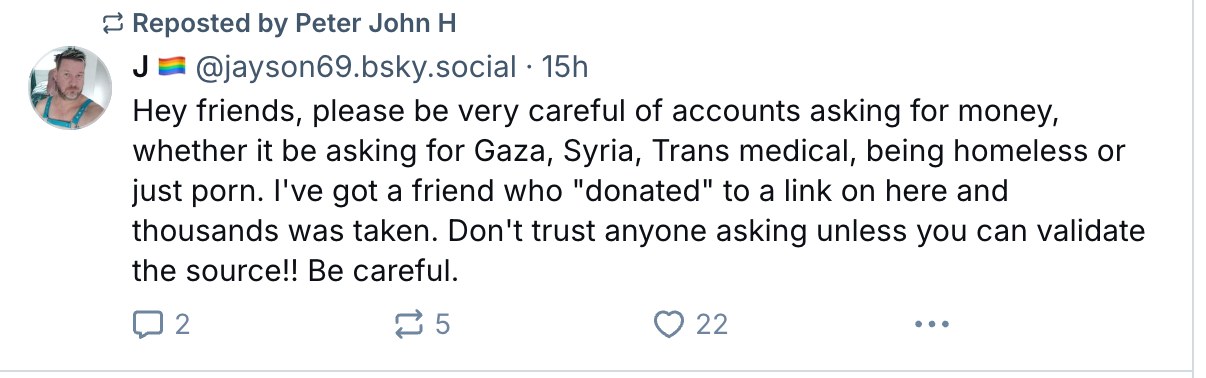
Here’s a warning from one Bluesky user about the type of scam account I mentioned.

An image of a warning from a BlueSky user about not donating money to certain accounts on BlueSky.
Never donate to any accounts asking for these kinds of donations.

More helpful tips from other Bluesky users.

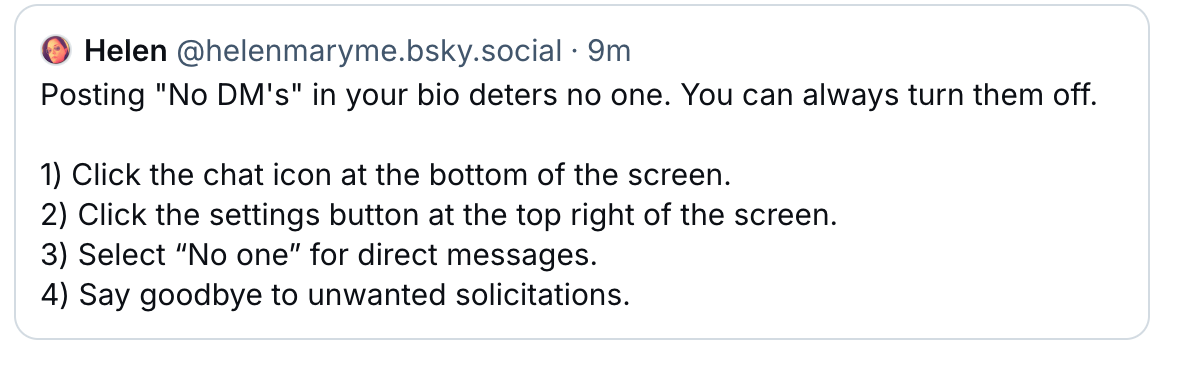
Helen describes ways to stop receiving direct messages (DMs).

An image showing how to turn off direct messaging on BlueSky.
Don’t want direct messages on Bluesky? Follow this advice.

Follow Helen on Bluesky at @helenmaryme.bsky.social.

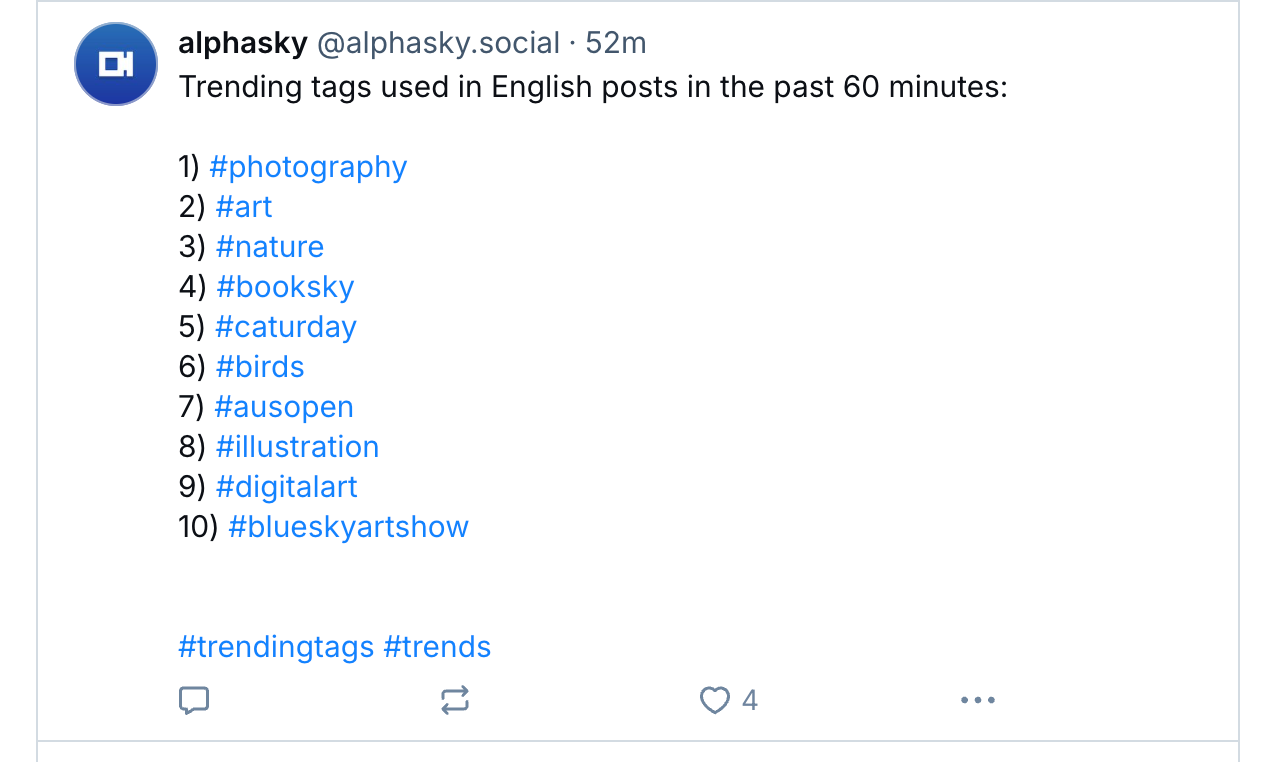
Follow these two accounts on Bluesky to discover which hashtags are trending: @trendtags.bsky.social and @alphasky.social.

An image showing popular hashtags on Bluesky.
An image showing an account that publishes trending hashtags on BlueSky
Follow these accounts to discover trending hashtags on BlueSky.

Bluesky encourages the use of hashtags, so I recommend using them.

Curious about who has blocked you or added you to lists or starter packs on Bluesky? Follow @listifications.app.

An image of a post showing an account to follow on BlueSky to find out who has blocked you or added you to lists or starter packs.

For authors, some Bluesky users offer to add details about your books to their author websites. While this may initially seem suspicious, I recommend sending information only to those you have been following or believe are trustworthy. Here are the details of one author who recently posted, inviting other authors to send him details of their books so he could add them to his author’s website. As you can see, I took up his kind free offer.

An image of a Bluesky post by an author providing free marketing on their author's website.
Free marketing offers on Bluesky.

Follow JP (James) at @pangeanchronicles.bsky.social. Visit James’ author’s website by clicking the following link.

The Pangean Chronicles

Create and get yourself added to BlueSky Starter Packs.

I highly recommend creating at least one starter pack and trying to get added to the starter packs of other Bluesky users. This will allow you to connect with numerous other Bluesky users who share similar interests, thereby increasing your exposure and that of your blog.

For more information about the benefits of Starter Packs on Bluesky, click the following link.

Introducing Bluesky Starter Packs

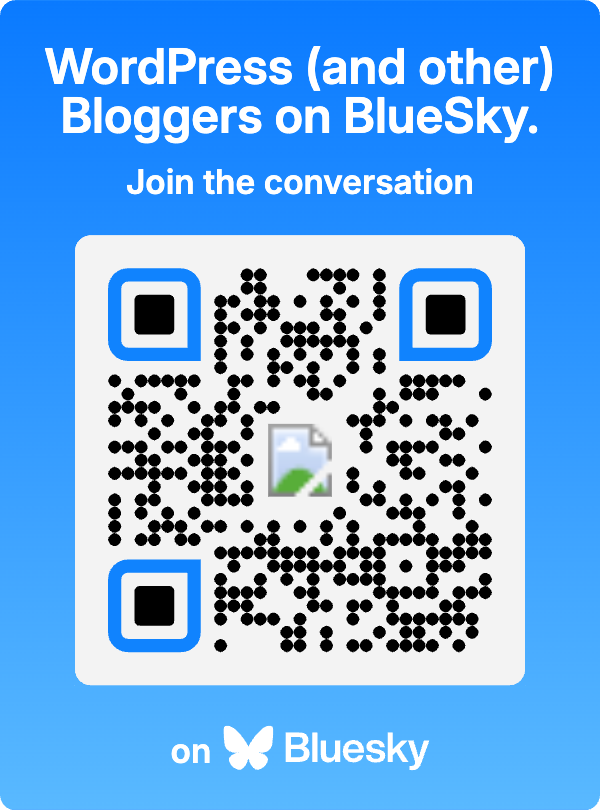
I have created a Starter Pack for Bloggers. Click the link or scan the QR code below to see it.

https://go.bsky.app/D5Nztv6

Please let me know if you’d like to be added to my bloggers’ Starter Pack by leaving a comment with your Bluesky handle.

And finally…

Don’t forget to add the BlueSky sharing button to your blog.

Ready to dive into Bluesky? Share your best tips for navigating the platform! If you have questions or want some help with its features, don’t hesitate to reach out. Feel free to drop your Bluesky handle here so others can easily connect with you.

Click the buttons below to follow Hugh on Social Media

Copyright @ 2025 hughsviewsandnews.com – All rights reserved.

Want More Blogging Success? What Happens When You Find It.

This is post number one hundred and four this year. It was meant to be my one-hundredth post, but life got in the way (I’m not going to bore you with the details), and my Wordless Wednesday post from a few weeks ago earned the honour of being post number 100.

When you think about it, one hundred and four posts in ten mouths seem like an awful lot. Am I overwhelming readers with too many posts, or do you want more? I’m averaging nine monthly posts, which appears to have become a good balance.

If you asked me, ‘Am I publishing too many posts?’ I’d respond, ‘Do what feels best for you.’ However, we should never forget our audience, so there’s no harm in reaching out and asking. Without you (my audience) reading these posts and engaging with me, this blog would be like arriving on a barren planet. And nobody wants that.

I’d be interested to know how many posts you have published in 2024 and if you’re happy with that number. Let me know in the comments.

Let’s discuss other blogging topics

Did you see my recent post about whole blog posts being shown in emails? No? It’s titled ‘WordPress: Excerpts Are Working Again!‘ It’s worth reading if you only want an excerpt of your posts to show in email notifications and want visitors to visit your blog to read them. Reading posts by visiting a blog is a much better experience than reading them by email, especially since some blocks do not appear in emails, making posts look odd and broken.

There are many reasons to encourage visitors to visit your blog, one of which is that they are more likely to engage with you if they are on your blog (rather than reading from an email). Furthermore, visitors can explore your blog, catch up on posts they have not read, and check any links. This brings me nicely to the subject of engagement.

Are you engaging or comment spamming?

As regular visitors to my blog know, I am passionate about engagement in the blogging world. Recently, I came across an alarming article stating that engagement has decreased to an all-time low in blogging. How sad is that? However, when you look at some blogs with low engagement or, conversely, blogs with numerous non-engaging comments, it is evident that this is happening.

Here’s an example. I recently discovered a writing challenge blog and wanted to get involved. But when I checked out some of the comments left, I knew that participating would not be worthwhile. With lots of non-engaging comments such as ‘Nice one’ and ‘great attempt” being left on stories, nobody wanted to engage with one another. It was a barren planet. I left with a heavy heart.

When I publish a post, it’s the engagement I crave. So when I publish a short story or piece of flash fiction, I look for feedback beyond being told it was a great story. Engaging feedback is critical for all of us to improve our writing.

Do you agree? Do engaging comments help to improve your writing?

Take action if you want engagement

This may seem like a shock-horror move, but I’m now marking comments such as ‘nice’ and ‘beautiful post’ as spam. Leaving short comments all over the blogging world is like leaving spam everywhere. We all know how spam can cause frustration and diminish the enjoyment of blogging.

One main reason readers do not leave engaging comments is a lack of time. However, many who offer that excuse leave non-engaging comments everywhere. They spend the time they could have used to leave an engaging comment, posting numerous non-engaging comments everywhere. The flash fiction challenge I mentioned earlier seems to confirm this.

Some bloggers believe that nobody will leave comments on their blogs if they don’t comment, so they leave short, non-engaging comments everywhere. Honestly, that’s a crazy thought.

Before I finish discussing engagement, I want to reassure everyone that they should not feel obliged to leave comments on any of my posts. I won’t be upset if you don’t comment, but I will mark comments as spam if they are those pesky, non-engagement comments I mentioned. One engaging comment every once in a while is worth a thousand non-engaging comments.

I don’t know about you, but it makes all the difference if somebody wants to engage with me and does so in a way that proves they’ve read the post and are interested. Do you agree?

Please preview your posts before publishing them!

Did you know you can preview your posts before publishing them? It seems that some bloggers do not know they can do this. From seeing upside-down images to posts with a terrible and hard-to-read layout, there is no excuse for anyone not to preview their posts before publishing them. It’s so simple to do.

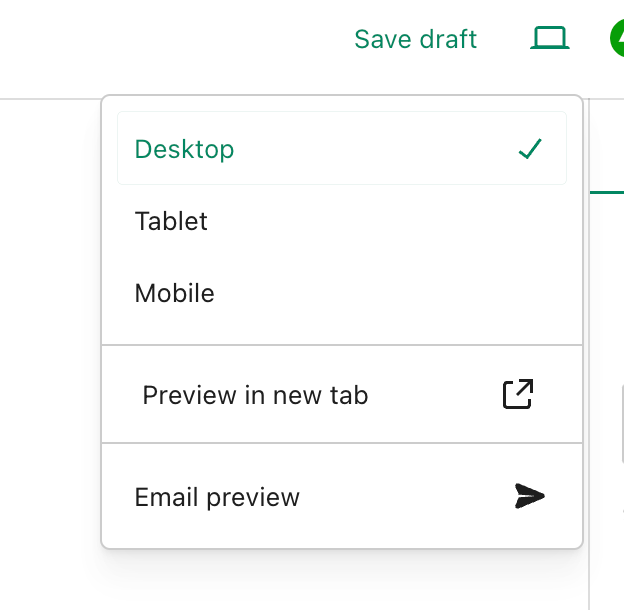
Before publishing a post, click the little ‘laptop computer’ symbol at the top right of the page on which you are drafting the post. You will be able to see a preview of your post as it will look on a desktop computer, tablet, and mobile phone. Plus, and this is fantastic news, WordPress has now moved the ‘preview email’ option to the same menu for how your post will look in an email.

Image showing the preview post and email option on WordPress.
Always preview your posts and WordPress notification emails before publishing them.

Thank you for making that option more accessible to find, WordPress.

There is no excuse for sloppiness in ensuring your posts and WordPress notification emails are at their best for your audience.

Finally, how are your blogging stats performing?

I’m delighted that my blogging statistics have rocketed this year. I’ve surpassed last year’s total number of visitors and views to my blog. But to make things even better, 2024 is on track to be my best year ever (in the ten years I’ve blogged) in terms of viewing statistics and engagement. I believe this disproves those who tell you that you must publish posts every day for your blog to be successful. You don’t need to force yourself to blog every day.

A blog’s success depends not on how often it publishes posts but on the quality of those posts.

Thank you to everyone who visits my blog, reads my posts, and engages with me. Without you, Hugh’s Views and News would never have reignited my passion for writing and engaging with others.

How are your blogging stats this year? Tell me in the comments section.

Layout, content, settings, and format might differ on self-hosted blogs.

Click the buttons below to follow Hugh on Social Media

Copyright @ 2024 hughsviewsandnews.com – All rights reserved.
What Kind Of Comments Are The Best To Leave On Blog Posts?

My blogging friend Brenda, who blogs at Curiosities, Castles and Coffee Shops, publishes a series of blog posts where she introduces a new blogger and shares some wonderful blogging tips.

In her recent post, Brenda talks about using prompts to get ideas for blog posts, especially when we struggle to find something to write about. She mentions the daily WordPress prompt, which asks a question bloggers can respond to in a blog post.

I won’t go into all the details of Brenda’s excellent advice, but it got me thinking about the subject of comments.

Light blue image with the words 'What Kind Of Comments Are The Best To Leave On Blog Posts?' in white text.
What kind of comments do you leave on blog posts?

I left a comment on Brenda’s post, which sparked a conversation with another blogger, Laura, who blogs at Keeping It Creative.

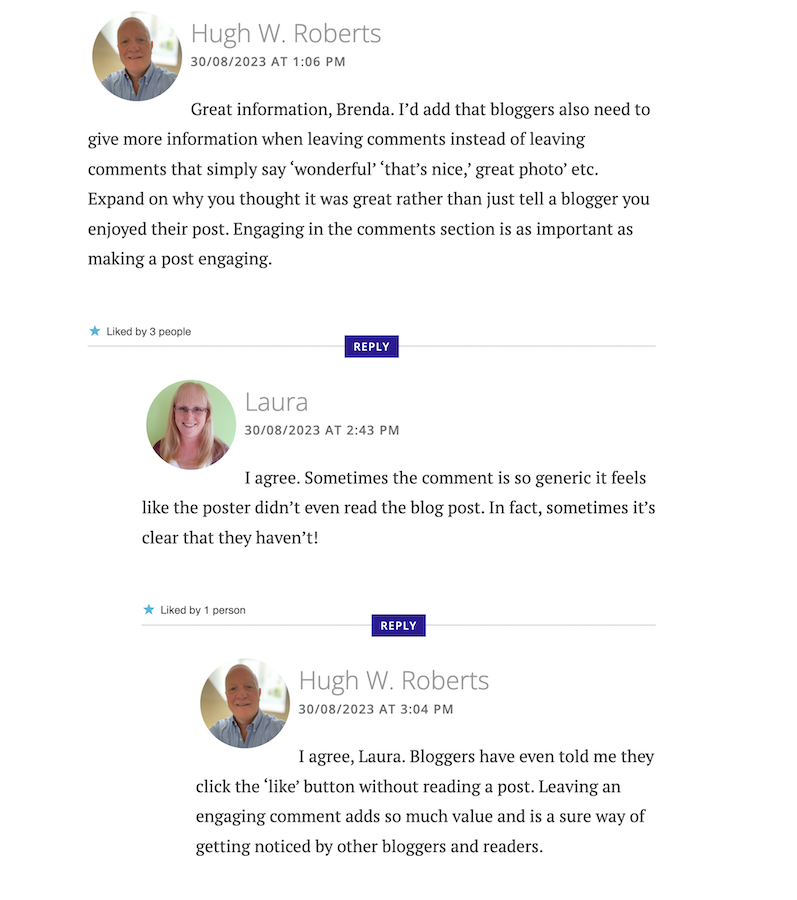
The following screenshot is just a small part of the conversation Laura, Brenda, and I had about the subject of comments.

Image showing engaging comments between bloggers on a blog post.
Are your comments engaging?

Our conversation got me thinking about the overall subject of comments and how I’ve noticed a big difference in the comments being left on blogs.

When I first started blogging, the majority of bloggers had conversations and discussions in the comments section with each other about the subject of the post. But over time, that trend seems to be dwindling which had me asking the question –

‘What has happened to the art of conversation and discussion in the comments section of blogs?’

Gone are the days when many readers left comments that not only proved they’d read the post but also gave feedback that opened discussion and conversation.

Now, it seems, some bloggers leave comments with little, if any, way of responding to them other than with a ‘Thank you.’ Comments such as –

  • ‘I enjoyed this.’
  • ‘Wonderful.’
  • ‘This is a great read.’
  • ‘Well done.’
  • ‘Great interview.’
  • ‘You did a great job.’
  • ‘Another great story.’
  • ‘Great authors and books.’
  • ‘Great post.’
  • ‘Thanks for sharing this.’

Or worse, a comment that includes nothing but emojis.

Yes, some of those comments sound encouraging, but as Laura said in her comment, ‘Sometimes a comment is so generic, it feels like the person leaving the comment never read the post.’

None of the above comments mention anything about the contents of the post.

Why do people leave short, non-engaging comments?

There are probably some genuine reasons for leaving non-engaging comments all over the blogging world, but what are they?

I hope some of the reasons will be left in the comments section of this post. I’m interested in knowing.

Some bloggers claim they don’t have the time to leave longer, engaging comments because they don’t have the time to leave them. Some have too many other blogs to visit. Some rush around the blogging world because they only have so much time to visit and comment on as many posts as possible.

But in contrast, if they didn’t feel obliged to visit these blogs to leave short, non-engaging comments, they could free up some time to leave a few engaging comments that open up discussion and conversation.

Then I got this comment from Janice, who blogs at Mostly Blogging.Com.

Image of a conversation saying that it is no longer trendy to leave comments on blog post.
Is it no longer trendy to leave comments on blogs?

I was shocked by what Janice told me. Is it really no longer trendy to leave comments on blogs? Are readers only wanting information, not a community?

The other side of the blogging coin.

It’s not only some of those visiting posts at fault for leaving short, non-engaging comments. Some bloggers respond to engaging comments that clearly show they want to discuss the contents of a post by saying nothing more than a ‘Thank you.’ They instantly cut off engaging with their audience.

What are engaging comments?

  • They contain information that proves the post has been read.
  • They are written in an engaging, friendly manner.
  • They are at least a couple of sentences long.
  • They indicate that you want to discuss the contents of a post further with who wrote the post.
  • Include any questions about the contents of a post.

And let me reassure you that you should never feel guilty for not leaving a comment or feel obliged to leave one on any blog. There is nothing wrong with clicking the ‘like’ button and moving on after reading a post if you’ve nothing of value to add.

I don’t enjoy having to reply to any comment with just a ‘thank you.’ I want to get into a discussion or conversation about the contents of my posts and what made whoever left a comment say what they said.

For example –

  • Why did they think the post was good?
  • What was it that made them enjoy reading the post?
  • Why was it a great read, story or interview?
  • Was it the way the post was written or some of the answers given? If so, which ones?
  • Did the post strike a cord? Why?
  • What parts did they like/dislike the most?
  • Was it something new they learned? If so, what, and how will they use the new information?

I’ve stopped leaving comments on blogs unless I’ve something of value to add.

And I never feel guilty for not leaving a comment.

I don’t need to prove I’ve visited a blog.

I don’t need to make anyone think I’ve read their post.

I don’t feel obliged to follow and read posts on a blog simply because that blogger follows me and leaves me comments.

And nor should you.

So, what has happened to the art of conversation and discussion in the blogging world? Is it dead, or have I, as a blogger who enjoys discussion and conversation, become a minority in the blogging world? Is it no longer trendy to leave comments? Join the discussion and conversation by letting me know what you think in the comments section.

My post, This Is Why It’s Important To Leave The Right Comments On Blogs: 9 Ways, may also help you to improve the types of comments you’re leaving.

Follow Hugh on social media. Click the buttons below.

If you enjoyed this post and want more like it, enter your email address and click ‘Subscribe’ to stay up-to-date with my latest content.

Copyright @ 2024 hughsviewsandnews.com – All rights reserved.