

Where To Legally Source Amazing Images For Your Blog Posts

The majority of bloggers understand the importance of visual content. Posts that include images receive up to 70% more traffic than those that contain no images. However, there is one major pitfall associated with using images in blog posts, which I will address shortly.

Images not only enhance the appeal of our posts but also help us communicate our messages more effectively. However, a key question remains: where do you source your images and photographs for your blog posts?

Are you breaking the law by using images that are not your own?

I’ve become concerned by the increasing number of bloggers using images or photos without giving credit to the owner or specifying the source of the image. Many of these images have been obtained from the internet; some are copyrighted and not freely available for use. Bloggers using these images and photos are breaking the law.

Some bloggers believe they will never be caught using copyrighted images and photos. They argue that their blog is too small for anyone to care. Nobody will come after them. However, I am aware of a few bloggers who have been prosecuted and fined for downloading and using copyrighted images and photos on their blogs.

It may also not have crossed the minds of some bloggers that there are serious consequences for using images and photos to which they do not have the rights in their posts. Hence, this post.

Where do bloggers get their images from?

Some bloggers, including myself, use stock photo websites that provide images and photos for free. However, even some of these can incur costs if the images are only free to use for a limited time or require the user to give full credit to the owner, along with a link to where the image was sourced. Always read the small print before using any images or photos that are not your own.

Here’s an example. The following image is from Pixabay, a website that offers a wide range of free-to-use images and photos.

An image of a desktop computer keyboard with the 'Copyright' trademark on it.
Image by Gerd Altmann from Pixabay

Notice that I have given credit to the person who created the image and where I obtained it from. The image is free to use, and although the content licence summary states ‘Use Content without having to attribute the author (although giving credit is always appreciated by our community!).’ I always include an attribute along with links to the source of the image.

Always check the content licence summary before downloading an image or photo from the internet and using it in a blog post. Ensure you follow any rules around the use of the image.

The perils of using copyrighted images

While it might be tempting to use appealing images from the internet, downloading and using copyrighted images and photos can result in serious legal trouble. Here are some risks to bear in mind:

Legal Consequences

Using copyrighted images without permission can lead to copyright infringement, which may result in potential legal action against you. This may result in hefty fines, the removal of your post, or even the closure of your blog, not to mention damage to your reputation.

Image Attribution Challenges

Even when images are shared with the intention of being used by others, understanding the precise attribution requirements can be confusing. Each source may have different rules, and failing to follow them can put you at risk.

Quality Concerns

Some free or low-cost images can often be of lower quality, which can damage the professionalism of your blog. Conversely, high-quality images usually come at a price, highlighting the importance of responsible sourcing. However, they can eat into your media space unless you reduce the size, which may then affect the quality.

The Perils of Reblogging

If you reblog a post of another blogger that contains images and photos, don’t think you are safe from prosecution if any of those images or pictures are copyrighted. You, too, could be fined for resharing images or photos that are not free to use, even though all you did was reblog the post. If you are not absolutely certain where those images and photos originated and whether they are free to use, don’t reblog the post.

Availability of Alternatives

Fortunately, there are many alternatives to using copyrighted images. Consider the following options:

  • Stock Photo Websites: Sites like Unsplash, Pexels, and Pixabay offer free images that are often licensed for commercial use.
  • Creative Commons: Use images that offer a Creative Commons license, ensuring you follow any stipulations regarding attribution or modification.
  • Original Content: Creating your own images can be the most reliable way to ensure your visuals are unique and free of legal concerns.
  • AI: Make use of the AI image creator on WordPress. It’s easy to use, although it doesn’t always come up with something relevant, especially if you don’t provide a clear enough description of what you want it to create, but I’ve found it very useful.

Summary:

In conclusion, sourcing images for your blog posts is an essential aspect of content creation that warrants careful consideration. However, be aware and always check if images and photos that do not belong to you are free to use!

The simplest way to avoid copyright issues with images and photos is to always use your own.

Please read this important yet alarming post by Jacqueline Lambert, ‘Bloggers Beware The Copyright Trolls – Even If You Use Royalty-Free Images,’ about a scam targeted at bloggers who use royalty-free images.

I want to open up the conversation and hear from you. What resources do you rely on for images? Do you have any favourite stock photo sites, or do you prefer to create your own visuals? Have you tried the WordPress AI image creator? What did you think of the images it created? Let’s discuss the various avenues we can explore to source images, and perhaps you’ll discover new options along the way.

The featured image in this blog post is taken from Pixabay. AI checked spelling and grammar mistakes.

Click the buttons below to follow Hugh on Social Media

Copyright @ 2025 hughsviewsandnews.com – All rights reserved.

WordPress Themes: Something Exciting Is Happening

Have you ever found yourself lost in the rabbit hole of themes while setting up your WordPress blog? Are you an existing blogger who needs to change an outdated, unsupported theme? Many bloggers embark on this journey—one filled with excitement, anxiety, and the quest for the perfect layout.

As I look back on my blogging evolution, I can’t help but recall the days of choosing that first simple theme, a decision that would shape my entire online presence. Little did I know, this was just the beginning of an adventure that would change with every new theme and update!

How did it all begin?

The first theme I chose was straightforward. It featured a space to add a profile picture and little else. It targeted first-time bloggers who sought a simple layout and a quick start. It got me off to a great start.

As the years progressed, I became more confident in changing the theme of my blog. I wanted a side widget bar to add information, such as a follow button, links to my social media accounts, and a box with links to previous posts.

That first theme change took me a whole weekend to complete. It wasn’t particularly complicated, but it required much work to ensure everything was as I wanted. After all, my followers had increased, and more people were visiting my blog, and I didn’t want anyone to think I was stuck in 2014 or going backwards in the blogging world.

Other theme changes occurred; each time, I found it easier and took less time to change themes. Then it came to a grinding halt.

Full-Site editing themes

Fast-forward a few years, and I considered changing my blog’s theme from the Classic theme I had been using to a new Full-Site-Editing (Block) theme. However, it seemed too complicated, and I was reading posts from other bloggers detailing the difficult transition they had gone through and a list of problems they faced. It reminded me of stories I’d read when some bloggers switched from WordPress.com to self-hosting their blogs.

Today, I’m still using a supported WordPress Classic theme (Toujours), and even though I have thought long and hard about switching to a Block theme, I haven’t jumped ship.

Future themes are here, but there’s a catch!

Last week, WordPress announced that anyone using WordPress could build a blog theme using AI for free. All you have to do is give AI some information about the type of layout you are looking for, and it’ll build the theme and do all the work for you.

Not only was I excited by this news, but it got me thinking about all those bloggers experiencing problems with their blogs because the theme they use is outdated and no longer supported by WordPress. These bloggers could let AI build a theme for their blog and eliminate all the problems they’re experiencing once and for all.

But what about those who won’t use AI? Would they rather continue using outdated, unsupported themes than allow AI to help them?

Using an outdated, unsupported theme can lead to several issues. Here are a few.


1. Security vulnerabilities: Without updates, the theme may become prone to security risks that could compromise your blog.
2. Compatibility issues: As plugins and WordPress itself update, an outdated theme may not function correctly with newer versions, causing layout glitches, functional problems such as not being able to leave comments and issues with WordPress believing you are not logged in.
3. Lack of support: You won’t have access to official support for troubleshooting any issues or queries that arise with the theme. WordPress will advise you to change to a supported theme.
4. Performance issues: Unsupported themes may not be optimised for speed and performance, leading to slower load times.
5. Missed features: Regular updates often include new features and improvements; sticking with an unsupported theme means missing out on these enhancements, which could benefit your blog’s features and user experience.

We’re not quite there yet!

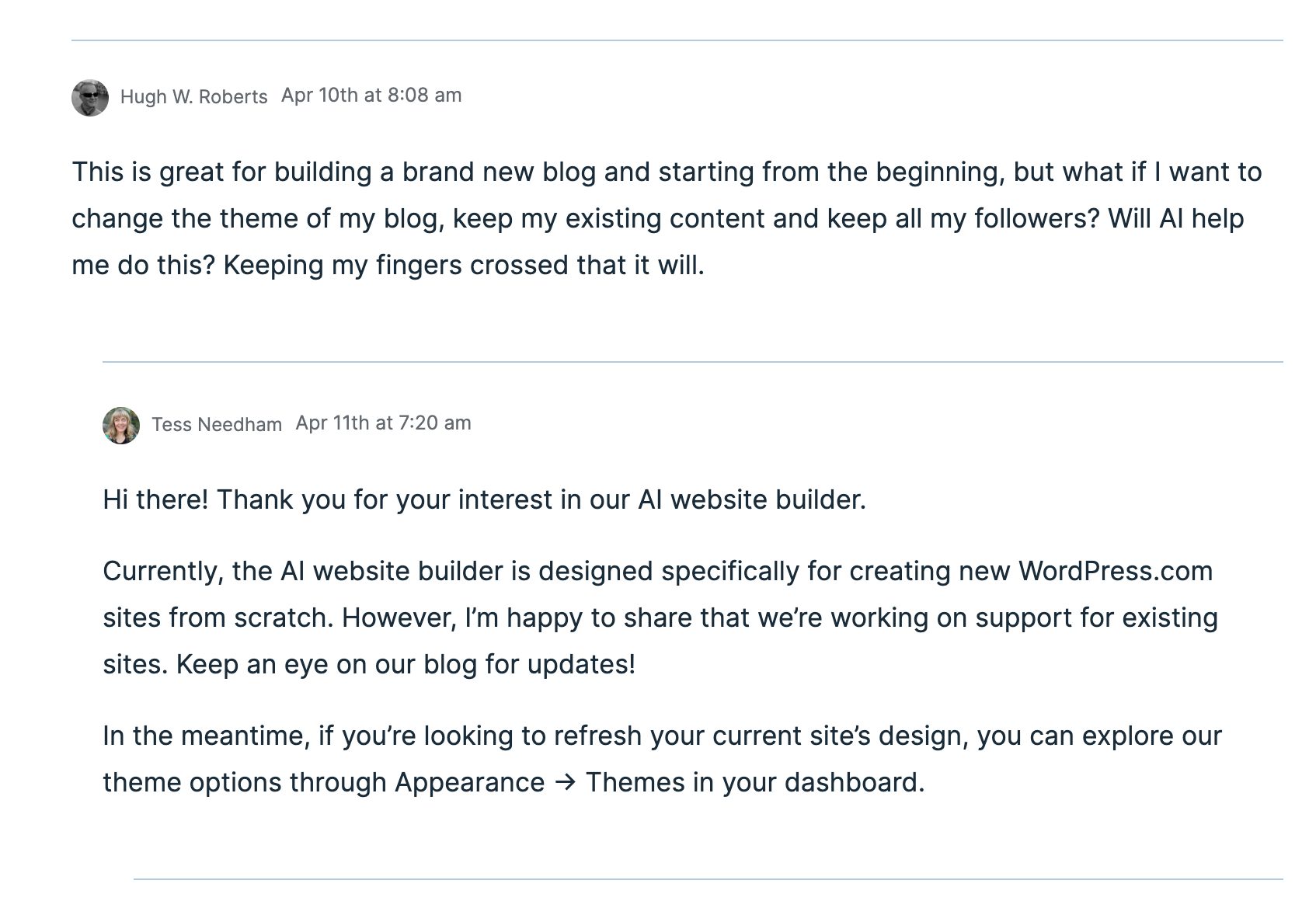
Unfortunately, after a few messages exchanged between a member of WordPress staff and me, I discovered that this new service of AI creating a theme for your blog is only available to those who want to start afresh with a brand new blog. The AI software can not change themes for an existing blog. However, WordPress is working on this, and it will become available sometime in the future.

An image showing a message conversation about the AI theme building.
Would you allow AI to help you change the theme of your blog?

Given that I’m not confident about changing my blog’s theme from my current theme to a full-site-editing theme, I’m looking forward to AI doing the work for me. I just hope it’s something I’ll be able to do sooner rather than later.

Recommended reading about AI in blogging from other bloggers.

If you want a guide on AI on WordPress, check out this excellent article from Fedora, ‘A Guide To WordPress.Com’s AI Assistant.’

This post from Debbie at Deb’s World, “Reinventing Blogging: A Look into the Future,” dives into the controversial realm of AI in blogging, and trust me, it’s a must-read that has ignited plenty of debate. Are you ready to jump into the fray and add your voice to the discussion?

Would you use and trust AI to help change your blog’s theme? Are you still using an outdated, unsupported theme and experiencing problems? Are you someone who will never use AI, even if it means the problems you’re experiencing with your blog will continue? Drop your thoughts in the comments, and let’s chat!

The featured image of this blog post was generated using the WordPress AI blocks.

I’m getting tough with non-engaging comments. Any non-engaging comments such as ‘Nice post’ are marked as spam.

Click the buttons below to follow Hugh on Social Media

Copyright @ 2025 hughsviewsandnews.com – All rights reserved.
Harnessing AI in Blogging: Benefits, Challenges, and Personal Insights

In today’s digital landscape, artificial intelligence (AI) is emerging as a progressively popular tool across various domains, including blogging.

WordPress integrated AI into its platform a few years ago, joining numerous other sites that now offer AI as an option.

I have witnessed many bloggers who are afraid of what AI can do, but I have also seen many bloggers embrace AI and utilise it for the benefits it can offer.

However, like any tool, there are pros and cons to consider.

What are your thoughts about using AI to blog?

This post examines the advantages and disadvantages of integrating AI into your blogging process.

Pros of Using AI in Blogging

1. Improved Efficiency

AI tools can streamline the writing process. From generating topic ideas to creating content drafts, AI can save bloggers considerable time, allowing them to focus on refining their unique voice and style.

This may prove beneficial to bloggers who publish daily, but those bloggers who publish less often may not see any benefit.

2. Enhanced Creativity

AI can assist in brainstorming and generating creative content ideas. With access to vast databases and algorithms that identify trends, AI can offer fresh perspectives and innovative suggestions.

However, some consider this to be plagiarism, a term that specifically refers to taking another person’s work—words, ideas, and so forth—and presenting it as one’s own without proper attribution.

Did you know that WordPress users can choose to stop their blog’s content from being shared with a WordPress-licensed network of content and research partners, including those that train AI models? To achieve this, navigate to your blog’s dashboard, select Settings—Reading, and tick the box next to ‘Prevent third-party sharing...’.

An image highlighting the box to tick on a WordPress dashboard to prevent AI tools from scraping your site.
Tick this box to stop AI from using your blog content.

3. SEO Optimization

Numerous AI-based tools can analyse keywords and optimise content for search engines. They offer insights into the types of content that rank well, assisting bloggers in enhancing their visibility and reach.

I utilise AI to generate titles for blog posts when I struggle to think of a captivating title that will entice readers to read and engage further. Consequently, I have observed a significant increase in engagement and visitors to my blog.

4. Data-Driven Decisions

AI can analyse reader behaviour and feedback to inform content strategy. By understanding what resonates with the audience, bloggers can create more targeted and engaging content.

However, your WordPress statistics can also provide this information by analysing the stats of posts that receive higher engagement. Typically, you’ll observe a correlation between those posts that engage readers more and those that attract less engagement.

5. Consistency

AI can assist in maintaining a consistent posting schedule by automating aspects of the content creation process. This guarantees that the blog stays active and engaging for readers.

It is widely known that blogs which publish on a schedule tend to retain readers; however, it is unwise to publish content merely for the sake of it. There is nothing wrong with occasionally missing the publication of a blog post or taking a break from blogging. Nevertheless, if you choose to take the latter route, ensure that you inform your readers.

Cons of Using AI in Blogging

1. Lack of Personal Touch

AI-generated content often lacks the emotional depth and personal touch that human writers naturally provide. Readers tend to connect more readily with personal stories and unique experiences that AI is unable to replicate.

If you let AI compose all your posts, you’ll soon notice a decline in visitors and engagement.

2. Quality Control

While AI can generate content rapidly, the quality does not always meet high standards. Bloggers must review and edit AI-generated content to ensure it aligns with their voice and is factually accurate. Remember, it is your blog, not that of AI. Your voice matters.

3. Dependence on Technology

Over-reliance on AI can hinder writing skills. Bloggers may grow overly dependent on tools, stifling creative development and originality. This is particularly evident in the fiction world, where I have observed AI produce stories that lack emotion or feeling, thus making them dull and unappealing.

My advice is that if you use AI, mix it with your written content.

4. Ethical Concerns

The use of AI raises ethical questions, such as plagiarism (which I discussed earlier) and authenticity. Bloggers must ensure that their use of AI does not compromise their integrity or mislead their audience. Always check (and check again) what AI produces.

5. Costs

Although some AI tools are free, many come with a cost. For bloggers on a tight budget, investing in AI technology might not be practical. However, this won’t affect those who choose not to use AI.

Do I use AI in blogging?

Yes, I utilise AI to assist with spelling and grammar corrections. I have also used AI to verify if I have omitted anything essential from a post, as well as for generating titles for blog posts.

The featured images I use in my blog posts (including this one) are primarily created using the WordPress AI image tool. However, I have found that the tool is not always particularly effective at generating images, especially when more than a few words are included. More work is needed to improve it.

Conclusion

Utilising AI in blogging offers both exciting opportunities and significant challenges. While it can enhance efficiency, creativity, and data-driven decisions, it is crucial to maintain a balance and preserve the unique voice that attracts readers. By carefully weighing the pros and cons, bloggers can make informed choices about incorporating AI into their writing process.

If you wish to utilise AI, do so with your own writing rather than generating posts entirely composed by AI.

Finally, we must never forget that we all have a choice regarding AI. We can either use it or leave it be. What we must never do is persuade other users to use it or not. It’s a personal decision. Never criticise those who choose to use AI if you are against any use of AI in writing. Likewise, don’t criticise anyone who refuses to use AI if you use it.

Recommended reading about AI in blogging from other bloggers.

If you want a guide on AI on WordPress, check out this excellent article from Fedora, ‘A Guide To WordPress.Com’s AI Assistant.’

This post from Debbie at Deb’s World, “Reinventing Blogging: A Look into the Future,” dives into the controversial realm of AI in blogging, and trust me, it’s a must-read that has ignited plenty of debate. Are you ready to jump into the fray and add your voice to the discussion?

Are you hopping on the AI train in your blogging adventure? If so, what tools are you using, and what benefits has AI brought you and your blog? Does the use of AI in the blogging world concern you? Are you against using AI in Blogging? If so, what are your reasons? We want to hear your thoughts if you’re for or against AI. Drop your thoughts in the comments, and let’s chat!

I’m getting tough with non-engaging comments. Any non-engaging comments such as ‘Nice post’ are marked as spam.

Click the buttons below to follow Hugh on Social Media

Copyright @ 2025 hughsviewsandnews.com – All rights reserved.