
Back in November 20025, I published a post, ‘The Latest Blogging and Publishing Scams You Need to Be Aware Of Now,‘ which outlined a number of scams aimed at bloggers, writers, and authors.
This week, I received an email that appeared to be from WordPress, but which raised my suspicions.
Firstly, I was fortunate that my email system identified the message as spam and moved it to my spam folder. However, it made me consider other WordPress bloggers who might have received or will receive the email, but whose antivirus or email security software does not recognise it as spam or a scam.
Here are two images of the email’s contents. I’ve highlighted some areas which I encourage you all to check before clicking on any link and risking becoming a victim of a scammer.
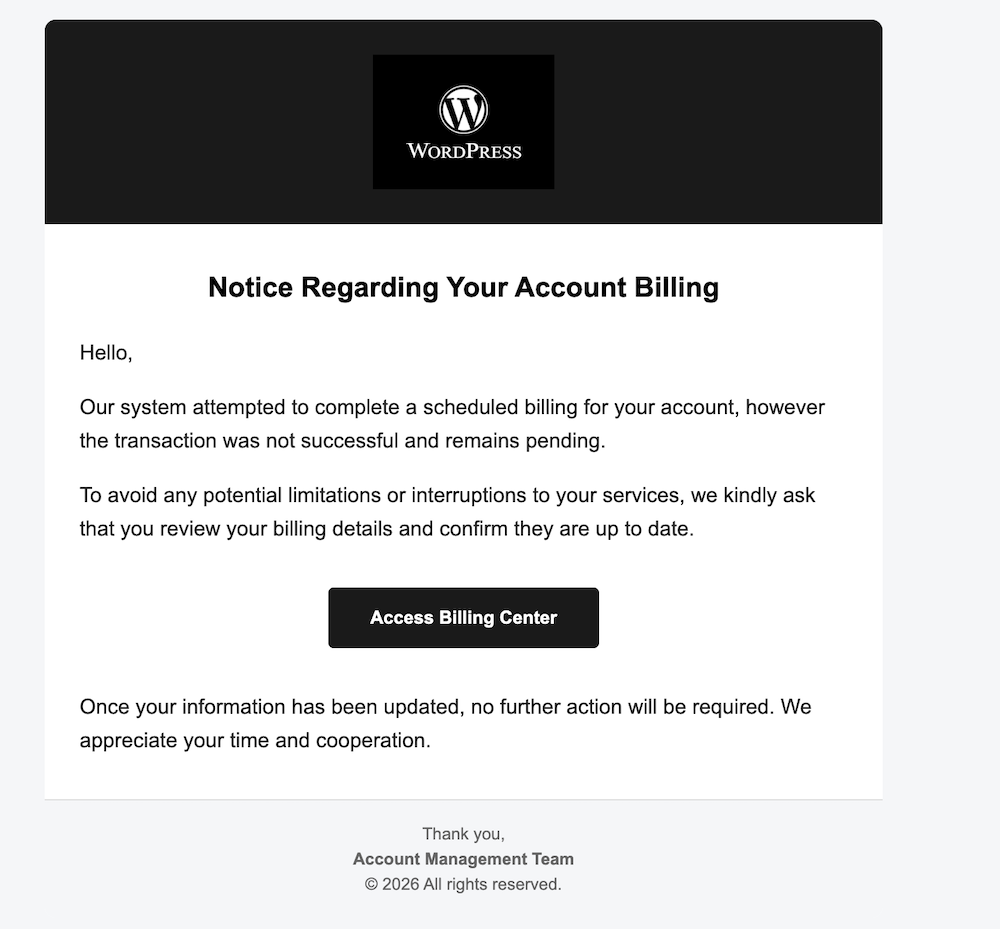
The image above may seem fine, but one clue indicates it’s not a genuine WordPress email. What is that clue?
- Not being addressed by name in any company email is a strong clue that the email is not genuine.
- The scammer simply said ‘Hello,’ which is a tactic used because addressing everyone by name is too time-consuming.
- Scammers send these emails to thousands of recipients hoping that some will respond.
- All the scammer needs is for one person to click the link to obtain login and username details.
- Once they have that information, they can lock you out of your blog and wreak havoc.
- Scammers are often more interested in obtaining any credit or debit card details you have on your account. If they obtain those details, they could go on a spending spree.
Here’s the next image.

- The scammer couldn’t even get the correct format for ‘WordPress’.
- The ‘P’ in ‘WordPress’ is always capitalised; the scammer missed this detail.
- The details after the first part of the email don’t match WordPress.
- The email address hidden behind what appears to be a WordPress email does not contain any WordPress information.
I was worried that somewhere out there, a scammer either has a list of email addresses for WordPress bloggers or has taken a chance, sending emails to addresses on a list, probably from the dark web. This email did not go to my private email address, but to the email address I use for my blog. I hate to think of my email address on a scammers’ list anywhere, but unfortunately, it can happen.
I contacted WordPress regarding the scam email, and they requested me to forward it so they could investigate.
If you receive a suspicious email from WordPress, the best way to report it is to forward it to phishing@automattic.com so their security team can investigate and act against the scammers.
As a quick tip:
- Legitimate WordPress.com emails always come from @wordpress.com or @automattic.com addresses. Note that any mention of WordPress before the ‘@’ will be the correct format of WordPress.
- They will never ask for passwords or payment info via email or a text message.
In the unlikely event that you click on any links or enter any information from a scam email that claims to be from WordPress, change your WordPress.com password as a precaution by visiting your ‘Profile‘ settings and selecting the ‘Security‘ tab.
If you are not sure or are suspicious of any email, always contact the company the email claims to be from before clicking any links or providing any information.
Summary:
- Always be aware of suspicious emails, not just from WordPress but from any company, especially if they include links and do not address you by name.
- Look for spelling mistakes, especially in the sender’s email address.
- Send any suspicious emails to the company they claim to come from. All reputable companies will have a dedicated email address for scam emails.
- Companies will never ask you for your passwords or payment information in an email or text message.
- If you click any suspicious links, change your password immediately.
Have you ever received a suspicious email claiming to be from WordPress or another service? What was your initial reaction? What steps do you take to verify the authenticity of an email before clicking on any links? Can you share any personal experiences with online scams you have encountered?
The featured image on this blog post is sourced from Pixabay. AI reviewed spelling and grammar errors.
You can follow me at the following sites.
Copyright @ 2026 hughsviewsandnews.com – All rights reserved.
Discover more from Hugh's Views & News
Subscribe to get the latest posts sent to your email.
 Hugh's Views & News
Thanks, Hugh. I got taken by a website that said I owed x amount of money from a stretch of highway near here where you have to pay. My husband pointed out that we have an account that automatically paid for this. I pride myself on sniffing out scams but I got caught.
I appreciate your keeping us up to date!
Sorry to hear you got caught out by the scammer. If ever unsure, always ask somebody else before paying. A fresh pair of eyes on a scam often helps avoid being scammed.
thanks of the warning
No need to thank me, Beth. I enjoy sharing this important information with readers.
Thank you for highlighting this, Hugh. I received an email like that just a few days ago. It went into my spam, but because I wasn’t addressed personally, it made me suspicious. But you have to look carefully for these things.
Glad to hear your email security system identified it as spam and put it in the spam folder, Esther. Not addressing the recipient by name is always a big giveaway that it’s likely a scam.
Thanks for this. Also the not capital p is a dead giveaway. By making that slight mistake they can avoid being sued by the federal government. 🤣😎🙃
I don’t think these scammers worry about getting caught, especially as they can now often remove all evidence if they believe the authorities are moving in fast.
Wow. Scammers and spammers are getting smarter and sneakier by the day. That first image doesn’t look suspicious at all. The last few months, I have received tons of scamming emails about my book being used in book clubs and so on.
More stressful, however, was a phone call we received from the “Portuguese airline” this past Friday, which we had just changed our flight with because our original one (last night) had been cancelled due to severe weather. This person claimed we owed a change fee (which we didn’t) and threatened to cancel our reservation for a refund if we didn’t pay. He was very insistent and adamant and wasted half an hour of our time, energy, and nerves. He had access to our booking via the booking number and our names, which worried us, even after this call.
Many calls to the real TAP customer service proved this was a scam. More calls put extra security in place so the scammer couldn’t mess with our booking (the plane is full, so we didn’t want to lose our tickets). This event made our already stressful days even worse. Anyway, we are still stuck in Newburyport and hope to leave for Europe on Tuesday.
I’ve heard and read about many bookclub scams, Liesbet. They seem to have become very common over the last years.
That is very concerning how that scammer got your phone number and names. Does that mean that the airlines website is not secure enough? Or was he somebody that had access to their system as an employee? Or maybe an employee sent him a list of passenger information and got paid for it? I can understand how stressful getting this call must have been. Another sign of a scammer is when they become too insistent and adamant.
Have a good flight tomorrow. I look forward to reading all about it.
Thanks, Hugh. We are nervous about that flight. It’s still snowing here and we just know this trip will be stressful and uncomfortable due to our original flight having been cancelled.
We think the scammer received this information from an airline employee (TAP Portugal) and we have reported all this to an agent we trusted. When you look at airline websites, all you usually need is someone’s booking code and name, to access the reservation and make changes – or cancel – it. The scammer had that information for us…
So, no, most airline websites are not very secure, which we learned the hard way. The security they put in place for our situation was the need for a code sent by email, before being able to change the reservation online. And, we provided them with a code for potential changes over the phone as well. We felt better after learning about these extra security measures.
That’s a frightening thought about how insecure their websites are, Liesbet. Two-step authentication is a feature WordPress offers and is a great idea for many websites. I’m glad to hear the airline offered you a code via email as an extra layer of security.
Your story reminded me of a time (many years ago) when I got a call from my bank asking if I had ordered a new debit card and whether I was at my bank branch to collect it. I wasn’t, so they stopped the card from being handed over. On investigation, they found that an employee was working with someone outside the bank to obtain debit cards. That employee had access to thousands of people’s bank details.
Wow. That’s a crazy story, Hugh. I’m glad your bank called you to double check!