

What do you do to make it easy for your readers to contact you?
Most bloggers aim to connect with their audience. This is mainly achieved through the comments section of blog posts, but sometimes someone may wish to contact you privately, which may not be suitable for public view. For example, I receive messages asking for help with WordPress or requests to buy a signed copy of one of my books. Nobody wants to share their address, email, or contact number in the comments section.
A ‘Contact’ page is an important connection point between a blogger and their readers, offering a convenient way to get in touch privately. If you look at the menubar of my blog, you’ll see a ‘Contact Hugh‘ link. That’s where any visitor to my blog can contact me privately.
Here’s why you should prioritise having a Contact page on your blog and how to easily set one up.
Benefits of Having a Contact Page
1. Establishes Credibility
Having a dedicated Contact page gives your blog a welcome and friendly impression. It demonstrates that you’re open to communication and approachable, increasing your credibility with readers and new visitors.
2. Facilitates Communication
A Contact page offers a clear and straightforward way for visitors to get in touch with you. Whether they have questions, feedback, or collaboration ideas, this page acts as a direct link to you, preventing confusion about how to contact you.
3. Encourages Engagement
By encouraging readers to contact you, you’re promoting engagement with your audience. This can lead to meaningful discussions, valuable feedback, and even new ideas for content, further benefiting and enhancing your blog.
4. Supports Networking Opportunities
For the majority of bloggers, networking is essential. A Contact page makes it easy for other bloggers to reach out for collaborations, sponsorships, or guest posting opportunities, contributing to your blog’s growth and visibility.
5. Keeps Your Private Details Private
Having a contact form means you don’t need to share your personal details, like an email address, on your blog. After all, do you know everyone who visits your blog? Even if you provide an email address solely for your blog, advertising it will attract spam, spammers, and trolls.
Some bloggers might prefer not to engage with their audience, so a Contact page may not be essential. However, if you choose not to engage, ensure you turn comments off.
How to Install a Contact Page
Creating a Contact page is a simple process. Here’s how you can set one up on your blog. For this purpose, I’m using an Apple iMac desktop computer.
- Go to the dashboard of your blog, click Pages and then Add Page.

- Title your page ‘Contact’ or ‘Get in Touch’ or choose a title you prefer.
- Add a Contact template. WordPress offers several ‘Contact’ templates. To find them, click the ‘+‘ symbol in the top-left corner of the page, then select Patterns and Contact.

- Choose the template you want to use and make any edits to it. For the contact form on my blog, I used Template Number One.
- Preview your contact form before publishing it. Once you’re happy, click the publish button so it appears on your blog.
Tip: Yes, you’ll likely receive spam or spam bots trying to contact you. To quickly sort out those messages, add a line to your Contact form giving instructions on what to do. I added the following details to my Contact form –
Please complete and submit the form below to contact me securely. To verify that you are not a bot or spam, please start your message with ‘Dear Hugh.’ I will then get back to you as quickly as possible.
Messages that do not start ‘Dear Hugh’ will be marked as spam.
And guess what, it works!
You can also find additional Contact forms under Jetpack – Forms (select the ‘About‘ tab) on the dashboard of your blog.
- Next, to make it easy for readers to contact you, add your contact form to the menubar of your blog.
- On the dashboard of your blog, go to Appearance – Menus.
- Search for your Contact form by clicking View All, tick the box next to it, and click the ‘Add To Menu’ Button.
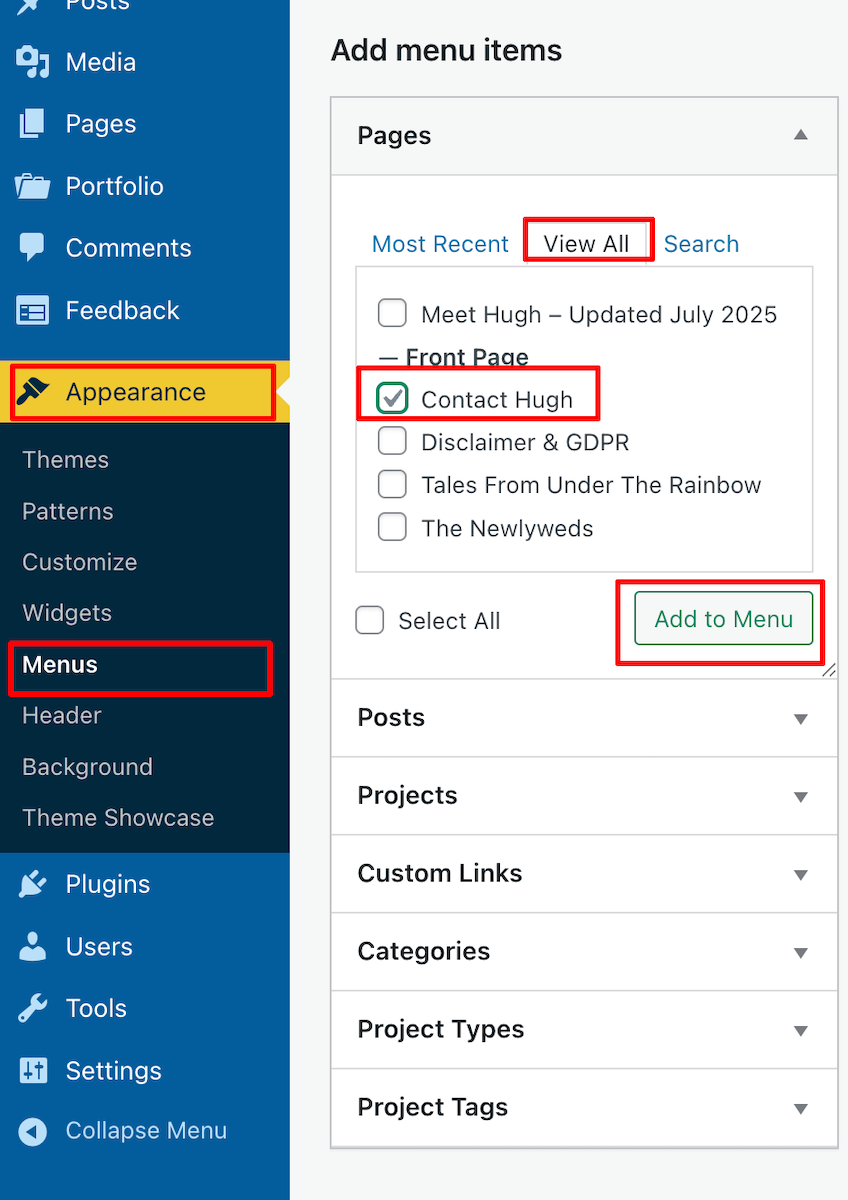
- Click the Save Menu button at the bottom of the page.
- To reposition the Contact form on the menubar, on the Menus page, click on it and drag it to the desired location. Remember to click the Save Menu button after any changes.

- Check the menubar of your blog to ensure the Contact form is visible and in the correct place.
WordPress also offers Contact forms plugins.
- Contact Form 7:
- Install and activate the plugin.
- Go to Contact – Add New in the dashboard.
- Customise your form fields as needed, then save.
- Copy the shortcode provided and paste it into your Contact page.
- Add the Contact form to your menubar.
- WPForms:
- Install and activate the plugin.
- Create a new form using their drag-and-drop builder.
- Save your form and copy the shortcode.
- Paste the shortcode into your Contact page content.
- Add the Contact form to your menubar.
How do I know when somebody has contacted me via my Contact form?
WordPress sends an email to you whenever anyone contacts you via the Contact form (except when they consider it as spam). Users will also see a notification under Jetpack – Forms on the dashboard of their blog.
Anything considered spam by WordPress goes straight to the spam folder. Spam is deleted automatically after 30 days, so there’s no need to worry about it.
Conclusion
Having a Contact page is essential for fostering communication and building relationships with your audience. By following these simple steps, you can easily set up a Contact page on your blog and start engaging with your visitors today!
Do you have a way that visitors to your blog can contact you directly? Any questions? Leave them in the comments section or contact me directly.
Layout, content, settings, and format might differ on self-hosted blogs.
The featured image in this blog post is taken from Pixabay. AI checked spelling and grammar mistakes.
Click the buttons below to follow Hugh on Social Media
Copyright @ 2025 hughsviewsandnews.com – All rights reserved.
Discover more from Hugh's Views & News
Subscribe to get the latest posts sent to your email.
 Hugh's Views & News
I hadn’t thought of this. I will try to establish one this weekend. Thank you.
Please let me know if you encounter any issues creating one. I’d be happy to help.
I only get spam in my contact page 😂. No real person has ever used it, so I’m thinking of removing it. Good tip, though!
Well, it’s entirely up to you, but I wouldn’t recommend deleting it, especially since WordPress deletes all spam after 30 days.
Thanks for sharing this excellent advice, Hugh, especially the part about not listing an email address! I’ve always had a contact form, but hardly anyone uses it, except the spammers. 😆 Good thing Akismet is on the case!
Yes, Akismet is great at sending the spam straight to the spam folder, where it’s deleted after 30 days, Debbie.
I’m surprised by how many bloggers share their email addresses on their blogs. It’s a magnet for spammers and spambots, some of whom will sell the information on.
Great advice , as usual, Hugh. I can’t do mine today as I’m going out, but it’s first on the list for tomorrow.
Please let me know if you need any assistance with it, V.M.
Thank you for your advice, Hugh. I had a Contact Page some time ago, and I deleted it because of the spam. With that said, perhaps I should give it another chance, and heed your advice.
WordPress takes care of the spam, Eugi. Anything in the spam folder is deleted after 30 days, so no need to see it. I’m now only getting genuine messages.
This is so timely, Hugh! I just read your post and made the appropriate changes. I also added “Contact Terri” to the menu, rather than it being a submenu of About Me. I also used some of your wording in the prompt. I also deleted my spelled out email address. Yep, I was getting my share of spam, who know why! Akismet chases them all the to spam folder. I always appreciate these how-to posts! Thank you!
Glad to have helped, Terri. I believe having a visible Contact form is just as important as having a visible ‘subscribe’ button. I do everything I can to keep out spam and spammers. Akismet does a great job of catching spam and hiding it from me. A big thumbs up to it.
I added a Contact Me page several years ago and I’m so happy I did. Although I get a few annoying inquires (usually asking me to allow them to provide content or to promote their product, which I ignore), most are legit and welcomed outreach. I hope your readers who don’t have a contact page add one. I have been frustrated a few times when I couldn’t find one on a blog. It’s almost as frustrating as not finding a clear way to subscribe to a blog.
Those pesky, annoying messages asking for more details or trying to promote their products are really a nuisance. I even found myself talking to a spambot a few months ago. It was only when they responded to questions I hadn’t asked that I realised it was a bot. I also agree about blogs that make it difficult to subscribe. If I can’t find how to subscribe within a few minutes, I leave.
I have a contact page but so far it’s gotten only spam. Adding the Dear Jan directive is an excellent idea! Thanks Hugh.
Mine gets a lot of spam, too, but adding the ‘Dear Hugh’ has certainly helped me fish out the clever spammers who sometimes get me to press the ‘reply’ button. Since adding it, the issue has never occurred.
Thanks Hugh, I’ve implemented changes using your guidance. In fact, I’ve just used your page example and just changed to ‘Dear Paul’, hope you don’t mind.
Not at all, Paul. It’s a great way to beat the bots and spammers who often start a message with ‘Hey!’
Thanks, Hugh. This is good information. I periodically check my contact page to make sure everything is working. You just never know. :)
That’s a great tip about checking it every so often, Jan. As we all know, things can sometimes go wrong for no reason.
Especially in the realm of WordPress!
Great advice, Hugh.This is something I’ve been meaning to do, so thank you for the reminder to get on and do it! I really can see the importance of having one.
Yes, it’s so important to have a page where readers can contact you directly rather than leave a comment where everyone can read it, Esther. And it’s easy to set up.
Let me know if you encounter any problems setting your Contact form up.
Thank you, Hugh.
This is helpful.
The recent changes of Wp made it harder to utilise it’s services properly. The addition of the screenshots made it easier to understand and act on the complete process.
Thank you for sharing!
You’re welcome. I’ve had feedback saying that screenshots help in these kinds of posts, so I always include some.
I was following Renard’s World earlier. He has deleted his blog.
I have seen your blog for some years. I wasn’t a regular visitor; did check some random posts.
I think it gets important to follow a serious, experienced and professional blogger, or become one, in order to survive for long time.
The changes Wp makes without consulting the users, makes it hard to cope up sometimes. For example: the Jetpack android app stops working for no reason. There are glitches in the Reader section, and the Wp editor isn’t friendly either.
I know a Happier Engineer will explain it better, these points just appeared in my mind so I share them here.
I don’t use the Android app, so I can’t comment on it not working, but the one I use on my iPhone works great. WordPress do ask occasionally for beta testers (I know Renard was one), but I don’t know how they decided what changes to make. I guess they have to keep up with the times, otherwise, their platform would soon look outdated and they’d end up losing lots of paying customers.
I don’t use the WP Reader very often and haven’t come across any major issues with the WordPress editor. Providing you are using a theme that is still supported by WordPress, then I’m sure WordPress would like to hear your feedback and what issues you are experiencing, otherwise, how will they know? I’d recommend contacting them.
Interesting tip about adding the “Dear Hugh” message. I will have to give that a try because almost all my messages are spam. 🙁
WordPress are already pretty good at sending spam to the spam folder, but the odd one still gets through, Michelle. However, I consider than anyone wanting to contact me will read the ‘How To Contact Hugh’ information first. If they don’t, and don’t follow what I ask, then I consider it spam, and mark it as so. Since adding that information, I feel more in control as to what is and isn’t spam. It’s defiantly worked for me.