


Do you know who follows your blog? Do you care about who is following you? If not, you ought to.
I’ve recently gained many new followers. Delighted, you may ask? Far from it. You see, I’ve noticed a trend among these followers. They all have a lot of random numbers (sometimes mixed with letters) in their profile names. Here’s an example:

Not only that, but all of them ended with @gmail.com or @hotmail.com. And they follow in batches.
They not only seemed strange to me, but I also had no way of discovering who these new followers were, as none of them had any links in their Gravatar profile apart from their email address.
I soon realised that most of these new followers were spam-bots. What’s wrong with that, you may ask? There are several reasons why permitting spam-bots to follow and subscribe to your blog is not advisable.
Reasons to Not Allow Spam-Bots to Follow Your Blog
- Reduced Engagement
- Spam followers do not contribute meaningful interactions, which can skew your engagement metrics and give a false impression of your blog’s popularity. They will, however, try to bombard your blog with spam comments and try to spam the comments box of your readers, too.
- Dilution of Community
- Genuine followers are lost in a sea of spam accounts, making it harder to build a real community around your blog.
- Potential Security Risks
- Spam-bots may pose security threats, as they can be linked to malicious activities such as hacking attempts or phishing schemes.
- Impact on SEO
- Search engines may see high numbers of spam accounts as a sign of poor-quality content, which can negatively affect your blog’s search ranking.
- Email Spam
- Spam-bots can lead to unwanted comments and email communication, and may even compromise your email’s reputation if they harvest your blog’s content.
- Negative Perception
- A blog with many spam followers can create a negative impression on potential genuine followers, who may question the legitimacy of your content, especially if lots of spam comments show up on your posts.
- Lack of Valuable Feedback
- Engaging with real readers provides valuable feedback and insights, whereas spam accounts offer no legitimate input on your content.
It’s simple to unsubscribe anyone (including spam-bots) from following your blog. Here’s how to do it. I’m doing this using an iMac Desktop computer.
- On your blog’s dashboard, select Jetpack – Subscribers.

- You will see a list of all your subscribers.
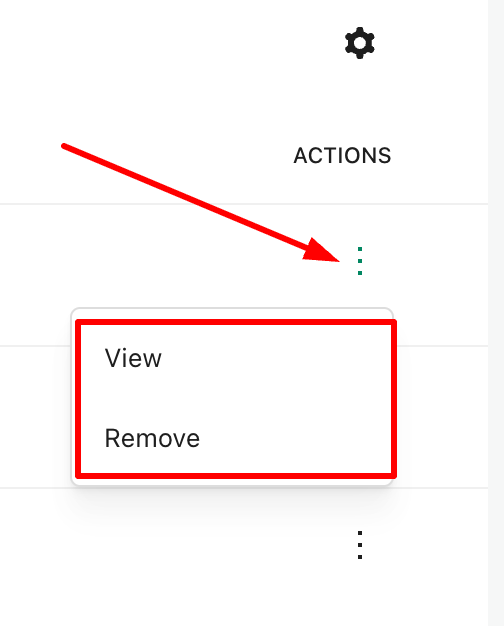
- Click on the three dots (also known as a kebab menu) next to the subscriber you wish to delete and select ‘Remove.’ You have now unsubscribed the account from your blog.
- If you wish to discover more about the subscriber, click the ‘View‘ button. Doing so allows you to gather further information about the subscriber, including whether they have a WordPress blog.
While removing these spam-bots from my blog, I noticed that WordPress had also been busy informing me of purged subscribers.

I had no idea WordPress did this. However, I still had to unsubscribe the purged accounts and remove them from following my blog.
By being vigilant in monitoring your followers, you can help ensure that your blog remains a vibrant and secure space for genuine interaction.
And here’s what happened when I unsubscribed these spam-bot and purged accounts.

Summary
- Allowing spam-bots to follow your blog can lead to several issues.
- They don’t contribute meaningfully, skewing your metrics.
- Genuine followers can be lost among fake accounts.
- Spambots may be linked to malicious activities.
- High numbers of spam followers may harm your blog’s search rankings.
- They can lead to unwanted communication and damage your email reputation.
- Many spam accounts can diminish your blog’s legitimacy.
- Real readers provide insights; spam accounts do not.
- Unsubscribing spam-bots is straightforward through the Jetpack – Subscribers section on your blog’s dashboard.
- After removing these accounts, you may notice a decline in subscribers, which, although concerning, can be a healthy sign of clearing out ineffective followers.
- Staying vigilant about your follower base is key to maintaining a genuine and engaging blog.
Are you aware of who is following your blog? How do you protect your blog from unwanted subscribers?
Layout, content, settings, and format might differ on self-hosted blogs.
The featured image in this blog post is taken from Pixabay. AI checked spelling and grammar mistakes.
I’m getting tough with non-engaging comments. Comments such as ‘Nice post’ are marked as spam.
Click the buttons below to follow Hugh on Social Media
Copyright @ 2025 hughsviewsandnews.com – All rights reserved.
Discover more from Hugh's Views & News
Subscribe to get the latest posts sent to your email.
 Hugh's Views & News
Wow! Thanks Hugh!
I did remove followers at one stage, then with WordPress changing layouts I sort of lost track how to do it! Thanks for the reminder.
I’m glad this post has helped.
Thank you for this cautionary information, Hugh!
Thank you! That was quite useful information that I was unaware of.
You’re welcome. You never know who may be following your blog unless to check out the details. I got rid of a lot of bots and spam followers.
This is such great advice, Hugh. One of my friends asked me about a drop in her blogging engagement. Maybe this is the reason. Right now I’m going through my old mailing lists on MailChimp to clean those up. Next I need to clean up my blogging bots. Thanks for these tips, Hugh.
I guess one reason these posts are so well read is that they really help bloggers. I think many people, like me come to expect that you will know the reason things happen on WP. Your fiction is great, but very few people offer the kinds of helpful, timely tips that you do. Thanks for being there.
Hi Marsha, the reports of a drop in blogging engagement worry me. That’s why I’m being strict with my blog and telling anyone who leaves short, non-engaging comments not to bother. I want to have a discussion, and if people don’t have the time to engage properly with me, then that’s not a problem. So I’m asking them to please refrain from leaving numerous unengaging, brief comments that don’t demonstrate they’ve even read the post. It appears to have been successful, as over 90% of the comments I now receive are engaging. I’m not at all concerned about missing those who used to leave the same non-engaging comments everywhere. Honestly, I can visit some blogs and, before even looking at the comments section, I can already guess what some people will have said.
My blogging tips posts are popular, and I appreciate that. My flash fiction posts don’t receive as many comments, but I’m gradually getting valuable feedback instead of just hearing that what I’ve posted was great or well written without further explanation.
That is helpful, then. I don’t publish any stories except on Story Chat. I love to write poems for Tanka Tuesday, and I’ve written a few short stories for contests or challenges like Charli’s. I am not good at doing a short post with just the story, though. Besides writing them take me so long! You have your nicely organized. Multi tasking and double dipping in challenges makes organization more difficult.
Have a great day, my friend. I’m glad you have had such an increase in engagement. I’m in the process of cleaning out my email list and starting that up again. Then I have to weeding out my blog followers. Whew!
thanks for this informative post Hugh! I am off to check my blog subscribers now and weed out the spammers!
I hope you don’t find many, Carol Anne. If you do, you now know how to get rid of them.
Thanks so much, Hugh. I’ll have to check out who my followers are and delete the spambots.
Hopefully, you won’t find any, Norah. But if you do, you now know how to get rid of them.
Patience above! This is good advice. I haven’t had a look see at the subscribers in a long while. You bet I will remedy this anon. As always, thank you for being our guiding light.
You’re welcome. I hope you don’t find anyone following you that you did not expect. Remove the spammers and spam bots.
Hmmm. As another commenter mentioned, my laptop menu looks nothing like the image above. Using my phone, I was able to find the list you’re referring to, but the process of deleting these accounts was so tedious it doesn’t seem worth it. For me, anyway. I’m not trying to gain followers or rank high on search engines. But I wouldn’t mind cleaning things up a bit, if it weren’t so laborious.
Are you using a free version of WordPress, Walt? If so, you can access subscribers via Stats – Subscribers. You may have already done this. The free plan on WordPress doesn’t offer many options, but if it’s working for you, that’s great.
Hi. I just tried to follow your instructions, but I didn’t get ‘subscribers’ when I clicked on Jetpack. In fact, my drop down menu was completely different from yours. If that’s the case, is there any other way of seeing my subscribers?
Yes, you can go via Jetpack – Stats – Subscribers. Then click on the Manage Subscribers link.
I believe you’ve posted about this before, on how to delete suspicious followers, Hugh. Since then, I check almost daily. This post reinforces the why behind doing so.
I believe that someone followed my blog 2 yrs ago and hijacked my Facebook blog page and eventually spent $. It was terrifying but I got help.
I’ve noticed an uptick in batch followers too, all with odd email names. Sadly, many are from certain nations that would have no interest in reading my blog. Thanks again for this valuable information!
Hi Terri, yes, I’ve written about this subject before, but this post provides further details about the types of spam bots and spam followers that follow our blogs. It’s great that you are checking daily. I receive email notifications of any new followers, so I can check them immediately. I don’t delete the email until I have completed the check.
I’m sorry about the Facebook hack you experienced. I’m not a fan of Facebook, but I have heard some horror stories about it regarding leaked and stolen information.
Thank you for another informative blog post, Hugh. I can guarantee I will learn something new and useful from your posts. I don’t have massive numbers of subscribers, but I will still check out those I do have on the list.
I’m glad these types of posts help, June. I hope you don’t encounter any spam-bots or spammers following you. But do watch out for them.
Following your post, I have begun to check out my subscribers, and there are some dodgy ones which I will deal with shortly! Thanks again!
Thanks Hugh. I spotted a couple of those “subscribers” and was debated if they were legit. Time to cull the herd.
Danny, good to hear you are culling those bogus accounts.
Thanks for linking to this post. Much appreciated.
Thank You for the info.
On my blog, Jetpack doesn’t list Subscribers as an option. Is there another way to access subscribers?
Yes, you can also access this via Jetpack-Stats-Subscribers.
Thank you.
Thank you for sharing this, Hugh, and you must have been reading my mind. In the last few days, I noticed many new followers, and I suspected they were spambots, since they are as you described. Today, I’ve been deleting them, and noticed most of them are from the country, Morocco. A day in the life of a blogger, sigh…
That’s excellent detective work in finding out those spam accounts were all from Morocco, Eugi. A job well done.
Thank you, Hugh.
Mine, too, Eugi. Many African and Middle Eastern nations and some SE Asian.
It’s annoying, Terri, but at least we know how to delete them.
Interesting… I’ve delete a couple who came back again but disappeared eventually. But there is one who just pops up again every time I remove him. I wonder how he does that…
Some spambots are persistent, Cathy. They will keep trying. I usually find that they give up in the end if you’re prepared to keep removing them.