


Do you know who follows your blog? Do you care about who is following you? If not, you ought to.
I’ve recently gained many new followers. Delighted, you may ask? Far from it. You see, I’ve noticed a trend among these followers. They all have a lot of random numbers (sometimes mixed with letters) in their profile names. Here’s an example:

Not only that, but all of them ended with @gmail.com or @hotmail.com. And they follow in batches.
They not only seemed strange to me, but I also had no way of discovering who these new followers were, as none of them had any links in their Gravatar profile apart from their email address.
I soon realised that most of these new followers were spam-bots. What’s wrong with that, you may ask? There are several reasons why permitting spam-bots to follow and subscribe to your blog is not advisable.
Reasons to Not Allow Spam-Bots to Follow Your Blog
- Reduced Engagement
- Spam followers do not contribute meaningful interactions, which can skew your engagement metrics and give a false impression of your blog’s popularity. They will, however, try to bombard your blog with spam comments and try to spam the comments box of your readers, too.
- Dilution of Community
- Genuine followers are lost in a sea of spam accounts, making it harder to build a real community around your blog.
- Potential Security Risks
- Spam-bots may pose security threats, as they can be linked to malicious activities such as hacking attempts or phishing schemes.
- Impact on SEO
- Search engines may see high numbers of spam accounts as a sign of poor-quality content, which can negatively affect your blog’s search ranking.
- Email Spam
- Spam-bots can lead to unwanted comments and email communication, and may even compromise your email’s reputation if they harvest your blog’s content.
- Negative Perception
- A blog with many spam followers can create a negative impression on potential genuine followers, who may question the legitimacy of your content, especially if lots of spam comments show up on your posts.
- Lack of Valuable Feedback
- Engaging with real readers provides valuable feedback and insights, whereas spam accounts offer no legitimate input on your content.
It’s simple to unsubscribe anyone (including spam-bots) from following your blog. Here’s how to do it. I’m doing this using an iMac Desktop computer.
- On your blog’s dashboard, select Jetpack – Subscribers.

- You will see a list of all your subscribers.
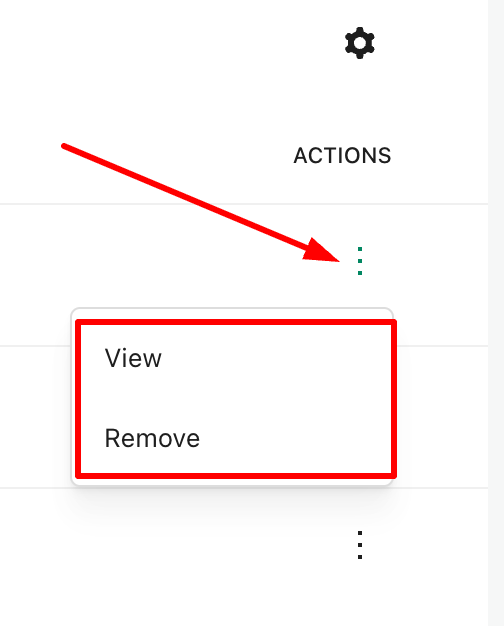
- Click on the three dots (also known as a kebab menu) next to the subscriber you wish to delete and select ‘Remove.’ You have now unsubscribed the account from your blog.
- If you wish to discover more about the subscriber, click the ‘View‘ button. Doing so allows you to gather further information about the subscriber, including whether they have a WordPress blog.
While removing these spam-bots from my blog, I noticed that WordPress had also been busy informing me of purged subscribers.

I had no idea WordPress did this. However, I still had to unsubscribe the purged accounts and remove them from following my blog.
By being vigilant in monitoring your followers, you can help ensure that your blog remains a vibrant and secure space for genuine interaction.
And here’s what happened when I unsubscribed these spam-bot and purged accounts.

Summary
- Allowing spam-bots to follow your blog can lead to several issues.
- They don’t contribute meaningfully, skewing your metrics.
- Genuine followers can be lost among fake accounts.
- Spambots may be linked to malicious activities.
- High numbers of spam followers may harm your blog’s search rankings.
- They can lead to unwanted communication and damage your email reputation.
- Many spam accounts can diminish your blog’s legitimacy.
- Real readers provide insights; spam accounts do not.
- Unsubscribing spam-bots is straightforward through the Jetpack – Subscribers section on your blog’s dashboard.
- After removing these accounts, you may notice a decline in subscribers, which, although concerning, can be a healthy sign of clearing out ineffective followers.
- Staying vigilant about your follower base is key to maintaining a genuine and engaging blog.
Are you aware of who is following your blog? How do you protect your blog from unwanted subscribers?
Layout, content, settings, and format might differ on self-hosted blogs.
The featured image in this blog post is taken from Pixabay. AI checked spelling and grammar mistakes.
I’m getting tough with non-engaging comments. Comments such as ‘Nice post’ are marked as spam.
Click the buttons below to follow Hugh on Social Media
Copyright @ 2025 hughsviewsandnews.com – All rights reserved.
Discover more from Hugh's Views & News
Subscribe to get the latest posts sent to your email.
 Hugh's Views & News
This isn’t something I’ve thought about, Hugh. I don’t seem to be getting many spam comments , these days, though. Thank goodness. Last time I looked at my spam folder there was only 1.
I like your idea of questioning those who leave a minimal reply, though. I think I’ll implement that myself.
WordPress does an excellent job of preventing spam, provided the user has the appropriate settings enabled. However, allowing spam-bots to follow your blog can also lead to various other risks, as I outlined in this post.
I’ve grown tough on those bloggers who consistently leave the same short, non-engaging comments not only on my posts but also on those of others. I’d rather they don’t leave them, and many no longer do because of my change of attitude toward them. I don’t believe they read the majority of the posts they leave those comments on.
You are right about those useless comments. I hate them, too.
I just had a rush of new subscribers in a two-hour window. These bots have to come up with better names than jytrp9864bl. 🤣
That’s what happened to me, Pete. Lots of followers in a short space of time, all of them with just email addresses and nothing more to see. Spambots regularly create these false accounts that do nothing but create suspicion, anger and sadness when they successfully scam somebody.
I’m pretty sure I have more than a few trollowers that I need to get rid of. Thanks for the easy how-to!
You’re welcome. I hope you don’t find many.
Yes, I delete followers who I think are spammers on a regular basis. I can’t see the point of having them on my list and well, they just totally annoy me when they “like” numerous posts one after another.
Good to hear you are already on top of this, Suzanne.
I agree that serial likers (who click the ‘like’ button on everything) are a nuisance. They’re just begging for attention, something I never give any of them.
Hugh, your post reinforced what I was doing and it’s always good to read your suggestions.
This is interesting, Hugh. I have noticed an increase in new subscribers to my blog lately and I suspect they may be bots.
What’s even more interesting is that on the site for my retirement coaching business that I set up late last year, ALL of the subscribers have those weird names—even ones I know to be legitimate subscribers because I recognize the email address. (For example, I subscribed myself under my personal email but my name shows up as random letters and characters).
🤷♀️
It’s not only how the email address appears, but whether they have any additional information you can view, Michelle. In the recent batch of spam-bot followers I received, none of them had a Gravatar profile picture or any links to a website, blog, or social media accounts. Everything was blank. That made me suspicious, and upon further checking, I discovered that they were all spam-bots. The fact that they all come through in batches is another sign that something is amiss. As I was unsubscribing them, more continued to arrive. Thankfully, they got the message and stopped, but I’m on the lookout for any others as well as checking through current subscribers.
I had a comment on my last blog from someone with a similar profile of those you mention saying he had noticed a fault on my blog and he could help me fix it if I emailed him. It was written in poor, broken English. Naturally I didn’t approve the comment but your blog has increased my vigilance further. Cheers Hugh.
Paul, that’s a great example of a scammer trying to get information from you. You did the right thing by not approving the comment. If you get any more similar comments, mark them as spam.
I have to check my followers. So far I have not noticed an instant increase of followers but your post will make me keep my eyes open. Thank you, Hugh!
You’re welcome, Erika. I’m glad this post helped and acts as a reminder to keep checking who or what is following our blogs.
I found a few with a string of random numbers. When I followed your advice to check them via “view” I see statistics about the number of emails they received and the %opened. Would i be right in thinking this still doesn’t mean they are genuine subscribers??
It very much depends on other things, such as whether they have a profile picture and whether they have links to their social media or blog. If they do, check the links, and if they are genuine, then the subscribers are genuine. However, if the links look dodgy, don’t click on them. Spambots are notorious for not having profile pictures.
Thanks for the added tips
Thank you for the info. I will have to check the followers I have, Never thought they could not be real followers, Will look and clean up my blog.
You could be lucky and find they are all genuine followers. However, it’s always good practice to check and weed out any you are not sure about.
Perfect timing! Last week I had 8 of these spam bots in a row. I thought they were fake but wasn’t sure how to get rid of them. Thank you for the info Hugh. 😁
You’re welcome. They seem to come through in batches. Then days/weeks go by before more come along. At least we know how to deal with them now.
Somehow my comment didn’t go through the first time. Anyway, thanks for this info, Hugh, it’s just what I need! I can’t take care of it right now because I am on am old lap top (brought for my sojourn in the hospital) but I will do it once get home! Thanks again. You are a gem of a source of information.
I did get an anonymous comment saying that the person leaving it was in hospital. Now I know who it was from. Sorry to hear you are in hospital, Noelle. I hope you are home soon. Get well soon. x
Thanks, Hugh. I appreciate it!
Thank you, Hugh. I’m just now back in the WordPress world. Did not even think of spam bots and increases in followers. I need to check my list and get rid of them. Jetpack interfered with my iPhone website. I didn’t change. Do not want to. Christine
Hopefully, you won’t have any to clear away, but if you do, you now know how to unsubscribe them, Christine.
Thank you so much, Hugh This i just what I need. Unfortunately I haven’t got the computer I need to get into my blog site (I’m enjoying a hospital stay) but will get on this when I get home. Thanks again!
I’m sorry to hear you are in hospital. I wish you a speedy recovery and hope you are home soon.
Thank you for clarifying this, Hugh. I also have seen some new subscribers with random numbers in the email address and it’s not anyone I recognize.
There are many whom I do not recognise, so I always check out more details first, Jan. If there are none, then I unsubscribe them immediately.
A good practice!
Good post, as always, Hugh! My increase in followers is really tiny but it would not surprise me if I have a lot of spam bots as followers. I also hate the short comments, but I’ve stopped caring about them. It’s also been a while since I got comments like that.
I loath short, non-engaging comments (e.g. ‘Great post’ or ‘These are lovely photos, Hugh), but have found a way to beat those who leave those types of comments everywhere. I respond to their comments asking, ‘What did you think was great about the post?’ or ‘What made you say they were lovely?’ Many don’t reply, which tells me they’re not interested, so I mark any further short non-engaging comments from them as ‘Trash.’ Some do come back and respond, and then either stop leaving short, non-engaging comments on my posts or occasionally leave a genuine comment. They either stop leaving short, non-engaging comments, or I start leaving feedback, which is much more beneficial to me and my readers.
I’ve tried that too, but it did not work. The person kept leaving short comments, so if he will return doing the same thing, I’m thinking about marking his comments as spam at least.
That’s something I have also done. I had one blogger who left ‘Great post’ on all my posts (usually within seconds of the post going live). When I noticed she was doing it on many other blogs I followed, I marked her comments as spam. I don’t hear from her anymore.
Good job! Probably a spam bot then
No, she has a WordPress blog, but leaves the same non-engaging comment everywhere. Probably never reads any of the posts she leaves the comment on.
Ugh. How annoying!
Thanks for this post, Hugh! I noticed a large jump in my subscribers recently. And yes, they were spam bots! I am now working on removing them. Initially, I thought a larger number of subscribers could influence someone to subscribe (must be good, look at the number of subscribers), but you’ve convinced me otherwise. What are the “engagement metrics” you mention? I haven’t really had any issues with spam comments. WordPress seems to filter most of these spam comments out. It’d be nice if we could filter our subscribers and then delete in batches. The ones I’ve deleted don’t have a WordPress site and have not opened any of my post emails.
Hi Betty, Yes, a large number of subscribers can influence some to subscribe, but I’ve usually found that the majority who do so only do it to try and piggy-back on the hard work of those bloggers with high subscriber counts. Additionally, many follow, even though they have no interest in the content and are unlikely to visit again. I call these types of followers ‘Ghost’ followers. They usually only follow in the hope of getting noticed, and that the person they followed will follow them back. Often, they will unfollow, thinking they have gained a new subscriber. It’s all about the numbers to them rather than content and forming a community.
SEOs, such as Google and Bing, measure engagement metrics (and so does WordPress). If the number is high, the blog will rank higher in searches. However, those with little engagement or those where posts are full of short non-engaging comments (e.g. These are lovely photos, Hugh) are seen as not active and are ranked lower. That’s why it’s always better to leave comments that are at least a few sentences long. Those comments also add to the word count of posts. Longer posts (of more than 2,000 words) consistently rank higher than short posts.
WordPress does a great job of filtering out spam, but some users still see high amounts of spam. I often see spam comments on established blogs, which always shocks me. These comments usually appear after the post has been up for a month. However, if the blogger moderated those comments, they wouldn’t occur.
I hope that all helps.
Thanks for the detailed reply, Hugh.
Thankyou. I’ve been wondering how to remove them.
It’s simple to do. I hope you don’t have too many to remove.
Quite a few but manageable if I start removing them now.
Great information, Hugh. I plan to go through mine today since I noticed a jump in followers over the weekend.
Hopefully, the majority are genuine, Gina. But at least you now know how to remove those you don’t want following your blog.
Thanks Hugh! They are so flipping annoying. I go through them each day & get rid of lots of them.
It’s good to hear that you’re doing this daily. I find that I get a batch of these dodgy followers come through maybe once every two weeks. Sometimes, more follow as I am removing them. But keeping on top of them is the best policy.
Thank you, so much, Hugh, for this timely information. I have been thinking about this for a very long time.
High time I remove my 4000+ useless followers.
Namaste.
That’s a lot to remove, Namaste. I’d recommend removing them in batches. Perhaps 10 a day. I know it’ll take a long time to get through them, but don’t try to remove them all at once. Once done, you can then remove them every month or, as in my case, when they come through in batches.
Thank you for this suggestion and help. I checked now. It’s been sitting since 2018. I try to remove 10-20 per day.